How to Extract Quality Inspection
Report Data into Excel (2026)
A quality engineer at a precision machining shop handles roughly 200 dimensional measurements per shift. Each measurement sits on a paper inspection report — a first article inspection Form 3, an in-process check sheet, or a final inspection sign-off — alongside a nominal value, a tolerance band (sometimes as tight as ±0.005"), a measured value, a pass/fail determination, an inspector's initials, and a non-conformance code if the dimension fell out of spec. At the end of the week, all of it needs to live in one spreadsheet: traceable, sortable, and ready for trend analysis that tells the engineering team which dimensions are drifting toward their tolerance limits. The manufacturing industry spent the last decade building inspection apps that digitize the act of performing an inspection. What it never solved is what happens to the data after the inspection is done.

Key Takeaways
- Manufacturing spent a decade digitizing how inspections are performed — then left the data stranded in four incompatible report formats that all need to feed the same spreadsheet columns.
- A dimensional reading of 1.2503" means nothing alone: it becomes auditable data only when paired with its nominal, tolerance band, pass/fail, gage ID, and inspector — yet template-based OCR extracts each field as an isolated box, discarding the relationships that give measurements their compliance value.
- ImageToTable.ai reads for field meaning rather than page position — define your 14 columns once, and the same extraction pulls dimensional data from an AS9102 Form 3 PDF, a handwritten check sheet, and a scanned supplier cert into identical columns in one pass.
Four Inspection Types, Four Different Data Structures
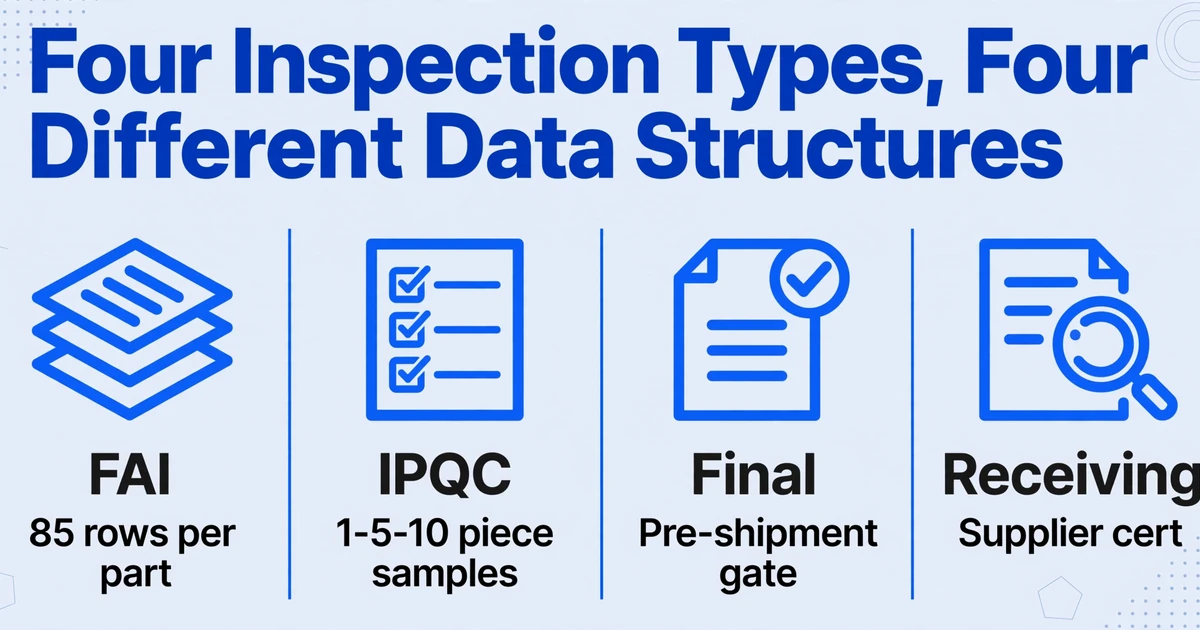
Part of why inspection report extraction resists automation is that "inspection" is not one document type. A single manufacturing cell generates at least four distinct report formats in a typical production cycle, each built for a different stakeholder at a different stage:
First Article Inspection (FAI)
Performed on the first production run of a new or revised part. Under the AS9102 standard, an FAI report spans three forms: Part Number Accountability (Form 1), Product Accountability for materials and special processes (Form 2), and Characteristic Accountability — the dimensional results (Form 3). Form 3 is the heavy one: every design characteristic on the drawing gets a unique balloon number, and the inspector records the specification, tolerance, actual measurement, and pass/fail for each. A single aerospace bracket with 85 drawing annotations produces an 85-row inspection report before the first production lot ships.
In-Process Inspection (IPQC)
Conducted at control points during production — after a critical machining operation, before a coating step, or at a shift change. The form is typically a one-page check sheet with fields for production order number, workstation, sample measurements (1-5-10 pieces), trend notes ("values drifting up"), and immediate disposition. These are the forms most likely to be handwritten on the shop floor and entered into a spreadsheet later — sometimes hours later, sometimes never.
Final Inspection
The pre-shipment gate. Confirms that all required operations are complete, all non-conformances are resolved, and traceability to lot/batch is recorded. Fields include: part number, drawing revision, final dimensional results, visual inspection pass/fail, certificate of conformance reference, and inspector sign-off. Under ISO 9001:2015 Clause 8.6, the report must identify the authority responsible for release — meaning the inspector's name and date must be present and traceable.
Receiving Inspection
Incoming raw material or purchased components checked against the purchase order and material cert. Key fields: supplier name, PO number, part number, quantity received, sample size inspected, dimensional checks, material cert number, heat lot number, and acceptance disposition. If the supplier sent a different cert format than last month, the layout changes — but the data you need to track is the same.
Four different documents. Four different form layouts, often from four different sources — your internal FAI system generates Form 3 as a typed PDF, the shop floor supervisor hands you a handwritten IPQC check sheet, the final inspector exports a report from a QMS app, and the receiving clerk attaches a scanned supplier cert. Yet the downstream spreadsheet — the one the quality manager uses for monthly trend reports and customer compliance evidence — needs all four to contribute to the same columns. That mismatch between upstream format variety and downstream column consistency is the core extraction challenge.
Why Inspection Report Data Is Harder to Extract Than an Invoice
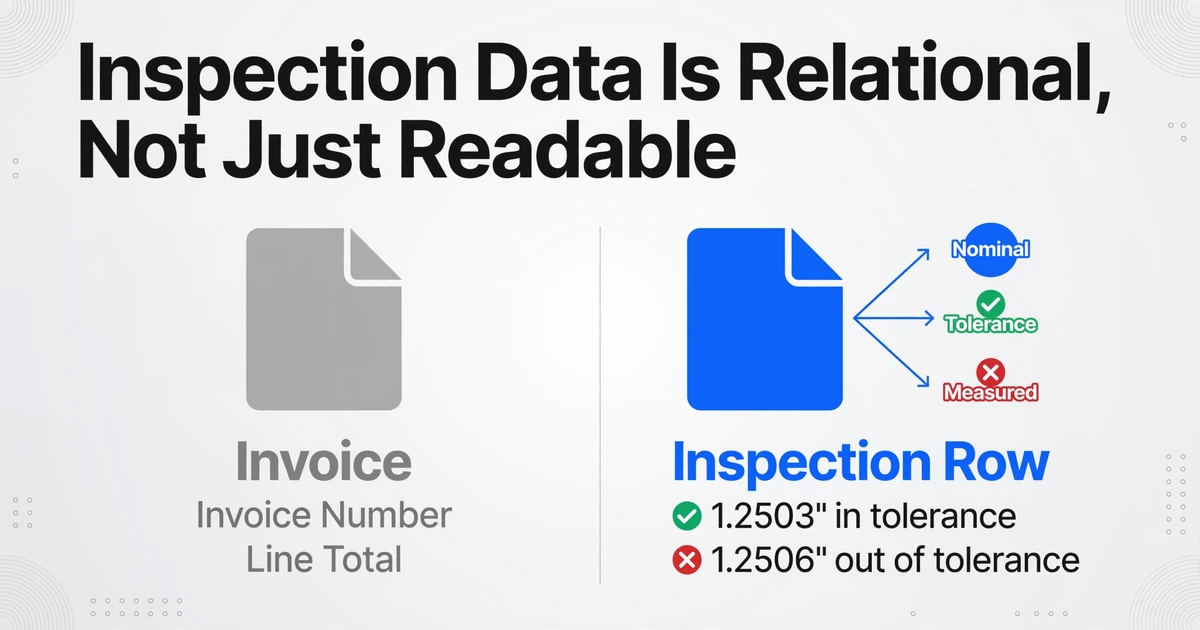
Invoice extraction is a straight read: invoice number, date, vendor name, line items, total. The fields are self-contained values — you find the number and you copy it. Inspection data doesn't work that way. Each data point exists in a relationship with at least three other values, and the meaning of a number depends entirely on its context.
Take a dimensional measurement row. A value of 1.2503" means nothing by itself. It only becomes meaningful when you know the nominal is 1.2500", the tolerance is ±0.0005", and the upper spec limit is therefore 1.2505". A reading of 1.2503" is in tolerance — pass. A reading of 1.2506" on the next part in the lot is out of tolerance — fail, and you need to record a non-conformance. The extraction isn't just about reading numbers off a page. It's about understanding which number is the nominal, which is the tolerance band, and which is the actual measurement — and then applying a pass/fail logic that is implicit in the document structure but rarely stated explicitly.
Add in the secondary data points that anchor each inspection to a compliance framework:
- Gage R&R numbers — the measurement system analysis that preceded the inspection. Under AIAG MSA 4th Edition, a Gage R&R study with a %R&R value under 10% is acceptable; 10-30% is conditionally acceptable. That gage ID and its study date need to travel with the measurement to satisfy a PPAP submission or an ISO 9001 audit.
- Non-conformance codes — when a measurement fails, the inspector assigns a severity: Critical (safety risk, regulatory impact, potential recall), Major (significant quality impact, not immediately hazardous), or Minor (isolated, procedural). The classification determines the escalation path and must be extractable alongside the measurement itself.
- Material cert and heat lot numbers — traceability fields that link a dimensional result back to the raw material supplier and batch. Under ISO 9001:2015 Clause 8.5.2, organizations must maintain records that enable full traceability from incoming material through final product.
- Inspector identification and sign-off — which can be a typed name on an FAI Form 3, a scribbled initial on a handwritten in-process sheet, or a digital signature block on a final inspection PDF. Three different representations of the same data field.
The hand-writing problem compounds all of this. Despite a decade of "paperless manufacturing" initiatives, the shop floor reality in many plants — especially small and mid-sized machine shops and fabricators — is that in-process inspections are still recorded on clipboards. The inspector measures the part, jots down the result, circles Pass or Fail, and initials the sheet. That paper then travels to a desk where someone retypes every measurement into a tracking spreadsheet. Two people doing the same data entry: once on paper, once in Excel. Across 200 measurements per shift, that's roughly 40 minutes of re-transcription per day — labor that adds zero quality insight.
On r/manufacturing, shop managers describe the same gap across inspection and maintenance records: "Half the time, stuff gets fixed and never written down, or someone scribbles notes on paper, and it never makes it into the sheet." When data entry depends on someone finding time at the end of a busy shift, some data never gets entered — and what does get entered is vulnerable to transcription errors.
AS9102, PPAP, and the Compliance Data You Can't Skip
For manufacturers supplying aerospace, automotive, or defense customers, inspection data extraction isn't optional — it's a contractual requirement with specific data fields dictated by industry standards. Two frameworks dominate:
AS9102 — Aerospace First Article Inspection
The SAE AS9102 standard governs FAI in aerospace manufacturing. A complete FAIR package always includes all three forms, and major primes like Lockheed Martin and Northrop Grumman publish supplemental requirements that make certain Conditionally Required fields mandatory. Form 3 — Characteristic Accountability — is where dimensional inspection data lives. Each row must include: characteristic number (linked to the ballooned drawing), reference location on the drawing, characteristic designator (key/critical), specification and tolerance, measured result, pass/fail determination, inspection method, and gage ID. If a part has 150 drawing annotations, the FAI dimensional report is 150 rows long before you count any nonconformance documentation.
PPAP — Production Part Approval Process
Defined by the AIAG, PPAP is the automotive industry's standardized approval framework with 18 required elements. Element 9 — Dimensional Results — demands a full dimensional layout of the part with measurements correlated to a ballooned drawing. Industry practice requires a minimum of six sample pieces from the first production lot. Element 8 — Measurement Systems Analysis — requires Gage R&R studies for each measurement system referenced in the dimensional results, with acceptance criteria defined in the AIAG MSA manual (%R&R ≤10% acceptable, 10-30% conditional, >30% unacceptable). When a PPAP submission includes 85 dimensional callouts measured across 6 parts, the raw data alone produces 510 cells — and every one of them must be traceable to a specific balloon number, gage ID, and inspector.
The consequence of skipping a field isn't just an incomplete spreadsheet — it's a rejected PPAP submission that can delay production launch. For a Tier-2 supplier shipping brake caliper components to a Tier-1, a returned PPAP package over missing gage traceability can push back a production start date by weeks. The data fields aren't negotiable; they're defined by the customer's quality requirements and the governing standard. Your extraction workflow has to capture them all — across whatever form they appear on.
Industry estimates put a manual first article inspection at roughly 6 hours to fully document — and that's before the CMM operator spends another 2–4 hours re-typing measurement results into a spreadsheet for PPAP submission. For a brake caliper with 150 measured features across 6 sample parts, that's 900 data cells transcribed by hand. For shops without automated FAI software, the transcription step is where the bottleneck lives — not in running the CMM program, but in getting the data from the machine's output into the submission package.
Step by Step: From Inspection Reports to an Analysis-Ready Spreadsheet
Here's the workflow for turning inspection reports — across all four types and multiple formats — into a single structured dataset you can trend, filter, and submit for compliance.
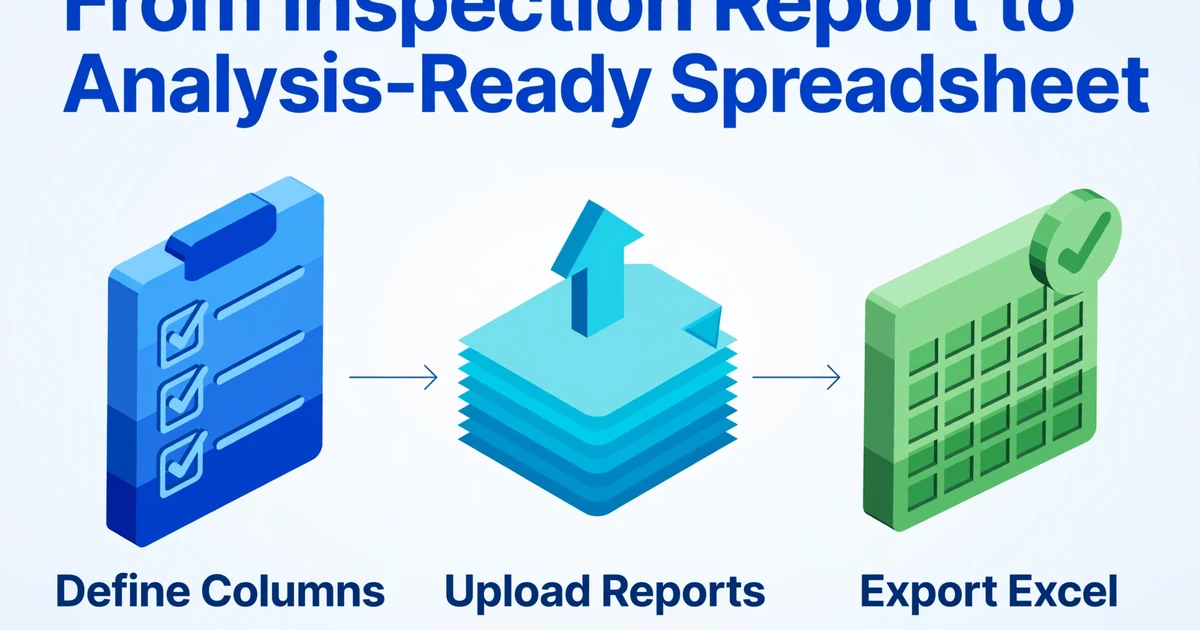
1. Define Your Tracking Columns Once
Decide what data points matter across all inspection types. For a manufacturing quality tracking spreadsheet that satisfies both internal trend analysis and AS9102/PPAP compliance needs, your column set might look like this:
| Column Name | What It Captures | Compliance Reference |
|---|---|---|
| Part Number | The part or assembly being inspected | AS9102 Form 1, Field 1 (Required) |
| Drawing Revision | Engineering drawing rev the inspection is performed against | AS9102 Form 1, Field 5 (Required) |
| Characteristic No. | Balloon number from the drawing, linking measurement to specification | AS9102 Form 3, Field 8 (Required) |
| Dimension / Feature | What is being measured (e.g. "Bore diameter Ø12.0") | AS9102 Form 3, Field 10 |
| Nominal | The target value | AS9102 Form 3, Field 11 |
| Upper Tolerance | Upper spec limit (or bilateral tolerance) | AS9102 Form 3, Field 11 |
| Lower Tolerance | Lower spec limit | AS9102 Form 3, Field 11 |
| Measured Value | Actual inspection result for this sample | AS9102 Form 3, Field 12 (Required) |
| Pass / Fail | Determination against tolerance band | AS9102 Form 3, Field 12 |
| Inspection Date | When the measurement was taken | ISO 9001:2015 Clause 8.6 traceability |
| Inspector | Name or ID of the person who performed the measurement | AS9102 Form 1, Field 20 (Required) |
| Gage ID | Measuring equipment identifier — links to calibration and MSA records | AS9102 Form 3, Field 13; PPAP Element 8 |
| NC Code | Non-conformance classification (Critical / Major / Minor) | AS9102 Form 3, Field 14 |
| Disposition | What happened: Accept / Rework / Scrap / Use-As-Is (deviation) | ISO 9001:2015 Clause 8.7 |
| Inspection Type | FAI / IPQC / Final / Receiving — so you can filter by stage | Internal tracking |
These column names become the headers of your final spreadsheet. The key insight: you define them once and apply them across every inspection report you upload — regardless of whether the report is an AS9102 Form 3 PDF, a handwritten in-process check sheet, or a supplier's scanned cert. The tool reads each document to find what each column name is asking for, matching by what the field means (e.g. "Measured Value") rather than where it sits on the page. This approach — known as Custom Column Extraction — is fundamentally different from template-based OCR that requires you to draw a box around the same field on every form. You specify what data you want; the AI locates it wherever it appears on each document.
2. Upload Your Inspection Reports
Upload the reports — PDFs, scans, or photos of handwritten sheets. The same column definitions apply whether you're processing one FAI report or a week's worth of in-process check sheets from three different shifts. All four inspection types feed into the same column structure.
3. Extract and Export
The AI reads each document, locates values matching your column definitions, and populates the spreadsheet. You get one row per measured characteristic, with all fourteen columns filled from whatever form the measurement came from. Export to Excel and you have a complete dataset — not a transcription, not a template you still need to fill.
Define your inspection tracking columns, upload reports, and export a complete dataset.
What the Data Tells You Once It's in One Place
Getting inspection data into Excel isn't the endpoint — it's the prerequisite for the work that actually improves quality. A structured dataset enables analysis that is impractical when measurements are scattered across paper forms and isolated PDFs:
Dimension Drift Detection
When bore diameter Ø12.00 ±0.05 shows values of 11.98, 11.97, 11.965, 11.96 across four consecutive shifts, the trend is clear weeks before a part actually fails inspection. Excel conditional formatting on the Measured Value column relative to the tolerance band — or a simple control chart plotting each measurement against upper and lower spec limits — surfaces this drift. You catch the tool wear or thermal shift before it produces scrap, not after.
Supplier Quality Scorecards
Receiving inspection data aggregated by supplier, part number, and date range produces a pass/fail rate per vendor. A supplier whose dimensional pass rate drops from 98% to 91% over two months triggers a corrective action request before a line-down event forces it. The data is already in your receiving inspection reports — it just needs to be extractable and comparable across batches.
Inspector Repeatability Checks
When Inspector A consistently records measurements 0.0003" higher than Inspector B on the same part and same gage, the data flags a systematic bias — not a part problem, not a gage problem, but a measurement technique difference. This is the kind of signal that disappears when data stays on paper. In a structured spreadsheet, a pivot table by inspector and dimension reveals these patterns in seconds.
Audit-Ready Traceability
An ISO 9001 auditor asks for the inspection history of Part# 2407-B from the last six months, including gage IDs, inspector names, and non-conformance dispositions. With the data in one spreadsheet, you filter by Part Number, select the date range, and export a PDF. Without it, you're walking the auditor through filing cabinets and hoping nothing is missing.
These analyses don't require specialized SPC software or a QMS platform. They run on Excel functions — pivot tables, conditional formatting, trend lines — that quality engineers already use. The bottleneck has never been the analysis. It's been getting the raw data out of paper forms and into a single table.
FAQ
Can it read handwritten inspection check sheets?
Yes, though with an important caveat: handwriting legibility matters. Clear block-capital numbers and standard abbreviations are reliably extracted. Dense cursive, smudged carbon copies, or measurements squeezed into margins will reduce accuracy. For the typical shop-floor check sheet — printed form, handwritten numbers in labeled boxes, circled Pass or Fail — the extraction works well. The cleaner the handwriting, the higher the accuracy. For critical dimensions on an AS9102 Form 3, a typed or digitally-generated report will always produce more reliable extraction than a handwritten equivalent.
Does it understand tolerance bands like ±0.005" or asymmetric tolerances?
The tool extracts whatever the document shows for nominal, upper tolerance, and lower tolerance as separate fields. It doesn't automatically compute pass/fail — you get the raw numbers. You can then add a formula in Excel (=IF(AND(Measured>=Lower, Measured<=Upper),"Pass","Fail")) or, if you need the extraction to also perform the pass/fail evaluation, set up a Computed Column that applies the logic. The difference is that the AI reads the tolerance from the document rather than you typing it into a formula — the source of truth stays on the inspection report.
Can it handle Gage R&R data embedded in inspection reports?
If the Gage R&R summary — gage ID, study date, %R&R value — appears on the inspection report as text, it can be extracted alongside the measurement data. If the Gage R&R study is a separate 10-page document, you'd need to upload that separately and define columns for the MSA fields you need. The tool maps column names to document content; it doesn't follow cross-references between documents automatically.
What file formats does it accept?
PDF, JPG, PNG, WebP, and AVIF. Scanned paper forms work as either PDF or image files. Photos of inspection reports taken with a phone work — just make sure the image is reasonably sharp and well-lit, especially for documents with small-font tolerance values.
Can I batch-process a week's worth of inspection reports at once?
Yes. Upload all the reports in one batch — whether 5 or 50 — with the same column definitions, and the tool processes them together, outputting one consolidated spreadsheet. This is how you go from "a stack of Friday afternoon paperwork" to a trend-ready dataset in a single session. Each report produces one or more rows; all rows share the same column structure.
Does it produce an AS9102-compliant FAIR?
It extracts the inspection data into a structured spreadsheet — it does not format that data into the official AS9102 three-form layout or generate ballooned drawings. If your customer requires a fully formatted FAIR package, you'd use this extraction as the data source, then populate the AS9102 forms manually or through FAI-specific software. What it eliminates is the step where you retype every measurement from the report into whatever format you need downstream.
The manufacturing quality industry has spent a decade building tools that tell you how to inspect. What it's been missing is a tool that handles what happens after the inspection — when the clipboard hits the desk and the measurements need to become data. The four report types, the compliance frameworks, and the dimensional relationships that make inspection data harder to extract than an invoice also make it more valuable once extracted. Drop a stack of inspection reports into the tool, define your columns, and see if the data comes out faster than you can retype it.