How to Extract Bill of Lading
Data to Excel
A mid-size freight forwarder absorbs $140,000 to $280,000 per year in costs directly tied to document errors — customs holds at $200–500 per day, carrier amendment fees at $50–150 per B/L correction, and duty penalties from HS code misclassifications.[1] But the real cost of manual bill of lading data entry isn't the labor — it's the cascading operational damage when a single mistyped BOL number hits customs, triggers a hold, racks up demurrage, and forces a credit to a client who just wanted their freight delivered on time. The defense line isn't a faster typist. It's extraction that doesn't make typos.
The Compliance Cost Nobody Budgets For
When freight operations teams talk about BOL processing pain, they usually start with volume — "we handle 500 bills of lading a week." The time math is straightforward: 10–15 minutes per document for manual data entry, and up to an hour for complex multimodal BOLs with extensive commodity line items.[2] But time is the shallow end of the problem.
A 2025 IARJSET study of freight forwarding firms found that 46.7% of companies face penalties directly caused by documentation errors — and 63.4% had to correct documentation on 1–10 shipments in just the last six months.[3]
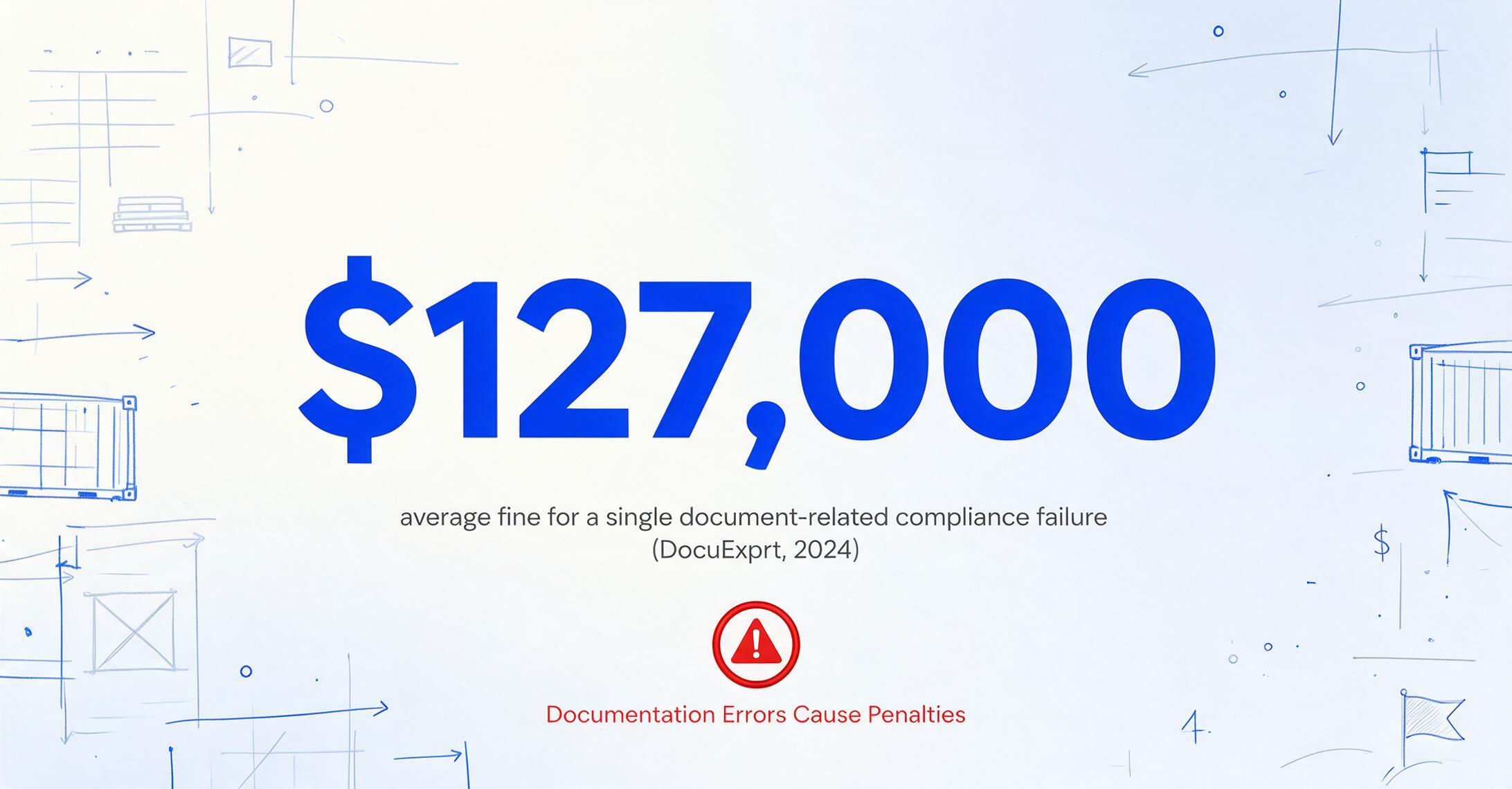
The penalty pathway is well-documented. The U.S. Federal Register's 2025 civil monetary penalty adjustments peg ISF filing violations at fines reaching $6,000 or more, with manifest non-compliance penalties between $1,740 and $4,730 per occurrence.[4] A DocuExprt 2024 survey found that the average fine for a single document-related compliance failure is $127,000, with audit preparation alone consuming 120–200 hours of staff time per year.[5]
This is the budget line item that manual BOL data entry creates — and one that automated extraction removes. A typo in a container number or a mistyped HS code isn't a minor clerical error; it's an entry point into a chain of customs holds, storage charges, reclassification delays, and client credits. When a logistics professional on Reddit observes that dispatchers spend their day "copy email → TMS, copy again → freight exchange, repeat 20× a day," the productivity loss is visible. The compliance risk behind each of those copy-paste operations is not.
Why Standard OCR Fails on Bills of Lading
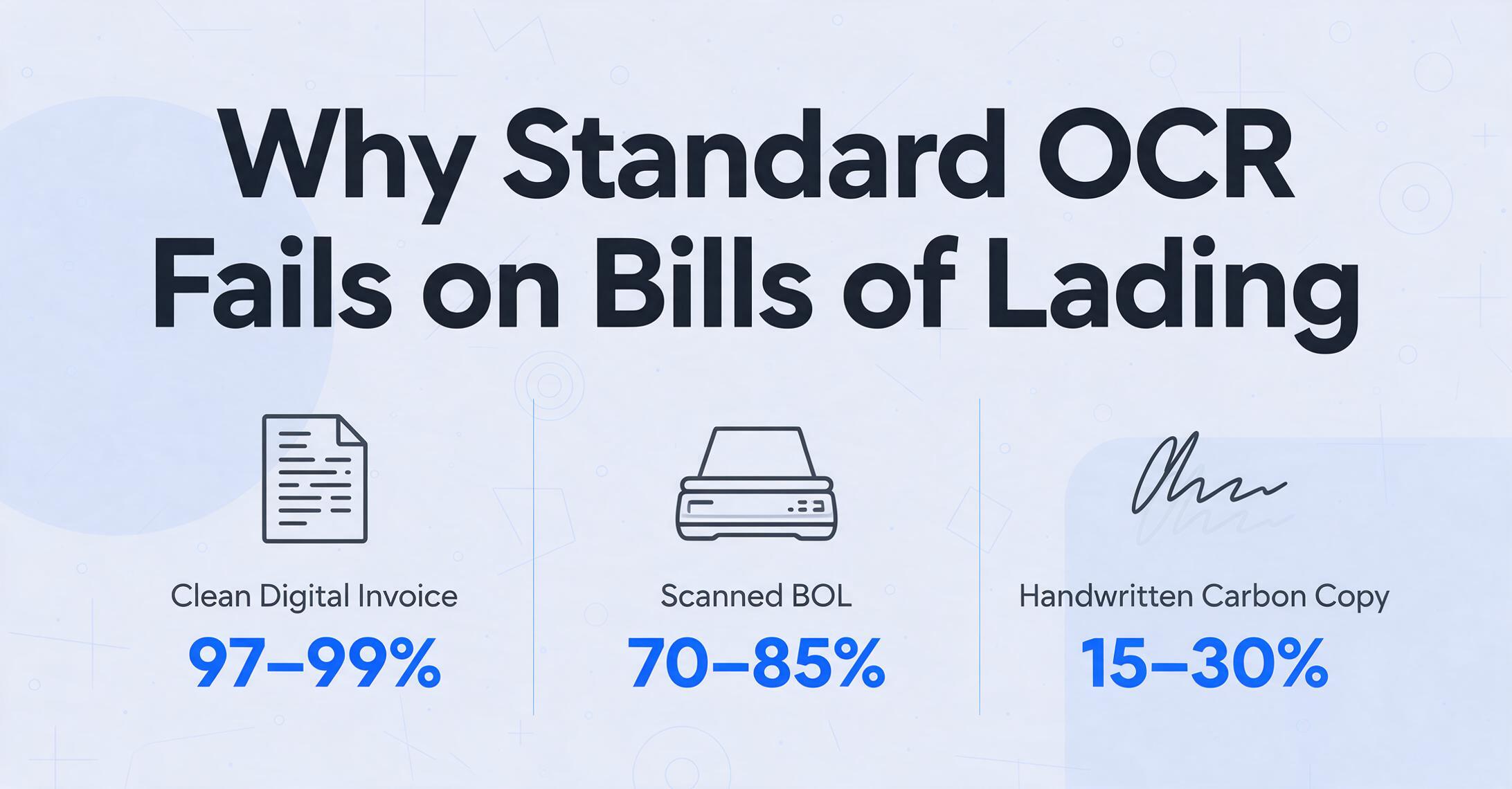
The standard argument for automating BOL data extraction goes like this: run OCR on the scanned PDF, get the text, map it to spreadsheet columns. This works on a clean digital invoice from a single vendor whose format you know. It breaks on bills of lading for three reasons that compound each other.
Every carrier uses their own layout. An ocean BOL from Maersk places the shipper block in the upper-left, the vessel details in a center table, and the cargo description in a multi-row grid below. A straight BOL from Old Dominion uses the NMFTA-standardized short-form layout with commodity descriptions in a tightly spaced grid. A FedEx Freight BOL uses yet another arrangement. Template-based OCR — where you draw zones around each field and train the system per layout — requires one template per carrier. A broker handling 50 carriers needs 50 templates, and every time a carrier updates their form, that template breaks silently.
Handwriting, stamps, and carbon copies are standard — not edge cases. BOLs are frequently filled out by hand at the loading dock on carbon-copy paper. The consignee name is scribbled in pen, the piece count is stamped over in red ink, and the third carbon copy is faded to near-illegibility. Traditional OCR treats these as noise. A tool that can only read crisp digital typefaces will miss the handwritten BOL number, the stamped "Freight Prepaid" marker, and the carbon-copy weight field — the three data points most likely to trigger a carrier invoice dispute.
NMFC freight class requires semantic understanding, not character recognition. The National Motor Freight Classification system defines 13 freight classes (50 to 500) based on density, stowability, handling, and liability. A BOL might list "Class 70" next to the commodity description, or it might list the commodity without the class, expecting the carrier to apply it. Standard OCR reads "Class 70" as text characters. But semantic extraction — the kind an AI vision model performs — understands that "Class 70" modifies "Wooden Furniture" and belongs in the Freight Class column, not the Commodity Description column. That distinction is the difference between an accurate freight bill and a $300 reclass charge three weeks later.
What Data Lives on a Bill of Lading — and Why Each Field Matters
A bill of lading serves three legal functions simultaneously: receipt for goods (the carrier acknowledges receiving the cargo as described), contract of carriage (terms and conditions of transport), and document of title (ownership of the goods, in negotiable BOLs). Each field on the document supports one or more of these functions — and an error in any field cascades into one of these legal domains.[6] A BOL rarely travels alone — see how it reconciles against the rest of the shipment packet in our guide to shipping & freight document extraction.
| Field Group | Fields | Error Consequence |
|---|---|---|
| Parties | Shipper name & address, Consignee, Notify Party, Carrier/SCAC code | Misdirected delivery, customs clearance failure, wrong party billed |
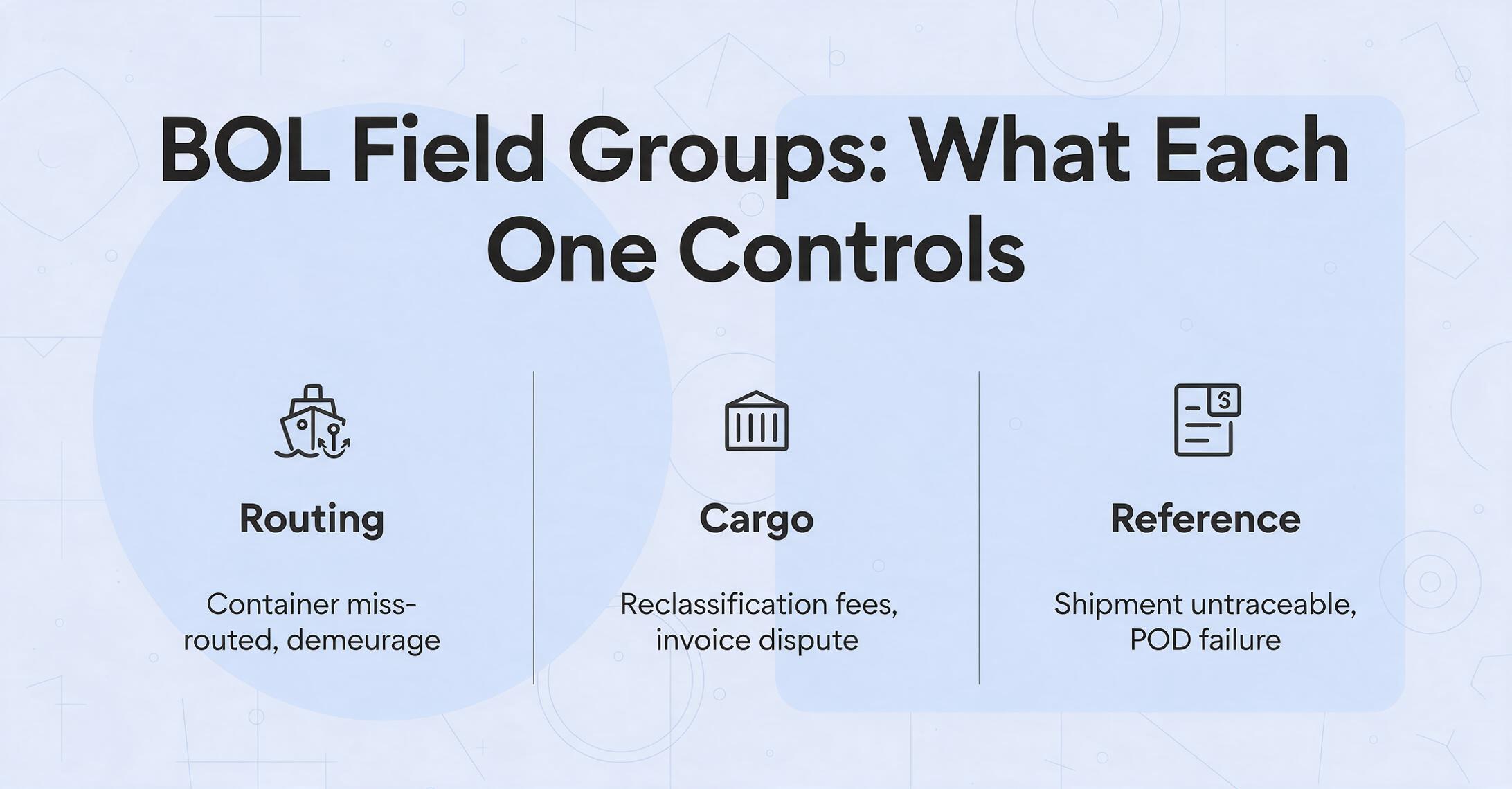
| Routing | Port of Loading, Port of Discharge, Vessel/Voyage, Container & Seal numbers | Container miss-routed, demurrage at wrong terminal, ISF filing mismatch |
| Cargo | Commodity description, Piece count, Package type, Weight (gross/net), Dimensions, Freight Class, NMFC code, HS code | Reclassification fees, duty recalculation, carrier invoice dispute, hazmat non-compliance |
| Charges & Terms | Freight terms (prepaid/collect), Freight charges, Accessorial charges | Incorrect billing party, duplicate payment, unrecovered accessorials |
| Reference | BOL number, PRO number, PO references, Pickup/Delivery dates | Shipment untraceable, missed delivery windows, POD verification failure |
Notice that the Cargo group — commodity descriptions, weights, piece counts, freight class — is the most data-dense section and the most error-prone. It's also the section that varies most dramatically across carriers. One carrier uses five commodity lines with individual weights; another uses a single consolidated line with a lump weight. A third stamps "NMFC 156600 Sub 3" in the margin. The extraction tool doesn't need to know the layout. It needs to know what each of these things means.
From PDF to Spreadsheet: How AI Extraction Actually Works
The workflow that replaces manual BOL data entry is deceptively simple. You define the output columns you want — not where the data sits on the document. This reversal is the core of the approach: instead of telling the tool "the BOL number is in the top-right corner of this carrier's form," you tell it "extract the BOL number" and let the AI locate it by understanding what a BOL number looks like in context.
For a logistics operation processing multiple carriers' BOLs, the column setup might look like: BOL Number, Shipper Name, Consignee Name, Carrier SCAC, Container Number, Port of Loading, Port of Discharge, Commodity Description, Piece Count, Weight (lbs), Freight Class, Freight Terms, Freight Charges. These column names become the Excel headers. The AI reads each uploaded BOL, finds the values, and populates the rows — regardless of whether the BOL came from Maersk, Old Dominion, or a handwritten carbon copy from a local cartage carrier.
This is Custom Column Extraction: you type the field names you want, and the AI locates each value by understanding what it means — not where it sits on the page. Unlike template-based OCR that draws zones around fixed positions, this approach adapts to any carrier's BOL layout without configuration. A freight broker with 50 carriers loads all 50 into the same batch and gets one unified spreadsheet out.
Files are processed securely and not stored. Try with a sample BOL.
After extraction, the data lands in a structured Excel spreadsheet — each row is one BOL, each column is one extracted field. This output is spreadsheet-native: it goes directly into Excel, Google Sheets, or CSV, ready to upload into your TMS or run through a freight audit. There's no intermediate JSON-to-CSV conversion step, no field-mapping wizard between the extraction engine and your spreadsheet. For teams using Google Sheets, there's even a sidebar add-on that runs extraction directly inside a spreadsheet without leaving the tab.
The Template Trap: Why Per-Carrier Setups Don't Scale
The logistics industry has a structural problem that makes template-based extraction fundamentally inadequate: carrier churn and format variability are features of the market, not bugs. A broker doesn't control which carriers their shippers use. A forwarder booking freight across lanes might use 8 different ocean carriers and 15 different trucking companies in a single month. Each one issues BOLs in its own format.
Template-based OCR requires a setup step per carrier format: draw a bounding box around "Shipper Name," label it, repeat for every field you need. Multiply by 50 carriers. Multiply again every time a carrier updates their form template. The maintenance overhead scales linearly with carrier count — which means the exact scenario where extraction should deliver the most value (high carrier diversity) is the scenario where template maintenance becomes unsustainable.
This is why a template-free, format-independent approach matters specifically for BOL extraction. The AI doesn't need to be told that Maersk puts the shipper in the upper-left and Old Dominion puts it in a box labeled "Shipper/Exporter." It reads the document the way a logistics professional reads it — scanning for the entity that matches the semantic pattern of a shipper, regardless of where it physically appears on the page. This isn't just faster setup. It's the difference between an extraction pipeline that works on day 1 for all your carriers and one that requires ongoing template maintenance for every new carrier you onboard.
Choosing Between Self-Serve Tools, API Integration, and Enterprise Platforms
The market for BOL data extraction splits along three operational profiles. The right choice depends on your volume, your technical resources, and whether extraction is a standalone improvement or part of a broader automation strategy.
Self-Serve Upload Tools
For: Freight brokers, small forwarders, ops teams doing 50–500 BOLs/month
Approach: Upload BOLs → type column names → download Excel. No API setup, no developer required.
Key requirement: Template-free extraction across all carriers. If you need to create a template per carrier, this approach fails at your scale.
API Integration
For: TMS platforms, brokerage systems, in-house tools processing 500–5,000 BOLs/month
Approach: REST API receives BOL files, returns structured JSON/CSV with field-level confidence scores.
Key requirement: Confidence scoring so your system can route low-confidence extractions to human review automatically.
Enterprise Platforms
For: Large 3PLs, global forwarders processing 5,000+ BOLs/month with compliance automation needs
Approach: End-to-end IDP with email ingestion, extraction, validation rules, exception routing, and TMS/ERP push.
Key requirement: Managed exception handling and audit trail — not just extraction accuracy.
For most freight brokers and mid-size forwarders, the self-serve tier hits the sweet spot: no integration overhead, immediate value on day one, and per-page pricing that scales with actual usage rather than a fixed platform subscription. The tool processes a single BOL page in 5–10 seconds — compared to the 10–15 minutes of manual data entry — and outputs directly to Excel. At that speed, a team processing 100 BOLs a day reclaims roughly 20 hours of staff time daily. If you're weighing self-serve tools against enterprise platforms across your whole document mix — not just BOLs — our logistics document extraction buyer's guide covers the broader evaluation criteria.
One nuance worth noting: no extraction tool achieves 100% straight-through processing on BOLs. Handwritten carbon copies with stamps over faded text will produce lower confidence scores. The right workflow expectation is 85–95% automated extraction with a review queue for flagged fields — not lights-out processing. But even at 85% automation, the remaining 15% that lands in a review queue is still faster to verify than typing every field from scratch.
Frequently Asked Questions
Can AI extraction handle handwritten bills of lading?
Yes — within limits. Modern vision models can read printed handwriting, block letters, and most cursive on BOLs, especially the standardized fields like BOL numbers, piece counts, and weights that are typically written in legible block script. Where accuracy drops is on heavily faded carbon copies with stamps layered over handwriting, or on documents where the pen pressure was too light to produce a clear scan. In those cases, the extraction engine flags the field with a low confidence score for human review rather than guessing.
Does BOL extraction work with multi-page documents?
Yes. Many ocean BOLs span multiple pages — the first page carries party and routing information, the second page lists the cargo details and terms, and a third page may contain the terms and conditions boilerplate. Batch extraction tools process all pages as a single document and merge the extracted fields into one row in the output spreadsheet. The key is that the tool recognizes continuation pages rather than treating each page as a separate document.
What happens if two carriers use different names for the same field?
This is exactly where semantic extraction wins over template-based approaches. When Carrier A labels the field "Shipper" and Carrier B labels it "Shipper/Exporter" and Carrier C writes it as "Consignor," the AI understands that all three refer to the same entity — the party sending the goods. You define your output column once as "Shipper Name," and the AI maps each carrier's variant to that column automatically. No per-carrier field mapping required.
Can extracted BOL data feed directly into my TMS?
Most self-serve extraction tools export to Excel or CSV, which can then be imported into your TMS via the TMS's standard import function. Some TMS platforms (like Turvo, Descartes, and McLeod) support CSV import templates — you'd export the extraction results, format the columns to match your TMS's import template, and upload. For API-level integration that pushes extracted data directly into the TMS without a file handoff, you'd need a tool with a REST API and some development work on the integration side.
Is BOL extraction a replacement for a customs broker?
No. Data extraction automates the data entry step — getting the BOL fields into a structured format. It does not replace the regulatory judgment a licensed customs broker provides: HS code classification decisions, valuation assessments, free trade agreement eligibility determinations, and customs entry filing strategy. Think of extraction as removing the typing work so your broker spends their time on the classification and compliance decisions that actually require expertise.
How accurate is AI extraction on BOLs compared to manual data entry?
Well-trained freight document AI achieves 97–99% field-level accuracy on standard digital BOLs. Manual data entry by experienced staff runs 96–99% under normal conditions — and lower during peak periods when volume pressure increases error rates. The critical difference: AI errors concentrate in flagged low-confidence exceptions that get routed to human review. Manual errors are random and harder to catch before they reach downstream systems. At 500 BOLs a day, even a 1% manual error rate means 5 shipments a day with at least one wrong field — and those errors go undetected until something breaks.
The bill of lading hasn't changed much in a century — a piece of paper that moves with the cargo, carrying the details that determine who pays what and when the goods change hands. What has changed is the cost of getting those details into the systems that route freight, clear customs, and settle invoices. Manual entry was never a good solution; it was just the only solution. Template OCR improved on it and then hit a ceiling at the point where carrier diversity exceeds template maintenance capacity. The next step — semantic extraction that reads a BOL the way a logistics professional reads it — changes the economic equation. Try it on your own BOLs. See if the data entry bottleneck shrinks to a review queue.