How to Extract Korean Export-Import
Declaration Data to Excel (2026 Guide)
The Korea Customs Service (KCS) UNI-PASS system processed over 30 million electronic declarations in 2025. Export clearance takes 1.5 minutes. Import clearance averages 1.5 hours. By any measure, Korea operates one of the most advanced digital customs infrastructures in the world — the World Bank ranked it first globally for trading across borders for six consecutive years. Yet in every Korean trading company, someone is still typing declaration data into a spreadsheet by hand.
Key Takeaways
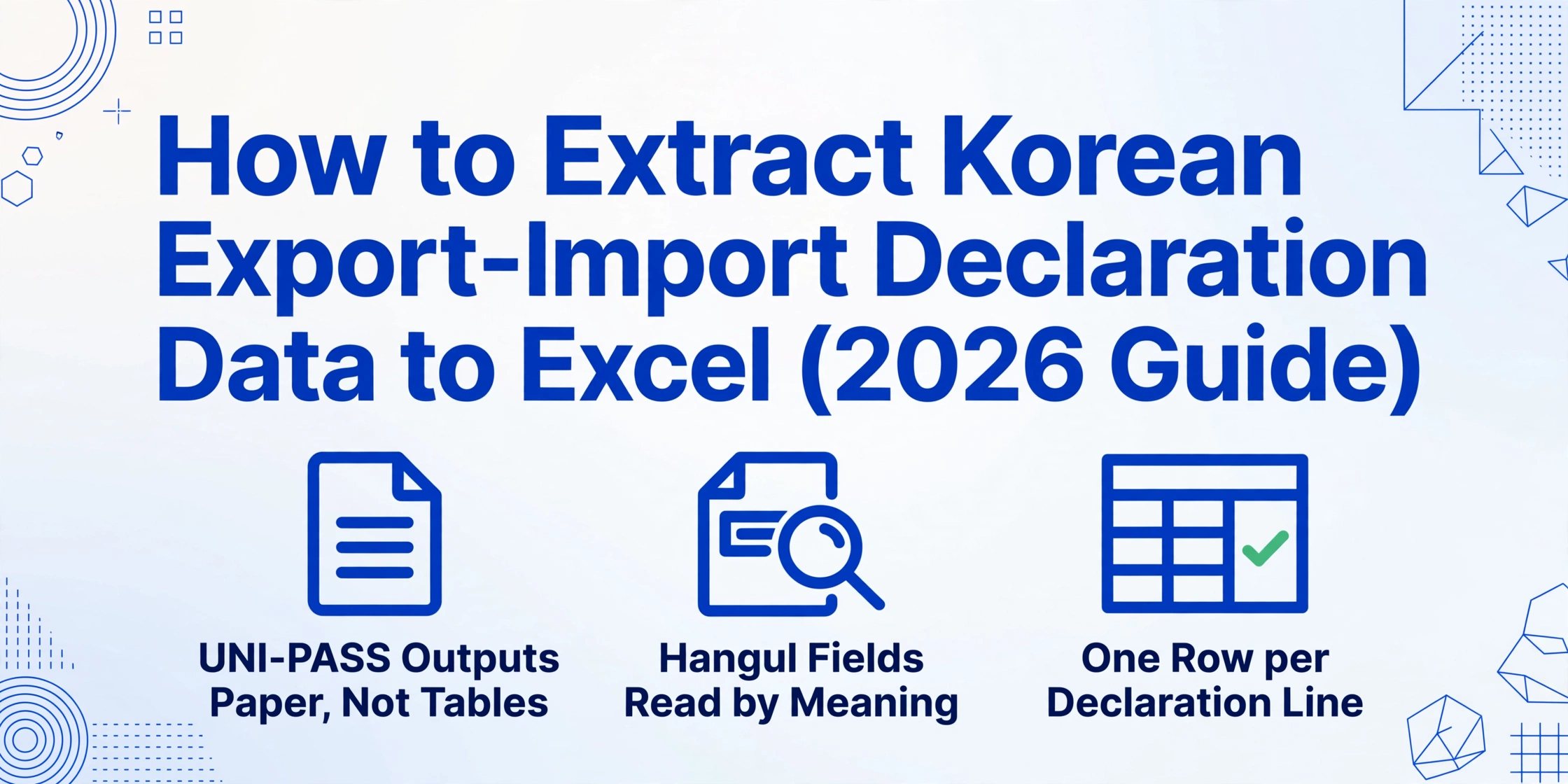
- UNI-PASS clears a Korean export declaration in 90 seconds — getting that same data into a trade compliance spreadsheet still takes 3 to 5 minutes of manual typing.
- The printed declaration layout changes between export and import forms, between general and simplified procedures, and between broker printouts — template-based OCR breaks on every format shift.
- Custom Column Extraction reads data by what each field means (신고번호 = declaration number), not where it sits on the page — one column definition works across every UNI-PASS layout.
The UNI-PASS Paradox: Korea's World-Class Customs System Creates a Data Entry Blind Spot
UNI-PASS is the Korea Customs Service's fully integrated electronic clearance platform — a single-window system that covers import declaration, export declaration, cargo management, duty payment, and customs audit. It processes declarations from every exporter, importer, and customs broker operating through ports like Busan and Incheon. With a 95%+ automated clearance rate and 24/7 operation, it has been exported to 10 countries as a model customs modernization solution.
The blind spot is hiding in plain sight: UNI-PASS handles the clearance process end-to-end, but it does not produce the structured data files that trade teams need for documentation. What it outputs is a printed 수출신고서 (export declaration) or 수입신고서 (import declaration) — a paper form or PDF that must be archived, cross-referenced against commercial invoices, and manually re-entered into spreadsheets for trade compliance tracking, HS Code registry maintenance, and FTA certificate of origin preparation.
South Korea's total trade reached $1.34 trillion in 2025 — exports of $709.7 billion and imports of $631.7 billion, making it the 7th largest trading nation globally. Every one of those transactions generated a customs declaration. And for the teams managing post-clearance trade documentation — reconciling HS codes, verifying FOB and CIF values, tracking country of origin — each declaration exists as data that has already been entered once into UNI-PASS but must be entered again into a spreadsheet. The system that cleared the shipment in 90 seconds creates a documentation task that takes 3 to 5 minutes per declaration.
A trade compliance team handling 300 declarations per month spends 15 to 25 hours re-entering data that exists in digital form inside UNI-PASS but arrives on their desk as a printed document. The system that made Korea a global benchmark for customs efficiency did not close this gap — it created it.
What a Korean Export-Import Declaration (수출입신고서) Actually Contains
To understand why manual re-entry persists, it helps to look at what a typical Korean export or import declaration carries. The UNI-PASS declaration form follows the WCO Data Model, adapted for Korea's specific regulatory and classification requirements. The fields that a trade team needs for post-clearance documentation are not the same fields needed for clearance — and the clearance output does not come pre-organized for the documentation use case.
| Field (English) | Korean | Why It Matters for Trade Documentation |
|---|---|---|
| Declaration Number (신고번호) | 신고번호 (12–15자리) | Primary key linking the shipment to customs records, invoice, B/L, and C/O |
| Exporter / Importer Business Registration Number | 수출자/수입자 사업자등록번호 (10자리) | Mandatory for VAT invoicing and trade partner matching |
| HS Code (10-digit HSK) | HS코드 (HSK 10자리) | Determines duty rate, FTA eligibility, and regulatory requirements |
| Product Description (Korean & English) | 품명 및 규격 | Required for C/O issuance and customs audit preparation |
| Quantity / Net Weight | 수량 / 중량 | Used for shipment verification and quota management |
| FOB Value (Export) | 수출금액 (FOB) | Basis for export revenue reporting and insurance valuation |
| CIF Value (Import) | 수입금액 (CIF) | Korea calculates import duty on CIF value (goods + freight + insurance) |
| Country of Origin (원산지) | 원산지 | Determines FTA preferential tariff eligibility and origin marking compliance |
| Payment Terms | 결제방식 (T/T, L/C, D/P 등) | Cash flow planning and trade finance application support |
| Transport Mode & Route | 운송수단 및 경로 | Logistics tracking, consolidation, and supply chain documentation |
Each of these fields exists in UNI-PASS as structured data. But when you request a printed declaration for your trade compliance records — either as a hard copy from your customs broker or as a PDF download from the UNI-PASS portal — it arrives as a formatted document. The structure is visual, not tabular. The 신고번호 sits in one area, the HS Code in another, the FOB value in a third. For a trade compliance officer building a shipment register or an HS Code audit trail, every field must be located, read, and retyped.
This is where the gap between Korea's world-class digital customs system and the daily reality of trade documentation work becomes visible. UNI-PASS digitized customs clearance. It did not digitize trade documentation. That job still lands on someone at a keyboard.
Three Reasons Export-Import Declarations Create Manual Entry Work
The frustration that trade teams feel — "this data already exists in the system, why am I re-entering it?" — has specific, structural causes. Identifying them helps separate the problem from the symptom.
1. UNI-PASS prints declarations as formatted documents, not structured data exports. The system generates a declaration PDF or printout designed for human reading and customs archiving. There is no "export to Excel" button on a submitted declaration. The data is locked inside a visual layout — headers in bold Hangul, values aligned under column headers, stamps and signatures overlaid — that a human must parse. Even the PDF download from the UNI-PASS portal is a declarative form image, not a machine-readable data file. This is by design: the system prioritizes clearance speed and legal completeness over post-clearance data portability.
2. Trade documentation requires cross-referencing against invoices, B/Ls, and C/Os. A declaration does not stand alone in trade compliance work. It must be matched against the commercial invoice (to verify declared values), the bill of lading (to verify cargo quantities), and the certificate of origin (to verify FTA eligibility). Each of these documents arrives in a different format — the invoice as a supplier PDF, the B/L from a freight forwarder's portal, the C/O as a scanned certificate. A trade team maintaining a shipment register does not just extract declaration data; they merge it across four document types. The declaration is one source among many, and the others are even less structured — the Korean invoice side of that stack is covered by our Korean tax invoice to Excel guide.
3. Declaration formats vary between general and simplified customs procedures. Korea operates a bifurcated declaration system. General declarations (일반수출신고/일반수입신고) carry the full field set described above. Simplified declarations (간이수출신고), used for shipments valued under $2,000, carry a reduced set of fields. Samples, gifts, and shipments under FTA preference may require additional markings. A trade team processing 200 declarations per month across multiple product categories handles a mix of these formats — and template-based tools that expect a fixed layout break the moment the format changes.
The common thread across all three causes is that the data exists but is not portable. It sits inside a declarative document format designed for clearance, not inside a table designed for documentation. Moving it from one container to the other is what creates the manual entry work.
Why Semantic Extraction Is the Right Fit for Korean Declaration Data
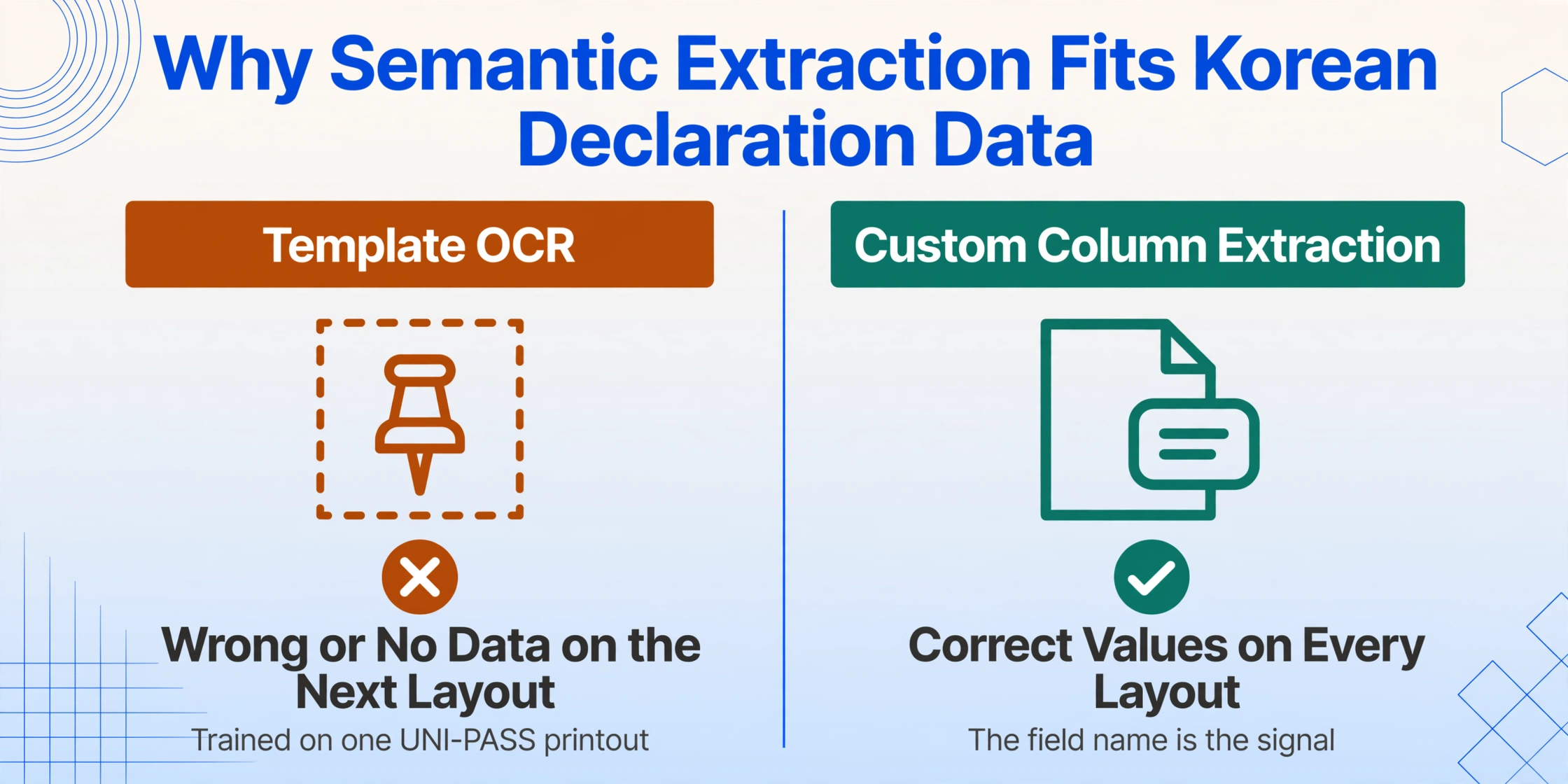
Traditional template-based OCR — the approach most document extraction tools use — would attempt to solve this by memorizing where each field sits on the UNI-PASS printout. You train it on one declaration layout, and it reads the 신고번호 from block A and the HS Code from block B. The problem is that UNI-PASS declarations come in multiple layouts: export versus import forms differ, general versus simplified declarations differ, and the printed PDF from the portal can look different from the broker's internal printout. A template trained on one layout returns wrong data or no data on the next.
Custom Column Extraction — the core mechanism that ImageToTable.ai uses — inverts this relationship. Instead of teaching the AI where data lives on the page, you tell it what you want to extract by naming the fields. The column name "HS Code (10-digit)" or "Country of Origin" tells the AI to locate that specific value by its semantic meaning across any declaration format — export or import, general or simplified, portal PDF or broker printout. The column name you define is the signal; the AI adapts to the layout.
This semantic approach matters for Korean declarations specifically because the Hangul field labels create a structural challenge for non-Korean-trained OCR engines. A vision AI that understands Korean text natively — reading 신고번호 as the declaration number, 원산지 as the country of origin, and 수입금액(CIF) as the CIF value — can extract the correct values from a layout it has never seen before. It does not need to be trained on every variant of the UNI-PASS printout because it reads the meaning of the label, not the position of the field.
This is the same paradigm we cover in the broader customs declaration extraction article, but applied specifically to Korea's declaration format landscape. The global principle — semantic extraction defeats format variation — is the same. The Korean implementation has its own field structure, regulatory context, and compliance workflow.
Setting Up Your Extraction Columns for Korean Declaration Data
Before extracting data from your first batch of declarations, define the output structure. The columns you set up once will apply to every declaration you upload, regardless of format variation.
Based on the typical fields a trade compliance team needs for post-clearance documentation, here is a recommended column set:
| Column Name (Use in Extraction) | What It Extracts | Why You Need It |
|---|---|---|
Declaration Number | 신고번호 (12–15 digits) | Unique identifier for cross-referencing with B/L and invoice |
Declaration Type | Export or Import | Filters your registry by trade direction |
Exporter Name | 수출자 (상호/성명) | Trade partner identification |
Importer Name | 수입자 (상호/성명) | Trade partner identification |
Business Registration Number | 사업자등록번호 (10 digits) | Mandatory for VAT and tax invoicing |
HS Code | HSK 10-digit code | Duty rate determination and FTA eligibility |
Product Description | 품명 및 규격 (Korean and English) | Required for C/O and customs audit trail |
FOB Value | FOB 금액 (for exports) | Export revenue recording and insurance |
CIF Value | CIF 금액 (for imports) | Import duty base (Korea uses CIF for valuation) |
Country of Origin | 원산지 | FTA preference and origin marking compliance |
Invoice Number | 송장번호 | Cross-reference with commercial invoice |
Transport Mode | 운송수단 (Sea/Air/Land/Post) | Logistics tracking and SOP documentation |
Define these columns once in the extraction interface. Every declaration file you upload — whether it is a UNI-PASS PDF, a broker's scanned printout, or a photographed copy — will be read against this same column set. The AI locates each field by its semantic match to your column name, not by scanning a template for the same pixel coordinates.
For teams that need additional fields beyond this standard set — such as port of loading (선적항), vessel name (선명), or container number (컨테이너번호) — add them as columns in the same interface. The column name is the only configuration required.
Step-by-Step: Extracting Korean Declaration Data
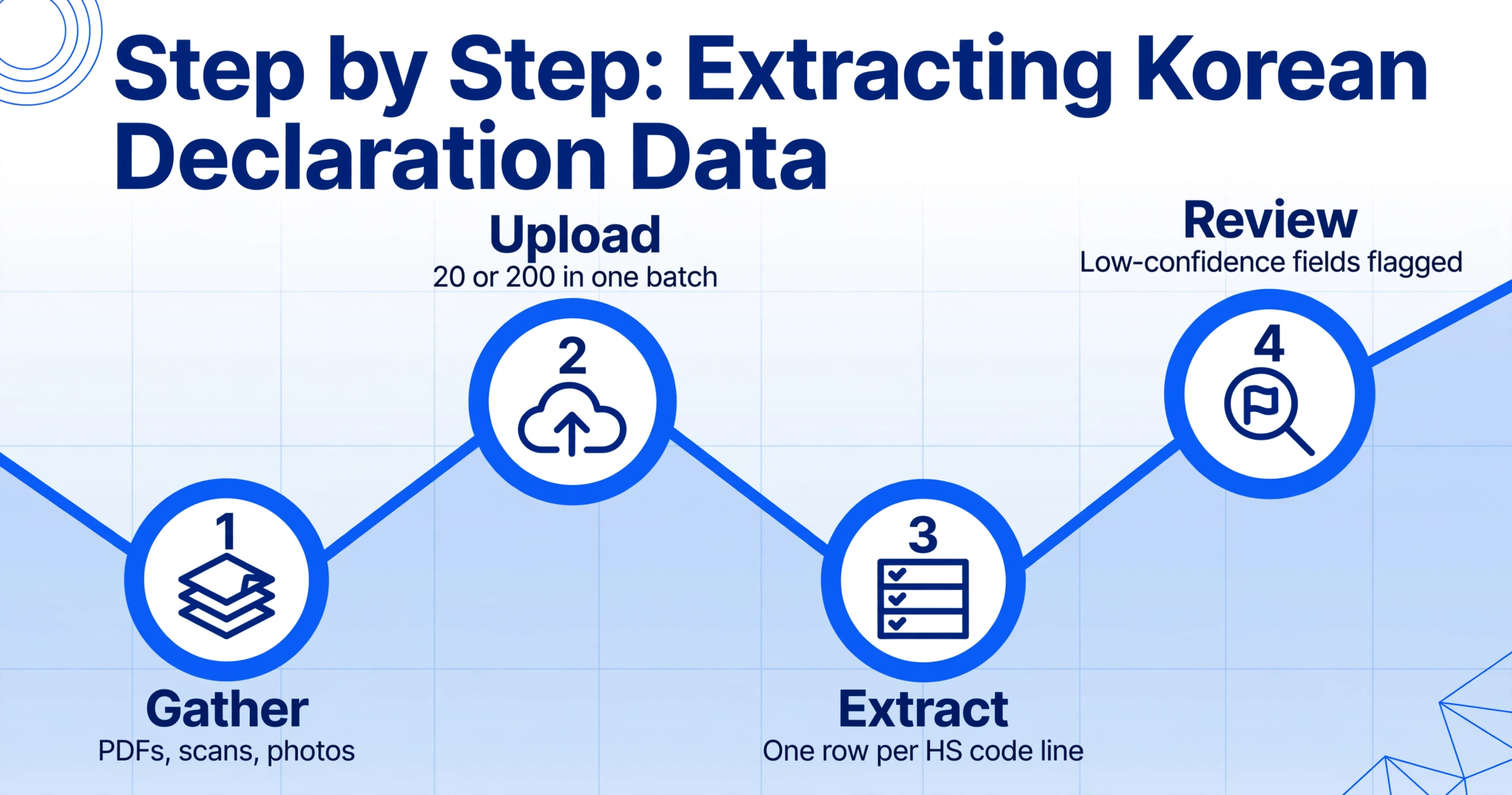
With your column set defined, the extraction workflow follows a consistent pattern regardless of how many declarations you are processing or how they arrive. Here is how it works in practice:
Gather your declaration documents. Collect the 수출신고서 or 수입신고서 files you need to process. They can arrive as PDFs downloaded from the UNI-PASS portal, scanned paper copies from your customs broker, or even photos taken of a printed declaration. The extraction tool reads all these formats in one batch — no need to distinguish between electronic and paper-originated documents at this stage.
Upload to a single batch. Upload all declaration files together. A batch can contain 20 or 200 declarations — the processing throughput is the same. The system assigns a batch name for tracking and generates a status for each file as it enters the queue. For teams handling mixed export and import declarations, upload them together; the AI will distinguish between export and import layouts based on the document content, not a manual sort step.
Run extraction against your column set. Each declaration is read by the vision AI model, which locates and extracts the values matching your defined columns. A declaration carrying 12 line items generates one row per HS code line — the AI handles multi-line declarations by populating a row for each distinct commodity line. The output is a single table with your columns as headers and one row per declaration line item beneath them.
Review and validate. Open the extraction results and scan for fields that may need correction. The AI returns values with confidence indicators — low-confidence fields (faded stamps, handwritten annotations over machine-printed text) are flagged so you know which cells to verify without reading every row. The most common edge cases on Korean declarations are: HS Code digits obscured by stamps, handwritten CIF value adjustments, and declaration numbers partially clipped during scanning.
Export to Excel or CSV. Export the complete table as an Excel file (XLSX) or CSV for import into your trade compliance system. The exported file carries all columns, all declaration rows, and your batch name as a traceable identifier. For Google Sheets users, the Google Sheets add-on writes results directly into the active spreadsheet, eliminating the export-import step entirely.
The entire workflow — from uploading 50 declaration files to having a structured table — takes minutes rather than the hours it would take to locate, read, and type each field manually. The bottleneck shifts from data entry speed to your validation speed.
What the Extracted Data Enables: Trade Compliance Use Cases
Once declaration data lives in a structured spreadsheet, it stops being a retrieval problem and starts enabling trade compliance workflows that are difficult or impossible when the data is scattered across paper files and email attachments.
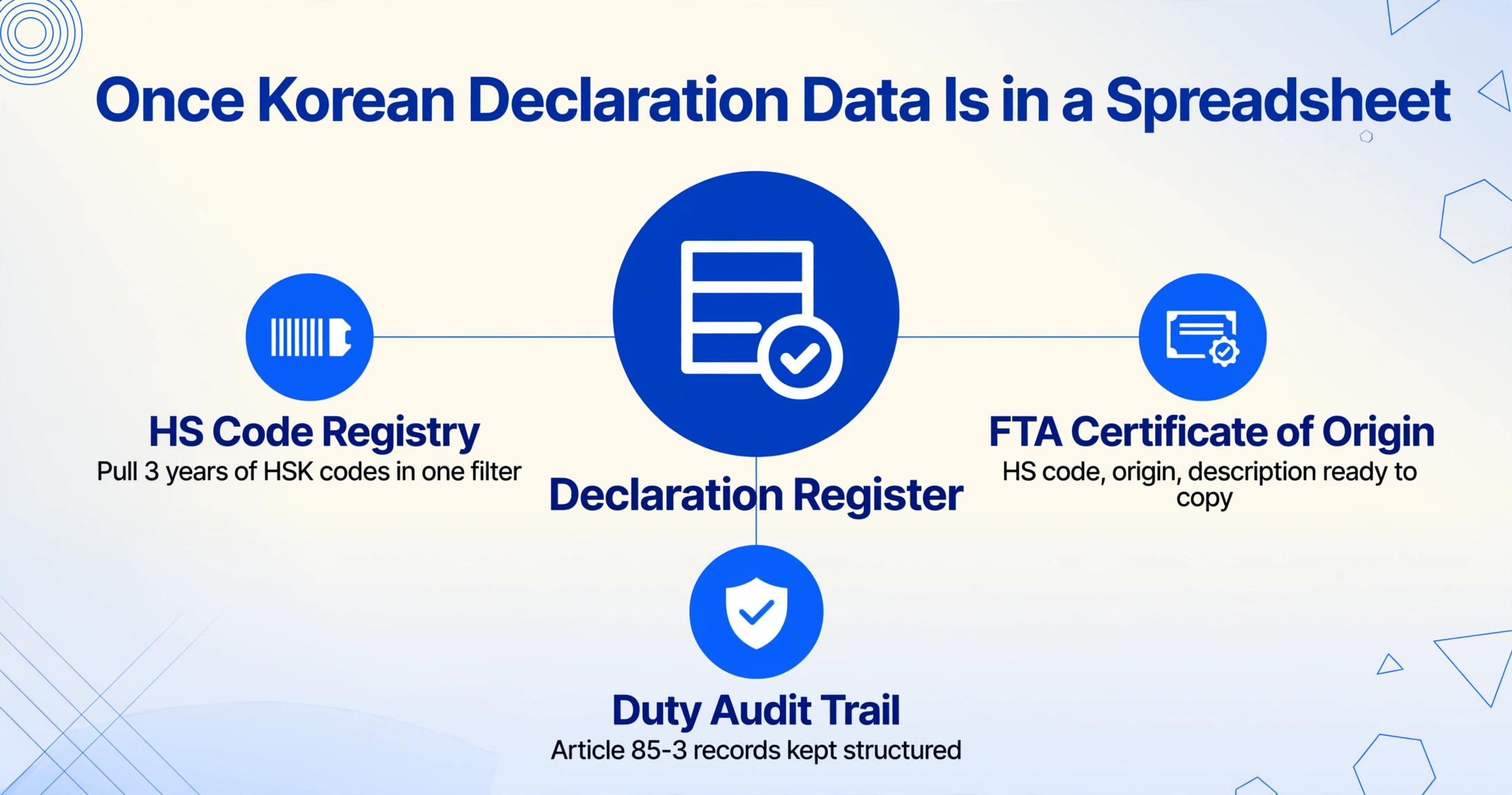
HS Code registry maintenance. Korea's 10-digit HSK codes are updated every 5 years — the next revision under HS 2027 is scheduled for 2027. During a code revision cycle, an importer needs to know exactly which HS codes were used in the previous period, for which products, at what duty rates. A structured declaration register makes this a filter operation — extract all HS codes from the past 3 years, identify codes that map to new HS 2027 classifications, and update the registry systematically. Without structured data, the same task requires opening each declaration individually and copying the code.
FTA certificate of origin preparation. Under the KORUS FTA, an exporter certifying origin for a shipment needs the HS code (6-digit international level), the country of origin determination, and the product description — all of which appear on the export declaration. When the declaration data is already in a spreadsheet, preparing a C/O application means pulling the relevant columns and confirming the origin criterion. When it is not, it means opening the declaration, finding the HS code, finding the origin field, and typing them into the C/O form.
Duty verification and audit trail. Article 85-3 of Korea's Framework Act on National Taxes (국세기본법) recommends retaining transaction records for five years. KCS customs audits can review declarations going back three years. A structured declaration register with full field history — 신고번호, HS code, declared value, origin — provides the audit trail that paper files do not. An auditor asks about a specific shipment; you open the register and find the row. Without it, you find the file, then find the declaration inside it, then transcribe the relevant data for the auditor's request.
Trade reconciliation and monthly reporting. A logistics manager reconciling 150 monthly declarations against commercial invoices needs a side-by-side view: declaration FOB/CIF values next to invoice amounts, HS codes next to product descriptions. When both datasets are in spreadsheets, the reconciliation is a VLOOKUP. When the declaration data is in paper files, the reconciliation is a physical document walk — locate, read, compare, note the discrepancy, move to the next.
For a deeper look at the cost side of this equation — what manual declaration data entry actually costs a Korean trading company in time, error exposure, and missed FTA savings — the analysis in our manual Korean tax invoice processing cost article follows the same structure for a related document type. The arithmetic for declarations follows the same pattern, with the added dimension of cross-document reconciliation.
Frequently Asked Questions
Can AI extract data from both Korean export and import declarations in one pass?
Yes. The AI reads the document content and distinguishes between 수출신고서 (export declaration) and 수입신고서 (import declaration) based on the field labels and layout. Export declarations carry FOB values as the primary value metric; import declarations carry CIF values for duty calculation. The same column set can include both FOB Value and CIF Value — the AI populates whichever field the document contains and leaves the other blank. A subsequent "Declaration Type" column lets you filter the output by trade direction.
What about handwritten values or broker annotations on printed declarations?
Vision AI that processes document images directly (rather than converting to text first) can read handwritten values and stamps that overlay machine-printed text. Accuracy depends on legibility: clear block handwriting on a clean PDF achieves comparable accuracy to printed text; cursive annotations or stamps that obscure the underlying value will produce lower confidence. The system flags low-confidence fields for human review rather than returning incorrect values silently. Handwritten CIF adjustments and broker correction stamps are the most common edge cases on Korean declarations.
Does this replace my customs broker or UNI-PASS filing?
No. Extraction handles the document-to-spreadsheet conversion step for post-clearance trade documentation — the work that happens after the shipment has cleared. Your customs broker continues to file declarations through UNI-PASS, and the KCS clearance process remains unchanged. Extraction replaces the manual re-entry of data from already-cleared declarations into your trade compliance spreadsheets, audit files, and HS Code registries.
Can I include supporting documents (invoice, B/L, C/O) in the same extraction batch?
Yes. Upload your declaration PDFs alongside the corresponding commercial invoice, packing list, bill of lading, and certificate of origin in the same batch. The extraction reads each document independently against your column definitions and outputs one consolidated table. This is the practical workflow for building a shipment register: a single batch per time period or per trade lane, with all four document types feeding into the same structured output. For a complete walkthrough of this approach applied to customs declarations generally, see our global customs declaration extraction guide.
How does the AI handle the 10-digit HSK code format unique to Korea?
The AI reads the full 10-digit HSK code as it appears on the declaration — including the dash or space separator between the 6-digit international prefix and the 4-digit Korea-specific suffix (e.g., 3304.99.00.00). The extracted value preserves the full code in a single cell. For FTA certificates of origin, which typically require only the 6-digit international level, the first six characters of the extracted code can be separated into a dedicated column. The extraction does not validate the code against the current HSK schedule — that remains a compliance step for your trade team or customs broker.
What is the accuracy rate for printed Korean Hangul on UNI-PASS declarations?
Printed Korean text on clean UNI-PASS documents — machine-generated PDFs, clear printed copies — achieves recognition accuracy up to 99% for structured fields (declaration number, HS code, dates, numeric values). Free-text fields like product descriptions (품명), which may blend Hangul with English product codes and technical abbreviations, have slightly lower accuracy but remain well within usable range. For a detailed analysis of AI accuracy on Korean documents specifically, see our article on whether AI can read Korean invoices accurately. The same model behavior applies to customs declarations.
How do I handle declarations that include multiple HS code lines (multi-item shipments)?
Each HS code line on a declaration generates one row in the output table. A declaration with 12 distinct product classifications produces 12 rows, each with the declaration number repeated and the line-specific HS code, product description, quantity, and value. This is the standard behavior for multi-line document extraction and matches the line-item structure you need for an HS Code registry or duty calculation audit. The declaration number serves as the grouping key across rows.
The data that UNI-PASS processes in seconds should not take minutes to re-enter by hand. Try it on a sample declaration — upload a 수출신고서 or 수입신고서 PDF, define your columns, and see how semantic extraction turns a formatted customs document into a structured trade compliance table.
Try It on a Declaration