Document Extraction Pricing 2026
How Much Does AI Extraction Really Cost?
AI document extraction tools range from $0 (free tiers with real limits) to $500+ per month for enterprise platforms, with most small-to-medium teams spending $9–$99 per month on plans that cover 100 to 1,500 pages. But the headline price is only half the story. Some tools count a "page" as a single PDF sheet, others bundle five pages into one credit, and a few charge per document regardless of length. A $39 plan that covers five pages per credit can end up cheaper than a $29 plan that charges by the page — or much more expensive if your documents are short. This guide compares 10 document extraction tools on actual cost at four real-world volume levels and highlights the hidden costs that no pricing page tells you about.
Key Takeaways
- A $9 plan with 150 one-page credits can be cheaper than a $39 plan with 100 multi-page credits because no two tools define a page the same way.
- Implementation on a $499 per month enterprise tool costs an additional $15,000 to $200,000 before you can process a single document.
- Stop comparing subscription prices and calculate one number: your fully-loaded per-page cost at your actual volume with your actual average document length.
Pricing Models Explained
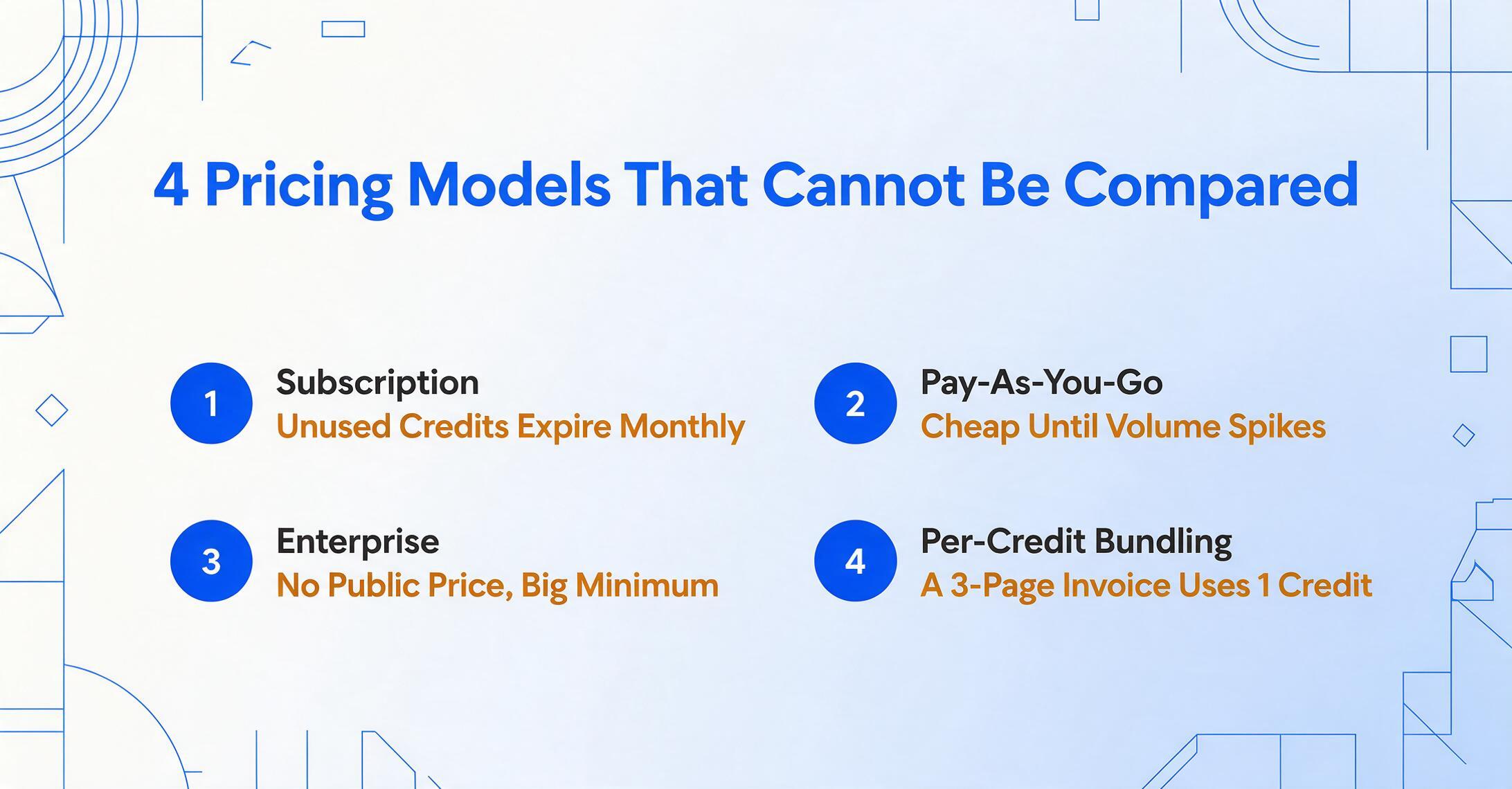
Document extraction tools use four fundamentally different pricing models. Comparing their headline numbers without understanding which model a tool uses is like comparing the cost of a taxi, a rental car, a bus pass, and a private jet based on "how much per mile."
Subscription (flat-rate credits). You pay a fixed monthly fee and receive a set number of credits. Each credit typically equals one page, one document, or one image. Unused credits expire at the end of the billing cycle in most tools, though some — like ImageToTable.ai — let you buy one-time credit packs that never expire. This model works best for predictable monthly volumes.
Pay-as-you-go (PAYG). You pay per page or per document processed, with no monthly commitment. Cloud APIs like AWS Textract and Google Document AI use this model almost exclusively. It is ideal for variable or low-volume workloads but can become expensive at scale if your volume spikes.
Enterprise / sales-led. No public pricing. You book a demo, negotiate a contract, and pay a custom annual fee. Tools like Rossum, ABBYY Vantage, and Nanonets (at the enterprise tier) operate this way. The per-page cost can be very low at high volumes, but the minimum commitment — both in dollars and implementation time — is substantial.
Per-credit with page bundling. Some tools, most notably Docparser, define one credit as covering up to five pages of a single document. This means a three-page invoice uses one credit, the same as a five-page contract. The effective cost per page depends entirely on your average document length. This is the single most common source of confusion when comparing pricing.
Price Tiers at a Glance
The table below shows each tool's published pricing as of June 2026. "Starting price" is the lowest monthly figure for a paid plan with meaningful extraction capability. "True per-page cost" accounts for how each tool defines a credit or page — this is the number that matters for comparison.
| Tool | Free Tier | Starting Price | Credit = ? | True $/Page (at entry tier) |
|---|---|---|---|---|
| ImageToTable.ai | Daily quota; 1 doc no sign-up | $9/mo (150 credits) | 1 page | $0.060 |
| Parseur | 20 pages/mo | $39/mo (100 pages) | 1 page | $0.390 |
| Airparser | 20 credits/mo | $33/mo annual (100 credits) | 1 page / email | $0.330 |
| Docparser | 14-day trial | $32.50/mo annual (100 credits) | 1 doc up to 5 pages | $0.065–$0.325 |
| Nanonets | $200 trial credits | $499/mo (10,000 pages) | 1 page | $0.050 (at Pro) |
| Docsumo | 100 pages (14-day trial) | $299/mo (5,000 pages) | 1 page | $0.060 (at Growth) |
| Rossum | 14-day trial | $1,500/mo (Starter) | 1 page | Sales-led |
| ABBYY Vantage | 60-day eval (gated) | ~$1,250/mo (50K pages/yr) | 1 page | ~$0.06–$0.10 |
| AWS Textract | 1,000 pages/mo (12 mos) | $1.50 / 1,000 pages (basic OCR) | 1 page | $0.0015 (basic) – $0.05 (forms) |
| Google Document AI | 1,000 pages/mo (basic OCR) | $1.50 / 1,000 pages (OCR) | 1 page | $0.0015 (basic) – $0.03 (Form Parser) |
The range is enormous: from effectively free at low volumes on cloud APIs to $1,500 per month before you process your first document with an enterprise platform. The right choice depends almost entirely on your document volume and whether you have engineering resources to build around an API.
100 Pages per Month: The Budget Tier
At 100 pages per month, you are processing roughly 3–5 documents per business day. This is the volume of a solo bookkeeper, a freelancer managing their own invoices, or a small business owner digitizing expense receipts. The right tool costs less than $40 per month — and in some cases, less than $10.
| Tool | Plan | Monthly Cost | Covers 100 Pages? |
|---|---|---|---|
| ImageToTable.ai | Basic (150 credits) | $9 | ✅ Yes, with 50 to spare |
| Parseur | Starter (100 pages) | $39 | ✅ Yes, exactly |
| Airparser | Starter (100 credits) | $33 (annual) | ✅ Yes |
| Docparser | Starter (100 credits) | $32.50 (annual) | ✅ Yes (up to 500 pages) |
| Nanonets | PAYG ($0.30/page) | $30 | ✅ Yes, but no monthly plan under $499 |
| Docsumo | Trial only at this tier | $299+ | ❌ No Growth plan under $299 |
| Rossum | Starter minimum | $1,500 | ❌ 15× overkill |
| ABBYY Vantage | Annual minimum | ~$1,250+ | ❌ Enterprise scale only |
| AWS Textract | Basic OCR (dev required) | $0.15 | ✅ Almost free — if you can build |
| Google Document AI | Basic OCR (dev required) | $0.15 | ✅ Almost free — if you can build |
At 100 pages per month, the budget-friendly tools (ImageToTable.ai, Airparser, Docparser, Parseur) all fall within $9–$39 per month. The cloud APIs are technically cheaper per page, but they require a developer to set up a processing pipeline and handle the output. For a non-technical user, the $9–$39 range is the real-world cost. The enterprise tools — Rossum, Docsumo, ABBYY — are not designed for this volume at all.
The standout at this tier is ImageToTable.ai's Basic plan at $9 per month for 150 credits — the only tool under $30 with AI-powered extraction and no template setup. Docparser's Starter plan is also strong if your documents are multi-page, because each credit covers up to five pages; 100 credits can cover up to 500 pages.
Bottom line at 100 pages/mo: If you have a developer, use Google Document AI or AWS Textract (≈$0.15/mo). If you don't, ImageToTable.ai at $9/mo is the cheapest AI-powered option that requires zero setup.
500 Pages per Month: Growing Teams
At 500 pages per month, you are processing roughly 15–25 documents per day. This is the volume of a growing small business, a busy accounting practice, or a department within a mid-sized company. The entry-tier plans no longer suffice — you need the next bracket, and the cost divergence between tools becomes much wider.
| Tool | Plan | Monthly Cost | Effective $/Page |
|---|---|---|---|
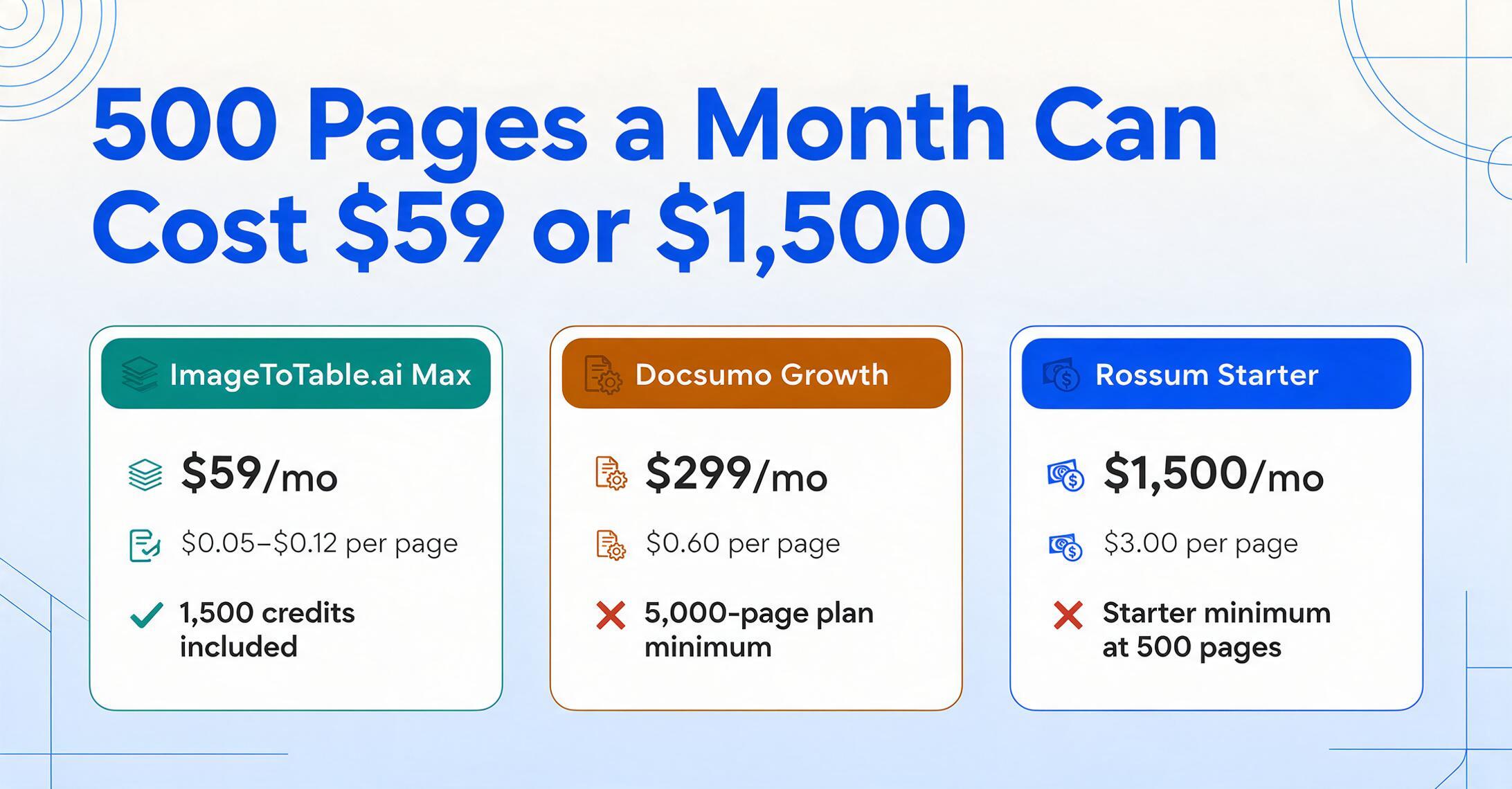
| ImageToTable.ai | Max (1,500 credits) or Pro + PAYG | $25–$59 | $0.05–$0.12 |
| Parseur | Pro (1,000 pages) | $99 | $0.20 |
| Airparser | Growth (500 credits) | $49 (annual) | $0.10 |
| Docparser | Pro (250 credits = up to 1,250 pages) | $61 (annual) | $0.05–$0.12 |
| Nanonets | Pro minimum (10,000 pages) | $499 | $1.00 (at 500 pages) |
| Docsumo | Growth (5,000 pages) | $299 | $0.60 |
| Rossum | Starter minimum | $1,500 | $3.00 |
| ABBYY Vantage | Annual contract | ~$1,250+ | $2.50+ |
| AWS Textract | Forms API (dev required) | $25 | $0.05 |
| Google Document AI | Form Parser (dev required) | $15 | $0.03 |
At 500 pages, the cloud APIs remain the cheapest option per page, but the engineering cost to build and maintain a reliable processing pipeline around them starts to matter. A simple extraction pipeline using Google Document AI or AWS Textract might cost $15–$25 per month in API fees, but you need a developer to set it up, handle errors, and push the output somewhere useful. If you already have that developer on staff, these APIs are the clear winner at this volume.
Among no-code tools, ImageToTable.ai offers the most flexible route: the Max plan at $59/month covers 1,500 pages (three times your volume), or you can use the Pro plan at $19/month for 400 credits and buy an extra $6 credit pack for the remaining 100 pages — bringing your total to $25. Airparser's Growth plan at $49/month for 500 credits is the next most affordable no-code option.
Bottom line at 500 pages/mo: With a developer: Google Document AI ($15/mo). Without a developer: ImageToTable.ai ($25–$59/mo) followed by Airparser ($49/mo). Avoid enterprise tools — you are paying for capacity you will not use.
1,000 Pages per Month: Regular Business Volume
At 1,000 pages per month, you are processing approximately 40–50 documents per day. This is a typical volume for a dedicated AP department in a mid-sized company, a property management firm processing rent rolls and invoices, or a logistics coordinator handling delivery notes and bills of lading. The gap between no-code tools and enterprise platforms narrows, but the enterprise tools remain several times more expensive unless you need their workflow features.
| Tool | Plan | Monthly Cost | Effective $/Page |
|---|---|---|---|
| ImageToTable.ai | Max (1,500 credits) or PAYG | $59–$60 | $0.059–$0.060 |
| Parseur | Pro (1,000 pages) | $99 | $0.099 |
| Airparser | Business (2,000 credits) | $149 (annual) | $0.075 |
| Docparser | Business (1,000 credits = up to 5,000 pages) | $159 (annual) | $0.032–$0.159 |
| Nanonets | Pro (10,000 pages) | $499 | $0.50 |
| Docsumo | Growth (5,000 pages) | $299 | $0.30 |
| Rossum | Starter minimum | $1,500 | $1.50 |
| ABBYY Vantage | Annual contract | ~$1,250+ | $1.25+ |
| AWS Textract | Forms API (dev required) | $50 | $0.05 |
| Google Document AI | Form Parser (dev required) | $30 | $0.03 |
This is the volume where the best no-code tools start to converge on a per-page cost of $0.06–$0.10. ImageToTable.ai's Max plan at $59/month for 1,500 credits and its pay-as-you-go rate of $0.06 per page both land at roughly the same number. Parseur's Pro plan hits $0.10 per page. Even Docparser's Business plan, at $159/month, becomes extremely cost-effective — $0.03 per page — if your documents average four to five pages and you max out each credit.
Nanonets and Docsumo remain significantly more expensive at $499 and $299 per month respectively, even though their per-page cost drops to $0.05–$0.06 at their full plan capacity. The issue is that you are buying 5,000–10,000 pages of capacity and using only 10–20% of it. If your volume grows into their range, they become competitive — but at exactly 1,000 pages, you are paying for unused headroom.
Bottom line at 1,000 pages/mo: Best no-code value: ImageToTable.ai at $59/mo ($0.059/page). Best API value: Google Document AI Form Parser at $30/mo. Docparser is cheapest only if your documents are consistently 3+ pages long.
5,000+ Pages per Month: High Volume and Enterprise
At 5,000 pages per month, you are processing over 200 documents per day. This is the domain of dedicated AP shared-service centers, large logistics operations, insurance claims departments, and any organization where document processing is a core operational function. The pricing calculus shifts: headline monthly cost matters less than per-page efficiency, workflow automation, and integration depth.
| Tool | Plan | Monthly Cost | Effective $/Page |
|---|---|---|---|
| ImageToTable.ai | PAYG pack or team plan | $250–$300 | $0.05–$0.06 |
| Parseur | Scale (10,000 pages) | $399 | $0.04 |
| Airparser | Premium (5,000 credits) | $249 (annual) | $0.05 |
| Docparser | Enterprise (contact sales) | Custom | Custom |
| Nanonets | Pro (10,000 pages) | $499 | $0.05–$0.10 |
| Docsumo | Enterprise (custom) | Custom | ~$0.04–$0.06 |
| Rossum | Silver (100,000 pages/yr ≈ 8,333/mo) | $3,333 | $0.40 |
| ABBYY Vantage | Mid-volume contract | ~$3,300–$8,300 | $0.04–$0.10 |
| AWS Textract | Forms API | $250 | $0.05 |
| Google Document AI | Form Parser | $150 | $0.03 |
At 5,000 pages per month, the per-page costs of most tools converge to $0.04–$0.10. The no-code tools (ImageToTable.ai, Airparser, Parseur) and the cloud APIs all sit in a similar range. The key differentiator is no longer per-page price — it is what the tool does with the extracted data. Do you need automated posting to SAP or NetSuite? Approval workflows? Human-in-the-loop validation? These features only come with the enterprise platforms.
ImageToTable.ai's pay-as-you-go credit packs — $300 for 6,000 credits at $0.05 each — keep the cost competitive at this volume without requiring an annual commitment. Airparser's Premium plan at $249/month also lands at $0.05 per page, while Parseur's Scale plan at $399/month drops to $0.04 per page. None of these require a sales call.
Rossum's Silver tier at $40,000/year for 100,000 pages ($0.40/page if spread over a year) looks expensive by comparison, but it includes ERP integrations, AI agents for exception handling, and a full validation interface — features the no-code tools do not offer. ABBYY Vantage's $0.04–$0.10 per page at this volume is competitive, but the implementation cost ($15,000–$200,000 upfront) is a significant barrier.
Bottom line at 5,000+ pages/mo: If you just need extraction without workflow: ImageToTable.ai PAYG ($250–$300) or Airparser Premium ($249). If you need ERP posting and exception handling: contact Rossum or ABBYY and budget for 3–6 months of implementation.
Beyond the Subscription: Hidden Costs to Watch For
The monthly subscription is only part of what you will pay. Five hidden costs routinely catch buyers off guard:
Implementation and onboarding. Enterprise tools (Rossum, ABBYY, Nanonets) require professional services to deploy. ABBYY Vantage implementation costs range from $15,000 to $200,000 depending on document complexity and the number of document types. Rossum's "Signature" onboarding plans are an additional cost on top of the annual license. Even mid-market tools like Docsumo charge separate setup fees.
Template maintenance. Tools that rely on zonal OCR or template matching (Docparser, traditional ABBYY FlexiCapture) require you to build and maintain a parsing template for each document layout. Every time a vendor changes their invoice format — which happens regularly — your template breaks and you spend time fixing it. This is rarely quantified in cost comparisons, but for organizations processing invoices from hundreds of suppliers, template maintenance can consume several hours per week.
Engineering time for API tools. AWS Textract and Google Document AI have the lowest per-page rates in this comparison — as low as $0.0015 per page for basic OCR. But turning an API response into a usable spreadsheet or database entry requires building a pipeline: preprocessing documents, calling the API, parsing the JSON response, handling errors and retries, and storing the output. A simple pipeline takes 2–4 weeks for an experienced developer. At a developer's fully loaded cost of roughly $10,000–$15,000 per month, the engineering cost alone can equal months or years of subscription fees for a no-code tool.
Credit expiry and unused capacity. Most subscription tools reset your credit counter at the end of each billing cycle. If you process 400 pages one month and 1,200 the next, you either pay for unused capacity in the slow month or overage fees in the busy month. Tools that offer non-expiring credits (ImageToTable.ai's PAYG packs) or rollover (some enterprise contracts) smooth out this variability.
Export and integration friction. If your extracted data needs to land in a specific system — QuickBooks, SAP, Google Sheets, a database — check whether the tool has a native integration or whether you need to build it yourself via API. A $39/month tool that requires $200/month in Zapier fees and a half-day of setup per month is not a $39 tool.
How to Calculate Your Actual Document Extraction Cost
Comparing pricing pages is not enough. Use this three-step framework to find your real cost:
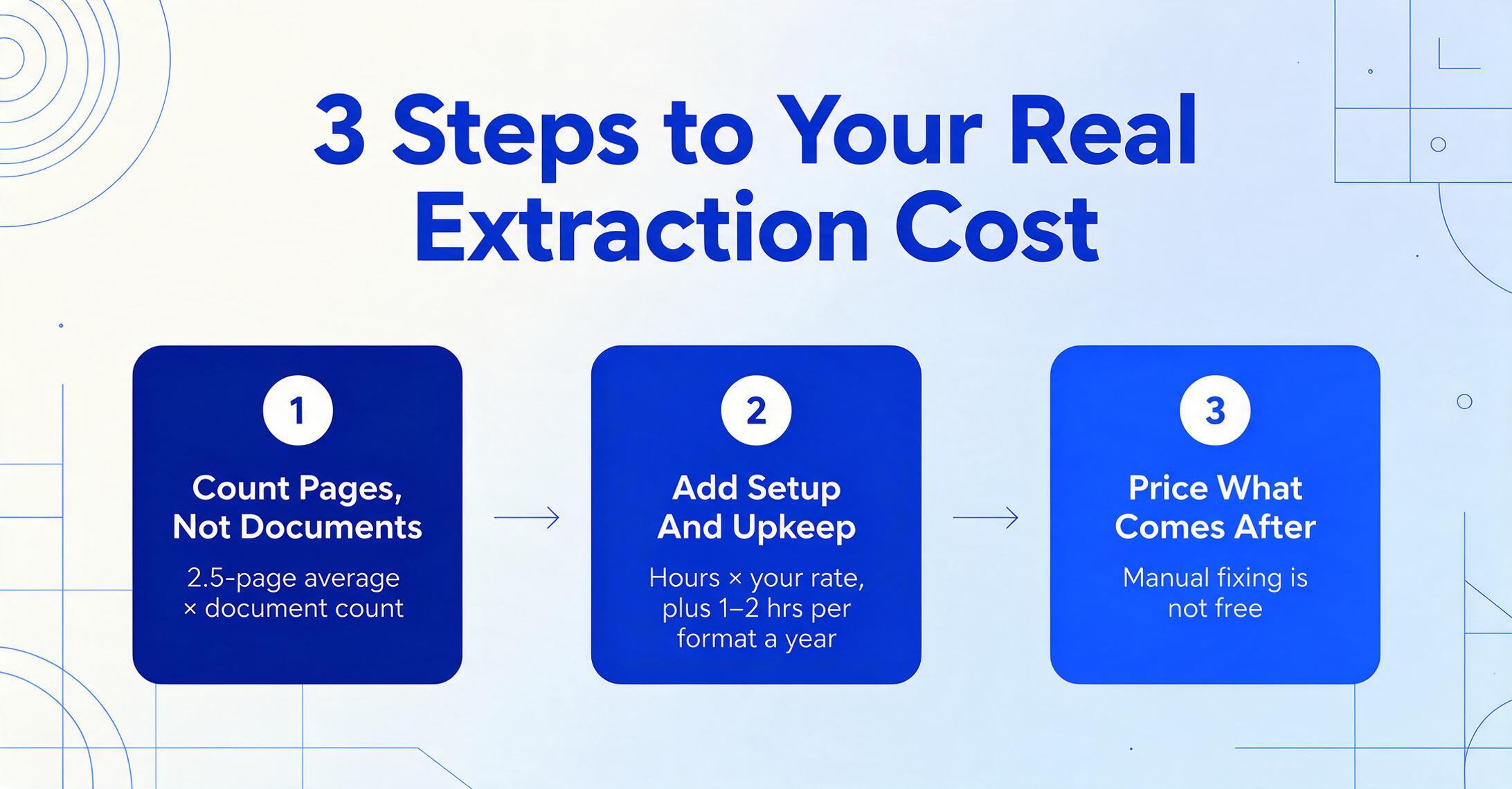
Count your actual pages, not documents
Most tools charge by the page, not by the document. A 3-page invoice is three credits on most platforms. If your average document is 2.5 pages, multiply your document count by 2.5 to get your true monthly page volume. If you use Docparser, divide that number by 5 (since one credit covers up to five pages of a single document) to get your true credit consumption.
Add the setup time cost
Estimate how many hours you (or a developer) will spend setting up the tool. Multiply by your hourly rate. For enterprise tools, include the cost of procurement (RFI, security review, legal). For template-based tools, estimate 1–2 hours per document format per year in maintenance. Add this to your first-year total.
Factor in what happens after extraction
A tool that outputs clean, structured data ready for your spreadsheet or database is cheaper than one that requires manual reformatting. A tool that offers native Google Sheets integration saves you the cost of exporting and re-importing. A tool that posts directly to your accounting system eliminates an entire workflow step. The value of native integrations is real — quantify it or risk comparing tools on misleadingly equal terms.
To put this into practice: a team processing 500 invoices per month (average 2 pages each = 1,000 pages) would pay $59/month with ImageToTable.ai and $99/month with Parseur. The difference is $40/month, or $480/year — but if Parseur saves you the cost of building a template (which its AI does), the gap narrows. Test both with your own documents before committing.
Once you have calculated your real cost, the next question is whether the tools that fit your budget can handle your specific document types. A separate guide covers the tools best suited for freelancers and solo practitioners, who often operate at the 100-page tier covered above. If you are on a tight budget, the roundup of genuinely free document extraction tools is worth reading before you pay for anything. And if you are specifically evaluating template-free tools that require zero training — which eliminates the biggest hidden maintenance cost — the no-training extraction guide covers the key options. If your interest is narrower than the full market — say, you only need the pricing that applies to a 1-10 person team — the small-team pricing guide isolates flat-rate vs per-seat trade-offs, and our market pricing map condenses the whole landscape into four price bands for a fast orientation.
Frequently Asked Questions
What is the absolute cheapest way to extract data from documents?
If you have a developer, Google Document AI's basic OCR at $1.50 per 1,000 pages ($0.0015 per page) is the cheapest option by far, with a free tier of 1,000 pages per month. If you do not have a developer, ImageToTable.ai's Basic plan at $9/month for 150 credits is the lowest-cost AI extraction tool that requires no setup. For zero-cost, genuine free tiers: Parseur offers 20 pages per month permanently, and Google Document AI's free OCR tier gives you 1,000 pages per month.
Why do enterprise tools cost so much more? Is the extraction better?
Enterprise tools like Rossum and ABBYY Vantage cost more because they include features beyond extraction: automated posting to ERP systems (SAP, Oracle, NetSuite), approval workflows, human-in-the-loop validation interfaces, audit trails, SLA guarantees, and dedicated support. The underlying AI extraction quality is comparable to modern no-code tools — a vision-language model does not become more accurate because you pay more for it. The premium is for the surrounding workflow, not the extraction itself.
How do I compare tools when each one defines a "page" differently?
Convert every tool's pricing to a per-page cost based on your average document length. If Docparser gives you 100 credits and each credit covers up to five pages, and your average document is two pages, then 100 credits cover 250 pages — not 100. If Airparser charges 100 credits for 100 pages and you have two-page documents, 100 credits cover exactly 100 pages. Always calculate on pages, not credits or documents. The PAYG vs subscription comparison digs deeper into this math.
Are there any tools with no hidden fees or surprise pricing?
Among the tools reviewed, the most transparent pricing belongs to ImageToTable.ai (published plans + PAYG packs with no expiry), Parseur (per-page pricing published for all tiers), and Airparser (flat-rate credit plans). Cloud APIs (AWS Textract, Google Document AI) are also transparent but require engineering effort to use. Tools that require a sales call to get a price — Rossum, Docsumo (enterprise), ABBYY — inherently have less pricing transparency. None of the tools reviewed here charges surprise overage fees without warning, but always check whether credits expire at the end of the month or roll over.
I currently use Parseur but the cost is adding up. Are there cheaper alternatives?
Yes. At most volume levels, ImageToTable.ai and Airparser offer lower per-page costs than Parseur. ImageToTable.ai's $59/month Max plan covers 1,500 pages at $0.059 per page, compared to Parseur's $99/month for 1,000 pages at $0.099 per page. The Parseur alternative guide compares the two tools side by side on features, accuracy, and supported document types. For teams processing meter reading documents specifically, the dedicated meter reading guide covers the best options in that niche.
The cheapest document extraction tool is not the one with the lowest monthly subscription. It is the one whose pricing model matches your actual document volume, whose definition of a "page" aligns with how your documents are structured, and whose hidden costs — implementation, template maintenance, engineering time — you have already quantified before you buy. Every tool in this comparison can save you money compared to manual data entry. The right question is not "which is cheapest." It is "which is cheapest for the way I actually work?"