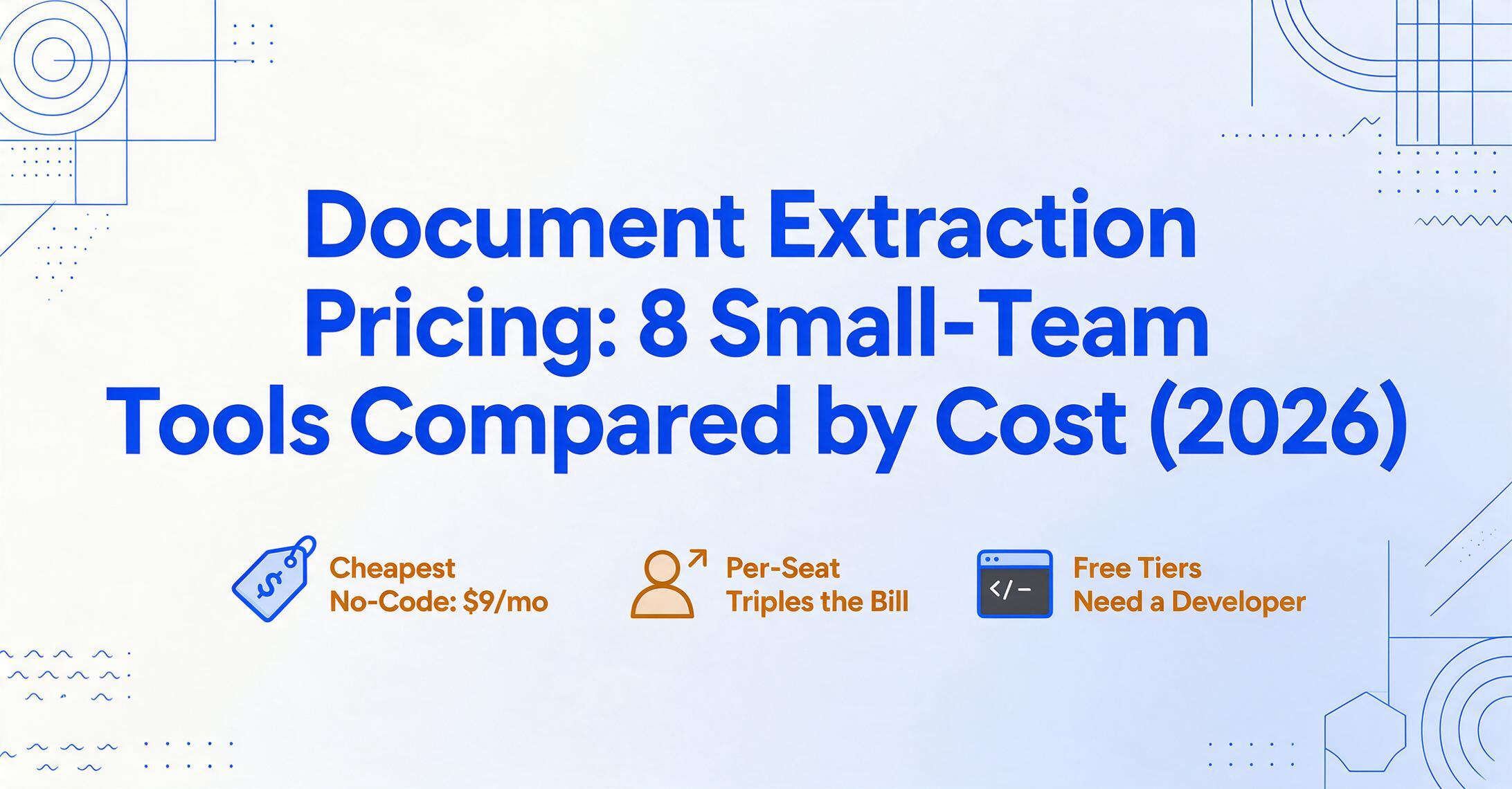
Document Extraction Pricing for Small Teams
8 Tools Compared by Real Cost in 2026
For a small team processing 50-500 documents per month, document extraction tools cost $0-$99/month — but the total cost depends far more on which pricing model fits your actual usage pattern than on the headline subscription price. A $9 flat-rate plan can beat a $499 enterprise plan at your volume. A per-seat tool at $20/user can cost more than a flat-rate tool at $59 for the whole team. And a "free" tier is only free if it actually covers what you need to do.
Key Takeaways
- For a 5-person team processing 500 documents a month, document extraction costs anywhere from $0 to $499 — a 26x price spread for exactly the same job.
- A tool that charges $6 per user costs your small team more than a $59 flat-rate tool for the whole team — and every new hire makes the gap worse.
- Three questions — Do you have a developer? What's your actual volume? Do your document layouts change? — place you in the right price band faster than reading any pricing page.
What "Small Team" Means for Document Extraction
A 1-10 person team looks nothing like a 500-person enterprise when it comes to buying software. You don't have a procurement department. You don't have an IT team to configure integrations. You have a budget, but it's small — typically $0-$100 per month for a tool that isn't your core business expense. And most importantly, your document volume is unpredictable. One month you might process 20 invoices. The next, a project rush puts you at 200.
This changes what "good value" means entirely.
For an enterprise processing 50,000 documents a month, a tool that charges $0.10 per page and costs $5,000/month is a rounding error if it saves 10 data-entry hours per day. For a small team, a tool that charges $0.10 per page and costs $100/month might already be too expensive — and require a setup effort the team doesn't have time for.
The broader document extraction pricing guide covers the full landscape from free to enterprise, and our four-tier market pricing map shows how the whole market splits by price band. This one focuses on what matters specifically for teams of 1-10 people: flat-rate subscriptions, free tiers that are actually useful, and the per-seat pricing trap that can quietly triple your bill as your team grows.
8 Tools and the Pricing Models They Use
Not all pricing models are the same, and the model matters more than the number. Here are the tools in this comparison and how they charge:
| Tool | Pricing Model | Entry Price | Free Tier |
|---|---|---|---|
| ImageToTable.ai | Flat-rate subscription + PAYG credits | $9/mo (150 docs) | Demo (no sign-up) |
| Parseur | Flat-rate subscription | $39/mo (100 pages) | 20 pages/mo forever |
| Airparser | Flat-rate subscription | $39/mo (100 credits) | 30-credit trial |
| Docparser | Flat-rate subscription | $39/mo (100 credits) | 14-day trial only |
| Nanonets | Pay-as-you-go ($0.30/block) or Pro subscription | ~$60-120/mo PAYG at low volume | $200 trial credits |
| Docsumo | Sales-led subscription | ~$179-299/mo (varies by source) | 14-day trial (1,000 pages) |
| Tesseract (DIY) | Free, open-source | $0 (your time to set up) | N/A — always free |
| Google Document AI | Pay-per-page | ~$0.0015-$0.03/page | 1,000 pages/mo free |
The key distinction is between flat-rate pricing (one monthly fee for a fixed number of pages) and pay-as-you-go or per-seat pricing (cost scales linearly with usage or headcount). Flat-rate plans get cheaper per document as you use more of your allowance. Per-seat plans get more expensive as you add people. For a small team, this difference can mean the tool costs twice as much as you expected.
Real Cost at 100 Documents Per Month
At 100 documents per month — roughly 3-5 per business day — you're a light but regular user. This is the volume of a small consultancy processing client invoices, a property manager handling lease agreements and maintenance receipts, or a freelancer tracking project expenses.
| Tool | Plan Used | Monthly Cost | Per-Doc Cost |
|---|---|---|---|
| ImageToTable.ai | Basic ($9, 150 docs) | $9 | $0.06 |
| Tesseract (DIY) | Free | $0 | $0 |
| Google Document AI | Free tier (1,000 pages) | $0 | $0 |
| Parseur | Free tier (20 pages) — insufficient | $39 | $0.39 |
| Airparser | Starter (100 credits) | $39 | $0.39 |
| Docparser | Starter (100 credits) | $39 | $0.39 |
| Nanonets | PAYG (~2-3 blocks/doc) | ~$60-90 | ~$0.60-0.90 |
| Docsumo | Starter (sales-led) | ~$179+ | ~$1.79+ |
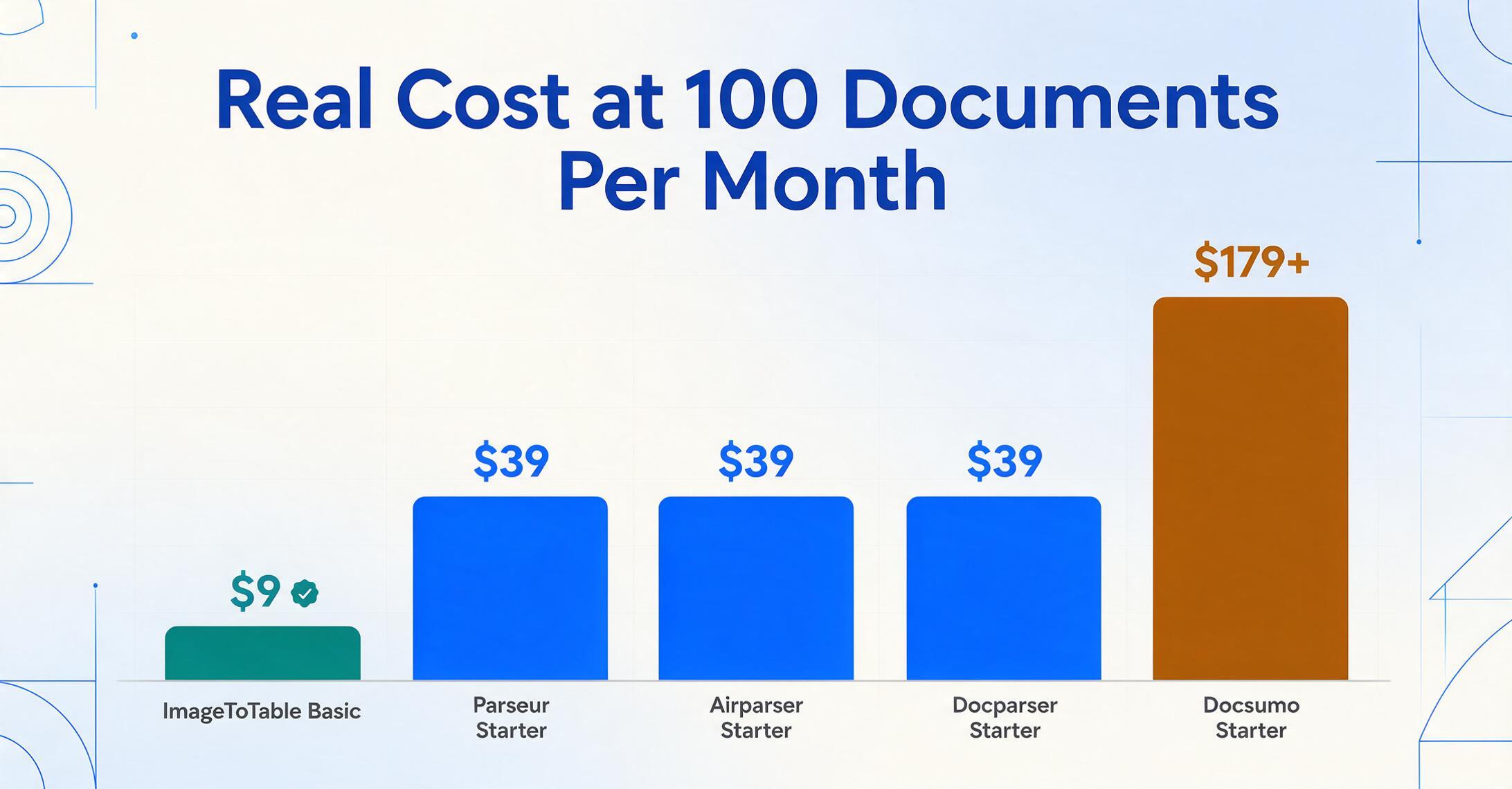
At 100 documents per month, the winner is clear: ImageToTable.ai's Basic plan at $9/month is the only flat-rate subscription that actually fits this volume at a price below $30. Parseur, Airparser, and Docparser all start at $39 and give you roughly the same 100-doc allowance — but at four times the price. Nanonets' pay-as-you-go at roughly $0.60-0.90 per document adds up fast: 100 documents could cost $60-90. Docsumo's entry point is simply not built for this volume.
Two free options exist: Tesseract (open-source OCR, requires technical setup and delivers raw text — not structured columns) and Google Document AI's free tier (1,000 pages/month, but requires a Google Cloud project and code to call the API). Both are genuinely free at this volume, but both demand skills a typical small team doesn't have in-house.
Best value at 100 docs/month: ImageToTable.ai Basic at $9 — the only no-code flat-rate plan under $30. DIY free tools win on price but lose on setup effort and output structure.
Real Cost at 500 Documents Per Month
At 500 documents per month — about 17 per business day — you're in consistent, weekly processing territory. This is where automated extraction starts saving real time. It's also where the pricing landscape shifts: entry-level plans run out, and you need to move to mid-tier subscriptions.
| Tool | Plan Used | Monthly Cost | Per-Doc Cost |
|---|---|---|---|
| ImageToTable.ai | Pro ($19, 400) + PAYG 100 ($6) | $25 | $0.05 |
| ImageToTable.ai | Max ($59, 1,500 credits) | $59 | $0.039 |
| Airparser | Growth (500 credits) | $49 | $0.098 |
| Google Document AI | Pay-per-page (~$10/1,000 pages) | ~$5 | $0.01 |
| Parseur | Interior (500 pages) | $69 | $0.138 |
| Docparser | Business (1,000 credits) | $159 | $0.318 |
| Tesseract (DIY) | Free | $0 | $0 |
| Nanonets | PAYG or Pro ($499) | $300-499 | $0.60-1.00 |
| Docsumo | Sales-led | ~$299+ | ~$0.60 |
At 500 documents, the cost gap widens into tiers. The most economical option for a team that can handle API setup is Google Document AI at roughly $5 for OCR-only extraction — but that gives you raw text, not structured fields like invoice numbers or line items. For no-code structured extraction, ImageToTable.ai's Max plan at $59 gives you 1,500 credits (enough for 500 pages with room for other document types), bringing the per-document cost to under 4 cents. Airparser's Growth plan at $49 is another solid option if exactly 500 credits fits your needs.
Docparser jumps to $159 for the Business tier because its Professional plan only covers 250 credits — not enough for 500 pages. This is a classic pricing gap: you pay for 1,000 credits when you only need half that. Parseur's $69 interior tier is reasonable but still higher per page than either ImageToTable.ai's Max or Airparser's Growth plan.
Nanonets and Docsumo remain impractical for a 5-10 person team at this volume. At $499/month or more, they cost more than most small teams spend on their entire software stack.
Best value at 500 docs/month: ImageToTable.ai Max at $59 (lowest per-doc cost under $0.04, no-code). Airparser Growth at $49 for 500 credits is the runner-up.
Real Cost at 1,000 Documents Per Month
At 1,000 documents per month — about 33 per business day — you're bordering on dedicated operations territory. A team of 5-10 people processing this volume is likely running document extraction as a core workflow, not an occasional task. This is where the economics of flat-rate pricing really separates from per-seat or per-page models.
| Tool | Plan Used | Monthly Cost | Per-Doc Cost |
|---|---|---|---|
| ImageToTable.ai | Max ($59, 1,500 credits) | $59 | $0.039 |
| Google Document AI | Form Parser ($30/1,000 pages) | $30 | $0.03 |
| Parseur | 1,000-page plan | $99 | $0.099 |
| Airparser | Business (2,000 credits) | $149 | $0.149 |
| Docparser | Business (1,000 credits) | $159 | $0.159 |
| Nanonets | Pro (5,000 pages) | $499 | $0.50 |
| Docsumo | Growth (5,000 pages) | ~$449 | ~$0.45 |
| Tesseract (DIY) | Free | $0 | $0 |
At 1,000 documents, the math becomes unmistakable. ImageToTable.ai's Max plan stays at $59 — the same price as at 500 docs — because the plan covers up to 1,500 credits. Your per-document cost drops to under 4 cents, the lowest among all no-code tools in this comparison. Parseur's $99 1,000-page plan is the closest competitor on price per page, but it still costs 70% more than ImageToTable.ai for the same volume.
Google Document AI's Form Parser at $30/1,000 pages is cheaper in absolute dollars — if you have a developer to set it up and build a review interface for the raw output. That "if" is the key qualifier. The best free document extraction tools guide covers when the DIY route actually makes sense.
Nanonets' Pro plan at $499 starts to look reasonable on a per-page basis ($0.10/page beyond the 5,000-page allowance), but the minimum commitment of $499/month is more than most 10-person teams pay for internet, office software, and document extraction combined. Docsumo's Growth tier at ~$449 has the same problem.
Best value at 1,000 docs/month: ImageToTable.ai Max at $59 — per-doc cost of $0.039, no-code, no per-seat fees. Google Document AI at $30 is cheaper on raw price but requires developer setup and delivers unstructured output.
Per-Seat vs Flat-Rate: Why It Destroys Small Team Value
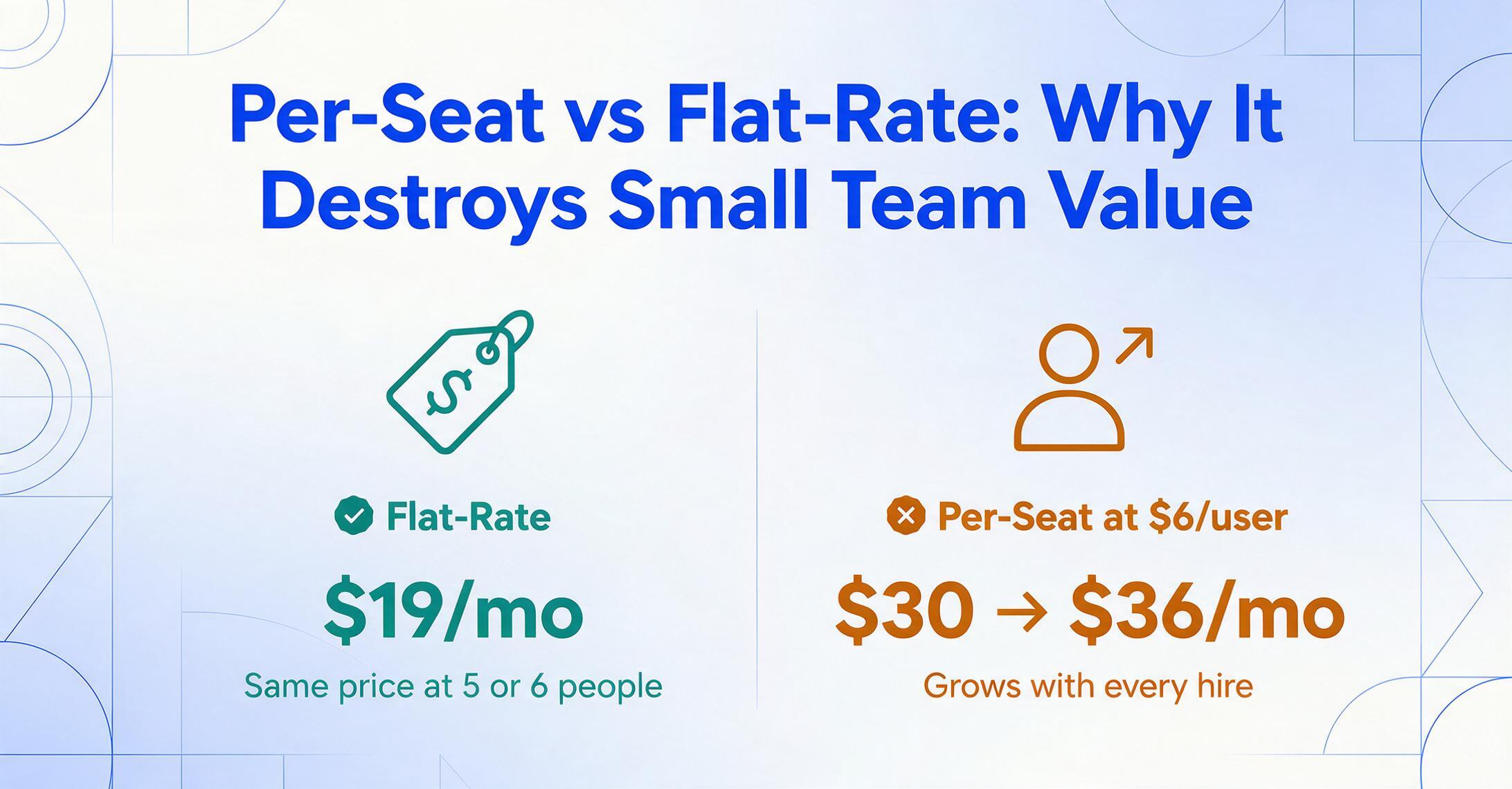
Some document extraction tools — particularly those that started as expense management platforms — use per-seat pricing: you pay for each person who needs access. Expensify charges $5-9 per user per month. Rydoo charges roughly €6-9 per user. These numbers sound harmless. A $6/seat plan for a 3-person team is only $18/month. But the model has a structural flaw for small teams: the cost grows with your team, not with your document volume.
If your team of 5 people processes 200 documents per month, a flat-rate tool at $19/month costs $3.80 per person. A per-seat tool at $6/user costs $30 — and still has document limits on top. Add one more person, and the flat-rate tool stays at $19. The per-seat tool goes to $36. The gap widens with every hire.
This matters because small teams shouldn't have to ration who gets access to a tool that everyone needs occasionally. The person who receives a supplier invoice, the person who matches it to a purchase order, and the person who approves the payment may all need to access the extraction output or upload documents. With flat-rate pricing, they all can. With per-seat pricing, you're incentivized to restrict access — which defeats the purpose of automation.
None of the 8 tools in this comparison use per-seat pricing for extraction access (Airparser and ImageToTable.ai include unlimited team members on paid plans). But if you're evaluating a tool that does — especially one that advertises a low per-user price — calculate the total cost for everyone who should have access, not just the one person who would administer it.
Free Tier Reality Check
Free tiers are useful — but only if they match your actual use case. Here's how the free options in this comparison actually stack up for a small team:
- Parseur's 20 pages/month — genuinely free, no time limit, no watermark. But 20 pages covers roughly one business day for a team processing 500 documents. Useful for testing, not for ongoing use.
- Google Document AI's 1,000 pages/month — the largest free allowance in this comparison. Enough for 33-50 documents per day. But the free tier only covers the Enterprise Document OCR processor, not the Form Parser or Custom Extractor that give you structured output. And you still need a developer to call the API and handle the output.
- Tesseract OCR — completely free, runs offline, supports 100+ languages. The catch: it outputs raw text, not structured fields. A small team without a developer would need to manually copy-paste invoice numbers and totals from a text dump. It's free in dollars but expensive in hours.
- Nanonets' $200 trial credits — enough to process thousands of documents for free once. But credits don't renew, and the minimum paid plan is either $0.30/page PAYG or $499/month Pro.
- Airparser's 30-credit trial — enough to test the tool on 30 documents, then you need to pay $39/month for 100 credits.
A free tier is the right starting point if you're evaluating a tool. But if you're setting up an ongoing workflow — processing documents every week — plan on a paid subscription from the start. The guide to free document extraction tools covers which free options work for ongoing use and which are strictly evaluation-only.
How to Choose: Decision Framework for Small Teams
Three questions will place you in the right price band faster than any feature matrix:
If yes, Google Document AI or the Tesseract route gives you the lowest per-page cost. If no, you need a no-code tool — ImageToTable.ai, Parseur, Airparser, or Docparser — and your choice narrows to flat-rate subscriptions.
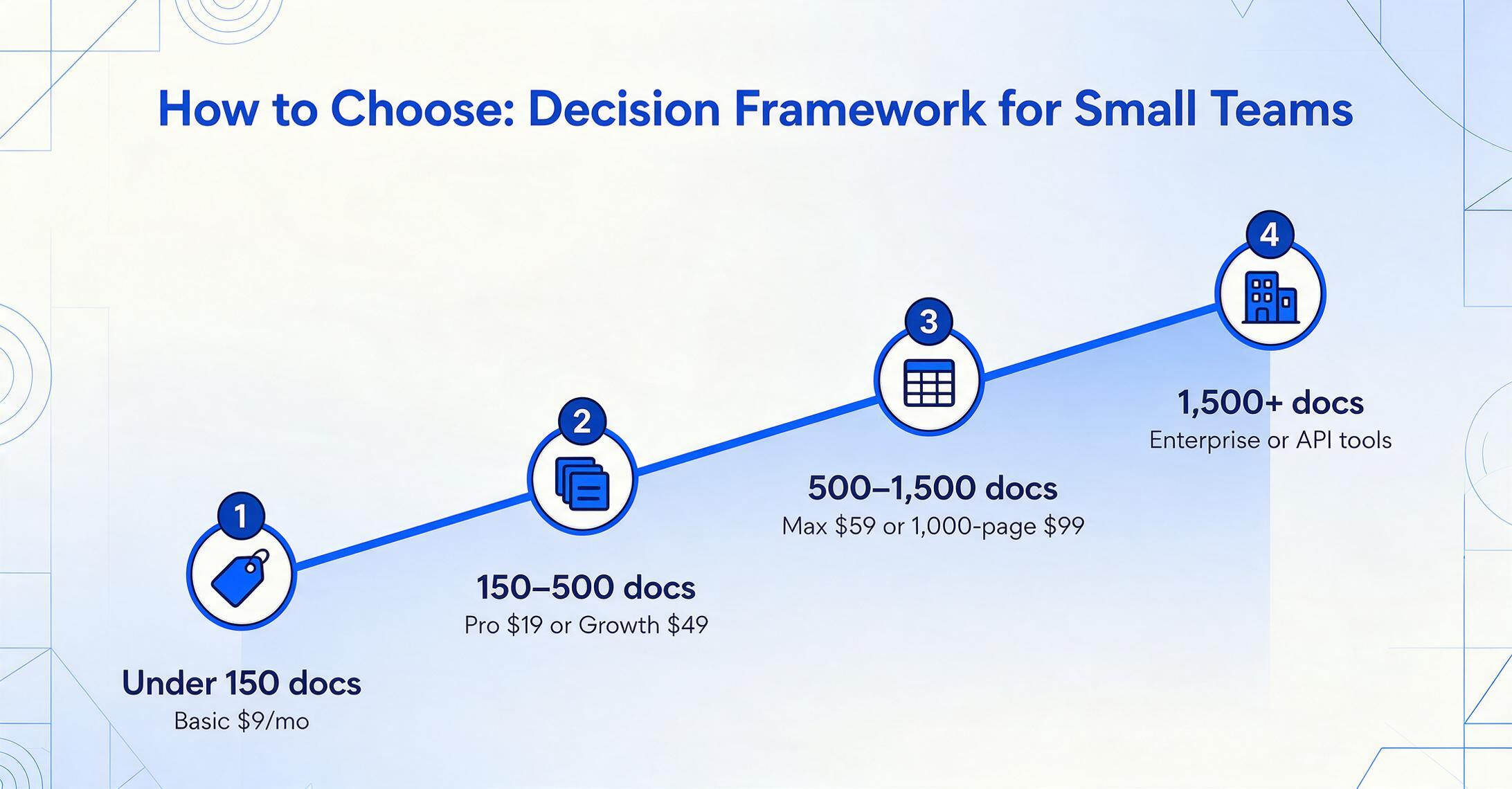
Under 150 docs/month → ImageToTable.ai Basic ($9) or a free tier. 150-500 docs/month → ImageToTable.ai Pro ($19) or Airparser Growth ($49). 500-1,500 docs/month → ImageToTable.ai Max ($59) or Parseur's 1,000-page plan ($99). Over 1,500 docs/month → you're out of small-team territory and should look at enterprise tools or API-based solutions.
Template-based tools like Docparser need a new template every time a supplier changes their invoice format — a hidden cost that doesn't show up on the pricing page. AI-based tools (ImageToTable.ai, Parseur, Airparser) read documents by meaning and adapt automatically. If you deal with many vendors or irregular documents, the template-free approach saves hours of setup time every month.
There's also the question of whether a subscription or a pay-as-you-go model suits you better when volume varies month to month. The detailed comparison of subscription vs PAYG models covers when each makes sense, with real cost breakpoints.
Frequently Asked Questions
What's the cheapest document extraction tool for a 5-person team?
For a team of 5 with typical volume (100-400 docs/month), ImageToTable.ai's Basic plan at $9/month or Pro plan at $19/month is the cheapest no-code option. The $9 plan covers up to 150 documents at $0.06 per document — less than the cost of a stamp per page. If you have a developer available, Google Document AI at $1.50-$30 per 1,000 pages is technically cheaper but requires setup and API integration.
Does per-seat pricing ever make sense for small teams?
Rarely. Per-seat pricing makes sense when each user consumes a similar amount of resources — like email inboxes or CRM licenses. In document extraction, one person typically processes most documents and others only need occasional access. A flat-rate plan covers the whole team at no extra cost. The only scenario where per-seat works is if exactly one person in the entire team will ever use the tool, and the per-seat price is lower than the flat-rate entry point.
Can I use a free tier indefinitely for my small business?
It depends on your volume. Parseur's 20-page free tier is genuinely renewable but too small for most businesses (that's less than one page per business day). Google Document AI's 1,000-page free tier is usable for light workflows — if you have a developer to set it up. For a no-code solution, most free tiers are trial-sized and require a paid plan for ongoing use. Read the free document extraction tools comparison for a detailed breakdown of what each free tier actually covers.
Why does Docparser cost $159 at 500 docs when its entry plan is $39?
Docparser's Professional plan ($74/month) covers 250 credits — enough for 250 single-page documents but not 500. To process 500 documents, you need the Business plan ($159/month, 1,000 credits). This creates a pricing gap between 250 and 1,000 documents where you're effectively paying for capacity you don't use. It's a common pattern in tiered subscription pricing — always check where your volume falls relative to the tier boundaries.
Is Nanonets or Docsumo worth the jump to $499/month for a small team?
Almost never. Both platforms offer enterprise-grade features — approval workflows, ERP integrations, dedicated support — that small teams don't need. The core extraction quality at $19-59/month tools uses the same class of AI models. The extra cost buys workflow infrastructure, not better reading accuracy. If your team processes fewer than 5,000 documents per month, you're paying for features you won't use.
What about tools for freelancers processing under 50 docs/month?
For very low volume ($50 or fewer documents per month), consider the free tiers of the tools above or the options covered in the freelancer document extraction guide. Google Document AI's free tier (1,000 pages/month of OCR) is more than enough. So is Parseur's 20-page free tier for truly occasional use — though you'll likely want a paid plan if processing happens more than once a week.