Best Expense Report & Receipt Management Tools
in 2026
The average company spends about $58 and 20 minutes to process a single expense report, and roughly one in five reports (19%) contains an error that costs another $52 and 18 minutes to fix, according to a GBTA Foundation study that remains the industry's benchmark figure. That cost is exactly what an expense report tool is supposed to erase — but the category is split down the middle, and most buyers don't realize they need only one half of it. Some of these tools run the entire expense workflow: capture, approve, reimburse, reconcile, post to the books. Others do one narrow thing — turn receipts and expense forms into clean spreadsheet rows you control — and leave the workflow to you. Pick from the wrong half and you'll either pay for a process you never use, or buy a scanner when you needed a reimbursement engine.
Key Takeaways
- Eight tools, one search term — but "best expense report tool" was never a single ranking, it's two completely different jobs wearing the same name.
- Half these tools run the whole workflow (approve, reimburse, reconcile) and half just hand you a spreadsheet, so pick from the wrong half and you'll pay per user for a process you never touch — or buy a scanner when you needed a reimbursement engine.
- One question settles it: if your end goal is a reimbursement or an approval you want a managed platform, but if it's a spreadsheet you own, a flat-rate extraction tool does the job for a fraction of the per-user cost.
What an "Expense Report Tool" Actually Does
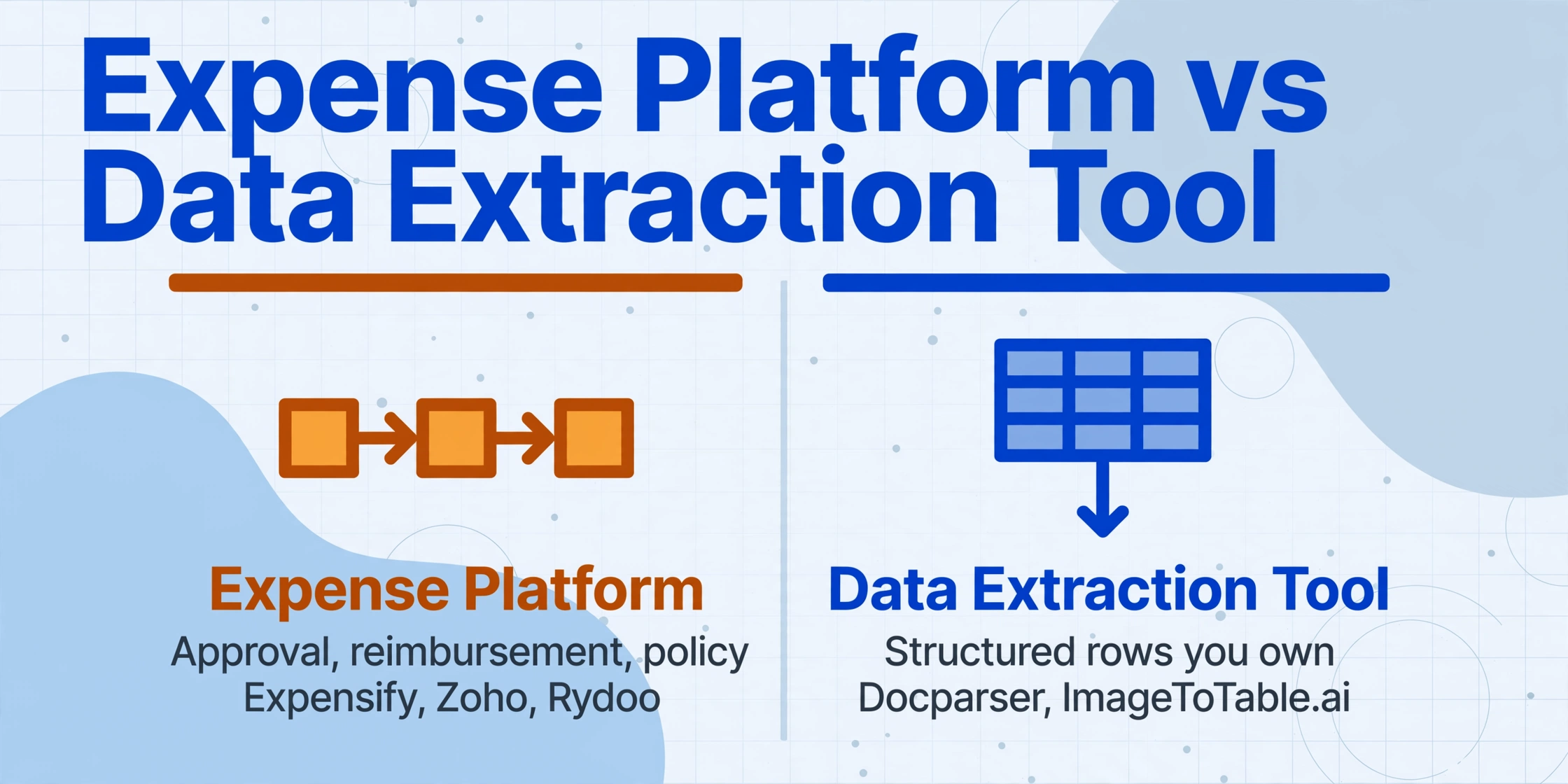
An expense report tool, in the sense most people search for, is a full expense-management platform: it captures receipts and runs the workflow around them — approval routing, reimbursement, corporate-card reconciliation, accounting-suite sync, and policy enforcement. The receipt scan is just the front door. What you're really buying is the process that turns a photographed coffee receipt into an approved, reimbursed, properly-coded line in your general ledger, with a manager's sign-off attached and a policy check applied along the way. Expensify, Zoho Expense, and Rydoo are this kind of tool.
That's a different job from what a data-extraction tool does. A data-extraction tool reads a receipt or an expense form and hands you the values — merchant, date, total, tax, line items — as structured rows you download as Excel or CSV, or send straight into a spreadsheet. There's no approval queue, no reimbursement, no opinion about your accounting process. You get clean data and decide what happens next. Docparser and ImageToTable.ai (the tool published on this site) live on this side.
Why does the workflow side exist at all, when extraction is simpler? Because expenses are where money quietly leaks. Expense-reimbursement schemes account for 13% of all occupational-fraud cases with a median loss of $50,000, and they typically run about 18 months before anyone catches them, per the Association of Certified Fraud Examiners' 2024 Report to the Nations. Approval routing, policy limits, and card reconciliation aren't bureaucratic decoration — they're the controls that catch the duplicate cab fare and the personal dinner billed as a client meeting. If you have employees submitting expenses, that workflow is the point. If you're a bookkeeper or a small team that just needs the numbers in a sheet, it's overhead.
A cold-start rule of thumb: if your end goal is a reimbursement, an approval, or a reconciled company card, you want an expense-management platform. If your end goal is a spreadsheet you own, you want a data-extraction tool. Almost every "which expense tool is best" debate dissolves once you answer that one question.
This guide is the management-and-workflow companion to our separate roundup of receipt scanning and data-extraction tools, which goes deeper on the pure capture-to-spreadsheet side. Here, the center of gravity is the full expense process — approvals, reimbursement, and policy — with the data-extraction options included honestly for the readers who'll realize, halfway down, that a workflow isn't what they need.
How We Picked and Tested These Tools
We sorted tools by buyer intent before scoring any of them, because ranking a reimbursement platform against a spreadsheet extractor on one list is meaningless. A finance team paying back fifty employees a month and a sole bookkeeper coding a client's shoebox of receipts are not shopping for the same thing — so this guide groups tools into three honest tiers (full platforms, capture-and-bookkeeping, and pure extraction) and judges each against the job it's built for.
Within those tiers we weighed four things together: workflow depth (approvals, reimbursement, card reconciliation, policy enforcement), capture and accuracy on real-world receipts, where the data lands (QuickBooks, Xero, NetSuite, Google Sheets, or a plain Excel file you own), and real monthly price at small-team volume. Every price below was pulled from the vendor's own public pricing page and is labeled "Pricing checked June 2026" — we used the concrete lowest published figure, and flagged the per-user models clearly, rather than repeating vague "starting from" language. And we wrote an honest "best for" and "not ideal for" for each tool, including our own.
Disclosure
ImageToTable.ai, the tool published on this site, is one of the seven tools reviewed here — and in this particular category it is a peripheral player, not the lead. It is not an expense-management platform: it has no approval flows, no corporate-card integration, and no reimbursement engine. We've placed it exactly where it honestly fits — as a no-code data-extraction option for teams that just want raw receipt and expense data in their own spreadsheet — and named the platforms that genuinely win for managed expense workflows.
The 7 Tools at a Glance
Here is every tool on the same six dimensions, ordered by tier: full expense-management platforms first, then capture-and-bookkeeping tools, then pure data-extraction tools. Note that the platforms charge per user per month, so a five-person team multiplies the sticker price by five, while the extraction tools charge a flat or usage-based rate regardless of headcount.
| Tool | Starting Price | Pricing Model | Best For | Key Limitation | Free Trial? |
|---|---|---|---|---|---|
| Expensify | $5/user/mo (Collect) | Per-member subscription | Team T&E: submit, approve, reimburse | Control discount tied to Expensify Card / spend | Yes — free tier (25 scans/mo) |
| Zoho Expense | $3/user/mo (Standard, annual) | Per-active-user | Budget teams; Zoho-suite users | No native corporate card; best inside Zoho | Yes — free for up to 3 users |
| Rydoo | $9/user/mo (Essentials, annual) | Per-active-user | Scaling / international teams, per diems | 5-user minimum; reimbursement on higher tiers | Yes — free trial |
| Dext | $31.50/mo (5 users, 250 docs) | Tiered (users + doc volume) | Bookkeepers capturing into QuickBooks/Xero | Document caps; cost climbs per client | Yes — trial, no card |
| Veryfi | $19.99/user/mo (Expense app) | Per-user app / per-transaction API | Line-item-deep capture; embedded OCR | OCR API has $500/mo minimum | Yes — 14-day app trial |
| Docparser | $39/mo (Starter) | Flat subscription (page volume) | Fixed, repeating document layouts | Zone templates break when layouts vary | Yes — 14-day + free tier |
| ImageToTable.ai | Free tier, then $9/mo | Credit-based (1 credit = 1 page) | Raw receipt/expense data into your own sheet | No approval, reimbursement, or card workflow | Yes — free tier, no sign-up to try |
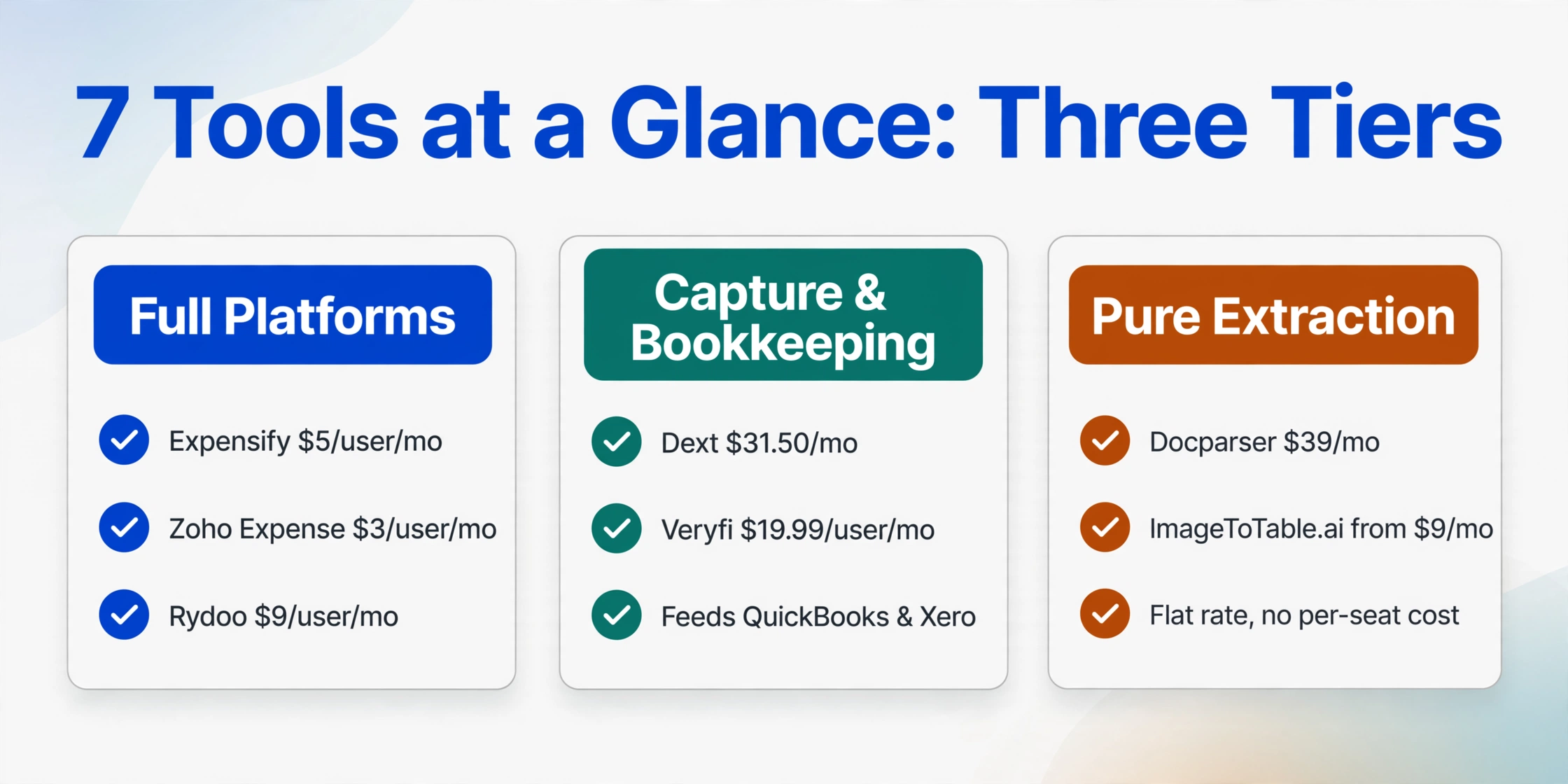
Pricing checked June 2026 from each vendor's public pricing page. Per-user plans (Expensify, Zoho Expense, Rydoo) multiply by headcount; annual billing lowers the monthly rate but requires paying upfront. ImageToTable.ai's paid plans run $9 (Basic) / $19 (Pro) / $59 (Max), with team plans from $149/month. Cost at your real volume and team size is the figure that matters.
The order isn't a ranking — it's a map of which job each tool is for. The first three run a managed expense process; the next two capture receipts into your books; the last three (including ours) just extract data. We'll walk through each tier on its own terms, because "best" only means something once you've decided which job you're hiring for.
The Full Expense-Management Platforms
These are the genuine leaders for managed expense workflows, and if you have employees submitting expenses, your shortlist almost certainly comes from this group. Each one captures a receipt as step one, then carries it through approval, reimbursement, card reconciliation, and a push into your accounting system. You're buying a whole process — and for the teams that need it, that's exactly right.
Expensify
The most recognized name in expense reporting, and the default for a reason. SmartScan reads a receipt photo into an expense entry, then routes it through customizable approval and reimbursement, reconciles against corporate cards, and syncs to QuickBooks, Xero, NetSuite, and Sage Intacct. For a team where employees submit and a manager approves, the whole loop is automated — and the optional Expensify Card adds direct card reconciliation with cash back.
Best for: Small-to-mid teams that need real expense reporting — submit, approve, reimburse — with company-card reconciliation and accounting sync.
Not ideal for: Teams keeping their existing corporate cards, who hit the pricing penalty below, and solo operators who'd never use the workflow.
Pricing (checked June 2026): Free tier with 25 SmartScans/month; Collect starts at $5/member/month (month-to-month); Control is $9/active member/month only with an annual commitment plus Expensify Card usage — without the card it's $18, and fully month-to-month it's $36. The discount mechanics are the catch to model carefully.
Zoho Expense
The most affordable full platform here, and the value leader for budget-conscious teams. It does receipt autoscan, mileage tracking, multi-level approvals, corporate-card management, and policy enforcement, syncing natively to Zoho Books as well as QuickBooks, Xero, and Sage. Standalone it's genuinely capable; inside the Zoho suite it's seamless, which is both its strength and its main caveat.
Best for: Budget-conscious small and mid-size teams that want approvals and reimbursement without per-user costs climbing — especially anyone already on Zoho Books, People, or CRM.
Not ideal for: Teams wanting a native corporate-card product (Zoho has none of its own — you connect existing cards), or those whose stack is entirely outside the Zoho ecosystem.
Pricing (checked June 2026): Free for up to three users (20 autoscans); Standard is $3/user/month billed annually ($4 month-to-month); Premium, which adds travel booking and per-diem automation, is $5/user/month annually.
Rydoo
A real-time expense platform built for companies that operate across borders. Instead of bundling expenses into monthly reports, Rydoo has employees submit each expense as it happens, applies AI policy checks to flag out-of-policy claims, and supports per diems, mileage, multi-country local compliance, and corporate-card auto-reconciliation. It integrates with NetSuite, SAP, Microsoft Dynamics, Xero, and Sage, and is a frequent pick for scaling teams with international travel.
Best for: Scaling and international teams that need multi-country compliance, per diems, and real-time expensing rather than batch monthly reports.
Not ideal for: Very small teams — plans start at a five-user minimum — and anyone who needs built-in reimbursement, which only appears on the higher Business and Enterprise tiers.
Pricing (checked June 2026): Essentials starts at $9/user/month billed annually ($10 month-to-month), starting at five users; Pro is $11/user/month annually ($12 monthly); Business and Enterprise use active-user billing and add reimbursement and advanced workflows.
The honest summary of this tier: for paying employees back and enforcing a spending policy, these three beat anything in the rest of this guide, full stop. If your monthly pain is the back-and-forth a small-business owner described on r/smallbusiness — "employees keep physical receipts, submit monthly in Excel, manual approval process, lots of back-and-forth for clarifications… taking up too much time for everyone" — a managed platform is the fix, and the tools below are not. You can see how that approval-and-policy layer plays out in practice in our walkthrough of checking expense reports against policy limits.
Receipt Capture & Bookkeeping Automation
This middle tier sits between a full reimbursement platform and a raw extractor: these tools are built to capture receipts and invoices and feed them into accounting, with strong OCR but a lighter (or accountant-focused) workflow. They're the right answer when your goal is getting documents into the books, not paying back travelling employees.
Dext
Built for bookkeepers and accounting firms rather than employees. Dext captures receipts, invoices, and bank statements from any source — mobile scan, email forwarding, bank feeds, e-commerce integrations — and publishes coded transactions straight into Xero, QuickBooks, or Sage. It has expense submission and approval features, but its center of gravity is document-heavy bookkeeping at scale, not employee reimbursement. For a practice processing paperwork across many clients, it's the bridge from paper to the general ledger.
Best for: Bookkeepers and accountants who need client receipts and invoices captured, coded, and posted directly into accounting software.
Not ideal for: A single business whose core need is reimbursing employees or enforcing travel policy — that's a platform job, not Dext's strength — and low-volume users who'll bump the document cap or pay for seats they don't use.
Pricing (checked June 2026): From $31.50/month ($25.21/month billed annually) for five users and 250 documents/month, with included credits for bank-statement and line-item extraction; 14-day trial, no card required, no permanent free tier.
Veryfi
A receipt and invoice OCR engine with two faces. Its Expense Management app gives non-technical users mobile capture, deep line-item extraction (including hotel-folio breakdowns), project accounting, bank/card reconciliation, and QuickBooks/Xero sync. Its OCR API is the better-known product — fast, accurate, no human-in-the-loop — used by companies embedding receipt capture into their own software or expense product. Capability is excellent; just be clear which Veryfi you're buying.
Best for: Teams that want line-item-deep receipt and expense capture with project accounting, and developers who need to embed receipt OCR via API.
Not ideal for: Teams wanting a simple managed approval-and-reimbursement suite — Veryfi captures and reconciles, but it isn't a per-employee T&E workflow tool, and the API's pricing floor is steep for low volume.
Pricing (checked June 2026): The Expense Management app is $19.99/active user/month ($17.50 annually); the OCR API has a free tier (100 docs) but a $500/month minimum once you commit, billed per transaction.
Both tools digitize receipts beautifully and sync to accounting — but neither is the place you'd run an employee reimbursement cycle, and neither is the place you'd go if all you wanted was a portable spreadsheet of expense data to slice yourself. That last need is the final tier.
When You Only Need the Data: Spreadsheet-First Extraction
These tools do one job and stop: expense documents in, structured spreadsheet rows out — no approval queue, no reimbursement, no opinion about your process. This is the tier for bookkeepers building a ledger, sole proprietors prepping a Schedule C, or any small team that would rather own a spreadsheet than live inside someone else's expense app. They are not expense-management platforms, and if you need a workflow, the earlier tiers beat them outright. But if you found this guide because you just want the numbers off your expense forms in a sheet you control, this is your lane — and it's the same lane covered in depth in our receipt-scanning and data-extraction roundup.
Docparser
One of the longest-running parsers in the market, and fundamentally zone-based: you define parsing rules that pull values from specific regions of a document. For expense forms or receipts from a single source whose layout never changes — the same template, month after month — that approach is precise and dependable. The catch is that real-world expense receipts are the least consistent document type there is, varying from merchant to merchant.
Best for: High-volume processing of consistent, repeating expense-form or receipt layouts where you can set a template once and trust it.
Not ideal for: The mixed-merchant reality of most expense piles. When layouts vary, zone templates need maintenance, and each new format means a new template.
Pricing (checked June 2026): Free tier (30–150 pages/month), Starter from $39/month, with a 14-day free trial.
ImageToTable.ai
A no-code, vision-AI extraction tool built around Custom Column Extraction: instead of picking a fixed template, you type the column names you want — "Merchant, Date, Total, Tax, Payment Method" — and the AI locates each value on the receipt or expense form by understanding what the field means, not where it sits. The names you type become the headers of your output spreadsheet. It's batch-first (upload 50 receipts, get one merged Excel file with a row per receipt) and supports inferred columns — define a column like Category (Meals / Travel / Office / Other) and the AI reads each receipt and fills the right category even though the slip has no "Category" field printed on it, so extraction and tax-categorization happen in one pass. It reads photos, screenshots, scans, and PDFs, ships a Google Sheets add-on that writes results straight into the active sheet, and offers a Collection Link — a shareable URL that lets employees or clients upload their receipts into your queue without creating an account.
Best for: Teams that need the raw expense and receipt data — including an AI-assigned spending category — extracted into their own spreadsheet-based expense workflow, with no platform to learn. A natural fit for pulling employee expense reports into Excel or collecting employee expenses into a Google Sheets workflow.
Not ideal for: Anyone who needs approval routing, reimbursement, corporate-card reconciliation, or policy enforcement. To be plain: ImageToTable.ai is not an expense-management platform, and for those jobs Expensify, Zoho Expense, or Rydoo are the right tools, not this one. It extracts data extremely well; it does not run the expense process.
Pricing (checked June 2026): A free tier (a daily quota, and you can try a single document with no sign-up), then $9/month (Basic), $19 (Pro), and $59 (Max); team plans run Growth $149, Scale $399, and Enterprise $899. Billing is credit-based — one credit equals one page, so a multi-page PDF uses more — which keeps the effective per-receipt cost among the lowest in this list.
Across this tier the differences are about delivery: Docparser hands you templates and ImageToTable.ai hands you a no-code browser tool with a Google Sheets add-on — both hand you data rather than a workflow. If your wider need is structured rows from many document types, this overlaps with the broader field of no-code document AI tools and with turning a PDF expense report into an Excel sheet.
How to Choose for Your Situation
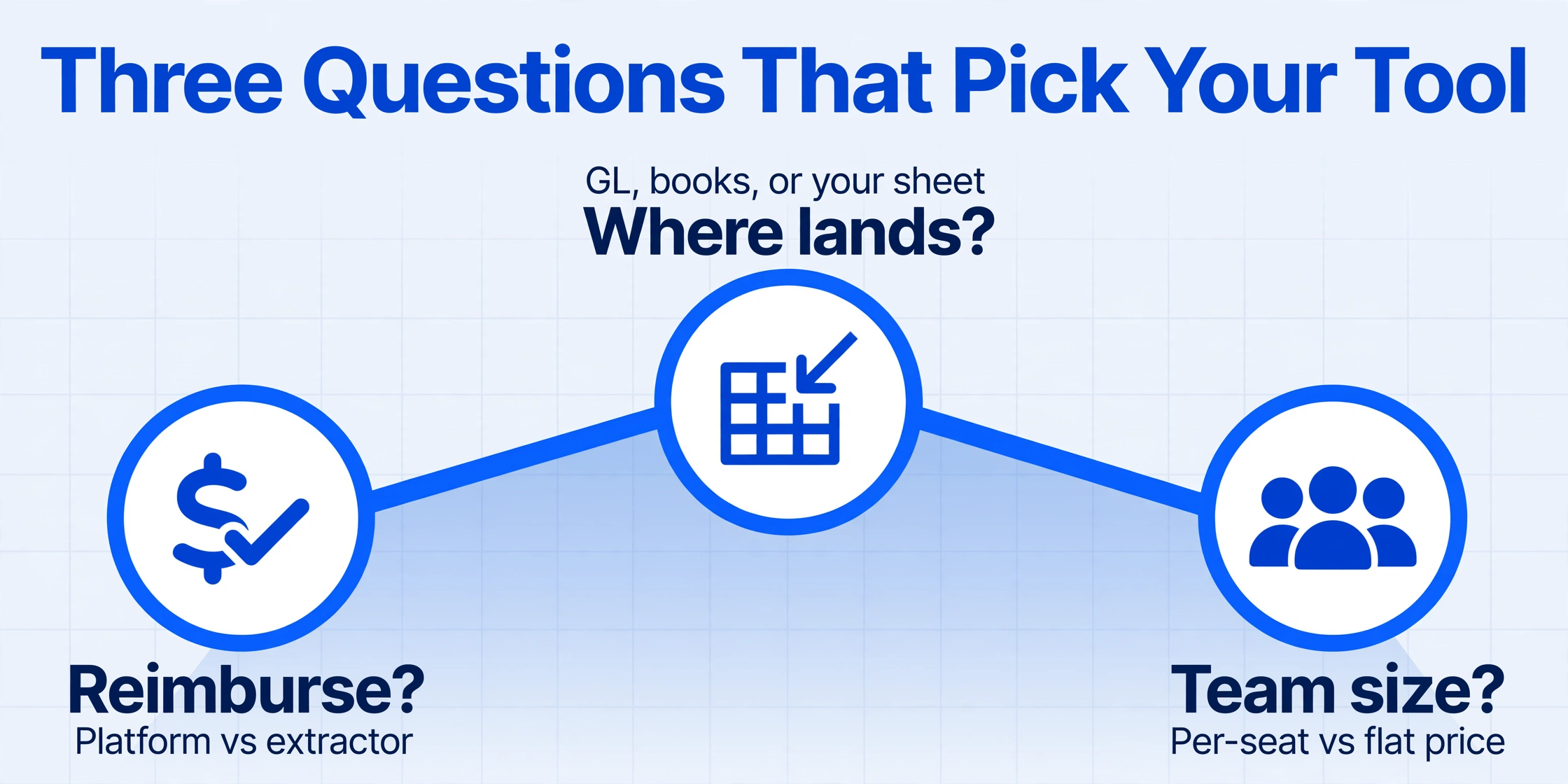
The right tool falls out of three questions, answered in order. The first sorts you into a tier; the next two pick a tool within it.
Do you reimburse employees or enforce a policy?
If yes — expenses feed approvals, reimbursement, or corporate-card reconciliation — you want a full platform: Expensify, Zoho Expense, or Rydoo. If no — you just need clean, exportable rows in a spreadsheet you control — you want a data-extraction tool: ImageToTable.ai or Docparser. This single question eliminates more than half the list.
Where does the data need to end up?
Reimbursed to employees with manager sign-off: Expensify, Zoho Expense, or Rydoo. Coded into QuickBooks or Xero by a bookkeeper: Dext or Veryfi. Into a Google Sheet or Excel file you own: ImageToTable.ai (its Google Sheets add-on removes the export step). Match the destination, not just the scan quality.
What's your team size and budget?
Remember the per-user math: a ten-person team on Expensify Collect is $50/month, on Rydoo Essentials around $90/month — while a flat extraction tool stays $9–$39/month no matter how many people upload. Low or one-off volume fits the free tiers — Zoho's three users, ImageToTable.ai's no-sign-up trial — which let you test on your own receipts before paying. The honest finance-cost case for automating at all is laid out in our breakdown of what manual expense processing really costs a finance team.
One caveat the marketing pages skip: the boundary between the tiers is real, but it isn't a wall. Plenty of small teams run a perfectly good expense process by extracting receipt data into a shared sheet and handling approvals over chat — cheaper than a platform, if less auditable. If that's you, read the honest trade-offs in expense-management apps versus AI extraction before you commit to a per-user subscription you may not need.
Frequently Asked Questions
What's the best expense report software for a small business?
If you reimburse employees, Zoho Expense is the value leader at $3/user/month (free for up to three users), and Expensify at $5/user/month is the most polished if you also want corporate-card reconciliation. If you don't reimburse anyone and just need expense data in a spreadsheet, a flat-rate extraction tool like ImageToTable.ai is cheaper and simpler. The right answer depends entirely on whether you need a reimbursement workflow or just the numbers.
What's the difference between expense management software and a receipt scanner?
Expense management software runs the whole process: it captures the receipt and then routes it through approval, reimbursement, policy checks, and accounting sync. A receipt scanner or data-extraction tool only reads the receipt and gives you the data — merchant, date, total, line items — as rows you control. If you need to pay people back or enforce a spending policy, you need the full platform; if you only need the numbers in a spreadsheet, the extraction tool is simpler and usually far cheaper.
Can I run expense reports without paying per user?
Yes, if you don't need a built-in reimbursement workflow. Per-user platforms (Expensify, Zoho Expense, Rydoo) bill by headcount, so a growing team's cost climbs with every seat. Flat-rate or credit-based extraction tools — Docparser, ImageToTable.ai — charge the same whether one person or ten upload receipts, because they hand you a spreadsheet instead of running approvals. Many small teams pair flat-rate extraction with a simple shared-sheet approval process to avoid per-user fees entirely.
How much does manually processing an expense report actually cost?
A widely-cited GBTA Foundation study puts the average at about $58 and 20 minutes per report, with roughly 19% containing errors that cost an extra $52 and 18 minutes each to fix. For a company processing tens of thousands of reports a year, that adds up to hundreds of thousands of dollars and thousands of staff hours spent purely on correction — which is the math that justifies automating capture, whether through a managed platform or a data-extraction tool.
Can these tools categorize expenses automatically?
Many can, in different ways. Expense platforms map receipts to preset categories tied to your chart of accounts and policy. On the extraction side, ImageToTable.ai uses inferred columns: you define a column such as "Category (Meals / Travel / Office)" and the AI reads each receipt and assigns the category even though it isn't printed on the slip — extraction and classification in a single pass. Always spot-check the first batch, since edge cases (a hardware store that also sells snacks) can be judgment calls.
Is ImageToTable.ai listed here because it's your product?
Yes, and we've said so plainly throughout. ImageToTable.ai is published by the team that wrote this article, and it's reviewed alongside six other tools on the same six dimensions. Because this is an expense-management roundup and ImageToTable.ai isn't a management platform, we've placed it honestly as a peripheral, data-extraction-only option — and named Expensify, Zoho Expense, Rydoo, Dext, and Veryfi as the tools that beat it for managed expense and bookkeeping workflows.
The Bottom Line
"Best expense report tool" was never a single ranking — it's two questions wearing one search term. Decide first whether you're hiring a tool to run an expense process or to hand you clean expense data, and the field cuts itself in half before you compare a single price. Need approvals, reimbursement, and policy? Expensify, Zoho Expense, or Rydoo are the genuine leaders, with Dext or Veryfi if the job is really getting documents into the books. Just need the numbers in a spreadsheet you own? Docparser or ImageToTable.ai — knowing none of them will run the workflow for you.
So don't shortlist from a table, including this one. Take ten of your real expense receipts — the faded thermal ones, the crumpled ones, the emailed PDFs — and run them through two free trials: one platform and one extractor. Five minutes on your own paperwork tells you, faster than any comparison, which of the two jobs you were actually trying to do.
Disclosure: This article is published by ImageToTable.ai, which is one of the seven tools reviewed above and a peripheral, data-extraction-only option in this expense-management category. All competitor pricing was checked against public pricing pages in June 2026; per-user, annual, and month-to-month rates differ, and usage allowances vary by plan. We aim to describe every tool — including our own — accurately, and we welcome corrections.