Expense Management Apps vs AI Extraction
When Less Is More
Most expense tool comparisons ask one question: which platform should you buy? The better question — and the one fewer teams stop to ask — is whether you need a full expense management platform at all. Here's a decision framework that doesn't assume the answer before you've asked the question.
Key Takeaways
- Full expense platforms cost more than their subscription — multi-month implementations, admin headcount, and policy engine maintenance add ongoing operational overhead.
- APQC data shows finance teams spend 18 minutes per expense report manually — roughly $6,480 per year in labor for a 30-person company.
- AI extraction reads documents semantically rather than matching templates, so handwritten logs, scanned multi-page forms, and photographed invoices process identically to standard receipts.
- The right tool depends on which bottleneck is bigger: data transcription or process control — target the dominant pain point first.
- For teams under 100 employees, starting with a lighter extraction tool and upgrading when signals appear costs less than paying for unused platform features proactively.
What Full Expense Management Platforms Actually Deliver
The category has grown far beyond receipt scanning. A modern expense management platform — SAP Concur, Expensify, Ramp, Brex, Zoho Expense — typically bundles four capabilities under one roof: expense capture (receipt scanning and data extraction), policy enforcement (rules that flag or block non-compliant spend), approval routing (multi-level chains that route expenses to the right manager), and accounting sync (pushing categorized transactions into QuickBooks, NetSuite, or your ERP). At the upper end, Concur and Navan add travel booking integrated directly into the expense workflow, so a booked flight auto-populates a report without the employee touching anything.
That's a lot of software. And for good reason — at scale, these capabilities become operational infrastructure, not nice-to-haves. A 500-person company with department-level budgets, multi-currency reimbursements across three continents, and audit requirements from an external accounting firm isn't going to run expense reports through a spreadsheet. The platform is the system of record.
But the flip side is real. Each of these capabilities carries a cost that isn't just financial. Policy engines need someone to configure the rules. Approval chains need someone to manage exceptions. ERP integrations need someone to troubleshoot sync failures. A Concur implementation for a multi-country rollout runs 6 to 12 months. Even the lighter platforms — Expensify at $5/user/month for Collect, Zoho Expense at $3/user/month for Standard — demand an admin who lives in the tool, managing user rosters, approval structures, and accounting mappings.
These aren't flaws. They're the price of control. The question is whether your team's actual workflow needs that level of control, or whether you're paying for infrastructure that sits idle because your expense process is simpler than the tool expects it to be.
What AI Document Extraction Brings That Full Platforms Don't
AI extraction tools approach the expense problem from the other direction. Instead of building a parallel workflow system that encloses the entire expense lifecycle — capture, policy check, approval, reimbursement, posting — they focus on doing one thing: getting structured data out of expense documents, fast.
The mechanism is fundamentally different from the OCR inside expense platforms. Rather than scanning for text regions and guessing which string is the date and which is the amount, AI extraction reads the document the way a person would — understanding what each value means regardless of where it sits on the page. This is column-name extraction: you define the fields you want — "Employee Name," "Date," "Vendor," "Amount," "Expense Category," "Project Code" — and the AI locates the corresponding value on each document by understanding the document's content, not by matching a template. Printed PDF, photographed receipt, scanned multi-page report, handwritten notes — the format doesn't dictate whether extraction succeeds.
This approach also enables capabilities that full platforms typically leave to the user. Computed columns let the AI perform math during extraction — multiply line-item quantity by unit price, sum all amounts in a section, flag when extracted totals don't match the document total — so what lands in your spreadsheet is already verified and calculated. Inferred columns let the AI classify expenses by reading the document context: given a column called "Category (options: Travel/Meals/Supplies/Other)," the AI reads each receipt and assigns the correct category, even though no receipt contains the word "Category."
For teams working specifically with PDF expense reports — the kind exported from ERP systems, corporate card portals, or travel booking platforms — AI extraction can pull individual line items (date, vendor, description, amount, category, payment method) into a consistent spreadsheet without per-format template setup, regardless of how each receipt within the report structures its data.
What AI extraction doesn't do is equally important to understand. It doesn't enforce spending policies — it won't block a $500 dinner or flag a duplicate submission. It doesn't route approvals or manage reimbursement payments. It doesn't integrate with corporate card feeds or book travel. It's not a spend management platform. It's an extraction engine: documents in, structured data out. If your workflow needs what happens after extraction — policy gates, multi-level sign-offs, payment orchestration — that's where a full platform earns its place.
The Six Dimensions That Separate the Two Approaches
The decision between a full expense platform and a lightweight extraction tool isn't about which product has a higher G2 score. It's about which dimensions of your workflow actually matter — and which you're willing to pay for, configure, and maintain.
| Dimension | Full Platform (Concur, Expensify, Ramp) | AI Extraction Tool |
|---|---|---|
| Cost | $3–$15+/user/month, plus implementation, plus admin headcount. Enterprise deals quote-based. | Per-use or flat-rate. No per-user fees. No implementation cost. |
| Setup effort | Days to months. Policy configuration, chart of accounts mapping, approval hierarchy design, user onboarding. | Minutes. Define column names, upload documents, get results. No configuration beyond the fields you want. |
| Learning curve | Steep for admins. Moderate for employees. Concur's interface is a common complaint among users. | Flat. Upload, name your columns, receive a spreadsheet. No training required. |
| Policy enforcement | Built in. Spend limits, category rules, duplicate detection, receipt requirements all enforced automatically. | Not included. Policy checks happen after extraction, manually or in your accounting system. |
| Document flexibility | Receipt-optimized. Standard receipts process well. Non-standard formats (handwritten reports, multi-page scans, mixed-format expense forms) often fail or require manual override. | Format-agnostic. Works across printed PDFs, photos, scans, handwriting, and mixed formats — because extraction is semantic, not template-based. |
| Integration depth | Deep. Direct sync with QuickBooks, Xero, NetSuite, Sage Intacct. Automatic GL coding, two-way reconciliation. | Export-based. Output to Excel, CSV, JSON. Data flows into your accounting system through import — no live sync, but no integration lock-in either. |
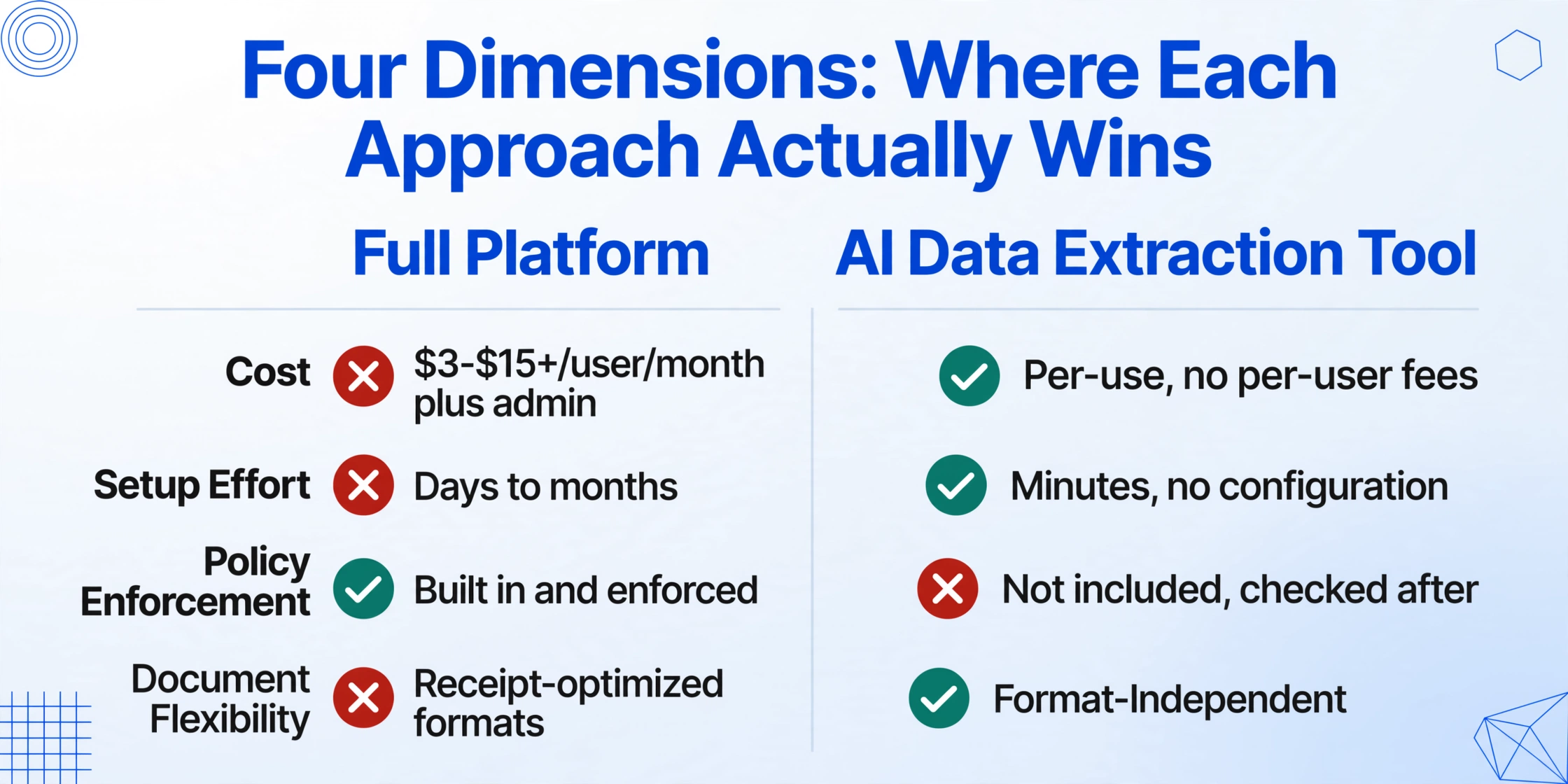
These six dimensions don't produce a single answer. They produce a profile — and the right tool is the one whose profile matches the actual shape of your expense workflow, not the one a vendor's marketing page says you should have.
When the Heavy Platform Earns Its Weight
There are expense workflows where a full platform isn't just convenient — it's operationally necessary. In these scenarios, the platform's overhead is the price of control that the business can't function without.
Multi-level approval hierarchies. If expenses need to route through a manager, then a department head, then finance — with different rules by amount, category, or project — a full platform's approval engine removes the coordination work that otherwise falls on email and Slack. Concur and Expensify Control plan handle this natively. Spreadsheets and extraction tools don't.
Regulatory audit trails. Public companies, government contractors, and firms in regulated industries (healthcare under HIPAA, defense under DFARS) need an immutable log of who submitted what, who approved it, when, and on what basis. Full platforms generate these trails automatically. An extraction tool + spreadsheet workflow relies on file naming conventions and shared drives — which auditors don't accept as a system of record.
Integrated corporate card programs. Ramp and Brex built their businesses on the insight that if the card and the expense tool are the same system, reconciliation almost disappears. A transaction hits the card, the receipt auto-matches, policy checks run in real time, and the expense posts without anyone touching it. This workflow only works when card and software are coupled. If your team issues corporate cards and reconciliation is a recurring bottleneck, a card-first platform solves a problem that extraction tools weren't designed to address.
Travel-heavy operations. Companies where employees book 50+ trips a year benefit enormously from integrated travel booking. When a flight, hotel, and rental car all auto-populate an expense report — with per diem calculations applied automatically — the hours saved stack up fast. SAP Concur and Navan dominate this territory because the integration is the product.
200+ employees. Above roughly 200 employees, the administrative burden of managing expenses outside a dedicated platform starts to compound. It's not that extraction tools stop working — they don't. It's that the surrounding workflow (who submitted what, what's pending approval, who needs to be reimbursed, which expenses are against which budget) becomes a management problem that a spreadsheet can't solve. At this scale, the platform isn't about data extraction. It's about organizational control.
When a Lighter Tool Is Actually the Smarter Choice
The expense management market talks almost exclusively about enterprises. But according to the U.S. Census Bureau, 89% of U.S. employer firms have fewer than 20 employees. Most of these teams don't need approval chains — the founder approves everything. They don't need policy engines — the policy is "don't spend money we don't have." What they need is expense data in a usable format, without spending hours transcribing it.
This is the territory where a lightweight extraction tool outperforms a full platform, not by being "almost as good for less money," but by solving the actual problem better:
Small teams (under 50 employees). A 12-person consultancy processing 30 expense reports a month doesn't need a workflow engine. It needs the data from those 30 reports in a spreadsheet — correctly extracted, categorized, and ready for the bookkeeper. A full platform adds process overhead (user management, approval configuration, policy rule maintenance) that generates more work than it eliminates at this scale.
Mixed document formats. Full platforms are built for standard receipts — the kind that come out of a Square terminal or a hotel folio. But real-world expenses produce documents that don't fit that mold: a handwritten mileage log, a scanned multi-page expense form from a conference, a PDF invoice from a freelance contractor that doubles as an expense receipt. AI extraction's format-agnostic approach means these non-standard documents get processed the same way as a standard receipt — the AI reads them, understands the content, and pulls the fields you asked for regardless of layout. Platform OCR, by contrast, often returns partial results or nothing at all on documents that don't match its expected receipt template.
Existing accounting software without the overhead. Many teams already have QuickBooks, Xero, or Sage. They don't need a second system that mirrors their chart of accounts and duplicates their approval logic. They need a tool that feeds clean data into the system they already use. Extraction tools output Excel or CSV — import it, and the expense data is where it needs to be. No duplicate configuration, no sync errors, no second system to maintain.
Batch processing. A finance manager processing 50 employee expense reports at month-end — each in a different format, from a different employee, with different expense categories — doesn't need to open each one individually. An AI extraction tool processes the entire batch in one pass, merging all extracted data into a single output spreadsheet with consistent column headers. Full platforms can batch-process too, but they require each employee to submit through the platform first — which means every employee needs an account, training, and an ongoing relationship with the tool. Extraction doesn't require submitter accounts.
Files are processed securely and not stored.
Budget sensitivity. The math changes fast as team size grows. Expensify Collect at $5/user/month for a 20-person team is $1,200/year — reasonable. The same platform at $9/user/month (Control plan) is $2,160/year. Zoho Expense Premium at $5/user/month is $1,200/year. Concur is quote-based and typically starts higher. For teams whose expense process is fundamentally capture data → send to bookkeeper, these per-user fees pay for approval chains and policy engines that nobody uses. Per-user pricing is the right model when every user actively engages the platform. It's a tax when most users never log in.
The Manual Baseline: What You're Actually Paying for Now
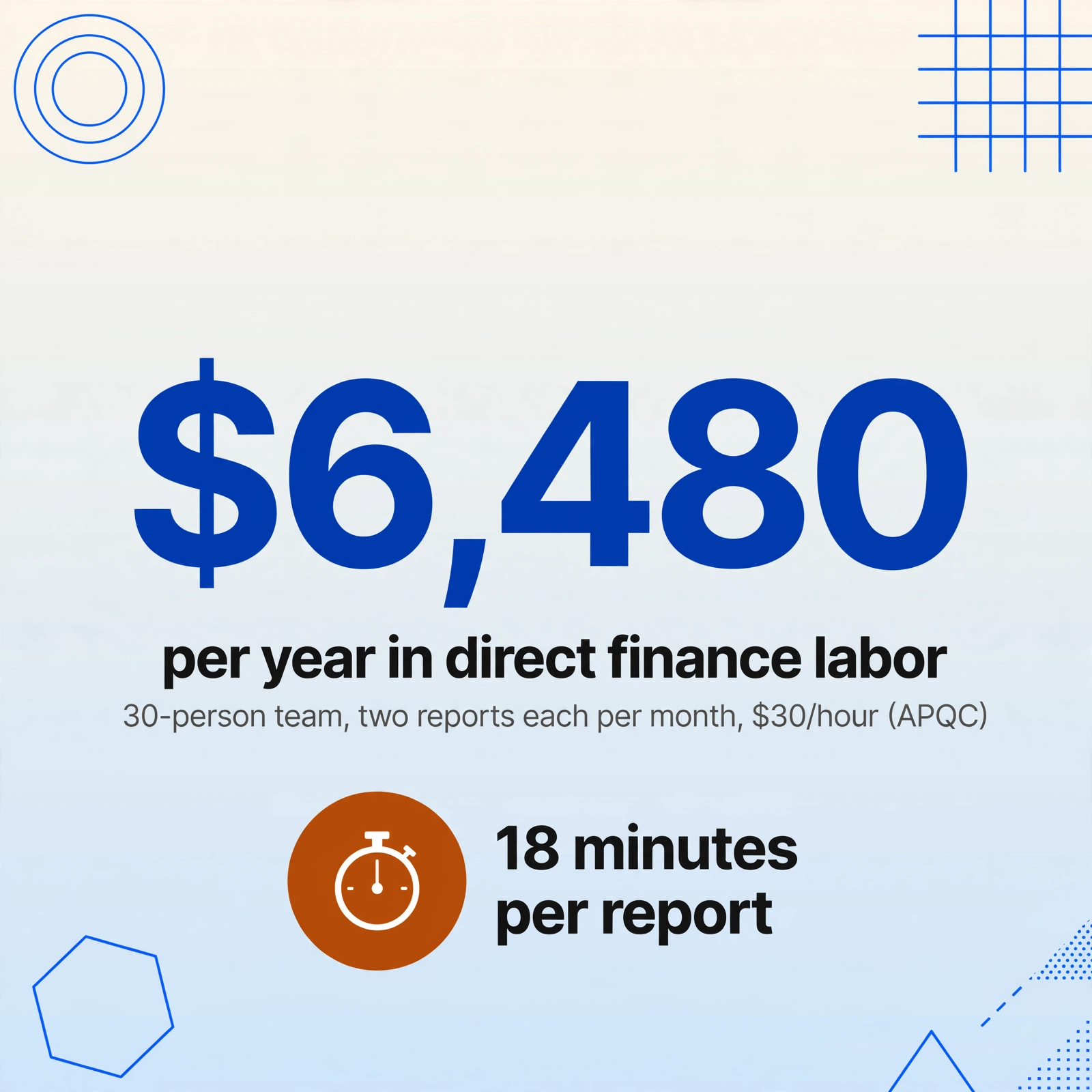
Before comparing tools, it helps to quantify what the current manual process costs. APQC benchmarking data shows that finance teams average 18 minutes per expense report when processing manually. That's not the time to submit — that's the time for finance to review, verify against receipts, correct coding errors, check policy compliance, and post to the accounting system.
For a 30-person company where employees submit two reports a month, that's 18 hours of finance time monthly — the equivalent of nearly half a full-time employee — spent on expense report processing alone. At a $30/hour fully loaded cost, that's roughly $6,480/year in direct labor for the expense review step. And that's before accounting for the employee-side time: the 10-15 minutes each person spends compiling receipts, filling out forms, and following up on status.
This is the cost both approaches reduce — the manual processing toll. The difference is what they replace it with. A full platform replaces the manual process with an automated workflow — but adds the ongoing cost of maintaining that workflow. An extraction tool replaces the data-entry portion of the process — the most time-consuming step — while leaving the workflow layer (who approves what, when) to existing tools like email, Slack, or accounting software. For teams whose approval workflow is already simple, the extraction-only approach removes the bottleneck without adding redundant infrastructure.
The Gray Zone: 20–100 Employees, Moderate Policy Needs
Between the "definitely need a platform" and "definitely don't" territories sits a wide middle band where the answer depends on details most comparison pages ignore. A 40-person professional services firm with project-based billing, a single approver (the managing partner), and no corporate cards doesn't map cleanly onto either category. The headcount says "platform," but the workflow says "extraction."
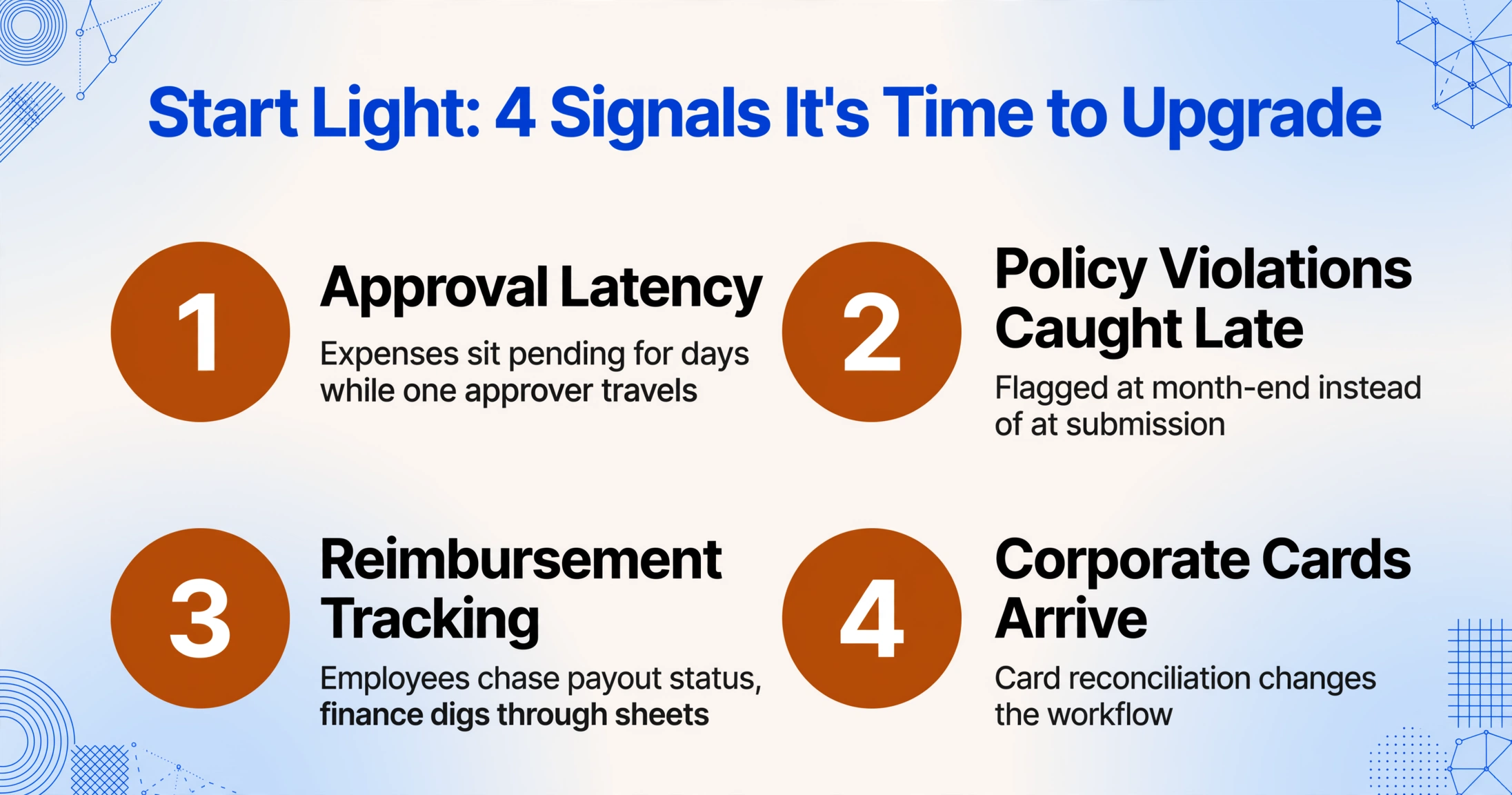
In this zone, the right strategy is often to start with the lighter approach and upgrade when signals appear — rather than onboarding a heavy platform "just in case" and discovering a year later that 60% of features are untouched. The signals that suggest it's time to upgrade:
- Approval latency becomes a bottleneck — expenses sit pending for days because the approver is the only person who can sign off, and they're traveling.
- Policy violations are caught after the fact rather than at submission — the classic "we didn't notice the $800 client dinner until the bookkeeper flagged it at month-end."
- Reimbursement tracking becomes a recurring headache — employees ask "when am I getting paid back?" and finance has to dig through spreadsheets to answer.
- Corporate cards enter the picture — once the company issues cards, the reconciliation workflow changes fundamentally, and card-linked platforms (Ramp, Brex) start making more sense.
Starting light doesn't mean staying light forever. It means matching the tool to the current problem, not the hypothetical future one. The cost of upgrading later — exporting data and migrating to a platform — is almost always lower than the cost of over-instrumenting now and paying for unused features month after month.
FAQ
Is SAP Concur worth it for a company under 100 employees?
Rarely. Concur is built for enterprises with dedicated T&E administrators, complex travel policies, and multi-entity structures. Its implementation timeline (months, not days) and quote-based pricing make it a poor fit for teams that could be operational on a simpler tool in under an hour. The exception is a regulated subsidiary of a larger enterprise that needs to use the parent company's Concur instance for compliance reasons.
We use Expensify already — should we consider switching to just an extraction tool?
It depends on what you use Expensify for. If you're on the Collect plan primarily for receipt scanning and basic approval — and you already have accounting software that handles categorization and reporting — an extraction tool may serve the same core need for less. If you rely on Expensify's approval workflows, reimbursement engine, or corporate card reconciliation, those features don't have an extraction-tool equivalent. The question isn't "is Expensify good?" (it is). It's "which 40% of Expensify's features do we actually use?"
What about Ramp and Brex? Aren't they free?
Both Ramp and Brex offer free tiers, but they're card-first platforms — the free tier works because they earn interchange revenue from the corporate cards they issue. If your team doesn't want to switch corporate card providers (or doesn't use corporate cards at all), the "free" tier delivers limited value. Ramp Plus at $15/user/month and Brex Premium at $12/user/month are closer comparisons to paid Expensify or Concur. And both platforms are U.S.-focused with limited multi-currency support compared to global-first alternatives.
Can an extraction tool handle non-receipt expense documents — like handwritten mileage logs or multi-page scanned reports?
Yes — and this is where extraction tools have a structural advantage. Because AI extraction reads documents semantically rather than matching receipt templates, it handles format variance that trips up receipt-optimized OCR. A handwritten mileage log, a scanned conference expense form with 15 line items across three pages, a photographed catering invoice — the AI locates the fields you defined regardless of document type or layout. For full platforms, non-receipt expense documents are the most common source of manual override and rework.
Does per-user pricing make sense for a team where only 3 people submit expenses regularly?
It rarely does. Most expense platforms bill per active user or per workspace member — which means you pay for the 15 salespeople who submit one receipt a quarter at the same rate as the finance team member who processes 60 reports a month. AI extraction tools that charge per document processed, rather than per user, align cost with actual usage — which is why they're often the better economic fit for teams where expense submission is concentrated among a few heavy users.
A Decision Framework, Not a Recommendation
Start with the expense data itself. If your bottleneck is that employees submit receipts in 12 different formats and someone spends hours transcribing them, you have a data extraction problem — solve it with extraction. If your bottleneck is that spending happens outside policy, receipts go missing, and month-end reconciliation is a fire drill every cycle, you have a process control problem — that's where a full platform earns its keep. Most teams have some of both. The right tool is the one that targets the bigger bottleneck first.
This isn't a case where one approach is objectively better. It's a case where the answer depends on variables that vendor comparison pages — written by one vendor comparing itself to another — can't afford to acknowledge. Sometimes Concur is the right answer. Sometimes a 10-second extraction tool is. The decision doesn't live in a feature comparison table. It lives in the gap between what your expense process actually looks like and what the tool assumes it should look like.
If your workflow is straightforward — capture expense data, verify against receipts, post to accounting — a platform built for policy engines, approval hierarchies, and travel integration is solving problems you don't have. At that point, the lighter tool isn't a compromise. It's the better match. Try it on a sample expense report and see whether the fields you need come out clean. If they do, you have your answer — not from a comparison page, but from your own documents.