What Manual Expense Reports Cost
Your Finance Team Per Employee
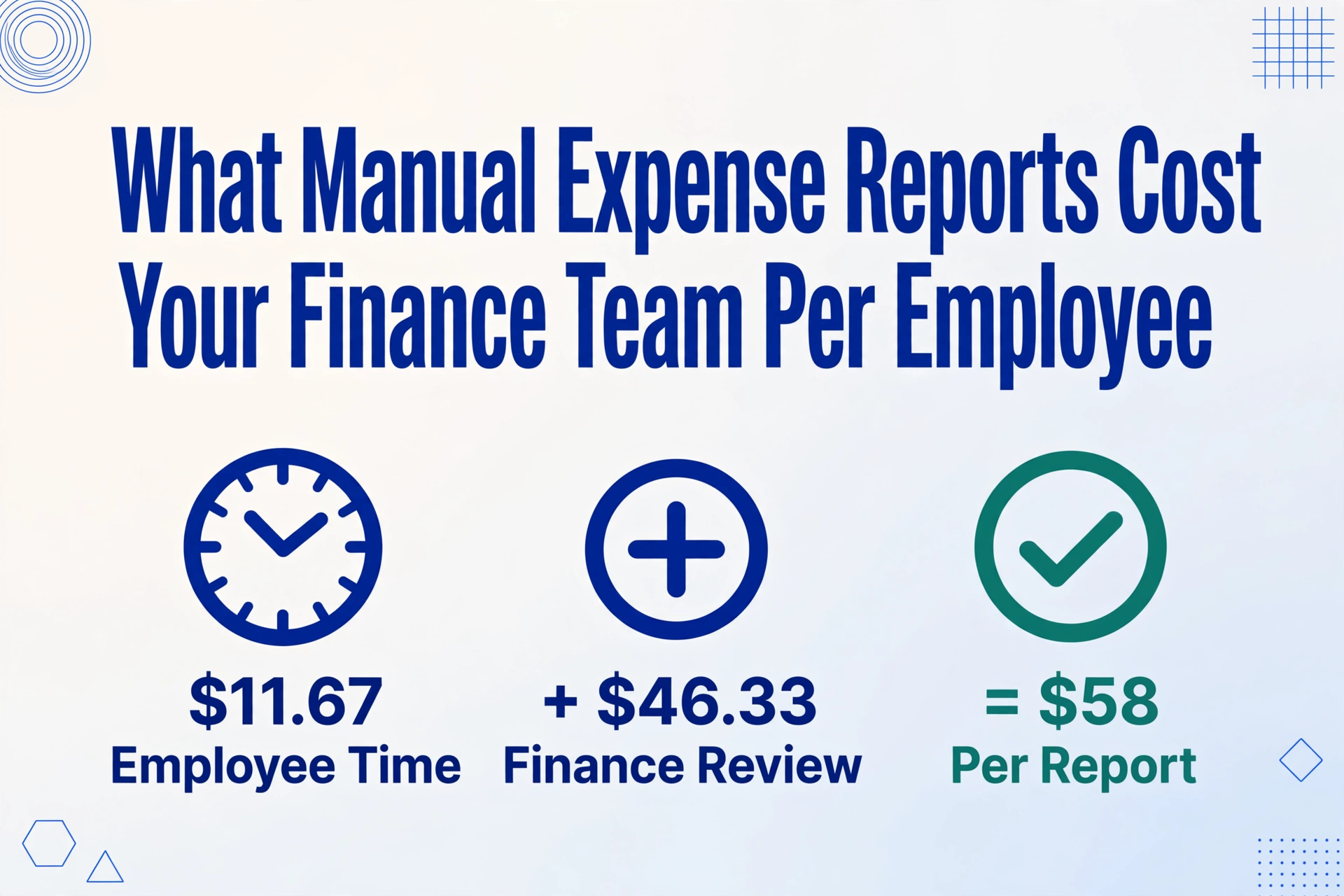
The Global Business Travel Association tracked real expense reporting costs across North America, Europe, Asia-Pacific, and Latin America. Their finding: a single expense report costs $58 to process and takes 20 minutes to complete. Nearly one in five contains an error that costs another $52 and 18 minutes to fix. What most finance teams never calculate is what that $58 means at the employee level — per person, per month, accumulated over a year. That number is almost always larger than expected, and it's the starting point for any honest conversation about process improvement.
Key Takeaways
- Each expense report costs $67.88 to process — the $58 GBTA benchmark plus a $9.88 weighted error correction buffer per report.
- A 150-employee company spends $12,218 per month — over $146,000 per year — on expense report processing alone.
- The 19% error rate in manual reports costs $52 per correction — turning a $58 report into a $110 problem.
- The 20-minute-per-report benchmark endures because the underlying task — reading a receipt and typing what you see — has not changed since 2015.
- AI extraction reduces data-entry cost from $34.80 to $3.48 per report — a 46% total cost reduction saving $67,649 annually for a 150-employee company.
The $58 Benchmark — What's Inside That Number
The $58-per-report processing cost comes from a 2015 GBTA Foundation study conducted in partnership with HRS, published on gbta.org. The study surveyed travel buyers across North America (79% using third-party expense software), Europe (66%), Asia-Pacific (75%), and Latin America. It is, by consensus, the most widely referenced benchmark in the expense management industry — cited by SAP Concur, Ramp, BILL, and nearly every expense automation vendor. It has not been superseded by a more authoritative public study.
But "$58 per report" is an aggregate. To use it in a cost model, you need to know what it includes — and what it doesn't:
- Employee time (submission): 20 minutes per report. The employee gathers receipts, enters expense descriptions, assigns GL codes or categories, attaches supporting documentation, and submits. At a fully loaded hourly rate of $35 (the approximate effective cost of a mid-level employee earning $50,000–$55,000, accounting for payroll taxes, benefits, and workspace overhead), those 20 minutes represent roughly $11.67 in labor.
- Finance review time (processing): The remaining portion of the $58 — approximately $46.33 — covers manager approval, finance team review, GL coding verification, policy compliance checks, and reimbursement issuance. This is where the majority of processing cost lives, and it's the portion most resistant to simple "snap a photo of your receipt" solutions, because the review workflow itself involves multiple people and decision points.
- Error correction buffer (not in the $58): The GBTA study also found that 19% of expense reports contain errors, each costing an additional $52 and 18 minutes to correct. This is a separate cost — a tax on the 19% of reports that require rework — and it must be added to the baseline $58 to get an honest per-report figure. Weighted across all reports, the error buffer adds $9.88 per report (19% × $52). The effective cost per report, accounting for the error rate, is roughly $67.88.
The $58 figure itself is a 2015 number. Wages have risen since then — the BLS reported a median hourly wage of $23.66 for bookkeeping clerks as of May 2024 (U.S. Bureau of Labor Statistics), and employer costs for employee compensation have risen materially over the same period according to the BLS Employment Cost Index. If you adjust $58 for wage growth alone, today's equivalent sits closer to $70. But the $58 is the number the industry uses, and it's conservative enough to serve as a defensible baseline. If anything, you're undercounting.
Per-Employee Monthly Cost — Run Your Own Numbers
Cost models become useful only when they can be adapted to your own headcount and expense reporting habits. The math is simple enough to compute on a napkin. The variables you need:
- N: Number of employees who submit expense reports
- E: Average expense reports per employee per month (industry data from the Aberdeen Group and GBTA research pegs this at 1.0–1.5 for most mid-market companies — frequent travelers submit 3–4, non-travelers submit 0–1)
- M: Percentage of reports processed manually (if your team uses spreadsheets and email for any part of the workflow, this is 100%)
- Effective cost per report: $67.88 (the GBTA $58 base + $9.88 weighted error buffer)
The formula:
Monthly Cost = N × E × M × $67.88
Now run it for a mid-market company — 150 employees, averaging 1.2 expense reports per month each, all processed manually:
150 × 1.2 × 1.0 × $67.88 = $12,218.40 per month. That's $146,620.80 per year. On expense report processing alone — not the actual expenses being reimbursed, just the administrative overhead of moving the data through the system.
Now scale it down to a smaller team. A 40-person company with the same parameters: 40 × 1.2 × $67.88 = $3,258.24 per month, or $39,098.88 per year. That's roughly the annual fully loaded cost of a part-time bookkeeping clerk — spent on a task that produces no revenue, no analysis, no strategic value.
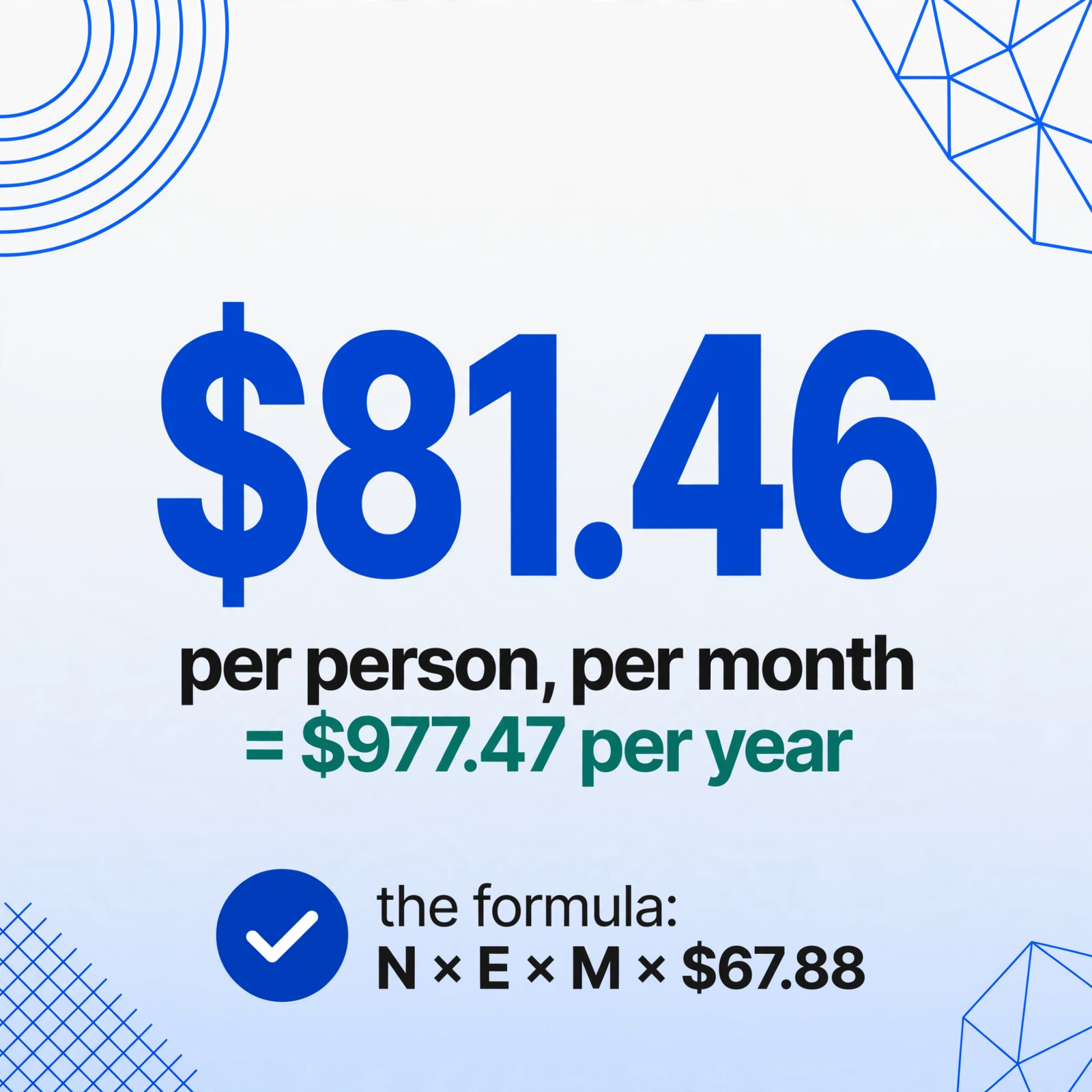
The per-employee figure is $67.88 × 1.2 = $81.46 per person per month, or $977.47 per year. For every employee who submits expense reports, your finance team is paying close to a thousand dollars annually just to move their receipt data from paper and screenshots into the general ledger. Multiply that by your headcount, and the number is rarely small.
The Error Tax — 19% of Reports, Twice the Cost
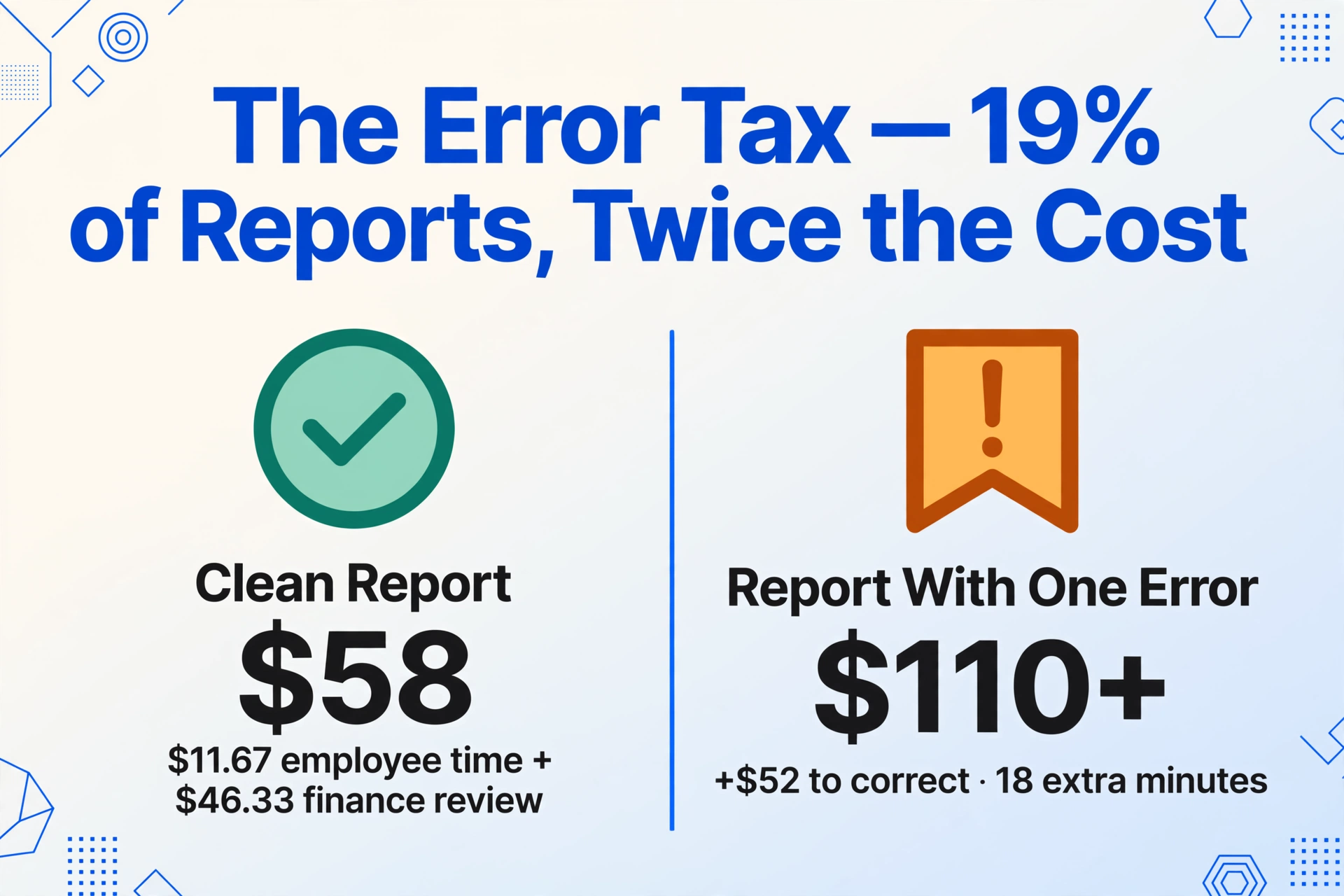
The error rate in manual expense reports is not a rounding error — it's the mechanism that turns a $58 report into a $110+ problem. The GBTA study found that 19% of reports contain errors and each correction adds $52 and 18 minutes. But the real damage from errors extends beyond the direct correction cost.
When an expense report contains a miscategorized expense, a missing receipt, or a transposed dollar amount, three things happen. First, the report enters a correction loop: finance flags it, the employee re-submits, finance re-reviews. The 18-minute correction figure from GBTA assumes a single round trip; in practice, complex errors often require two or three exchanges, pushing the real correction cost well above $52. Second, the error delays reimbursement. Employees who traveled for work, paid out of pocket, and submitted receipts are now waiting an extra week or more for their money — a friction point that finance teams rarely track but that employees feel acutely, especially in an economic environment where a Bankrate survey found that 56% of Americans cannot cover a $1,000 emergency expense from savings. Third, reports with errors often trigger a batch confidence problem: once a reviewer finds one error in a batch, they slow down and scrutinize every subsequent report more carefully, adding invisible minutes to every report in the queue — a behavioral cost that no benchmark study captures but every experienced AP manager has observed.
At 19% error rate and 150 employees submitting 1.2 reports each per month: roughly 34 reports per month will contain errors. At $52 each, that's $1,768 per month in direct correction cost — $21,216 per year — before accounting for the delayed-reimbursement morale impact or the batch slowdown effect.
Errors are not spread evenly, either. Scanned paper receipts — the crumpled taxi receipt, the faded restaurant bill, the thermal-printed gas station slip that went through the wash — produce significantly more transcription mistakes than clean digital receipts. The variation in receipt quality alone makes a uniform error rate underestimate the real variance across a company's expense report population.
The Receipt-to-Data Bottleneck Is Where Most Money Leaks
The entire expense management industry — Concur, Expensify, Ramp, Brex, and two dozen others — has spent two decades optimizing the approval workflow, the policy enforcement, the reimbursement timing. And these are real improvements: automated approval routing eliminates manager bottlenecks, corporate card integration pre-populates transaction data, mobile receipt capture attaches images to line items. But all of these improvements operate around the extraction step. None of them eliminate it. The employee still has to look at a receipt and transcribe the merchant name, the date, the amount, the expense category, and the line-item breakdown into the report. Or someone in finance does it for them. Either way, someone is reading an image and typing.
This is why the 20-minute-per-report figure endures. The GBTA benchmark was measured in 2015, but the underlying task — "look at a receipt, type what you see" — has not changed. The receipt formats haven't changed either: credit card slips, emailed PDFs, mobile screenshots, paper receipts photographed under office lighting, multi-page hotel folios, ride-share trip summaries. Each format presents the same data in a different visual layout. A human reading a Marriott folio has to find the room rate, the taxes, the incidentals, the total — items scattered across a page designed for a guest, not an accountant. A human reading a gas station receipt has to distinguish the fuel grade, the gallons, the price per gallon, and the total from four lines of thermal-printed text, often faded. The cognitive load of parsing these varied layouts, one after another, is what consumes the bulk of those 20 minutes.
This is not a workflow problem. It is a visual comprehension problem — and it is exactly the class of problem that visual AI models are designed to solve. When you feed a receipt image through an AI extraction tool, the model reads the image the way a person would: it understands that "59.40" next to "Total" in a larger font is the total amount, that "03/15/2026" under a hotel logo is the check-in date, and that the line items under "Charges" describe individual expenses. It doesn't need the receipt to follow a specific template or format — it identifies each field by what it means, not where it sits on the page.
Files are processed securely and not stored.
What AI Extraction Does to Your Cost Per Report
The thing about visual AI extraction applied to expense receipts is that it does not try to replace the entire expense management workflow. It replaces one step: the transcription. The employee or finance team member still needs to submit the report, still needs it approved, still needs reimbursement to be issued. But the step that was eating 15 of the 20 minutes per report — reading the receipt and manually keying in every field — collapses to the time it takes to upload an image and verify the extracted output.
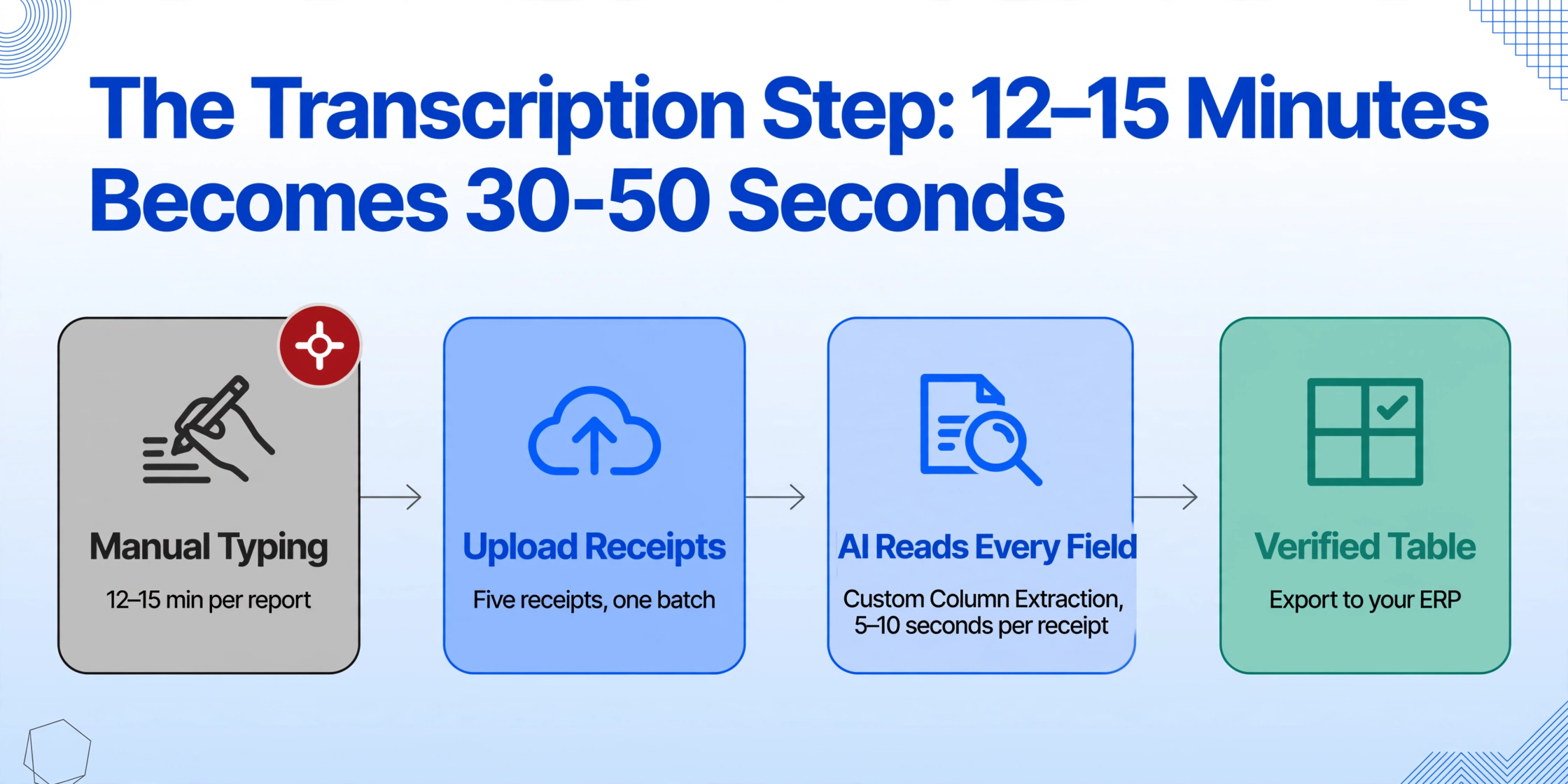
Instead of manually entering columns like "Vendor," "Date," "Amount," "Category," and "Description" for each receipt, you define the column names once — using custom column extraction, where you type the field names you need and the AI locates each value anywhere on the receipt by understanding what it means, not by template-matching against a pre-trained layout — and the tool populates all fields from the uploaded receipt image in 5–10 seconds. For a report containing five individual receipts, that's roughly 30–50 seconds of processing time, compared to 12–15 minutes of manual transcription. The time compression at the extraction step alone is roughly 18×.
What that translates to in the cost model: if the data-entry portion of the $58 processing cost accounts for roughly 60% of the total (a conservative estimate — the GBTA study identified "entering the data" and "attaching receipts" as the top pain points reported by 54% and 55% of travel buyers, respectively), then $34.80 per report is addressable through AI extraction. At a 90% reduction on that portion, the per-report data-entry cost drops from $34.80 to $3.48. The total per-report cost shifts from $67.88 (with error buffer) to roughly $36.56 — a 46% reduction. For the 150-employee company processing 180 reports per month: monthly cost drops from $12,218 to $6,581. Annual savings: $67,649.
This is not a full expense management suite replacement number — those suites address the approval and reimbursement workflow on top of extraction. But for finance teams that already have an accounting system and a process but are bleeding time on manual data entry, extraction is the highest-ROI lever. It requires no process change, no software migration, no change management. You log into the tool, upload the receipts, and get a structured table in Excel that feeds directly into your existing workflow. The same approach scales to batch processing: upload an entire month's worth of employee expense receipts at once, and the AI extracts all of them into a single structured spreadsheet — what used to take hours of manual keyboard work finishes in minutes.
For comparison, the cost structure of other manual document processes shows the same pattern of hidden labor. Our analysis of manual payment confirmation logging found that a single administrative task consumes $562 per month at a typical small business — and the cause is the same: someone is reading screenshots and PDFs and retyping data that a visual AI model could extract automatically.
Frequently Asked Questions
Is the GBTA $58/report figure still valid for 2026?
The figure is a 2015 benchmark and has not been updated in a comparably authoritative public study. However, it remains the most widely cited baseline in the industry because it is conservative: adjusted for wage inflation, today's equivalent would be closer to $70. Finance teams should treat $58 as a floor, not a ceiling. Use the formula in this article — if your own numbers come out higher, your numbers are the ones that matter.
Does AI extraction work on handwritten receipts?
Yes — within limits. Visual AI models can read handwriting, including cursive and dense handwriting on thermal paper, but accuracy drops relative to printed text. A clear, well-lit photo of a handwritten receipt with legible writing will extract correctly in most cases. A faded carbon copy with overlapping text and low-contrast pencil marks will produce lower accuracy. The tool works best when the receipt image is reasonably sharp and well-lit, which is the same condition a human reviewer would need.
Can I use this alongside my existing expense management software?
Yes. AI extraction from receipts produces structured data — typically an Excel spreadsheet or CSV — that can be imported into any expense management system or ERP that accepts file imports. The extraction step sits before the expense management workflow, not inside it. You upload receipts, get clean structured data, and feed it into your existing approval and reimbursement pipeline. There is no need to replace the systems you already use.
What's the accuracy rate compared to manual entry?
Printed table data achieves up to 99% recognition accuracy with visual AI extraction. Manual data entry, by comparison, carries a 1–4% field-level error rate depending on document complexity and operator fatigue — and the GBTA study's 19% report-level error rate confirms that human errors compound across fields. AI extraction does not eliminate all errors (handwritten or heavily degraded receipts can produce mistakes), but it eliminates the systematic error sources that dominate manual entry: transposition, misreading, field-mixing, and category misclassification.
How does the cost model change if my employees use corporate cards?
Corporate cards reduce the data-entry burden by pre-populating transaction amounts and dates, but they do not eliminate it. Receipts still need to be matched to transactions (which card feed? which employee? which GL code?), line-item detail still needs to be extracted from multi-line receipts like hotel folios and restaurant bills, and the receipt image itself still needs to be attached for audit compliance. The $58 benchmark includes these remaining steps. Corporate card integration addresses the transaction-matching portion but leaves the line-item extraction problem — the part most finance teams still do by hand — untouched.
Compute Your Own Number, Then Test the Alternative
The formula is N × E × M × $67.88. If you plug in your company's actual numbers and the result exceeds what you'd expect to pay for a task that produces no revenue and no strategic insight, the benchmark has done its job. It didn't give you an answer — it gave you the right question: at what monthly cost does manual extraction stop being acceptable?
The entry-point test is low-friction by design: upload an actual expense report receipt, specify the columns you need extracted, and watch the AI read and populate the table in seconds — no account required, no setup, no integration. If 20 minutes per report becomes 30 seconds per report on your own receipts, the per-employee cost model stops being theoretical. It becomes a calendar item: how soon can the switch pay for itself?