Best Receipt Scanning & Data Extraction Tools
in 2026
Most receipt tools answer a question you may not be asking. "Scan a receipt" and "get usable data out of a receipt" sound like the same job, but they split this entire market into two camps that barely compete with each other — and picking from the wrong camp is the most common reason a tool gets abandoned two weeks after the free trial. One camp manages an expense workflow: capture, approve, reimburse, sync to accounting. The other just turns receipt images into clean, structured rows you control in a spreadsheet. There's a real reason to digitize either way — the IRS requires documentary evidence (a receipt) for any expense of $75 or more under Treasury Regulation §1.274-5, and digital copies are fully acceptable for audits. The question isn't whether to go paperless. It's which of the two jobs you're actually trying to do.
Key Takeaways
- The wrong receipt tool is rarely a bad tool — it's a great one built for a job you didn't actually have.
- "Scan a receipt" and "get usable data out of a receipt" are two markets that barely compete: one runs approvals and reimbursement, the other just hands you a spreadsheet you own.
- Answer one question — do you need a workflow, or just the data? — and half this list disappears before you compare a single price.
How We Picked and Tested These Tools
We started by separating the two jobs receipts get used for, then judged each tool against the job it's built to do. A receipt app made for an employee submitting a travel report behaves nothing like a tool a bookkeeper uses to convert a year's worth of client receipts into a clean ledger — comparing them on a single ranked list would be useless. So this guide groups tools by buyer intent first and scores within each group.
Within those groups we weighed four things together: capture quality (how well it reads faded thermal paper, phone photos, and handwriting), output (does it give you an expense report and approval trail, or clean spreadsheet rows you own), integrations (where the data lands — QuickBooks, Xero, Google Sheets, or a plain Excel file), and real monthly price at small-business volume. For every figure, we pulled the lowest publicly listed plan straight from each vendor's own pricing page — all labeled "Pricing checked June 2026" below — rather than repeating vague "starting from" language. And we wrote an honest "best for" and "not ideal for" for each, including our own.
Disclosure
ImageToTable.ai, the tool published on this site, is one of the nine tools reviewed here. We've placed it where it honestly fits — as a no-code data-extraction tool for getting receipt data into your own spreadsheet — and named the tools that beat it for jobs it doesn't do, like running a reimbursement workflow or digitizing a physical shoebox by mail.
Receipt Scanning vs. Receipt Data Extraction: Two Different Jobs
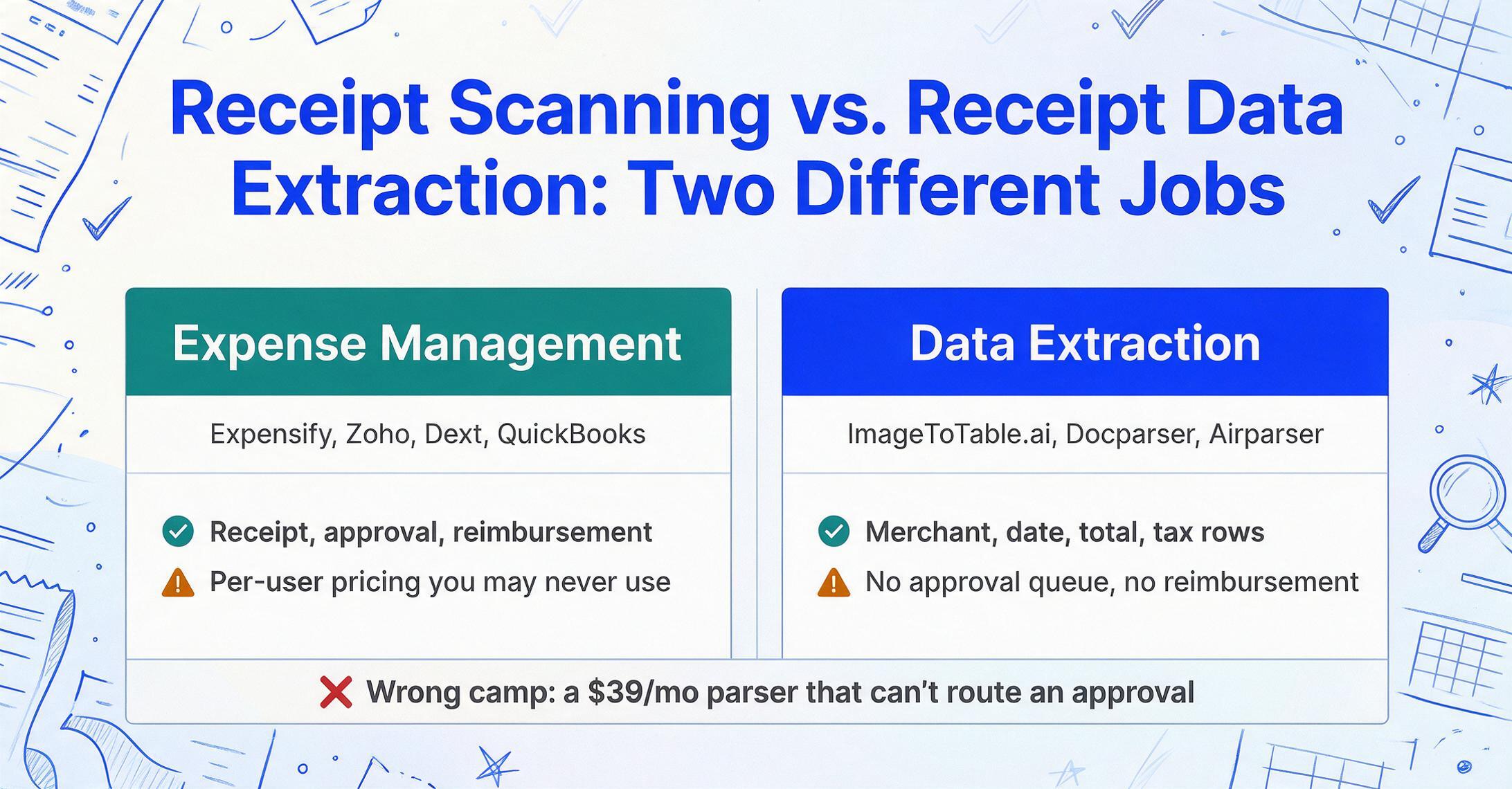
The split that organizes this whole category is between managing expenses and extracting data — and most people search without realizing they need only one side of it. Getting this wrong is why a finance team buys a $39/month parser and discovers it can't route an approval, or a freelancer buys a per-user expense platform and fights its workflow just to get a flat CSV for their accountant.
Expense-management apps — Expensify, Zoho Expense, Dext, and the receipt features inside QuickBooks — do far more than read a receipt. They attach the receipt to an expense, run it through approval and reimbursement, enforce policy, and post the coded transaction into your accounting system. The receipt scan is the front door to a workflow. If you have employees submitting expenses, company cards to reconcile, or reimbursements to pay, this is the side you want.
Receipt data-extraction tools — ImageToTable.ai, Veryfi, Docparser, and Airparser — do one thing and stop: they turn a pile of receipt images into structured rows (merchant, date, total, tax, line items, category) that you download as Excel, CSV, or send into a spreadsheet you control. There's no approval queue, no reimbursement, no opinion about your accounting process. You get clean data and decide what happens next. This is the side you want when you're a bookkeeper building a ledger, a sole proprietor prepping a Schedule C, or anyone who'd rather own a spreadsheet than live inside someone else's expense app.
A cold-start rule of thumb: if your end goal is a reimbursement or an approval, you want an expense-management app. If your end goal is a spreadsheet you own, you want a data-extraction tool. Almost every "which receipt tool is best" debate dissolves once you answer that.
One thing both sides handle equally well: compliance. The IRS lets you keep records "in any recordkeeping system suited to your business," and Publication 583 is explicit that "all requirements that apply to hard copy books and records also apply to electronic records" — so a clean digital capture satisfies the same burden of proof a paper receipt does, with the IRS generally suggesting you keep records for at least three years. Whichever camp you pick, the photo on your phone is as audit-valid as the curling slip in your glovebox.
The 9 Tools at a Glance
Here is every tool on the same six dimensions, grouped by the two jobs above. Prices are the lowest publicly available entry point; note that several expense apps charge per user per month, so a five-person team multiplies the sticker price by five.
| Tool | Starting Price | Pricing Model | Best For | Key Limitation | Free Trial? |
|---|---|---|---|---|---|
| ImageToTable.ai | Free to try (no sign-up) | Subscription / usage | Receipt data into your own spreadsheet | No approval or reimbursement workflow | Yes — instant, no sign-up |
| Expensify | $5/user/mo (Collect) | Per-user subscription | Team T&E, approvals, reimbursement | Per-user cost; overkill for solo | Yes — free tier (25 scans/mo) |
| Zoho Expense | $3/user/mo (Standard, annual) | Per-active-user | Budget teams; Zoho-suite users | Best value only inside Zoho ecosystem | Yes — free for up to 3 users |
| Dext | ~$24/mo | Per-client / credit | Bookkeepers, multi-client capture | Cost scales steeply per client | Yes — 14-day trial |
| Shoeboxed | $18/mo (Startup, annual) | Subscription + mail-in | Clearing a physical-receipt backlog | Receipts only; mail-in is slow | Yes — 30-day trial |
| QuickBooks Online | ~$18/mo (lowest tier) | Accounting-suite subscription | Receipts attached to existing QBO books | Only useful if you live in QuickBooks | Yes — 30-day trial |
| Veryfi | Usage-based (free dev tier) | API / pay-per-scan | Developers embedding receipt OCR | Built for code, not non-technical users | Yes — free developer tier |
| Docparser | $39/mo (Starter) | Flat subscription | Fixed, repeating receipt layouts | Zone templates break when layouts vary | Yes — 14-day + free tier |
| Airparser | $33/mo (annual, 100 credits) | Credit subscription | Email-in receipts, scans, handwriting | Only 30 trial credits; per-user fees | Yes — 30 credits |
Pricing checked June 2026 from each vendor's public pricing page. Per-user plans (Expensify, Zoho Expense) multiply by headcount; annual billing usually lowers the monthly rate but requires paying upfront. Cost at your real volume and team size is the figure that matters.
The table sorts into the two camps the whole guide turns on. The first six tools manage expenses; the last four (plus ImageToTable.ai at the top) extract data. We'll walk through each group on its own terms, because "best" only means something once you've decided which job you're hiring for.
Receipt Scanning & Expense-Management Apps
These tools scan a receipt as step one of a longer workflow: approval, reimbursement, policy enforcement, and a push into your accounting system. You pick from this group when the receipt is attached to a person to pay back or a transaction to reconcile, not just a number to record. The trade-off is that you're buying a whole process, and if all you wanted was the data, the workflow is friction.
Expensify
The most recognized name in expense reporting. Its SmartScan reads a receipt photo and turns it into an expense entry, then routes it through customizable approval and reimbursement, reconciles against corporate cards, and syncs to QuickBooks, Xero, NetSuite, and others. For a team where employees submit expenses and a manager approves them, it's the default for a reason — the whole loop is automated.
Best for: Teams that need real expense reporting — submit, approve, reimburse — with company-card reconciliation and accounting sync.
Not ideal for: A solo operator or anyone who just wants a flat spreadsheet of receipt data. The per-user pricing and workflow are overhead you won't use.
Pricing (checked June 2026): Free "New Expensify" tier with 25 SmartScans/month; the Collect plan starts at $5/user/month and Control at $9/user/month, though active-user and card-spend conditions can raise the effective rate.
Zoho Expense
The most affordable full expense platform here, especially if you already use Zoho. It does receipt autoscan, mileage tracking, multi-level approvals, and policy enforcement, and syncs natively to Zoho Books as well as QuickBooks and Xero. Standalone it's capable; inside the Zoho suite it's seamless.
Best for: Budget-conscious small teams that want approvals and reimbursement without per-user costs climbing, and anyone already on Zoho Books or CRM.
Not ideal for: Teams outside the Zoho ecosystem wanting deep ERP integrations, or solo users who'd find an expense platform heavier than they need.
Pricing (checked June 2026): Free for up to three users (20 autoscans); the Standard plan is $3/user/month billed annually ($4 month-to-month), with 20 autoscans per user.
Dext
Built for bookkeepers and accounting firms rather than employees. Dext captures receipts and invoices from any source — mobile scan, email forwarding, bank feeds, e-commerce integrations — and publishes coded transactions straight into Xero, QuickBooks, or Sage, claiming up to 99.9% capture accuracy. For a firm processing documents across many clients, it's the bridge from paper to the general ledger.
Best for: Bookkeepers and accountants who need client receipts and invoices captured, coded, and posted directly into accounting software at scale.
Not ideal for: A single business with modest volume — pricing is structured per client and rises steeply (roughly $235/month for ten clients), which only makes sense for a practice.
Pricing (checked June 2026): From around $24/month on entry plans, billed on a per-client / credit model where line items and bank statements consume monthly allowances; 14-day free trial, no permanent free tier.
Shoeboxed
A receipt-digitization service with a feature no software tool matches: prepaid "Magic Envelopes." You physically mail in a pile of paper receipts, and Shoeboxed's team scans, categorizes, and stores them — purpose-built for clearing the literal shoebox of receipts a business has been accumulating for a year. Receipts captured by app or by mail are sorted into IRS tax categories.
Best for: Owners drowning in physical receipts who'd rather mail a backlog than scan each one, and who want IRS-ready, human-verified records.
Not ideal for: Real-time workflows or anything beyond receipts — mail-in turnaround is days, not seconds, and it won't touch invoices, statements, or structured multi-field tables.
Pricing (checked June 2026): From $18/month on the Startup plan with annual billing (around $29/month month-to-month), including a 30-day free trial.
QuickBooks Online (Receipt Capture)
Not a standalone scanner, but worth naming because so many small businesses already pay for it. QuickBooks Online lets you snap or email a receipt, reads the merchant, date, and total, and matches it to a transaction in your books — no second app, no export. If your accounting already lives in QuickBooks, the receipt is captured exactly where it needs to land.
Best for: Businesses already running on QuickBooks Online that want receipts attached to transactions without adding another subscription.
Not ideal for: Anyone not on QuickBooks, or anyone needing detailed line-item extraction or a portable spreadsheet — the capture is built to feed QBO, not to hand you raw data.
Pricing (checked June 2026): Receipt capture is included in QuickBooks Online plans, which start around $18/month for the lowest tier, with a 30-day free trial.
Notice what every tool above has in common: the receipt is in service of a workflow you have to live inside. That's the right trade when you genuinely need approvals and reimbursement. Managing the full expense report — policy limits, who approves what, when reimbursement clears — is its own category with its own best tools, distinct from the question of simply getting receipt data out, and worth evaluating separately if a workflow is what you're after. But if you found this article because you just want the numbers off the receipts in a sheet you control, none of the above is built for you. The next group is.
Receipt Data-Extraction Tools: Clean Rows You Control
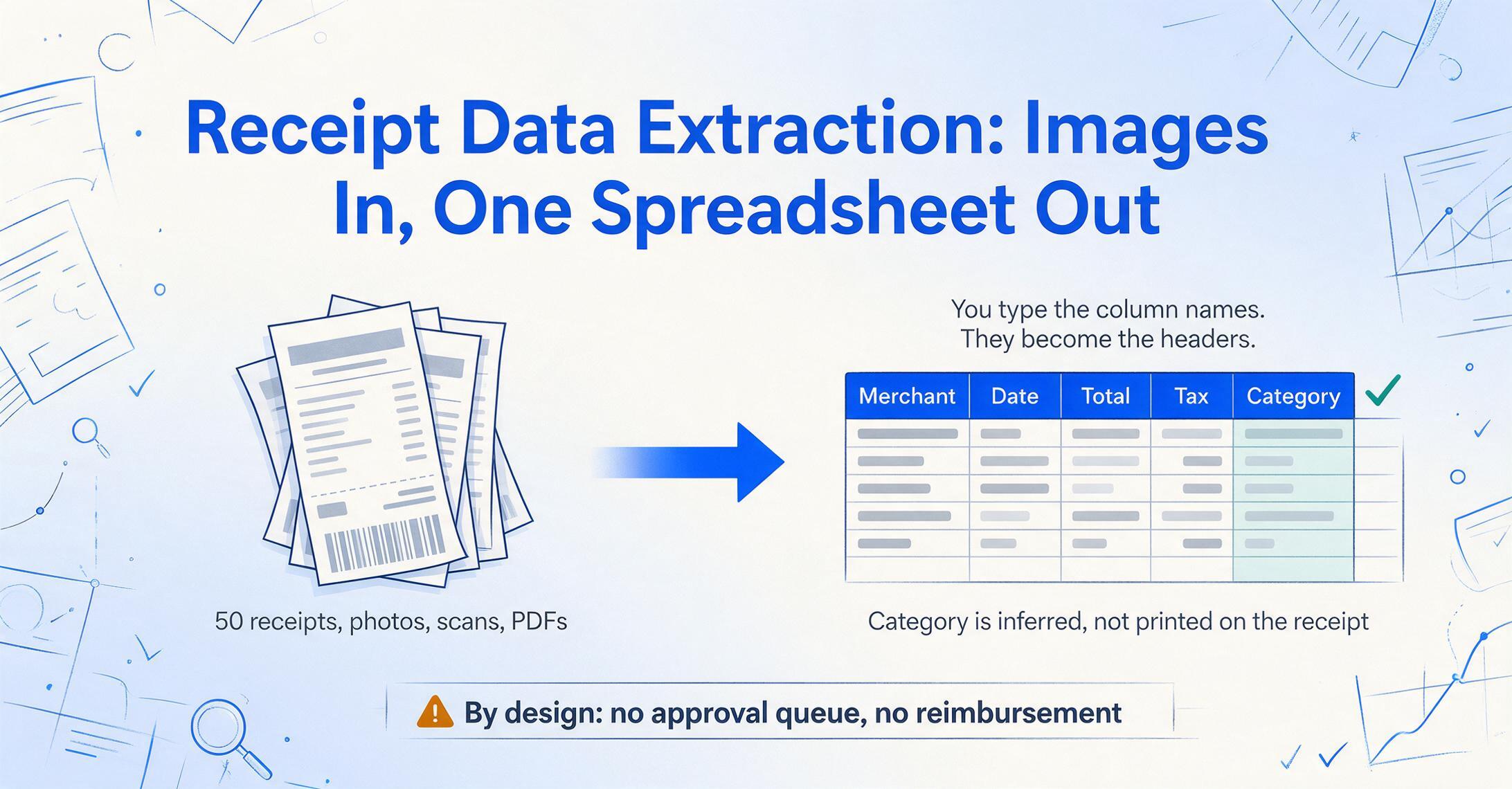
These tools do one job and stop: receipt images in, structured spreadsheet rows out. There's no approval queue and no opinion about your process — you get merchant, date, total, tax, line items, and often an inferred category, then decide what happens next. This is the group for bookkeepers building ledgers, sole proprietors prepping taxes, and anyone who'd rather own a spreadsheet than rent a workflow. It's also where you go to turn receipt photos directly into an Excel spreadsheet.
ImageToTable.ai
A no-code, vision-AI extraction tool built around Custom Column Extraction: instead of picking a fixed template, you type the column names you want — "Merchant, Date, Total, Tax, Payment Method" — and the AI locates each value on the receipt by understanding what the field means, not where it sits. The names you type become the headers of your output spreadsheet. It's batch-first (upload 50 receipts, get one merged Excel file with a row per receipt), and it supports inferred columns — define a column like Category (Meals / Travel / Office / Other) and the AI reads each receipt and fills the right category even though the receipt has no "Category" field printed on it, so extraction and tax-categorization happen in one pass. It reads photos, screenshots, scans, and PDFs, ships a Google Sheets add-on that writes results straight into the active sheet, and offers a Collection Link — a shareable URL that lets employees or clients upload their receipts into your queue without creating an account.
Best for: Bookkeepers, freelancers, and small teams who want receipt data — including an AI-assigned spending category — in a clean Excel or Google Sheets file they control, with no workflow to learn. It's a strong fit for organizing client receipts or building a Schedule C spreadsheet.
Not ideal for: Teams that need approval routing, reimbursement, or company-card reconciliation. It extracts data extremely well; it doesn't run the expense workflow before or after.
Pricing (checked June 2026): Free to try with no sign-up; affordable monthly plans with one of the lowest effective per-receipt costs in this list.
Veryfi
A receipt and invoice OCR engine built primarily as a developer API. Veryfi is fast and highly accurate on line items — its own benchmarks cite around 99.5% line-item accuracy with sub-five-second processing and no human-in-the-loop — which makes it a common choice for companies embedding receipt capture into their own app or expense product. The capability is excellent; the delivery is code.
Best for: Developers and product teams who want to embed fast, accurate receipt OCR into their own software via API.
Not ideal for: Non-technical users who just want to upload receipts in a browser and download a spreadsheet — there's no simple no-code front end for that.
Pricing (checked June 2026): Usage-based, pay-per-scan, with a free developer tier to test the API; committed business volume scales into the hundreds per month.
Docparser
One of the longest-running parsers in the market, and fundamentally zone-based: you define parsing rules that pull values from specific regions of a document. For receipts from a single source whose layout never changes — the same vendor, the same format, month after month — that approach is precise and dependable. The catch is that receipts are the least consistent document type there is, varying from merchant to merchant.
Best for: High-volume processing of consistent, repeating receipt or document layouts where you can set a template once and trust it.
Not ideal for: The mixed-merchant reality of most receipt piles. When layouts vary, zone templates need maintenance, and a new format means a new template.
Pricing (checked June 2026): Free tier (30–150 pages/month), Starter from $39/month, with a 14-day free trial.
Docparser pricing → · Docparser vs ImageToTable, side by side
Airparser
An LLM-based parser that leans on a vision engine to read scanned PDFs, images, and even handwriting, alongside its core strength of pulling structured data out of emails. For a business that receives a lot of receipts as email attachments — ride-share, hosting, SaaS confirmations — that intake path is genuinely useful, and the AI handles varied layouts without per-format rules.
Best for: Teams parsing emailed receipts plus scanned or handwritten ones without writing per-layout rules.
Not ideal for: Cost-sensitive testers — the free allowance is just 30 one-time credits, barely enough to evaluate, and additional users add cost as you scale.
Pricing (checked June 2026): $33/month on annual billing for 100 credits (one credit = one page, email, or image), rising to about $49/month month-to-month.
Across this group, the differences come down to delivery: Veryfi hands you an API, Docparser hands you templates, ImageToTable.ai hands you a no-code browser tool, and Airparser hands you an email pipeline. If you want the broadest no-code option that also handles handwriting, screenshots, and a POS receipt to a sales spreadsheet, that's the lane the all-rounders compete in — and it overlaps with the broader field of no-code document AI tools.
How to Choose for Your Situation
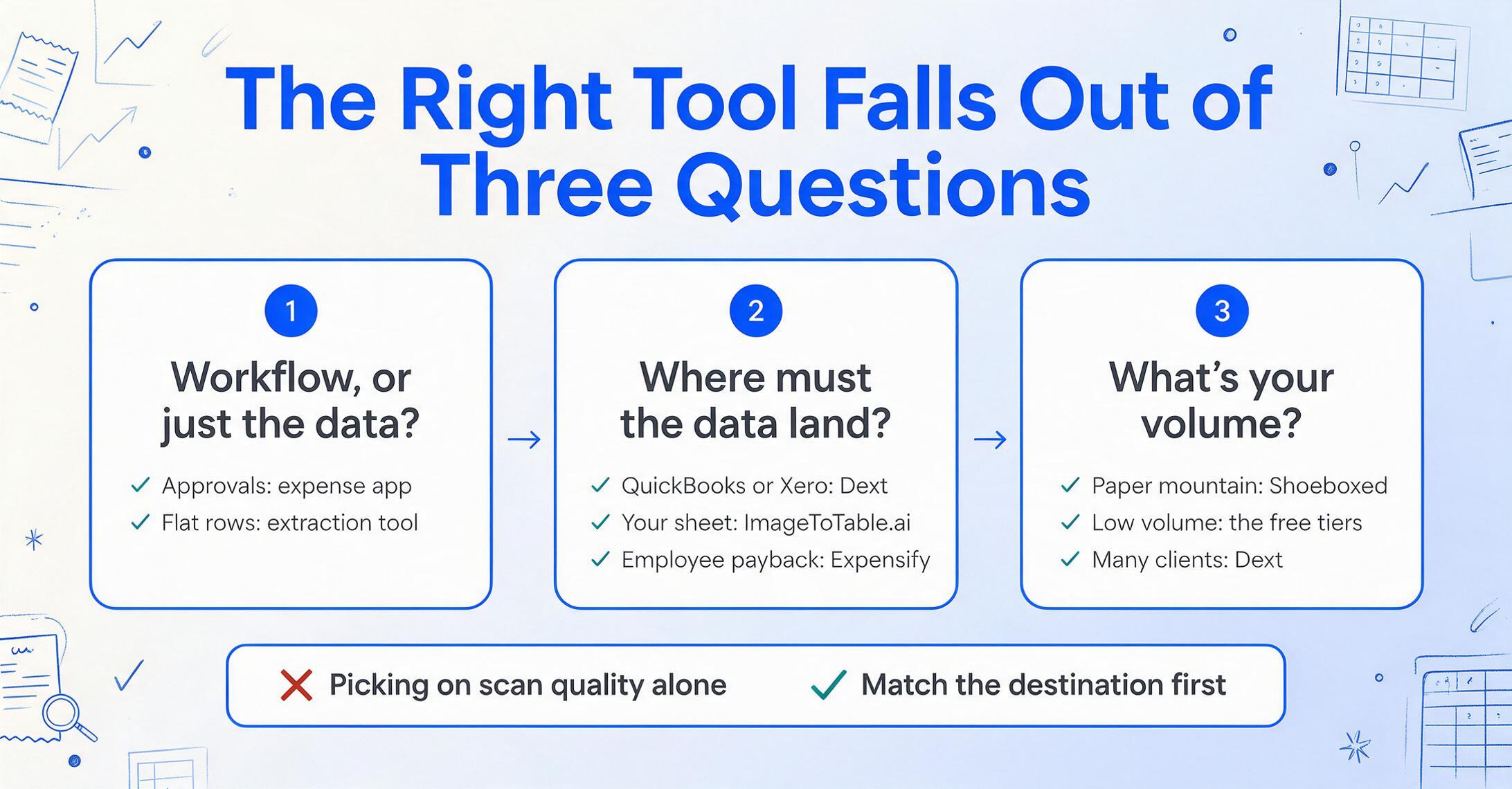
The right tool falls out of three questions, answered in order. The first sorts you into a camp; the next two pick a tool within it.
Do you need a workflow, or just the data?
If receipts feed approvals, reimbursement, or company-card reconciliation, you want an expense-management app (Expensify, Zoho Expense, Dext, or QuickBooks if you already use it). If you just need clean, exportable rows in a spreadsheet you control, you want a data-extraction tool (ImageToTable.ai, Docparser, Airparser, or Veryfi for developers). This single question eliminates half the list.
Where does the data need to end up?
Into QuickBooks or Xero with coded transactions: Dext or QuickBooks' own capture. Into a Google Sheet or Excel file you own: ImageToTable.ai (its Google Sheets add-on removes the export step) or Docparser. Reimbursed to employees: Expensify or Zoho Expense. Pulled automatically from your inbox: Airparser. Match the destination, not just the scan quality.
What's your volume — and is it a backlog?
A one-time mountain of paper points to Shoeboxed's mail-in service. Ongoing low volume fits the free tiers — Expensify's 25 scans, Zoho's free three users, ImageToTable.ai's no-sign-up trial — which let you test on your own receipts before paying. High recurring volume across many clients is where Dext earns its per-client price, and where batch-processing a stack of receipts into one tax spreadsheet pays off.
One realistic caveat the marketing pages skip: none of these tools is perfect on a bad photo. A small-business owner handling high receipt volume put it well on r/smallbusiness: AI "cuts the manual entry time by at least half," but "the key is to scan them consistently and in good light, right when you get them, so you don't end up with a huge backlog of blurry photos." Feed any tool here a crumpled, dim receipt and you'll still review a field or two. Capture cleanly and the work nearly disappears — which is also the difference between a tool you abandon and one you keep, a tension freelancers describe well when weighing scanning apps against AI extraction.
Frequently Asked Questions
What's the best app to scan receipts to Excel?
For getting receipt data into an Excel or Google Sheets file you control, a data-extraction tool beats an expense app. ImageToTable.ai and Docparser all output structured rows (merchant, date, total, tax) you can download as Excel or CSV; ImageToTable.ai also writes directly into Google Sheets and can add an AI-assigned category column. Expense apps like Expensify export too, but they're built around a reimbursement workflow you don't need if a spreadsheet is the goal.
Do I need a separate receipt scanner if I already use QuickBooks?
Often not. QuickBooks Online includes receipt capture — snap or email a receipt and it reads the merchant, date, and total and matches it to a transaction in your books. That's enough if your goal is attaching receipts to QuickBooks entries. You'd add a dedicated tool only if you need detailed line-item extraction, a portable spreadsheet outside QuickBooks, or higher-volume batch processing than the built-in capture handles comfortably.
Are scanned or photographed receipts acceptable for the IRS?
Yes. IRS Publication 583 states that "all requirements that apply to hard copy books and records also apply to electronic records," so a clear digital capture is as valid as the paper original, provided it's legible and retrievable. The IRS requires documentary evidence for expenses of $75 or more and generally suggests keeping records for at least three years. Any tool in this guide produces audit-acceptable digital copies — just keep the images legible and backed up.
What's the difference between a receipt scanner and an expense-management app?
A receipt scanner (or data-extraction tool) reads a receipt and gives you the data — merchant, date, total, line items — as structured rows you control. An expense-management app does that and then runs the receipt through a workflow: approval, reimbursement, policy checks, and accounting sync. If you only need the numbers in a spreadsheet, a data-extraction tool is simpler and usually cheaper; if you need to pay people back or enforce a spending policy, you need the full app.
Can these tools categorize receipts automatically?
Many can, in different ways. Expense apps map receipts to preset expense categories tied to your chart of accounts. On the extraction side, ImageToTable.ai uses inferred columns: you define a column such as "Category (Meals / Travel / Office)" and the AI reads each receipt and assigns the category even though it isn't printed anywhere on the slip — extraction and classification in a single pass. Always spot-check the first batch, since edge cases (a hardware store that also sells snacks) can be judgment calls.
Is ImageToTable.ai listed here because it's your product?
Yes, and we've said so plainly. ImageToTable.ai is published by the team that wrote this article, and it's reviewed alongside eight other tools on the same six dimensions. We've placed it as a no-code data-extraction tool for getting receipt data into your own spreadsheet, and named the tools that beat it for jobs it doesn't do — Expensify, Zoho Expense, and Dext for reimbursement and bookkeeping workflows, and Shoeboxed for digitizing a physical backlog by mail.
The Bottom Line
"Best receipt tool" was never a single ranking — it's two questions wearing one search term. Decide first whether you're hiring a tool to manage an expense process or to hand you clean receipt data, and the field cuts in half before you compare a single price. Need approvals and reimbursement? Expensify, Zoho Expense, or Dext, with QuickBooks if your books already live there and Shoeboxed for a paper mountain. Just need the numbers in a spreadsheet you own? ImageToTable.ai, Docparser, or Airparser — and Veryfi if you're building it into software.
So don't shortlist from a table, including this one. Take ten of your real receipts — the faded thermal ones, the crumpled ones, the emailed PDFs — and run them through two free trials, one from each camp. Five minutes on your own paperwork tells you more than any comparison, and it's the fastest way to find out which job you were actually trying to do.
Disclosure: This article is published by ImageToTable.ai, which is one of the nine tools reviewed above. All competitor pricing was checked against public pricing pages in June 2026; per-user, annual, and month-to-month rates differ, and usage allowances vary by plan. We aim to describe every tool — including our own — accurately, and we welcome corrections.