Taobao/Tmall Order Screenshots:
Find the Order Number, Actual Payment & Tracking Status
You just placed an order on Taobao (淘宝) or Tmall (天猫) — China's two largest e-commerce platforms, both owned by Alibaba — and took a screenshot to keep a record. The image has the order number, the product you bought, what you actually paid, and where your package is. But the interface is in Chinese, the price could be buried under a stack of discounts, and the tracking information might be split across multiple packages. Extracting the right fields from that screenshot without retyping everything is the challenge this article solves.
Key Takeaways
- 50 Taobao order screenshots a month translates to 25 minutes of retyping the same four fields from each image into a spreadsheet.
- Grab the wrong price from a Taobao discount stack and your records are silently wrong because during 双11 a single order can show five different numbers before you reach the one labeled 实付金额.
- Define your four column names once and let them be read from every screenshot regardless of seller page customizations or the layout differences between Taobao and Tmall interfaces.
The Four Key Fields on a Taobao/Tmall Order Screenshot
A Taobao or Tmall order detail screenshot contains four core fields — but their layout differs significantly from Western e-commerce platforms. On the mobile app (手机淘宝 / 手机天猫), which is the primary way people use these platforms, the order detail page is a vertically scrolling screen divided into clear sections. Here is where each field lives:
| Field (English) | Chinese Label | Location on Mobile Screenshot |
|---|---|---|
| Order Number | 订单号 (Taobao) / 订单编号 (Tmall) | Top of the order detail page, below the status bar |
| Product Title | 商品名称 | Middle section, next to product thumbnail image |
| Actual Payment | 实付金额 | Bottom of the price summary section, after all discount line items |
| Logistics Status | 物流状态 | May appear in the order summary or in a separate 物流详情 section |
On a desktop browser (淘宝网 / 天猫官网), the layout switches to a wider table-like arrangement where the price breakdown sits in the right sidebar and the product list occupies the main column. Desktop screenshots are less common — most users access Taobao/Tmall through the mobile app — but when they occur, the fields are spread across a wider canvas and easier to distinguish at a glance.
The most important thing to understand is that the order detail page is not a receipt or invoice. It is a transaction record that shows the full lifecycle of the order — from placement to delivery — and its layout is optimized for mobile scrolling, not for printing. The fields you need are all present, but they are distributed across different vertical sections rather than grouped into a single block.
The Order Number (订单号) — A Consistent Pure-Digit Identifier
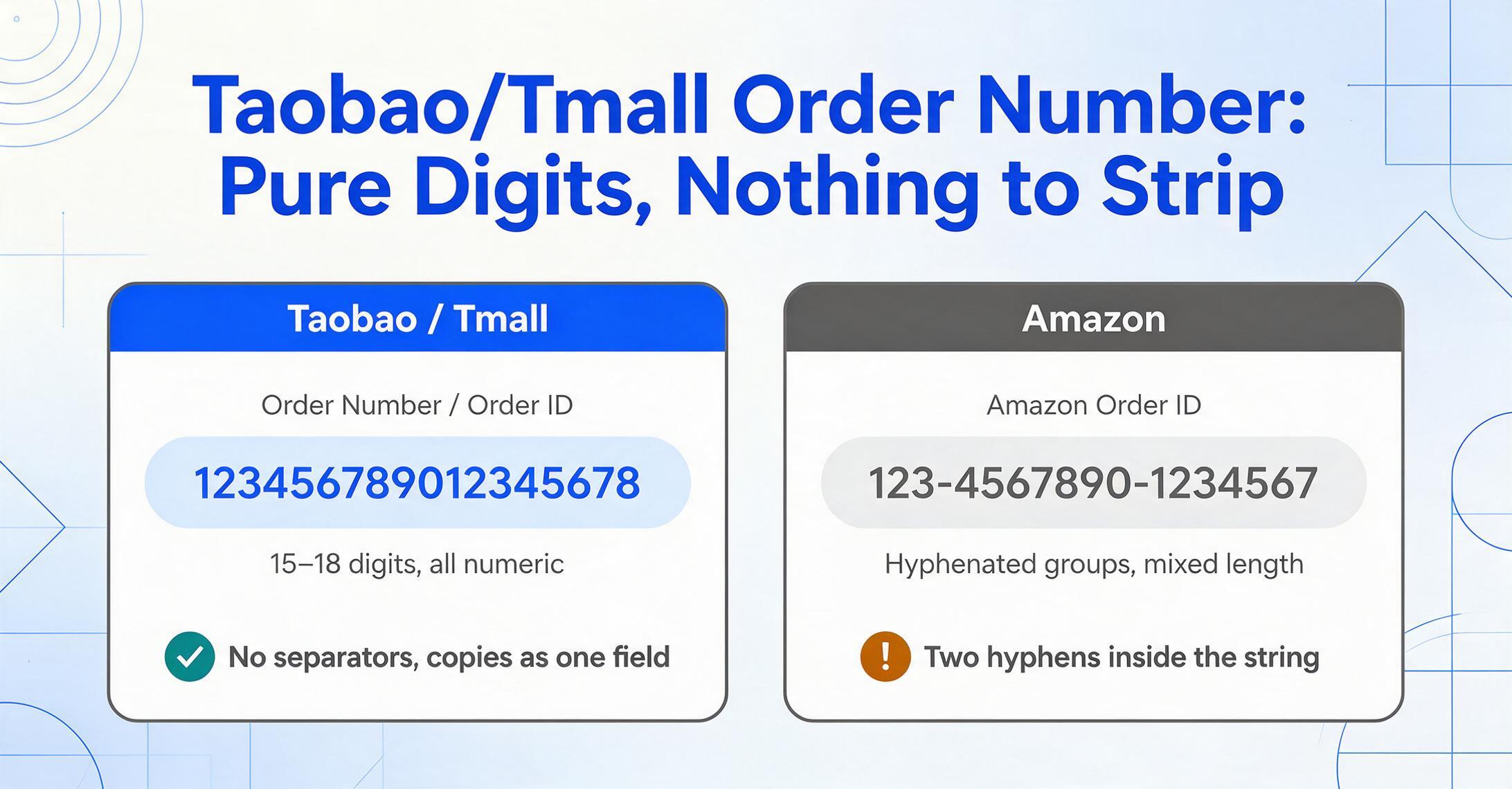
The Taobao or Tmall order number (订单号 / 订单编号 — the label varies slightly between the two platforms, though both point to the same field) is a string of consecutive digits, typically 15 to 18 characters long. Unlike Amazon's three-group hyphenated format (123-4567890-1234567) or eBay's alphanumeric mix, the Chinese e-commerce order number is simpler: pure digits, no hyphens, no letters, no separator characters of any kind.
123456789012345678
On the mobile app order detail page, the order number appears at the very top of the screen, just below the order status indicator (e.g., 待发货 — "Pending Shipment"). It is labeled either 订单号 (Taobao) or 订单编号 (Tmall) in small text, followed by the numeric string on the same line. The label difference — 订单号 on Taobao versus 订单编号 on Tmall — is one of the subtle UI distinctions between the two platforms, but the field itself is identical in purpose and format.
On a desktop browser, the order number sits in a similar position — at the top of the order detail view within the "My Orders" (我的订单) section. The desktop page also displays the order number immediately next to the order status, making it equally straightforward to locate.
One practical distinction from platforms like Amazon: the Taobao/Tmall order number is not used for customer service in the same way. If you need to contact a seller, the platform uses the order number internally, but most seller communication happens through Alibaba's built-in chat system (阿里旺旺 / Alibaba Wangwang), which links to the order automatically. The order number's primary value is external — for shipping agents (daigou), cross-border logistics handlers, and personal record keeping. A daigou agent managing 50+ orders from Chinese suppliers uses the order number as the master key to match each purchase with its tracking updates and cost records.
The pure-digit format is actually an advantage for data extraction. Without hyphens or mixed characters to confuse a parsing algorithm, the order number is easy for any tool to locate by finding the long numeric string near the top of the image.
The Actual Payment (实付金额) — The Only Price That Matters
The 实付金额 (Actual Payment) is the single most important and most confusing field on a Taobao/Tmall order screenshot. It represents the final amount charged — after every discount, coupon, and red packet has been applied — and it is almost never the same as the product's listed price.
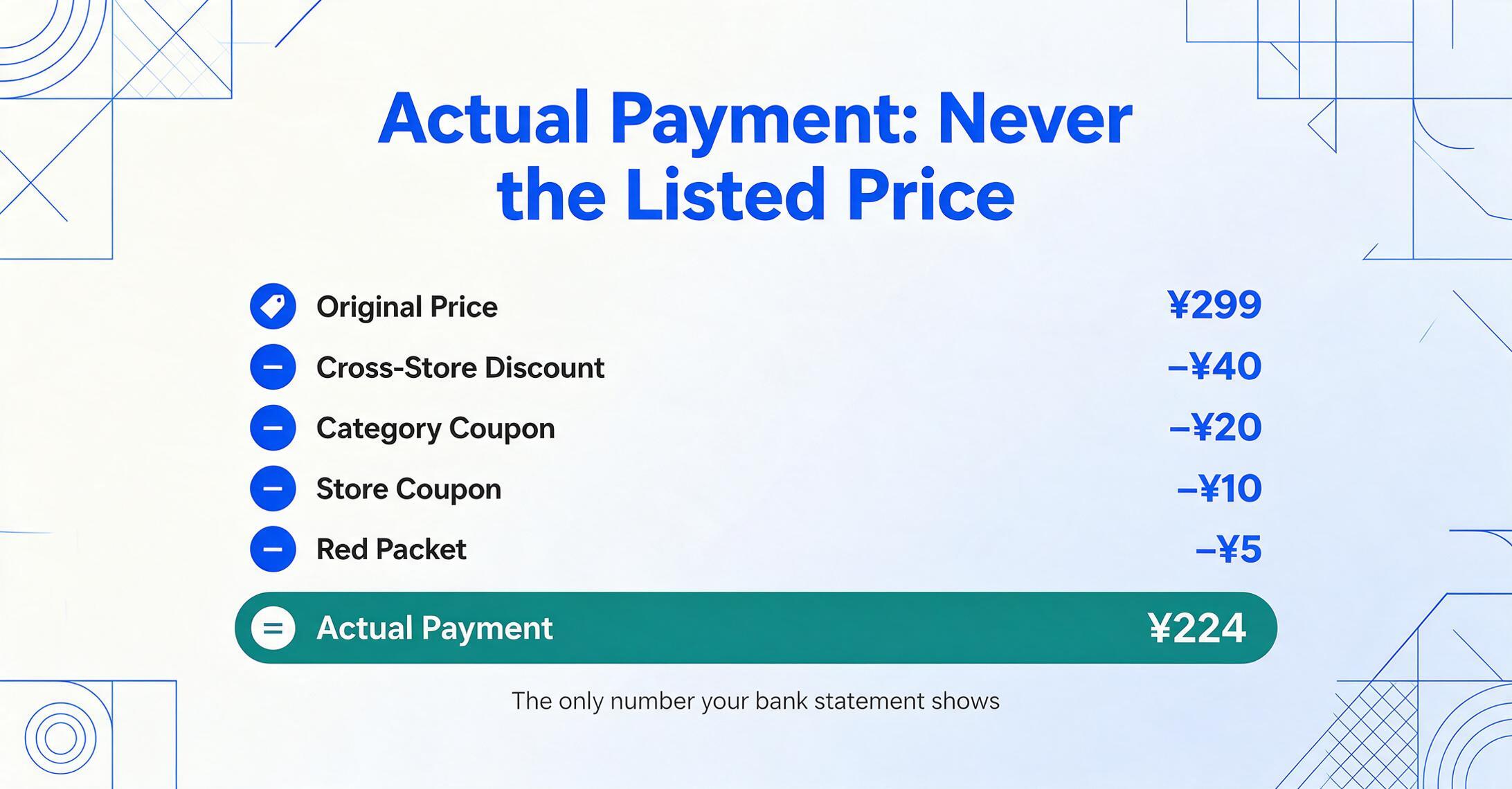
When you open the order detail page on the mobile app, the price section shows a breakdown of deductions. During a normal (non-festival) purchase, this breakdown typically includes two to three layers:
- 商品原价 (Original Price) — The listed price of the product before any discounts
- 优惠券 (Coupon) — A seller-issued or platform-issued discount coupon
- 运费 (Shipping Fee) — May be shown separately or included in the total
- 实付金额 (Actual Payment) — The final amount, in bold, at the bottom of the price section
Major shopping festivals — 双11 (Singles' Day, November 11) and 618 (June 18) — add significantly more layers. A 双11 purchase might show:
商品原价 (Original Price): ¥299
− 跨店满减 (Cross-Store Discount): −¥40
− 品类券 (Category Coupon): −¥20
− 店铺券 (Store Coupon): −¥10
− 红包 (Red Packet): −¥5
= 实付金额 (Actual Payment): ¥224
Each of these deduction types subtracts from the original price in sequence, and the screenshot captures every single line item. The field you need — the number your bank statement will eventually show — is the one at the bottom labeled 实付金额 (Actual Payment). This is usually displayed in a larger or bolder font than the deduction items above it, making it visually distinct once you know what to look for.
A common mistake is grabbing the 商品原价 (Original Price) or 需付 (Amount Due) from a different section of the page. The 需付 value sometimes appears on the order list card (the compact view that shows a summary of all your orders) and reflects the amount due before promotional adjustments are fully calculated — it is not the final charge. The 实付金额 on the order detail page is the authoritative number.
This multi-layer price structure is the most distinctive differentiator of Taobao/Tmall compared to all other e-commerce platforms in the A2 batch. Amazon shows a single "Order Total" after a clean subtotal-plus-tax breakdown. Shopee and Mercado Libre each have simpler discount structures. Only Taobao/Tmall routinely displays a 3-to-5-layer deduction chain — and only during 双11 or 618 does that chain become genuinely complex enough to confuse even experienced users. Those platform differences never change the column list, which is why mixed-platform order screenshots can be processed in one batch.
Product Title (商品名称) and Logistics Status (物流状态)
The remaining two fields are simpler but have their own platform-specific quirks.
Product Title (商品名称) appears in the middle section of the order detail page, next to a product thumbnail image. On the mobile app, the title links to the product listing page and is usually visible in full (unlike Amazon's truncated mobile titles). If the order contains multiple items — say, three different phone cases from the same seller — each item appears as a separate row with its own thumbnail, title, quantity, and unit price. The title is in Chinese, but the product image next to it serves as a visual cross-reference. For cross-border users who do not read Chinese, having an extraction tool that captures the title along with the thumbnail reference makes later identification possible without opening the original listing.
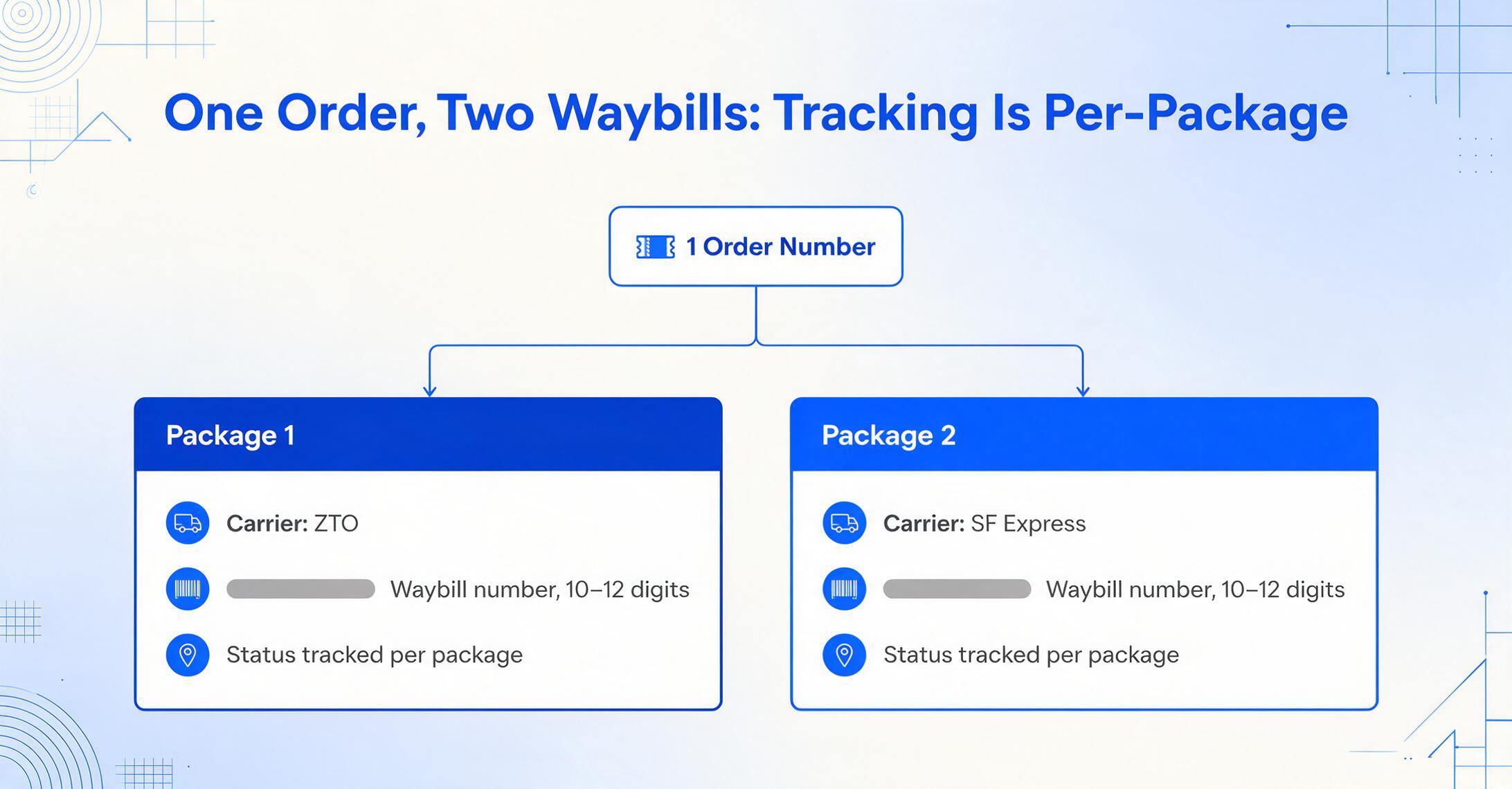
Logistics Status (物流状态) is where Taobao/Tmall order screenshots differ from most Western platforms in a practical way. A single order can ship in multiple packages (包裹). This happens frequently: the same order might contain items from different warehouses, or a seller may split a large order into two boxes. Each package gets its own entry in the logistics section, labeled consecutively as 包裹1 (Package 1), 包裹2 (Package 2), and so on. Each package entry includes:
- 运单号 (Waybill/Tracking Number) — The carrier-level tracking number, typically 10-12 digits
- 物流公司 (Logistics Company) — The carrier name (e.g., 顺丰速运 SF Express, 中通 ZTO, 圆通 YTO)
- 物流状态 (Logistics Status) — Current status indicator, such as 已签收 (Delivered) or 运输中 (In Transit)
On the mobile app, the logistics information may appear either as a section within the order detail page or as a separate 查看物流 (View Logistics) screen that you tap into from the order summary. A screenshot of the main order detail page typically shows just the overall logistics status (e.g., 已发货 — "Shipped") without the package-level breakdown. To capture the individual tracking numbers, you would need to screenshot the logistics detail screen specifically. This distinction between order summary and logistics detail is important: a single screenshot of the order summary will not contain all the tracking numbers.
Logistics companies also differ significantly from Western carriers. The major players — 顺丰速运 (SF Express, the premium carrier), 中通快递 (ZTO), 圆通速递 (YTO), 韵达快递 (Yunda), 申通快递 (STO) — each have their own tracking number formats. An SF Express tracking number starts with letters (e.g., SF1234567890), while ZTO and YTO use pure digits of varying lengths. Recognizing the carrier from the screenshot helps narrow down which tracking system to check for updates.
Why These Four Fields Work Better as a Batch
Individually, each field on a Taobao/Tmall screenshot serves a clear purpose: the order number identifies the purchase, the product title tells you what was bought, the actual payment records the cost, and the logistics status tracks delivery. Together, they create the complete transaction record needed for any downstream workflow — and the value multiplies when you process them as a batch rather than one screenshot at a time.
Consider a cross-border buyer sourcing products from multiple Chinese suppliers through a shipping agent. A typical workflow involves:
- Receiving screenshots or order details from 50-100 Taobao/Tmall purchases per month
- Each order has its own order number, product title, actual payment, and tracking updates
- The shipping agent repackages items at their warehouse, generating new-waybill numbers that need to be mapped back to the original Taobao/Tmall order numbers
- Manual reconciliation means opening each screenshot, reading the four fields, and typing them into a spreadsheet row by row
This is precisely where the volume justifies automation. The four fields on a single screenshot take about 30 seconds to copy manually. At 50 orders, that is 25 minutes of repetitive transcription work — with every entry carrying the risk of a misread digit in the order number or a mistyped decimal in the payment amount. An AI-based extraction approach, such as screenshot-to-spreadsheet tools based on Custom Column Extraction, lets you define the four column names — "Order Number (订单号)", "Product Title (商品名称)", "Actual Payment (实付金额)", "Logistics Status (物流状态)" — and the tool reads each screenshot and fills the corresponding cells automatically, regardless of whether the fields appear in slightly different positions across different sellers' order pages.
The semantics-based approach matters here because Taobao/Tmall order pages are not standardized templates. Different sellers can customize parts of the display, and the layout shifts between the Taobao and Tmall interfaces. A tool that reads by meaning rather than by pixel position does not break when the page layout changes.
Frequently Asked Questions
Is the Taobao order number the same as the Tmall order number format?
Yes — both platforms use the same pure-digit format, typically 15-18 digits. The only difference is the label: Taobao displays it as 订单号 (Order Number), while Tmall labels it 订单编号 (Order ID). The underlying format and function are identical. This consistency extends across Alibaba's ecosystem — the order number format on 1688.com (the B2B wholesale platform) is similar, though the number of digits may vary.
What is a 红包 (Red Packet) in the price breakdown?
A red packet (红包 / hóngbāo) is a platform-issued cash credit that can be applied to purchases on Taobao or Tmall. Users earn red packets through platform games, daily check-ins, or promotional events — especially during 双11 and 618. Unlike coupons (优惠券), which discount specific products or categories, red packets function like platform-wide cash. The red packet deduction appears as one of the line items before the 实付金额 (Actual Payment) in the price breakdown. It reduces the final amount but is not visible as a line on any bank or credit card statement — it is purely an internal platform credit.
My order shipped in two packages. Do they have different tracking numbers?
Yes. Each package in a multi-package order gets its own waybill number (运单号) and may even ship via different carriers. For example, Package 1 might go through 中通 (ZTO) while Package 2 uses 顺丰速运 (SF Express). The order detail page's logistics section lists each package separately as 包裹1, 包裹2, etc. A screenshot of the main order page will only show a summary status — you need to tap into 查看物流 (View Logistics) for the per-package breakdown. If you track these orders for business purposes, capturing the logistics detail screen as a separate screenshot (or ensuring your tool can navigate both pages) is essential.
Is a Taobao/Tmall order screenshot the same as a fapiao (发票)?
No. An order screenshot is a transaction record showing what you purchased and paid. A fapiao (发票) is an official tax invoice recognized by Chinese tax authorities (国家税务总局). Only Tmall merchants (B2C) are generally required to issue fapiao upon request; Taobao sellers (C2C) may not offer one. For cross-border importers who need the fapiao for customs clearance or VAT deduction in their home country, the order screenshot is a supplementary record — not a replacement for the official tax document. The order number on the screenshot helps match the purchase to the eventual fapiao when it arrives.
Can I extract the order number from a partial or blurry screenshot?
The pure-digit format of Chinese e-commerce order numbers makes them more resilient to partial visual data than alphanumeric codes. Even if a few digits are blurry or cropped at the edge, the surrounding context (position at the top of the page, numeric-only string, adjacent 订单号 label) provides enough semantic cues for a vision-based extraction tool to locate the number. However, severe blur, extreme low resolution, or screenshots that crop out the top portion of the order detail page may still produce unreliable results — the sharpness of the original image directly affects extraction quality.
The 实付金额 on my screenshot does not match my credit card statement. Why?
There are a few possible reasons. First, if you used Alipay (支付宝) to pay, the 实付金额 on the Taobao/Tmall order page in Chinese yuan (CNY/¥) is the platform-side charge — your bank or card issuer may apply a currency conversion fee or FX markup that results in a slightly different posted amount. Second, some Tmall orders allow installment payments (分期付款), where the order detail page shows the total but your statement shows a partial monthly charge. Third, if a red packet (红包) was applied on the platform side, the order page reflects the discounted amount while your statement reflects the pre-red-packet charge that the merchant received. The 实付金额 is always the authoritative platform-recorded amount for the purchase itself.
The value of a Taobao or Tmall order screenshot is not just that it captures data — it is that the data has structure waiting to be extracted. Four fields, one image, and dozens of orders per month add up to a transcription workload that no one should do by hand. When the fields are consistently located, consistently labeled, and consistently needed, the only variable is whether you copy them or let the extraction happen automatically.