Tax Source Document Triage
Is Where Your Season Goes
The most expensive step in a high-volume tax practice is not reading the documents. It is deciding which ones the return actually needs. A W-2 is load-bearing on nearly every individual return. Twelve months of bank statements, a folder of receipts, or last year's return stapled to the back are not. Someone has to make that call page by page before a preparer can begin, and in most offices that someone is a person with a printed cheat sheet and a stack that keeps growing.
Key Takeaways
- 80 to 90 percent of one firm's clients still handed over paper, even though it already ran SmartVault alongside Lacerte.
- Document software automates naming and routing but still cannot say whether a page belongs in this return, so firms keep writing cheat sheets for whoever sorts the pile.
- ImageToTable.ai fills a classification column by reading each document by meaning, so a preparer filters Needs Preparer Attention to Yes instead of reading the whole pile.
The Hours Leave in the Triage Step, Not the Scan
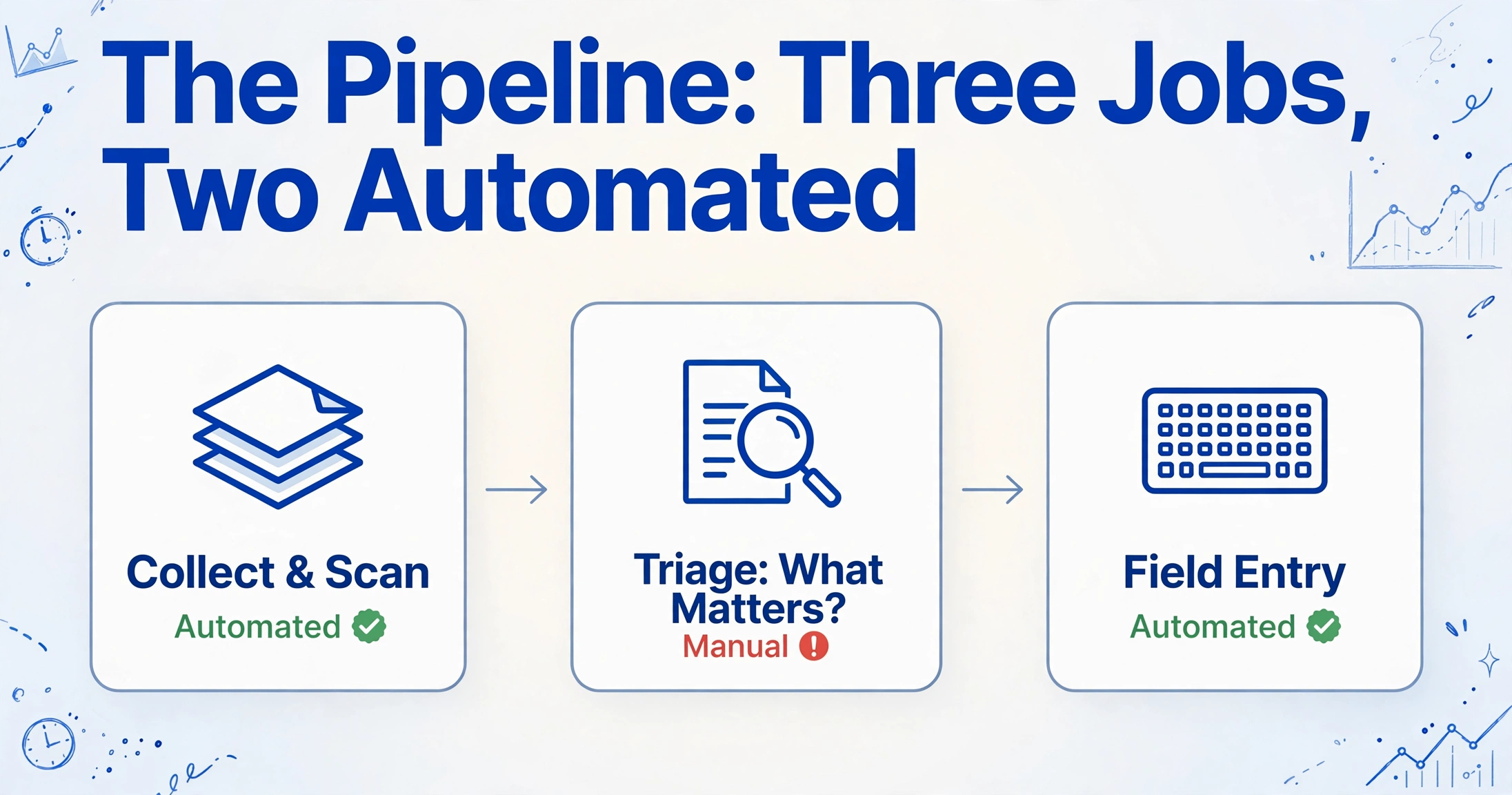
The cost of a paper-heavy season sits in the sorting and the judgment call, not in the scanning or the typing. A client walks in with a folder, the front desk feeds it through a scanner, and the return then waits for a human to decide what matters. Call that step tax document triage. It is the part of the pipeline most firms never name, never budget, and never measure, which is exactly why it keeps absorbing hours that were supposed to go to preparation.
The pipeline itself is simple to draw. Documents arrive at a front desk or a portal. They get scanned. Someone sorts them by form type and files them against the client. A preparer opens the return and works from the stack. The IRS has its own reason to want that stack orderly: Publication 583 requires supporting documents to be kept in an orderly fashion and, for electronic systems, to remain indexed and retrievable in legible form for the life of the retention period (IRS Publication 583). Sorting is not busywork invented by an office manager. It is the shape the record has to take.
What the drawing hides is that the pipeline has three separate jobs, and most firms automate only two of them. Collection and scanning get a tool. Field entry gets a tool. The middle job, deciding which pages the return needs and which are there only for the file, still runs on a person's memory and a one-page cheat sheet. Most tax prep document organization advice stops at the folder and never names this step at all. Our own write-up of batch paper form extraction is explicit that it solves what happens after forms arrive, not the sorting that happens before. That gap is the subject here.
Seasonality makes the gap expensive. The National Association of Tax Professionals reports that 65 percent of its member firms' gross revenue is earned during tax season (NATP), and the IRS processed 271.4 million federal returns and supplemental documents in fiscal year 2025 (IRS Data Book 2025). Every hour spent on triage is an hour taken from the weeks that pay for the year.
Triage Answers One Question Per Page: Does This Return Need It?
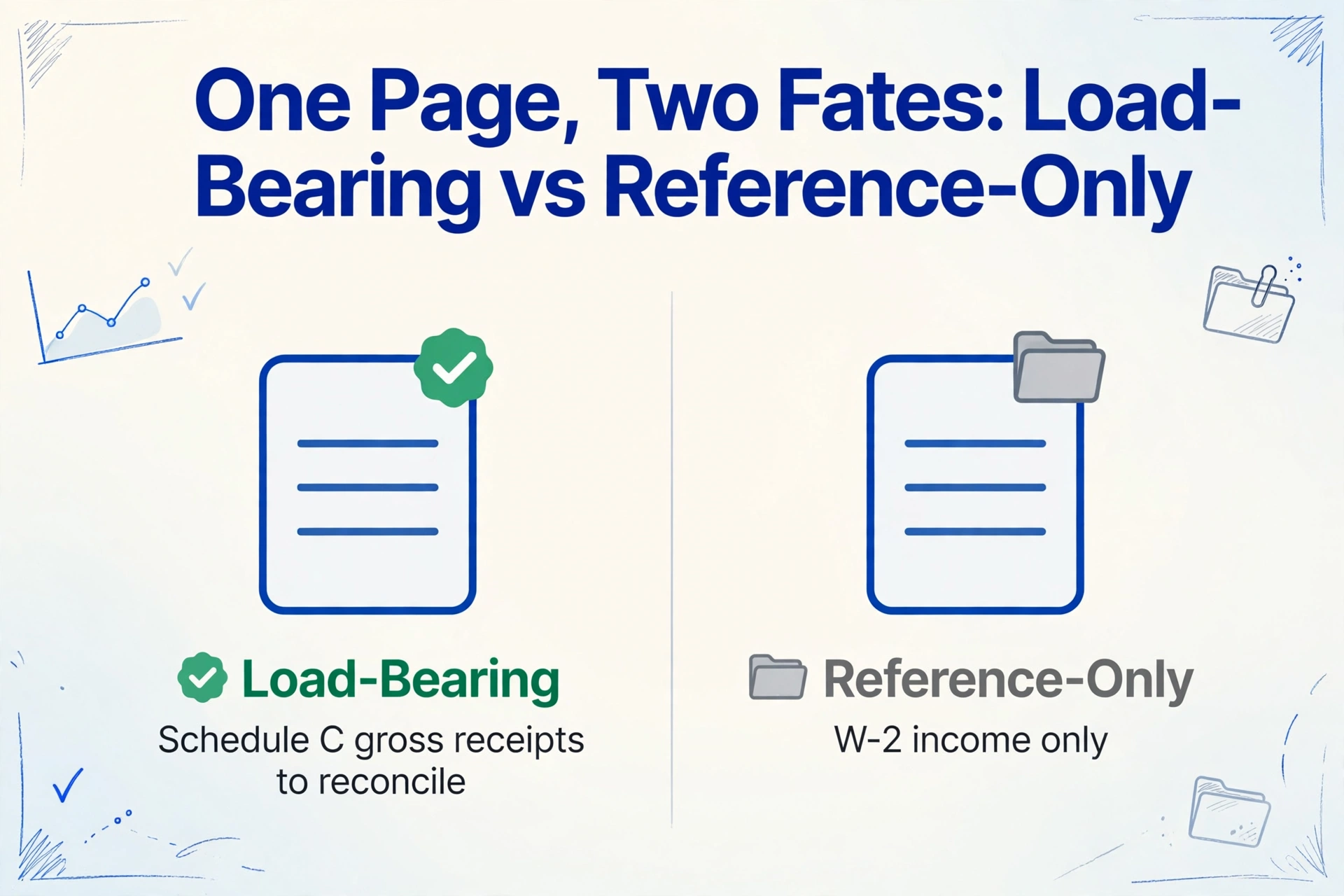
Triage is a relevance decision, not a filing decision, and it changes with the return. The question a sorter is really answering is whether a given page carries a number or a fact this specific return depends on. If it does, the page is load-bearing and a preparer has to see it. If it does not, it is reference-only, and it belongs in the file without ever touching the desk.
The distinction is not a property of the document type. It is a property of the return. A year of bank statements is load-bearing for a client with Schedule C gross receipts to reconcile and reference-only for a client whose only income is a W-2. A stack of receipts is load-bearing when it substantiates a deduction and reference-only when the client takes the standard deduction. The IRS's own definition of supporting documents covers the same mix, listing sales slips, paid bills, invoices, receipts, deposit slips, and canceled checks, and asking that they be organized by year and by type of income or expense (IRS recordkeeping guidance). A bank statement is not clutter. It is exactly the document an extraction tool is built to read when the return needs it, and exactly the page to set aside when the return does not.
Three failure modes repeat in every paper-heavy office. The first is the wrong year, where a prior-year statement or an old K-1 rides along in the current folder. The second is the wrong entity, where a K-1 or a bank statement belongs to a sibling company the client also owns. The third is the wrong client entirely, which happens when two people scan two folders at the same desk in the same hour. None of these is a scanning problem. All three are triage problems, and a sorter moving fast will let each one through.
For the pages that do need work, the extraction itself is well understood. A statement that has to be reconciled line by line is a solved case once it is in a spreadsheet, which is the workflow behind pulling bank statement data into a table. The unsolved part is upstream: knowing which statements in the folder are the ones that need that treatment.
Why the Pile Breaks at Volume, Not at Complexity
A single folder is easy to triage. The trouble starts when the same judgment has to be made a thousand times in a season by whoever is free at the desk. Tax professionals describe the sorting step as the choke point in plain language. One practitioner asked the r/taxpros community how other firms handle "scanning, uploading and sorting docs before you send them to the preparer," and named it directly: "That is currently our choke point" (r/taxpros). The most upvoted answer described the workaround most firms converge on, a receptionist who "sorts the docs based on return flow" using a cheat sheet the firm had to write for her.
The paper has not gone away either. In a 2025 r/taxpros thread about going digital, a firm already running SmartVault alongside Lacerte estimated that 80 to 90 percent of its clients still hand over paper (r/taxpros). That is a firm with document management already in place, which points at the real shape of the problem: the software firms buy has automated naming and routing, and the judgment has stayed manual.
Look at what the established tools actually do. SmartVault's SmartRouting reads metadata from UltraTax CS, Drake, or CCH Axcess and files returns and source documents into the right folders, split by copy type. Canopy renames files and classifies them by type or issuer using global rules. SurePrep's 1040SCAN and GruntWorx go further and push W-2, 1099, and K-1 fields into the return. Each of these solves a real step. None of them answers whether a page belongs in this return at all. That question is left to the sorter, which is why firms that bought the software still write cheat sheets.
Turn Triage Into a Column, Then Filter Instead of Read
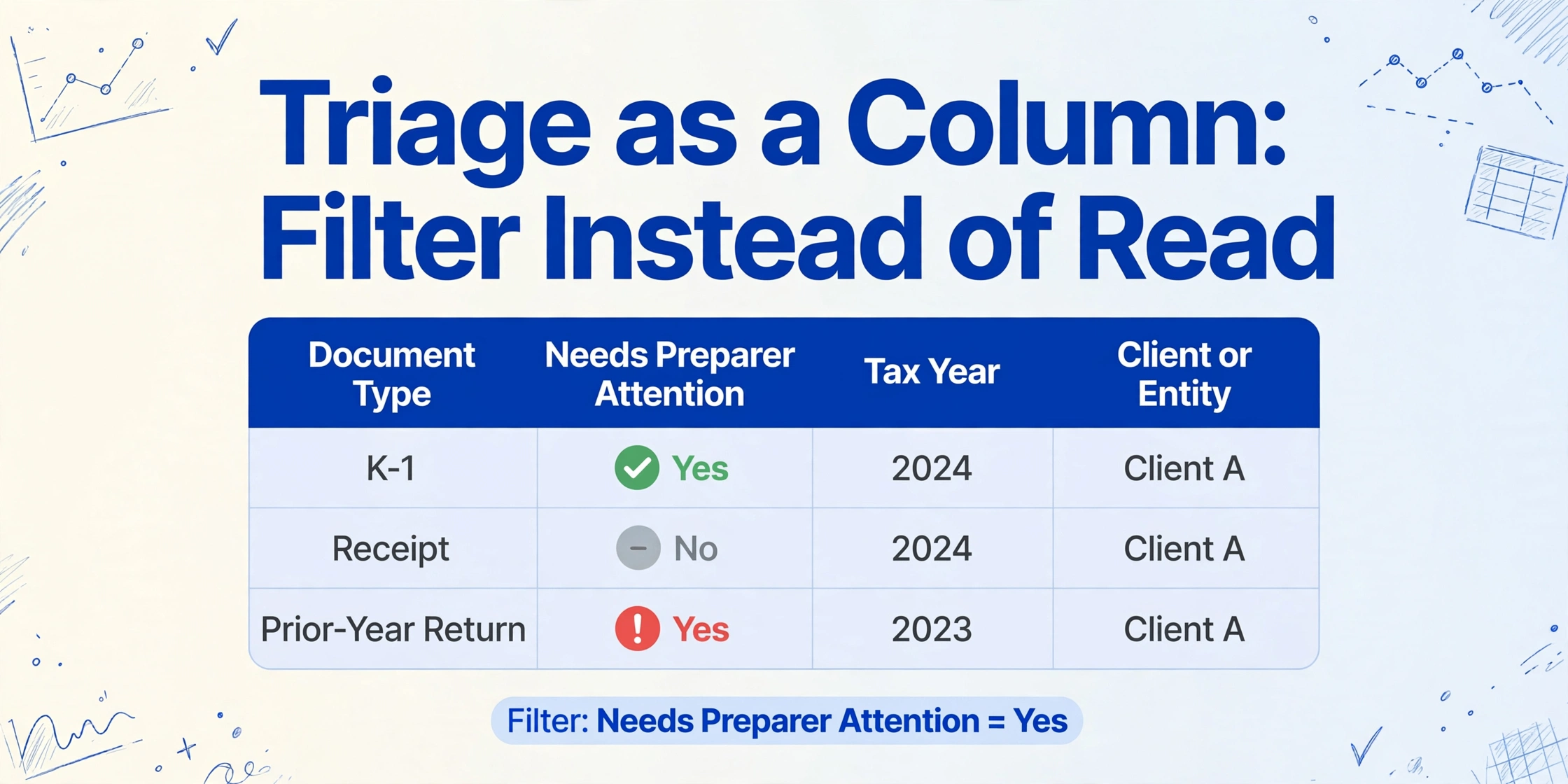
The way to take triage out of a person's head is to make it a column in the extraction output. That is a different move from the folder-based source document sorting the document management tools sell. Instead of deciding where a file goes, you decide what a file is, write that decision into a spreadsheet column, and let the preparer filter on it. The judgment is still made, but it is made once, in a form the whole team can see and reuse.
The mechanism that makes this possible is Custom Column Extraction. You type the column names you want, and the AI reads each document and fills in the value that matches each name by meaning, not by position on the page. That is what lets one set of column names work across a W-2, a bank statement, and a photographed receipt in the same upload, without a template per format. The relevant mode here is the inferred column: a column whose value is not printed anywhere on the document but can be determined from what the document contains. A receipt has no "Document Type" field, but the AI can read it and decide that it is a receipt.
Applied to triage, that produces a small set of columns that turn a client folder into a work queue:
Document Type (options: W-2, 1099-INT, 1099-DIV, 1099-B, K-1, Bank Statement, Receipt, Mortgage Interest 1098, Prior-Year Return, Other)Needs Preparer Attention (options: Yes, No)Tax YearClient or Entity
The first column classifies every page. The second is the triage decision itself, expressed as a rule the AI applies consistently: a K-1 or a 1099 with withholding is a Yes, a twelve-month bank statement on a return that does not reconcile is a No. The last two columns catch the wrong-year and wrong-entity failures before they reach a preparer, because a document tagged 2024 or tagged to a different entity stands out the moment the sheet is sorted.
Because processing is batch-first, the whole client folder goes in at once and comes back as one spreadsheet with one row per document. Triage then stops being a reading task and becomes a filter. The preparer opens the sheet, filters Needs Preparer Attention to Yes, and works the rows that matter. The reference-only pages are still in the sheet, still classified, still traceable to the file, which is what the IRS orderly-record requirement asks for. This is also where the classification pays off for firms doing this at the scale described in our guide to document extraction for accounting practices and in the case for extraction software inside accounting firms.
The Full Scan, Classify, Extract Setup
The setup is four decisions, and once they are made the triage runs on every batch automatically. None of them is a scanning setting or a folder convention. They are all about what the output spreadsheet should contain.
Upload the whole client folder as one batch
Drop in the scans, the PDFs, and the phone photos together. Batch processing merges them into a single table, so the client's folder stops being a pile and becomes a set of rows. You do not need to pre-sort by form type first. That is the job the next step takes over.
Define the classification columns
Add Document Type with its option list, Needs Preparer Attention, Tax Year, and Client or Entity. The option list is the whole point. It is where the triage vocabulary lives, so every sorter applies the same categories instead of inventing their own.
Add the value columns the return actually needs
This is where you pull the numbers for the pages that are load-bearing: payer name, account number, statement period, total, withholding. A bank statement that is reference-only simply leaves these cells blank, and a blank is a clear signal rather than a guess. For the receipts half of the folder, a column like Category (options: Meals, Travel, Office, Other) classifies each one in the same pass.
Filter, review, and hand off
The preparer filters Needs Preparer Attention to Yes and works only those rows. The full sheet, including the reference-only pages, stays as the record. When the same client returns next year, the column set is saved as a preset and reused without rebuilding it.
Files are processed securely and not stored.
The same pattern covers the receipt-heavy end of a season, where the volume is high and the per-document value is low, which is the scenario behind batching business receipts into one tax spreadsheet. When the whole season is W-2s and 1099s, the pipeline folds into the same idea, covered in the tax-season W-2 and 1099 pipeline.
What This Pipeline Still Cannot Decide for You
Three things stay with the firm no matter how the columns are configured. The first is the professional judgment itself. The classification column routes a preparer's attention to the pages that matter, but whether a particular deduction applies, or whether a business expense is ordinary and necessary, is still a call a person makes. The pipeline narrows where that person looks. It does not make the call.
The second is input quality. A blurry phone photo or a scan under roughly 150 dpi can blur the difference between a 2024 and a 2025 date, which is exactly the field triage depends on. A page that contains two unrelated forms, such as a K-1 printed above a payment voucher, can confuse a model built around one row per document. Those pages still need a human eye, and the honest workflow is to treat them as review candidates rather than settled rows.
The third is where the data goes next. This pipeline exports Excel, CSV, or JSON. It does not post into Drake, UltraTax CS, Lacerte, or CCH Axcess on its own, and it does not replace the document management system that handles retention and access control. The IRS recordkeeping rules in Publication 583 and the safeguarding practices around taxpayer data remain the firm's responsibility, not the tool's. A spreadsheet-native layer keeps the extracted data inspectable before it reaches a return, and that inspection step is deliberate.
Frequently Asked Questions
Can the AI tell a bank statement from a receipt without me sorting first?
Yes. You define a Document Type column with the categories you use, and the AI reads each document's content to decide which one applies. It does not rely on the file name or the folder the file arrived in, so an unnamed scan still gets classified.
What happens to a document the AI labels as Other?
It still appears as a row with its classification and its source, so nothing disappears. An Other row is a prompt to review, either because the document is genuinely unusual or because your option list needs one more category. The value of the column is that unusual documents surface instead of blending into the pile.
Does this replace SmartVault, Canopy, or SurePrep?
No. Those tools handle storage, routing, and in some cases pushing fields into tax software. This pipeline handles classification and extraction, and it produces a spreadsheet. A firm can keep its document management system for retention and use the classification layer on top of the intake it already has.
Can I run a whole client's folder in one batch?
Yes. Batch processing is the default. The whole folder goes in together and comes back as one table with one row per document, which is what makes the triage filter practical. Processing a single document at a time would rebuild the same pile in a different place.
How does the triage column handle a document that is relevant for one client but not another?
The rule behind Needs Preparer Attention is yours to define, so you can express it in terms of the return rather than the document. A firm that reconciles every bank statement would mark all of them Yes. A firm that only reconciles Schedule C clients can tie the flag to the presence of business income on the same return. The column follows your rule consistently across the batch.
Does the output import directly into Drake, UltraTax CS, Lacerte, or CCH Axcess?
Not directly. The output is Excel, CSV, or JSON, and your firm maps it into the tax software using the import path you already use. Keeping that step explicit means the extracted data is reviewed before it reaches the return.
The pile is not the problem. The unspoken judgment about which pages matter is, and the moment that judgment becomes a column, a preparer stops sorting and starts preparing.
Test it on a real client folder from your last season, including the reference-only pages you would normally set aside, and see whether the classification column puts the load-bearing documents at the top of the queue. Try it on your own documents.