What Is Receipt Scanning?
A Freelancer's Guide to Tax-Ready Records
Receipt scanning for freelancers is the automated process of capturing key expense data — vendor name, date, amount, tax, and category — from a photo of a paper or digital receipt and organizing it into a tax-ready spreadsheet, without manual typing. For a freelancer filing a Schedule C, this means the difference between handing your accountant a shoebox of faded thermal paper in April and handing them a clean, categorized expense report with every IRS-required field already populated.
Key Takeaways
- Forty hours a year on receipt organization costs you $3,000 in lost billable time — and every thermal-paper receipt in your shoebox is chemically fading while you wait for tax season.
- Receipt photo apps capture vendor, date, and total — three fields that can't split a $47.83 Walmart trip into deductible supplies and personal groceries, so every unsplit dollar costs you 15.3% self-employment tax on money already spent.
- Line-item extraction reads every item on every receipt and auto-categorizes it to your Schedule C lines — your 40 hours of typing collapse into 5 hours of reviewing, and deductions you used to lose at the cash register actually make it onto your return.
What Receipt Scanning for Freelancers Actually Is
For freelancers, receipt tracking isn't about corporate expense policy — it's about surviving tax season with deductions intact. Most receipt scanning content on the web is written for employees submitting reports through Concur, where a finance team handles categorization and a corporate accountant files the return. A freelancer has none of that. You are the finance team, the accountant, and the person who gets the IRS notice.
Receipt scanning is not the same as taking a photo of a receipt and saving it. That gives you an image — useful for reference, useless for deductions. It's also not the same as the receipt capture built into QuickBooks or Wave, which typically extracts three fields: vendor, date, and total. Full receipt data extraction means every line item, every amount, in structured columns you can sum, filter, and hand directly to your Schedule C.
This matters because a freelancer's expenses rarely map neatly to three fields. A single big-box store trip might include deductible office supplies, a non-deductible personal snack, and a partially deductible meal (50% rule under IRS Publication 463). Three-field capture can't split that receipt. Line-item-level extraction can — turning "$47.83 at Walmart" into "$32.50 deductible, $15.33 personal."
The fields a receipt scanning tool extracts for tax purposes typically include:
Transaction Header
- Vendor / Store Name
- Transaction Date
- Subtotal, Tax, Tip, Total
- Payment Method
- Expense Category (auto-classified)
Line Items (per product)
- Item Description
- Quantity
- Unit Price
- Line Total
- Deductible / Non-Deductible Split
For the core technology behind this — the shift from position-based OCR to semantic AI extraction — see our AI document extraction deep dive. And for how that technology applies specifically to receipts, see our breakdown of receipt OCR.
Receipt Scanning vs Receipt Apps vs the Shoebox Method
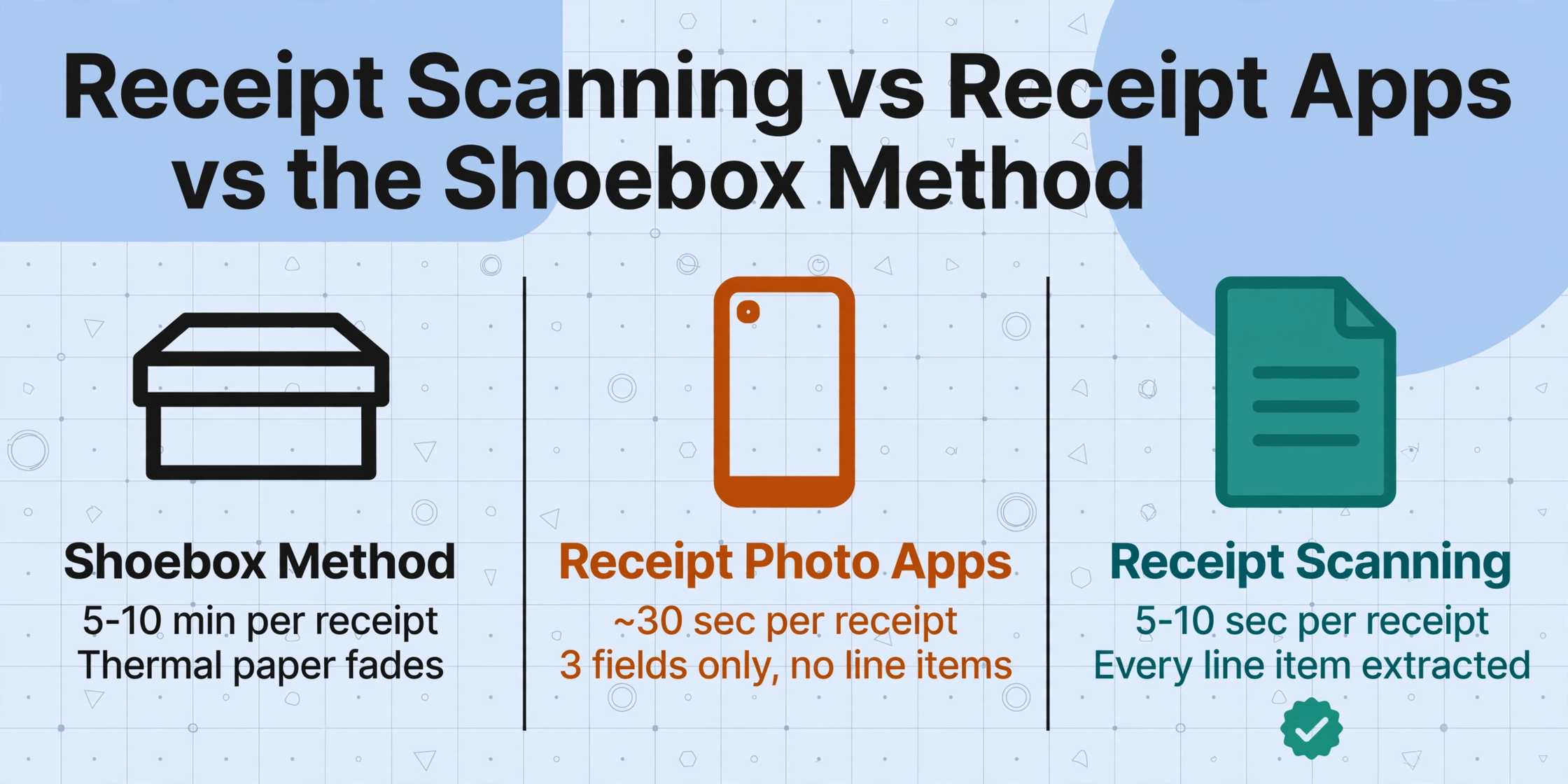
Most freelancers pass through three stages of receipt management before landing on a system that works.
| Shoebox Method | Receipt Photo App | Receipt Scanning Extraction | |
|---|---|---|---|
| What happens | Paper receipts go into a drawer. You deal with them at tax time. | Snap a photo with Wave or QuickBooks. 3 fields auto-captured, photo stored. | Upload a batch. AI extracts vendor, date, every line item, tax, total into structured columns. |
| Time per receipt | 5-10 minutes (sorting + typing) | ~30 seconds | 5-10 seconds (batch, review not retype) |
| IRS substantiation | Paper originals — thermal fading risk | Photo stored (Rev. Proc. 97-22). Basics captured. | Full structured record + image. Audit trail ready. |
| Line-item detail | Only if typed manually | Not extracted | Every item extracted, one row per line |
| Deductible splitting | Manual judgment at tax time | Impossible — no line-level data | AI auto-classifies each item |
The shoebox method fails for predictable reasons. Thermal paper fades chemically within weeks — the coating degrades, and nothing stops it. Under IRS Revenue Procedure 97-22, digital copies are valid tax records if legible and complete. A blank slip is neither. Even surviving receipts cost hours to sort at tax time.
Receipt photo apps occupy the middle ground. Wave, QuickBooks Solopreneur, and Keeper Tax extract vendor, date, and total — meeting the minimum substantiation threshold under Treasury Regulation §1.274-5T. But they stop at line items. That $47.83 at a big-box store could be $32.50 in deductible supplies and $15.33 in personal items — and you need line-item detail to claim the split. For more on this comparison, see our breakdown of receipt scanning apps vs AI extraction.
How Receipt Scanning Works
The old way: template matching. Traditional tools work by position. "Walmart receipts have the total at coordinates (400, 850)." This breaks when Walmart changes POS systems or you shop at a different location. Template-based systems are maintenance — for a freelancer processing receipts from dozens of stores, maintaining templates is the overhead the tool was supposed to eliminate.
The modern way: semantic extraction. AI-based receipt scanning works by understanding what text means, not where it sits. This is Custom Column Extraction: you type the column names you want — "Vendor," "Date," "Item," "Amount," "Category" — and the AI reads the entire receipt, identifies which text blocks correspond to which fields by their semantic role, and maps each to the right output column. A receipt from a store the AI has never seen works on the first try, because it reads meaning, not coordinates.
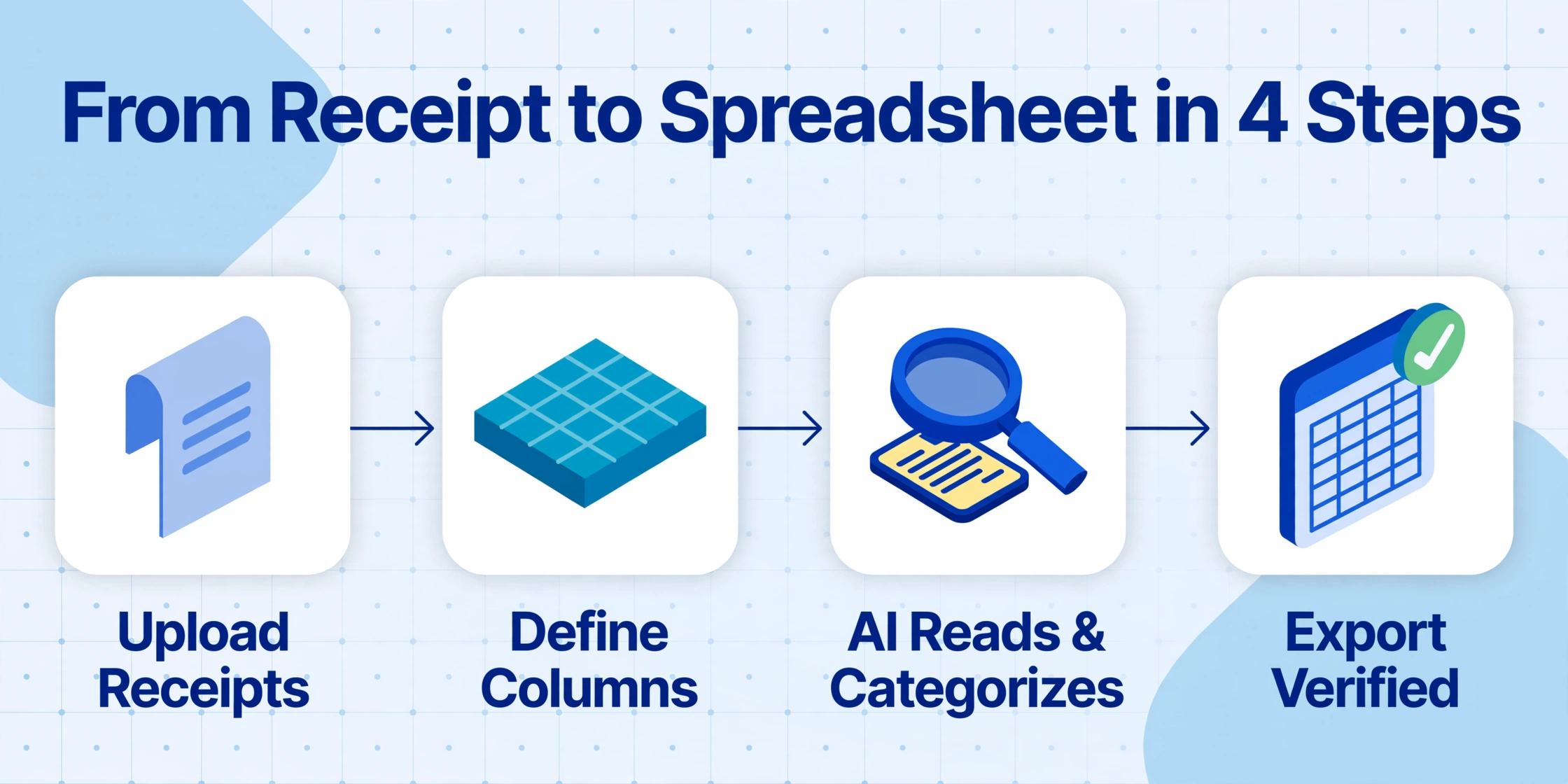
Upload Your Receipts
Drop in photos, scans, or PDFs — single or in batches. Works on phone photos of crumpled paper. Upload an entire quarter's receipts in one go.
Define Your Columns
Type the fields you need for your Schedule C: "Vendor," "Date," "Item," "Amount," "Tax," "Category (options: Office Supplies, Meals, Travel, Equipment)." These become your spreadsheet headers. No template setup, no training.
AI Reads & Categorizes
The vision model identifies each text block by its semantic role and maps it to your columns. Inferred columns auto-classify: define a "Category" column with Schedule C categories, and the AI assigns each item based on what it reads — even though "Category" doesn't appear anywhere on the receipt.
Export to Spreadsheet or Tax Prep
Download as Excel (XLSX) or CSV, or write directly into Google Sheets. Each receipt becomes structured data — one row per line item, every field in its own column, ready for your Schedule C or your accountant's inbox.
Files are processed securely and not stored.
When a Freelancer Needs Receipt Scanning
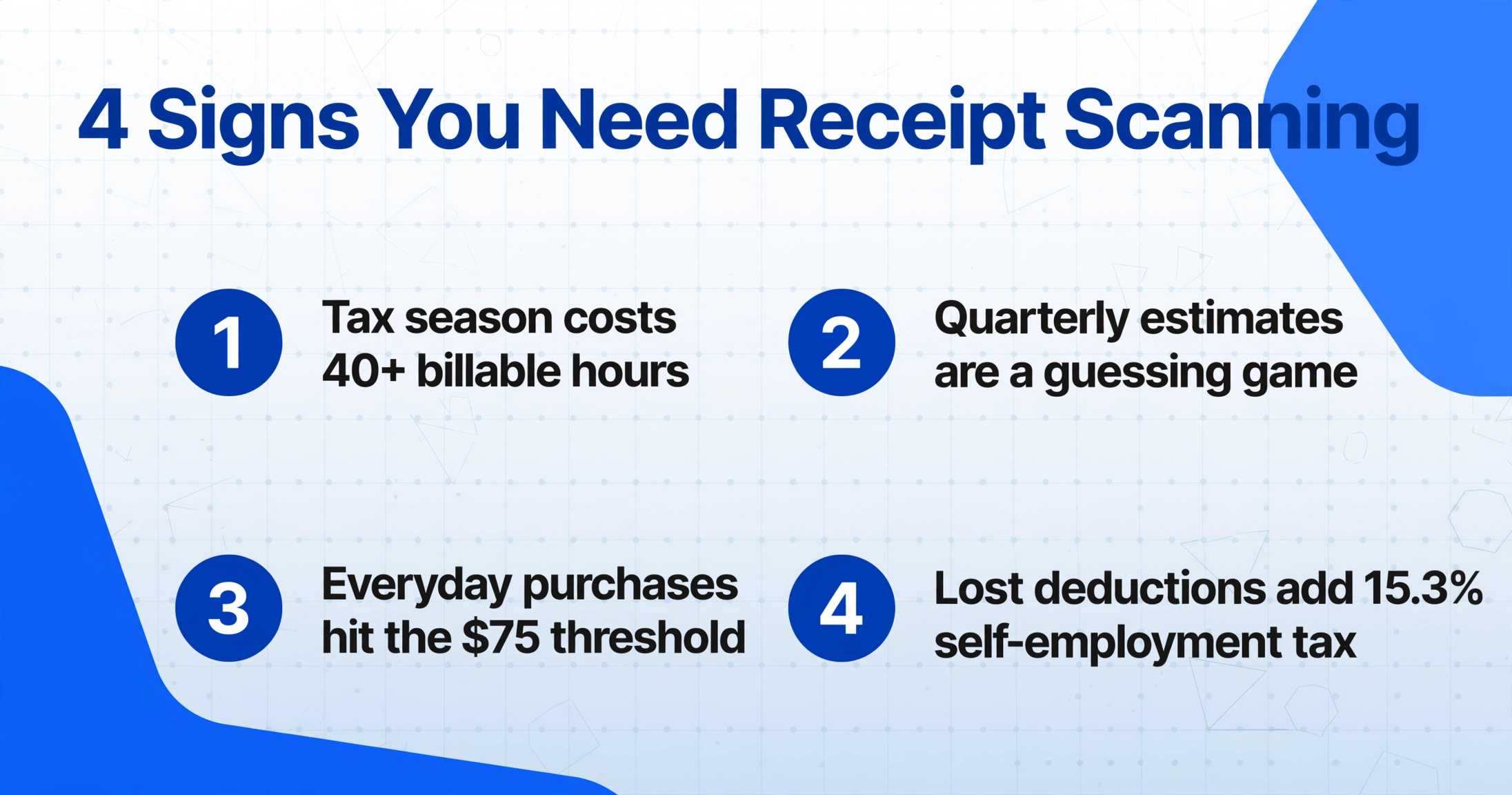
Receipt scanning crosses from "nice to have" to "necessary" at specific moments in the freelance tax cycle.
1. Tax season costs you real billable hours. The SCORE Association reports most small business owners spend 40+ hours annually on tax preparation, with receipt organization as the largest component. At $75/hour, that's $3,000 in lost billable time. Receipt scanning shrinks those hours to review time, not data entry time.
2. Quarterly estimated taxes come due and you're guessing. Freelancers pay estimated taxes four times a year using Form 1040-ES. Each payment requires an estimate of year-to-date profit — and that estimate is only as good as your expense tracking. Pulling totals from unsorted receipts three days before the deadline means you're either overpaying or risking underpayment penalties. A running categorized total makes quarterly estimates a calculation, not a panic.
3. The IRS substantiation threshold applies to everyday purchases. Under §1.274-5T, expenses of $75 or more require a receipt — not just a bank statement. That threshold catches a tank of gas, a software subscription, a client dinner. For lodging, receipts are required at any amount. Clean, dated, categorized receipts make the difference between audit-ready and audit-vulnerable. See our guide to common freelancer receipt deduction mistakes.
4. Undocumented deductions cost you self-employment tax on top of income tax. Self-employment tax is 15.3% of your net profit — on top of regular income tax. Every dollar of undocumented expenses adds 15.3 cents of unnecessary SE tax plus your marginal rate. For a freelancer with $80,000 gross and $20,000 in expenses, missing just 10% of deductions ($2,000) means overpaying ~$306 in SE tax plus ~$440 in income tax at 22%. Receipt scanning ensures every deductible dollar is captured. For the full workflow, see our guide on freelancer receipt preparation for tax season.
What to Look For in a Freelance Receipt Scanning Tool
Not every tool is designed for freelancers. Enterprise platforms like Expensify are built for teams with approval workflows and reimbursement cycles — complexity that adds nothing for a solo operator. Here's what matters.
Template-free operation. If the tool requires you to create a template for each store's receipt layout, pass. You shop at dozens of stores, each printing differently. A template-free tool reads by semantic understanding: a receipt from a store it has never seen works on the first upload.
Line-item extraction. Vendor, date, and total are the easy part. The real test is whether the tool extracts individual items — descriptions, quantities, unit prices, line totals — from a densely printed receipt. Without line items, you can't split a receipt across deductible and non-deductible categories.
Auto-categorization for Schedule C. Freelancers file expenses by category: office supplies (Line 18), meals (Line 24b, at 50%), travel (Line 24a), equipment, professional services. Inferred columns auto-classify each item into these categories during extraction, turning manual sorting into a review step.
Batch processing for quarterly bookkeeping. Processing receipts one at a time isn't meaningfully faster than manual entry. Batch processing — upload 30 at once, get one merged spreadsheet — is where time savings compound. For quarterly bookkeeping, this means uploading a quarter's receipts in one session. For the full numbers, see our cost analysis for freelancer document extraction.
Frequently Asked Questions
Does the IRS accept digital receipt scans as valid records?
Yes. Under IRS Revenue Procedure 97-22, digital receipts carry the same legal weight as paper originals — provided the copy is legible, complete, and retrievable. The IRS has accepted electronic records since 1997. Once scanned and verified, you can discard the paper original.
What's the difference between receipt scanning and an expense app like Wave or QuickBooks?
Wave and QuickBooks Solopreneur extract vendor, date, and total and attach a photo to a transaction. Receipt scanning extraction goes further: it extracts every line item into structured columns. The accounting app tells you "you spent $47.83 at Walmart." Receipt scanning tells you "$12.99 on printer paper (deductible), $8.49 on cleaning supplies (partially deductible), and $26.35 on groceries (personal)." They complement each other — scanning feeds richer data into your accounting system. For the workflow, see our receipt-to-Schedule-C pipeline guide.
Can receipt scanning handle handwritten tips on restaurant receipts?
Yes. Modern AI-based tools read handwriting alongside printed text in the same pass. A restaurant receipt with "$14.00" scribbled near "Tip:" is readable — the AI uses context to distinguish the handwritten tip from the printed subtotal. Accuracy depends on legibility: clear block print extracts reliably, dense cursive less so. For more on edge cases, see how receipt OCR handles real-world receipts.
How much does receipt scanning cost for a freelancer?
Dedicated scanning tools range from free tiers to $9-25/month for batch processing of 50-500+ receipts. If a freelancer billing $75/hour spends 40+ hours on receipt organization annually (the SCORE average), a $15/month tool that reduces that to 5 hours of review pays for itself in the first week of tax season — and typically recovers more than its cost in deduction accuracy alone.
Can receipt scanning handle faded or crumpled receipts?
Yes, with limits. AI-based tools handle moderate fading, creasing, and wrinkling because they read context and shape, not just characters. A partially faded receipt still legible to a human is typically readable to the AI. But once thermal paper fades completely blank, no tool can recover the data. Scan receipts immediately — waiting until tax season is a race against chemistry.
Do I still need a CPA if I use receipt scanning?
Yes. Receipt scanning handles data capture. A CPA handles tax strategy: QBI deduction eligibility (Section 199A), home office rules, audit representation. Receipt scanning makes your CPA faster (clean data instead of a shoebox) and your return more accurate (every receipt accounted for). What it replaces is the $200+/hour CPA time spent on data entry instead of tax planning.
Where to Go From Here
Receipt scanning solves a problem unique to freelancers: the gap between "I have the receipts" and "I can prove every deduction on my Schedule C." Thermal paper fades. The IRS requires documentary evidence. Quarterly estimated taxes don't wait. And every lost receipt is a deduction you can't claim — adding 15.3% self-employment tax and your marginal rate to money already spent.
The tools exist — and unlike even three years ago, they work without templates, without training, and across any receipt format. Upload a sample receipt and see what structured data you get back — or read our guide to preparing freelance receipts for tax season.