How to Extract Clinical Data from
EHR Screenshots — Semantic Abstraction Without Templates
A clinical data abstractor at a mid-sized health system opens Epic, navigates to a patient's chart, and begins reviewing. Vitals. Medications. Lab panels. Problem list. Each data point sits on the screen in front of them — fully digital, fully legible — but to get it into the registry submission tool, the stroke registry database, or the quality measures spreadsheet, they have to read it and retype it. Field by field. Patient by patient. They are not alone. A 2024 Carta Healthcare survey of clinical data abstractors found that more than half of respondents spend the majority of their working hours on manual data entry and extraction, with 70% reporting they encounter errors or discrepancies resulting from manual abstraction — 20% said it happens "very often." The irony is sharp: the data is already digital, stored in a relational database inside an EHR, but the moment it appears as a screenshot, a printed report, or an exported PDF, it becomes unstructured again. It becomes something a person has to transcribe.
The Screenshot Paradox: Why Digital Records Don't Mean Extractable Data
Electronic health records were supposed to solve the data portability problem. Instead, they created a new one: the screenshot as the de facto unit of clinical data exchange.
This isn't hyperbole. On Reddit's r/healthIT, one hospital biller described the daily reality in clinical data workflows: "Exchanging data between systems is extremely cumbersome, and usually must be done by copy and pasting each field you want into the other system." A clinical research thread on r/clinicalresearch asked why EMR-to-EDC data entry remains manual and tedious. The top answer: "Individual hospital privacy and security concerns. Every single site is different, and nearly all of them have extreme trust issues with PHI."
The root cause is structural. EHR systems — Epic, Cerner (now Oracle Health), Meditech — store data in proprietary relational databases designed for transaction processing, not extraction. Epic uses a reporting database called Clarity that mirrors clinical data from its Chronicles transactional system. Cerner relies on Millennium, which organizes records across hundreds of tables with vendor-specific schemas. Direct database access requires SQL expertise that most clinical teams don't have — and most health systems don't grant.
This creates the screenshot paradox: the data is digital inside the EHR, but the only way to move it to another system — a clinical registry, a research database, a quality reporting spreadsheet — is through a screen. Someone logs in, navigates to the right patient, the right encounter, the right tab, and reads the values they need. Then they type them somewhere else. This is clinical data abstraction in practice: the systematic process of extracting, reviewing, and validating key information from patient medical records. And despite the word "systematic," it is overwhelmingly manual. A study published in the Journal of AHIMA found that 58% of healthcare organizations use manual abstraction as their primary method, while only 18% use natural language processing and 12% use simple database queries (PMC study, 2021).
What Makes Clinical Data Harder to Extract Than a Standard Form
A standard invoice has about a dozen fields — date, amount, vendor name, line items — and their meaning is unambiguous across formats. A clinical record is different. The same data type appears in wildly different representations depending on the EHR module, the report layout, and even which hospital within the same health system generated it. Here are the four data categories that break traditional extraction approaches and why.
Vital Signs: More Than Just Numbers
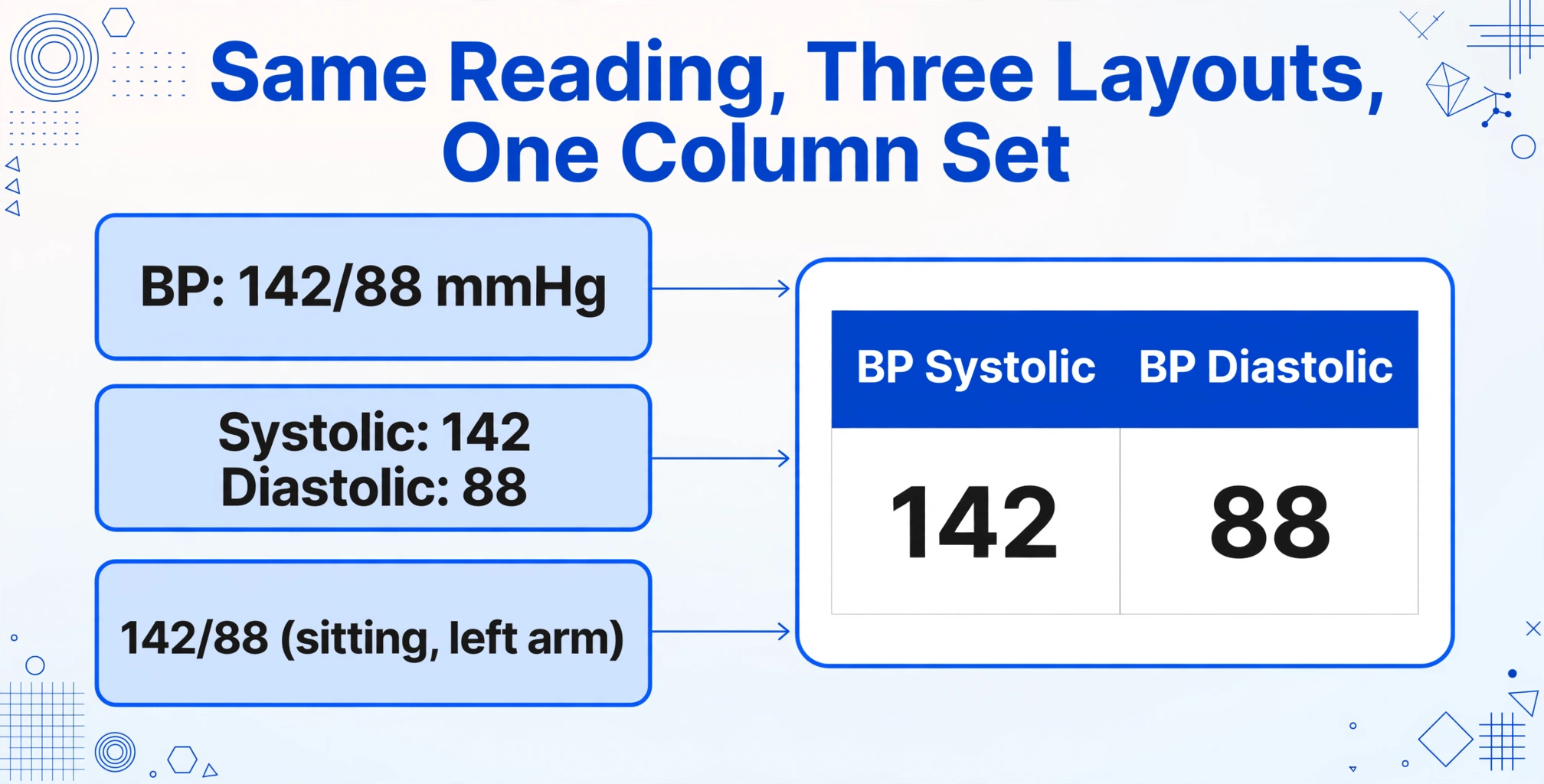
A blood pressure reading of "142/88" might appear on one screen as BP: 142/88 mmHg, on another as a two-row table with "Systolic: 142" and "Diastolic: 88," and on a third as "142/88 (sitting, left arm)" with positional context appended. A template-based extraction tool — one that looks for values at fixed pixel coordinates or pattern-matches against a known label format — breaks on the first variation. It needs a separate template for each layout. A semantic extraction model, by contrast, recognizes that "142/88," "Systolic 142 / Diastolic 88," and "BP 142/88" all describe the same clinical concept regardless of how they're formatted, because it reads by meaning rather than by position.
Vital signs also carry reference ranges that change by patient age, sex, and clinical context. A heart rate of 110 bpm is normal for a neonate and concerning for an adult at rest. The extraction tool doesn't need to make that clinical judgment — the abstractor does — but it does need to preserve the value accurately along with its unit and the timestamp it was recorded, so the abstractor has complete information for downstream review.
The same reading shows up outside the EHR: a home health aide documenting a visit photographs the blood pressure monitor, glucose meter, or pulse oximeter display and later types each number into the care log. That home health aide vitals photo is the same extraction problem — one row per visit, with systolic, diastolic, pulse, and SpO2 as columns.
Medication Lists: Multi-Field Parsing in Free Text
Medication data on an EHR screen is rarely a clean table. It may appear as a continuous medication administration record (MAR) with columns for drug name, dose, route, frequency, and last administration time — or it may appear as a narrative medication reconciliation note: "Metformin 1000 mg PO BID, Lisinopril 20 mg PO daily, Atorvastatin 40 mg PO QHS." The first format is a table. The second is a sentence. A template-based OCR tool might capture the text from both, but it won't parse "Metformin 1000 mg PO BID" into the structured fields [Drug: Metformin, Dose: 1000 mg, Route: Oral, Frequency: Twice daily] without hand-written rules for every possible drug name abbreviation. A semantic AI approach reads the sentence and understands the relationship between each drug name and its associated dose, route, and frequency — the same way a pharmacist would scan a med list and mentally organize it.
Lab Panels: One Value, Many Labels
A serum glucose result can appear as "Glucose: 102 mg/dL" on a Quest Diagnostics report, "GLU 102" on a Cerner lab flowsheet, and "Glucose, Serum — 102 mg/dL (Ref: 70-99)" on an Epic Results Review screen. All three represent the same clinical observation: a fasting glucose of 102. A template-based approach needs to be trained on each label variant individually. A semantic model recognizes that "Glucose," "GLU," and "Glucose, Serum" are three labels pointing to the same analyte — because it understands clinical terminology, not just text strings.
This distinction matters enormously in practice. A clinical research coordinator extracting lab values for 200 patients from a mix of external lab PDFs, internal EHR screenshots, and faxed results can't build 200 extraction templates. They need one extraction pass that works across all formats. Semantic extraction — which identifies values by what they mean rather than where they sit — is the mechanism that makes this possible.
Problem Lists: Codes and Narratives Side by Side
A problem list entry in Epic might read: "E11.9 — Type 2 diabetes mellitus without complications." The ICD-10 code "E11.9" sits next to its text description. Some reports display only the code; some display only the description; some display both. A naive extraction tool might pull "E11.9" into one field and drop the description, or pull the description and lose the code. The abstractor needs both — the code for registry submission and the description for clinical context. A semantic extraction approach that understands the relationship between a diagnosis code and its associated text description can reliably capture the pair, preserving the complete clinical picture.
Why FHIR and HL7 Don't Solve the Screenshot Problem
The obvious question at this point is: why not use an API? FHIR (Fast Healthcare Interoperability Resources) is the HL7 standard designed precisely for this — structured clinical data exchange between systems. Epic supports SMART on FHIR. Cerner offers Ignite APIs on FHIR R4. Meditech's Expanse platform exposes FHIR R4 endpoints. So why are people still copying and pasting from screenshots?
Because FHIR APIs cover a narrow set of data elements and a narrow set of users. Epic's FHIR APIs serve patient demographics, appointments, allergies, and some clinical documents — but they don't expose quality metrics, detailed billing data, or the custom fields that practices add to track referrals, prior authorizations, and registry-specific variables. As the Skyvern analysis of EHR automation documented (March 2026), even the best FHIR implementations leave significant gaps in what's programmatically accessible.
More fundamentally, API access requires IT infrastructure that most clinical teams don't control. A quality improvement nurse abstracting data for the ACC's CathPCI Registry or a stroke coordinator submitting to Get With The Guidelines doesn't have the credentials, the API keys, or the technical support to build FHIR integrations. They have access to the EHR front end. They can log in, view patient charts, and take screenshots. That's their data extraction pipeline — and for a large fraction of clinical data abstraction work, it's the only pipeline available.
The Health Elements team, which builds AI-driven abstraction tools for cardiovascular registries, estimates that a medium-sized health system spends $15 million or more annually on clinical data abstraction across all service lines (Health Elements analysis). The same analysis found that AI-driven abstraction can reduce abstraction time by up to 90% and cut total abstraction costs by 50% or more. Those savings don't come from better APIs — they come from tools that can read what's on the screen the same way a human abstractor does, just faster and more consistently.
Semantic Extraction vs. Template-Based OCR: The Difference That Matters
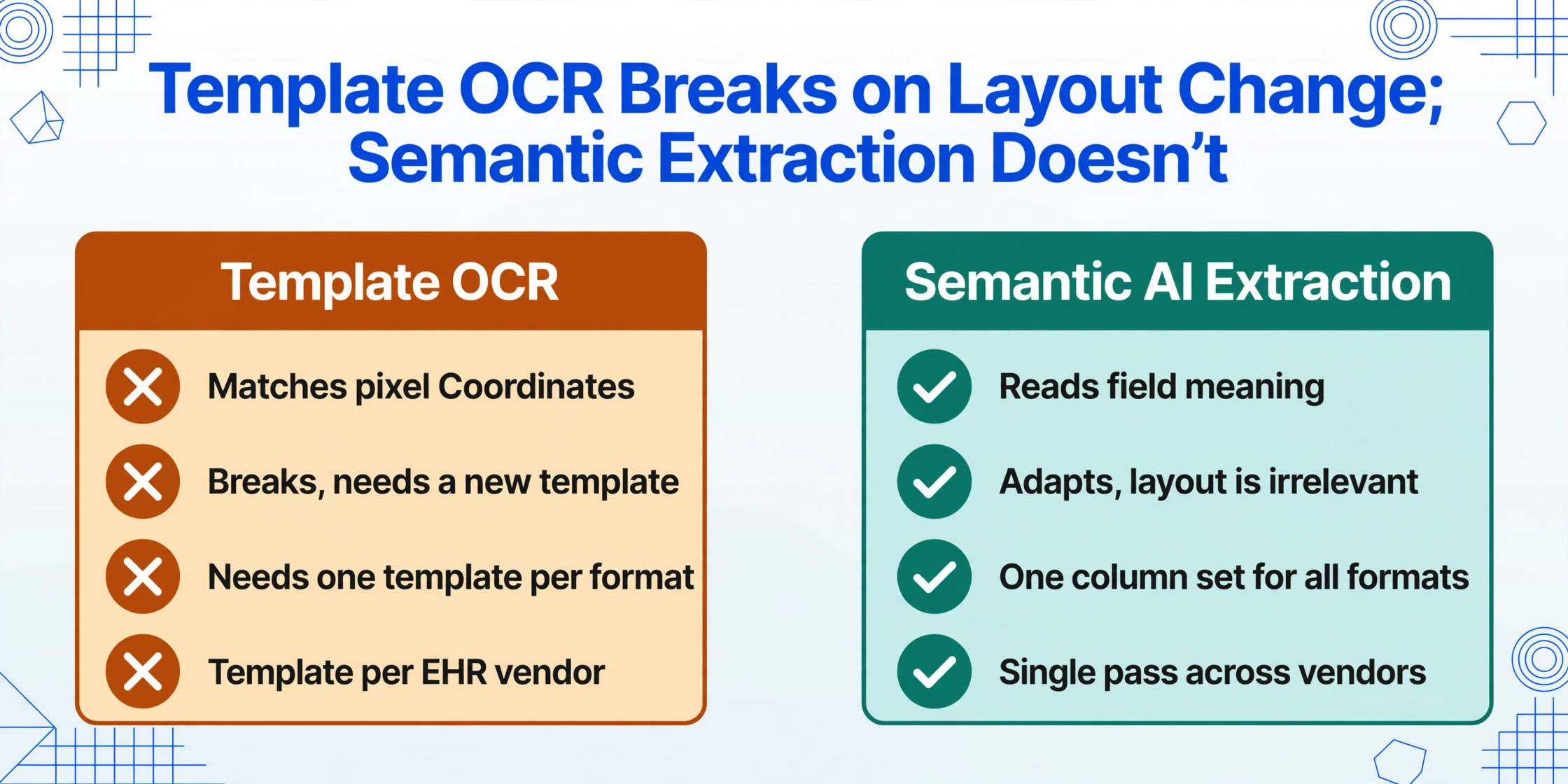
Not all AI extraction works the same way. The critical distinction for clinical data is between position-based extraction (template OCR) and semantic-based extraction (AI that reads by meaning).
| Template-Based OCR | Semantic AI Extraction | |
|---|---|---|
| How it finds data | Matches pixel coordinates or label patterns | Understands what each field means |
| What happens when the layout changes | Breaks — requires a new template | Adapts automatically — layout is irrelevant |
| Setup per report format | One template per format | One set of column names for all formats |
| Handles "Glucose" labeled as "GLU" | No — needs a separate rule | Yes — recognizes both as the same analyte |
| Works across Epic, Cerner, Meditech | Separate template per EHR vendor | Single extraction pass works across vendors |
The difference is a paradigm shift. Template-based OCR asks: "Where is the glucose value on this page?" Semantic AI extraction asks: "Which value on this page means glucose?" The first is a geometry problem. The second is a reading comprehension problem. For clinical data — where the same observation can appear under a dozen different labels across different EHRs, lab vendors, and report layouts — the reading comprehension approach is the one that scales.
This is what Custom Column Extraction means in practice: instead of defining bounding boxes or training a template on a specific EHR screen layout, you type the column headers you want — "Patient MRN," "BP Systolic," "BP Diastolic," "Heart Rate," "Hemoglobin A1c," "LDL Cholesterol" — and the AI locates each value anywhere on the document by understanding its clinical meaning. You define the output. The AI understands the input.
This approach also unlocks batch processing: uploading multiple screenshots, PDFs, or scanned reports at once and receiving a single merged spreadsheet with one row per patient, all columns populated. For a clinical research coordinator abstracting data from 200 patient charts — each containing screenshots from different EHR modules taken at different points in time — batch processing turns a multi-week manual task into something that completes in minutes, with the human reviewer's role shifting from data entry to data verification.
Paper registration forms are no different in kind — a patient intake form to Excel run takes the header list you defined and fills it from the scanned pages, so the paper half of the chart lands in the same table as the screenshots.
A Practical Walkthrough: From EHR Screenshot to Structured Spreadsheet
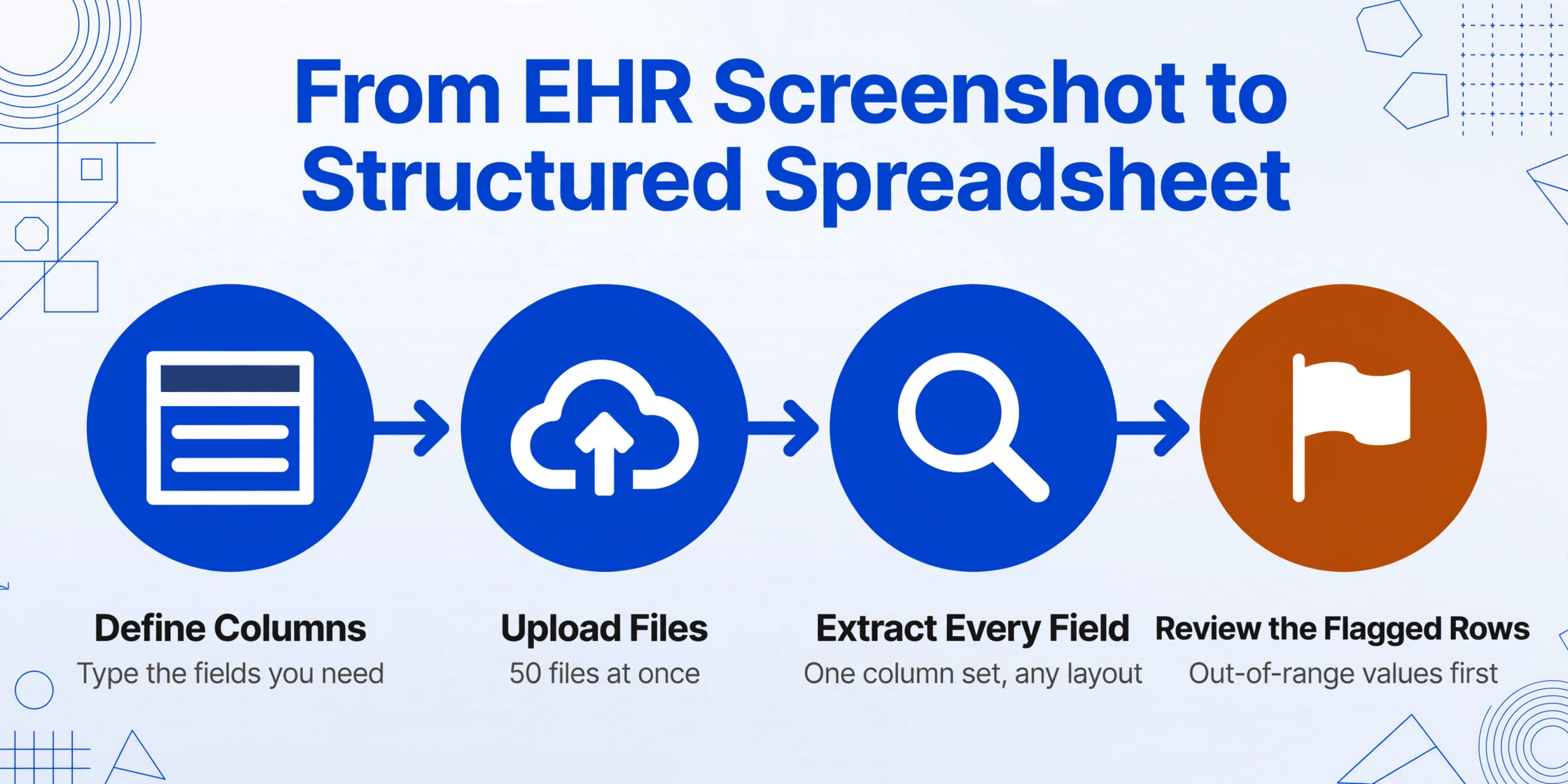
Here is what the extraction workflow looks like end to end, using a real clinical data abstraction scenario: extracting key variables for a cardiology registry submission from Epic chart screenshots.
Define your columns
Type the data fields you need: "Patient MRN," "Admission Date," "Discharge Diagnosis," "LVEF (%)," "Troponin Peak," "Antiplatelet at Discharge." You can also include inferred columns — fields where AI makes a judgment based on document content. For example, "LVEF Category (options: Preserved/Mildly Reduced/Reduced)" instructs the AI to read the ejection fraction value, compare it against clinical thresholds, and output the appropriate category — even though "LVEF Category" isn't explicitly printed anywhere on the chart.
Upload your files
Drag in screenshots, exported PDFs, scanned lab reports — any format, any EHR vendor. You can upload 50 files at once. The tool handles JPG, PNG, PDF, and WebP, so a mix of Epic screenshot PNGs, Cerner-exported PDFs, and faxed lab result scans all go into the same batch.
AI extracts across all files
The AI processes all files in parallel. It reads each document, locates the values matching your column definitions, and populates the output table. Because extraction is semantic rather than positional, a troponin value displayed as "cTnI: 0.04 ng/mL" on one hospital's Epic screen and "High-Sensitivity Troponin I — 12 ng/L" on a different hospital's Cerner report both map to the same "Troponin Peak" column. The AI recognizes both as troponin results despite different assay types, units, and label formats.
Review and export
The output is a spreadsheet with one row per patient and your specified columns as headers. Review for completeness — spot-check outlier values, verify that multi-page reports had all pages processed — then export to Excel, CSV, or JSON. If you use Google Sheets, the add-on writes results directly into your active sheet without downloading and re-uploading.
Files are processed securely and not stored.
When Extraction Alone Isn't Enough: Quality Checks and Edge Cases
Clinical data extraction carries higher stakes than invoice processing. A misplaced decimal point in an invoice means a billing correction. A misplaced decimal point in a lab value means a registry data quality flag — or worse, a misclassified patient outcome. Here are the edge cases that matter and how to handle them.
Out-of-Range Values and Unit Mismatches
A creatinine value of "15.2 mg/dL" is clinically alarming. A creatinine of "1.2 mg/dL" is routine. If the decimal point shifts during extraction, the error propagates into every downstream analysis. The safeguard is not in the extraction step — it's in the review step. After AI extraction, scan the output column for values outside the physiologically plausible range for the patient population. Modern extraction tools can flag outliers automatically by comparing extracted values against configurable reference ranges. This doesn't replace human review, but it directs the reviewer's attention to the rows most likely to contain errors — a dramatically more efficient workflow than reviewing every row equally.
Duplicate Medications and Reconciliation Artifacts
A patient's medication list on an EHR screen may include both an active prescription for "Metformin 500 mg BID" and a discontinued order for "Metformin 1000 mg daily" — both visible on the same medication history view. A naive extraction that pulls every medication entry will capture both, creating a false duplicate. The solution is to configure the extraction to capture the medication status as a separate column (Active/Discontinued/Completed), allowing the abstractor to filter during review. This is where inferred columns become valuable: a column defined as "Active Medications Only (yes/no)" instructs the AI to evaluate each medication entry's status context and output only those currently active.
Multi-Page Reports and Continuation Pages
A 4-page lab report where CBC results start on page 2 and continue onto page 3 presents a continuity challenge. Does the extraction tool understand that page 3 is a continuation, not a new report? Semantic extraction models that process documents holistically — reading all pages as one continuous clinical document — handle this naturally. The model recognizes that page 3's "WBC: 7.2" belongs to the same CBC panel that began on page 2, not to a separate report. When uploading multi-page PDFs, ensure all pages are included in a single file rather than split across separate uploads, so the AI can maintain this continuity context.
Handwritten Annotations and Marginalia
Clinicians annotate. A printed lab report with "repeat in 2 weeks" handwritten in the margin. A medication list with a circled dose and "d/c'd — causing GI upset" scrawled next to it. These annotations contain clinically significant information that a standard OCR engine will either miss or misread. Vision-based AI models that process the document as an image — not just as extracted text — can read handwriting alongside printed text, capturing both the structured data and the unstructured clinical context in a single pass. If a handwritten note modifies a medication status, an inferred column like "Medication Status (Active/Discontinued/Modified)" can surface that annotation as a structured flag for the reviewer.
HIPAA, Security, and What "Compliance" Actually Means
Any tool that processes clinical data must address HIPAA. But HIPAA compliance is not a certification badge — it's an operational state defined by the HIPAA Security Rule's requirements for administrative, physical, and technical safeguards (45 CFR Part 160 and Subparts A and C of Part 164). No government agency issues a "HIPAA Certified" seal. What matters is whether the tool's data handling practices satisfy the Security Rule's three safeguard categories.
For clinical data extraction, the relevant technical safeguards are: encryption in transit (all data transmitted over HTTPS), encryption at rest, access controls that restrict who can view or process patient data, and a clear policy on data retention and deletion. A tool that processes files ephemerally — extracting data without storing the source documents after processing — removes a significant category of risk because there is no persistent PHI repository to breach.
For organizations that require a Business Associate Agreement (BAA) — which is most covered entities under HIPAA — the key question to ask any extraction tool vendor is whether they will sign one. A BAA is a contract that extends HIPAA obligations to the vendor as a business associate. Without a signed BAA, a covered entity cannot legally share PHI with that vendor for processing. This is not a technical feature; it's a contractual requirement. Verify before uploading any patient data.
In practice, the security model for AI-powered clinical data extraction should be: the user controls what data enters the system, the system processes it without retaining source files, and the user controls where the output goes. No persistent storage of PHI. No training on user data. No sharing with third parties. These are the operational practices, not marketing claims, that distinguish a HIPAA-compatible workflow from a generic file upload tool.
When Semantic Extraction Excels — and When It Needs a Human
Semantic AI extraction handles the majority of clinical data abstraction scenarios well, but there are specific situations where human judgment remains essential. Being honest about these limits is better than promising a frictionless experience that doesn't exist.
Where it excels: Structured or semi-structured clinical data on a single screen or report — vitals tables, medication lists, lab panels, problem lists, immunization records, discharge medication reconciliations. These data types have predictable clinical semantics even when their visual presentation varies. The AI can capture them with high accuracy across different EHR vendors and report formats because the underlying clinical concepts (blood pressure, hemoglobin A1c, medication dose) are universal.
Where a human should verify: Narrative clinical notes with embedded data — a progress note that mentions a lab value in passing ("K was 3.1 this morning so we repleted") without a formal lab result entry. AI may extract "3.1" as a potassium value, but it may not capture the clinical context that this was a point-of-care check, not a formal lab draw, and the value may not belong in the registry's "Serum Potassium" field. Similarly, scanned documents with heavy artifacts — faxed records that have been faxed multiple times, creating ghost text and alignment skew — may produce degraded results. In these cases, the AI extraction should be treated as a first-pass draft that a human reviewer confirms, rather than a final answer.
A 2024 benchmarking study of LLM-based information extraction tools for medical documents (posted on medRxiv) found that modern AI models "offer a significant advancement over rule-based methods" for clinical IE tasks but noted that performance varies by document type and extraction complexity. The takeaway for practitioners: use AI extraction as a productivity multiplier that handles the 80% of straightforward data points, freeing the human abstractor to focus verification effort on the 20% that require clinical judgment.
How This Compares to Other Approaches
The landscape of clinical data extraction options ranges from fully manual to fully automated. Here is how they compare in practice, not in marketing copy.
| Approach | Setup Required | Handles Format Variation | Works Without IT Access | Best For |
|---|---|---|---|---|
| Manual abstraction | None | Yes (human adapts) | Yes | Very low volume, high clinical complexity |
| FHIR/HL7 API | IT integration + credentials | N/A (structured data) | No | High-volume structured data within one EHR ecosystem |
| Template OCR | One template per format | No — breaks on layout change | Yes | High-volume, single-format documents |
| NLP pipeline | Technical build + training data | Partial | No | Enterprise-scale, single-institution deployment |
| Semantic AI extraction | Type column names | Yes — layout-independent | Yes | Multi-format, multi-source clinical data abstraction |
The right choice depends on volume, format diversity, and organizational access to technical resources. For the clinical research coordinator abstracting 200 charts from a mix of Epic screenshots, external lab PDFs, and faxed records — with no database credentials, no API access, and no NLP engineering team — semantic AI extraction is the only option in the list that doesn't require either template construction or IT integration. It's not the only valid approach, but it's the only one that matches the real-world constraints of most clinical data abstraction work.
FAQ
Does AI extraction work with screenshots from any EHR system?
Yes, because extraction is based on understanding what data means rather than matching a specific screen layout. A blood pressure reading on an Epic flowsheet, a Cerner vitals table, and a Meditech patient summary all get recognized as blood pressure — regardless of font, position, or label format. The AI processes the screenshot as an image and reads it the way a human clinician would, by interpreting content semantically. That said, extremely cluttered screens with dense overlapping data — multiple tables stacked vertically, popup overlays, or split-pane views with small font — may reduce accuracy and warrant spot-checking.
Can it extract data from handwritten clinical notes?
Yes, with caveats. Vision-based AI models can read handwritten text alongside printed text in the same document. Clear, structured handwriting — medication annotations, vital sign notations on a paper flowsheet — extracts reliably. Heavily cursive, rushed clinical handwriting with non-standard abbreviations will have lower accuracy. For handwritten content, treat AI extraction as a first draft that needs human verification, not as a final authoritative record.
How does this handle PHI and HIPAA requirements?
HIPAA compliance is an operational state, not a certification. The relevant factors for any extraction tool are: (1) whether data is encrypted in transit (HTTPS) and at rest, (2) whether files are processed ephemerally — extracted and then discarded without persistent storage of PHI, (3) whether the vendor will sign a Business Associate Agreement (BAA) if your organization requires one, and (4) whether access to processed data is restricted to authorized users only. Verify these details with the specific tool you're evaluating before uploading patient data. No extraction tool should claim HIPAA "certification" — because no such certification exists. What matters are the operational safeguards.
What's the accuracy on multi-page PDF lab reports?
For printed text in clean scans, accuracy can reach 99% for clearly defined fields. Multi-page reports work best when uploaded as a single PDF so the AI can maintain cross-page continuity — recognizing that page 3's WBC result belongs to the same CBC panel that started on page 2. Accuracy degrades with heavily artifacted scans (ghosting from multi-generation faxing), extreme skew, or very small font sizes. For critical registry submissions, spot-check a sample of extracted results against source documents before bulk processing.
Can I process hundreds of patient charts at once?
Yes. Batch processing is designed for exactly this scenario: upload all files at once, define your column headers once, and receive a single merged spreadsheet with one row per patient. Processing time scales with file count, not linearly — multiple files are processed in parallel. A batch of 100 screenshots typically completes in under a minute. For larger volumes (500+ files), split into multiple batches to avoid timeout limits and make incremental review easier.
What if I need to extract data that isn't explicitly written on the screen?
This is what inferred columns are for. An inferred column tells the AI to make a judgment based on document content, not just transcribe a visible value. For example, "LVEF Category (options: ≥50% Preserved / 40-49% Mildly Reduced / <40% Reduced)" reads the ejection fraction percentage from the document, compares it against the clinical thresholds, and outputs the appropriate category — even though "LVEF Category" is never written on the chart. Similarly, "Medication Reconciliation Status (Complete/Incomplete)" can evaluate whether discharge medications match admission medications and flag discrepancies. Inferred columns turn extraction from simple transcription into structured clinical data generation.
Is this a replacement for clinical data abstractors?
No — it's a tool that changes what abstractors spend their time on. Instead of spending 50% of their hours on manual data entry (the Carta Healthcare 2024 finding), abstractors can shift to verification, clinical judgment, and outlier investigation. The AI handles the rote transcription; the human handles the clinical reasoning. This is not about replacing abstractors. It's about removing the part of the job that no clinician went to school for — reading values off one screen and typing them into another.
Clinical data abstraction has been waiting for a tool that reads screens the way a human does — by understanding what data means, not where it sits. Semantic AI extraction doesn't replace the abstractor's clinical judgment. It replaces the copy-paste.
If you're extracting clinical data from EHR screenshots today — for a registry, a research study, a quality improvement project, or an audit — the first step is to test the approach on a small batch of your own files. Pick 10 patient charts. Define your columns. Run the extraction. Compare the output against your manual abstraction. If the AI captures 90%+ of the data points correctly, you've just reclaimed the majority of the time you currently spend transcribing. The remaining 10% is where your clinical expertise belongs.