GCash Screenshot: How to Extract
the Amount and Reference Number
A customer sends you a GCash screenshot. It sits in your Facebook Messenger, your Viber thread, or your email inbox — a rectangle of blue and white that says the payment went through. The amount is there. The sender's name is there. The reference number — that string of digits near the bottom that GCash's own security team tells you to always check — is there too, usually in a smaller font, easy to skim past. If you process five of these a day, typing out each field by hand is tedious. If you process fifty, it's a bottleneck. The information on a GCash screenshot isn't hard to find — it's that finding it one screenshot at a time, for every transaction, eats the time the payment was supposed to save.
Where the Amount, Reference Number, and Recipient Sit on a GCash Screenshot
Open a completed GCash transaction — tap into any entry from the Transactions tab — and the detail screen follows a layout that has stayed broadly consistent across app updates, even as GCash evolved from a simple send-money tool into a financial super-app with savings, investments, insurance, and lending products layered on top.
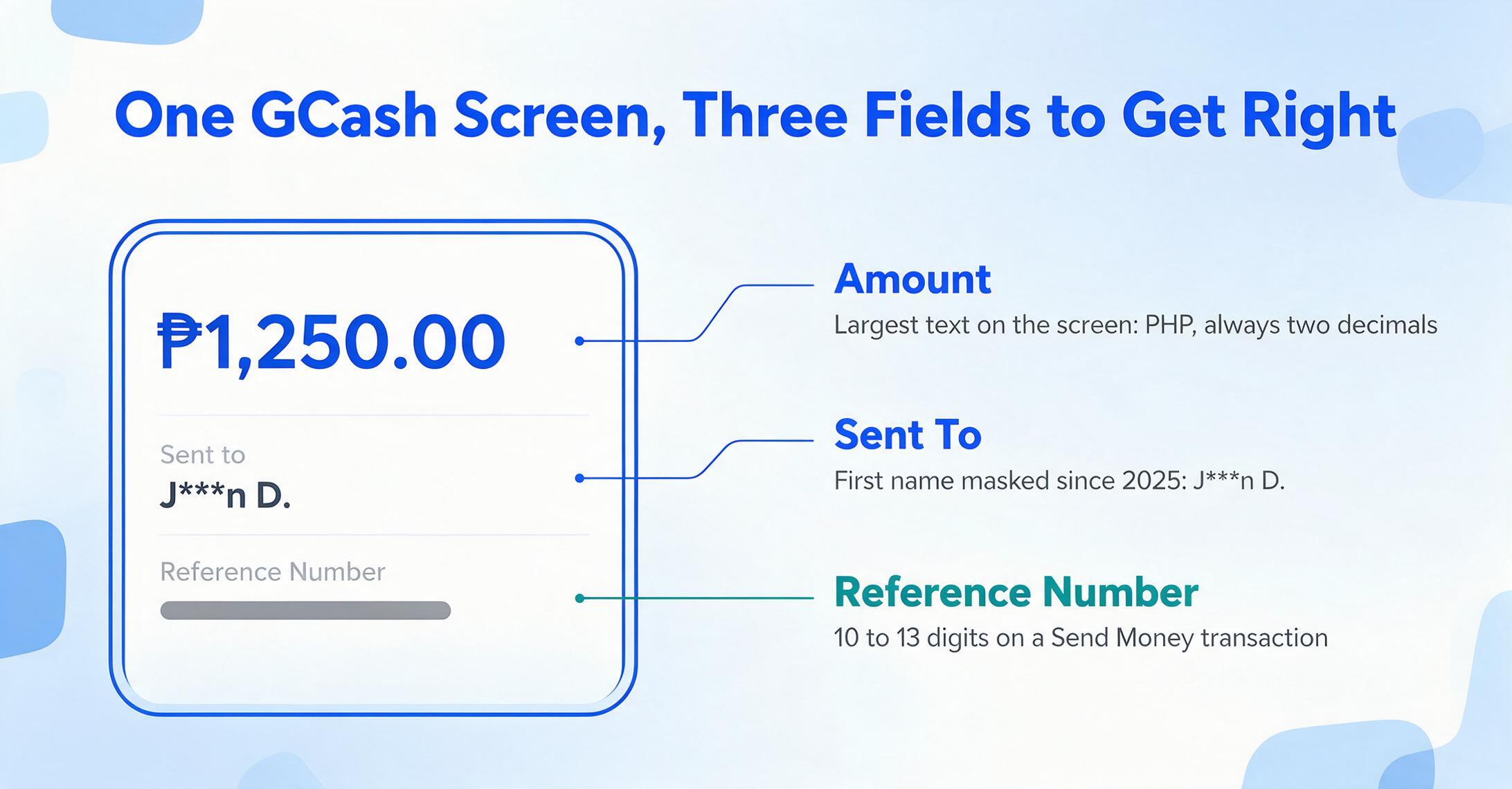
At the very top, in the largest text on the screen: the amount. It's displayed in Philippine pesos (PHP), always with the peso sign (₱) and two decimal places — ₱1,250.00, ₱500.00, ₱15,750.50. There is a comma separating thousands, and the figure is right-aligned in most views. For a Send Money transaction, the amount is the deduction from your wallet balance plus any convenience fee. For a Pay Bills transaction, the amount includes the bill total plus any service charge the biller applies through GCash's platform.
Below the amount sits the recipient name (labeled "Sent to" on Send Money screens, or the biller name on Pay Bills screens). As of 2025, GCash began partially masking the recipient's first name on the confirmation screen — a privacy measure aimed at reducing the information exposed in a screenshot that might be shared or leaked. The full name still appears in your own Transaction History inside the app, but on the shared screenshot, the recipient might appear as "J***n D." rather than "John D." If you're logging who a payment went to from a screenshot alone, the masked name may not be enough — which is why the unmasked name is best pulled from the in-app detail view rather than the shared confirmation screen.
Further down the screen, usually in smaller text below the recipient information: the reference number. This is a string of 10 to 13 digits — alphanumeric on older transaction formats, purely numeric on newer ones. The reference number is the field that GCash's own fraud prevention guidance tells users to check: verify the reference number, sender's name, amount, and timestamp against what appears in your app's Transaction History. The reference number might appear as a continuous string like 6028871884223 or with spaces like 6028 871 884223 — both are valid, and the formatting can differ between the in-app detail screen and the SMS confirmation message. A Reddit user on r/GCashPH noted that older GCash screenshots sometimes show a 13-digit reference number with a different spacing pattern than the current format, which can trip up anyone matching reference numbers across batches of screenshots taken months apart.
The date and timestamp — always in Philippine Standard Time (UTC+8) — appears near the bottom of the detail screen along with the transaction type label (Express Send, Buy Load, Pay Bills, Pay QR) and the funding source (GCash wallet balance, linked bank account, or linked debit card if the transaction drew from a linked account).
The Reference Number Is the Field That Actually Matters
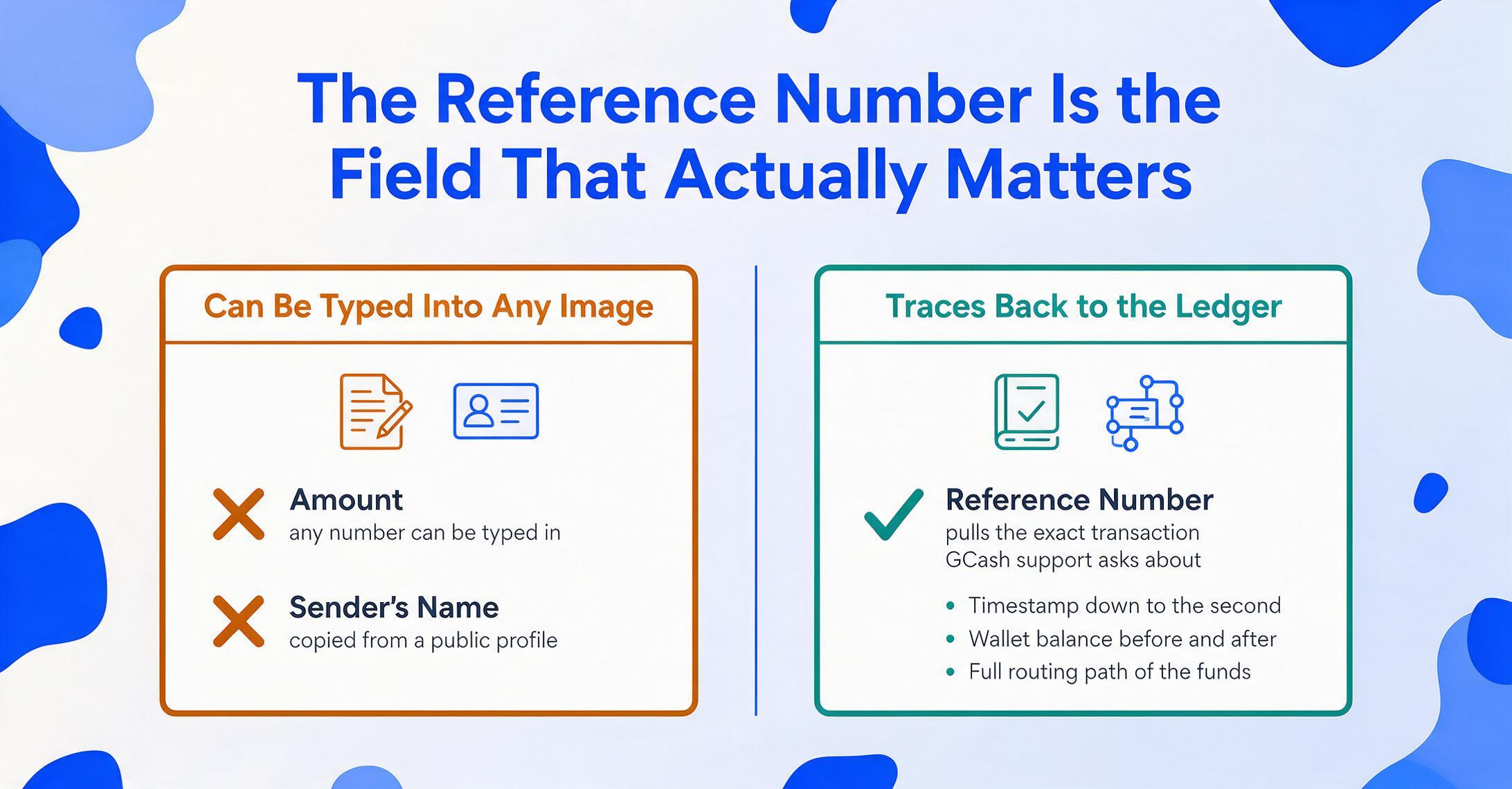
Among all the data points on a GCash screenshot, the reference number is the one that connects the image to a real, traceable transaction. The amount tells you how much moved. The recipient name tells you who it went to. But the reference number is the only field on that screenshot that, when entered into a dispute ticket or a customer inquiry, lets GCash's support team pull up the exact transaction — timestamp down to the second, wallet balances before and after, and the full routing path of the funds.
GCash itself reinforces this in its fraud prevention communications: when verifying a payment, check the reference number first. Not the amount — someone fabricating a screenshot can type any number they want in the amount field. Not the sender's name — a scammer can copy a real name from a Facebook profile. The reference number is what ties a screenshot claim to a real entry in the ledger, and it's the field GCash support asks for when you file a report through the "Chat with Gigi" help system or escalate to the Philippine National Police Anti-Cybercrime Group.
The practical upshot: if you're building any kind of record from GCash payment screenshots — a daily sales log, a shared expense tracker, a reconciliation sheet against your GCash wallet statement — the reference number is your anchor. Each row needs one. Without it, a row is just a number and a name with no way to prove where it came from. With it, you can trace any row back to its source transaction in seconds.
The reference number also serves as a natural deduplication key. A customer might send you the same payment screenshot twice — once on Messenger, once on Viber. A colleague might forward a screenshot you already logged. Two screenshots with the same reference number are the same transaction. Extracting the reference number from every incoming screenshot and checking it against your existing log keeps double-counting out of your records without requiring you to visually compare every new image against your backlog.
Why a Screenshot Alone Isn't Proof — and How Extraction Fits In
In July 2025, GCash issued an official warning through parent company Mynt: AI-generated fake GCash receipts were circulating, and the company's Chief Information Security Officer, Miguel Geronilla, explicitly stated that users should "avoid relying solely on screenshots sent by others" as proof of payment. The warning was unambiguous — a screenshot, no matter how legitimate it looks, is not a receipt. The only valid proof is the transaction record inside the GCash app itself.
Under Philippine law, creating a fake GCash receipt qualifies as falsification of a private document under Article 172 of the Revised Penal Code, carrying criminal liability. Scammers use free or low-cost editing tools to insert names, amounts, and even plausible-looking reference numbers into realistic GCash transaction screenshots, then circulate them on marketplace chats, Facebook Messenger, and Viber to convince sellers to release goods without receiving actual payment.
All of this creates a tension that every business accepting GCash payments lives with: screenshots are what customers send you, but screenshots are also what GCash tells you not to trust. The resolution isn't to stop receiving screenshots — in the Philippines, where small businesses routinely ask customers to send payment screenshots to a social media page as part of the order confirmation flow, that's not a realistic option. The resolution is to extract the reference number from each incoming screenshot and verify it against your in-app Transaction History — exactly the workflow GCash recommends.
Extraction turns the screenshot from an end point into a starting point. You're not treating the image as proof. You're treating it as a carrier of the reference number — the one piece of data that lets you confirm, in the app, whether the transaction actually happened. Pull the reference number, the amount, and the sender's name from the screenshot. Open the GCash app. Search for that reference number. If it's there and the details match, log the row. If it's not, you've just caught a fake before you released the goods.
Files are processed securely and not stored.
Getting Screenshots Into a Spreadsheet Without Typing Every Row
GCash does not offer a built-in export to CSV or Excel. The Transaction History is viewable and scrollable inside the app, and you can request a transaction history report by email for a date range of up to four years — but the emailed report is a PDF, not a spreadsheet, and it covers your own outgoing and incoming transactions, not the screenshots customers send you. The screenshots sitting in your chat threads and email inbox are a separate data source entirely, and getting them into a structured record means either typing each field by hand or extracting the data from the images directly.
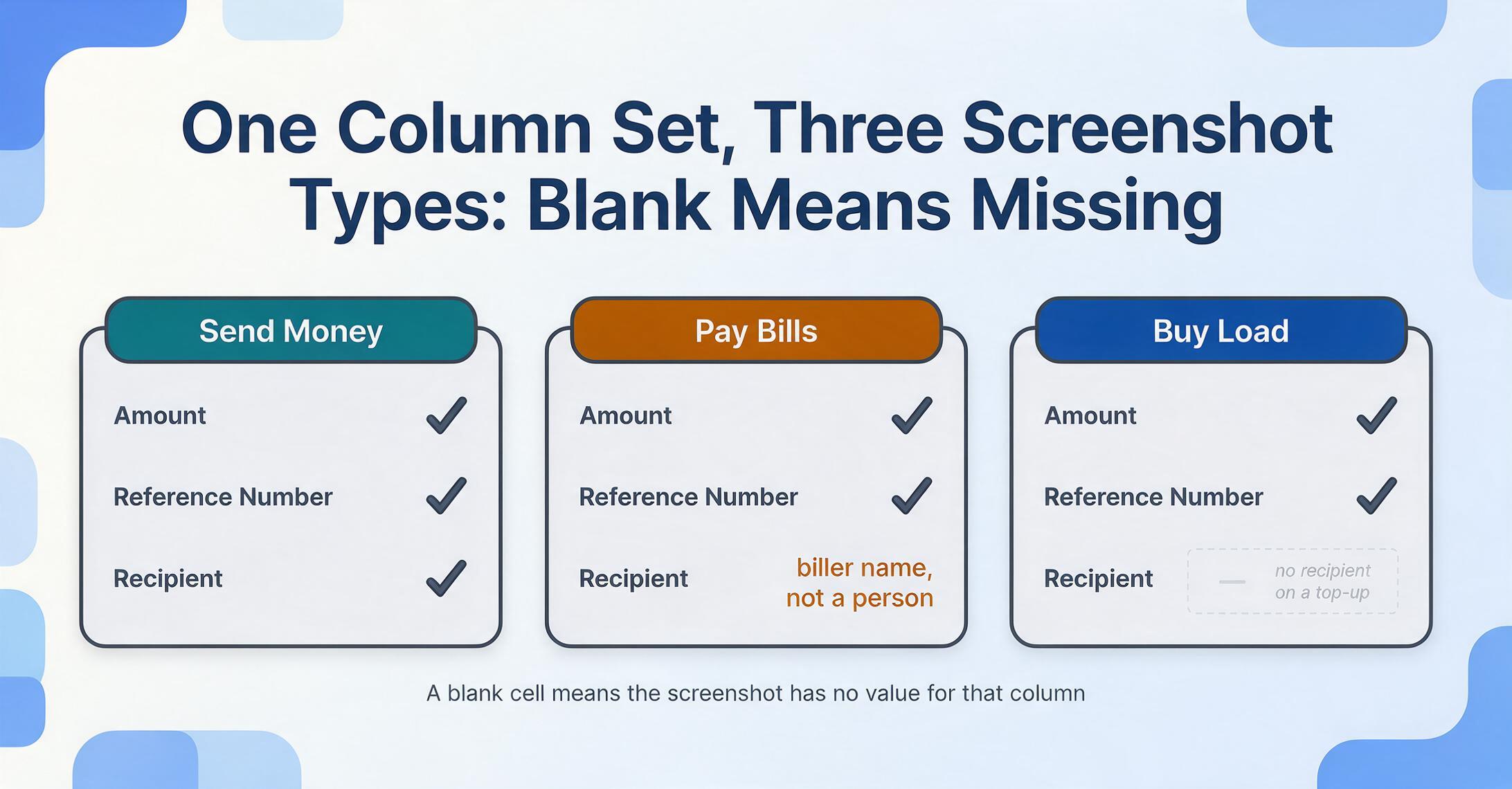
When you upload a batch of GCash screenshots and define the column names you want — Amount, Reference Number, Recipient, Transaction Date — the extraction engine finds each value on each screenshot by understanding what it means, not where it sits. A Send Money confirmation screen populates all four fields. A Pay Bills confirmation populates the amount, biller name (as Recipient), reference number, and date — but the biller name is the utility company or service provider, not an individual. A Buy Load confirmation might populate only the amount, the telco network name, and the reference number — there's no recipient on a top-up transaction. The column definitions stay the same across all screenshots in the batch; the values appear where the source contains them, and the cell stays empty where it doesn't.
If you also accept payments through platforms other than GCash — PayPal for international clients, a bank transfer for larger amounts, WeChat Pay for Chinese tourists, or Maya payment screenshots from customers on the other major Philippine wallet — the same set of column names works across all of them. Amount, date, and counterparty are universal payment fields. A semantic extraction approach — defining columns by meaning rather than by pixel position or template — means you don't need a separate processing pipeline for each payment app your business accepts. The output is a single table, one row per screenshot, with each payment method's confirmation screen contributing whatever fields it contains — the payment screenshot extraction pipeline handles them all in one batch.
The reference number, specifically, is what makes GCash rows traceable in a way that other payment screenshots aren't always. PayPay in Japan generates a transaction ID that's visible on the confirmation screen but not always surfaced in the user-facing detail view. LINE Pay in Thailand and Taiwan uses a LINE display name as the counterparty — a label your contact chose, not a verified identity. GCash's reference number is the exception: a universally present, GCash-acknowledged, support-traceable identifier that appears on every transaction type and serves as both a verification anchor and a deduplication key. If you're going to extract one field from every GCash screenshot, make it the reference number. Everything else — the amount, the name, the date — you can fill in from context. The reference number is the one field you can't reconstruct later if you skip it.
FAQ
Does GCash's reference number format change between transaction types?
The reference number is present on every GCash transaction type — Send Money, Pay Bills, Buy Load, Pay QR, and bank transfers — but the format can vary. A Send Money reference number is typically a 10- to 13-digit numeric string. A Pay Bills reference number may include the biller's own reference prefix concatenated with GCash's internal transaction ID. A bank transfer through GCash's "Send to Bank" feature generates a reference number that sometimes includes the receiving bank's transaction code. If you're matching reference numbers across transaction types — for example, reconciling a mix of Send Money and Pay Bills screenshots in the same spreadsheet — extract the reference number as it appears on each screenshot and use an exact-match comparison, not a format-dependent check. Two reference numbers that look different in structure can still be compared character by character.
Can I extract data from a screenshot of the GCash Transactions list instead of the individual transaction detail?
The GCash Transactions list — the scrolling feed you see when you open the Transactions tab — shows a summary per entry: the amount, the counterparty name, the transaction type label, and the date. It does not show the reference number. To get the reference number, you need the individual transaction detail screen, reached by tapping into any entry from the list. A screenshot of just the list view gives you amounts and names but no reference numbers — useful for a quick scan but insufficient for building a traceable record.
What if the recipient's name is masked on the screenshot?
GCash's partial masking — introduced as a privacy feature — hides some characters in the recipient's first name on the shared confirmation screen, turning "Jennifer" into "J***er" or "J****" depending on the name length and the app version. The full name is still visible in your own Transaction History inside the GCash app, but it won't appear on a screenshot sent to you by the sender. If the recipient name is essential to your record — for matching a payment to a specific customer or order — supplement the screenshot extraction with a manual check of the unmasked name from the app. For record-keeping where the reference number and amount are sufficient to identify the transaction, the masked name may not be a blocker.