How to Extract Timesheet Data
for Billing Reconciliation
SPI Research's 2025 Professional Services Maturity Benchmark surveyed 403 firms globally and found billable utilization at 68.9% — the lowest in five years and 6.1 points below the 75% threshold most firms need for healthy margins. Behind that number is a quieter, less-discussed problem: the gap between hours tracked and hours billed. A separate study of professional services firms found that 15% of chargeable work never reaches the invoice — not because the work wasn't done, but because the timesheet-to-invoice pipeline leaks. For a consultant billing €212 per hour, that's roughly €44,000 per year in unrecovered revenue. This article is about plugging that leak — specifically, the transcription step where handwritten and PDF timesheets get turned into rows your billing system can read.
Key Takeaways
- Fifteen percent of billable consulting hours vanish between the timesheet and the invoice — a leak that costs roughly €44,000 per consultant each year and has nothing to do with how well your team tracks time.
- The manual transcription step breaks the moment you have twenty consultants submitting timesheets — not from slower typing but from twenty different formats, twenty different handwriting styles, and 200 chances per week for a single mistyped digit to cost $87.50.
- A week's batch of thirty timesheets from thirty different consultants each using their own format becomes one reconciliation-ready Excel table in under five minutes — once you replace position-based data entry with semantic extraction that reads fields by what they mean rather than where they sit.
This Isn't About Tracking Time — It's About Getting Tracked Time Into the Invoice
Open the top five search results for "timesheet tracking consultant" and you'll get software comparisons: Toggl vs Harvest, BigTime vs BQE Core, a roundup of "10 Best Time Tracking Tools." Every one of them assumes you haven't started tracking time yet.
But that's not where most consulting firms, law practices, and creative agencies actually are. They have timesheets. Their consultants log hours every day — on paper forms, in fillable PDFs, on Timesheet spreadsheets shared across the team. The problem isn't recording the time. The problem is what happens between the timesheet and the invoice: someone in accounting opens each file, reads entries line by line, types them into the billing system, and hopes nothing gets missed or mistyped.
That transcription step — turning timesheet data into structured billing rows — is where the 15% leakage happens. It's tedious, error-prone work that most firms treat as unavoidable overhead. But with AI-based document data extraction, it doesn't have to be. If you're new to the concept, what timesheet data extraction is and how it works explains the underlying mechanism — the AI reads the document, understands what each field means, and populates a structured table accordingly.
This article takes the perspective of a billing coordinator or operations manager at a professional services firm — the person who receives thirty consultant timesheets on Friday afternoon and needs those numbers reconciled against client invoices by Monday. If you've ever sat down with a stack of timesheets and a QuickBooks window and thought "there has to be a faster way," this is for you.
Where Billable Hours Go Missing: The Three-Stage Leakage Pipeline
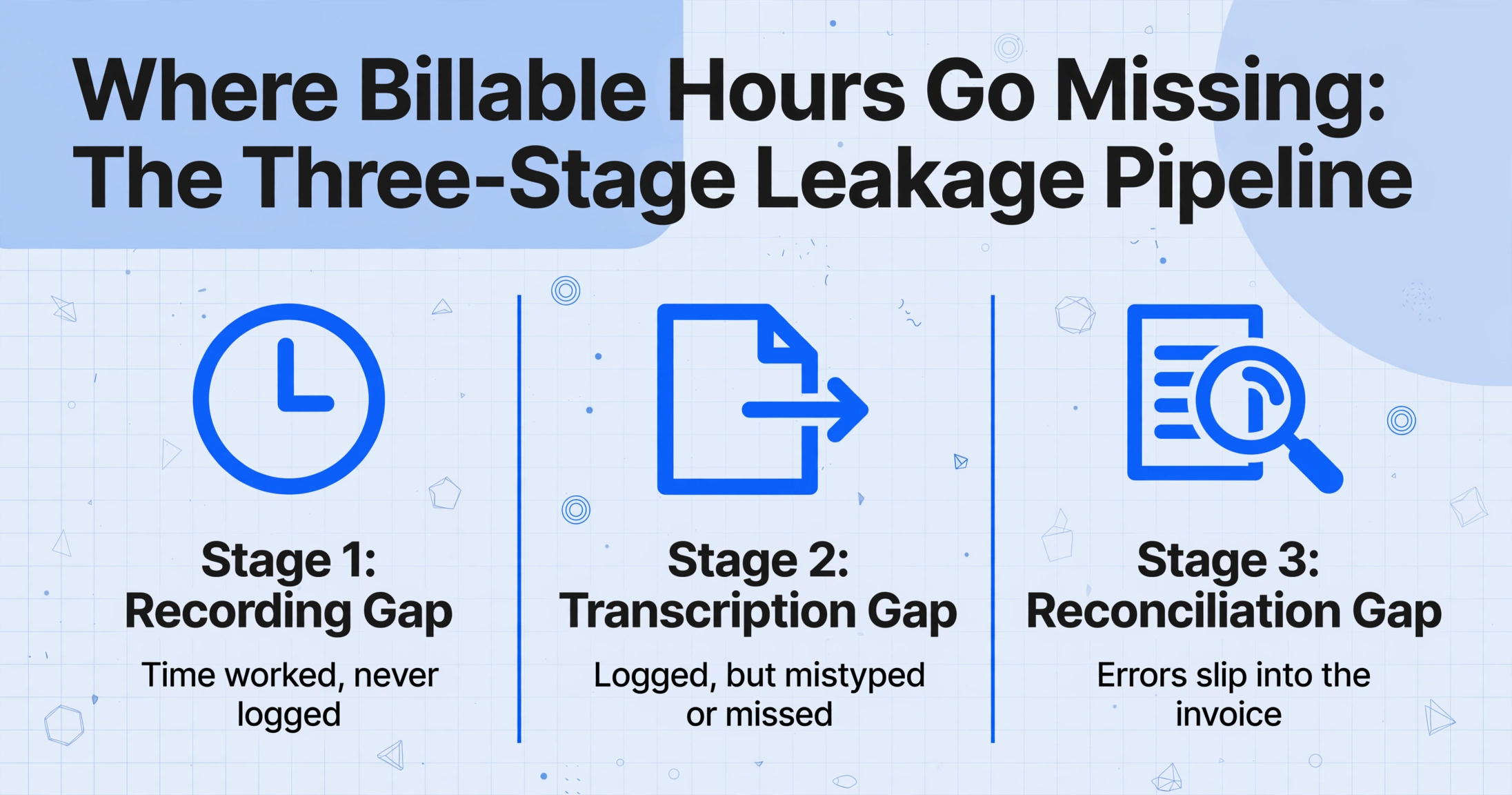
The 15% billable-hour leakage figure isn't one problem — it's three stacked on top of each other. Understanding which stage is bleeding the most at your firm tells you where to fix first.
Stage 1: The Recording Gap
Time worked but never written down. A consultant takes a 15-minute client call on Tuesday, forgets to log it, and by Friday afternoon the memory is gone. Or the partner answers a quick email at 10pm — billable work, zero record. Research on professional services time tracking consistently finds that retrospective time entry (filling timesheets from memory at week's end) undercounts billable hours by 10–25% compared to real-time logging. Email and client calls are the worst offenders: a study across consulting, legal, and accounting sectors found that 58% of advisors record less than 20% of their email time, and 50% record less than 20% of phone time.
The Recording Gap is primarily a behavior and tooling problem. Real-time timers and calendar-integrated trackers (Harvest, Toggl Track, Clio for legal) address this layer. But even a firm that records 100% of its time still has the next two stages to deal with.
Stage 2: The Transcription Gap
Time recorded, but the data doesn't make it into the billing system intact. This is the paper-to-digital handoff. A consultant submits a filled timesheet — whether it's a PDF form with Client Name, Project Code, Date, Hours, Rate, and Description fields — and someone has to type every row into a billing platform. Common transcription errors include: mistyped hour quantities (1.75 becomes 1.5), wrong project codes (the code for "Acme Corp" entered under "Acme Inc"), and entirely skipped rows when the handwriting is difficult to read. A single typo on a $350/hour partner's timesheet entry costs $87.50 in lost revenue. Across a 20-person firm processing weekly timesheets, these small errors compound into thousands in unrecovered billings per month.
Stage 3: The Reconciliation Gap
Time transcribed and invoiced — but the numbers don't match. The invoice says one thing, the timesheet says another, and nobody catches it until a client disputes the bill or an audit reveals the discrepancy. This is the most insidious stage because the work was recorded and entered — it just wasn't verified against the source. Firms running manual reconciliation typically catch these errors reactively (when a client complains) rather than proactively (before the invoice goes out).
For government contractors subject to DCAA (Defense Contract Audit Agency) requirements under FAR 31.201-2, reconciliation isn't optional — DCAA mandates daily time entries, supervisor approvals, and complete audit trails. A timesheet-to-invoice mismatch during a DCAA floor check can trigger a full audit and put contract revenue at risk. For law firms billing corporate clients through LEDES (Legal Electronic Data Exchange Standard) format, incorrect billing codes on a single entry can bounce the entire invoice from the client's e-billing clearinghouse.
Each of these three stages is addressable. But the transcription gap — Stage 2 — is where AI-based document extraction delivers the fastest return because it replaces minutes of manual typing per timesheet with seconds of automated processing, while simultaneously eliminating the typos and omissions that create Stage 3 reconciliation problems downstream.
Why Manual Transcription Breaks at Team Scale
Tracking your own time is manageable. A solo consultant fills one timesheet a week, types the numbers into an invoice template, and sends it. The process takes maybe five minutes and errors are self-correcting because you wrote both the timesheet and the invoice.
The moment a second person enters the picture, the math changes. A billing coordinator processing 20 consultants' timesheets every week isn't dealing with 20 × 5 = 100 minutes of work. They're dealing with:
- Format fragmentation: Consultant A uses the firm's fillable PDF. Consultant B emails a photo of a handwritten form from a client site. Consultant C shares a link to a personal Timesheet tab. Consultant D printed the form, filled it by hand, scanned it, and attached it to an email upside down. Each format requires a different mental parsing strategy. For field teams submitting paper forms, paper job sheet to billable amount automation walks through the end-to-end workflow from paper to invoice.
- Handwriting variability: "3.5" hours written hastily looks like "3.3" or "3.8." A project code scrawled at the edge of a page is illegible. The billing coordinator must either guess (and risk billing errors) or chase the consultant for clarification (which delays the invoice).
- Rate × Hours verification: Each entry needs a mental math check: did the consultant apply the right rate? Does 7.25 hours at $275/hour = $1,993.75? Multiply that by 200 entries a week and you're running a full-time reconciliation operation.
- Accumulated error cost: The AICPA's 2025 National MAP Survey of over 1,400 CPA firms found that 36% of total hours worked across the profession — roughly 752 hours per FTE annually — goes into non-billable work, admin, and activities that never reach the invoice. A portion of those hours are billable work that simply wasn't captured or transcribed correctly. The cost of manual timesheet data entry — measured in labor, errors, and delayed billing — compounds with every consultant added to the roster.
This is the inflection point where manual processes stop being "good enough." When you have five consultants, you double-check their timesheets. When you have twenty, you process them as fast as you can and hope the errors don't cost too much. The only sustainable fix is to remove the manual transcription step entirely.
How AI-Based Timesheet Data Extraction Works — Step by Step
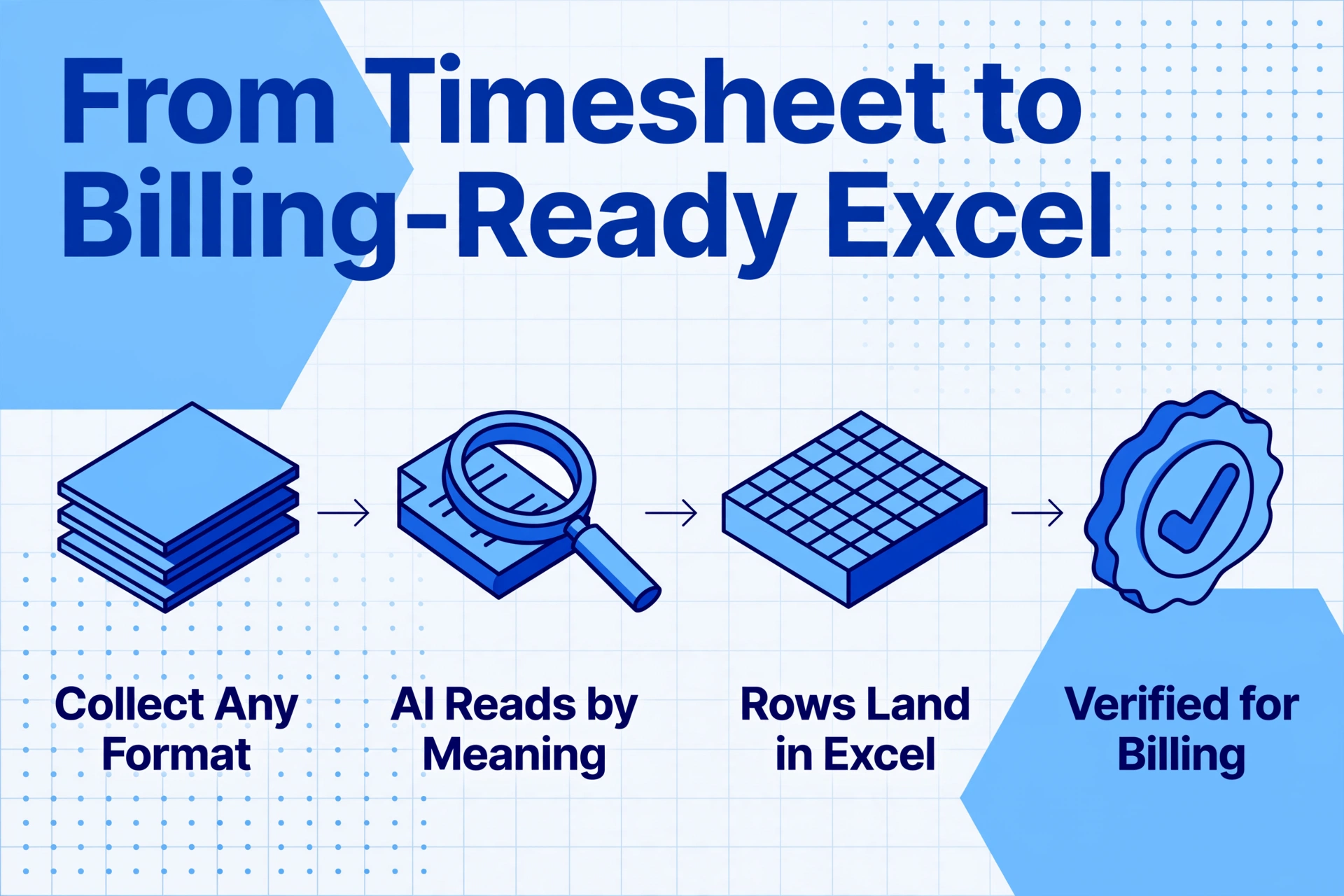
The mechanism that makes this possible is a shift from position-based extraction (traditional OCR that reads "what's in this box") to semantic-based extraction: AI reads the document, understands that "7.25" next to "Hours" under a row labeled "Acme Corp / PRJ-2405" means 7.25 billable hours for that client and project, and extracts it accordingly — regardless of where on the page those fields sit. For the full end-to-end methodology — from choosing an approach to handling multi-format batches — our complete guide to timesheet data extraction covers every step in detail.
Unlike template-based tools that require you to draw zones around each field for every timesheet format your consultants might use, AI data extraction tools identify data by meaning, not position. You define the columns you want — Client Name, Project Code, Date, Hours, Rate, Description — and the AI locates each value anywhere on the page. When a consultant changes the layout of their timesheet PDF next week, nothing breaks. This approach to timesheet extraction works across PDFs, scanned images, photos of handwritten forms, and screenshots with equal reliability.
Here's the extraction workflow, from timesheet collection to billing-ready Excel:
Collect timesheets in any format.
Gather PDFs, JPGs, PNGs, or scans — every format your consultants use. No need to standardize or pre-process. If a consultant submits a photo of a handwritten form taken on their phone at a client site, it works. For firms that want to automate collection, a Collection Link (a shareable upload page, no login required for submitters) lets consultants drop their timesheets directly into your processing queue.
Define the columns you need for billing.
Type the field names you want extracted: Client Name, Project Code, Date, Hours, Rate, Description. The column names you enter become the headers of your output spreadsheet. You can also add a Computed Column — for example, Line Total (Hours × Rate) — so the AI calculates the billable amount for each row during extraction, not after.
Batch-upload all timesheets at once.
Upload every timesheet file as a batch. The AI processes them together and merges all extracted rows into a single Excel spreadsheet — one row per timesheet entry, regardless of how many files or consultants contributed. This batch-first design is what turns a week's worth of timesheets from 30 separate files into one reconciliation-ready table in minutes.
Export to Excel and verify.
Download the merged Excel file. Sort by Client Name or Project Code to group entries for billing. The Computed Column gives you the line total for each row. Run a quick SUM on the Hours column against each client's expected monthly total, and you have your reconciliation base.
Files are processed securely and not stored.
Running the Reconciliation: From Timesheet Rows to Invoice Verification
With all timesheet data extracted into a single Excel table, reconciliation becomes a structured check rather than a hunt through individual files. The output spreadsheet gives you rows with Client Name, Project Code, Date, Hours, Rate, and a computed Line Total — and this is where the real billing control starts.
Here's a reconciliation workflow that catches discrepancies before invoices go out:
- Group by Client or Project Code. Use Excel's SORT or pivot on the Client Name column. Now you can see every hour logged against each client in one place — including entries from different consultants on the same matter. This alone eliminates the most common reconciliation error: failing to include all timekeepers' entries on a multi-consultant engagement.
- SUM Hours per client and multiply by Rate. If you used a Computed Column for Line Total, the per-row amounts are already calculated. Sum them by client to get the total expected invoice amount. Compare this against what's in your billing system (QuickBooks, Clio, Harvest, BQE Core). Any discrepancy larger than the smallest time increment you bill (typically 0.1 or 0.25 hours) is a gap that needs investigation.
- Scan for outliers. Sort the Hours column descending. A single 40-hour entry in a week where everyone else logged 20–30 is either a billing error or a conversation starter. Either way, you want to flag it before the client sees it.
- Verify rates against engagement letters. Cross-reference the Rate column against each client's contracted rate. A consultant billing at $325/hour on a matter with a $275 agreed rate generates a $50/hour overcharge that, if sent, damages trust and triggers a billing dispute.
- Lock the reconciliation, not the invoice. Save a copy of the extraction output as your reconciliation record. If a client questions a bill three months later, you have the source timesheet data, the extraction output, and the invoice — a three-way audit trail that answers the question in minutes instead of days.
The distinction between reconciliation and invoicing matters more than most firms realize. Reconciliation verifies that what you're about to invoice matches what was actually worked. Invoicing is the downstream act of sending the bill. Firms that skip reconciliation and invoice directly from timesheet data are betting that no transcription errors occurred — a bet the 15% leakage data says they routinely lose.
Billing Requirements by Profession: What Compliance Looks Like in Practice
Not all professional services firms reconcile timesheets the same way. Each profession has its own billing conventions, compliance rules, and output formats — and the extraction workflow needs to support them.
Government Contractors: DCAA Compliance
For firms contracting with US federal agencies, timesheet tracking isn't optional — it's governed by FAR 31.201-2 and enforced through DCAA audits. DCAA-compliant timekeeping requires daily time entries, total time accounting (all hours — billable and non-billable — must be recorded), supervisor approval signatures, segregation of duties between timekeeping and payroll, and complete audit trails documenting every change to every time record. The extraction output from AI processing provides a timestamped, unalterable record that supports the audit trail requirement. When the extracted data includes the original timesheet filename, date of processing, and the consultant's name as it appears on the document, you have a digital paper trail that survives a floor check.
Law Firms: LEDES and UTBMS Coding
Corporate legal clients increasingly require invoices in LEDES format, the global standard for legal electronic billing maintained by the LEDES Oversight Committee since 1995. LEDES invoices use standardized UTBMS (Uniform Task-Based Management System) codes to classify each time entry by activity type — L210 for legal research, L310 for drafting, L410 for court appearances. A single miscoded entry can bounce the entire invoice from the client's e-billing clearinghouse, delaying payment by weeks. When extracting timesheet data for LEDES billing, the Description column becomes critical: the AI needs to capture enough detail from the timesheet so the billing coordinator can assign the correct UTBMS code without going back to the original file. For firms using Clio, MyCase, or LeanLaw, extracted timesheet data can be formatted to match the field structure these platforms expect for LEDES export.
Consulting and Agencies: Project-Based Profitability Tracking
Management consultancies, marketing agencies, and design studios track time not just for client billing but for internal profitability analysis. A project with a $50,000 fixed fee might look profitable at the proposal stage — but if the extracted timesheet data shows 230 billable hours were spent to deliver it, the effective rate is $217/hour. If the firm's target is $250/hour, the project lost margin even though the client paid in full. Extraction workflows that include Project Code as a column let firms run this analysis project by project, across all consultants who contributed time — without waiting for month-end accounting reports that arrive too late to adjust resource allocation.
Connecting Extracted Timesheet Data to Your Existing Billing Stack
The extraction step produces an Excel file. That file needs to flow into whatever system generates your invoices. Most professional services billing platforms accept Excel imports natively or through CSV:
| Platform | Primary Audience | Excel Import Path |
|---|---|---|
| QuickBooks Online | General professional services | Import via CSV or third-party connector; invoice line items map to timesheet rows |
| Harvest | Agencies, consultancies | CSV import of time entries with Client, Project, Task, Hours, Date fields |
| Clio | Law firms | Bulk time entry import via CSV; maps to Matter, Activity, Hours, Rate |
| BQE Core | A/E, consulting, accounting firms | Time entry import via CSV with Project, Phase, Employee, Hours mapping |
| BigTime | Mid-market professional services | CSV and QuickBooks-integrated import; supports Staff, Project, Date, Hours, Rate |
The common denominator across all of these platforms is CSV import. If your extraction output maps correctly to the columns your billing system expects, the import is a matter of saving the extracted Excel as CSV and running the platform's standard import. For firms on QuickBooks, this means your extracted timesheet data feeds directly into the invoicing module — eliminating the manual re-entry entirely. For a broader comparison of what's available, our roundup of the best timesheet extraction tools in 2026 evaluates the current landscape across accuracy, pricing, and workflow fit.
FAQ
Can AI extraction handle handwritten timesheets?
Yes. Modern vision-language models (the AI behind the extraction) are trained on diverse handwriting styles and can read printed text, cursive, and mixed printed/handwritten documents. Accuracy varies with handwriting legibility — a neatly filled form will extract at high accuracy, while heavy cursive on a crumpled page introduces more errors. The system works best when the handwriting is reasonably clear, but it is not limited to printed text only. For legibility-critical scenarios, providing consultants with a structured PDF form that guides handwriting into defined areas improves extraction consistency.
What if each consultant uses a different timesheet format?
Format diversity is one of the core problems this approach solves. Because AI extraction identifies data by semantic meaning rather than by position on the page, it doesn't matter whether Consultant A's timesheet has "Client" in the top-left corner and Consultant B's has "Client Name" in a table header row. The AI understands that both fields refer to the client's name and extracts accordingly. This is the key distinction between AI-based extraction and traditional template OCR — template-based systems require a separate parsing template for each format variant, which becomes unmanageable when you have 20 consultants using 20 different forms.
How long does extraction take for a batch of timesheets?
Processing speed depends on the number of files and the complexity of each page. As a practical benchmark, a batch of 20 single-page timesheets processes in approximately 3–5 minutes. Individual pages process in roughly 5–10 seconds each — about 18 times faster than manual data entry, which averages 3 minutes per page for structured forms. The output is a single merged Excel file with all extracted rows.
Can I export directly to my billing software instead of Excel first?
The standard output format is Excel (XLSX) and CSV. Most billing platforms — QuickBooks, Clio, Harvest, BQE Core, BigTime — accept CSV imports for time entries, which means you can export from the extraction tool as CSV and import directly into your billing system. There is no requirement to use Excel as an intermediate step, though many firms prefer to keep the Excel file as their reconciliation record before importing to the billing platform.
What if the timesheet has a different billing rate per client or per consultant?
If the timesheet form includes a Rate column, the AI extracts it per row — which means different rates for different entries are handled automatically. If rates aren't on the timesheet itself, you can apply them after extraction in Excel by cross-referencing against a rate table — or use a Computed Column to embed the rate logic during extraction. For example, a column defined as Line Total (Hours × 275) applies a fixed rate, while separate per-client columns can capture varying rates.
Is this approach suitable for 6-minute (0.1 hour) billing increments?
Yes. If your firm bills in 0.1-hour (6-minute) or 0.25-hour (15-minute) increments, the AI extracts the hours as they appear on the timesheet. The rounding to the billing increment should happen during the reconciliation step, not during extraction — because the raw extracted value is your audit record. Comparing raw hours against rounded billing hours is itself a useful reconciliation check: if a consultant logged 0.3 hours on a call and your billing system rounds to 0.5, that delta should be visible and intentional, not hidden.
The 15% leakage doesn't fix itself. Test extraction on your own timesheets — see if your reconciliation workflow gets faster by an order of magnitude.
Try It on Your Timesheets