Vendor Quote Data Extraction:
The Complete Procurement Guide
A procurement professional on Reddit described a familiar Friday-afternoon scene: five supplier quotes arrived that week as five different formats. One ERP-generated PDF from a multinational vendor. One Excel spreadsheet from a mid-size supplier. One scanned handwritten form emailed by a smaller partner. One quote typed directly into the email body. One Word document with embedded pricing tables. The comparison spreadsheet — the template they had carefully built with conditional formatting and weighted scoring — sat empty. The bottleneck was never the template design. It was getting the data out of five different documents and into the cells where it belonged.
Key Takeaways
- A five-vendor RFQ costs two hours of data entry before your comparison spreadsheet sees a single formula.
- Template-based extraction doesn't automate quote processing — it renames data entry work as template maintenance and breaks silently with every vendor ERP upgrade.
- Semantic extraction reads any quote format without per-supplier templates: define your columns once and they work across every format from every vendor forever.
What Is Vendor Quote Data Extraction?
Vendor quote data extraction is the process of automatically reading structured fields — item descriptions, quantities, unit prices, line totals, payment terms, delivery conditions — from supplier quotation documents and converting them into a usable spreadsheet format. It is the intake step of procurement: the moment when a supplier's price offer becomes data your systems can compare, analyze, and act on.
This is distinct from invoice processing or purchase order extraction. A vendor quote (also called a quotation, proposal, or bid) is a pre-purchase document. It represents an offer, not a commitment. The extraction challenge is therefore about comparison, not reconciliation: you need five quotes side-by-side to pick the best one, AI document extraction in practice applied to this specific procurement workflow means turning unstructured quote documents into a structured comparison matrix — without manual rekeying.
CAPS Research's 2025 Metrics of Supply Management report found the average managed spend per supply management FTE is $27.4 million, based on data from hundreds of participating organizations across five sectors. For teams managing 50+ RFQ cycles per year — each involving 3-8 vendor responses — quote data entry and comparison represent a significant operational cost. At that level of responsibility, time spent reformatting PDF quotes into spreadsheets is time not spent on strategic supplier decisions.
Why Manual Quote Comparison Is Costly
A single 20-line-item quote, typed by hand into a comparison spreadsheet, takes 15-25 minutes to transcribe. Multiply by five suppliers, and you have two hours of work before the first analysis cell is filled. The real cost, however, runs deeper and shows up in several specific places.
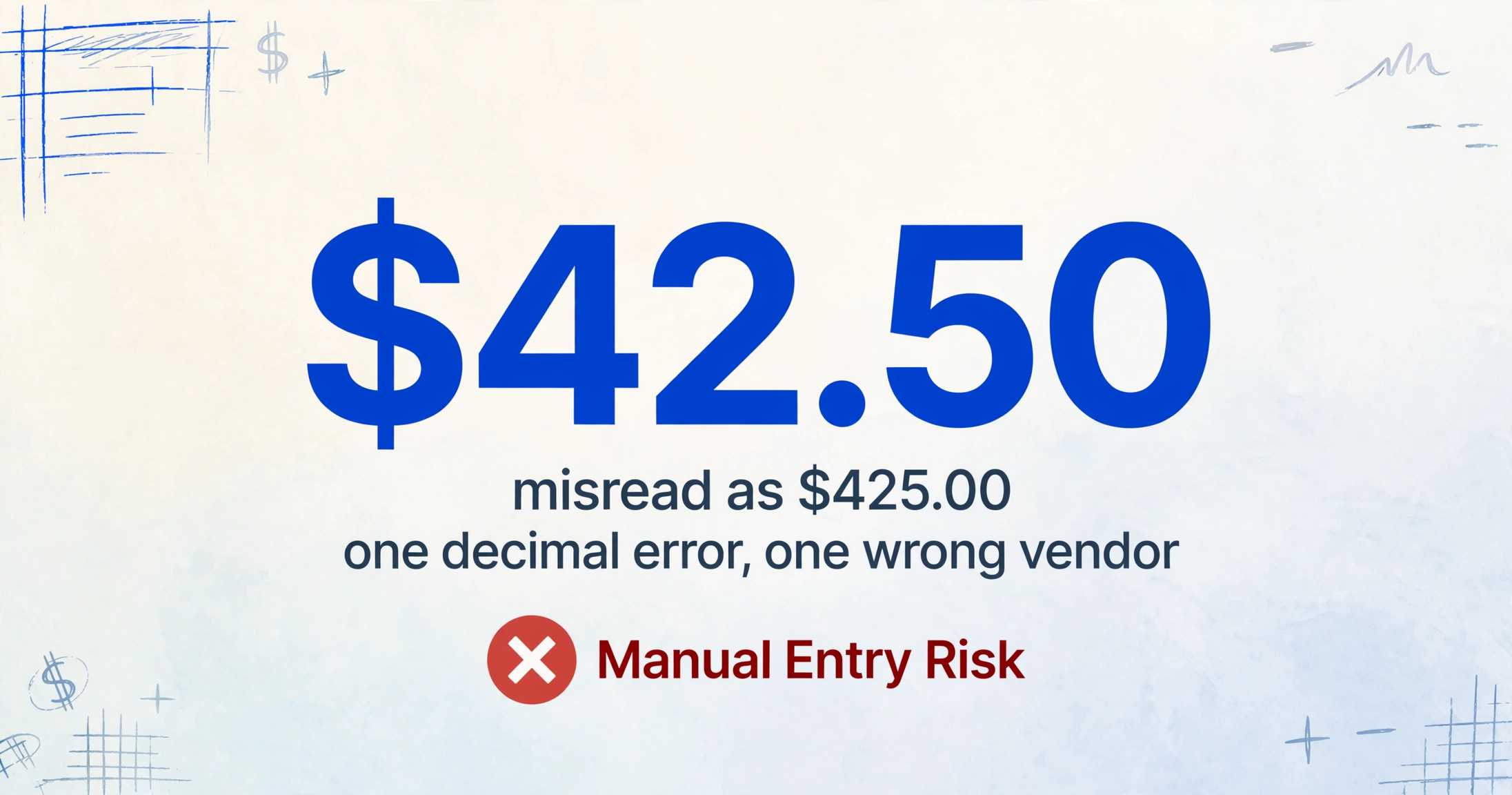
The error propagation chain. A misread unit price — $42.50 read as $425.00 — affects total cost calculations, scoring, and potentially the vendor selection itself. A procurement manager on r/procurement described catching a $0.52 vs. $5.20 decimal error only because the total seemed "too high." In a manual process, each line item across each quote has the potential for that kind of error. Most go unnoticed until the PO is issued and the invoice arrives with different numbers. By then, the sourcing decision has been made on incorrect data.
The hidden normalization tax. Even with all data entered correctly, quotes from different vendors rarely use the same units, the same item names, or the same scope boundaries. One supplier quotes "per unit," another "per 100." One includes freight in the line price, another lists it separately. Item "HP 500 Electric Motor" from Vendor A is the same item as "Drive Unit, 500HP 3-Phase" from Vendor B — but in a spreadsheet without semantic alignment, they appear as different rows. Aligning these manually for a 30-line-item RFQ adds another 30-60 minutes per comparison cycle. For a 450-line-item construction bid, that normalization step alone spans days.
Decision delays and missed savings. The longer it takes to build a comparison sheet, the longer supplier quotes sit with their validity dates ticking. A vendor quote with a 14-day validity arrives on Monday. By the time the spreadsheet is finished, that window may be half gone. When you reduce the time from "quotes received" to "comparison ready," you increase the number of bids you can evaluate per sourcing event. APQC's procurement benchmarks show best-in-class organizations process purchase orders at under $3 per document while average organizations spend $14-$54 — the difference is automation at the data intake layer. A team that compares five quotes thoroughly almost always negotiates better terms than a team that picks between two because they ran out of time to process the other three.
Manual quote comparison is not a neutral process choice — it is a known source of errors that compounds with supplier count and quote complexity. Every added vendor doubles the entry work and increases the probability of an undetected data error propagating through to the purchasing decision.
The Core Challenges of Vendor Quote Extraction
Vendor quotes present a combination of structural problems that make them harder to extract than invoices or purchase orders. Understanding each challenge explains why a general-purpose OCR tool or a simple copy-paste approach falls short.
Zero format standardization. A multinational vendor with SAP ERP generates a multi-page PDF. A mid-market supplier sends an Excel workbook. A small fabricator emails a scanned handwritten quote. A service provider types the quote directly into the email body. These four formats require four different extraction strategies in a template-based system. A procurement team with 100 active suppliers may face 150+ format variants — and that number grows with every new supplier added to the roster.
Embedded spec and pricing in the same table. Unlike invoices where line items typically show description, quantity, unit price, and total in a straightforward table, many vendor quotes embed technical specifications directly inside the pricing table. A single row might contain: "Model XT-5000, 500HP, 3-Phase, 460V, 1800 RPM" as the item description — with the unit price buried at the end of a long spec string. The extraction system must distinguish the specification attributes (voltage, RPM, phase) from the commercial data (price, quantity, lead time) within the same table cell, and output them as separate fields so the comparison table can show spec-to-spec differences alongside price differences.
Multi-page quotes with continuation tables. A capital equipment quote often spans 5-10 pages. The pricing table starts on page 2 and continues through page 6. Line items can break across pages with column headers not repeating. Totals and subtotals appear on the last pricing page. Terms and conditions occupy separate pages. The extraction system must recognize that the table structure continues across page boundaries, that a "Total" on page 6 refers to the sum of items on pages 2-6, and that terms on page 8 do not belong in the line-item output. This cross-page continuity is where basic table extraction fails — it treats each page as an independent document and loses the relationship between sections. A vendor catalog pushes that continuity requirement further, which is why vendor catalog extraction has to hold one column set across a product table hundreds of pages long.
Validity date tracking. A valid-until date can appear in the header, a footer note, a terms section, or as a handwritten note on a scanned quote. Missing it means your comparison spreadsheet cannot flag quotes that expired before the award decision. The team may award based on pricing the vendor no longer honors.
Unit of measure variability. One supplier quotes in "EA," another in "PCS," an industrial supplier uses "CTN" for carton, a raw materials supplier uses "MT" for metric ton. These are not extraction failures — the system reads all of them — but the comparison spreadsheet needs to normalize them. A unit price of $50/CTN (where CTN = 10 units) is fundamentally different from $50/EA. If the extraction tool does not preserve the UOM field alongside the price, the comparison silently compares apples to oranges.
Files are processed securely and not stored.
Traditional vs AI-Powered Quote Extraction
The difference between a manual copy-paste workflow and AI-powered extraction is not just speed — it is structural. One approach preserves format variability as a bottleneck; the other absorbs format variability as a solved problem.
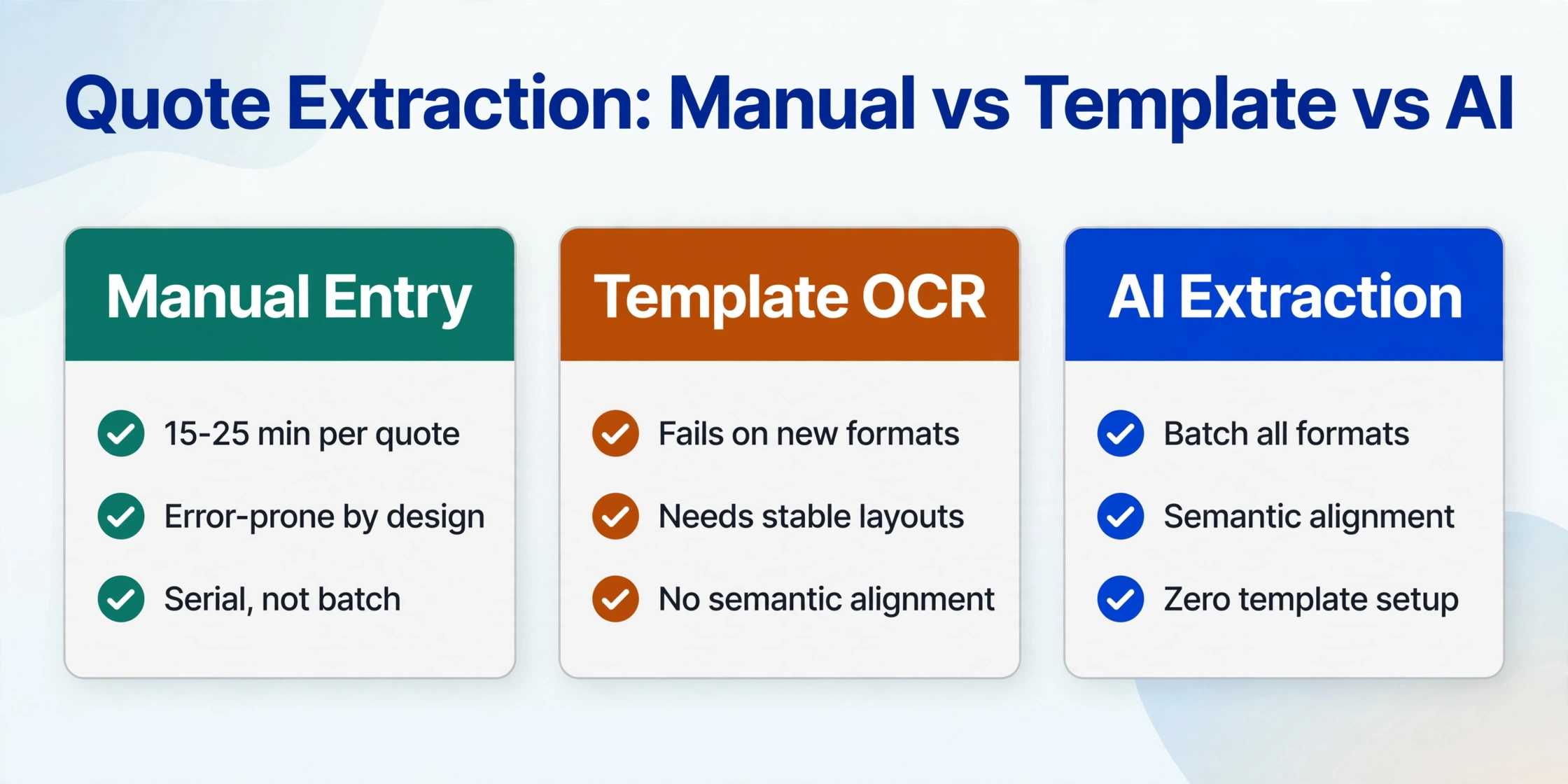
Manual Excel comparison. The classic workflow: open each vendor PDF, locate the pricing table, select cells, copy, switch to the comparison spreadsheet, find the right cell, paste. Repeat for each line item, each quote. The process works, but it is serial — you touch every data point individually — and it is error-prone by design because the person doing the copying has to interpret what each cell means before deciding where to paste it. A different column layout, a merged cell, a missing header, or a page break can cause misalignment that propagates through the entire row. A procurement professional on r/procurement described the typical outcome: "3 hours of data entry, then another hour checking for errors, then you find one anyway."
VLOOKUP and Power Query help once the data is in spreadsheet form, but they do not solve the extraction problem. They solve the merging problem. The raw data still has to get from each vendor's PDF into a spreadsheet in the first place, and neither VLOOKUP nor Power Query reads PDFs. For a deeper look at how this fits into the broader procurement data workflow, see our guide to purchase order data extraction — the intake principles overlap significantly.
Template-based extraction tools. A step up from manual: you configure a parsing template for each supplier's quote layout. Item Description is in column A, rows 5-25. Unit Price is in column C. The system reads the PDF according to your layout map. The limitation is maintenance: every new supplier, every format change, every ERP upgrade that shifts column positions requires template updates. A team with 100 suppliers maintaining 100+ templates is not automating — it is trading data entry for template management. When Supplier A upgrades their SAP system and moves the unit price column one position to the right, the template silently maps quantities to prices and prices to totals. The output looks plausible. The comparison is wrong.
Semantic AI extraction. Instead of telling the system where each field sits on each supplier's layout, you define what data you want: "Item Description / Quantity / Unit Price / Line Total / Lead Time / Payment Terms / Delivery Terms." The AI reads each quote document — regardless of format, layout, or supplier — and locates the matching values by understanding what each text element means in context. A field labeled "Product Name" on one quote, "Description of Goods" on another, and "Item" on a third is recognized as the same thing because the AI interprets the semantic role, not the column header string. This is Custom Column Extraction: you define the output columns once, and the AI finds the data by meaning across any supplier's document.
The operational difference: with semantic extraction, adding a new supplier requires no configuration. The same column definitions that worked for Supplier A's SAP PDF work for Supplier B's Excel spreadsheet and Supplier C's scanned handwritten form. Format changes are absorbed automatically because the extraction logic does not depend on format-specific coordinates.
| Approach | Setup per new supplier | Handles format changes | Line-item accuracy | Scalability (100+ suppliers) |
|---|---|---|---|---|
| Manual copy-paste | None (but 15-25 min per quote) | Human adapts | Variable, depends on attention | Breaks down at ~5 quotes/cycle |
| Template-based extraction | 15-30 min per layout | Template breaks silently | Good if layout matches template | Template maintenance becomes full-time work |
| Semantic AI extraction | Zero | Adapts automatically | 90%+ for printed tables | Same setup scales to any count |
Critical Fields to Extract from a Vendor Quote
A vendor quote contains more data fields than most procurement teams use in their comparison spreadsheet. The art of effective extraction is knowing which fields are non-negotiable for comparison and which are supplementary detail you can add later. Below are the fields that matter for a side-by-side vendor comparison, organized by category.
| Category | Field | Why It Matters |
|---|---|---|
| Header | Quote Number | Unique reference for the bid; used in PO cross-referencing and audit trail |
| Quote Date | Issuance date; establishes the pricing baseline and determines validity period | |
| Supplier Name | Identifies which vendor's pricing appears in each row of the comparison | |
| Valid Until | Expiration date; critical for award timing — an expired quote should not be the basis of a PO | |
| Line Items | Item Code / SKU | Supplier's internal part number; used for downstream ERP matching |
| Item Description | The product or service name; must capture specifications embedded in the description field | |
| Specifications | Technical attributes (size, voltage, material grade, model number) — often mixed with the description | |
| Quantity | Number of units quoted; the starting point for total cost calculation | |
| Unit of Measure | Each, dozen, KG, MT, CTN, linear meter — must preserve for cost normalization | |
| Unit Price | Price per unit; the primary comparison metric for most procurement decisions | |
| Line Total | Qty × Unit Price; enables cross-supplier cost comparison at the line level | |
| Commercial | Subtotal / Total | Overall quote value; the primary cost comparison metric |
| Currency | USD, EUR, GBP, etc.; required for FX normalization in international sourcing | |
| Delivery Terms | FOB, CIF, EXW, DDP — incoterms determine who bears shipping risk and cost | |
| Payment Terms | Net 30, Net 60, 2/10 Net 30 — affects cash flow and effective cost | |
| Logistics | Lead Time | Delivery timeline in days or weeks; critical for project scheduling and inventory planning |
Extracting all of these fields consistently across multiple supplier formats — from different locations on each page, with different naming conventions, and often buried inside dense spec text — is what separates a usable comparison from a partial data set that still requires manual hunting.
Batch Processing: From 5 Vendor Quotes to One Comparison Spreadsheet
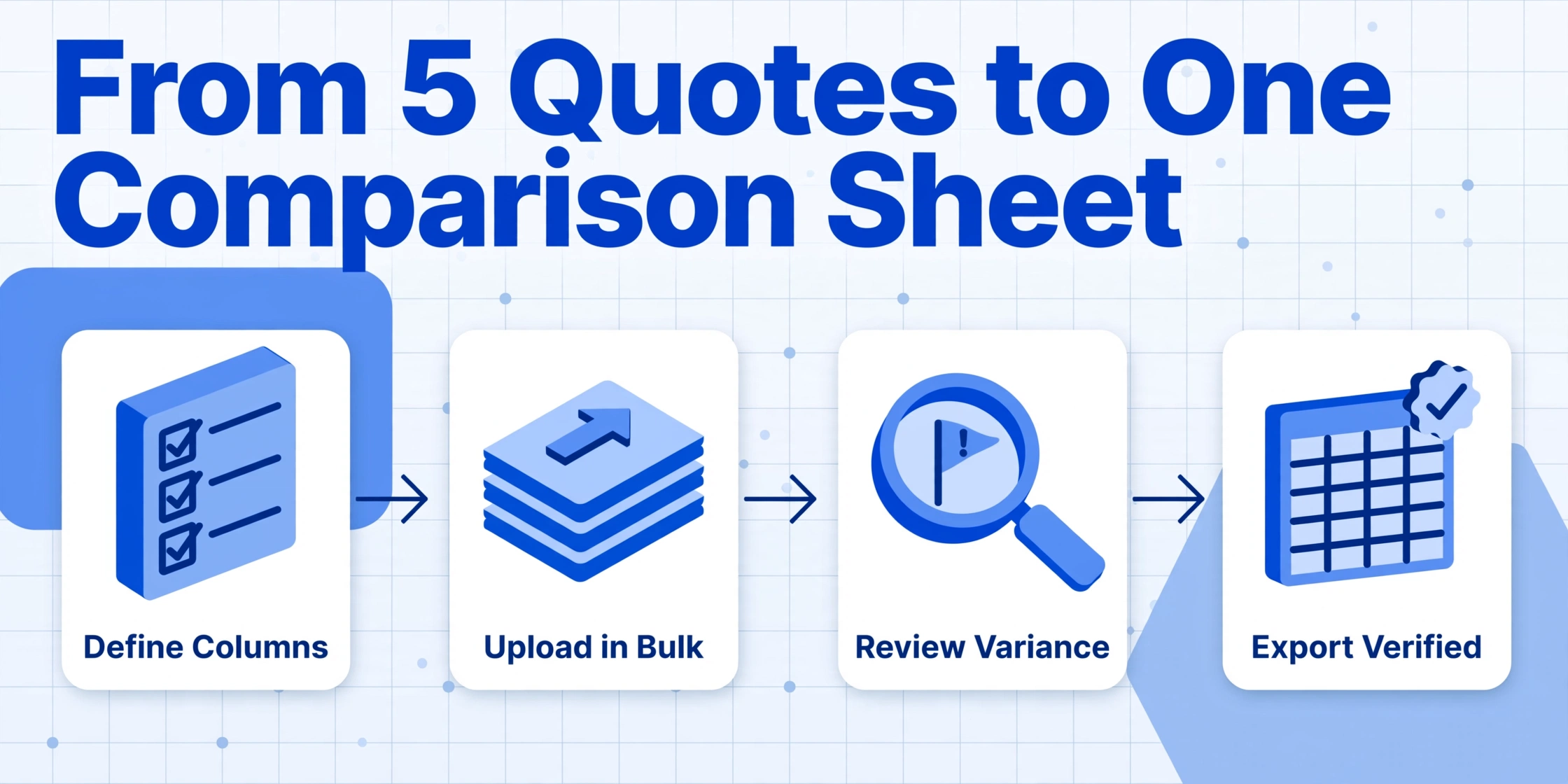
The single most impactful change a procurement team can make to their quote comparison workflow is switching from serial document processing to batch processing. Instead of opening Quote A, extracting data, pasting into the comparison sheet, then opening Quote B, you upload all quotes simultaneously and extract against a single set of column definitions. The result is a unified spreadsheet where each supplier's data appears in its own column group or row set — ready for comparison without intermediate assembly.
Here is how a typical batch comparison workflow works, from receiving five vendor PDFs to having a structured comparison table ready for scoring:
For a typical 5-vendor, 15-line-item RFQ, the entire process from upload to comparison-ready spreadsheet takes under 10 minutes. The manual equivalent — open PDF, copy cells, paste, repeat for each vendor, then manually align line item descriptions — takes 2-3 hours and introduces error risk at every step.
Batch processing also introduces a capability that manual comparison cannot match: computed columns for price comparison. You can define a column like "Total Cost (Qty × Unit Price × Lead Time Risk Factor)" and the AI calculates it during extraction, saving the step of adding formulas after the data arrives in Excel. For multi-vendor comparisons where landed cost depends on more than just unit price (freight, duties, payment term discounts), computed columns turn extracted data into decision-ready metrics in a single pass. For more on this approach, see how document extraction pricing compares across tools and tiers when you factor in the operational cost of template maintenance vs. zero-setup extraction.
Export and Integration: From Comparison to Purchase Order
Extracting quote data into a comparison spreadsheet is the middle step, not the end. The output needs to feed into downstream procurement systems that turn a supplier selection into a purchase order. The export path you choose depends on where your procurement process lives.
Excel price comparison matrix. The most common export path. The batch output lands as an XLSX file with structured columns and aligned line items. From here, procurement teams add weighted scoring, conditional formatting for price thresholds, and vendor ranking formulas. The final matrix becomes the award recommendation document attached to the PO requisition. This works for any organization already running its comparison process in Excel — it replaces the manual data entry step while preserving the existing scoring and analysis workflow.
Google Sheets live comparison. For teams using Google Sheets as their comparison platform, the extraction output can land directly into a sheet via the Google Sheets add-on, eliminating the download-upload round trip. The comparison table updates as new quotes arrive, and team members can collaborate on scoring and notes in real time. This is particularly valuable for distributed procurement teams evaluating quotes across different locations or categories. For a practical example of this workflow, see our guide on extracting vendor quotes into Google Sheets for comparison.
ERP PO module integration. The comparison spreadsheet — with the selected vendor's pricing verified — becomes the data source for purchase order creation. In SAP Ariba, Coupa, Oracle Procurement Cloud, or Jaggaer, the PO is created by pulling the selected vendor's line items from the comparison table into the PO form. The key requirement for clean ERP integration is that the extraction output preserves the line-item structure: item code, description, quantity, unit price, and UOM must be in consistent columns so the data can map directly to PO line items without rekeying. Any extraction approach that flattens line items or merges spec data into description fields creates a remapping step that defeats the purpose of automation.
Collection Link for vendor submission. Before extraction can happen, quotes must be collected. If your current process relies on email attachments — vendors sending PDFs to your inbox, you downloading and saving each one — there is a simpler path. A Collection Link generates a unique URL that you embed in your RFQ email. Vendors open the link, enter a short verification code, and upload their quote directly. The file lands in your processing queue without you touching an email attachment. This closes the loop from collection to comparison: Collection Link gathers the quotes, batch extraction structures the data, and the export feeds your ERP or spreadsheet for the final award decision.
Email Inbox for vendors who already email you. Collection Link works best when you are proactively soliciting quotes and can send every vendor the same link. Plenty of RFQ cycles run the other way: a longtime vendor just replies to your last email with a PDF attached, the way they always have. Email Inbox is built for that habit rather than asking vendors to change it. Every account gets a dedicated inbox address you can share with regular suppliers, and quotes land in your processing queue the moment they arrive, no login or upload page involved. Turn on Auto-Process with a bound column template and extraction starts automatically as each quote comes in. A sender whitelist limits the inbox to vendors you have approved, and password-protected quotes are tried automatically against your saved passwords instead of bouncing back for manual unlocking. Collection Link suits an active RFQ where you are chasing quotes down. Email Inbox suits the standing relationships where the quotes come to you anyway.
How to Choose a Vendor Quote Extraction Tool
Not all extraction tools handle vendor quotes equally. The following criteria are specifically relevant to the quote comparison use case — distinct from what you would look for in an invoice processing or document scanning tool.
Table extraction quality. The single most important capability. A vendor quote's value is in its line-item table, and extraction quality is measured by how accurately it captures every row and column — including across page breaks, merged cells, and multi-line descriptions. Test on the hardest quote in your collection: the 4-page quote with embedded specs and pricing interspersed, not the clean single-page quote. If the tool handles the difficult case, it will handle the easy ones.
Multi-vendor comparison support. Some extraction tools process documents in isolation — they extract Quote A and Quote B independently, leaving you to combine the results. A purpose-built comparison workflow should output a single unified table where the same item from different vendors appears in adjacent rows or columns, with the Supplier Name field identifying each row's source. The ability to semantically align different vendor names for the same item is the feature that separates a comparison tool from a plain document extractor. For a broader look at how extraction tools stack up across the manufacturing sector, see our roundup of the best document extraction tools for manufacturing in 2026.
Spec and description separation. As discussed in the challenges section, many vendor quotes embed specifications inside the item description field. A good extraction tool should allow you to define separate columns for description and specifications, and the AI should correctly split a cell like "Model XT-5000 / 500HP / 3-Phase / 460V / 1800 RPM" into its structured components. Tools that treat the entire cell as a single text string force you to manually parse specs after extraction — recreating the manual work the tool was supposed to eliminate.
Computed columns for price comparison. The ability to define columns that calculate during extraction — e.g., "Total Landed Cost (Unit Price × Qty + Freight ÷ Qty)" — turns extracted data into decision-ready metrics. Without computed columns, you perform the same calculations in the spreadsheet after extraction. With them, the calculation happens inline, and the comparison table arrives with net prices, percentage differences, and ranking scores already populated. For procurement teams comparing quotes on total cost of ownership rather than unit price alone, this feature is the difference between a data extractor and a decision support tool.
Format independence. The tool should process ERP-generated PDFs, Excel spreadsheets, scanned paper, Word documents, and email body quotes without per-format configuration. If a tool requires you to classify each upload by format type or create a new template for a format it has not seen before, it is not format-independent — it is template-based extraction with a different user interface.
The practical test: take the five most differently formatted vendor quotes from your last RFQ cycle and run them through the tool in one batch without per-supplier configuration. If the output requires less than 15 minutes of cleanup and line-item alignment, the tool passes. If it needs per-supplier template setup or manual row matching, the extraction is not saving you time — it is shifting where the time goes.
Frequently Asked Questions
Can vendor quote extraction handle quotes with different units of measure across suppliers?
Yes — the system extracts UOM as a separate field alongside quantity and unit price, preserving what each vendor quoted. It does not automatically convert between units — a comparison where one supplier quotes per CTN and another per unit requires a conversion step in the spreadsheet. What extraction does is make the UOM visible and structured so you can build conversion formulas instead of hunting through each PDF to find what unit the supplier used.
Does this work with handwritten quote forms from smaller suppliers?
Yes, with limitations. Clear block handwriting on printed quote forms extracts at 85-90% accuracy for printed prices and neatly written entries. Dense cursive handwriting, heavily annotated forms, and very low-resolution scans (below 150 DPI) will reduce accuracy significantly. The practical advice: for handwritten quotes, treat extraction as a first pass that captures the majority of data points, and plan a 10-15% verification pass against the original document. For typed and printed quotes — which represent the majority of vendor quote formats — extraction accuracy exceeds 90% for line items.
Can the system handle multi-currency quotes from international suppliers?
Yes. Currency codes (USD, EUR, GBP, JPY, etc.) are extracted alongside amounts and preserved in a Currency column. The system does not convert currencies at extraction time — it captures the value and denomination as quoted. To compare multi-currency bids, add a conversion formula in your spreadsheet that references the Currency column. This separation is intentional: automatic FX conversion would introduce exchange rate assumptions that may not match your finance department's preferred rate.
What happens when a supplier's quote includes terms on separate pages?
The AI processes the full document — all pages — and locates the requested fields wherever they appear. If your column definitions include "Payment Terms" or "Delivery Terms," the system scans the entire quote, including terms-and-conditions pages, headers, footers, and separate specification sheets. You do not need to specify which page contains which field. The output column for each field is populated from wherever the AI finds the matching data, regardless of page position.
Can I reuse the same extraction setup for every RFQ cycle?
Yes. The column definitions you create — "Supplier Name / Item Description / Quantity / Unit Price / Line Total / Lead Time / Payment Terms / Delivery Terms" — become a reusable preset. Every subsequent RFQ uses the same column structure. New suppliers require no additional configuration. Different product categories may benefit from different column definitions (e.g., adding "Warranty Period" for equipment quotes, "MOQ" for raw material quotes), but you can save multiple presets for different procurement categories and switch between them as needed.
Does quote extraction integrate with SAP Ariba, Coupa, or other procurement platforms?
The extraction output is XLSX format, which most procurement platforms can import for PO creation. There is not a native one-click integration with SAP Ariba or Coupa — the export step is download the comparison spreadsheet, then upload or copy the relevant data into your procurement platform's PO module. For teams using SAP Ariba, the comparison matrix typically serves as the award recommendation attachment; for Coupa, the spreadsheet data can be manually entered or imported into a purchase requisition. The integration quality depends on your platform's import capabilities rather than the extraction tool's export options. For a deeper comparison of platform-specific workflows, see our guide to packing slip extraction, which covers similar export-path considerations for logistics document data.
What is the single biggest mistake teams make when automating vendor quote comparison?
Treating extraction as the entire solution rather than one step in the procurement workflow. A clean extraction output is necessary but not sufficient — you still need to normalize units of measure, convert currencies, validate that all quoted scopes are equivalent, apply your organization's weighting criteria, and document the decision rationale. The mistake is buying an extraction tool and expecting it to produce a final award recommendation without human review. The correct expectation: extraction eliminates the 2-3 hours of data entry per RFQ cycle. The procurement professional's judgment — comparing total cost of ownership, evaluating supplier reliability, negotiating terms — becomes the entirety of the remaining work rather than a small window of analysis after hours of data wrangling.
Vendor Quote Extraction Is the Intake Layer of Smarter Procurement
The data needed to fill a comparison spreadsheet is locked inside five differently formatted vendor documents. The manual work of extracting, normalizing, and aligning that data consumes the time and attention that should go into analysis and negotiation. Moving the extraction layer from manual copy-paste to semantic AI shifts the procurement professional's role from "data transcriber" to "decision-maker." The comparison spreadsheet still needs your judgment — weighting criteria, total-cost analysis, supplier relationship factors — but it no longer needs your keyboard for data entry.
The simplest way to evaluate whether this applies to your workflow: take the last five vendor quotes you compared manually. Upload them as a batch. If the extraction captures 80% of the data correctly and the remaining 20% needs adjustment, the time equation is already transformed — 10 minutes of extraction plus 15 minutes of review replaces 2-3 hours of manual data entry. That is not a marginal improvement. It is a structural change in how procurement time is spent. Upload a sample vendor quote to see the difference on your own documents.