Why Best ZUGFeRD Extraction Tools
Miss Half Your Invoices
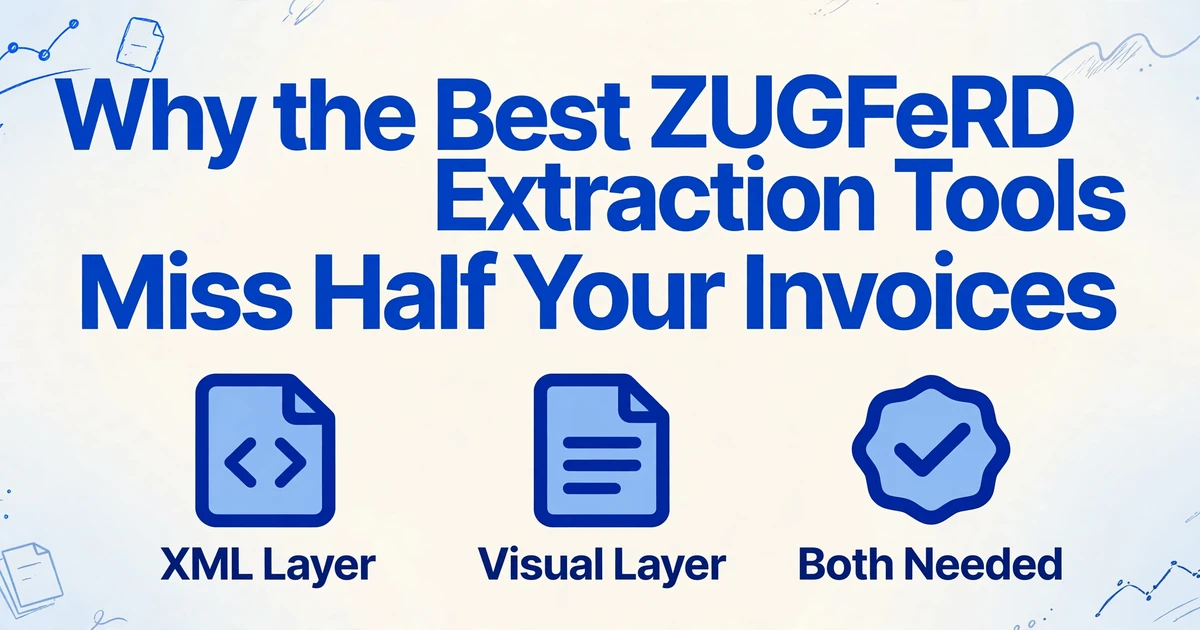
Search for the best ZUGFeRD extraction tools in 2026 and nearly every list opens with the same test: does it parse the embedded XML? That is the right question for a file that carries a complete XML payload. It is the wrong first question for an accounts payable team, because the answer depends on what your suppliers actually send. Germany has required businesses to be able to receive structured e-invoices since January 2025, but the obligation to issue them phases in through 2028, and during the transition a large share of what lands in your inbox is still an ordinary PDF. Even a genuine ZUGFeRD file can carry an XML attachment too thin to book. A tool that only reads XML is an excellent answer to a question that half your invoices do not ask.
Key Takeaways
- Every 2026 ZUGFeRD tool ranking is secretly a ranking of one skill: how well a tool parses the XML tucked inside the PDF.
- Half the invoices in a German AP inbox are plain PDFs or scans, and even a genuine ZUGFeRD file can carry a MINIMUM or BASIC WL profile with no line items.
- The right shortlist starts with your supplier mix, not with whichever parser sits at the top of the list.
What Is Actually Inside a ZUGFeRD File
ZUGFeRD (Zentraler User Guide des Forums elektronische Rechnung Deutschland) is Germany's hybrid e-invoice format. One file, technically a PDF/A-3 document under ISO 19005-3, holds two copies of the same invoice: the visible pages a person reads and prints, and an XML document attached inside the PDF under the archival rules that permit embedded files. That XML follows the UN/CEFACT Cross Industry Invoice (CII) syntax and is the legally decisive layer in Germany. Factur-X is the French name for the same standard, and since ZUGFeRD 2.1 the two are technically identical, one specification published under two names in Germany and France.
The XML is written at one of several profiles, and the profile decides how much of the invoice the structured layer actually contains. This is the part most tool comparisons list without explaining what it means for the person building an AP table.
| Profile | Line items in XML | EN 16931 compliant | Valid e-invoice under §14 UStG |
|---|---|---|---|
| MINIMUM | No | No | No |
| BASIC WL (without lines) | No | No | No |
| BASIC | Yes | Yes | Yes |
| EN 16931 (COMFORT) | Yes | Yes | Yes |
| EXTENDED | Yes | Yes | Yes |
| XRECHNUNG (reference profile) | Yes | Yes, as a CIUS | Yes |
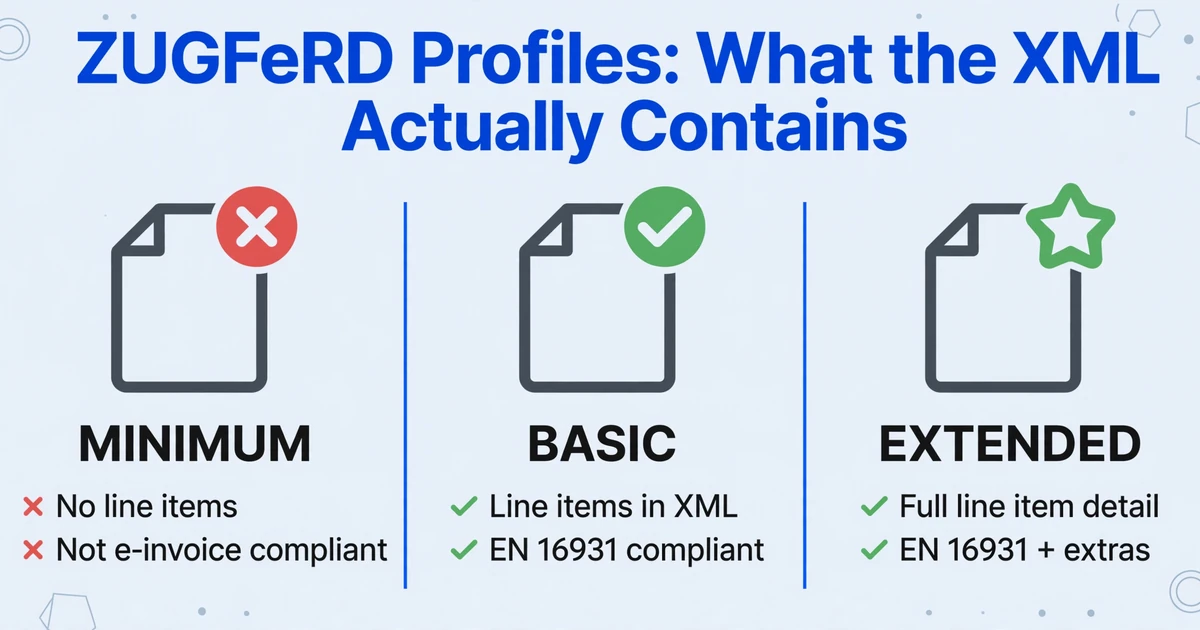
The German Ministry of Finance accepts ZUGFeRD from version 2.0.1 onward but excludes MINIMUM and BASIC WL, because those two profiles are too shallow to count as compliant e-invoices. The current specification, maintained by FeRD together with France's FNFE-MPE, is published with the profile declared inside the XML and read by validators and accounting systems alike. The exact profile rules and file naming conventions are documented on the official ZUGFeRD information site.
The profile, not the mere presence of an XML attachment, decides whether a ZUGFeRD file carries the line items your AP table needs. MINIMUM and BASIC WL carry none at all.
XRechnung sits beside ZUGFeRD rather than inside it for most practical purposes. It is a pure XML format, in either CII or UBL syntax, with no human-readable PDF layer at all, maintained by KoSIT and required for German public-sector invoices. ZUGFeRD also defines an XRECHNUNG reference profile, which wraps a XRechnung-compliant XML inside the hybrid PDF. That distinction matters later, because it decides which tools can even open a file.
The XML-Native Tool and the Visual Tool Solve Different Problems
Nearly every ZUGFeRD comparison collapses into two technical families, and the useful move is to understand what each one reads rather than which one sounds more advanced.
An XML-native tool locates the embedded CII XML and parses it directly. There is no recognition step, so field values are deterministic: the tool reads the same bytes a validator would. It handles the XML whether that payload is attached to a PDF or delivered as a standalone XRechnung file. Its blind spot is any invoice that has no usable XML, which includes plain PDFs, scans, photographs, and low-profile files whose XML carries no line items.
A visual-layer tool reads the rendered page the way a person sees it, using OCR and a vision model to understand what each value means. It can process any file with a readable page: a true ZUGFeRD PDF, a flat supplier PDF, a scan, or a phone photo. Its blind spot is the raw XRechnung XML, which has no page to read at all, and it cannot offer the byte-level certainty of parsing.
| Input you receive | XML-native tool | Visual-layer tool |
|---|---|---|
| ZUGFeRD PDF, EN 16931 (COMFORT) or EXTENDED | Reads the embedded XML exactly | Reads the rendered pages |
| ZUGFeRD PDF, MINIMUM or BASIC WL | Reads header data only, no line items | Reads whatever the pages show |
| Plain PDF or scanned invoice | Nothing to parse | Reads the page |
| Raw XRechnung XML (no PDF) | Reads the XML directly | No page to read |
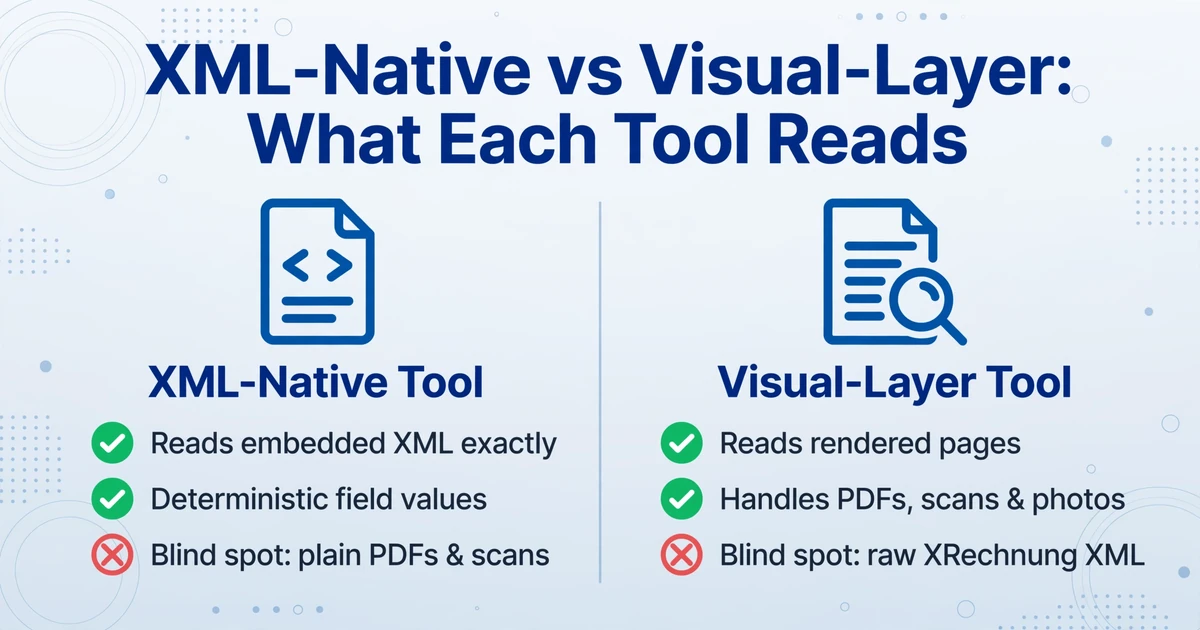
The two families are not ranked against each other. They are matched to the input, and most real inboxes need both kinds of coverage at some point.
Why "Just Parse the XML" Breaks in a Real AP Inbox
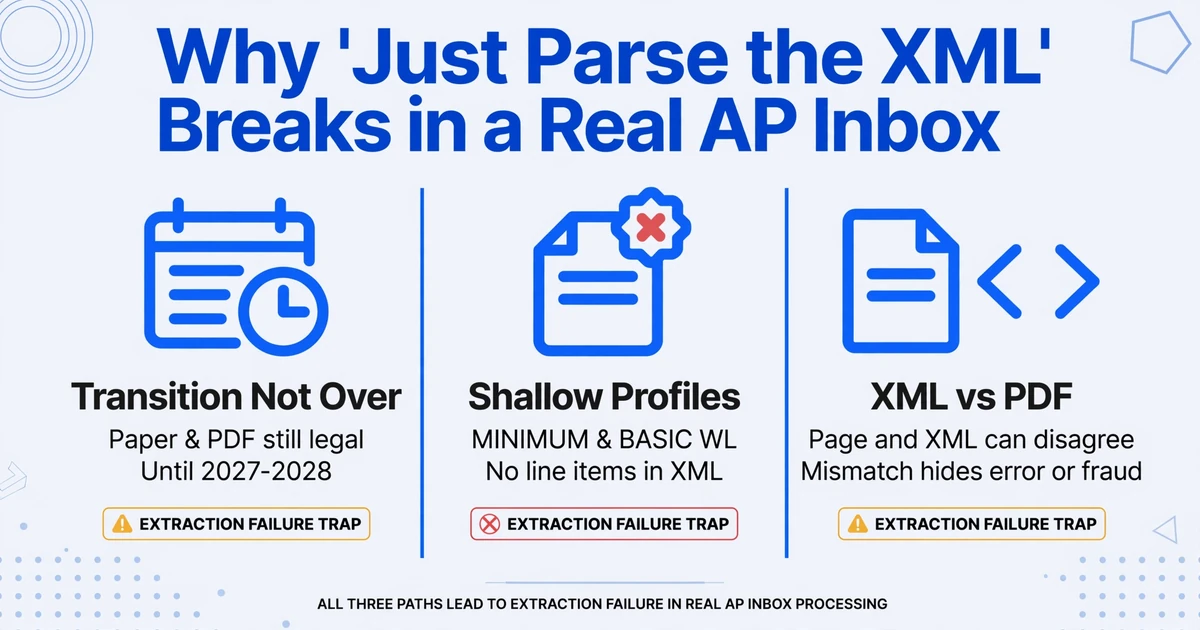
Three specific realities explain why the XML-first framing leaves gaps, and each one shows up in German and EU accounts payable work today.
The transition period is not over. Since January 1, 2025, every business in Germany must be able to receive EN 16931 e-invoices, and the European Commission's Germany eInvoicing page sets out the phased start: suppliers with turnover above EUR 800,000 must issue e-invoices from January 1, 2027, and all remaining suppliers from January 1, 2028. Until those dates, and for smaller firms under the transition rules, suppliers may keep sending paper or plain PDF invoices with the recipient's consent. A team that rips out its PDF handling in 2026 because "e-invoicing is mandatory now" will strand every supplier that has not switched. The full legal timeline, including the XRechnung and ZUGFeRD split, is covered in our guide to Germany's e-invoicing mandate.
Not every XML is worth parsing. The profiles table above is not trivia. MINIMUM and BASIC WL are explicitly excluded from the mandate, which means a supplier sending one is not meeting the requirement either, yet those files still arrive and often get forwarded to AP as if they were complete. If your output table needs per-line quantities, unit prices, and tax codes, a parser that dutifully reads a BASIC WL file returns header totals and stops. The XML exists. The data you need does not. Legacy ZUGFeRD 1.0 files, which predate EN 16931 and use a different root element, add the same problem for archived invoices.
The XML and the PDF can disagree. This is the point the tool lists skip entirely, and the official ZUGFeRD guidance raises it directly. Because a hybrid file carries two representations, a fraudulent or erroneous invoice can show one figure on the page and another in the XML. The ZUGFeRD FAQ warns against checking only the PDF and then paying the XML version, and notes that automatically detecting deviations requires OCR and invoice recognition, with results that will most likely not be perfect. In practice that cuts both ways: the visual layer is worth reading even when XML exists, and no method, visual or XML, gets to claim perfection.
The lived version of this problem sounds less technical. In an r/Accounting thread on handling German e-invoices into non-German ERPs, one practitioner described the situation plainly: "most German suppliers still send regular PDFs despite all the e-invoice hype, and our ERP (not SAP) basically treats XRechnung like a foreign language so yeah, lots of manual entry still happening. The OCR tools we tried were maybe 70% accurate on a good day" (r/Accounting). Suppliers sending PDFs, ERPs that do not speak XML, and tools that miss fields all appear in the same sentence.
The question that decides your outcome is not "does it parse XML". It is "does it produce the columns my output needs, from every kind of file my suppliers send".
The Best ZUGFeRD Extraction Tools in 2026, Grouped by Approach
There is no single winner among ZUGFeRD extraction tools for 2026, because the tools are built for different inputs. Grouping them by approach is more useful than a single ranked list. The entries below cover the names that recur in serious shortlists, plus the visual-layer option. If you are still defining your criteria across the wider category, our comparison of invoice data extraction software goes broader.
| Tool | Approach | Best for | Watch for |
|---|---|---|---|
| FormX | XML-native REST API, free single-document tool | Developers whose files carry complete XML and who want JSON over an API | Hosted only; confirm it fits your data-residency rules |
| InvoiceXML | XML-native API for extract, create, validate, convert | Teams that also need to generate or validate e-invoices | Developer-facing; not an AP review interface |
| Rossum | Enterprise document AI, ML extraction with workflow rules | Mixed portfolios where ZUGFeRD is one format among many | Verify whether ZUGFeRD input goes through XML or the visual layer |
| Klippa (Doxis) | EU document-processing platform with review UI and API | Mid-market EU teams that want human review alongside automation | Vendor-led onboarding and pricing |
| ABBYY | Enterprise IDP, configurable toward XML | Organizations already standardized on ABBYY | Configuration and implementation overhead for a ZUGFeRD-only scope |
| Docsumo | Document AI for financial documents, OCR-first | One platform across bank statements, invoices, and purchase orders | Confirm ZUGFeRD XML is read directly rather than re-recognized |
| Mustang | Open-source Java library for CII XML | Java teams, zero license cost, self-hosting and data residency | You build and run the service; typed objects, no UI |
| ImageToTable.ai | Visual-layer extraction of the PDF or scan, no XML parsing | Mixed inboxes with plain PDFs, scans, and low-profile ZUGFeRD files heading to Excel or Sheets | Cannot read a raw XRechnung XML file; use an XML-native tool when the XML is the source of truth |
A few notes on reading that table. "Best for" describes the input profile a tool was built around, not an overall quality ranking. Tool capabilities change, so verify the current documentation before committing. And the right answer is often two tools rather than one: an XML-native parser for the files that carry complete structured data, plus a visual-layer tool for the plain PDFs, scans, and incomplete files that never had usable XML to begin with. That second category is larger than the tool lists imply during the German transition.
How to Choose Based on What Your Suppliers Actually Send
The decision framework that holds up in practice starts with a count, not a feature matrix. Pull your last hundred incoming supplier invoices and sort them into four piles: true ZUGFeRD or Factur-X PDFs with an EN 16931 or EXTENDED profile, raw XRechnung XML, ordinary PDFs, and scans or photos. The size of each pile answers most of the selection question.
If nearly everything carries complete XML
Choose an XML-native parser or API. You get deterministic fields, you can validate against EN 16931 rules, and the raw XML stays available for archiving, which German record-keeping rules expect you to keep as the original. A visual tool adds little here.
If a meaningful share is plain PDF or scan
You need a visual-layer tool, or a two-tool setup. This is the common 2026 case: a supplier base split between early e-invoice adopters and companies still inside the transition window. A visual tool reads both true ZUGFeRD pages and flat PDFs through the same pipeline.
If you must read raw XRechnung XML
An XML-native tool is the only option. A pure XML file has no page for a visual tool to read. Teams invoiced by German public-sector buyers should treat this as a hard requirement, not a preference.
Decide where the data has to land
DATEV, Lexware, and SAP import the embedded XML directly, so if that path already works for you, the remaining gap is the PDFs. If your destination is a spreadsheet or an import template, a visual tool that outputs Excel or CSV, and optionally writes into Google Sheets, removes the most retyping.
Match the tool to your volume and line depth
Batch handling matters once you are past a trickle of invoices a day, or when individual invoices run to hundreds of line items on many pages. A per-document API call model and a batch-upload model feel equivalent in a demo and diverge sharply at month-end volume.
One more consideration that has nothing to do with formats: cross-border e-invoicing is only widening. Under the EU's VAT in the Digital Age package, structured e-invoicing plus digital reporting for intra-EU B2B transactions becomes mandatory from July 1, 2030, and the European Commission has already let member states mandate domestic e-invoicing without a special derogation. XML share will keep rising. The tools that stay useful are the ones that cover the structured path without abandoning the files that still arrive as documents.
What PDF-Layer Extraction Can and Cannot Do for ZUGFeRD
This is where the boundary of our own tool matters, and it is worth stating plainly. ImageToTable.ai reads the visual layer of an invoice. It does not parse the embedded XML. That single fact determines both what it is good at and what it cannot do.
The mechanism is Custom Column Extraction: you type the column names you want, such as "Supplier", "Invoice Number", "Invoice Date", "Net Amount", "VAT Amount", and "Line Item Description", and the AI locates each value by understanding what it means rather than by where it sits on the page. There is no template to draw and no sample to train, and the column names you enter become the headers of the output table. This is what makes a flat supplier PDF and a true ZUGFeRD PDF flow through the same request, because both have pages to read.
For AP work, three further capabilities line up with the ZUGFeRD reality. Batch processing means you upload many files at once and they merge into a single Excel table with consistent columns, so a mixed folder of ZUGFeRD PDFs and scans produces one dataset instead of one file per supplier. Multi-Page Merge groups results that belong to the same logical document, so a long invoice spanning several pages, or a document photographed page by page, folds into one row or one continuous set of rows rather than scattering. Review mode with bbox verification lets you hover or click an extracted cell and see exactly where on the original page the value came from, which matters for finance work where one misread digit becomes a wrong payment. Inputs include PDFs, including password-protected files, plus JPG, PNG, WebP, AVIF, and screenshots, and the output can be Excel, CSV, JSON, or Word.
On speed, the tool processes a printed invoice page in five to ten seconds, against an average of about three minutes of manual entry, and reaches up to 99 percent recognition accuracy on printed table data. Dense handwriting or a low-quality scan is better handled on a higher processing tier, which the tool exposes as Standard, Advanced, or Premium.
The limits are just as specific. It does not read, emit, or validate the embedded CII XML, so it cannot replace an XML-native parser for teams that must keep or validate the structured original. It cannot process a raw XRechnung XML file, because there is no page to read. It does not check a file against the EN 16931 rules, and it does not book anything into DATEV, Lexware, or SAP. What it does is turn the documents that carry no usable structured data into the spreadsheet rows the rest of your process consumes. The mechanics carry over to ordinary German invoice (Rechnung) extraction, whether or not a file happens to be ZUGFeRD.
Visual extraction covers the layer that is present on every invoice you receive; XML parsing covers the layer that is only sometimes complete. Neither replaces the other, and knowing which file is which is the skill the tool lists leave out.
Frequently Asked Questions
What is the best ZUGFeRD extraction tool in 2026?
It depends on what your suppliers send. If your incoming files reliably carry complete EN 16931 or EXTENDED XML, an XML-native parser such as an API-based extraction service gives you deterministic fields. If a meaningful share arrives as plain PDFs, scans, or low-profile ZUGFeRD files, you need a visual-layer tool that reads the rendered pages. Many teams end up using both.
Should a ZUGFeRD extraction tool read the XML or the PDF layer?
Both approaches are valid and they answer different situations. Reading the XML is exact and can validate against the standard, but it only works when the XML is present and complete. Reading the PDF or scan works on every file that has a readable page, including the plain invoices that still dominate many inboxes during the German transition. The mistake is assuming one approach covers the whole supplier base.
Can ImageToTable.ai extract data from a ZUGFeRD PDF?
Yes, from the visible PDF pages. ZUGFeRD is a hybrid file, so it always has a human-readable layer, and ImageToTable.ai reads that layer using the columns you define. It does not parse or output the embedded XML, so it is the right tool for getting line items and header fields into a spreadsheet, not for validating or archiving the structured original.
Does ImageToTable.ai work with XRechnung invoices?
Only when a XRechnung arrives as a PDF or a scan with a readable page. A raw XRechnung file is pure XML with no visual layer, and ImageToTable.ai does not accept XML as an input. For bare XRechnung files you need an XML-native parser.
Can I batch-process many ZUGFeRD invoices at once?
Yes. ImageToTable.ai is built batch-first: upload multiple files, and they merge into one Excel table with the same columns. That works for a folder that mixes true ZUGFeRD PDFs, flat supplier PDFs, and scans, because extraction is driven by the column names you set rather than by each file's format.
Is there a free ZUGFeRD extraction tool?
Free options exist and are worth using for a first look. The open-source Mustang library genuinely parses ZUGFeRD and Factur-X XML at no license cost, though you have to build and run the service around it. Several commercial vendors offer a free single-document online tool or a trial for testing, typically without batch or API access. For volume work, expect a paid plan or self-hosted effort.
What is the difference between ZUGFeRD and Factur-X?
They are the same technical standard under two names. ZUGFeRD is the German label and Factur-X the French one, both maintained jointly since ZUGFeRD 2.1, with identical PDF/A-3 containers, identical CII XML, and the same profiles. A tool that handles one should handle the other; ask specifically how it treats files with a factur-x.xml attachment versus the older zugferd-invoice.xml name.
The list of "best ZUGFeRD extraction tools" is really a list of answers to one narrow question: which tool parses the embedded XML. That question is worth asking, and for a fully structured supplier set the XML-native answer is the right one. But the German mandate is still phasing in, plain PDFs remain legal for a while yet, and the lower ZUGFeRD profiles ship XML without the line items an AP table needs. The team that knows which of its invoices actually carry complete structured data chooses a better tool than the team that picks the highest-ranked parser.