Best OCR Software for Accounting Firms in 2026:
10 Tools Compared
The Intuit 2026 Accountant Technology Survey of 725 US professionals found that 54% of accounting firms now use AI for data entry and processing, and the average firm loses roughly five hours per week moving and re-entering data across an average of ten different software tools. That five-hour drag — more than half a working day before client work starts — is the real reason accounting firms evaluate OCR technology. It is not about scanning receipts faster. It is about stopping the data from having to move through so many hands in the first place. This guide compares ten document extraction tools across the criteria that actually matter for a multi-client practice: accuracy on mixed document types, line-item handling, per-client configuration, compliance readiness, and what the monthly cost looks like when your firm processes documents for 10, 20, or 50 clients.
Key Takeaways
- Every OCR tool on the market claims 95%+ accuracy — and on clean single-vendor PDFs, they genuinely all deliver it.
- The benchmarks that tool vendors compete on — field-level accuracy percentage — are irrelevant to a firm that receives 200 different invoice formats from 50 clients every month.
- The only criterion that predicts whether a tool survives tax season: template-free extraction — AI that reads a field by what it means, not by where it sits on the page.
What Makes Accounting Firm OCR Different From Every Other Document Extraction Use Case
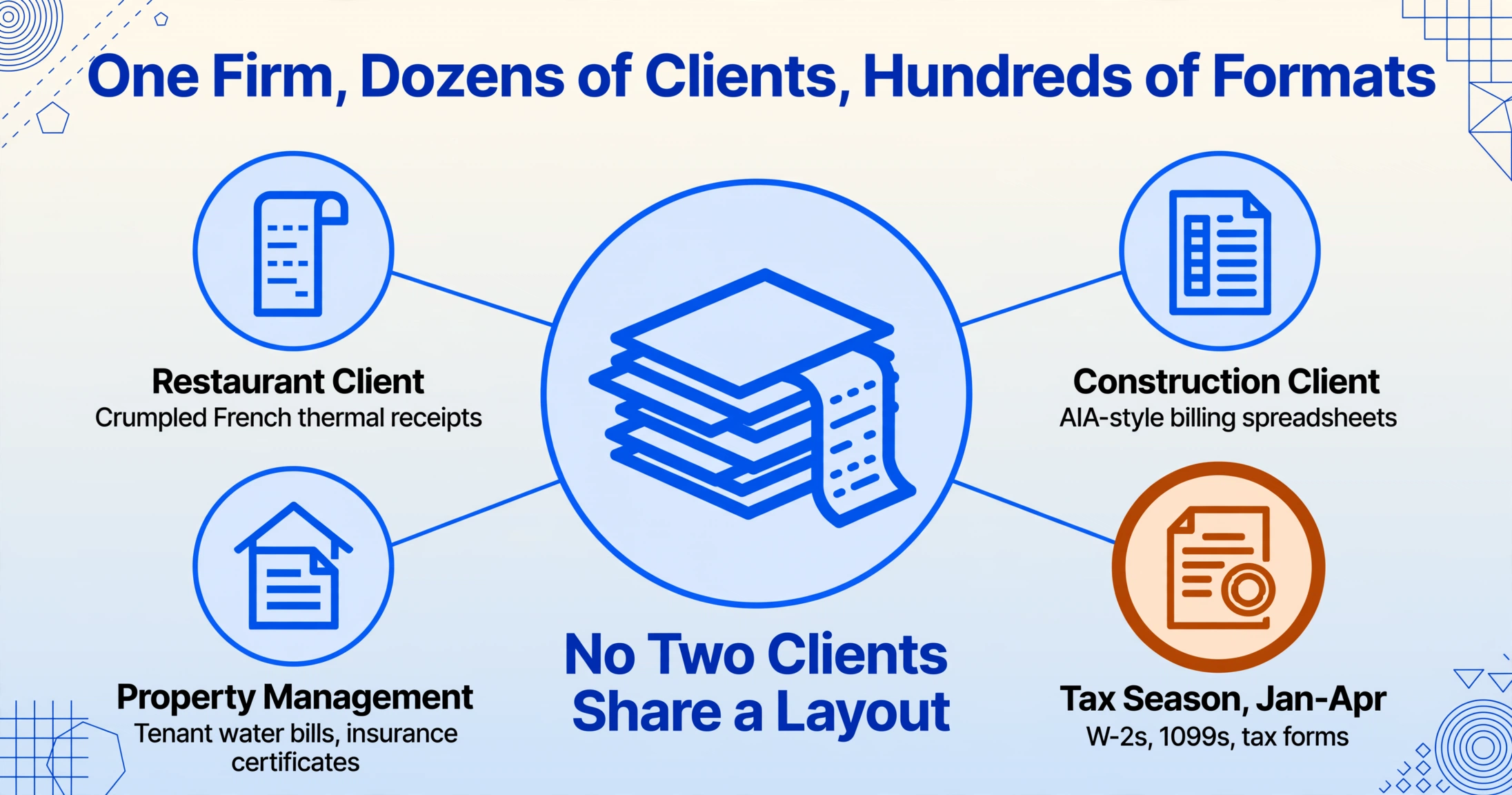
An accounting firm does not process its own vendor invoices. It processes invoices from dozens of clients, each with dozens of vendors — which means it faces hundreds of unique document formats simultaneously. A restaurant client sends crumpled thermal receipts printed in French from Metro and Transgourmet. A construction client uploads AIA-style billing spreadsheets. A property-management client forwards tenant water bills and insurance certificates. And in January through April, all of that gets layered on top of W-2s, 1099s, and tax forms.
This multi-client format chaos is the single most important difference between OCR tool selection for accounting firms and every other use case. If a tool requires a template per vendor or per layout — it creates work, not removes it.
The second factor is volume and seasonality. The same firm that processes 200 invoices per month during August may process 2,000 tax documents per week during filing season. The AICPA's 2026 PCPS CPA Firm Top Issues Survey found that technology adoption and integration now ranks as the top long-term concern across firms of every size. Tools that cannot flex during tax season — or that price per document at rates that punish seasonal spikes — become cost centers rather than solutions.
Third, accounting firms face compliance requirements that other businesses do not. Under IRC Section 6001, the IRS can request electronic accounting records during an examination, and Revenue Procedure 97-22 governs how electronic records must be maintained to satisfy recordkeeping rules. SOC 2 Type 2 compliance, which verifies how a vendor secures client data, is increasingly a prerequisite for firms handling client financial information. A tool cannot simply extract text — it must do so in a way that meets the standard of evidence your clients and regulators expect.
These three constraints — format diversity, seasonal volume, and compliance — are the lens through which this guide evaluates each tool. Most best OCR software comparisons stop at invoice-processing speed, but they miss the real question: does this tool fit the shape of how an accounting firm actually works? If you are new to how optical character recognition and AI extraction work under the hood, our guide on what OCR is and how it actually works covers the baseline technology. For a smaller-scale perspective aimed at solo bookkeepers and freelancers rather than multi-client firms, the best OCR software for small business comparison covers a different set of tools at lower price points.
How We Picked and Tested
Ten tools made this list because they represent the genuine options that accounting firms encounter during procurement — not because they are the easiest to rank. We started from the names that practicing CPAs and bookkeepers actually search for and reference on forums like r/Accounting and r/taxpros: Dext, AutoEntry, and Hubdoc (the three incumbent document-capture tools), then added the newer AI-native contenders (Tofu, DocuClipper, Klippa, Vic.ai), the ecosystem-integrated platforms (Bill.com, DataSnipper), and our own ImageToTable.ai.
Each tool was evaluated on six dimensions: document-type coverage (does it handle invoices, receipts, bank statements, and tax forms?), extraction approach (template-free semantic AI vs. template-based vs. fixed-format OCR), multi-client workflow (per-client configuration, workspaces, or lack thereof), line-item extraction (is it included or an add-on?), pricing at volume (what 50 clients or 500 documents per month actually costs, not the promotional tier), and compliance readiness (SOC 2, data retention, audit trail). Pricing was checked against each vendor's public pricing page or verified through neutral review sources in June 2026.
One disclosure up front: ImageToTable.ai — the product this domain belongs to — is one of the ten tools reviewed. We have placed it where it honestly fits: a template-free alternative for firms that need to extract structured data from diverse client documents without per-vendor configuration. The scenarios where Dext, Vic.ai, Bill.com, or DataSnipper are the better call are named explicitly. An affiliation-disclosure note appears at the end of the comparison table.
The 10 Best OCR Tools for Accounting Firms at a Glance
The table below is the fast answer. Pricing was checked against each vendor's published rate card in June 2026 (denoted as "Pricing checked June 2026"). "Per-client configurable" means the tool lets you organize extraction rules or templates by client account, which is essential for multi-client firms.
| Tool | Starting Price | Docs Covered | Best For | Key Limitation |
|---|---|---|---|---|
| Dext | $239/mo (10 clients) | Invoices, receipts, bank stmts | Pre-accounting automation, Xero/QBO/Sage shops | Line items are a paid add-on; weak on tax docs |
| AutoEntry | ~$30/mo (credit-based) | Invoices, receipts, bank stmts | Classic OCR capture, Sage integration | Templated engine; struggles with irregular layouts |
| Hubdoc | Free with Xero | Invoices, receipts, bank stmts | Free Xero document collection | No line-item extraction; basic OCR only |
| Tofu | $79/mo (unlimited users) | Invoices, receipts, bank stmts | Line-item extraction, multilingual firms | Newer platform; limited integration ecosystem |
| DocuClipper | $79/mo (300 pages) | Bank stmts, invoices, receipts, checks, tax forms | Financial doc specialists, reconciliation | No per-client workspace separation |
| Klippa | Custom/API-based | Invoices, receipts, ID docs | Custom API workflows, multilingual | Sales-led pricing; requires dev effort |
| Vic.ai | Custom (mid-market) | Invoices (AP-focused) | High-volume AP, mid-market firms | Invoices only; no tax docs or bank stmts |
| DataSnipper | Custom (Excel-native) | Invoices, reports, audit evidence | Audit-centric firms, Excel-native workflow | Excel-only; no direct accounting-software sync |
| Bill.com | $49/mo (Essentials) | Invoices (AP + payments) | Full AP-to-payment pipeline | AP-only; not a general extraction tool |
| ImageToTable.ai | $9/mo (150 pages) | Invoices, receipts, bank stmts, tax docs, any document | Template-free extraction across mixed document types | No native ERP/accounting sync |
Affiliation disclosure: ImageToTable.ai is the product offered by this website. All other tools are evaluated independently. Prices checked June 2026.
Dext (formerly Receipt Bank): The Pre-Accounting Benchmark
Dext remains the most full-featured of the three incumbent document-capture tools, and it is the benchmark that every newer entrant measures itself against. It connects directly to Xero, QuickBooks, and Sage, pushing extracted invoice data into the correct accounts with GL coding applied. Its supplier rules engine learns recurring invoice formats over time, reducing manual correction for repeat vendors. Dext supports per-client workspaces, so a firm managing 30 client accounts can keep extraction rules and document archives separate.
The tradeoff that matters: Dext captures header-level data (vendor name, date, total) by default, but full line-item extraction sits behind a higher-tier plan that consumes additional processing credits. For a firm processing supplier invoices with 10 to 30 line items each, the effective per-document cost climbs significantly once line items are needed. Dext also does not cover tax documents (W-2s, 1099s, W-9s) as a core capability, which means firms that want a single tool for both bookkeeping and tax-season intake still need a second solution.
Best for: Firms already embedded in Xero, QuickBooks Online, or Sage that want a polished pre-accounting layer for invoices and receipts and accept the add-on cost for line-item extraction.
Not ideal for: Firms that handle tax-form intake, need line items without per-document credit costs, or process documents from clients who use multiple different accounting platforms.
AutoEntry: Classic OCR With a Sage Backbone
AutoEntry, owned by Sage, takes a more traditional approach: it uses template-based OCR to extract data from invoices and bank statements and supports two-way sync with Sage Accounting, Xero, and QuickBooks. Its credit-based pricing means you buy bundles of extraction credits — roughly 2–5 credits per document depending on complexity — and use them across invoices, receipts, and bank statement transactions.
AutoEntry's extraction engine is reliable on clean, standard-format invoices but struggles with irregular layouts, non-English documents, and poor-quality scans — the kind of documents that show up regularly in multi-client practice. It has no native support for tax forms. Its credit-based model can be hard to predict for firms with variable monthly volume, though it is transparent: you know exactly what each document type costs.
Best for: Firms whose client base sends clean, standard-format invoices consistently and who want a Sage-integrated solution with predictable per-document pricing.
Not ideal for: Firms handling diverse document formats, receipts from mobile photos, or any tax-document intake during filing season.
Hubdoc: Free but Fundamentally Limited
Hubdoc, acquired by Xero in 2018 and bundled free with Xero subscriptions, solves a specific and narrow problem: it automatically fetches invoices, receipts, and bank statements from client portals and syncs them to Xero or QuickBooks Online. For a firm whose staff spends hours each month manually downloading bank statements from 20 different client portals, the auto-fetch feature alone can save significant time.
The limits are sharp. Hubdoc uses a basic OCR engine and does not extract line items. The extracted data is header-level only (vendor, date, total, category), with no structured table output. There are no per-client extraction rules, no template configuration, and no tax-document processing. r/Xero threads frequently note that Hubdoc is slow for users processing more than a few hundred documents a month, and the 3.5-star average rating on the Xero marketplace reflects user experience with performance at scale.
Best for: Low-volume Xero firms that primarily need automated document collection and can accept basic header-level extraction.
Not ideal for: Any firm that needs line-item extraction, tax-document processing, or works at a volume where an hour per week of waiting for documents to sync becomes a real cost.
Tofu: AI-Native With Full Line-Item Extraction
Tofu is a newer entrant that has gained attention among accounting firms for its flat-fee, unlimited-user pricing and genuinely strong line-item extraction out of the box. It handles invoices, receipts, and bank statements across 200+ languages including handwriting recognition and fading thermal receipt processing — the kind of documents that break template-based engines. At $79/month for unlimited users, its pricing structure directly addresses the add-on cost frustration that Dext users report.
The "self-learning AI" claim — that it builds persistent knowledge from user corrections — is a legitimate time-saver for firms with repeat vendors. Tofu publishes extracted data to Xero or QuickBooks with source documents attached. Its limits are typical of a newer platform: a smaller partner ecosystem than Dext, no tax-form coverage, and less operational track record during peak tax-season volumes.
Best for: Firms with high line-item volume across diverse invoice formats that want predictable flat-rate pricing and multilingual support.
Not ideal for: Firms that need tax-form extraction (W-2s, 1099s), bank-statement reconciliation features, or deep integration with tax-prep platforms like UltraTax CS or Drake Tax.
DocuClipper: Built for Financial Document Accuracy
DocuClipper positions itself differently from the pre-accounting tools: it specializes in extracting data from financial documents with reconciliation-grade accuracy, including bank statements, tax forms, checks, and invoices. Its engine is tuned for numbers — transaction-level extraction from bank statements, check-image data capture, and tax-form field extraction — areas where a misread decimal or transposed digit creates downstream compliance problems. The platform claims 99.9% extraction accuracy on financial documents and processes a 12-month bank statement in roughly 30 seconds.
DocuClipper exports to QuickBooks, Xero, Excel, and CSV, and its client roster includes firms from Deloitte and KPMG to regional practices. Its $79/month Business plan covers 300 pages with pooled users, making it one of the more cost-predictable options for firms doing significant bank-statement and tax-form work. The limitation is that DocuClipper does not offer per-client workspace separation — all documents are extracted in a single queue, then exported client-by-client — which adds an organizational step for firms managing 20+ client accounts.
Best for: Firms that process high volumes of bank statements, tax forms, and checks and need financial-document-grade accuracy with QuickBooks/Xero export.
Not ideal for: Firms that need per-client workspace separation, real-time GL coding, or supplier-rule learning for recurring vendor invoices.
Klippa: Template + AI Hybrid for Custom Workflows
Klippa, based in the Netherlands, takes a hybrid approach: it offers both template-based zones for high-volume standard documents and AI-assisted extraction for anything the template does not cover. It processes invoices, receipts, and identity documents through a structured API, making it a strong option for firms building custom intake workflows or integrating extraction into proprietary client portals. Its multilingual support handles dozens of languages, which matters for firms with international clients.
Klippa's hybrid model is both its strength and its complexity. For a firm processing the same five vendors' invoices from 30 clients, templates work well and are highly accurate. For the remaining documents — and there are always remaining documents in multi-client practice — the AI fallback handles them without template creation. The tradeoff is that Klippa's pricing is sales-led and custom, requiring a conversation to get a rate card. The API-first design also means that extracting data requires some technical setup or a developer's involvement.
Best for: Firms with technical resources that need a customizable extraction API balancing template accuracy with AI flexibility across multiple languages.
Not ideal for: Non-technical firm owners who want a plug-and-play solution with no setup or sales conversation required.
Vic.ai: AP Volume Specialist for Mid-Market Firms
Vic.ai focuses on a single but critical slice of accounting firm document processing: accounts payable invoice extraction at high volume. Its AI engine extracts invoice data, codes transactions to the GL based on historical patterns, and routes invoices through approval workflows. For mid-market firms or client-accounting-services (CAS) practices that process hundreds of invoices daily for a concentrated set of clients, Vic.ai's per-invoice efficiency is legitimately strong — users report 30–70% time savings on AP processing.
The narrow scope is the constraint. Vic.ai handles invoices only. It does not process bank statements, receipts, tax forms, or any other document type that an accounting firm encounters daily. It is also oriented more toward finance teams inside mid-market companies than toward accounting firms serving multiple clients. Integration is strongest with NetSuite, Sage Intacct, and Microsoft Dynamics — less so with QuickBooks Online and Xero.
Best for: Mid-market CAS practices processing high AP volumes for clients on NetSuite or Sage Intacct, where per-invoice efficiency matters more than document-type breadth.
Not ideal for: Firms that need a general-purpose extraction tool covering receipts, bank statements, tax forms, and invoices in one workflow.
DataSnipper: Audit-Centric Extraction Inside Excel
DataSnipper takes a fundamentally different approach: it embeds document extraction directly inside Excel, so auditors and accountants can pull data from invoices, bank statements, contracts, and supporting evidence without leaving their spreadsheet. The tool is used by Deloitte, RSM, and Grant Thornton, and its design reflects audit workflow requirements: every extraction creates a compliance-ready audit trail, source documents are linked to extracted values, and changes are tracked.
DataSnipper's relevance to accounting firms depends on how much audit work the practice does. For firms running audit, review, or attest engagements — where every figure in the workpapers must trace back to a source document — DataSnipper is the most purpose-built tool on this list. For firms focused on bookkeeping, CAS, or tax preparation without audit, its Excel-native approach adds unnecessary complexity: it does not sync directly to QuickBooks or Xero, and it is not designed for the batch intake workflow of processing 50 client invoices into an accounting system.
Best for: Firms with a significant audit practice that needs compliance-ready document extraction tied to Excel workpapers.
Not ideal for: Bookkeeping-focused firms that need direct sync to accounting platforms rather than Excel-native extraction.
Bill.com (BILL): Full AP Platform With Embedded OCR
Bill.com (recently rebranded as BILL) is not an OCR tool — it is a full accounts-payable and accounts-receivable platform that includes AI-powered invoice capture as one component. For accounting firms whose primary pain is the end-to-end AP pipeline (invoice capture → approval → payment → reconciliation), BILL handles everything in one platform and integrates natively with QuickBooks, Xero, NetSuite, and Sage Intacct.
The embedded OCR extracts invoice data including line items and supports multi-entity workflows for firms managing multiple clients. BILL's $49/month Essentials plan is accessible for small firms, while the Corporate plan at $89/month adds custom approval workflows. The tradeoff is scope: BILL is designed for AP, not for general document extraction. It does not process bank statements, tax forms, receipts, or the diverse document mix that accounting firms handle. Firms using BILL for AP will still need a separate tool for everything else.
Best for: Firms that want a single platform for their clients' AP-to-payment pipeline and already use BILL for invoice processing.
Not ideal for: Firms that need general-purpose document extraction across invoices, receipts, bank statements, and tax forms.
ImageToTable.ai: Template-Free Semantic Extraction for Mixed Document Workloads
ImageToTable.ai approaches the accounting firm problem from a different starting point: instead of building pre-configured templates or training models per document type, it uses a vision-language model that reads documents the way a person does. You type the column names you want — "Invoice Number," "Due Date," "Line Items Total," "Category" — and the AI locates each value anywhere on the page by understanding what it means, not where it sits. This is called Custom Column Extraction, and it directly addresses the multi-client format chaos that defines accounting firm OCR.
The practical effect: a firm processing invoices from 50 different clients does not need to create 50 template configurations. The same column names work whether the vendor places the invoice number in the top-left corner or the bottom-right. The tool also supports computed columns — defining calculations like "Line Total (Qty × Unit Price)" as a column name so the AI extracts and multiplies in one step — and inferred columns like "Category (Options: Meals/Transport/Office/Other)" where the AI classifies each document based on content rather than a pre-set field.
ImageToTable.ai handles invoices, receipts, bank statements, tax forms (W-2s, 1099s), and any structured document in a single upload interface. Batch-first processing means 50 client invoices upload simultaneously and export as one Excel file with a client-identifier column to keep them separated. The Google Sheets add-on lets reviewers extract directly into a spreadsheet without switching applications. Pricing starts at $9/month for 150 credits, with the Pro plan at $19/month for 400 credits — per-document cost that does not penalize seasonal volume spikes because credits roll over.
The honest limitation: ImageToTable.ai does not sync directly to accounting platforms. The output is Excel, CSV, or JSON that the user imports into QuickBooks, Xero, or their tax-prep software. For firms that want push-button GL posting, Dext or Tofu provide a more integrated path. For firms that want maximum flexibility in how they structure and extract data from wildly varying client documents — and prefer to own the import step rather than be locked into a single accounting platform — ImageToTable.ai's template-free approach is the more adaptable fit.
Which Tool Is Right for Your Firm?
No single tool covers every accounting firm scenario. The right choice depends on your firm's primary document types, client mix, and where the operational bottleneck actually lives. Here is the decision framework by firm profile:
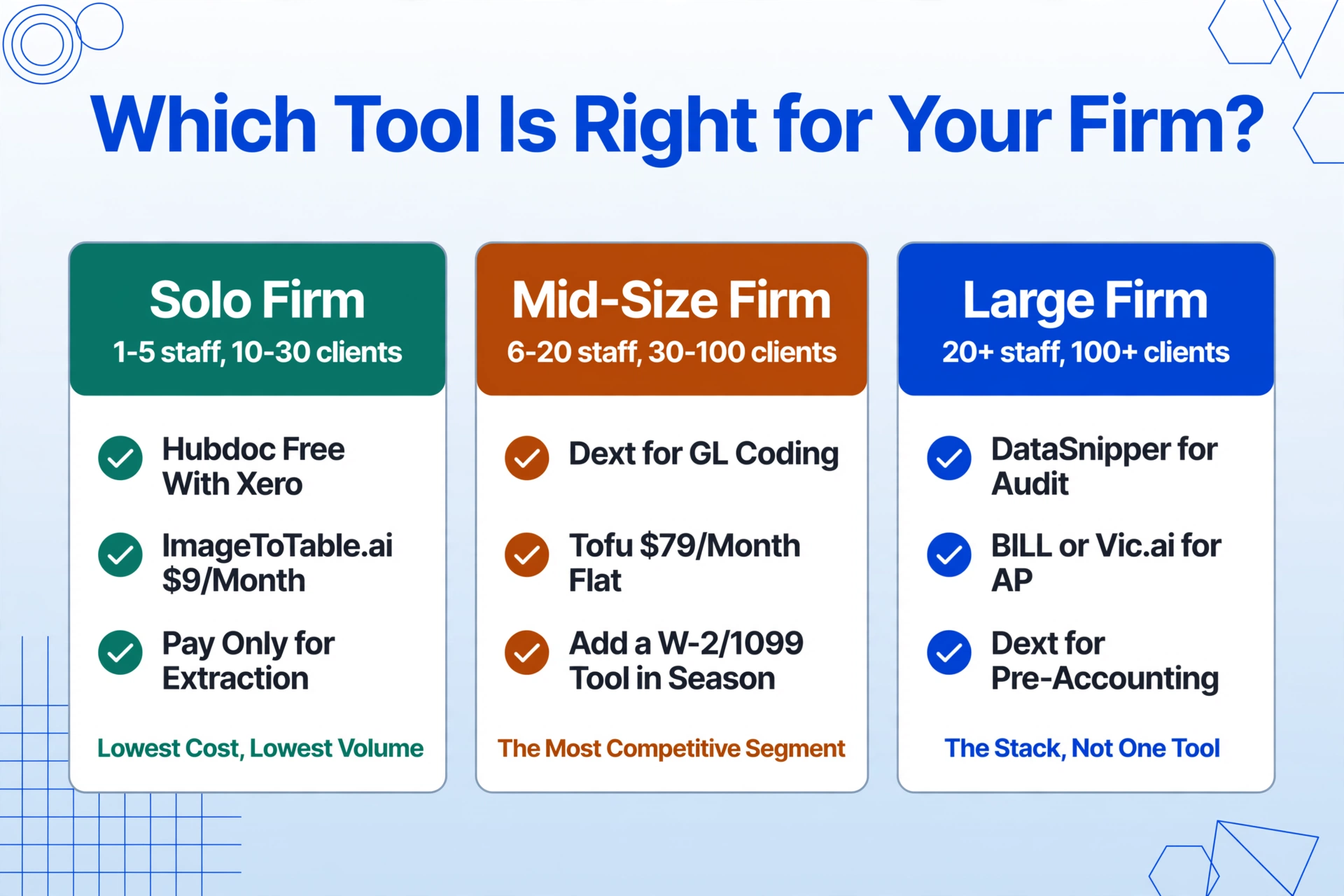
Solo practitioner or small firm (1–5 staff, 10–30 clients). If your volume is low and you are on Xero or QuickBooks Online, the combination of Hubdoc (free auto-fetch) for collection plus a lightweight extraction tool for the documents that need structured data output keeps costs close to zero for collection and lets you pay only for what you extract. ImageToTable.ai at $9/month or DocuClipper at $79/month for bank-statement-heavy practices fits this tier.
Mid-size firm (6–20 staff, 30–100 clients). This is the most competitive segment. Dext is the default option for firms already embedded in Xero/QBO/Sage that want GL coding and supplier-rule automation — but budget for the line-item add-on if your clients send detailed invoices. Tofu at $79/month flat is a strong alternative when line-item volume is high and multilingual support matters. If tax-document intake is the bottleneck (January–April), add DocuClipper or ImageToTable.ai for the W-2/1099 workflow.
Large firm (20+ staff, 100+ clients, audit practice). The stack becomes multi-tool. DataSnipper for audit workpapers, BILL or Vic.ai for high-volume AP from mid-market clients, and Dext for the broader pre-accounting intake. ImageToTable.ai fills the gap for the documents that do not fit any of these specialized pipelines — the one-off vendor format, the foreign-language receipt, the poorly scanned tax form that a template-based tool cannot read.
Frequently Asked Questions
What is OCR software for accounting firms?
OCR software for accounting firms is technology that converts scanned or digital financial documents — invoices, receipts, bank statements, and tax forms — into structured data that can be imported into accounting platforms like QuickBooks, Xero, or tax-prep software. The best tools for accounting firms specifically handle the multi-client format challenge: they extract data from documents that come in hundreds of different layouts without requiring per-vendor template creation.
Dext vs Hubdoc vs AutoEntry — which is best for a CPA firm?
It depends on your accounting platform and document volume. Hubdoc is free with Xero but does not extract line items and has basic OCR only — suitable for low-volume firms where document collection is the main pain point. Dext is more powerful with GL coding and supplier rules but costs $239+/month for 10 clients and charges extra for line-item extraction. AutoEntry sits between them with credit-based pricing and reliable performance on clean invoices, but struggles with irregular layouts. None of the three handles tax forms (W-2s, 1099s) well.
Can OCR tools handle tax forms like W-2s and 1099s?
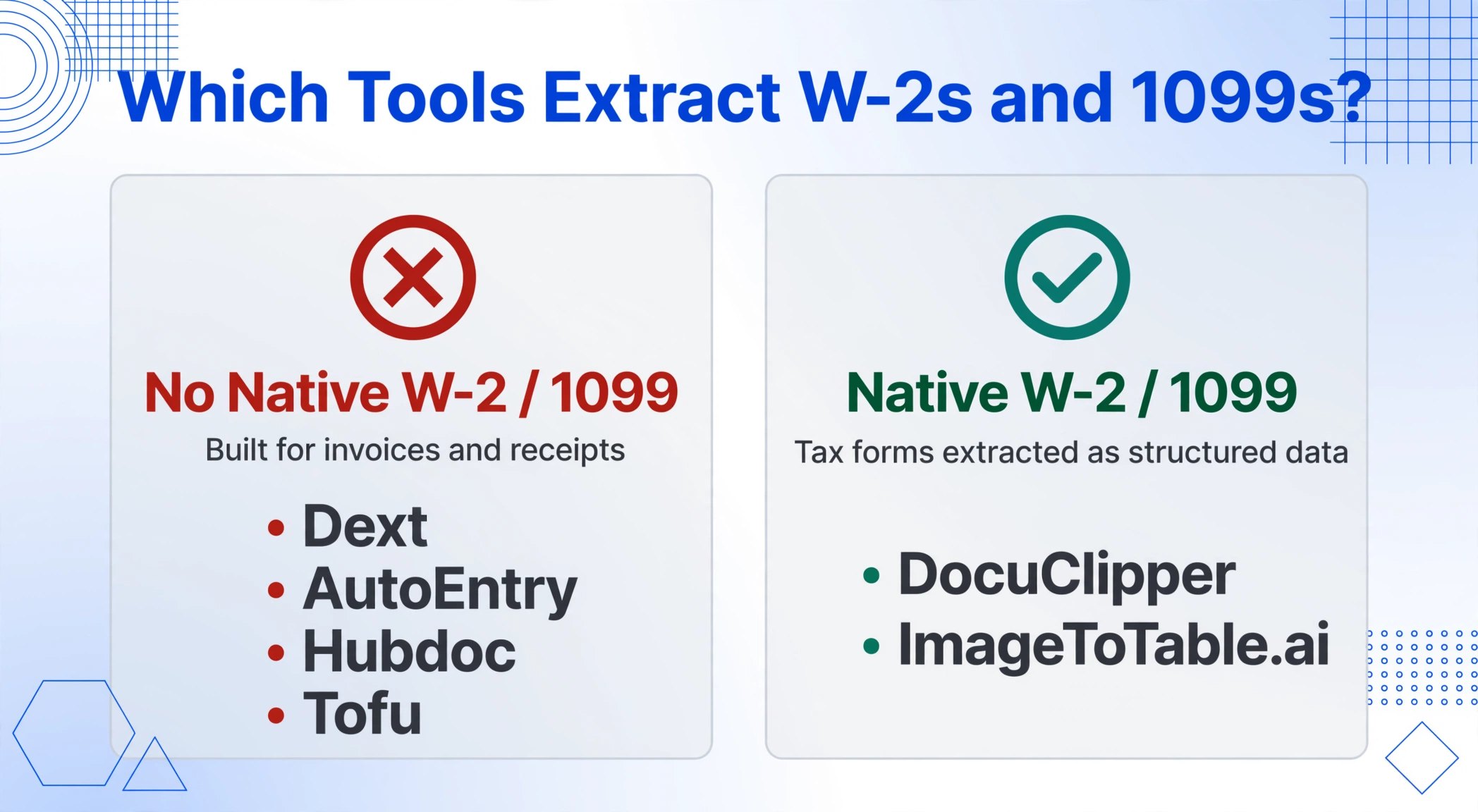
Some can, but most accounting-focused OCR tools cannot. Dext, AutoEntry, Hubdoc, and Tofu are designed primarily for invoices and receipts — they do not support W-2 or 1099 extraction as a native capability. DocuClipper and ImageToTable.ai do handle tax forms, extracting structured data from W-2s, 1099s, and similar documents using AI that reads field labels rather than fixed-position templates. If tax-form processing is a core requirement, verify this capability explicitly before purchasing.
How much should a firm expect to pay for OCR software?
For a small firm processing ~300 documents per month, budget $30–$100/month (ImageToTable.ai at $9–$19/month, DocuClipper at $79/month, or AutoEntry's credit-based model). For a mid-size firm with 10–30 clients and higher volumes, expect $200–$500/month (Dext at $239+ for 10 clients, Tofu at $79/month flat). For large firms or those needing full AP automation, costs range from $500/month into the thousands, especially for enterprise platforms like Vic.ai or BILL that bundle payments and workflow. Per-document costs vary widely — from as low as $0.026 (BillBjorn) to $0.40–$0.48 (Dext) — so check your volume against the per-document rate, not just the monthly tier.
Do all accounting OCR tools extract line items from invoices?
No. This is one of the most important distinctions between tools. Dext captures line items only as a paid add-on that consumes extra processing credits. Hubdoc does not extract line items at all — it captures only the header total. AutoEntry extracts line items but charges multiple credits per document when line items are involved. Tofu and ImageToTable.ai both include line-item extraction in their base pricing. When evaluating tools, ask explicitly: "Is line-item extraction included in the plan I am looking at, or is it an add-on?"
What security certifications should an OCR tool have for accounting firms?
At minimum, look for SOC 2 Type 2 compliance, which verifies that the vendor's controls for data security, availability, and confidentiality have been audited over a period of time. For firms handling client tax data, the IRS recordkeeping requirements under Section 6001 and Revenue Procedure 97-22 mean that extracted data should be retained in a format that supports audit trail and retrieval. If your firm serves healthcare clients or processes protected health information, HIPAA compliance becomes necessary. Most consumer-grade OCR tools lack any of these certifications — ask for the vendor's SOC 2 report or compliance documentation before processing client documents.
How do OCR tools handle multi-client workflows?
It varies widely. Dext provides per-client workspaces with separate extraction rules and document archives — this is its strongest feature for accounting firms. Hubdoc uses Xero's organization structure but offers no per-client extraction configuration. DocuClipper processes all documents in a single queue and requires manual organization at export time. ImageToTable.ai uses batch-level separation: each upload batch can represent a client, and the batch name becomes a column in the export, so the reviewer can filter and organize after extraction. If per-client workspace separation is critical, test the workflow before committing.
Final Thoughts: The Tool That Fits Your Documents, Not the Other Way Around
The common thread across every accounting firm that succeeds with document extraction is not which tool they chose — it is that they stopped asking documents to fit a rigid extraction format. For a deeper look at the technology that makes template-free extraction possible, see the comparison between AI OCR and traditional OCR accuracy, or explore the OCR software and AI OCR tools pages for more on how these approaches differ in practice. The firms that pull ahead in the AICPA's widening competitive divide are the ones that picked a tool whose extraction approach matches the shape of their client base: template-based for predictable, high-volume formats; template-free AI for the diverse and unexpected; or a hybrid that mixes both depending on the document.
The data from the Intuit 2026 survey is clear: 88% of accounting firms already use AI for client services or firm operations, and 77% agree the gap is widening between firms where AI is embedded in daily workflows and firms that use it only occasionally. Document extraction is the entry point — the first workflow where AI's practical value is unambiguous because the alternative is someone typing numbers from a PDF into a spreadsheet. The cost of making the wrong tool choice is not the subscription fee. It is the five hours per week per staff member that could have been client time.
Every tool on this list has a free trial or demo. Test two or three against your actual client documents — not sample files the vendor provides. The tool that handles your messiest receipt, your most cluttered bank statement, and your most irregular vendor invoice without requiring a template is the one that will still work next month when a new client brings a format you have never seen before.