15 T5s, 6 Banks, One Tax Summary:
The Batch Fix for Canadian Investors
The problem with T5 slips isn't that the investment income data is complex. CRA standardized every Box number decades ago — Box 13 is always interest, Box 24 is always eligible dividends, from TD to RBC to Wealthsimple. The problem is that CRA never standardized what the slip looks like. Six institutions. Six visual layouts for the same thirty Boxes. An investor with accounts at TD Direct Investing, Questrade, Scotia iTRADE, Wealthsimple, RBC Direct Investing, and Qtrade faces fifteen PDFs, six layout variations, and one Sunday afternoon spent hunting for Box 16 on a document that puts it in a different place than the previous five did.

Key Takeaways
- The same thirty CRA Box numbers appear on every T5 slip — and not one Canadian brokerage puts Box 16 in the same corner of the page as any other.
- Coordinate-based templates for each bank's layout work beautifully the first year they're built — then one institution quietly updates its PDF generator and your extraction breaks without a single error message.
- Read each slip by what its Box labels say rather than memorizing where they sit on the page — and the same ten column names pull correct values from every T5 every brokerage will ever send you.
Why 15 T5s Take Longer Than They Should
One T5 slip takes about 90 seconds to transcribe into tax software. Fifteen T5 slips don't take 15 × 90 seconds — they take closer to 40 minutes, because every institution change resets your visual search pattern.
The Canada Revenue Agency's T5 Guide T4015 specifies exactly which income types go into which Boxes. Box 10 is the actual amount of non-eligible dividends. Box 11 is the taxable amount — 115% of Box 10 under the gross-up rules for dividends paid in 2019 or later. Box 13 is interest from Canadian sources. Box 15 is gross foreign income. Box 16 is foreign tax paid. Box 24, 25, 26 are eligible dividends and their tax credits. The structure is federal law. Every institution follows it.
What none of them follow is where on the page each Box sits. TD Direct Investing's T5 PDF arranges the boxes in a two-column grid with the payer information at top-left. Questrade's T5 puts the recipient name in bold across the header and stacks all boxes in a single vertical column with grey divider lines. Scotia iTRADE's T5 uses a compact tabular format with the box numbers in small font beside each value. Wealthsimple generates a clean, modern layout with the amounts right-aligned. RBC Direct Investing's T5 — issued through RBC Wealth Management — spaces the "Other information" area (Boxes 14-19) into a separate quadrant entirely, visually disconnected from the top-section dividend boxes.
This isn't a data complexity problem. It's a format multiplicity problem. Your brain spends the first 20 seconds on each new institution's slip just recalibrating — scanning the page to locate the box grid, identifying which visual convention this particular issuer uses, then re-mapping your eye to the right rows. Multiply that recalibration cost across six institutions and fifteen PDFs, and a task that should be mechanical becomes a cognitive drain.
The tax return consequences are real. Every T5 Box feeds a specific line on the T1 General: Box 11 lands on Line 12000, Box 13 and 15 on Line 12100, Box 18 capital gains dividends on Line 17400 of Schedule 3, and Box 16 foreign tax paid routes through Form T2209 to Line 40500. Miss a Box 16 entry on one of fifteen slips, and you're underclaiming a foreign tax credit you're legally entitled to — a silent overpayment that no CRA notice will flag because the CRA doesn't know you forgot to enter it.
This is the overlooked tax-season bottleneck for Canadian investors who diversify across platforms. Not the volume of slips — the variety of layouts. And the batch solution isn't faster typing. It's a different way of reading the document entirely.
Same Boxes, Different Layouts: The Real T5 Bottleneck
There's a paradox built into every CRA tax slip: the form is federally standardized, but its presentation is not. T4015 defines what data must appear — Box 10 through Box 30, with exact gross-up formulas and recipient-type codes — but says nothing about layout, typography, or visual hierarchy. Each financial institution's compliance department interprets the same regulatory text and produces a different PDF.
This wouldn't matter if every investor used one institution. But the Canadian discount brokerage market is fragmented for a reason: TD Direct Investing charges $9.99 per trade while Wealthsimple Trade charges $0, Questrade offers free ETF purchases, Scotia iTRADE drops to $4.99 after 150 quarterly trades, and Qtrade and RBC Direct Investing serve specific niches. Sensible investors hold accounts at two or three — sometimes more. A diversified portfolio across six platforms isn't unusual for someone who's been investing for a decade and drifted between brokers without closing old accounts.
The outcome is a stack of PDFs where the same federal tax form has been redesigned six different ways — and the investor has to reconcile them all into a single set of T1 line totals.
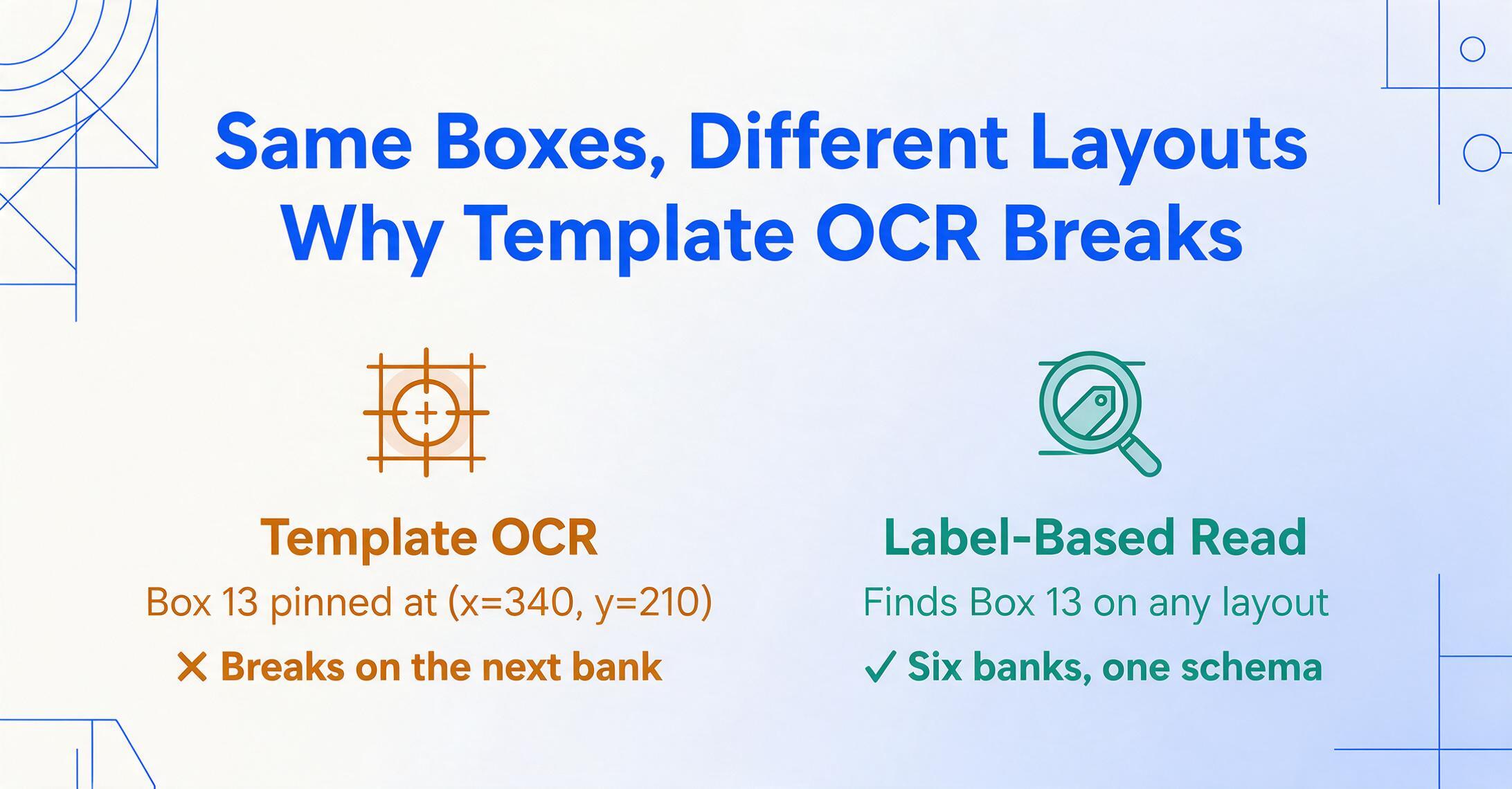
Traditional OCR tools struggle with this scenario for a structural reason. Template-based extraction defines extraction zones by coordinates: "Box 13 is at position (x=340, y=210)." That works for TD's T5 — until you feed it Questrade's T5, where Box 13 sits at a completely different (x, y). You need a separate template for each institution. Six banks means six templates. And when one bank updates its PDF generator next year — which happens — you're updating templates again.
Custom Column Extraction takes the opposite approach. Instead of "find the value at coordinates (x=340, y=210)," it asks: "find the box labelled '13' anywhere on this page, then read the number next to it." You type column names that match the semantic labels on the T5 — Box 13 Interest Income, Box 24 Eligible Dividends, Box 16 Foreign Tax Paid — and the AI reads each T5 the way a human accountant would: by understanding what each label means, not where it sits. Six layouts, one instruction set. No templates to create or maintain.
One Column Schema to Rule Them All
The power move in T5 batch processing is this: define your column schema once, feed every slip through the same configuration, and get one consolidated spreadsheet where each row is an institution — columns are your investment income categories — and the last row is the sum you need for each T1 line.
Here's a practical column schema for a Canadian investor consolidating T5 income across multiple non-registered accounts. Each column name corresponds to a CRA-defined Box number and the T1 line it feeds:
| Column Name | CRA Box | T1 Line | Income Type |
|---|---|---|---|
| Institution | — | — | Name of bank or broker issuing the slip |
| Box 11 Taxable Dividends (Non-Eligible) | 11 | 12000 | Taxable amount of non-eligible dividends |
| Box 12 Dividend Tax Credit (Non-Eligible) | 12 | 40425 | Tax credit for non-eligible dividends |
| Box 13 Interest Income (CAD) | 13 | 12100 | Interest from Canadian sources |
| Box 15 Foreign Income (Gross) | 15 | 12100 | Gross foreign income in CAD |
| Box 16 Foreign Tax Paid | 16 | 40500 | Foreign tax paid — feeds T2209 |
| Box 18 Capital Gains Dividends | 18 | 17400 (Sch 3) | Capital gains dividends from mutual fund corporations |
| Box 24 Actual Eligible Dividends | 24 | — | Actual amount (not taxable amount) |
| Box 25 Taxable Eligible Dividends | 25 | 12000 | Taxable amount of eligible dividends |
| Box 26 Dividend Tax Credit (Eligible) | 26 | 40425 | Tax credit for eligible dividends |
Notice what this schema does: it maps every T5 Box you're likely to encounter directly to the T1 line it feeds. Once all fifteen slips are processed, summing each column gives you the exact numbers to enter on your return — no manual addition, no spreadsheet formula errors, no quietly missing a Box 16 on Scotia's slip because it's tucked in the "Other information" area at the bottom right.
For investors with US-listed securities — dividend-paying US stocks or US-domiciled ETFs in non-registered accounts — the foreign income columns become especially valuable. US dividends appear in Box 15 (gross, pre-withholding) and the 15% US withholding tax appears in Box 16. Without batch consolidation, these two numbers live on separate PDFs from each broker, and the investor has to manually aggregate all Box 16 values to complete Form T2209. With a batch workflow, the column totals are already summed. Your T2209 foreign tax credit calculation becomes one row of read-from-table input.
From 15 PDFs to One Tax Summary: Walkthrough
The full process — from logging into six brokerage portals to having a complete tax summary — takes under ten minutes, not counting download time from each institution's document portal.
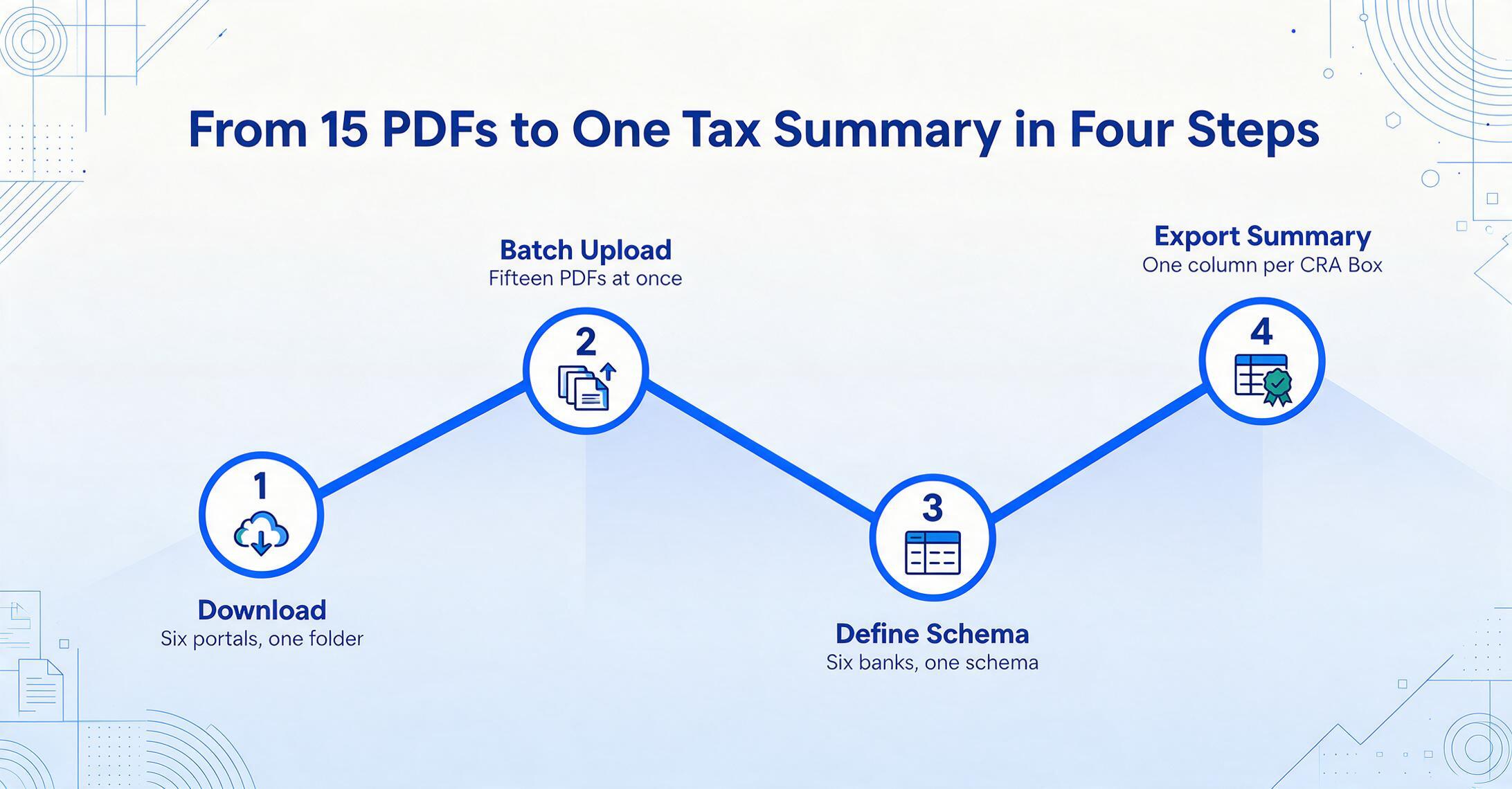
Download all T5 PDFs from each institution
Log into each brokerage or bank portal. TD Direct Investing, RBC Wealth Management, Questrade, Wealthsimple, Scotia iTRADE, and Qtrade all provide downloadable T5 PDFs by late February under their tax documents section. Save all PDFs to a single folder — no need to rename or organize.
Upload all fifteen T5 PDFs in one batch
Drag all files into the upload area at once — batch-first tools process multiple files simultaneously, not sequentially. PDF format works natively; no need to convert or screenshot.
Define the column schema from the table above
Enter the column names matching the T5 Boxes you need. Key columns: Institution, Box 11, Box 13, Box 15, Box 16, Box 25, Box 26. The same column names work across every T5 — six banks, one schema — because the AI reads labels semantically, not positionally.
Review and export the consolidated tax summary
The output is one table — each row is one T5 slip from one institution, each column is a CRA Box. Sum each column: the Box 11 total is your non-eligible dividend income for Line 12000. The Box 13 total is your interest income for Line 12100. The Box 16 total is your foreign tax paid for Form T2209, Line 40500. Read the numbers directly into your tax software or NETFILE.
Files are processed securely and not stored.
Foreign Dividends, Foreign Tax: Don't Miss the T2209 Data
If your non-registered portfolio includes US dividend stocks — Apple, Microsoft, Johnson & Johnson — or US-listed ETFs, you receive T5s that show Box 15 (gross foreign income) and Box 16 (foreign tax paid, typically 15% US withholding). These two numbers are the raw inputs for Form T2209, Federal Foreign Tax Credits, which calculates how much of that foreign tax you can recover as a credit against your Canadian tax liability.
The T2209 calculation requires aggregating all Box 16 values across all T5 slips — across all institutions — and separately verifying that none of the underlying income was earned in a TFSA or RRSP (where foreign tax credits are not claimable). Manual consolidation introduces two failure modes: missing a Box 16 on a slip with an unusual layout, or double-counting a slip that was already transcribed. A batch extraction that produces one row per T5 slip eliminates both — you can see at a glance whether you have fifteen rows (one per slip) or fewer, and the Box 16 column total is exactly what you need for Line 1 of T2209.
CRA requires that foreign income and tax be reported in Canadian dollars, converted at the Bank of Canada exchange rate in effect on the day each amount arose — or, for multiple payments, the average annual rate. Most institutions already report Box 15 and 16 in CAD on the T5, but if yours doesn't, the amounts must be converted before entry. See CRA Line 40500 guidance for the full calculation.
For investors filing through NETFILE using TurboTax Canada, Wealthsimple Tax, or UFile, the flow is straightforward: the tax software prompts for Box 15 and Box 16 amounts separately by slip. With a consolidated spreadsheet, you simply read the column totals into each field — no searching through individual PDFs for the two boxes on each one.
The batch advantage isn't theoretical here. A CPA at the Canadian Tax Foundation notes that the most common T5 reporting error isn't entering wrong numbers — it's forgetting to enter a foreign tax credit entirely because Box 16 sits in the "Other information" area, visually separated from the dividend and interest boxes that dominate the top half of the slip. A batch extraction that includes Box 16 as a named column — just as prominent as Box 13 or Box 24 — makes this silent omission impossible.
Beyond One Tax Year: Why Batch Workflow Compounds
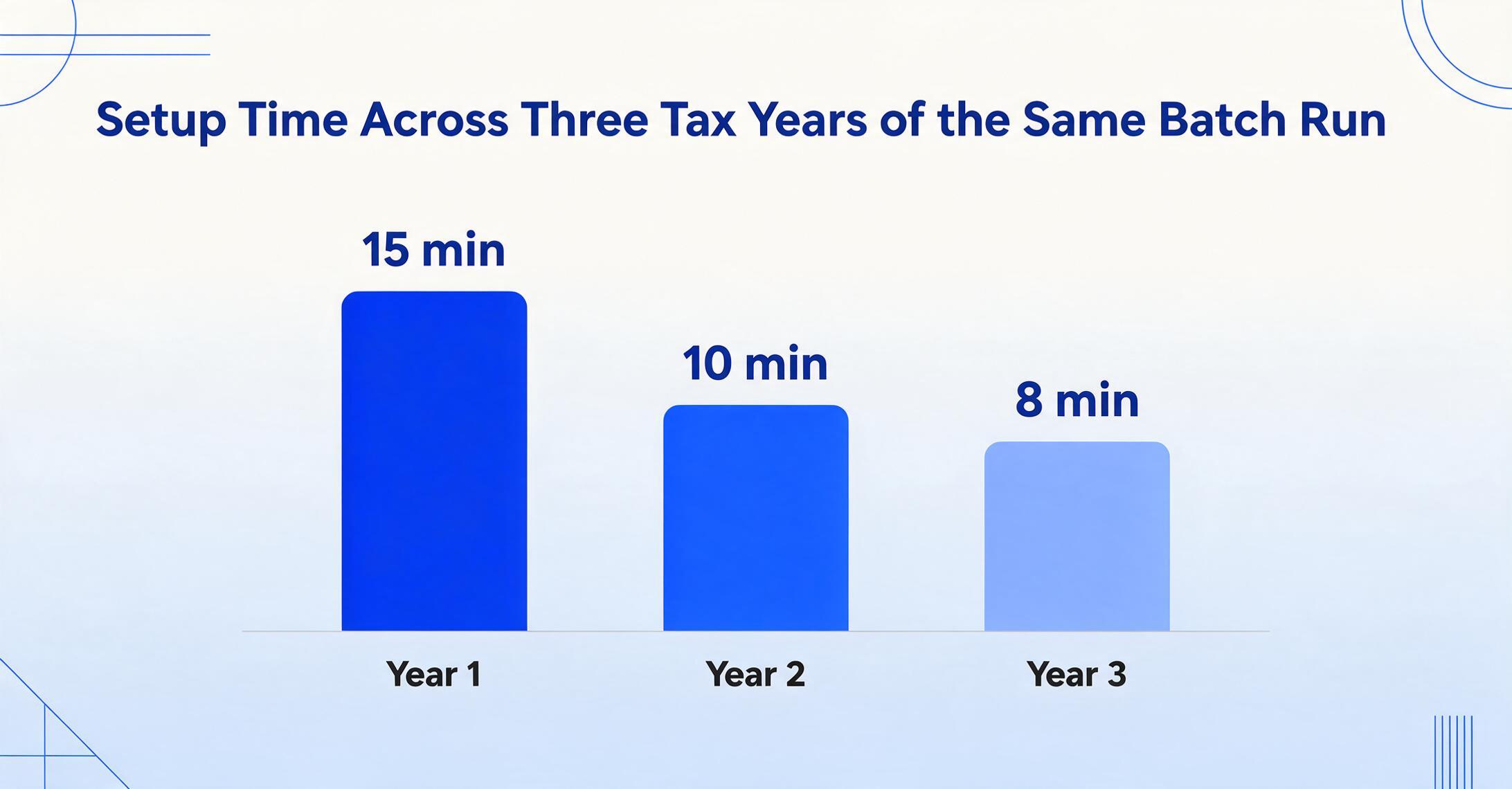
The first year you batch-process fifteen T5s, you spend five minutes defining column names and ten minutes downloading PDFs. The second year, you open last year's saved configuration — the same column schema — and the setup time drops to zero. New institution added? Same schema still works, because the AI reads labels, not coordinates. No new template to build.
This compounding effect is what makes the batch approach fundamentally different from both manual entry and template-based automation. Each year, your investment portfolio might grow — another broker, another account type, another set of dividend-paying securities. With template-based tools, each new institution means another template to configure and maintain. With a labelless, semantics-based extraction approach, your column schema doesn't grow. The AI simply locates Box 11, Box 13, Box 16, etc. on whatever new layout it encounters.
The workflow that takes 15 minutes in year one takes 10 minutes in year two and 8 minutes in year three — not because you got faster at transcribing, but because the work was already defined.
Canadian investors who also consolidate employment income across multiple T4 slips can apply the same approach — see our guide on batch-processing T4 slips into a CRA-compliant payroll summary. For investors who also run a small business and need to handle quarterly GST/HST returns alongside investment income, the same batch workflow extends to consolidating quarterly GST/HST returns into an annual summary. And the core approach — define once, process many — is universal across tax jurisdictions, as demonstrated in our guide on batch-processing Australian PAYG payment summaries.
For step-by-step guidance on extracting a single T5 slip — including a detailed walkthrough of every Box-to-T1-line mapping — see how to extract Canadian T5 investment income data to Excel for personal tax filing.
FAQ
My T5 slips each show less than $50 in investment income. Do I still need to report them?
Yes. While financial institutions are not required to issue T5 slips for accounts earning less than $50 in a calendar year, you as the taxpayer must still report all investment income received — regardless of amount. If you hold accounts at six institutions each paying $30 in interest, no single T5 may be issued, but the $180 total is reportable on your T1. Batch consolidation helps track these below-threshold amounts that might otherwise slip through.
My T5 is in joint names with my spouse. How do I split the income?
If both account holders contributed equally, each reports 50% of the income. Otherwise, each reports the portion proportional to their contribution. A batch extraction that outputs a full table of income by institution and Box number gives you a clear basis for the split — you can allocate each row's values to the appropriate taxpayer. If a joint T5 uses Code 2 in Box 23 (Recipient Type), the CRA expects you to report only your share.
The T5 shows amounts in USD. Do I convert before or after entering the data?
All amounts on your T1 return must be in Canadian dollars. Most Canadian institutions already report Box 15 and 16 in CAD after converting at the prevailing Bank of Canada rate — check your slip carefully. If amounts are shown in USD (indicated in Box 27), convert at the exchange rate in effect on the day the income was received, or use the Bank of Canada average annual rate for recurring payments. With a batch-extracted spreadsheet, you can apply a single conversion factor to a column — faster than converting each slip's Box 15 individually.
What if a bank issues an amended T5 after I've already filed?
Amended slips are marked with Report Code "A" in Box 21. If you receive one after filing, you must file an amended T1 return — either through ReFILE (via your tax software), CRA's Change My Return service, or a paper T1-ADJ adjustment request. Having your original batch extraction spreadsheet makes this straightforward: compare the amended row against your original data, identify the changed Box values, and adjust only the affected T1 lines.
How is a T5 different from a T5008?
A T5 reports investment income — interest, dividends, foreign income. A T5008 reports proceeds from the disposition of securities — selling stocks, ETFs, or bonds. If you sold securities during the year, you'll receive both a T5 (for income earned while holding) and a T5008 (for the sale transaction). These feed different sections of your return: T5 income goes to Lines 12000/12100; T5008 proceeds inform Schedule 3 capital gains calculations.
I live in Quebec. Does the batch workflow work with Relevé 3?
Yes. Quebec residents receive both a federal T5 and a Relevé 3 (RL-3) for investment income. The Relevé 3 uses different box codes (e.g., Box A for eligible dividends) but reports the same underlying income. A batch extraction of your T5 PDFs produces the federal figures for your T1; your Relevé 3 data feeds the Quebec TP-1 return separately. The batch workflow handles the T5 side — you'll still need to enter Relevé 3 data manually into your Quebec return.
The Payoff: Fifteen PDFs, One Number Per T1 Line
The real win of a batch T5 workflow isn't that it saves time — though turning a 40-minute manual entry slog into a 10-minute download-and-process routine is substantial. The real win is that it eliminates the cognitive error surface that makes multi-institution investment income reporting fragile.
When you manually transcribe fifteen T5s spread across six different PDF layouts, your brain runs a small but real risk on each one: misreading a Box number, skipping a field in the "Other information" area, transposing digits from Box 24 to Box 25. When you define a column schema once and let the AI read the labels the same way on every slip regardless of visual layout, these error modes don't exist. Every Box 16 appears in the same column. Every Box 25 rows up with every other Box 25 for easy summing. The output is a single spreadsheet where each column total is the number you enter on your T1 return.
Tax season is already a multi-institution data aggregation problem. Don't let six different renderings of the same federal form make it harder than it is.