Which Value Wins When
ZATCA Invoice XML and PDF Disagree
A ZATCA tax invoice can carry SAR 230 including VAT and SAR 126 payable, and both numbers can be correct. The difference is a SAR 104 advance already received, held in the XML as a prepaid amount and often shown on the page as a separate advance or balance line. A spreadsheet column called "Total" can hold only one of them. Post the wrong one and the supplier is paid twice for the same advance.
That is the shape of ZATCA invoice XML extraction in accounts payable. The file is not one document. It is a signed UBL 2.1 payload that carries the tax record, a PDF/A-3 page that carries what a person reads, and a QR code that carries a summary of five business values. They agree where ZATCA designed them to agree and diverge everywhere AP needs operational context. The work is a field-level authority map plus a recorded exception path. A parser alone produces neither.
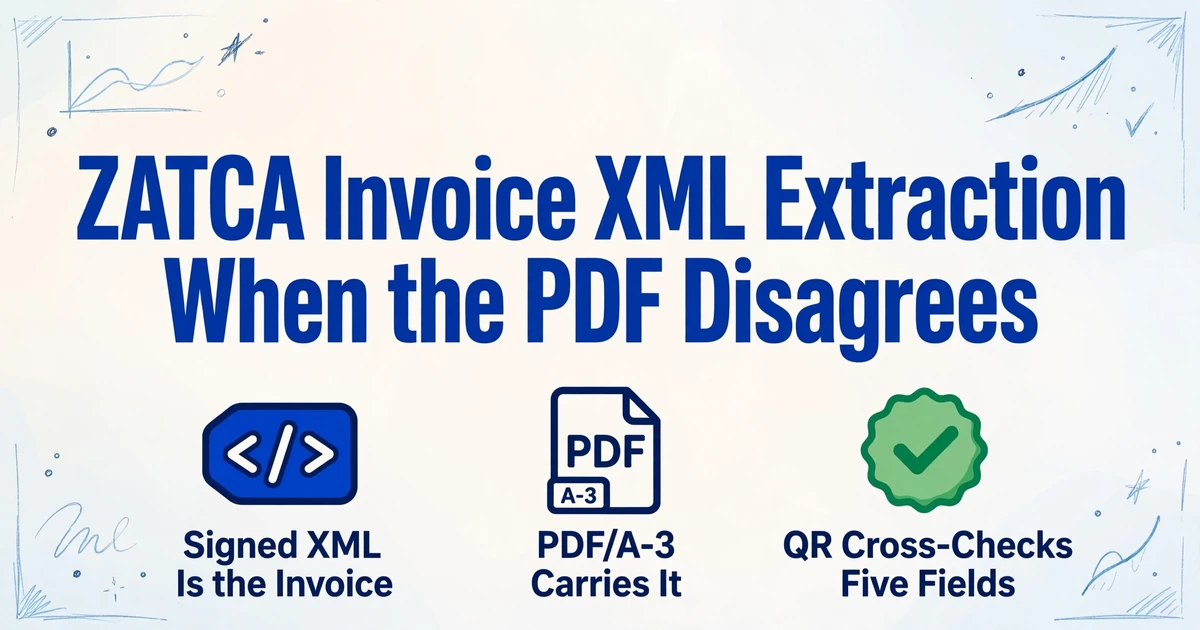
Key Takeaways
- SAR 230 including VAT and SAR 126 payable can both be correct on one ZATCA invoice, because a SAR 104 advance sits in the XML.
- The signed XML is the invoice and the PDF/A-3 is only a rendering, so the printed page can disagree without either record being wrong.
- Extract the stated line net and the payable amount as their own columns, and the disagreement becomes a review queue instead of a payment error.
A ZATCA Invoice Is Two Records in One Container
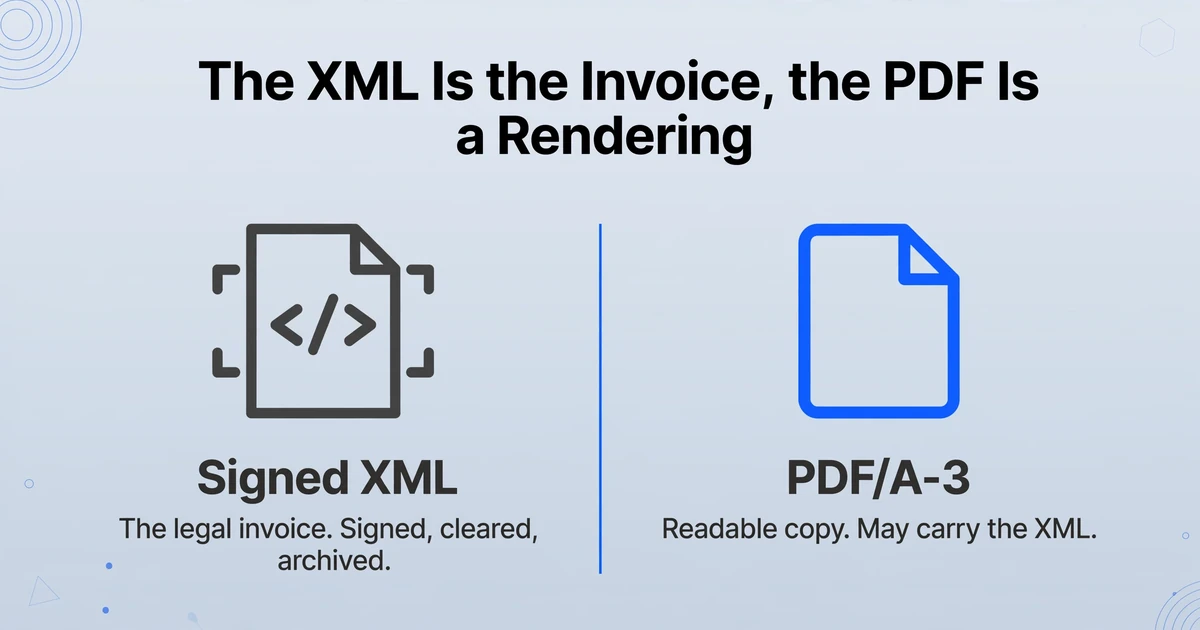
The signed XML is the invoice; the PDF/A-3 is a rendering that is allowed to carry it. ZATCA, the Zakat, Tax and Customs Authority, requires every Phase 2 invoice to be generated and stored as ZATCA UBL 2.1 XML, or as a PDF/A-3 file with that XML embedded. The XML is the object that gets signed, then either cleared by ZATCA before a standard invoice reaches the buyer, or reported within 24 hours for a simplified invoice. The PDF is the human-readable copy.
The ZATCA Detailed Guidelines for E-Invoicing answer the common question directly: if a taxpayer wants to send a PDF, PDF/A-3 with embedded XML is mandatory. Under Phase 2, a plain PDF, a Word file or a scan is not a compliant electronic invoice at all. The human-readable copy also has to be in Arabic, with any additional language allowed alongside it. That is why the same supplier name can appear twice, once in Arabic and once in English, and why the two versions are not interchangeable in a matching rule.
UBL 2.1 is the OASIS XML standard underneath the format. Its elements come in two families: cbc for values such as ID, IssueDate and TaxAmount, and cac for containers such as AccountingSupplierParty and InvoiceLine. The familiar prefixes are aliases. A supplier can use different prefix names for the same namespace, so a parser should resolve namespaces rather than match the string cbc:. The ZATCA XML Implementation Standard adds the Saudi rules on top of UBL and EN 16931.
PDF/A-3 is an archival PDF variant that allows embedded files. A hybrid invoice is a normal-looking page plus an attachment. The attachment is what you parse; the page is what a person reads. The QR is a third, smaller record: a Base64 string of tag-length-value records, up to 500 characters. Tags 1 to 5 carry the seller name, seller VAT number, timestamp, total including VAT and VAT total; tags 6 to 9 carry the hash, signature, public key and, on simplified invoices, ZATCA's signature over that key. ZATCA's e-invoicing program is called Fatoora (فاتورة).
A PDF with a QR code is not evidence that the XML is inside it. The extension describes the container, not its contents. Check the attachment collection before you decide which record you are reading.
What Actually Reaches an AP Inbox
The extension tells you almost nothing; the attachment collection tells you what you can parse. A supplier's ERP can produce a correct hybrid and the buyer can still receive a flattened PDF. Procurement portals re-render attachments, email gateways strip them, and AP clerks print to PDF before filing. The invoice in the inbox can look perfect and be structurally empty. ZATCA's 2025 annual report puts the year's e-invoice volume above 8 billion, so a mixed inbox is not an edge case. The four states below need different handling.
| What arrived | What you can parse | First check | Trust level |
|---|---|---|---|
Raw .xml | The invoice payload itself | Well formed, root Invoice, expected namespaces, checksum of the received bytes | Parsed |
| PDF/A-3 with an accessible XML attachment | The embedded payload | Attachment opens, parses as XML, and the page matches the values you spot-check | Parsed |
| PDF/A-3 with no usable XML attachment | Pixels, not characters, if the page is image-only | Attachment missing, corrupt or unreadable; text may not be selectable | Observed |
| Plain PDF, JPG or PNG | Selectable text or pixels | No attachment; a QR may still be printed on the page | Observed |
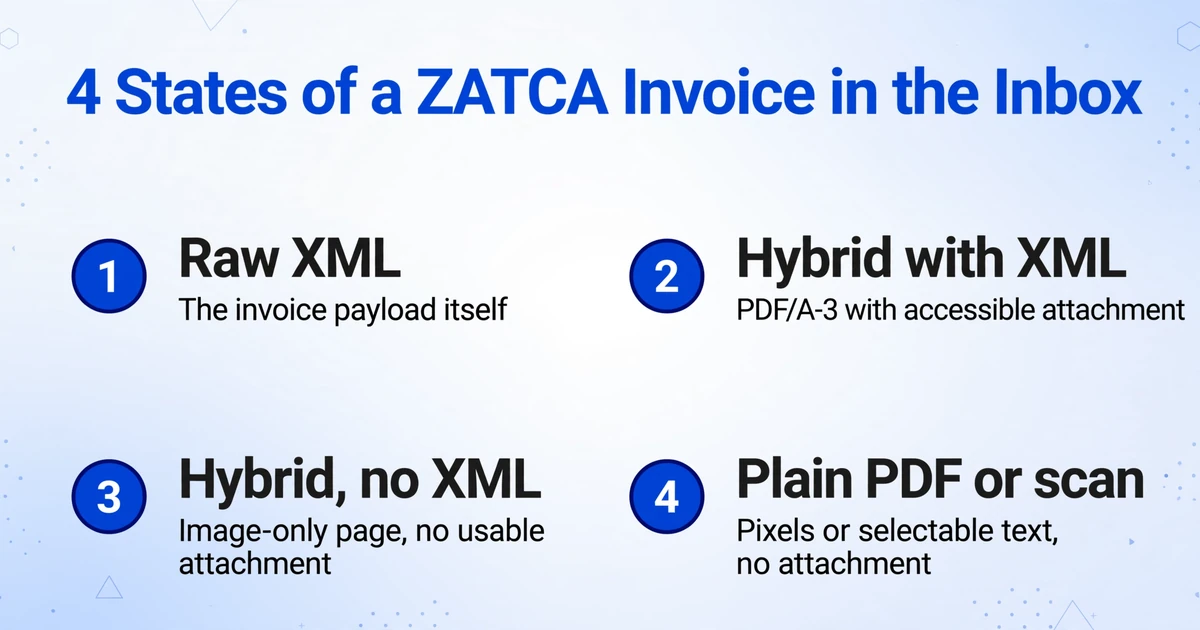
The reverse also happens. ZATCA's developer forum has a thread from a supplier asking whether values can be supplied as an image on a PDF/A-3. The file declares conformance, but the characters cannot be selected or copied because there are no fonts, only pixels. In that case the embedded XML is the only machine-readable layer, and OCR becomes a fallback rather than a default. The forum thread is a useful reminder that "PDF/A-3" describes the container, not the legibility of the page.
Check the attachment, not the filename. Open the attachments panel in a PDF reader, or inspect the /AF entry, extract the file to a controlled working folder, confirm that it parses as XML, and leave the original bytes untouched. If the attachment is missing, corrupt or inaccessible, record that condition before you use the page. The four states above are not equivalent, and treating an observed page as a parsed payload is the first place an AP exception gets lost.
The Fields That Decide the Payment
AP needs about a dozen header fields and five per line, and the XML names every one of them. Once the artifact is triaged, the field list is the same whether the values come from a parser or a page. The table is a working map, not the full data dictionary. It keeps the fields that change a payment, a tax posting or a duplicate check, and leaves out the ones that only matter to the seller's clearance. Paths are relative to the Invoice root.
| AP field | UBL path | PDF usually shows | Authority |
|---|---|---|---|
| Supplier legal name | cac:AccountingSupplierParty/cac:Party/cac:PartyLegalEntity/cbc:RegistrationName | Bilingual name block | XML |
| Seller VAT number | .../cac:PartyTaxScheme/cbc:CompanyID | 15 digits, starting and ending in 3 | XML, cross-check QR tag 2 |
| Buyer legal name and VAT number | cac:AccountingCustomerParty/... | Buyer block; optional on simplified invoices | XML |
| Invoice number | cbc:ID | Top corner or header line | XML |
| UUID | cbc:UUID | Often not printed | XML only |
| Issue date and time | cbc:IssueDate, cbc:IssueTime | Date, rarely the time | XML |
| Invoice type | cbc:InvoiceTypeCode and its name attribute | "Tax Invoice" or "Simplified" | XML |
| Currency and tax currency | cbc:DocumentCurrencyCode, cbc:TaxCurrencyCode | Currency symbol or code | XML |
| PO, delivery note, due date | cac:OrderReference/cbc:ID, cac:Delivery, cac:PaymentTerms | Usually printed | Page when XML omits it |
| Line quantity and unit | cac:InvoiceLine/cbc:InvoicedQuantity and unitCode | Quantity column | XML |
| Unit price and base quantity | cac:InvoiceLine/cac:Price/cbc:PriceAmount, cbc:BaseQuantity | Unit price column | XML |
| Line allowance or charge | cac:InvoiceLine/cac:AllowanceCharge/cbc:Amount | Discount column or footnote | XML |
| Stated line net | cac:InvoiceLine/cbc:LineExtensionAmount | Line total | XML |
| Line VAT category and rate | cac:InvoiceLine/cac:Item/cac:ClassifiedTaxCategory/cbc:ID (S, Z, E or O) and cbc:Percent | "15%", "Zero-rated" or "Exempt" | XML |
| Tax and totals | cac:TaxTotal/cbc:TaxAmount; cac:LegalMonetaryTotal | Subtotal, VAT, total, amount due | XML, page for visual check |
| Credit note reference | cac:BillingReference/cac:InvoiceDocumentReference/cbc:ID | "Against invoice ..." | XML |
Two rules make the map usable. Extract LineExtensionAmount and PayableAmount as their own columns even when you also extract quantity and price. Recomputing a value the document already states is how AP creates a variance that does not exist. Keep the raw string beside the normalized value as well. An invoice number with a leading zero, an Arabic legal name and a timestamp in Arabia Standard Time all lose information when they are coerced too early. Arabic names can also display in a different visual order even when the characters are correct, so keep the raw string and set the display direction instead of retyping the value. If the header and line split is new to you, the complete guide to invoice data extraction covers the general model.
Where the Two Layers Actually Disagree
Most disagreements are not corruption. They are two correct renderings of different fields. The five cases below account for most of the AP exceptions that look like data errors but are really mapping errors.
A line discount changes the line net, not the unit price
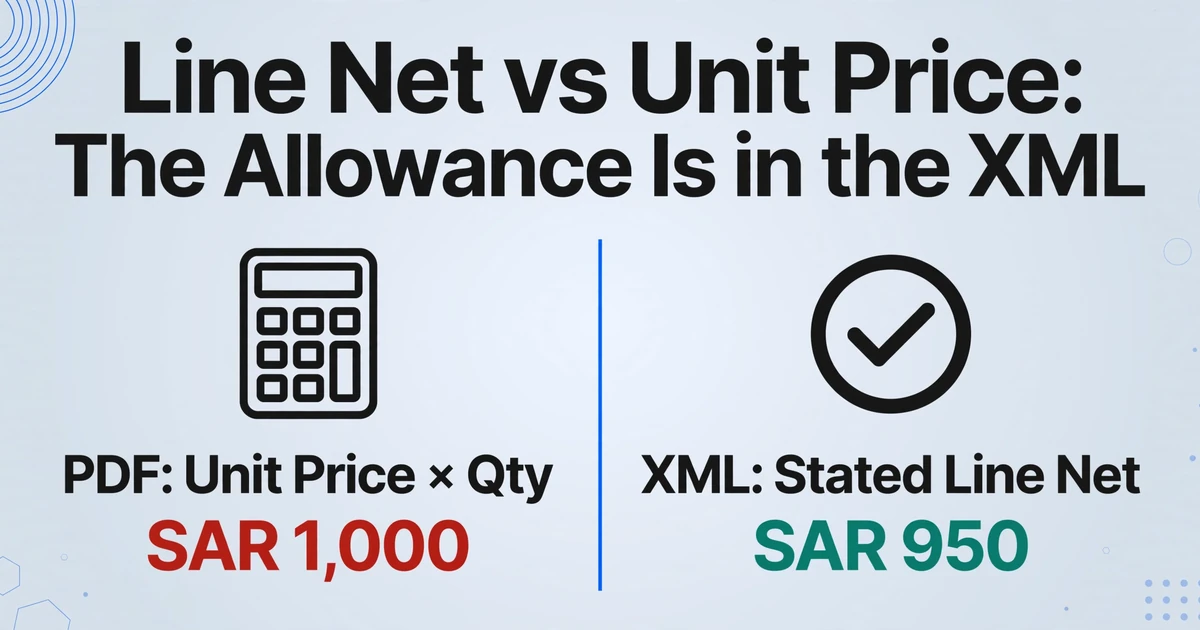
ZATCA's implementation standard defines the line net as ((item net price ÷ base quantity) × invoiced quantity) minus line allowance plus line charge. A line with 10 units at SAR 100 and a SAR 50 line allowance has a line net of SAR 950, while the printed unit price remains SAR 100. If the PDF shows the unit price and the line total but not the allowance, the page looks arithmetically wrong. It is not. The allowance sits in the XML, inside cac:InvoiceLine/cac:AllowanceCharge.
If AP extracts quantity and unit price and calculates a line total, it gets SAR 1,000 against a document that says SAR 950. The invoice then fails a check it should have passed, or a clerk adjusts the wrong field to make it balance. Extract the stated line net, and keep the allowance in its own column so the arithmetic can be reproduced later.
A computed column is useful for checking. It is not a substitute for the line net the document states.
A prepayment splits the total into two numbers
ZATCA's own prepayment example shows the pattern: SAR 230 including VAT, SAR 104 already prepaid, SAR 126 payable. TaxInclusiveAmount is 230, PrepaidAmount is 104, PayableAmount is 126. All three are correct, and each answers a different question. Map the amount due to PayableAmount, the invoice value to TaxInclusiveAmount, and the advance to its own column. If the ERP has a single total field, put the invoice value there and carry the payable amount in the payment schedule. Overwriting one with the other hides the advance and pays it twice.
A foreign currency invoice carries two tax totals
When the document currency is not SAR, ZATCA requires TaxCurrencyCode to be SAR and a second tax total in SAR. The PDF often prints the document currency only. An AP team that converts the printed total at a month-end rate will get a different SAR VAT figure from the one in the XML, and the difference lands in the VAT recovery account. Read both tax totals, post the SAR one, and keep the document-currency one for the supplier ledger.
The PDF can carry fields the XML is not required to contain
ZATCA's standard is a minimum. In the Fatoora developer forum, a supplier asked whether extra information printed on the PDF/A-3 had to appear in the XML. The answer was that fields outside the data dictionary are not required in the XML, though they may be added if they conform to UBL. That is where purchase order numbers, delivery note references, internal cost centers and approval stamps often live. They are on the page, not in the payload.
For a pure XML pipeline, that is a gap. Three-way matching needs the PO, and payment scheduling needs the due date. The XML has cac:OrderReference and cac:PaymentTerms, but a supplier is not obliged to populate them on every invoice. The practical design is a field-level source column: tax and identity from the XML, operational context from the page, and an explicit "not present" state when neither has it.
A credit note is a new document, not a negative invoice
A credit note uses invoice type code 381, carries a billing reference to the invoice it corrects, states a reason, and usually keeps its amounts positive because the document type carries the direction. Key it as a negative purchase invoice and the sign can be flipped twice: once by the type, once by your entry. The result is a credit that increases the balance.
Net the note against the referenced invoice, and check that the reference resolves. The ZATCA guideline allows one credit note to reference multiple original invoices as a text range, so the reference is not always a single key. When it is a range, split the credit or hold it until the supplier provides a per-invoice breakdown.
The table below turns the common cases into a routing sheet.
| Symptom | Usual cause | Owner |
|---|---|---|
| XML total differs from the printed total | Line allowance or prepayment mapped to the wrong field | AP clerk, with the ERP owner for the mapping |
| Seller VAT differs from QR tag 2 | Wrong attachment, stale render, or document assembly error | ERP or integration owner |
| SAR VAT differs from the ledger | Printed total converted instead of the XML's SAR tax total | Saudi tax or compliance lead |
| PO or due date is missing | Field only on the PDF, or absent from both records | AP clerk, then the supplier |
| Credit note will not match | Billing reference is a range, or points to a replaced invoice | AP clerk, with the tax lead |
| Attachment will not open | Portal re-rendered the PDF, or a PDF/A-3 conformance issue | ERP or integration owner |
The QR Code Is a Consistency Check, Not a Clearance Certificate
Matching a QR to the page proves the two were built from the same values; it does not prove the invoice was cleared. Tags 1 to 5 are the only business values in the code. There is no invoice number, no line item, no PO and no buyer VAT number. A QR is a summary, and a short one.
Used as an intake check, tags 1 to 5 are still useful. Normalize before comparing: the VAT number as digits, the timestamp as an instant, because Arabia Standard Time and UTC can describe the same moment, and the amounts to two decimals. A mismatch usually means the QR belongs to a different invoice, or that the page was rebuilt after the code was generated. Both are worth stopping for.
Tags 6 to 9 cannot be checked by eye or by a phone scanner. Verifying them requires the signed XML, the exact byte-level form the signature was computed over, the certificate chain and a revocation check. A scan that displays nine fields has displayed nine fields. It has not verified the signature.
AP teams get told different things about this. In the Fatoora developer forum, an AP practitioner wrote: "The ZATCA support team says it is mandatory to scan the QR codes for supplier invoices. I am asking my question from Accounts Payable perspective." The community lead's reply was that scanning is an optional check, and that an invoice which has been successfully reported or cleared already satisfies the e-invoicing requirements. The same thread records that the ZATCA app cannot scan codes outside Saudi Arabia, which is a practical problem for a shared service center in another country.
The workable position: use the QR as a sampling control and a check on attachment integrity. Do not make it a per-invoice gate, and do not treat a scan as clearance evidence. The evidence is the cleared or reported XML, retained with its response.
A copied QR can sit on a manipulated page. Compare the values; do not treat the square as proof.
A Six-Step Workflow That Survives the Exceptions
The Saudi e-invoice AP workflow has to produce one row per invoice line, a source label for every field, and an exception state that nobody can quietly overwrite. The steps are deliberately boring. Boring is what makes the output defensible six years later.
Triage the artifact
Inspect the attachment collection before you read the page. Record one of four source states: raw XML, hybrid with accessible XML, hybrid with an image-only page, or plain PDF or scan. Hash the original and keep it. The source state decides how the next two steps are executed.
Extract the header once
Invoice number, UUID, type code, issue date and time, seller and buyer VAT identifiers, currency and tax currency. Keep the UUID separate from the invoice number. One identifies the document in ZATCA's system, the other identifies it in the supplier's books, and duplicate checks need both.
Expand the lines
One row per cac:InvoiceLine: line ID, quantity and unit code, price and base quantity, allowance or charge, stated line net, VAT category and rate, line tax. Do not copy header totals onto every line without labeling the grain, or a later sum will count the same total once per line.
Compare a narrow set
Seller VAT, timestamp, total including VAT and VAT total, across XML, page and QR. Then run four arithmetic checks: the line net formula, the sum of lines against LineExtensionAmount, TaxExclusiveAmount plus tax against TaxInclusiveAmount, and TaxInclusiveAmount minus prepaid plus rounding against PayableAmount.
Apply AP controls separately
Supplier master, duplicate check on supplier VAT plus invoice number plus UUID, PO and receipt match, VAT recovery, approval authority. A parsed invoice is not an approved invoice. Keep the controls in their own statuses so a parse failure does not look like a commercial rejection.
Archive the original and the record
Keep the untouched XML or PDF/A-3 container, the clearance or reporting evidence, the extraction record and the exception history together. The spreadsheet points to the artifact. It does not replace it, and it cannot reproduce a signature.
Three owners, three questions. The AP clerk owns the commercial match and the supplier query. The ERP or integration owner owns the attachment, the namespace and the parser. The Saudi tax lead owns the VAT category, the clearance evidence and the retention decision. A single "valid" flag collapses those answers into one and hides which team needs to act. Store the states separately: parsed, schema failed, values disagree, cryptographic evidence unverified, AP hold, approved for payment.
What Visual Extraction Can and Cannot Do Here
A visual extraction tool reads the page, not the attachment, so it belongs on the PDF side of this workflow. That is the part ImageToTable.ai covers, and it is a narrower role than "ZATCA invoice extraction". It is still useful in three places.
The first is the field that exists only on the PDF. When the ERP parses the XML, the page may still be the only place the PO number, delivery note or internal approval appears. Custom Column Extraction lets you type the column names you want, such as "PO Number", "Payment Due Date" and "Delivery Note", and the model finds the values by meaning rather than by fixed coordinates. The column names you enter become the headers of the output table.
The second is the no-XML exception. When a supplier sends a plain PDF or an image-only PDF/A-3, there is nothing to parse. The page becomes the source. Batch processing handles a folder of mixed supplier layouts in one pass and merges the rows into one spreadsheet, which is the difference between a workable exception queue and a pile of one-off conversions.
The third is the visual comparison. Review Mode with Bbox highlighting lets you hover a cell and see the region on the original page that produced it, and click a region to jump back to the cell. For a ZATCA invoice, that is how a clerk compares the printed payable amount with the XML value without printing the page and using a ruler. The AI's original value is kept and can be restored if an edit was wrong. For image-only scans and dense bilingual layouts, a higher Model Tier uses a stronger vision model. Standard covers most printed tables; the hard case is a scanned printout with small Arabic text and a stamp over the total.
The limits matter as much. It does not open the embedded XML, validate the cryptographic stamp, verify the QR hash, onboard a supplier to ZATCA or file anything. A visual extraction of a PDF/A-3 is an observation of the rendered page, not a parse of the signed payload. Label it that way in the output. If the page omits a line allowance, the observation will omit it too, and the arithmetic check in step 4 is what catches the difference.
The same distinction applies in other markets. Japan's qualified invoice system has no mandated XML payload, so the visual layer is often the only source, which is why the same discipline applies to Japanese qualified invoices. Germany's mandate makes the structured file the invoice, which changes the intake order for German supplier invoices. A team handling both needs one field map and two intake rules.
The Archive Is Part of the Extraction
The spreadsheet is not the invoice, and a PDF alone is not the record an auditor can validate. Article 66 of the Saudi VAT Implementing Regulations requires invoices, books, records and accounting documents to be kept for at least six years from the end of the tax period to which they relate. Capital asset records run for the Article 52 adjustment period plus five years, which is 11 years for movable assets and 15 for immovable assets. Records must be in Arabic and stored in the Kingdom, electronically or physically, with access from a terminal in the Kingdom.
Keep the received XML, or the untouched PDF/A-3 container, rather than only an extracted copy of the attachment. Keep the clearance or reporting response for standard invoices, because that is the evidence the invoice was accepted. Keep the invoice counter and the previous hash chain intact; a gap is itself evidence. Keep credit notes with the invoices they correct, since amendment is prohibited.
The extraction record has its own fields: source file hash, source type, parser or model version, rule-set version, field-level source, normalized value, raw value and exception state. Re-running a parser or a model later requires the same bytes. If you overwrite the original with a normalized value, you have destroyed the evidence you would need to defend the row.
Other clearance models make the same point. Poland's KSeF system assigns an identifier without which the invoice does not legally exist, and Mexico's CFDI invoices pair a structured file with a printable representation. In each case the archive is the structured artifact plus the authority's response, not the PDF.
Frequently Asked Questions
Can I extract line items from a ZATCA QR code?
No. Tags 1 to 5 carry the seller name, seller VAT number, timestamp, total including VAT and VAT total. There is no invoice number, no buyer identifier and no line detail. Use the code to cross-check those five values, not to build a line-item table.
Is every PDF/A-3 invoice a hybrid with XML inside?
No. PDF/A-3 is a container that permits embedded files; it does not guarantee that the supplier put one there, that the attachment is readable, or that the page was generated from it. Open the attachment collection and parse the file before you treat the PDF as a structured source.
Which total do I post when an invoice includes a prepayment?
Post the invoice value from TaxInclusiveAmount and pay the amount due from PayableAmount. Carry PrepaidAmount in its own column and link it to the prepayment invoice. Do not collapse the three into one "total" field, and do not overwrite the invoice value with the payable amount.
Is the PDF/A-3 the legal invoice?
No. The signed XML is the invoice. The PDF/A-3 is the human-readable copy that is allowed to carry it. For a standard invoice, hold the cleared XML or the cleared hybrid, and archive the container rather than a re-saved PDF.
Can I use OCR on a ZATCA invoice?
Yes, when there is no usable XML. An image-only PDF, a scan or a photo can be read visually, but the result is an observation of the page, not a parse of the signed payload. Record the method, run the same normalization and arithmetic checks, and cross-check the QR's five values where readable.
How do I handle a credit note that references several invoices?
Treat it as a new document with type 381 and a billing reference, not as a negative purchase invoice. If the reference is a range, split the credit against the original invoices or hold it until the supplier supplies a per-invoice breakdown. Net it to the invoices it corrects, and keep it archived with them.
Does ImageToTable.ai parse the embedded UBL XML or verify the QR?
No. It reads the PDF page, image or scan and extracts the columns you define, including fields that exist only on the printed page. It does not open the embedded XML attachment, validate the cryptographic stamp, verify the QR hash, onboard a supplier to ZATCA or submit a return. XML parsing and signature verification belong to your ERP or integration layer.
How long must a Saudi supplier invoice be kept?
At least six years from the end of the tax period to which it relates, under Article 66 of the VAT Implementing Regulations. Capital asset records run for the adjustment period plus five years, which is 11 years for movable assets and 15 for immovable assets. Keep the XML or the untouched PDF/A-3 container, the clearance or reporting evidence and the credit notes together.
The Row That Survives the Question
The invoice that survives an audit is the one where every row can name the field it came from, the artifact behind it, and the check that let it through. Once that map exists, the disagreement between the PDF and the XML stops being a mystery and becomes a queue with an owner.