A warranty registration record is
two documents in conflict
A warranty registration record is assembled from two documents that were never designed to agree. One is a card, filled in at a kitchen table or a dealer counter. The other is a receipt or invoice, printed at the point of sale. The card carries the owner. The receipt carries the transaction. Most receipts do not carry the unit.
The record needs twelve fields. The two documents between them can supply ten. Two have to be derived, and four of the ten can appear on both with different values. That arithmetic is why a registration file can look complete and still fail at the first claim.
Key Takeaways
- A warranty record takes twelve fields, and the card plus the receipt can only supply ten of them.
- Four of those fields can appear on both documents with different values, so a file that looks complete can still fail the first claim.
- Keep both values and a source column, because complete means every field is filled while correct means every field is sourced.
One good record is one row per unit, and no document has all twelve fields
A warranty registration record is the per-unit entry that answers five questions: which physical product, sold to whom, when, by whom, and under what coverage. Per unit is the part most registration files get wrong. A sale is an event. A unit is an object with a serial number, a service history and a lifecycle that outlasts the receipt.
The table below is the field list a working record needs, and which document can supply each field. The last column is the one to argue about. It says where the value should come from when the two documents disagree.
| Field | Registration card | Receipt or invoice | Authoritative source |
|---|---|---|---|
| Product model | Sometimes, from the box | Sometimes, retailer description | Carton label or unit plate |
| SKU or barcode number | No | Yes, barcode or store code | Receipt |
| Serial number | Sometimes, copied by hand | Rarely | Unit label |
| Quantity | No, one card per unit | Yes, line quantity | Receipt |
| Purchase date | Often, from memory | Yes, transaction timestamp | Receipt or delivery note |
| Retailer or dealer | Often | Yes, header | Receipt |
| Receipt or invoice number | No | Yes | Receipt |
| Price paid | No | Yes | Receipt |
| Owner name | Yes | No, unless the invoice is named | Card |
| Owner contact and address | Yes | No | Card |
| Warranty start date | No | No | Program rules |
| Warranty term | No | Rarely, if a plan was sold | Program rules |
Four fields appear only on the receipt, two only on the card, and four can appear on both. The last two are not reliably on either. A warranty start date is a rule applied to a sale and a delivery, not a value printed anywhere. A warranty term comes from the product line and the program, sometimes with an extended plan layered on top. No extraction tool can read either one off a card.
The card is not worthless. It is the only source for the owner and the contact details, which is also the data a recall or a safety notice depends on. The receipt is the only source for the transaction. The unit label is the only source that ties the two to a physical object. Those are three different jobs, and one document cannot do all of them.
The card owns the owner. The receipt owns the sale. The unit label owns the identity.
Identity fails first, because a model name, a retail SKU and a GTIN are three different things
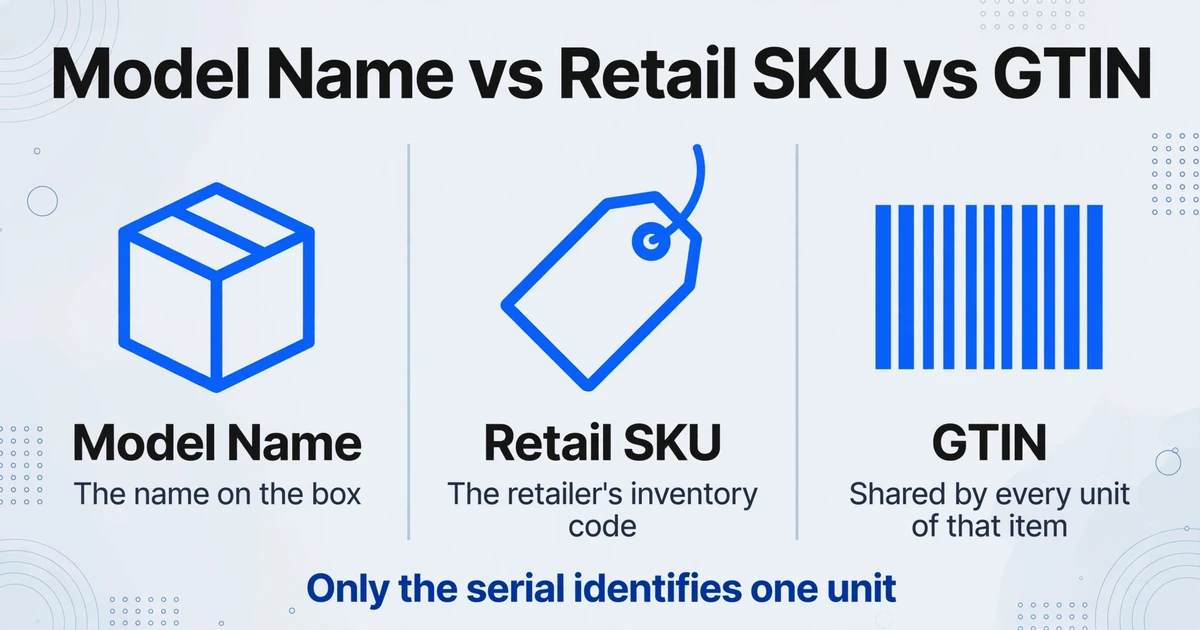
The model field is the first place a card and a receipt stop agreeing, and the disagreement is structural rather than clerical. A customer writes the name printed on the box, because that is the name they know. A retailer prints its own description and its own inventory code, because that is what its point-of-sale system stores. Neither is the manufacturer's model number on the rating plate.
The standards behind retail barcodes separate these identifiers for a reason. GS1, the body that maintains the barcode system, defines a GTIN as the identifier for a trade item: every unit of that item shares it. Add a serial number, carried in a barcode as Application Identifier 21, and you identify one physical unit. A GTIN alone cannot tell you which of ten identical units left the store. Read the GS1 Global Traceability Standard for the full distinction.
A receipt with a barcode number tells you which product was sold. It does not tell you which unit left the store, unless the serial is printed on the receipt. Most receipts do not print it. That is why a serial on a receipt is worth more than a page of product description, and why it is usually absent.
The gap is not theoretical. A buyer described the same problem in r/Lenovo: "the serial number on the invoice issued by Croma didn't match my actual laptop. This led to warranty activation issues and a lot of back-and-forth between Croma and Lenovo." The customer had the laptop, the retailer had the invoice, and the manufacturer had the warranty system. The serial was the only field that connected all three, and it was the one that was wrong.
Handwriting adds a second failure on the card. A serial copied from a label can turn O into 0 or I into 1, and a thermal receipt can put a fold line through the middle of the same string. The registration portal can reject the value as invalid, and the person holding a correct product is told that the product is not correct. A correct serial and a valid serial are not the same thing.
Keep three columns rather than one: Model on Card, Receipt SKU or GTIN, and Serial. If the serial appears only on the card, mark it as claimed rather than confirmed. The label, not the card, is where a serial becomes a fact.
A GTIN tells you which product. Only the serial tells you which unit.
The purchase date is a memory on the card and a timestamp on the receipt
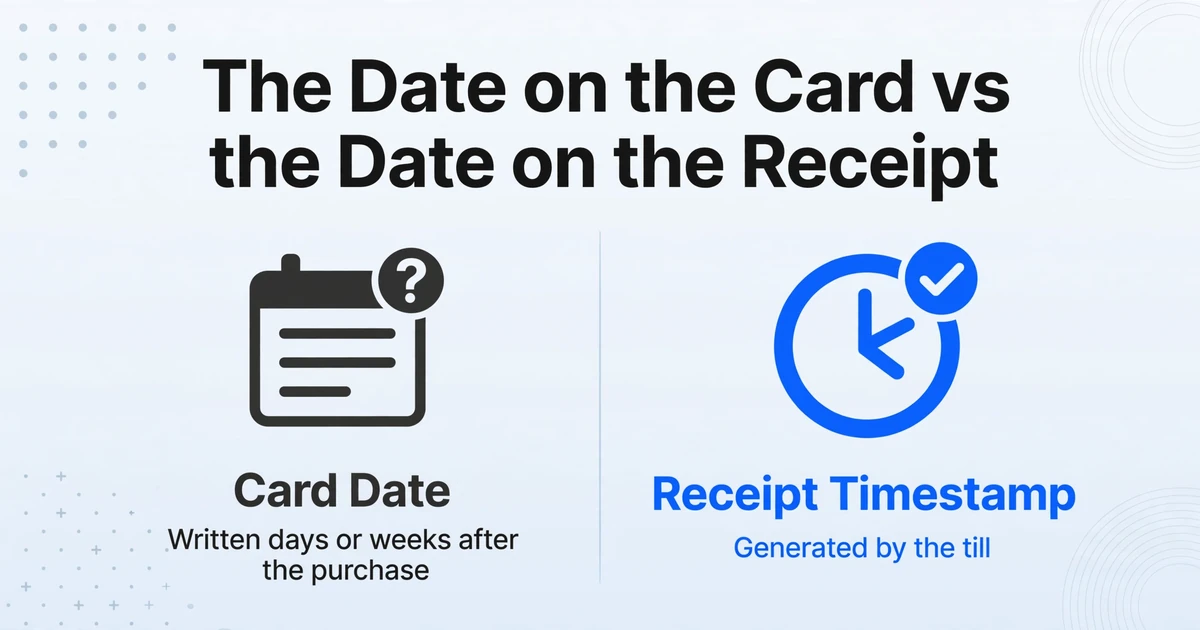
The second field to fail is the date, because the card records a recollection and the receipt records an event. Customers fill in cards days or weeks after the purchase. They write a month and a year, or the day the unit was delivered, or the day they finally opened the box. The receipt has a transaction date and often a time, generated by the till.
The date that starts coverage is not necessarily either one. In the EU, the seller is liable for a lack of conformity that becomes apparent within two years of delivery, under Article 10 of Directive (EU) 2019/771. The clock starts at delivery, not at registration. In the US, the FTC's interpretation of the Magnuson-Moss Warranty Act says a full warranty cannot require the consumer to return a registration card, and the card can only be suggested as one way to document the purchase date, under 16 CFR 700.7. The card is not the legal clock in either system.
Program rules still decide which date is used. Some programs use the sale date, some use delivery or installation, and some default to the shipment date or the invoice date to the dealer when no sale date has been recorded. That last default is the one that quietly shortens the customer's coverage, and it is the reason a missing sale date is not a neutral event.
A workable record therefore needs at least two date columns: the date on the proof of purchase, and the delivery or installation date when it is known. A single Purchase Date column forces the admin to pick one and throws away the evidence for the other.
Quantity creates the other mismatch. A dealer invoice can carry a quantity line: ten units of one model, one invoice number, one date. The cards arrive one per unit. A sheet built one row per receipt has one row and nine missing units. A sheet built one row per card has ten rows and no invoice number unless someone copies it ten times.
If the invoice lists the ten serials, extract the quantity and the serial list, then split the list into rows in the spreadsheet. If it does not, the cards are the only per-unit link, and every one of them is a claim rather than a confirmation. When the serials are spread across invoices, packing lists and cards, getting them into one column is its own step; the workflow for pulling serial numbers out of mixed documents covers that part.
A receipt is a transaction. A record is a unit. The two counts rarely match.
Four people copy the same fields, and each copy is a chance to drift
The record passes through four pairs of hands, and every handoff re-keys data that was already written down once. The drift is not caused by carelessness. It is caused by each person having a different document and a different reason to copy from it.
| Who | What they know | What they add or lose |
|---|---|---|
| Customer | Owns the name, contact, address, and the memory of when and where the purchase happened | Adds the owner data; guesses the model, serial and date; often registers weeks later, or never |
| Retailer or dealer | Prints the receipt; knows the actual delivery date and, for a multi-unit sale, the serial list | Adds the transaction; may register at the point of sale; one counter sale can put ten units behind one invoice |
| Warranty admin | Receives cards and proofs; keys them into the warranty system; decides whether the record is complete | Adds the program rules and the activation; retypes every field; owns the rejection when a claim fails |
| Service technician | Reads the model and serial plate on the unit; meets the customer at the point of failure | Tests the record against the physical unit for the first time, often years later |
The admin is the pivot. On a dealer claim, they often have the dealer's invoice in a dealer management system (DMS) on one screen and the manufacturer's warranty portal on another, and they retype between them. Each retype is a chance to drop a digit or to choose the card's handwritten date over the receipt's timestamp. After two copies, nobody can tell which value was the original.
Registration is also not a return, and the difference decides who owns the data. A registration record is created at the sale, before any return exists. A return authorization (RMA) record is created at failure, when the unit comes back. The same serial can appear in both, but the documents, the timing and the person holding them are different. If your team is treating them as one paper problem, the paper return forms at the warehouse are a separate problem with a separate fix.
By the third copy, the record is a rumor of the original.
The paper-to-data step breaks because a card and a receipt share no layout and no key
The paper-to-data step breaks on two things a template cannot fix: the card and the receipt share no layout, and they share no key. Template-based extraction assumes the field sits in the same place on every document. Neither a registration card nor a retailer receipt makes that promise. Cards are printed once and then filled by hand: checkboxes, cursive, a staple through the serial box, a phone photo taken at an angle. Receipts are worse. Every retailer's point-of-sale system has its own abbreviations, line order and paper stock. Thermal print fades, and a receipt photographed on a counter is skewed and partly shadowed.
A template for one retailer's receipt breaks on the next. A template for one card print run breaks when the manufacturer reprints. The two documents also share no reference number: the card has no invoice number, and the receipt usually has no serial. Even a perfect extraction leaves two tables that cannot be joined on a single column. The layout problem is visible. The missing key is the one that stops the work.
Custom Column Extraction starts from the other end. You type the column names you want, such as Receipt Date, Receipt SKU or Serial Number, and the AI finds each value by meaning rather than by coordinates. There is no zone to draw and no template per retailer, so a new receipt layout is a new page to read, not a new configuration to build.
Name the columns after the document as well as the field: Model on Card, Date Written on Card, Receipt SKU, Receipt Date, Card Serial. In a batch of cards, the labels keep the output honest. In a single image that shows both documents, they also give the model a way to keep the two date values apart instead of returning whichever it saw first.
Batch processing is the other half. A carton of cards is one upload, processed as a set and merged into one Excel file, so the unit of work matches the unit of intake. The output can be XLSX, CSV or JSON, depending on whether the next step is a spreadsheet, a warranty system import or a script.
Review Mode with Bbox is the check for the four fields that can conflict. Hover any extracted cell and the region it came from is highlighted on the original image. Click a region on the image and the matching cell is selected. A disputed date stops being a memory contest: you can see whether the card says 3/2026 or 5/2026, and whether the receipt's timestamp is the same day as the delivery note. If the cards are dense handwriting, the higher Model Tier, the account setting that selects the underlying vision model, is the one to use; the standard tier is built for printed tables.
Extraction does not settle the disagreement. It puts both values in front of the person who can.
A four-step intake keeps the disagreements visible instead of averaging them away
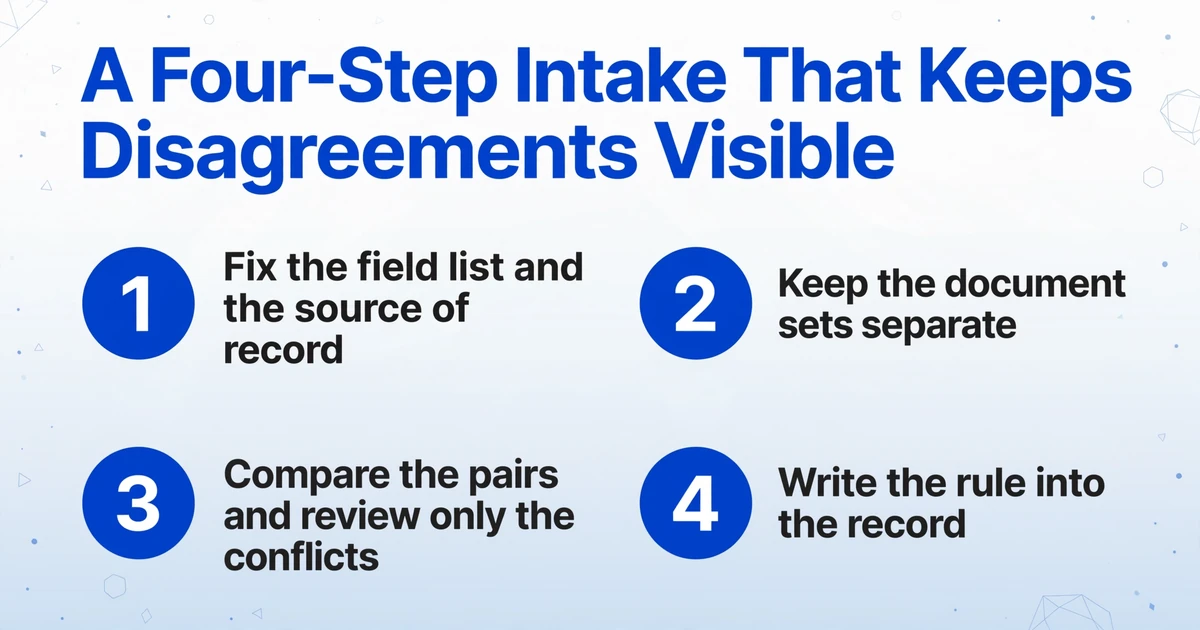
The goal of the intake is not a clean sheet. It is a sheet where every value can still be traced to the document that supplied it. That takes four decisions, made once and applied to every batch.
Fix the field list and the source of record
Take the twelve fields and write down which document wins each one. The receipt wins the purchase date, price, retailer and receipt number. The unit label wins the serial. The card wins the owner and contact details. Warranty start and term are filled from program rules after the documents are read, not copied from either one.
Keep the document sets separate
Run cards as one batch and proofs of purchase as another. If a unit's card and receipt arrive as separate files, keep two tables and join them later. If they arrive as one multi-page scan, the pages come back as separate rows by default, which is fine for review but not a per-unit record until you join them. Dealers can upload their own cards and invoices through a Collection Link, a shareable link that lets someone outside your account upload files without registering.
Compare the pairs and review only the conflicts
Join on the serial where both sides have it. Where the receipt covers one unit, the invoice number can serve as the key. For the rest, a person matches by date, retailer and model. Then open Review Mode on the rows where the two values differ. A ten-unit invoice with ten matching cards should produce ten rows and one pattern to check, not ten separate investigations.
Write the rule into the record
Add a Source column and a short note for every conflict you resolved. Source: receipt for the date. Source: card, unconfirmed for a serial that appears nowhere else. The note is what makes the record auditable six months later, when the person who resolved it has moved on.
Files are processed securely and not stored.
The record still cannot decide coverage, and neither can the extraction
Extraction gives you sourced values. It does not give you a verdict. The boundary matters because warranty work is decided by rules that live outside either document, and a tool that blurs that line creates a new kind of bad record: one that looks authoritative and cannot be defended.
It does not verify that a purchase happened. A receipt can be edited, reused or borrowed, and the tool reads what is on the page. It does not check a serial against a manufacturer database, either. A serial can match the box and the unit plate and still be rejected by the registration portal, because the portal is checking a database, not the document in front of you. The HP support thread where a buyer asks "HOW CAN THEY BE INVALID?" after the product number and serial match the shipping box is the clearest version of that gap.
It does not decide coverage, exclusions, start and end dates under program rules, or whether a claim is valid. It does not join the two tables when there is no shared key; that remains a spreadsheet formula or a person's judgment. It does not run an RMA or a claim. When the unit fails, the paperwork changes from a registration card to a return authorization, and the RMA data going into an inventory system is a different job with different fields.
The output is also not a system of record. It is a table you import, review or merge into the warranty system you already run. And because the scan carries the same names, addresses and contact details as the record, the retention and access rules that apply to the record apply to the files too.
A record can be complete and still be wrong. Complete means every field is filled. Correct means every field is sourced.
The record is only as good as its weakest source
A digital product registration record is not a form that was filled in. It is a set of values with a documented source, and the source is what survives a dispute. The card still has a job: it is the only place the owner exists. The receipt has the stronger job: it is the only place the sale exists. The unit label has the final word on identity, and it is usually the last thing anyone looks at.
Build the record so those three can be compared. Keep both dates. Keep both model fields. Keep the serial that was claimed separate from the serial that was confirmed. Then review the rows where they disagree, because those are the rows that turn into a rejected claim two years later.
Run one carton of cards and the receipts that came with them through a batch, and look at the conflicts before a customer does. Try it on a carton of cards.
FAQ
Does a warranty registration card prove I bought the product?
In the US, a full warranty cannot require the consumer to return the card, and the card can only be suggested as one way to document the purchase date, under 16 CFR 700.7. The receipt, invoice or order confirmation is the stronger proof because it records the transaction. Keep both, but build the record around the proof of purchase and treat the card as the owner record.
Can the tool read a handwritten registration card?
Yes. Handwriting, cursive and checkboxes are supported, along with printed receipts and scans. Dense handwriting is the case for a higher processing tier. The tool extracts what is written; it does not decide whether the handwritten serial is the correct one.
What if one receipt covers several units?
Extract the quantity and the serial list from the receipt, then split the list into one row per serial in the spreadsheet. If the receipt does not list serials, the cards are the only per-unit link you have, and they should be treated as claimed values until the unit label is checked.
Does it validate serial numbers against the manufacturer's database?
No. It reads the serial as printed. Validation is a separate step against your own master data, the dealer's records or the manufacturer's portal, and a value can be correct on the label and still fail that check.
Which date should start the warranty?
Start from the delivery or sale date on the proof of purchase, not the date written on the card. Program rules decide whether that is the invoice date, the delivery or installation date, or an activation date. The tool gives you the candidate dates; the rule that picks one belongs to the warranty program.
Can dealers submit cards and invoices directly?
Yes. A Collection Link lets a dealer upload files without an account, and cards already received can go through as a normal batch. The dealer's upload still needs the same source check, because a dealer invoice can carry a serial that does not match the unit.