How to Feed RMA Return Data
into Your Inventory System
A return lands at your warehouse. A staff member opens the box, pulls out the RMA form — it might be a printed PDF, a handwritten slip, or a return-label with a reason code scrawled across it — and types the RMA number, SKU, reason code, and condition into a spreadsheet. That spreadsheet lives on a shared drive. It never touches your inventory management system. The second most valuable dataset in your operation — what came back, why, and in what condition — stops at a clipboard.
Key Takeaways
- $849.9 billion in retail returns in 2025 and the data on every RMA form — what came back and why — stopped at a clipboard instead of reaching the inventory system.
- 60% of retailers had to choose between shipping orders and processing returns during peak season because transcription labor burns the budget before anything else happens.
- Add a single extraction step that reads any RMA form from any vendor and drops structured data into your IMS — without replacing Shopify, your WMS, or your warehouse receiving workflow.
The Inventory Blind Spot That Returns Create
The National Retail Federation tracked $849.9 billion in returns across U.S. retail in 2025 — 15.8% of all sales. Online return rates are higher, estimated at 19.3%. In January alone, retailers anticipated 17% of holiday purchases would come back. Behind every one of those returns is a form: the RMA slip, the return authorization PDF, the vendor-provided return label with fields printed on it. And here is the part most workflow diagrams skip: the data on that form is what tells your inventory system whether the item goes back to stock, to refurbishment, or to disposal. But in most operations, that decision gets made at the warehouse bench, and the associated data — SKU, reason code, condition grade, final disposition — stays scribbled on a paper form or locked inside a PDF that never syncs to any system.
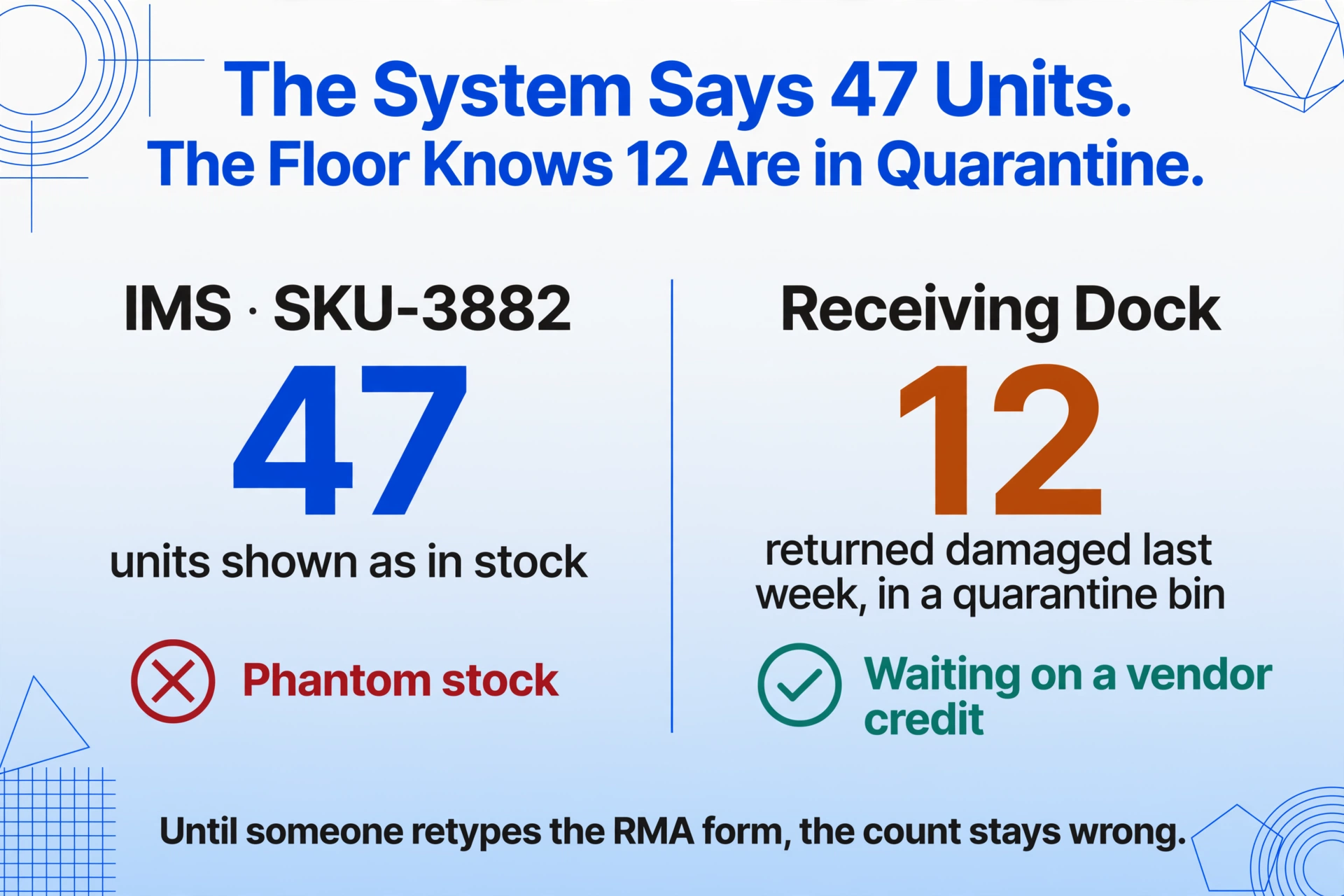
The result is an inventory count that drifts further from reality with every return cycle. Your IMS says you have 47 units of SKU-3882 in stock. The warehouse floor knows 12 of those came back last week with damaged packaging and are sitting in a quarantine bin waiting for a vendor credit. But until someone manually updates the system — which might happen at end-of-week reconciliation — your inventory system is wrong. And wrong inventory means overselling, underselling, and purchase orders based on phantom stock.
Where RMA Data Gets Lost: The Receiving-Dock Handoff
The gap is not that the data doesn't exist. The gap is that it exists in the wrong format at the wrong stage of the workflow. A typical e-commerce returns flow for a Shopify merchant using ShipStation looks like this: customer initiates return through Shopify → ShipStation generates a return label with an RMA number → package arrives at warehouse → staff opens box, inspects item, finds the RMA form. The form has the RMA number, the order number, the listed return reason, and often a condition checklist the inspector needs to fill out. Everything needed to update inventory status is on that sheet. But the next step after inspection — restocking the item — requires data in the IMS, not on paper. So someone retypes.
Loop Returns and similar platforms handle the customer-facing return portal and label generation. Narvar manages the tracking and customer communication. ShipStation handles the shipping label and carrier routing. But none of these tools extract the form data from the RMA PDF — the reason code, the condition, the inspector's disposition — and feed it into your inventory system. That handoff — from physical form to system record — is a manual gap that every tool in the chain assumes someone else fills.
According to the NRF's 2025 report, 60% of retailers reported having to choose between "shipping new orders or processing returns" during peak periods. That tradeoff exists because returns processing eats labor — and the largest single labor component is data transcription. Processing a single return costs between $10 and $65 depending on product type and whether the item can be resold, per 2026 industry benchmarks. The majority of that cost is not shipping or inspection — it is the time it takes to get the right data into the right system.
The Extraction Layer: What Goes Between Your RMA Forms and Your IMS
The instinct when a tool gap appears is to look for a new tool — a different returns management platform, an upgraded IMS, an ERP module with returns functionality built in. But that is a forklift migration. It means retraining warehouse staff, reconfiguring your Shopify integration, possibly breaking the ShipStation label generation flow that already works. The cost of migration often exceeds the cost of the problem.
A lighter approach: add an extraction layer. This is a step that sits between the RMA form arriving at the warehouse and the inventory record being updated. It reads the form — whether it is a printed PDF, a scanned return slip, a handwritten note — and outputs structured data (CSV, XLSX, or JSON) that matches the field schema your IMS expects. The rest of your workflow — Shopify, ShipStation, the warehouse receiving process, the restocking shelf layout — stays exactly as it is. You are inserting one new step, not replacing any existing ones.
This is the model that Custom Column Extraction enables. Instead of building parsing templates for every RMA form layout — your vendor A uses a PDF with fields at the top, vendor B sends back a printed portal page with a barcode and a reason-code dropdown, and a B2B customer scribbles "defective batch" on a packing slip — you define what output columns you need: RMA Number, SKU, Return Reason, Condition, Disposition. The AI reads each document, locates the values that match each column name based on what they mean — not where they sit on the page — and fills the rows. The column names you choose become the headers of the CSV or Excel file that drops into your IMS import path.
This is different from template-based OCR, which requires you to draw zones around each field on each layout variant. If you receive RMA forms from 15 different vendors or marketplaces — each with its own form layout — you would need 15 templates with a template-based tool. With semantic extraction, the same set of column names works across all 15 formats. The format becomes irrelevant. What matters is that the document contains an RMA number, a SKU, and a return reason — and the AI finds them. When your largest supplier changes their form layout next quarter, nothing breaks. No template to update. No zone to re-draw. No downstream process to reconfigure. The extraction produces the same spreadsheet regardless of the source format.
There is no RMA-specific preset for this workflow — nor does there need to be. The absence of a fixed template is precisely the point. The extraction starts from the columns you define, not from a pre-built assumption about what the document should look like. For a walkthrough of the full field set, mixed-format batch upload, and export options, see the RMA to Excel converter.
Files are processed securely and not stored.
Mapping RMA Fields to Inventory Fields: What to Extract
If the extraction layer outputs data your IMS cannot consume, the bridge is useless. The key design decision is the column mapping: what you name your extraction columns determines whether the output file can be imported directly or requires manual reformatting. The goal is zero manipulation between extraction and import.
Here is what a standard RMA-to-IMS field mapping looks like for a Shopify merchant running Zoho Inventory or Cin7:
| RMA Form Field | Extraction Column Name | IMS Target Field | Notes |
|---|---|---|---|
| RMA Number | RMA Number | Return ID / Ref Number | Links this return record to the original RMA for audit trail |
| Original Order Number | Order Number | Sales Order Ref | Connects the return to the original sale for refund reconciliation |
| SKU / Product Code | SKU | Item Code / SKU | Must match the SKU format in your IMS exactly — case and delimiter matter |
| Quantity Returned | Qty Returned | Return Qty | Feeds directly into stock adjustment |
| Return Reason | Return Reason | Return Reason Code | If your IMS uses numeric codes, add a lookup table as a separate import step |
| Item Condition | Condition | Stock Status / Grade | Determines whether the item goes to "Sellable," "Quarantine," or "Write-off" |
| Disposition (inferred) | Disposition (options: Restock / Refurbish / RTV / Liquidate / Dispose) | Warehouse Route / Bin Assignment | Inferred column — AI reads condition + reason and decides the path. Not a field on the form itself |
| Customer / Vendor Name | Customer Name | Returned By | Useful for B2B returns where vendor credit needs to be tracked |
The Disposition column in this mapping uses inferred extraction: it is not a field anyone wrote on the RMA form. Instead, the AI reads the reason code and condition — "Defective" + "Damaged packaging" → route to Return-to-Vendor. "Wrong size" + "Unopened" → Restock. You define the options in the column name itself, and the AI assigns the correct one per row based on what the form says. This eliminates the step where a warehouse supervisor manually decides each item's destination and types it into a separate spreadsheet. The extraction output already has the routing instruction baked in.
If your organization has been tracking RMA returns data in Excel as a standalone process, the same column definitions that worked for manual tracking can be reused here — the only difference is that the output now lands inside your IMS instead of stopping at a spreadsheet. And if you have already batch-processed RMA forms for refund reconciliation, the batch flow is identical — upload the forms once, get all rows in one file, import once.
Step by Step: Feeding RMA Data into Your System Without Touching Anything Else
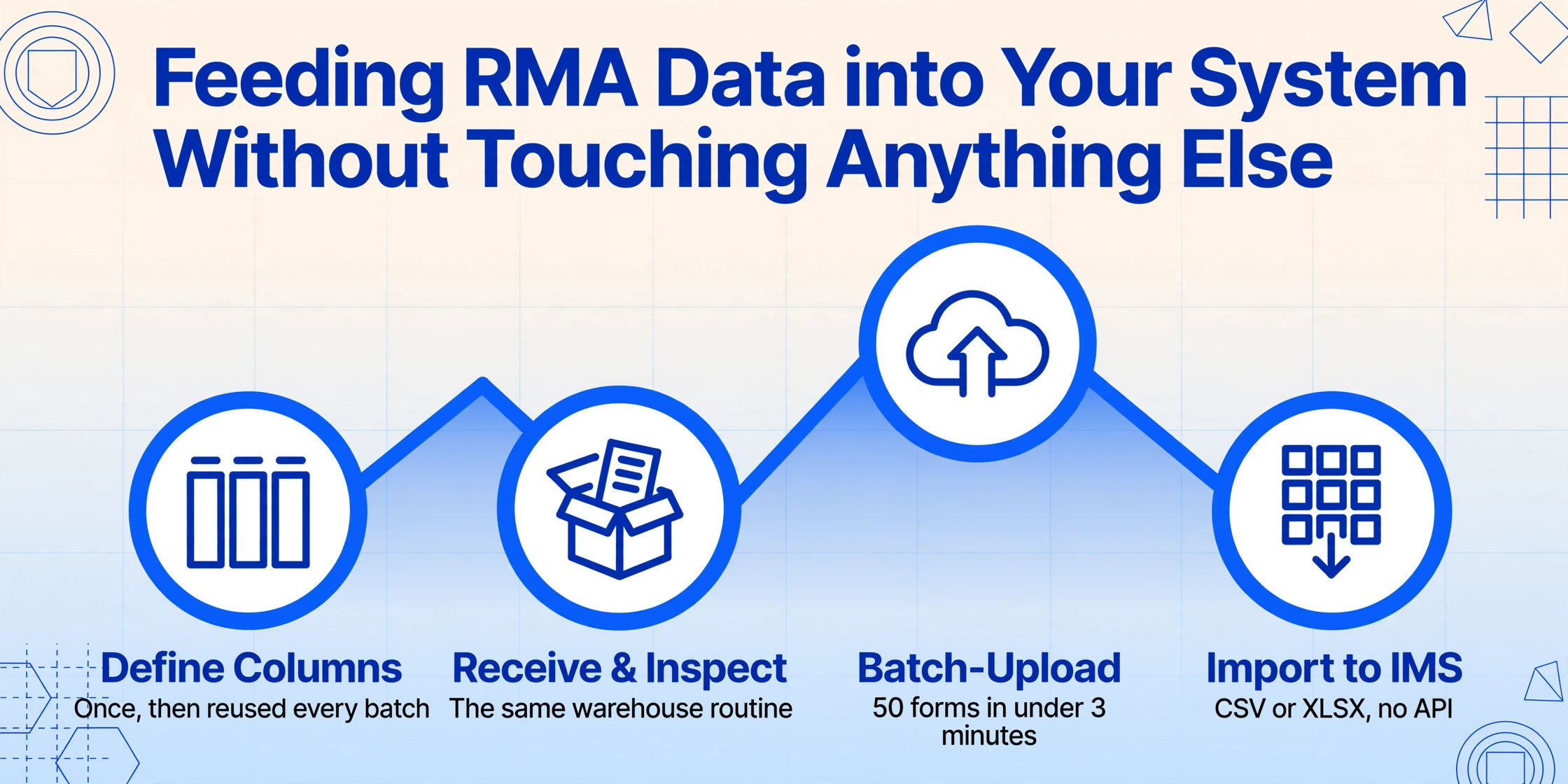
The workflow fits inside your existing returns process at exactly one insertion point: after physical inspection, before inventory update. Here is how it slots in for a typical Shopify + IMS operation:
This is not a replacement for your IMS. It is not a replacement for your returns management platform. It is the step that connects them — a data pipeline that converts RMA form fields into IMS records. You keep Shopify for the storefront, ShipStation for shipping labels, Loop or AfterShip for the customer return portal, and your IMS for inventory. The only new piece is the extraction that turns the forms into something those systems can consume.
If you have also handled supplier invoice data for inventory ledger entries, you have already built the muscle memory for this pattern — batch documents in, structured data out, import once. The same principle applies here, just with a different document type at the inbound dock.
What Happens When Vendors Change Their RMA Forms
A recurring objection to any workflow integration is fragility: you build the pipeline, it works for three months, then a vendor redesigns their RMA form and the whole thing breaks. This is a legitimate concern with template-based extraction — zone-based OCR tools fail when field positions shift. It is also why template maintenance becomes a full-time overhead in large returns operations: someone has to redraw zones every time a supplier updates their paperwork.
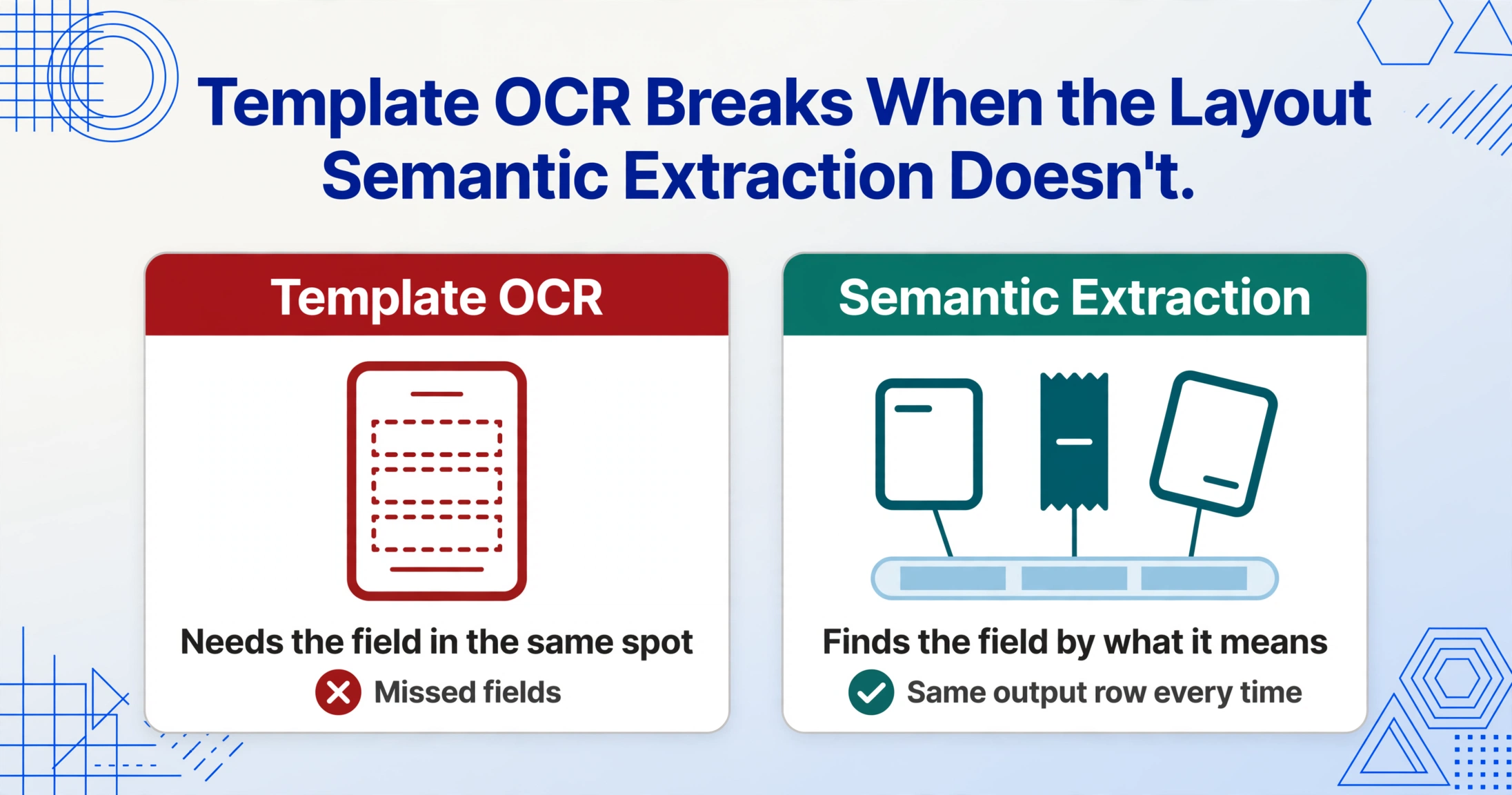
Semantic extraction handles this differently. The extraction does not depend on field positions or layout. It depends on field meaning. An RMA number is an RMA number whether it is printed in the top-right corner of a branded PDF, handwritten in the middle of a return slip, or embedded in a barcode label with human-readable text next to it. The AI locates it the same way a person would — by recognizing what the text means, not where it sits. This is the practical difference between position-based extraction (which is what template OCR does) and semantic-based extraction (which is what a vision language model does when you tell it "find the RMA number on this page").
For warehouse teams dealing with returns from multiple sales channels — a Shopify order here, an Amazon FBA removal there, a B2B return from a wholesale customer, a warranty claim on a different set of paperwork — this format independence is what makes the extraction layer viable as a single insertion point. When the same column definition works across every RMA format without reconfiguration, you are not maintaining 15 extraction pipelines. You are maintaining one.
This also extends to handwritten RMA forms — still common in B2B and wholesale returns where the returning customer fills out a paper slip at the warehouse counter. If your team has processed handwritten warehouse slips into daily inventory logs, the pattern is identical: the AI reads handwriting the same way it reads printed text. An RMA number scribbled in ballpoint is as extractable as one typeset in Helvetica. The extraction column you defined — RMA Number — does not care about font or medium. It cares about meaning.
FAQ
Do I need to change my IMS to make this work?
No. The extraction output is a standard CSV or XLSX file. If your IMS can import a spreadsheet — and every major IMS can, including Zoho Inventory, Cin7, NetSuite, Finale Inventory, and Sellercloud — the output goes in through the same import path you already use for bulk stock updates. No API integration, no middleware, no new connector to maintain. If your IMS has a CSV import button, you are ready.
What if my RMA forms don't have all the fields listed in the mapping table?
The AI extracts only the fields that are present on each form and leaves the rest blank. If a form has an RMA number and a SKU but no return reason, you get those two columns filled and the reason column empty. Empty cells in the output are normal — they do not cause import errors. Your IMS can handle null values in optional fields. You are not required to populate every column on every form.
Does this work with handwritten return slips?
Yes. The underlying extraction engine reads handwriting, cursive, and printed text with equal capability. A warehouse clerk's handwritten "RMA #4421 — broken clasp — return to vendor" on a packing slip produces the same structured row as a crisp PDF from a returns portal. The key is that the handwriting is legible — if a human can read it, the AI can read it. Severely smudged or illegible writing will produce errors, same as manual transcription.
How does this fit with returns management platforms like Loop or AfterShip?
These platforms manage the front end of returns — the customer portal, the return label, the tracking. They answer the question "where is this return?" They do not extract the data from the physical RMA form itself. The extraction layer you add after warehouse receiving fills that gap. You keep Loop for the customer experience and the label generation. You add extraction for the form data → IMS handoff. The two are complementary, not conflicting.
Can I track return-reason trends across all channels with this approach?
Yes — and this is where the system-level payoff lives. Once RMA data from every channel (Shopify, Amazon, B2B, warranty) feeds into one structured output, you have a unified dataset: SKU-level return reasons, condition grades, dispositions, and timestamps — all in one table. This is the dataset that tells you which SKU has a 22% defect rate, which reason code spikes in Q4, and which vendor's products generate the most return-to-vendor claims. Without the extraction step, this dataset does not exist — the information stays scattered across PDFs and handwritten slips that nobody aggregates.
The gap between what your RMA forms say and what your inventory system knows is not a technology gap — it is a handoff gap. Every system in your returns chain assumes another system handles the form data. The extraction layer is the piece nobody built. It costs you 90 seconds per return form today. It costs you inventory accuracy every day the data stays on paper. And it costs you the reason-code data that would otherwise tell you which products to fix, which vendors to renegotiate, and which return reasons you can eliminate with better product descriptions on your storefront.
No sign-up required for your first extraction