OCR vs Vision AI: Which Document
Layout Survives Conversion to Word
In independent benchmarks by Firstsource, vision-language models (VLMs) reach 67% accuracy on complex document layouts — where traditional OCR tops out at 40 to 60%. Even an entry-level VLM like DONUT, scoring 52%, already outperforms the upper range of what traditional OCR can deliver. The gap is not incremental. The two technologies read documents in fundamentally different ways.
Key Takeaways
- You spend 15 to 30 minutes per document fixing broken formatting after PDF-to-Word conversion — and the source of every scrambled table is a technology that was never designed to understand document structure, let alone preserve it.
- OCR's celebrated 95% character accuracy is a decoy — the four reconstruction steps that follow recognition each multiply the errors of the last, and by the time the document reaches Word, the layout has collapsed beyond what any accuracy number can predict.
- Vision AI reads a document the way you do — as one visual scene where tables, images, headings, and paragraphs have meaning in relationship to each other, not as a scatter plot of characters waiting to be reassembled from coordinates.
The OCR Pipeline: How Traditional Conversion Actually Reads a Document
To understand why PDF-to-Word conversion breaks formatting, you need to understand what traditional OCR does — step by step — when it encounters a page.
The process starts with character recognition. The OCR engine scans each line of pixels and classifies them into characters: that shape is an "A," that one is a "3," that one is a comma. On clean, high-resolution printed text, this works reasonably well. Google's Document AI and AWS Textract both reach above 95% character-level accuracy on pristine documents — comparable to what an LLM achieves on the same input.
Character accuracy is not the problem. The problem is everything that happens after.
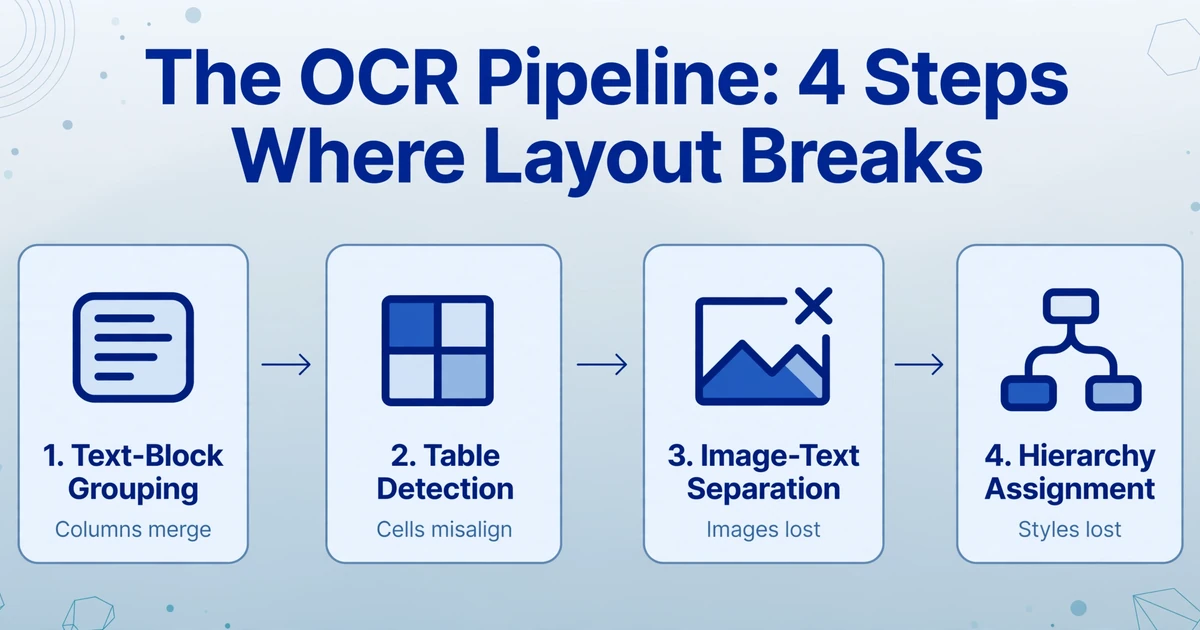
Once OCR has a list of recognized characters and their x,y coordinates on the page, it faces a series of reconstruction tasks that character recognition alone cannot solve. It needs to group characters into words, words into lines, lines into paragraphs. It needs to figure out that those horizontal and vertical lines near some text are meant to be a table — and then reconstruct which cell contains which text, and which cells should be merged. It needs to decide whether that large blank region in the column is an embedded image or just empty space. And it needs to determine why one block of text is in 14-point bold while another is in 11-point regular, and what that hierarchy means.
Every one of these steps — text-block grouping, table detection, image-text separation, hierarchy assignment — is a separate algorithm stacked on top of the raw character output. Each introduces its own error rate. And errors compound. A 95% character accuracy, multiplied through four downstream reconstruction steps each operating at 85–90%, yields a final layout fidelity far below what the initial accuracy number suggests.
This compounding effect is the mechanism behind every broken table, every wandering text box, every missing image region that users encounter after a PDF-to-Word conversion. The OCR engine didn't "fail" — it never had the capacity to do these reconstruction tasks in the first place. Those tasks require understanding what the document means, not just what characters it contains. As we explain in our deep dive on why PDF-to-Word loses formatting, the PDF format itself stores text as positioned objects rather than flowing paragraphs — making this reconstruction particularly brittle when the source was never a Word document to begin with.
What Vision AI Does Differently: The 4 Dimensions
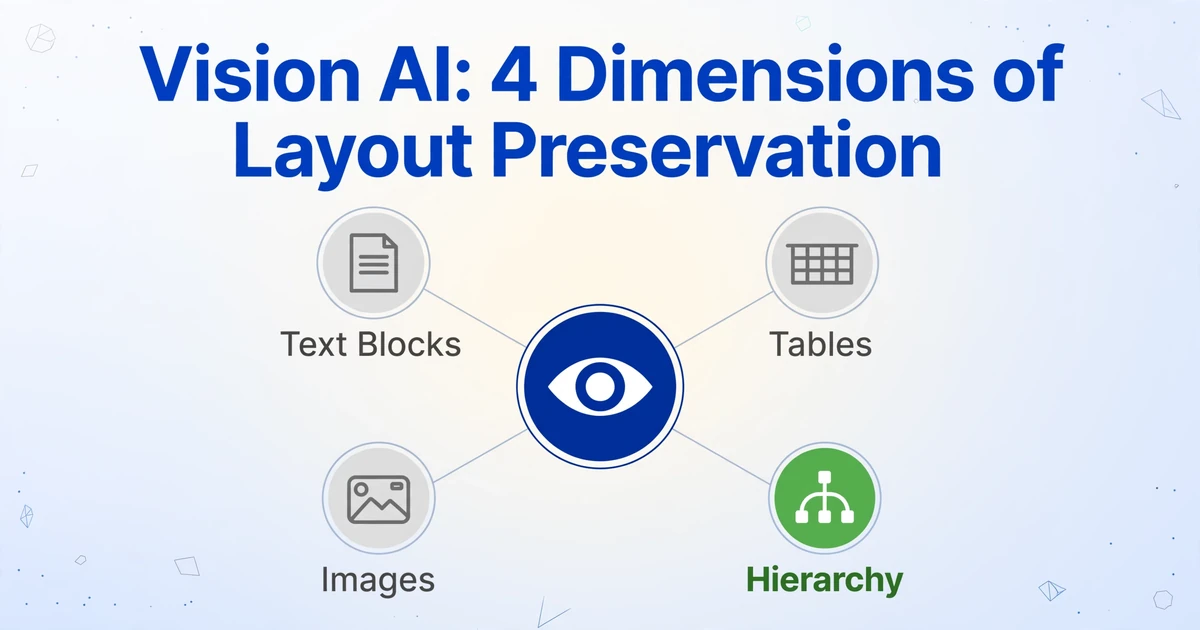
Vision-language models (VLMs) — the class of models that includes GPT-4o, Claude, Gemini, and specialized document models like NVIDIA's Nemotron Parse — approach the problem from the opposite direction. Instead of recognizing characters first and building structure afterward, they process the document as a single visual scene. The model "sees" the page the way a human reader does: as a composition of regions, each with a visual role and a semantic relationship to the others.
This difference manifests across four critical dimensions of layout preservation. Each dimension is a place where traditional OCR's stepwise approach introduces errors that a unified visual model simply does not make.
1. Text-Block-Level Understanding
What OCR does. After recognizing individual characters and mapping their coordinates, the OCR engine applies spatial proximity heuristics to group them: characters within N pixels of each other become a word, words within M pixels become a line, lines within a certain vertical gap become a paragraph. When the document has multi-column layouts, sidebars, callout boxes, or irregular text flows — an invoice with a header block, a sidebar with payment terms, and a line-item table all on the same page — these heuristics collapse. Text from the sidebar gets merged into the main body. Column boundaries blur. Reading order scrambles.
What vision AI does. A VLM encodes the entire page through a vision transformer that captures spatial relationships at multiple scales simultaneously. It doesn't need to guess that "text fragments separated by X pixels form a paragraph" — it sees the rectangular text block as a visual unit, bounded by whitespace, borders, or background color changes. The model recognizes that a block in the upper-right corner with a different background shade is a sidebar, not a continuation of the body text. It understands that two parallel columns on a scientific paper are separate reading flows, not one wide line of text that got split.
The practical consequence: a multi-section invoice with a header, a billing address block, a line-item table, and a footer notes section — converted by OCR, these four regions often collapse into one undifferentiated text stream. Converted by a VLM, each block maintains its spatial boundaries and reading order. The layout survives.
2. Table Structure Recognition
What OCR does. This is where the gap is widest. PDFs do not have a native table structure — they simulate tables through a combination of text positioned at coordinates and visual line segments drawn between them. An OCR engine must algorithmically detect that the line segments form a grid, then match each text fragment to the correct cell, then identify which cells are merged, then determine the column header row. As Winder.ai's technical breakdown puts it: "OCR outputs a stream of characters. It doesn't preserve the row and column structure of tables. A three-column invoice line-item table becomes a jumble of interleaved text that requires manual reconstruction."
On the PubTabNet benchmark — a dataset of 568,000 table images from scientific publications — NVIDIA's Nemotron Parse vision model achieved a TEDS (Tree Edit Distance-based Similarity) score of 81.37 for table content reconstruction and 93.99 for structural accuracy. Traditional OCR tools, which perform table detection as a separate post-processing step, consistently score below 60 on the same benchmark. The gap is structural: the vision model sees the grid as part of the scene, while the OCR pipeline has to reconstruct it from fragmented line segments.
Azure's own next-generation table recognizer (TSR-v2) provides useful calibration: even a purpose-built computer vision table detection system improved F1 scores from ~90% to ~95% across Latin scripts in their 2026 update, and a blog post from their team noted that "for tasks requiring precision in data alignment, classical computer vision techniques currently offer superior performance" over generative AI — an honest assessment of where the technology stands. But notably, that comparison was against general-purpose LLMs asked to output tables, not against vision-language models purpose-trained on documents.
What vision AI does. The VLM perceives the entire table as one visual object. It sees the grid lines, the column headers with bold formatting, the alternating row shading, the merged cells with centered text, the subtotal rows with a different background. It understands that row 4, column 3 contains the quantity "12" because that cell's spatial position under the "Qty" header and its left-alignment within that column make that assignment unambiguous — not because an algorithm calculated polygon intersections and guessed.
For scanned documents with complex tables, this difference is decisive. A purchase order with 8 columns, merged header cells spanning two rows, conditional formatting for backordered items, and footnotes below the table — the OCR approach produces output that requires reconstruction from scratch. The VLM produces a structured representation where row and column relationships are preserved. If you need tables intact in your converted Word document, our step-by-step guide on keeping tables intact during conversion walks through the practical workflow.
3. Image-Text Separation
What OCR does. Traditional OCR engines are fundamentally text-oriented. When they encounter an image region — a chart, a logo, a photograph, a signature — they have two options: attempt to "read" it as text (producing garbage characters), or mark it as an unrecognized region and skip it. Neither preserves the image in the output document. The chart that explained the quarterly revenue trend, the company logo from the letterhead, the scanned signature on the contract — these become blank spaces or error characters.
Some advanced OCR systems add a separate image-detection module that identifies non-text regions and saves them as embedded images. But the detection is based on negative space — "area without recognized text = image" — which fails when text overlays an image (watermarks, diagrams with labels, annotated photographs). It also cannot distinguish between a decorative image that should stay inline and a data chart that should float with its caption.
What vision AI does. The VLM parses the page holistically. It identifies photographic regions, vector graphics, charts, logos, and handwritten annotations as distinct visual element types — not as "the absence of text." A research team at Towards AI documented their experience building a VLM-based document pipeline: training a vision detection model to classify document regions (text, table, figure, diagram) improved region-type accuracy from 72% to 91%, with the biggest gains coming from adding hard negative examples — dense tables and certain figure arrangements that visually resemble diagrams but are not.
The practical outcome: a scanned contract with a company letterhead logo and a handwritten signature at the bottom. OCR produces a Word file where the logo is a broken image placeholder and the signature is a smear of misrecognized characters. The VLM preserves the logo as an image, recognizes the signature as a signature (not text to be transcribed), and places both correctly in the document flow.
4. Paragraph Hierarchy Reconstruction
What OCR does. OCR engines can detect font size and weight — a 14-point bold line followed by 11-point regular text. From this, they apply heuristics: "larger font + bold = probably a heading." But font-size heuristics are fragile. A 12-point bold line in a financial statement could be a section header, a column label in a table, or a total amount formatted for emphasis. The OCR engine has no way to distinguish these because it doesn't understand what the text says or what role it plays in the document structure.
Research from ICLR 2025 on graph-based document structure analysis formalizes what OCR cannot do: constructing a hierarchical tree where section headers are parent nodes, body paragraphs are child nodes, subsections nest under their parent sections, and captions link to their associated figures. This kind of relation prediction — "this text block is the caption for that image" or "this heading introduces the three paragraphs that follow" — requires understanding content, not just measuring font metrics.
What vision AI does. The VLM reads the text semantically, not just visually. When it sees a line that says "3.2 Revenue Recognition Policy" in bold, it doesn't just note the font size — it understands that this line introduces a subsection of a financial document, that the following paragraphs elaborate on this topic, and that the next heading at the same level ("3.3 Expense Classification") begins a new subsection. The generated Word document reflects this: proper heading styles (Heading 1, Heading 2, Body Text) rather than direct formatting, a navigable outline structure, and the ability to collapse or expand sections.
This is the dimension where the VLM's advantage is least about accuracy percentages and most about output usability. An OCR-converted document may have correct characters but flat formatting — every paragraph looks the same, requiring the user to manually reapply heading styles, rebuild the table of contents, and restructure the document before it becomes editable. A VLM-converted document preserves the hierarchy, making it immediately workable. For the underlying mechanism of how AI models parse this structure, our explanation of how AI reads documents goes deeper into the technical details.
Files are processed securely and not stored.
What This Means in Practice
The four dimensions above are not academic abstractions. They correspond directly to what users experience when they convert a document to Word and then spend time fixing the output.
On Reddit's r/techsupport, a user named stanstr articulated the root cause better than most technical documentation: "The PDF format was designed for presentation, and Word was designed for creation. A PDF is basically a digital 'printout.' It treats every element — a letter, a line, or a logo — as an object with fixed coordinates on a 2D plane. It doesn't 'know' what a paragraph is; it just knows that the letter 'H' sits at a specific spot." This is exactly why traditional OCR pipelines, which operate on those same coordinate-based primitives, inherit the PDF's structural blindness.
On r/TechnologyProTips, another user captured the universal frustration: "I've been asked this a zillion times from colleagues. Me: Yes there is, Acrobat Pro. Other: This is not free. Me: Then try xyz online pdf to doc. Other: Yeah but they don't always work, formatting is gone blah blah." The exchange is nine years old — and the underlying problem hasn't changed, because the underlying technology (coordinate-based text extraction layered with heuristic reconstruction) hasn't changed.
What changes with a VLM is that the document is not being reconstructed from coordinates. It is being understood as a composition. The difference shows up most visibly in the total time from "I have a scanned document" to "I have an editable Word file I can actually work with." A traditional OCR pipeline produces output that requires manual cleanup — reformatting tables, reapplying heading styles, re-embedding logos, correcting reading order. Users report spending 15 to 30 minutes per document on these fixes. A VLM produces output that is structurally complete, requiring review but not reconstruction.
This is the practical translation of the accuracy numbers. A 67% to 60% gap on paper is 15 to 30 minutes of saved cleanup per document in practice. For a more detailed walkthrough of what the post-OCR cleanup process actually looks like, our breakdown of what happens after OCR documents the full remediation workflow.
When Traditional OCR Still Makes Sense (and When It Doesn't)
No honest comparison treats one technology as universally superior. Traditional OCR has real advantages in specific scenarios — and understanding those boundaries is as important as understanding where vision AI excels.
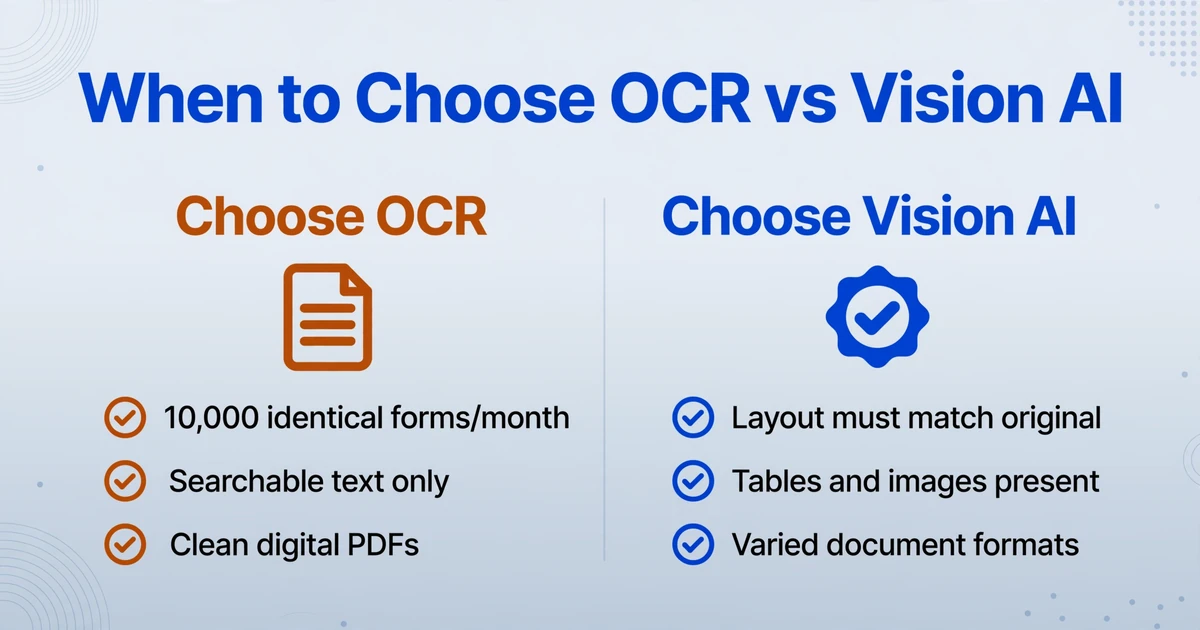
OCR is the better choice when:
- You process extremely high volumes of identical documents. If you receive 10,000 W-9 forms per month from the same template, a template-based OCR pipeline with zonal extraction will be faster and cheaper per page than running every document through a VLM. The consistency of the input eliminates the reconstruction problem.
- You only need searchable text, not editable formatting. If the goal is to make a scanned PDF text-searchable in a document management system — not to produce an editable Word file — OCR's output is sufficient.
- Your documents are clean, digitally-created PDFs with embedded text. A PDF that was exported from Word itself already contains the text as data. Using OCR to "extract" it is unnecessary — a direct parser that reads the embedded text stream will be faster and perfectly accurate without any model overhead.
- Budget is the absolute constraint and per-document cost must be minimized. Tesseract is free and open source. Running 100,000 pages through a VLM costs real compute. For pure text extraction from clean documents, the additional cost of a vision model may not be justified.
Vision AI is the clear choice when:
- Layout preservation matters. If the output needs to look like the original — tables in place, headings styled, images positioned correctly — a VLM is not a luxury. It is the only approach that delivers this result without manual reconstruction.
- Documents have varied, unpredictable formats. If you receive invoices from 200 different suppliers, each with a different layout, the template maintenance cost of a traditional OCR pipeline exceeds the per-page cost of a VLM. Template-free means you stop building and maintaining extraction rules.
- The document is a scan or photograph, not a digital original. Scanned documents have no embedded text — OCR is mandatory, and VLM-based OCR consistently outperforms traditional OCR on scanned input by 10 to 15 percentage points according to independent benchmarks.
- The output needs to be structurally editable, not just text-searchable. If someone needs to open the converted file in Word and make substantive edits — add sections, reformat tables, update figures — they need a document with proper structure, not a flat text dump with ad-hoc direct formatting.
In practice, many organizations use a hybrid approach: traditional OCR for the high-volume, uniform document streams, and vision AI for the varied, layout-sensitive, or scanned documents. The decision is not ideological — it is economic. For a detailed market overview of which tools currently deliver the best results in each category, see our 2026 comparison of PDF-to-Word converters. And for the complete picture of what layout-preserving conversion requires end to end, see the layout-preserving document-to-Word guide.
FAQ
Can vision AI handle multi-column layouts and sidebars?
Yes. VLMs process the page as a scene and can distinguish separate reading flows — a main body column, a sidebar, a callout box — because they identify each as a distinct visual region. Traditional OCR, which groups text by spatial proximity, frequently merges adjacent columns into a single text stream. This is one of the most common causes of "garbled text order" in converted documents.
What happens to images, charts, and logos during conversion?
With traditional OCR, images are typically either skipped (producing blank spaces in the output) or rendered as unreadable character strings. With vision AI, the model identifies image regions, preserves them as embedded images in the Word output, and places them in the correct document position. Charts, logos, photographs, and signatures all survive the conversion process.
Is vision AI slower or more expensive than traditional OCR?
Per page, yes — running a full page through a vision-language model consumes more compute than running it through a lightweight OCR engine. According to the cost comparison shared by Poorna Reddy on LinkedIn, processing 1,000 documents through a vision-only pipeline costs roughly $10 to $40, compared to $1 to $3 for an OCR-plus-LLM hybrid. However, the per-document cost difference must be weighed against the per-document time savings from not having to manually fix broken formatting. For documents where layout preservation matters, the reduced cleanup time typically outweighs the higher processing cost.
Does this work for handwritten documents?
Traditional OCR accuracy on handwritten text drops below 70% on most styles — and for cursive or free-form annotations, it is largely unreadable. Vision AI handles handwriting significantly better, though accuracy varies with handwriting quality. For highly stylized or dense cursive, some errors should be expected. The model uses surrounding context to resolve ambiguous characters, which traditional OCR cannot do.
What's the difference between "To Table" and "To Word" modes?
"To Table" mode extracts structured data from documents into spreadsheet rows — useful when you need the document's information, not its appearance. "To Word" mode converts the entire document into an editable Word file while preserving the original layout — useful when you need to edit the document itself. The 4-dimension comparison in this article applies primarily to "To Word" mode, where layout fidelity is the goal.
The Bottom Line
Traditional OCR reads characters. Vision AI reads documents. The four dimensions where this distinction matters — text blocks, tables, images, and hierarchy — are not edge cases. They are core structural elements present in virtually every document longer than a single paragraph.
The decision tree is straightforward: if your documents are clean, digitally-native, single-column, and you only need the text — not the formatting — traditional OCR works. If your documents have tables, images, multi-column layouts, or varied formats — and you need an editable Word file that looks like the original — a vision-language model is not competing with traditional OCR. It is solving a different problem entirely.
Try it on a document you care about. See if the layout that OCR spent decades breaking finally comes through intact.