Read the Order Number and Tracking Code
From an SMS Order Confirmation
An order confirmation text message is 160 characters of plain text. No email headers, no branded card, no order summary table — just a string of words with two numbers buried in it: the order number and the tracking code. The problem is that every sender arranges those two numbers differently. Amazon uses a different format when shipping via USPS than when shipping via UPS. eBay's order numbers are 12 digits; Shopee's are shorter. If you screenshot these messages to keep a record — for order tracking, package follow-up, or monthly purchase logs — you end up hunting for the right number in each message manually.
Key Takeaways
- Amazon writes the order number as 17 hyphenated characters, eBay uses 12 digits, Shopee uses 9 — three senders, three incompatible formats for the exact same information.
- Template-based extraction needs a separate parsing rule for every sender × carrier combination — just three marketplaces could require dozens of rules that all break on the next format.
- Semantic extraction identifies each number by its role in the message — not its character pattern — so one column setup handles Amazon, eBay, and Shopee in a single batch.
Why SMS Order Messages Are Different From Email Confirmations
An email order confirmation has structure. There are subject lines, sender names, HTML tables, and — most usefully — a consistent layout that email parsing tools can learn to read. A text message has none of that. SMS operates on a 160-GSM-character limit per message segment, which forces senders to pack as much information into as few words as possible. There is no "Order Number:" label. No "Tracking:" header. Just the brand name, the order identifier, and a tracking link or number, all in one continuous line.
This makes SMS screenshots a different extraction problem than email confirmations. Email parsers like Mailparser rely on the repeating HTML structure of transactional emails — field labels, table cells, header regions — to anchor extraction rules. An SMS screenshot offers none of those landmarks. The same message rendered on two different phone screens (Android vs. iOS, different font sizes) can wrap text at different points, but the underlying string is identical: a flat text sequence where the order number and the tracking code are identified only by their format pattern.
The same principle that applies to extracting data from payment screenshots that aren't tables applies here: the data exists in the image, but its position is not guaranteed by any template. The difference is that SMS messages are the most stripped-down version of that problem — no UI chrome, no menu bars, no decorative elements — just the raw text with the numbers you need embedded somewhere within it.
Three SMS Order Formats You've Probably Received
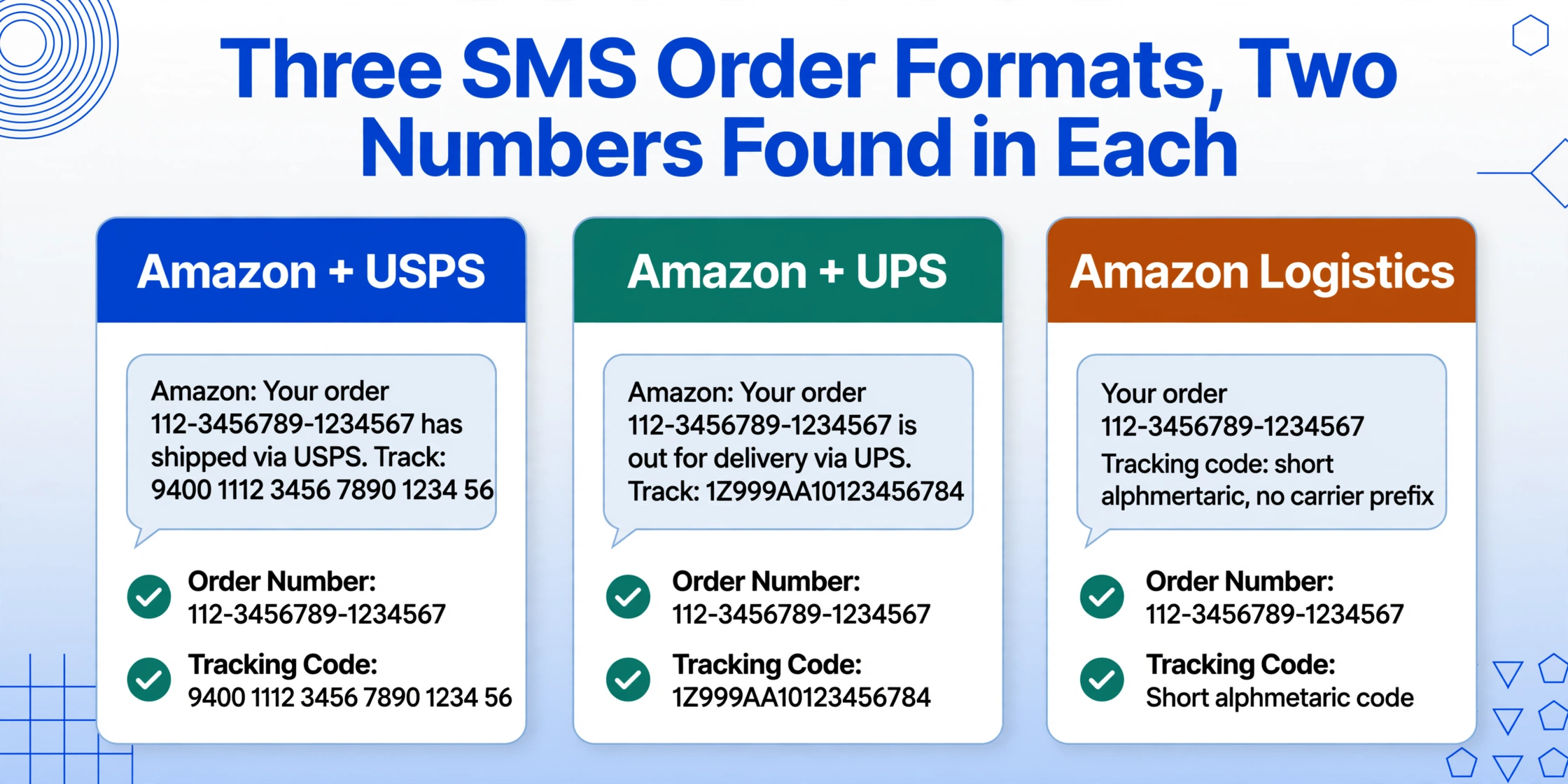
The format of an order confirmation SMS depends entirely on who sent it. Different retailers and marketplaces compress their information differently, and the carrier handling the shipment often changes the structure of the tracking section. Here are three common formats and where to find the two numbers in each.
Amazon: Carrier-Dependent Format Variants
Amazon sends order notifications by SMS if you've opted into shipment updates via text through your account settings. The format changes depending on which carrier is fulfilling the delivery, because Amazon embeds the carrier name directly in the message body.
USPS shipments typically look like this:
"Amazon: Your order 112-3456789-1234567 has shipped via USPS. Track: 9400 1112 3456 7890 1234 56"
The order number here is the 17-character Amazon format (###-#######-#######), which appears right after the word "order." The tracking number is the long numeric string beginning with "9400" — the standard USPS tracking identifier format — which appears after "Track:".
UPS shipments use a different tracking number format:
"Amazon: Your order 112-3456789-1234567 is out for delivery via UPS. Track: 1Z999AA10123456784"
The UPS tracking number starts with "1Z" followed by a mix of letters and numbers (the standard UPS format), while the Amazon order number stays in the same 17-character format. If the carrier is Amazon Logistics, the tracking number may be a shorter alphanumeric code with no carrier prefix.
The practical takeaway: in an Amazon SMS, the order number is always the 17-character ###-#######-####### format, and the tracking number follows the word "Track:" — but its length and character format vary by carrier. You can't just copy "the second number you see" without knowing which carrier the message references.
eBay: Seller-Provided Tracking, Variable Format
eBay's SMS notifications are generated when a seller marks an item as shipped and uploads a tracking number. Unlike Amazon, eBay does not control which carrier the seller uses, so the tracking format varies widely.
"eBay: Your item (Wireless Headphones) shipped! Carrier: USPS. Tracking: 9400111899223456789012. Track at..."
The eBay order number is a 12-digit numeric identifier, not the Amazon-style hyphenated format. It appears in the message differently — often preceded by "Order" or "Item" — and may share the same line as the item name. The tracking number follows the "Tracking:" label and uses whatever format the carrier assigns.
One difference from Amazon: eBay messages often split the confirmation into two separate texts — one when the seller creates a shipping label (tracking number assigned, but package not yet dropped off) and another when the carrier actually scans the package. A screenshot of the first message gives you the tracking number but not a real shipment status. If you're saving these for delivery monitoring, wait for the second message.
Shopee and Southeast Asian Carriers
Shopee (dominant in Southeast Asia and Taiwan) sends order confirmation SMS messages in a more compact format, often in a single line with no carrier name at all:
"Shopee: Order 123456789 shipped via J&T. Track: JD0001234567890"
Shopee order numbers are 9-10 digit numeric identifiers. Tracking numbers for regional carriers like J&T Express, Ninja Van, or Pos Laju use shorter alphanumeric strings compared to USPS or UPS — typically 13-16 characters. Some Shopee SMS messages in the Philippines and Indonesia include the tracking number without any "Track:" label, embedding it inline after the carrier name.
Lazada, the other major SEA marketplace, follows a similar compact format. Its order numbers often start with a two-letter prefix (e.g., "LA-123456789") and tracking numbers are appended without a label, requiring you to distinguish the order number from the tracking code by length and character pattern alone.
A similar format variability exists in SMS bank alerts — where the merchant name, amount, and date shift position depending on which bank sent the notification. The extraction challenge is the same: the data is in the text, but its position is not standardized.
How to Pull Both Numbers From One Screenshot
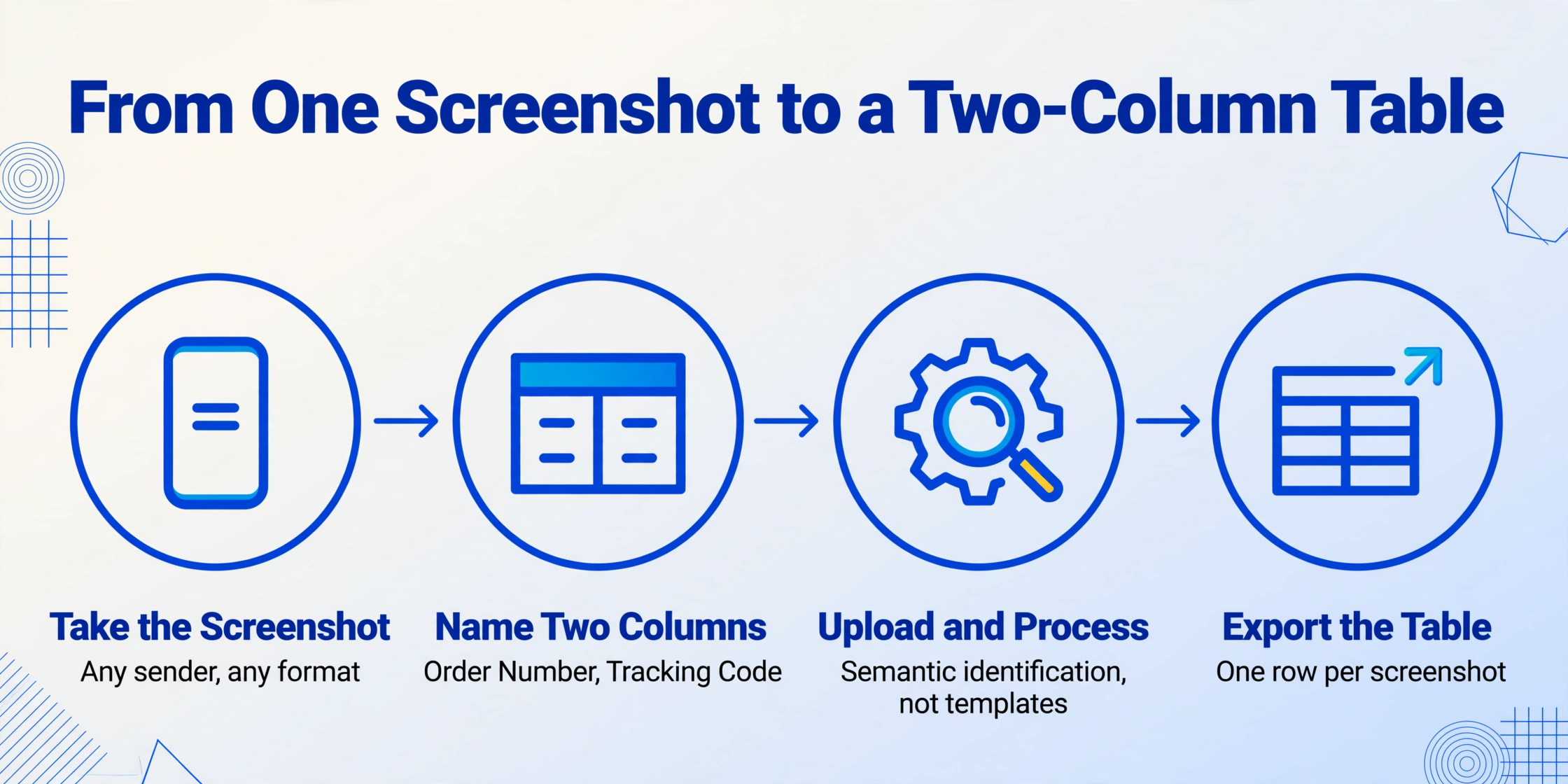
The approach that handles all these format variants without per-sender configuration is Custom Column Extraction. Instead of writing rules for each format, you define what you want — Order Number and Tracking Code — and the extraction engine reads the message text to locate each value by what it means, not by where it appears.
Here is what the workflow looks like:
Take the screenshot
Standard phone screenshot of the SMS message. The format of the message does not matter — Amazon, eBay, Shopee, or any other sender.
Define two column names
Type "Order Number" and "Tracking Code" as your column names. No rules, no regex, no carrier-specific configuration.
Upload and process
Upload the screenshot. The engine reads the text in the image, identifies which string is the order number and which is the tracking code, and places each into the correct column.
Export or view the table
One row per screenshot. If you process 20 screenshots from different senders, you get a single table with 20 rows — order numbers and tracking codes matched correctly per row.
The reason this works where template-based tools fail is semantic identification. The engine recognizes that an Amazon order number is a 17-character hyphenated string, an eBay order number is a 12-digit numeric string, and a Shopee order number is a 9-10 digit numeric string — but it does not need to know which marketplace sent the message. It detects the pattern that most likely represents "the identifier that refers to this purchase" based on the text structure and the context provided by the column name. The tracking code is identified similarly: it is the string after a carrier name or the word "Track:", or — in messages without labels — the alphanumeric sequence that follows the shipping announcement.
Files are processed securely and not stored.
Why Plain Text SMS Is Actually Easier for AI to Process
An SMS screenshot has zero noise. No navigation bars, no advertising banners, no multi-column layouts, no embedded images. It is 160 characters of text on a dark or light background — the closest thing to a "clean" input that document extraction can receive.
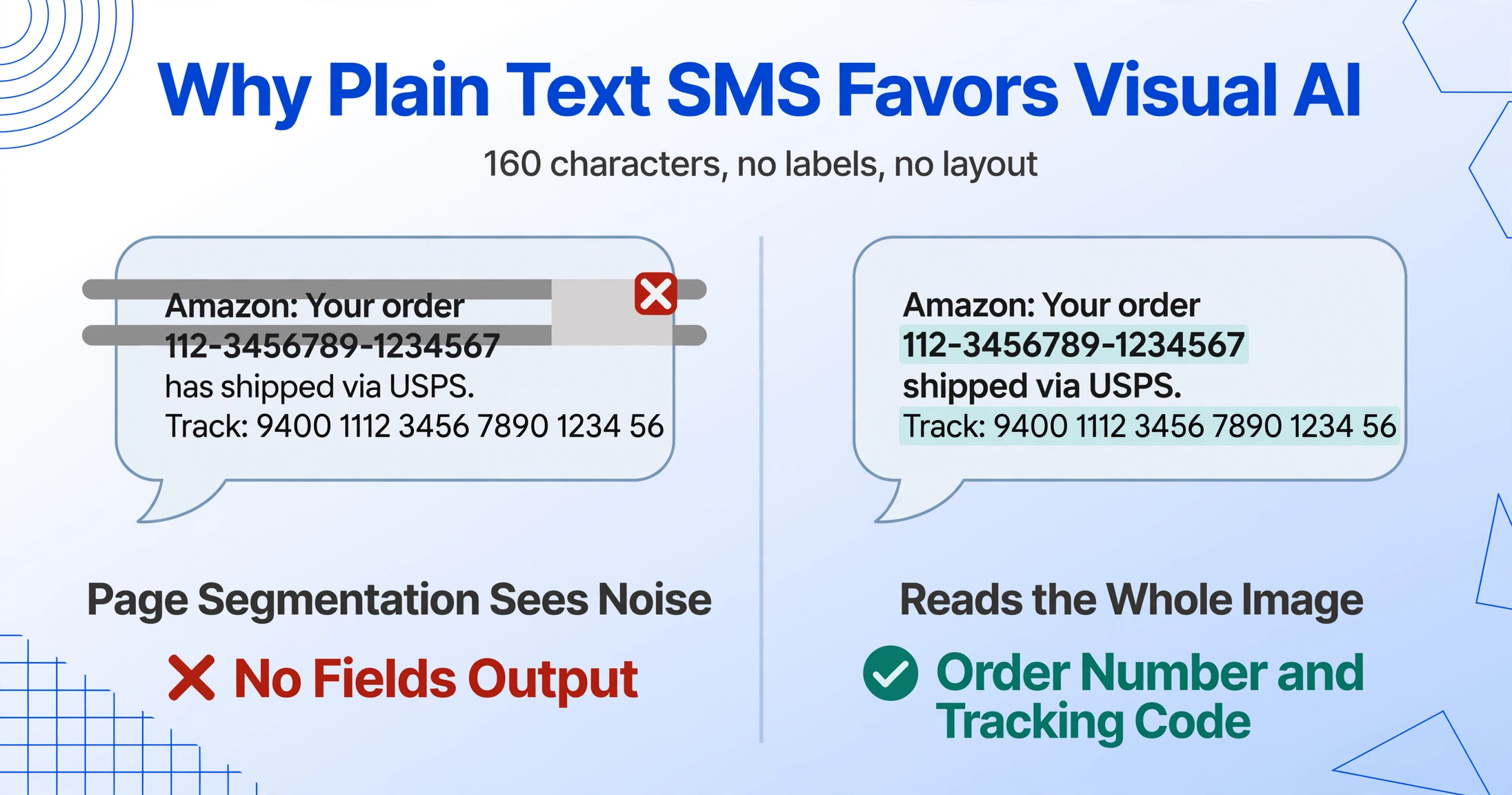
Traditional OCR engines handle SMS text poorly for an ironic reason: they are designed for larger documents. An OCR pipeline that segments a page into text blocks, lines, and words often fails on a 160-character phone screenshot because the segmentation thresholds assume a full-page layout. The single short paragraph gets classified as "noise" or gets truncated during preprocessing. Visual AI models do not rely on layout segmentation in the same way — they read the image as a whole and recognize the text content holistically, which makes a short, clean message like an SMS especially well-suited to this approach.
The 160-character limit also means that every piece of text in the message is likely relevant. There is no "fine print" section, no promotional footer, no legal disclaimer. The brand name, order number, tracking code, and carrier name are the entire content of the message. An extraction engine that needs to identify two specific values from that set is working with a signal-to-noise ratio that is much higher than a typical invoice or receipt, where irrelevant fields outnumber the ones you need.
This is not to say SMS extraction is perfect in all cases. Multi-segment SMS messages — those exceeding the 160-character limit — are concatenated by the phone into a single longer message, but different phones handle the concatenation differently. Some insert a separator character; others join segments without any delimiter. A screenshot of a concatenated message may include an incomplete tracking number at the join point if the message was captured mid-reassembly. If the tracking code appears truncated in the screenshot, extraction cannot reconstruct the missing digits — the limitation is in the source image, not the extraction method. For the standard case of a single-segment message, which covers the majority of order confirmations, the text is complete and self-contained.
Frequently Asked Questions
Can I process multiple SMS screenshots from different senders in one batch?
Yes. The same column definitions — "Order Number" and "Tracking Code" — work on an Amazon USPS message, an eBay FedEx message, and a Shopee J&T message within the same upload batch. Each screenshot is treated as a separate row, and the AI identifies the correct values from each message independently, regardless of sender or carrier.
What if the SMS does not contain a tracking code yet?
Some sellers generate the order confirmation SMS before the tracking number is available. The message will contain the order number but not a tracking code. When you define a "Tracking Code" column, the engine will leave that cell blank for screenshots where no tracking identifier is present in the message. It will not hallucinate a number or misidentify the order number as the tracking code.
Does this work with delivery notification SMS after the order has shipped?
Yes. Delivery notifications — "out for delivery," "delivered," "attempted delivery" — contain the same tracking code as the original order confirmation. If you are tracking the lifecycle of a package, you can extract the tracking code from a delivery notification screenshot and match it against the order number from the original confirmation.
What about SMS messages that include a shortened tracking link instead of a number?
Some carriers and marketplaces include a short URL (like amzn.to/xxxx) instead of the raw tracking number. The engine can read the URL, but the tracking code embedded within it is not extracted by default unless you define a "Tracking Link" column. If you need the numeric code for use on the carrier's standalone tracking page, you may need to open the link once to reveal the full tracking number, then capture that result in a second screenshot.
An SMS order confirmation is just 160 characters of text — but those 160 characters contain the two pieces of information that tell you what you bought and where it is. The formats differ by sender, the tracking code changes by carrier, and the order number hides behind whatever identifier format the marketplace chose. None of that matters when the extraction method reads by meaning rather than by position.