P11D Deadline Checklist:
How to Prepare Employee Benefits Data Before the 6 July Filing Date
The 2025/26 tax year closed on 5 April. Between that date and the P11D filing deadline on 6 July, a UK payroll team has approximately 92 calendar days to identify every taxable benefit provided to every employee, calculate the cash equivalent of each one using HMRC's prescribed valuation rules, cross-reference the totals against the payroll ledger, produce a separate P11D for each affected employee, submit the P11D(b) summary, provide copies to employees, and arrange payment of Class 1A National Insurance by 22 July. Ninety-two days sounds generous. It is not. The first two weeks of the window are consumed by the final Full Payment Submission and year-end payroll close for April. May and June each host a month-end payroll cycle that occupies the last week of each month. Summer holidays start drawing down headcount from late June. By the time the calendar reaches early July, the P11D deadline is one week away, June's month-end close has just finished, and the window that looked like three months has compressed to roughly three working weeks — and if the data is not already gathered and structured by then, those three weeks are not enough.
Key Takeaways
- HMRC gives you ninety-two calendar days between the tax year end and the P11D deadline — but after month-end payroll closes, P60 season, and summer leave, your actual working window shrinks to roughly twenty-five days.
- There is no grace period after 6 July — the £100-per-50-employees P11D(b) penalty is automatic from day one, and the first penalty notice will not reach you until October, by which point three months of charges have already accrued.
- The difference between a clean submission and a summer of corrections is not working faster in the final week — it is starting the data gather in May so that by July, the only task left is verification, not discovery.
The Three-Month Window That Shrinks to Three Weeks
The deadline structure is fixed in legislation and repeated every year. Under HMRC's published deadlines for expenses and benefits, the clock runs as follows after the tax year ends on 5 April:
| Obligation | Deadline | What HMRC charges if you miss it |
|---|---|---|
| Submit P11D forms online | 6 July 2026 | Penalties for incorrect returns up to £3,000 per form |
| Submit P11D(b) Class 1A NIC declaration | 6 July 2026 | £100 per 50 employees for each month or part month the return is late |
| Provide employee copies of P11D information | 6 July 2026 | Employee tax code errors trigger downstream HMRC enquiries |
| Pay Class 1A National Insurance (electronic) | 22 July 2026 | 5% surcharge after 30 days, rising to 10% at 6 months and 15% at 12 months, plus daily interest |
| Pay Class 1A National Insurance (cheque) | 19 July 2026 | Same penalty ladder as electronic — but the cheque must clear by this date |
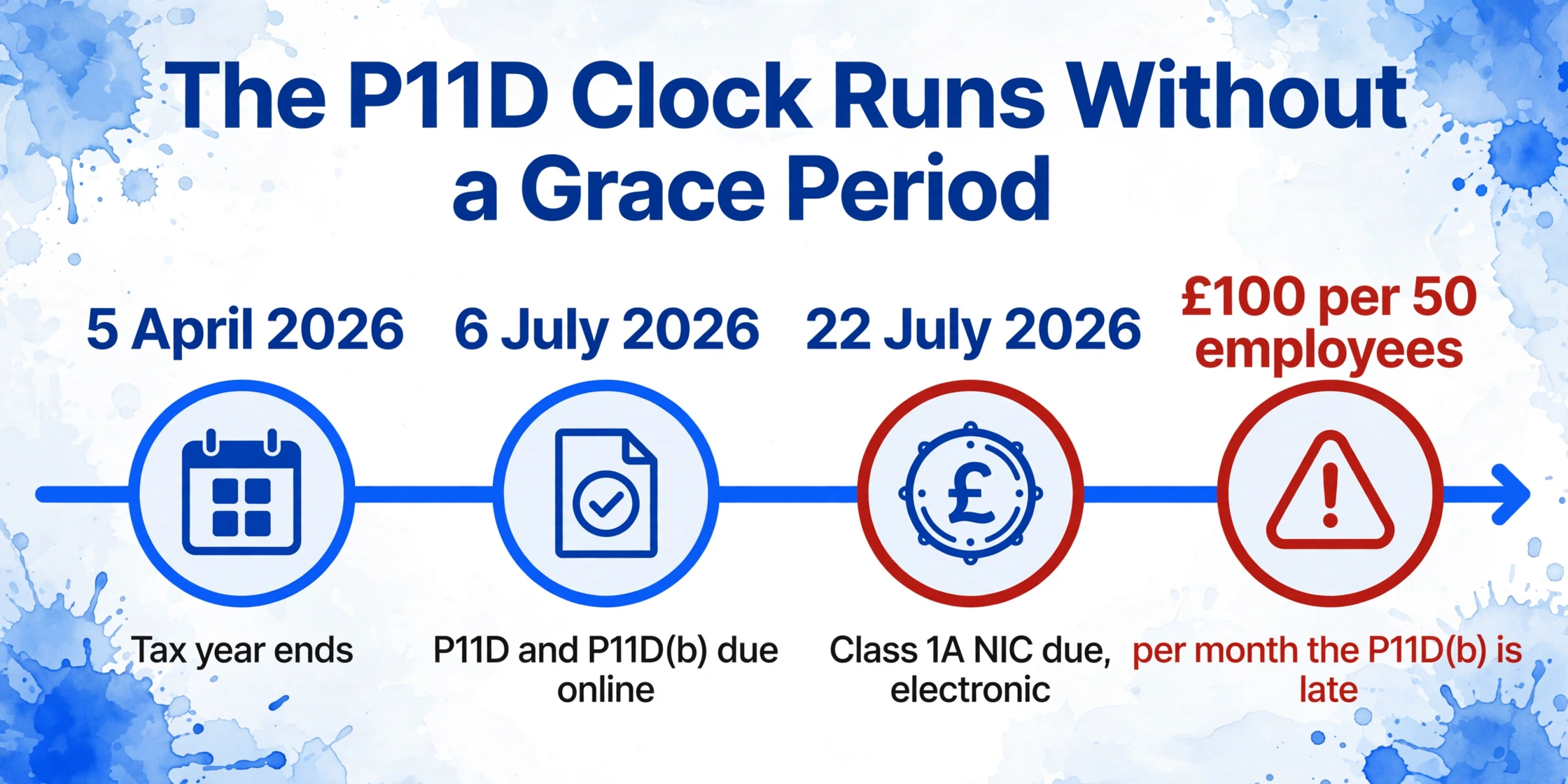
The £100-per-50-employees penalty is automatic and per month — there is no grace period. A firm with 120 employees that files the P11D(b) on 10 August has accumulated two months of penalty (£100 × 3 bands × 2 months = £600), and the meter keeps running until the return is received. HMRC issues penalty notices quarterly, which means the first notification of a July miss may not reach the employer until October — by which point three months of penalty have already accrued. The HMRC guidance on completing P11D and P11D(b) also flags penalties for careless or deliberate inaccuracies — a separate regime from the late-filing charge — which can add up to £3,000 per incorrect form on top of any monthly penalty already running.
But the deadline is only the endpoint. The real problem is the compression of the working window leading up to it.
May looks available on a calendar but in practice it is not. Most payroll teams run their month-end cycle in the last five working days of May — processing final pay for that month, reconciling RTI submissions, and handling the tail of April close queries — while also racing to issue every employee their P60 by the 31 May deadline. That is one full working week lost. June looks available but contains its own month-end cycle plus the annual mid-year review season in many finance and HR departments. Personnel start taking summer leave from the third week of June onward. The early July window — the four or five working days between the end of June close and 6 July — is the only genuinely clear stretch of time, and by then the data must already be complete because the window is too short to gather from scratch.
The working calendar, realistically: May: 2 usable weeks (minus month-end). June: 2 usable weeks (minus month-end, minus leave). Early July: 1 week for final verification and submission. What began as 92 calendar days is roughly 25 working days — and if the gathering step has not started by mid-May, the calculation and cross-reference step inherits whatever data happened to arrive and runs out of time.
This is why a phased checklist — gather in May, calculate and cross-reference in June, verify and file in early July — is the difference between a P11D submission that lands clean and one that accumulates corrections through August. The checklist below is built around that phased structure. Every item in it is something that, if deferred to the next phase, becomes a bottleneck.
May: Identify Every Benefit, Locate Every Data Source
The first phase is not calculating anything. It is answering a single question that is harder than it should be: which employees received which benefits, and where is the evidence? If you need a section-by-section reference for what each P11D field means and how to structure the extraction spreadsheet, our P11D data extraction guide covers the full form breakdown — this article assumes you have that baseline and focuses on the timeline to get it done.
P11D obligations cover 14 sections — A through N — each with its own valuation rule set out in HMRC's Expenses and Benefits: A Tax Guide (480). The first task in May is to cross-reference the employee roster against every benefit category and flag who received what. Most payroll software — Sage 50 Payroll, BrightPay, Xero Payroll, IRIS Staffology — maintains a benefits register as part of the employee record, and that is the starting point. But the software only knows what was entered into it. Benefits provided outside the system — a gym membership arranged by the office manager, a relocation package approved by HR outside payroll, a private medical policy where the insurer invoices the finance team directly — do not appear in the payroll system's benefits register unless someone put them there.
Pull the payroll system benefits register
Export the full benefits-in-kind register for the 2025/26 tax year from your payroll software. Sage 50 Payroll keeps this under Employee Record → Benefits. BrightPay stores it under Expenses & Benefits. Xero Payroll lists it under Employee → Benefits. This export is your baseline — the benefits the system already knows about — but it is not the complete list.
Cross-reference with HR, finance, and the office manager
Send a one-line email to the HR lead, the finance manager, and whoever handles office admin: "Can you confirm — were any of the following provided to any employee or director during 2025/26: gym memberships, professional subscriptions, private medical insurance, relocation costs, staff loans, company cars or vans assigned or changed mid-year, or any other non-salary benefit?" The responses almost always surface one or two benefits that never made it into the payroll register.
Confirm which benefits are already payrolled
If your organisation registered for voluntary payrolling of benefits before 6 April 2025, those benefits do not need a P11D — the tax was collected through PAYE during the year. But the Class 1A NIC on them still goes on the P11D(b). Flag payrolled benefits separately in your tracking spreadsheet. Benefits that cannot be payrolled — living accommodation and beneficial loans — always require a P11D regardless of payrolling registration status.
Locate the primary data source for each benefit category
This is the step most P11D checklist articles skip. Every benefit type draws its valuation from a specific external source — and that source is not always inside your payroll system. The table below maps the most common categories to the document or system you need to locate before you can calculate a cash equivalent.
| Benefit category | P11D section | Data source you need to locate | Common friction point |
|---|---|---|---|
| Company car | F | Lease agreement or purchase invoice showing list price + CO2 emissions rating from V5C registration document | CO2 figure on V5C may differ from what the fleet manager logged. Mid-year car change means two partial-period calculations. |
| Car fuel benefit | F | Fuel card statements or mileage logs showing private vs business split | If the employee made good the full cost of private fuel by 6 July, the fuel benefit charge is zero — but the evidence has to exist. |
| Private medical insurance | I | Annual premium invoice from the insurer (BUPA, AXA, Vitality, etc.) | Insurers often issue renewal invoices in April, sometimes as late as May. A policy that started mid-year (new joiner) may have a part-year invoice that finance has not yet received. |
| Beneficial loan (>£10k) | H | Loan agreement + opening/closing balance statements for the tax year | HMRC reviews the official rate of interest quarterly from April 2025 — the rate that applied in May 2025 may differ from the rate in March 2026. Average-rate method vs day-by-day method can produce different cash equivalents. |
| Living accommodation | D | Tenancy agreement or property purchase records showing cost, plus gross rateable value | Properties acquired before the community charge was abolished (1990) still use gross rateable value. If the property cost exceeded £75,000, the additional benefit charge applies. |
| Relocation expenses | M | Receipts for estate agent fees, legal fees, stamp duty, removal costs, temporary accommodation | £8,000 exempt threshold applies across the entire relocation. Partial documentation — only some receipts kept — can push the total over the limit despite the employer not knowing the true figure. |
| Professional subscriptions | N | Invoice or receipt for the subscription payment | Subscriptions to bodies on HMRC's approved list (List 3) are exempt. Subscriptions not on the list are reportable — and many employers assume all professional subs are exempt. |
| Vans | G | Fleet register showing which employees had access, dates of availability, and any private-use restrictions | The flat £4,020 van benefit charge (2025/26) is reduced if the van was unavailable for 30+ consecutive days. Pooled van rules exempt vehicles used for business only and garaged at workplace overnight — but the evidence must exist to support this treatment. |
By the end of May, you should have a spreadsheet with one row per employee who received a benefit, columns for each P11D section that applies to them, and a status flag on each cell indicating whether the data source has been located. Empty cells are not a problem yet — that is what June is for. But a row for an employee you did not know had any benefits is a problem that gets harder to fix with each passing week.
June: Calculate Cash Equivalents and Cross-Reference Against the Ledger
Once the data sources are assembled, the June phase turns them into the figures that go on the P11D. Every benefit category has a different valuation rule. Getting any one of them wrong produces an incorrect P11D — and as the HMRC P11D completion guidance makes clear, penalties for inaccurate returns apply separately from penalties for late returns. A single benefit valued incorrectly on 30 P11Ds is an error that compounds.
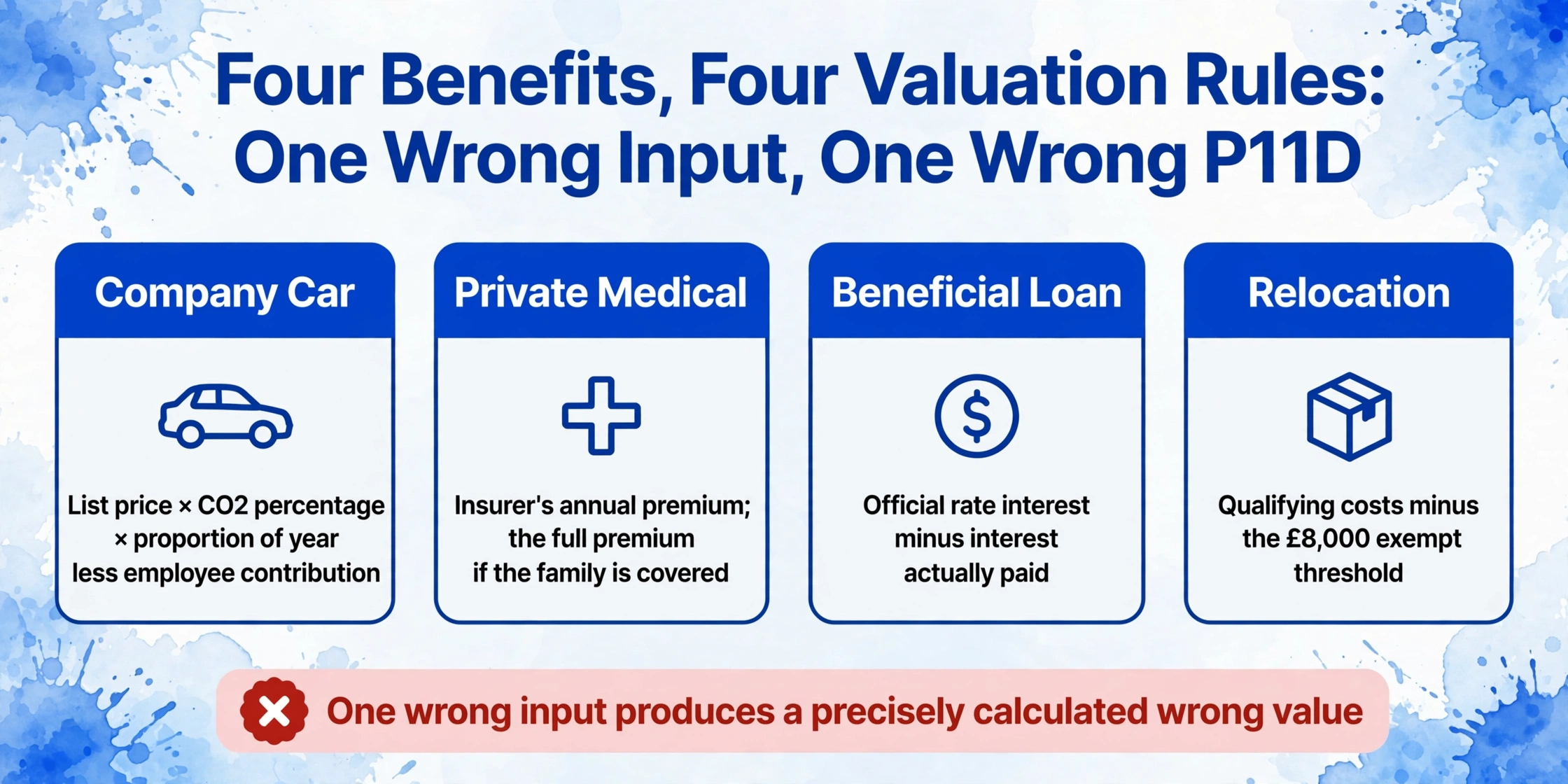
Calculate each benefit using the HMRC-prescribed method
Company car: list price × appropriate percentage (CO2-based) × proportion of year available, minus any employee contribution. Private medical: insurer's annual premium cost — if the policy covers the employee's family, the full premium is the benefit value. Beneficial loan: the difference between interest at the official rate and interest actually paid by the employee, averaged or calculated day-by-day. Relocation: total qualifying costs minus £8,000 exempt threshold — the excess is the reportable amount. If you use dedicated P11D software — Sage 50 P11D, BrightPay's Expenses & Benefits module, Taxshield P11D Manager, BDO P11D Enterprise — the software will calculate these from the inputs you provide. But the software can only calculate from correct inputs — a wrong CO2 figure entered into Sage 50 P11D produces a precisely calculated wrong value.
Cross-reference benefit values against the general ledger
The total cost of benefits on your P11D summary should tie back to the costs recorded in the nominal ledger. If the finance team recorded £47,000 in medical insurance premiums but the P11D(b) total for Section I shows £41,000, the £6,000 gap is either an employee you missed or a premium allocated to the wrong cost centre. Run this cross-reference before you submit, not after.
Handle mid-year benefit changes
A benefit that started or ended mid-year needs a time-apportioned value. A company car provided from 1 October 2025 is reportable for 6/12 of the annual charge. An employee who left in December and returned their car has an 8/12 charge — and their P45, which payroll processes in the same January leaver rush, does not carry the P11D data, so the two submissions must be reconciled independently. A medical insurance policy that was upgraded from single to family cover in August has two partial-period calculations for the same employee. Most P11D software handles time apportionment automatically once you enter the start and end dates — but only if the dates are entered correctly.
Check Optional Remuneration Arrangements (salary sacrifice)
If a benefit was provided under an OpRA — the employee gave up salary in exchange for the benefit — the taxable value is the greater of the amount of salary foregone and the cash equivalent under normal BIK rules. A common error: calculating only the BIK value and ignoring the salary foregone figure. If the salary sacrifice was set up mid-year, the foregone salary calculation runs from the effective date, not the full tax year.
At this stage — end of June — every P11D section for every employee should have a value in the spreadsheet. Even if a value is provisional (waiting on a final insurer invoice, for example), flagging it now is better than discovering the gap on 4 July.
At that point the source values are still locked inside PDF drafts, so getting each section into its column is exactly where a P11D to Excel pass earns its keep — one run populates the sheet the 5% cross-check below then tests.
The software landscape matters here because different tools handle different parts of the workflow. Sage 50 P11D is a standalone module — separate from Sage 50 Payroll — that calculates benefit values and produces the submission file, but it requires manual data entry for each benefit. BrightPay's Expenses & Benefits module sits inside the payroll application and auto-populates from the employee record, then generates a combined P11D and P11D(b) EXB submission. Xero Payroll tracks benefits as part of the employee profile and handles the P11D production within the platform, though some accountants still export the raw data and calculate separately. IRIS Staffology's Staffology P11D module captures benefit values year-round and calculates cash equivalents automatically. Knowing which tool you are using determines how much of the June calculation work is automated — and how much is a manual spreadsheet exercise with cross-checks against HMRC's 480 guide.
The cross-reference that catches the most errors: Export the P11D values into a spreadsheet and sum them by benefit section. Then pull the corresponding cost-line totals from the general ledger or the finance team's benefit-cost tracker. Any section where the P11D total differs from the cost total by more than 5% has either a missing employee, a wrong valuation, or a benefit that was recorded in the wrong section.
Early July: The Final Verification Before You File
By the first working day of July, every P11D value should be populated and cross-referenced. The final phase is not about calculation — it is about the checks that catch errors before they become HMRC penalty notices. There are six of them, and each one takes minutes but prevents hours of correction work in August.
Verify the P11D(b) totals against the sum of individual P11Ds
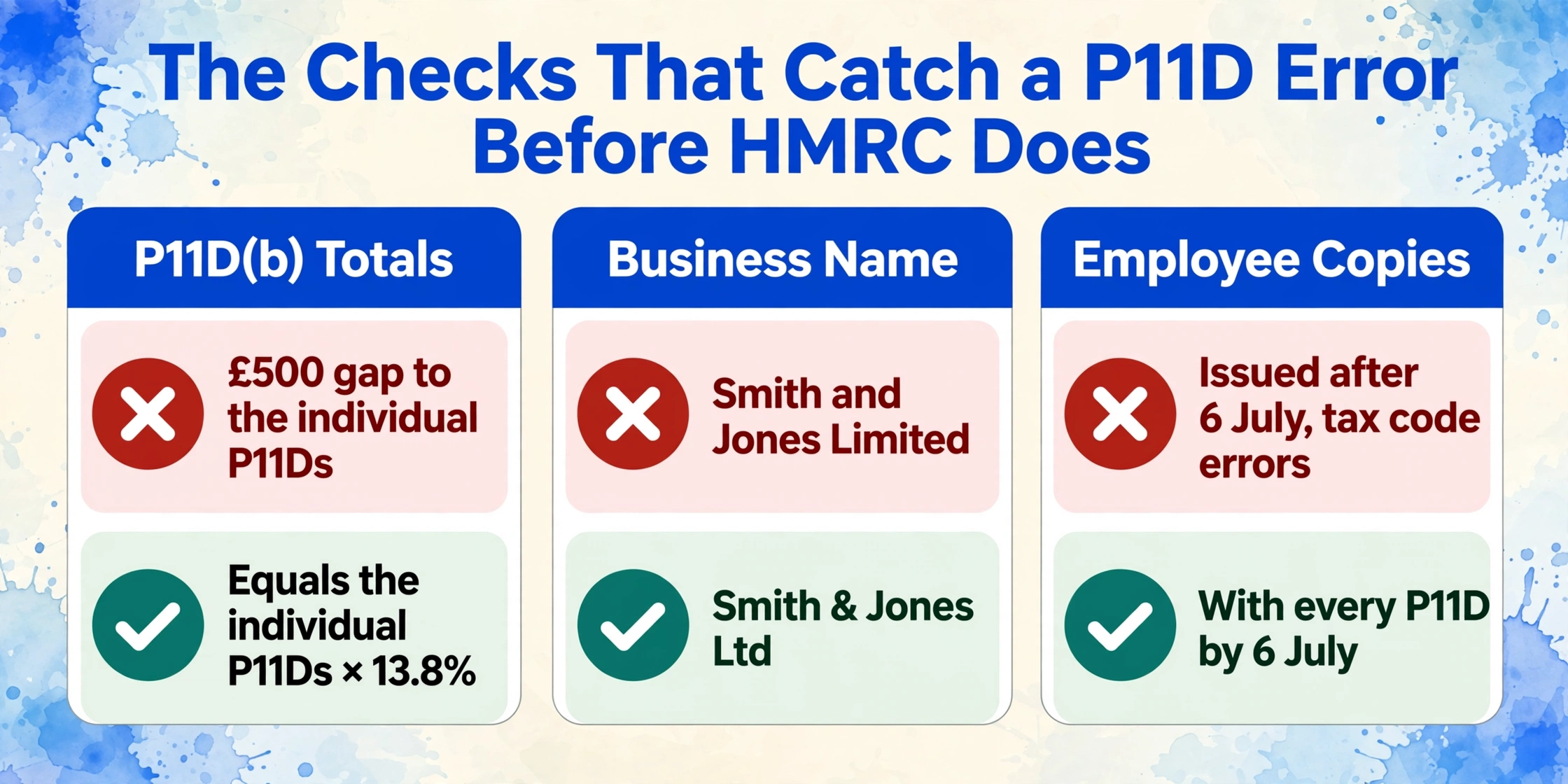
The P11D(b) is the Class 1A NIC declaration and it must equal the sum of all individual P11D values (excluding any amounts already taxed through payroll) multiplied by 13.8%. A £500 discrepancy between the P11D(b) total and the aggregated individual P11D totals is a filing that will not reconcile when HMRC cross-checks it — and HMRC does cross-check.
Check your business name exactly matches HMRC records
HMRC's June 2026 Employer Bulletin specifically warns: "When submitting your P11Ds and P11D(b), make sure that the business name is entered exactly as registered, without any abbreviations, punctuation or alterations." A limited company trading as "Smith & Jones Ltd" that submits as "Smith and Jones Limited" creates a mismatch that can delay processing and trigger an enquiry.
Confirm employee copies are ready for distribution
Each employee who receives a P11D must be given their benefit information — either a copy of the form or a letter detailing the figures — by 6 July. If an employee needs the figures for a Self Assessment tax return — and many do, since the SA100 requires BIK values for the employment pages — a late copy means they file with incomplete data and face the same January deadline scramble that half a million UK taxpayers already go through. Provide them before the deadline, not on it — a P11D copy emailed on 5 July to an employee on annual leave is effectively a late copy.
Confirm Class 1A NIC payment arrangements
The Class 1A NIC payable figure is on the P11D(b). Payment must reach HMRC by 22 July (electronic) or 19 July (cheque). HMRC's payment reference for Class 1A NIC uses the employer's Accounts Office reference followed by the digits "13" for the tax month — the same reference format as monthly PAYE. Check that the correct reference is set up in your banking system now, not on 21 July.
Files are processed securely and not stored.
The Five Late-Discovered Issues That Surface Every P11D Season
Every year, the same problems hit payroll teams in the final week before the deadline — not because anyone was careless, but because the issues sit outside the payroll software and only surface when someone manually cross-references the data. Here are the five that recur most often, and what you can do about each one in the final stretch.
Wrong CO2 rating on a company car. The CO2 figure printed on the V5C registration document is the definitive value for P11D purposes — not the figure on the lease agreement, not what the fleet management portal says, and not the figure from last year's P11D. A car that changed during the year — an employee upgraded from a diesel to a plug-in hybrid — has a different CO2 band and a different appropriate percentage. HMRC's company car benefit rules use the approved CO2 figure at first registration, which for cars registered since April 2020 uses WLTP testing. A V5C that shows 112 g/km produces a different car benefit charge than a lease document that rounded it to 110 g/km, and if you used the lease document figure, the P11D is wrong.
Medical insurance invoice not yet received from the insurer. Private medical policies typically renew on 1 April or 1 January. A policy that renewed on 1 January 2026 with a premium increase is reportable at the new rate for the final three months of the 2025/26 tax year. But the renewal invoice may not arrive until late April or even early May — after the tax year has closed but before the data has been gathered. If the payroll team uses last year's premium figure, the P11D undervalues the benefit. The solution is to note the estimated figure, flag it as provisional, chase the insurer in May, and update before filing. If the invoice still has not arrived by late June, use the most recent known premium and note the estimate on the P11D working sheet — an amended P11D is always better than a knowingly inaccurate one filed on time.
Relocation expenses with partial documentation. The £8,000 exemption for qualifying relocation costs is generous on paper but demanding in practice: every item claimed under the exemption must be a qualifying expense listed in HMRC's appendix 7 of the 480 guide, paid by the relevant day (the end of the tax year following the one in which the employment started), and supported by documentation. A relocation that included a temporary rental deposit, storage fees for furniture, and the employee's own house-hunting travel costs can easily exceed £8,000 — but if the employee kept only some of the receipts, the employer cannot prove how much of the total is exempt and how much is reportable. The safest approach: if a receipt is missing, treat the associated cost as non-qualifying and include it in the reportable amount. HMRC will not accept "the receipt was lost" as a reason for under-reporting.
Benefits provided to family members overlooked. A benefit provided to an employee's spouse, civil partner, child, parent, or dependant is treated as provided to the employee for P11D purposes — and the tax charge falls on the employee. The most common example: a private medical insurance policy that covers the employee and their spouse, where the full premium is reportable on the employee's P11D. If the payroll system records the employee-only premium (because that is what HR negotiated) but the actual policy covers the spouse, the P11D under-reports the benefit by exactly the spouse's premium component. This is caught by cross-referencing the insurer's invoice against the P11D values — one of the reasons Step 6 above is not optional.
Beneficial loan official rate changed mid-year. From April 2025, HMRC started reviewing the official rate of interest for beneficial loans on a quarterly basis rather than annually. The rate that applied for the period from 6 April to 5 July 2025 may be different from the rate that applied from 6 July to 5 October 2025, and so on through the tax year. If the employer calculated the cash equivalent using a single rate for the entire year — which was standard practice when the rate was annual — the calculation is wrong for at least one quarter. HMRC publishes each quarter's rate in the rates and allowances: beneficial loan arrangements page. Check which rate applied in each quarter and recalculate if necessary. This is a new-source-of-error for the 2025/26 filing season and one that HR teams may not have encountered before.
The common thread across all five: the payroll software calculates what you tell it to calculate. The errors that survive into July are usually in the inputs, not in the arithmetic — and they live outside the software, in documents that someone has to find, read, and transcribe correctly.
Frequently Asked Questions
Do I need to file a P11D for an employee whose benefits are payrolled?
No — if a benefit is payrolled (the tax was collected through PAYE during the tax year), you do not submit a P11D for that benefit for that employee. However, you must still submit a P11D(b) to declare the Class 1A NIC due on the payrolled benefits. The P11D(b) is never optional — it covers all Class 1A-liable benefits regardless of how the tax was collected.
What happens if I file the P11D on time but the P11D(b) is late?
The late-filing penalty of £100 per 50 employees per month applies to the P11D(b), not the individual P11Ds. Even if every individual P11D was submitted on 6 July, a P11D(b) filed on 10 July attracts the same penalty as if nothing was filed at all. HMRC treats the P11D and P11D(b) as part of the same return obligation — both must be submitted by 6 July.
Can I amend a P11D after the deadline?
Yes. If you discover an error after 6 July, you can submit an amended P11D and, if the amendment changes the total Class 1A NIC, an amended P11D(b). Amendments are submitted through the same PAYE Online or commercial software channel as the original. Do not wait until next year's return to "correct" a figure — an error corrected promptly shows good faith and reduces the risk of a penalty for an inaccurate return.
Is there any grace period after 6 July?
No. HMRC's penalty regime for late P11D(b) filings is automatic and runs from the day after the deadline. There is no seven-day grace period, no "reasonable excuse" exemption that applies automatically, and no warning letter before the first penalty accrues. The first penalty notice typically arrives in October — covering the period from July through September — by which point three months of penalty have already been charged.
What counts as a "month" for the monthly penalty?
Each calendar month or part of a calendar month that the P11D(b) remains unfiled after 6 July counts as a separate month for penalty purposes. A return filed on 7 July is one month late. A return filed on 1 August is two months late. A return filed on 1 September is three months late. HMRC does not pro-rate the penalty within a month — any part-month is a full month for penalty calculation.
Do I need P11D software, or can I submit through HMRC's PAYE Online?
You can submit through HMRC's PAYE Online service for employers without purchasing commercial P11D software. However, PAYE Online does not calculate cash equivalents — it provides the forms for you to fill in. You still need to calculate each benefit value manually (or in a spreadsheet) using HMRC's 480 guide rules before entering the figures. Commercial P11D software — Sage 50 P11D, BrightPay, Taxshield P11D Manager — automates the calculation from your inputs and generates the submission file directly, which reduces arithmetic errors but does not eliminate input errors.
What if an employee refuses to provide the information I need to complete their P11D?
The obligation to submit an accurate P11D rests with the employer, not the employee. If an employee does not provide information that you need — for example, the private mileage total for a company car — you must use the best available estimate and note it on your working sheet. HMRC accepts that some figures may be estimated where the employer has taken reasonable steps to obtain the data. Document your requests to the employee — an email trail showing you asked three times is evidence of reasonable steps.
The P11D clock is fixed — 6 July arrives whether the data is ready or not. What makes the difference is not working faster in the final week but starting the gather in May, so that by the time the window compresses to those three working days in early July, the only task left is verification. That verification step — cross-referencing insurer invoices against payroll system values, pulling CO2 figures from V5Cs instead of lease agreements, checking that the P11D(b) total reconciles to the individual forms — is where a spreadsheet of extracted figures beats a stack of PDFs. The same extraction pass that populates your P11D values from payroll system drafts can also pull the supporting data from the external documents that the payroll system never saw. Try it on a P11D draft — see if the cross-reference step shrinks from an afternoon of manual checking to ten minutes of scanning a single spreadsheet for gaps.