The January P45 Rush
A UK Payroll Survival Guide
December is the month everyone talks about. CIPP quick polls document it, payroll blogs fill with checklist templates, and LinkedIn overflows with sympathy for the "nightmare before Christmas." But ask any UK payroll administrator when the P45 workload actually peaks, and the answer is not December. It is the second week of January — after the holiday backlog has been triaged, after the early December pay date has been processed, and after the resignations that accumulated through Christmas have finally landed on the desk. 83% of payroll professionals told the CIPP their biggest December challenge was the shorter processing window — down from a normal month to roughly 15 working days before the bank holiday shutdown. That compressed timeline forces trade-offs. One of the things that gets pushed to January: the P45 paperwork from every employee whose last day fell between mid-December and the new year. And January brings its own flood. 31 January is statistically the most common day for UK employees to hand in their notice — post-Christmas reflection meets the first payday of the year, and "new year, new job" resolutions go live. A payroll team that ended December exhausted walks into January facing two simultaneous P45 queues: the ones they delayed and the ones that just arrived.

Key Takeaways
- Every UK P45 carries the same five HMRC-defined fields — but because layout was left to the software market, Sage, BrightPay, Xero, and Iris each print those fields in different positions, leaving the employer-to-employer handoff a manual typing chain that peaks every January.
- Traditional OCR and template-based extraction need a separate parsing rule per P45 layout — maintaining templates for every payroll software and version update is a full-time job that costs more than the manual typing it was supposed to replace.
- An extraction method that reads "Tax Code at Leaving" by understanding what the label means — not where it sits on the page — processes all thirty January P45s in one batch against a single column definition, regardless of which software produced each one.
The January Spike Nobody Scheduled
UK employee turnover runs at roughly 34% annually, according to CIPD analysis of the Annual Population Survey — around 27.4% of workers move to a new employer and 6.6% leave the labour market each year. At approximately 33 million people on PAYE, that is roughly 9 million P45s generated annually just for job changers. But the churn is not uniform across the calendar. Every payroll practitioner knows it clusters, and January is the densest cluster of the year.
The timing is not random. Most UK employers operate a notice period of one month, sometimes three months for senior roles. Someone who decides to leave over the Christmas break — after the office party, after the bonus lands, after a fortnight of family time that clarified what they actually want from their working life — hands in their notice in the first week of January. That notice runs through January, and their final pay and P45 date lands in late January or early February. Meanwhile, the new starters arriving to replace them bring P45s from their own previous employers — documents produced by different payroll software, on different layouts, with different field positioning — and every one of those P45s has to be read, transcribed into the new employer's payroll system, and verified before the first pay run. A construction company with 400 site workers and 35% annual churn will process roughly 140 P45s in a year, and a disproportionate number of those hit in the first quarter. A payroll bureau running 30 SME clients with a total of 450 employees will face a condensed version of the same pattern across multiple industries, multiple payroll software exports, multiple P45 formats — none of them standardised.
The volume alone is not the problem; payroll teams handle volume year-round. What makes January different is that the volume collides with catch-up work from December's compressed processing window. CIPP's data shows that the shorter December month forces payroll departments to front-load tasks and defer others. "The renewal of benefit years in January also adds significantly to the December workload," the CIPP noted in its December payroll report. Benefit year renewals, P11D processing, and tax code updates all pile on top of the standard January pay run. The P45 leaver wave lands in the middle of a month that was already going to be tight — and it arrives in two directions at once.
The core dynamic: December compresses the payroll calendar. January expands the P45 volume. The two effects compound — the paperwork that December pushed forward meets the resignations that January triggered, and both have to be complete before the first pay date of the year.
The Dual-Direction Problem: Leavers and Starters, Same Week
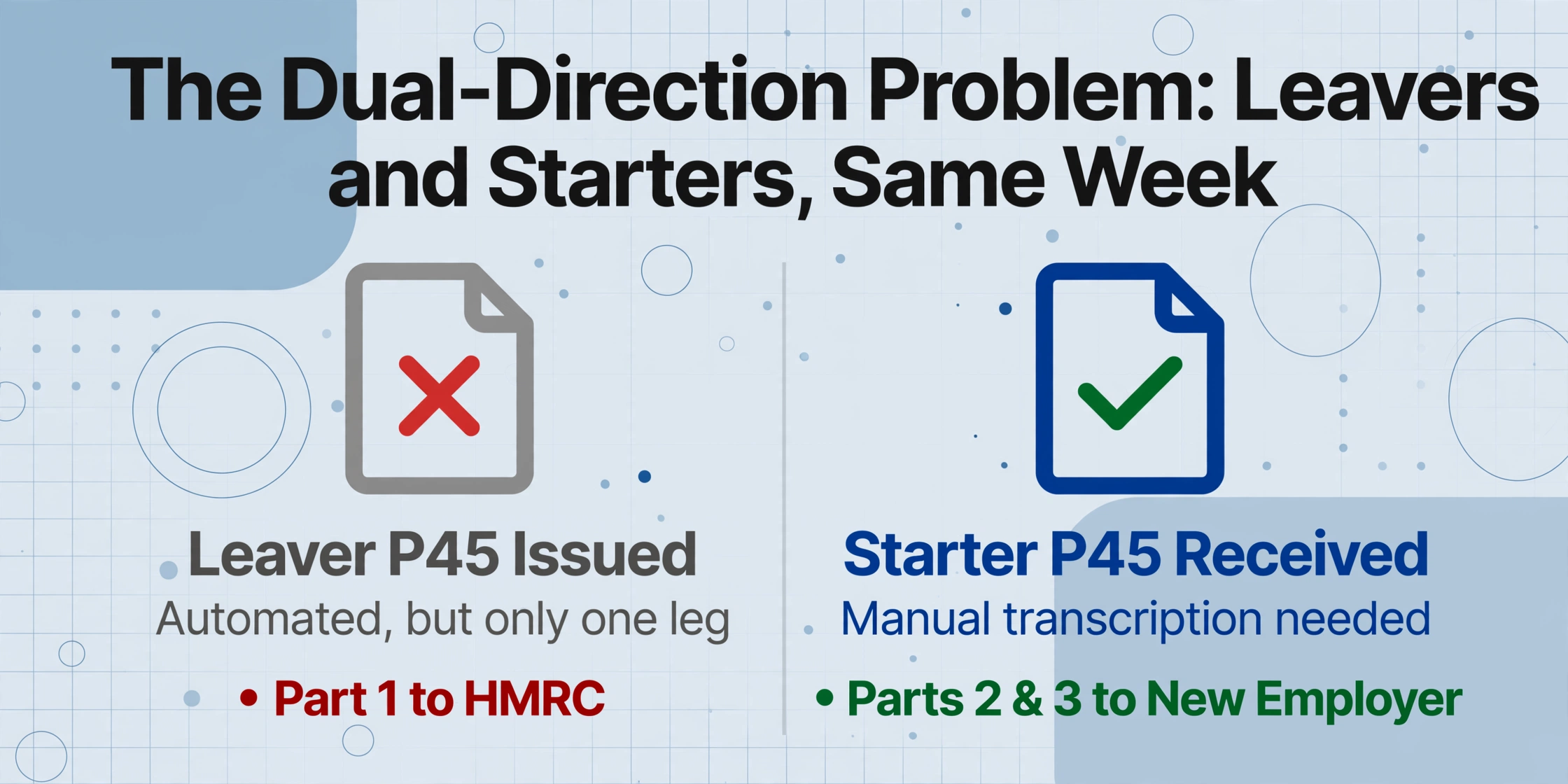
The P45 is the only payroll document a UK employer both produces and consumes in the same workflow. When an employee leaves, the employer issues a P45 (formally "Details of employee leaving work") under Regulation 36 of the Income Tax (PAYE) Regulations 2003. The software generates the four-part certificate — Part 1 goes to HMRC through RTI in the final Full Payment Submission, while Parts 1A, 2, and 3 go to the employee. The issuing side is largely automated: Sage Payroll, BrightPay, Xero Payroll, Iris, and Moorepay all handle P45 generation as a standard function, calculating year-to-date figures from the start of the tax year (6 April) to the leaving date, applying the correct tax code basis, and populating the certificate.
The receiving side is where the automation ends. When a new starter walks in with a P45 from their previous employer — or emails a PDF generated by entirely different payroll software — someone has to open that document, locate five fields, and type them into the new employer's payroll system. Those five fields are: leaving date, total pay to date and total tax to date for the current tax year, tax code at leaving, National Insurance number, and student loan deduction status. If any one of them is entered wrong, the new starter's first payslip will be incorrect — and the correction lands on the payroll team's desk, not the software vendor's. HMRC requires payroll records to be kept for at least three years and warns that inadequate records may trigger an estimated tax bill and a penalty of up to £3,000.
In January, the receiving side of this equation multiplies. A payroll administrator who normally handles two or three new-starter P45s a week may face fifteen in the second week of January — the leavers from December who are now someone else's January starters. Each one takes two to three minutes to transcribe and verify. At the UK payroll administrator median of roughly £29,750 gross — which translates to a loaded employer cost near £21 per hour once employer's Class 1 National Insurance at 15% above the £5,000 secondary threshold and auto-enrolment pension contributions are factored in — that is about 70 pence of labour per P45. The cost is small enough that nobody budgets for it, which is precisely why P45 data entry has never been properly costed in most organisations. But at fifteen P45s a week across a January that stretches over four or five pay periods, the clock is ticking on a task that has no automation layer between the PDF on the screen and the payroll record in the system.
The Five Fields That Keep P45s Manual
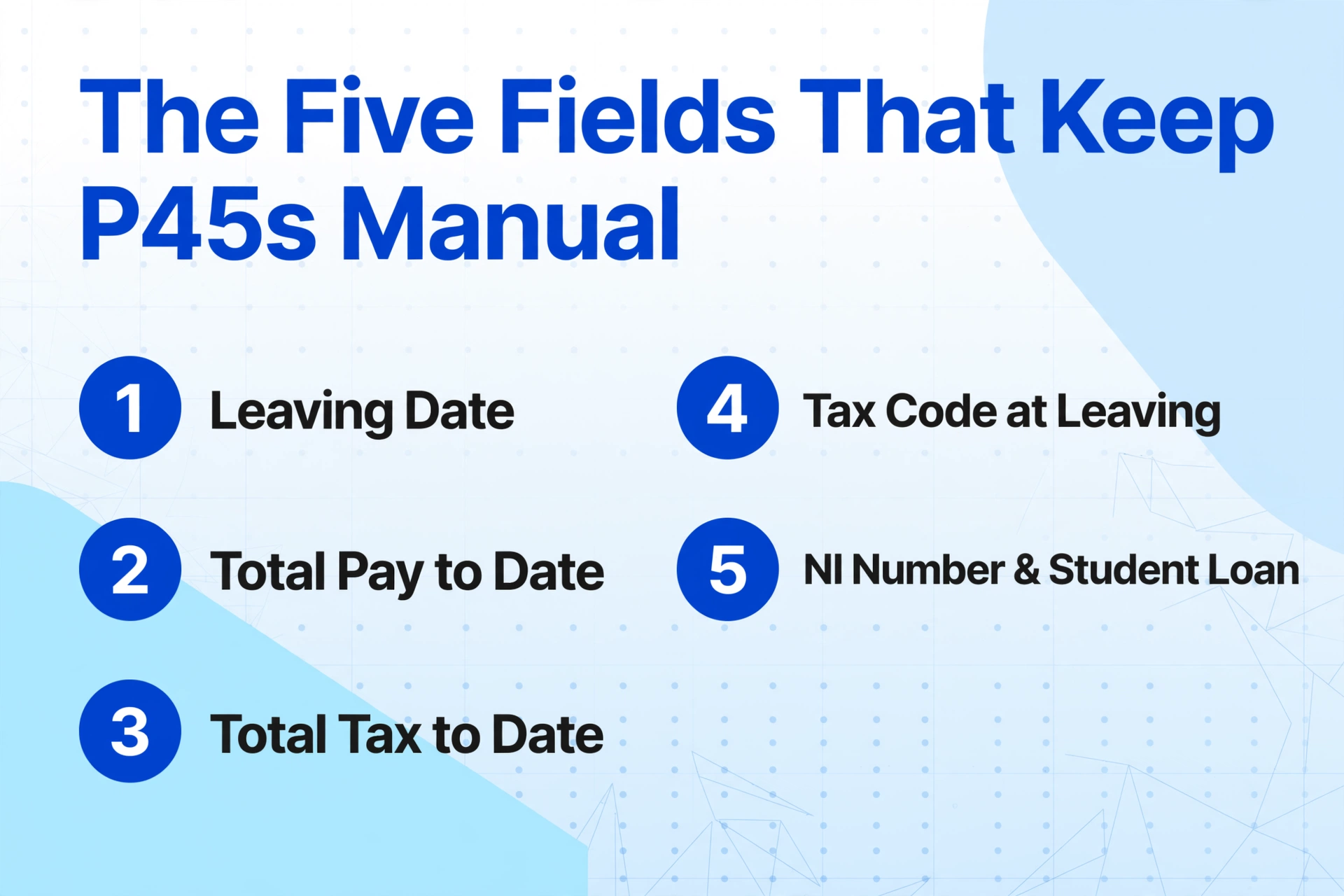
RTI digitised the employer-to-HMRC leg of the P45 in 2013. Every payroll software now transmits leaver data directly to HMRC through the Full Payment Submission — Part 1 of the P45 is effectively redundant. But RTI did nothing for the employer-to-employer leg. Parts 2 and 3, which carry the same data payload to the new employer, remain physical or PDF documents designed for human reading. They were never designed for machine reading. And because HMRC specifies what data a P45 must contain but not how it should be laid out, every payroll software vendor designs its own P45 format.
A P45 generated by Sage 50 Payroll places the tax code in a different position than one from BrightPay. Xero's P45 PDF looks different from Iris's. Moorepay's layout differs from FreeAgent's. The five fields that matter — leaving date, pay to date, tax to date, tax code, NI number — appear on every certificate, but their coordinates, font sizes, label wording, and proximity to other data fields vary with every software vendor, every version update, and sometimes every template preference set by the employer. A payroll bureau receiving P45s from thirty different client companies may encounter thirty different layouts — and the only guaranteed common denominator across all of them is that a person has to find the fields and type them.
This layout variability is why P45 processing has resisted automation even as every other part of payroll has moved to software. Traditional OCR needs to know where each field sits on the page — a position-based approach that breaks the moment a different payroll provider's P45 arrives. Template-based extraction tools require building and maintaining a separate parsing rule for each layout variant, which adds an administration burden that rivals the typing it was supposed to replace. The bottleneck is structural: P45 data is standardised at the field level — HMRC defines the fields — but not at the layout level, which is left to the software market.
What changes the equation is semantic extraction: reading a document by understanding what each field means rather than where it sits. Instead of programming a tool to find "Tax Code" in column A, row 7 of a specific P45 template, a semantic extractor identifies the field by its label — "Tax Code at Leaving," "Tax code," "Tax Code (at date of leaving)" — and extracts the adjacent value regardless of its position. This approach, which ImageToTable.ai calls Custom Column Extraction, is the first extraction method that matches the way P45s actually work in the UK payroll ecosystem: same data, different layouts, no standardisation. You type the column names you want — Leaving Date, Pay to Date, Tax Code, NI Number, Student Loan Status — and the AI locates each value anywhere on the page by understanding what the label means, not where it appears.
Files are processed securely and not stored.
What a Mistyped Tax Code Actually Costs
A 1257L tax code means the employee is entitled to the full £12,570 personal allowance for the 2025/26 tax year — the standard code for most employees with one job and no adjustments. The 'L' suffix signals the standard tax-free personal allowance, and the number 1257 is the allowance divided by 10. If a payroll administrator types 1275L instead — two digits transposed — the payroll software interprets this as a personal allowance of £12,750, and the employee receives £180 too much in their tax-free allowance over the year. HMRC's system will eventually detect the mismatch and issue a corrected code, but by then the employee may have been underpaying tax for months. The underpayment gets collected through an adjusted future tax code, which shows up on the employee's payslip without warning — and the employee calls the payroll department wanting to know why their take-home pay dropped.
This is not a hypothetical. The AccountingWEB forums carry real cases of P45 data entry errors cascading through multiple pay periods. One payroll bureau reported entering P45 year-to-date figures from a previous employer's Sage CSV export into BrightPay for a mid-year transfer — and discovering months later that the client had been charged £2,390 by HMRC, exactly the cumulative tax from the P45 figures that had been double-counted. HMRC's response: file a dispute, which can take "more than a year to get resolved." The two minutes of typing that caused the error had already happened; the correction took a year.
The error rate for manual data entry sits between 1% and 4% per field depending on document quality, time pressure, and the operator's familiarity with the layout. Across five P45 fields, a 1% per-field error rate gives roughly a 5% chance that any given P45 carries at least one mistake. At fifteen P45s a week during January, that is a statistical near-certainty of at least one error per month — and the error that lands in the tax code field will not announce itself until a payslip is wrong. The employee who notices the error calls payroll. Payroll checks the source P45, finds the transcription mistake, and initiates a correction. HMRC gets involved. The two minutes of data entry that cost 70 pence have now consumed three desks, multiple emails, and potentially weeks of follow-up — none of it budgeted, none of it visible in a cost-centre report, all of it traceable to a single mistyped digit.
The full cost of manual P45 processing — labour, error correction, compliance exposure, and the £3,000 per-employee record-keeping penalty — has been broken down in detail. For the January payroll team, the relevant part of that framework is the receive side: every P45 that arrives from a new starter is a manual transcription task, every transcription task carries an error probability, and January multiplies both the volume and the time pressure that raises the error rate.
The cost of January's P45 rush is not the 70 pence of labour per form. It is the one P45 in twenty that carries a wrong digit — and the downstream correction chain that begins the moment that digit enters the payroll system.
Breaking the January P45 Cycle
The structural fix for January's P45 pile-up is not more staff or more overtime — payroll teams that are already stretched thin in December do not have spare capacity to absorb a January surge by working harder. The fix is removing the transcription step entirely. The data on a P45 — leaving date, pay to date, tax to date, tax code, NI number, student loan status — is already printed on the certificate. The payroll administrator's role should be verification, not creation. Look at the extracted data, confirm it matches the source, import it into the payroll system. One step instead of two, and the step that carries the error risk — the typing — is eliminated.
This is where template-free AI extraction changes the workflow for P45 processing. Unlike position-based OCR that needs to know where each field sits on a specific P45 layout, semantic extraction reads the document by understanding what each field label means. A P45 generated by Sage places the tax code in one location; a P45 generated by BrightPay places it elsewhere. A human reader navigates both instinctively — they scan for "Tax Code" or "Tax Code at Leaving" and read the adjacent value. Semantic extraction does the same thing: it locates the field by its meaning rather than its coordinates. This is the core mechanism that makes it viable to batch-process P45s from multiple sources in a single operation — you are not building templates for each payroll software's output format. You are telling the system what columns you want, and it finds the matching data on each document regardless of layout.
The batch dimension is critical for January specifically. With fifteen, twenty, or thirty P45s arriving in a single week — a mix of outgoing leavers whose forms need issuing and incoming starters whose forms need entering — processing them one at a time does not solve the time-pressure problem. Extracting all of them in a single batch operation, with results merged into one spreadsheet where each row is a completed P45 data record, turns a week's worth of distributed typing into an afternoon's worth of review. The batch P45 processing workflow — building a leaver database from multiple forms simultaneously — applies equally to the incoming starter side. The same extraction run that populates a leaver database for outgoing employees can populate a new-starter setup sheet for incoming ones, because the five core fields are identical in both directions.
A January Payroll Workflow That Doesn't Depend on Typing
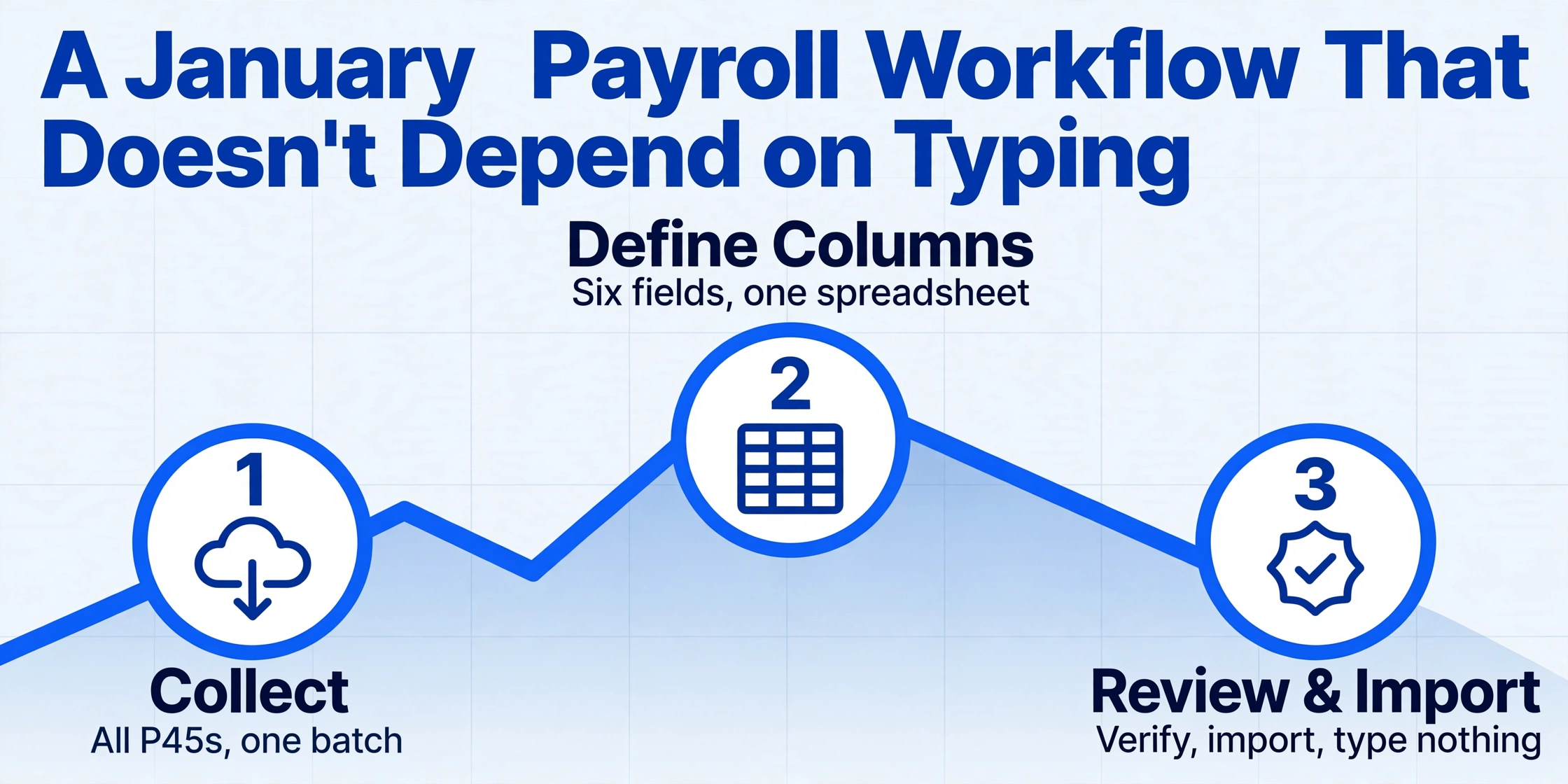
Instead of opening each P45 PDF individually, reading five fields, switching to the payroll software, typing five fields, and repeating thirty times, a payroll administrator with extraction tools can restructure the January workload into three blocks:
Collect all incoming P45s into a single batch
Drop every new-starter P45 PDF — Sage, BrightPay, Xero, paper scan, whatever format it arrived in — into one upload batch. No need to sort by source or layout.
Define your columns: Leaving Date, Pay to Date, Tax to Date, Tax Code, NI Number, Student Loan
These six column names become your output spreadsheet headers. The AI locates each field on every P45 by understanding the label, not the position. The output is one Excel row per employee — all thirty new starters in one table.
Review, verify, import — type nothing
Scan the output spreadsheet once. Verify tax codes against source P45s where needed. Import the verified data into your payroll software. The payroll administrator becomes a reviewer — the transcription step is gone.
The time arithmetic is straightforward. At two minutes per P45 for manual entry, thirty new-starter P45s consume an hour of typing — and that is before correcting any errors discovered later. With batch extraction, the same thirty P45s are uploaded, extracted, and compiled into one spreadsheet in minutes. The remaining hour becomes verification and import — work that was always necessary and that the payroll administrator can now do properly instead of squeezing it into the gaps between typing sessions.
For the outgoing leaver side, the same extraction workflow serves a different purpose: verifying that the figures on generated P45s are correct before they go to the employee and HMRC. A batch extraction of outgoing P45 PDFs against the payroll system's own records creates an automated cross-check — does the leaving date on the P45 match the system? Do the year-to-date pay and tax figures reconcile? Running this check before the RTI submission closes the loop between what the payroll software says and what the certificate shows, catching discrepancies before they reach HMRC's FPS processing. The step-by-step guide to extracting P45 leaver data into Excel walks through this workflow in detail, including the specific field mappings and common edge cases like Week 1/Month 1 basis indicators and student loan plan types.
Why January Is the Month That Reveals the Problem
For eleven months of the year, manual P45 processing is a low-grade administrative friction — a few minutes here, a few forms there, the occasional error that gets caught before it causes damage. In January, it stops being friction and becomes a bottleneck. The volume spikes, the time pressure intensifies, the error rate climbs, and the correction workload — emails to HMRC, amended FPS submissions, employee payslip queries — eats into February and March. The problem was always structural: P45 data is standardised at the field level but not the layout level, and the employer-to-employer hand-off remains a human transcription chain in an otherwise automated payroll ecosystem. January just exposes the fracture at the worst possible moment.
The deeper issue is that UK payroll teams still process P45s by hand not because they lack the skills or the tools to do otherwise, but because the tools available until recently — template-based OCR, zonal extraction — required a level of per-format configuration that made automation slower than the manual process it was supposed to replace. When a payroll bureau receives P45s from thirty different client companies using five different payroll packages, building and maintaining thirty extraction templates is a full-time job in itself. Semantic extraction removes this barrier: one column definition, applied across every P45 in the batch, because the AI understands what "Tax Code at Leaving" means regardless of which software printed it.
For payroll teams preparing for next January, the question is not whether manual P45 data entry is sustainable — the volume numbers have already answered that. The question is at what point the cumulative cost of transcription errors, correction cycles, and the administrative drag of typing the same five fields over and over again exceeds the cost of switching to a non-typing workflow. The cost framework is already available. The tools exist. The only remaining variable is the decision to stop typing and start reviewing — and January, more than any other month, makes the case for making that decision before next year's leaver wave arrives.
Frequently Asked Questions
How quickly must a UK employer issue a P45 after an employee leaves?
Under Regulation 36 of the Income Tax (PAYE) Regulations 2003, the P45 must be completed on the day employment ends or, if that is not practicable, without unreasonable delay. In practice, HMRC expects the P45 to be issued with the employee's final pay or within the same payroll cycle. Most payroll software — Sage, BrightPay, Xero Payroll, Iris, Moorepay — generates the P45 automatically when the employee is marked as a leaver and the final pay run is processed. Part 1 is submitted to HMRC through the Full Payment Submission (FPS) on or before the employee's last pay day.
Can I batch-process P45s from different payroll software?
Yes, with semantic AI extraction rather than template-based OCR. Template-based tools require a separate parsing rule for each payroll software's P45 layout — Sage, BrightPay, Xero, Iris, Moorepay, and FreeAgent all produce differently formatted certificates. Semantic extraction reads each P45 by understanding the meaning of field labels (like "Tax Code at Leaving" or "Total Pay to Date") rather than their position on the page. This means you can upload a mixed batch containing P45s from multiple payroll providers and extract all of them against a single set of column definitions. The output is one spreadsheet with one row per P45.
What information on a P45 must be entered into the new employer's payroll system?
Five core fields from Parts 2 and 3 of the P45: the employee's leaving date from their previous employment, total pay to date and total tax to date for the current tax year (running from 6 April to 5 April), the tax code at leaving (including any Week 1/Month 1 basis indicator), the National Insurance number, and the student loan deduction status. If any of these are entered incorrectly, the new starter may be placed on an emergency tax code and their first payslip will be wrong. The tax year figures are cumulative — they are the running totals the new employer needs to continue the employee's tax position without a reset.
What is the difference between a P45 and a P60?
Both show what an employee has earned and the tax paid in a tax year, but they are triggered by different events. A P45 is issued when an employee leaves a job — it covers the period from the start of the tax year (6 April) to the leaving date. A P60 is issued at the end of every tax year to employees who are still working for the employer at that point — it covers the full 12 months to 5 April. Employers must provide P60s to all current employees by 31 May each year. For more on P60 processing, see the guide on extracting UK P60 data into Excel for payroll reconciliation.
What happens if a P45 tax code is entered incorrectly?
An incorrect tax code changes the employee's tax-free allowance calculation immediately. For example, entering 1275L instead of 1257L gives a £12,750 allowance instead of £12,570 — the employee is undertaxed by £180 over the year. HMRC typically detects the discrepancy through RTI data matching and issues a corrected tax code. The underpaid tax is recovered through a future tax code adjustment, which reduces the employee's take-home pay in a subsequent month. The employee will often contact payroll to ask why their pay changed, and payroll must trace back to the original P45 entry to explain the correction. If the error is not caught, it can persist across tax years and compound into a larger underpayment that HMRC pursues directly.
Can paper P45 forms be processed with the same extraction tool?
Yes. A scanned image or a photo of a paper P45 works the same way as a PDF — the AI reads the document visually, not from embedded text layers. This is particularly useful for the paper P45s that still circulate in smaller businesses, or for P45s that arrive as attachments in formats that cannot be directly parsed (scanned PDFs, JPEG photos, screenshots from a payroll portal). The extraction tool supports PDF, JPG, PNG, WebP, and AVIF inputs.
Does batch P45 extraction work for payroll bureaus managing multiple client companies?
Yes — bureaus are the strongest use case because they face the maximum layout diversity. A bureau managing payroll for thirty SMEs across five different payroll software packages encounters P45s in dozens of different formats every month. With semantic extraction, the bureau defines one set of column names and applies it to every P45 in the batch regardless of which software produced it. The output is one consolidated spreadsheet per client or per processing run. The batch P45 processing guide covers multi-client bureau workflows in detail.