SA100 January Checklist:
What Freelancers Need Before the Deadline
Eight days before the last Self Assessment deadline, 8.6 million people had filed and roughly 3.3 million had not — and of those who cut it fine, 475,722 waited until 31 January itself, with 27,456 submitting in the final hour between 23:00 and 23:59, according to HM Revenue and Customs (HMRC) filing figures. Those late-night filers are not filling in the SA100 for three hours; the form takes an evening. What eats the final week is the gathering — pulling twelve months of income and expenses out of bank statements, payment platforms, receipts, and a P60 that is somewhere in an email folder. This is a survival guide for exactly that problem: what you need, where it lives, when it has to be ready, and how to compress the whole gather into a single sitting.
Key Takeaways
- 475,722 people filed their SA100 on deadline day itself and 27,456 squeezed into the final hour, not because they are disorganised but because the return demands figures from ten to twelve separate sources each in its own format, and the gathering alone eats every working hour of the last week before you can even open the form.
- The penalty ladder starts at £100 for a missed deadline and climbs to £1,600 at twelve months, but it prices the filing step not the gathering step — so the fine is triggered by the one part of the process that takes an evening, while the weeks you lose to locating, exporting, and totalling documents are free to the system and invisible to any penalty schedule.
- Your job in January stops being about typing figures into SA100 boxes faster and starts being about how early you turn documents into a single spreadsheet, because every figure that arrives pre-extracted is a figure you no longer have to transcribe under a ticking penalty clock.
The January Maths: Why the Window Is Tighter Than It Looks
The reason January feels like a scramble is that the deadline is fixed but the preparation is not. HMRC expected more than 12 million returns for the 2024/25 tax year, and 11.48 million arrived by 31 January — but the distribution of when people filed tells the real story. With eight days to go, one in every four expected returns still had not been submitted. The busiest single hour on deadline day ran from 17:00 to 17:59, when 32,982 returns came in — the after-work rush of people who spent the day assembling figures and filed the moment they had them.
That pattern is not laziness. Filing the SA100 online is a guided process: you log in, work through the boxes, and submit. If your numbers are ready, it is an evening's work. The bottleneck sits one step earlier. A UK freelancer or sole trader has to reconstruct a full tax year from documents that were never designed to be added up together — a business current account, a personal account that occasionally received client payments, PayPal or Stripe exports, a shoebox of expense receipts, and any employment paperwork from a job held earlier in the year. None of these arrive in the shape the return wants. The work of January is turning that pile into figures, and the closer to 31 January you start, the less margin you have to find the one document that is missing.
The deadline is fixed; the gather is what compresses. The SA100 itself takes an evening. The days that vanish in late January go into locating, exporting, and totalling a year's worth of income and expenses from a dozen separate sources — which is exactly the part you can prepare in advance and shorten.
The Penalty Clock You're Actually Racing
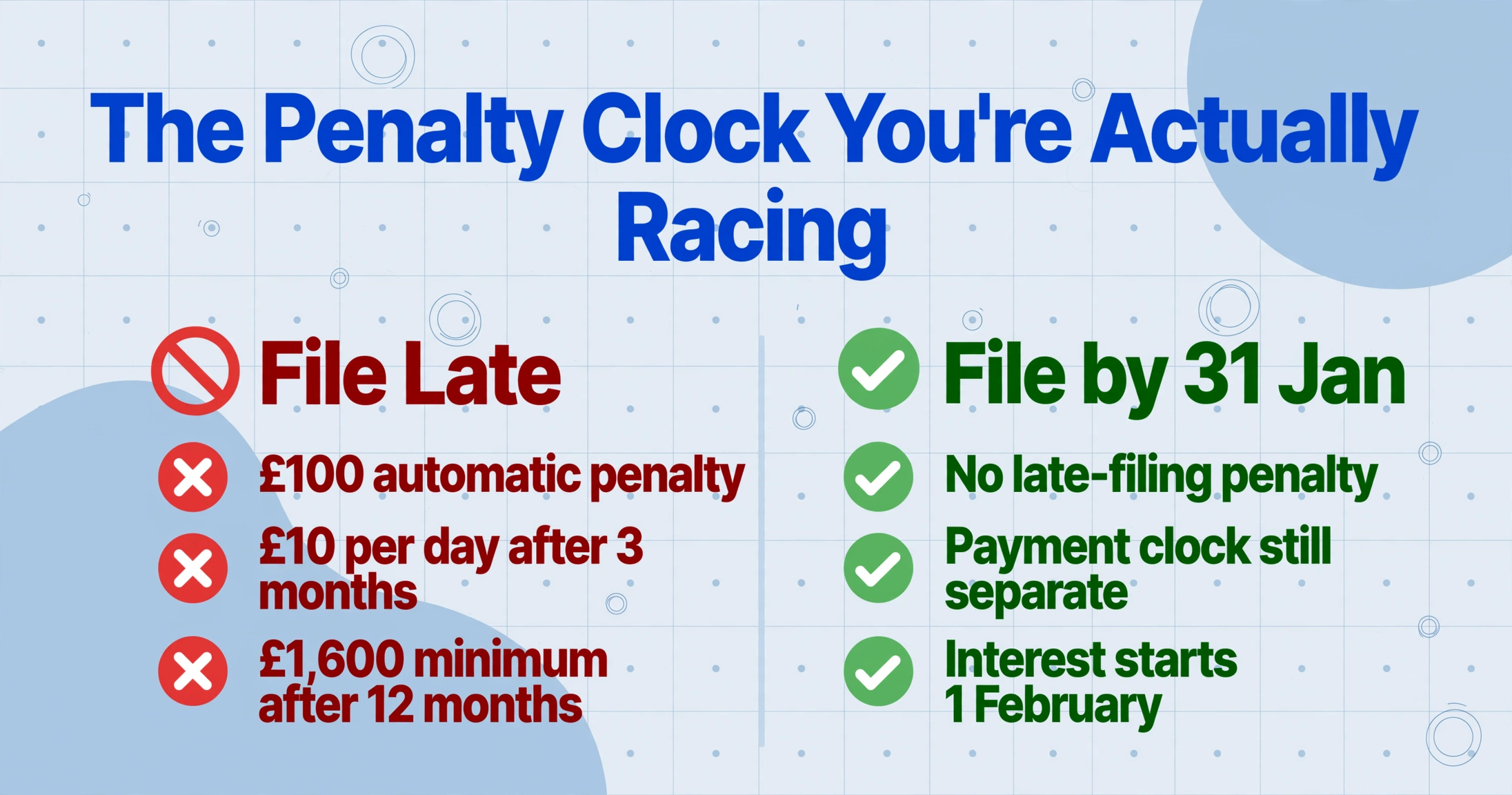
Missing 31 January is not a single fine — it is a ladder that keeps climbing the longer the return stays unfiled. The moment the deadline passes, HMRC applies an automatic £100 late-filing penalty, and this applies even if you owe no tax at all. After that, the charges escalate on a schedule:
- 1 day late: £100 automatic penalty, regardless of the tax due.
- 3 months late: £10 for each additional day, up to 90 days — a maximum of £900 on top of the £100.
- 6 months late: a further £300, or 5% of the tax due if that is greater.
- 12 months late: another £300, or 5% of the tax due if greater.
The Low Incomes Tax Reform Group (LITRG), an initiative of the Chartered Institute of Taxation, spells out where that leads: a return that is twelve months late accrues minimum late-filing penalties of £1,600 before any tax-geared charges. Late payment runs on a separate clock — 5% of the unpaid tax at 30 days, another 5% at 6 months, another 5% at 12 months — and HMRC charges interest on the outstanding balance from 1 February. Filing on time but paying late still triggers penalties; the two obligations are independent, and 31 January is the deadline for both.
There is a trap that catches first-time filers in particular. LITRG's published case studies describe people who "finally went online to do the tax return in late January" only to discover they could not file at all — because they had never registered for Self Assessment and had no Unique Taxpayer Reference (UTR). Registration is supposed to happen by 5 October following the end of the tax year, and the 10-digit UTR arrives by post, which takes time you do not have on 30 January. If you are filing for the first time, confirming that you are registered and hold a working UTR and Government Gateway login is the very first checklist item — before you gather a single figure.
Two earlier dates are worth knowing so they do not surprise you. The paper SA100 deadline is 31 October, three months ahead of the online one. And if you want any tax you owe (under £3,000) collected through your PAYE tax code instead of as a lump sum, you must file online by 30 December, not 31 January — a full month earlier. Both dates come from HMRC's Self Assessment deadlines guidance.
The Data You Need Before You Log In

The single biggest time-saver is knowing what to gather before you open the return, because the SA100 is not one form — it is a core return plus supplementary pages, and each source document feeds a specific part of it. HMRC's own step-by-step guide to getting ready lists the documents you will need; the table below maps the ones a typical self-employed or landlord filer holds to the part of the return they populate. Not everyone needs every row — but knowing which apply to you turns a vague "gather my paperwork" into a finite checklist.
| Source document | Where it lives | What it feeds on the return |
|---|---|---|
| Business bank / building society statements | Bank portal, PDF downloads | Self-employment turnover and expenses (SA103); untaxed interest on the main SA100 |
| Sales invoices you issued | Accounting software, email, spreadsheets | Turnover box on the self-employment page (SA103) |
| Expense receipts | Wallet, inbox, photo roll, receipt apps | Allowable business expenses (SA103) |
| Payment platform exports (PayPal, Stripe, Etsy) | Platform dashboard exports (CSV/PDF) | Self-employment turnover (SA103) |
| P60 and P45 | Employer, payroll portal, email | Employment pay and tax deducted (SA102) |
| P11D (benefits and expenses) | Employer | Taxable benefits on the employment page (SA102) |
| Dividend vouchers | Company / broker statements | Dividend income section of the SA100 |
| Rental income records and mortgage interest certificate | Letting agent, lender annual statement | Property income and finance-cost relief (SA105) |
| Pension statements and Gift Aid records | Provider, charity receipts | Tax reliefs section of the SA100 |
| Student loan statement | Student Loans Company account | Student loan repayment section of the SA100 |
| Capital gains records | Broker, conveyancer, contract notes | Capital gains summary (SA108) |
Read down that list and the reason January feels overwhelming becomes obvious: a freelancer with a side employment and a rental flat is pulling data from ten or twelve different places, each with its own format and its own login. The return does not accept any of those documents directly — it wants figures typed into boxes. Every row in the table is a small manual translation job, and the more rows apply to you, the longer the gather takes.
A Realistic Final-Three-Weeks Countdown
If you are reading this in January with the deadline in sight, the useful thing is not a lecture about filing early — it is a plan for the time you actually have. Break the remaining window into three blocks, working backwards from 31 January.
Three weeks out — confirm access and collect the sources
Check you can log in to the Government Gateway and that you have your UTR to hand — if you are filing for the first time and are not registered, start that today, because the UTR arrives by post. Then download every source document from the checklist that applies to you: bank statement PDFs, platform exports, your P60, dividend vouchers, the mortgage interest certificate. Collecting is the part most likely to hit a delay, so front-load it.
Two weeks out — turn documents into figures
This is the real work: totalling turnover, adding up allowable expenses by category, and reconciling what the bank shows against what you invoiced. Do it in a spreadsheet, one tab per income and expense type, so the numbers that go into each SA100 box are already summed and checked. This is the step that extraction can compress from days to an afternoon — covered in the next section.
Final week — file, then sort the payment
With figures ready, work through the return and submit. Note the tax and any first payment on account it calculates, and make sure the money reaches HMRC by 31 January — filing on time but paying late still triggers a 5% penalty at 30 days. Do not leave it to the final hour: card and bank payments can be slow on the busiest day of the year.
The countdown works because it puts the slow, failure-prone step — collecting documents — first, and the fast, guided step — filing — last. The middle block is where most of the hours go, and it is the one part of the process that has, until recently, had no shortcut.
Compressing the Gather: One Spreadsheet Instead of Twelve Tabs
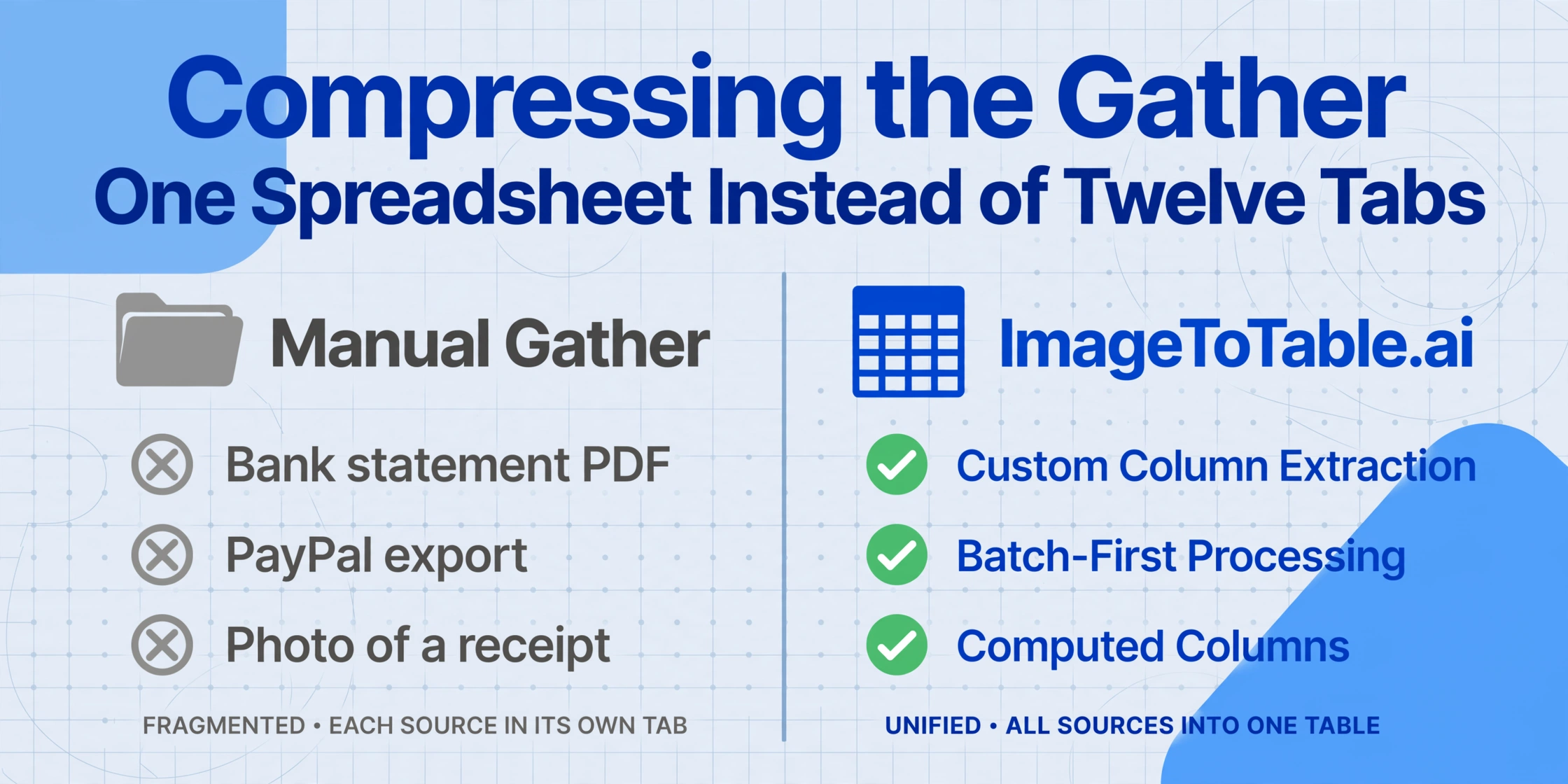
The middle block shrinks dramatically once you stop typing figures out of documents by hand. The problem with the traditional gather is that every source has a different layout — a bank statement looks nothing like a PayPal export, which looks nothing like a photographed receipt — so there is no single "read everything" method. Older tools tried to solve this with templates: you configure a parser for each document format, which only works if the format never changes and you are willing to maintain a rule for every bank and platform you use. For a one-a-year task, that setup costs more time than it saves.
A different approach reads documents the way a person does — by understanding what each field means rather than where it sits on the page. This is what ImageToTable.ai calls Custom Column Extraction: you type the column names you want — say Date, Description, Amount, Category — and the AI locates each value on every document by meaning, regardless of layout. A bank statement PDF, a Stripe report, and a snapshot of a paper receipt all resolve to the same columns, so they land in one spreadsheet instead of twelve separate tabs you would otherwise have to reconcile by eye.
Two features matter specifically for the SA100 gather. Because the tool is batch-first — you upload many files at once and the results merge into a single Excel table — a whole folder of receipts becomes one expense schedule rather than a stack processed one at a time. And computed columns let the AI do the arithmetic while it reads: define a column such as Line Total (Qty × Unit Price), or ask it to categorise each receipt into "Travel / Office / Software / Other", and the totals you need for each SA100 box come out already summed rather than requiring a second pass in a formula. If an accountant is doing your return, the Collection Link feature — a shareable link (like /c/xxxx) that lets you upload your documents straight into their processing queue without either of you creating extra accounts — removes the email-attachment shuffle that usually eats the first week of January.
Files are processed securely and not stored.
The mechanics of doing this end to end — which columns to define for each document type, how to keep the output clean enough to type straight into the return — are covered step by step in the guide to extracting SA100 data into Excel for filing and record-keeping. Bank statements are usually the largest single source, and the workflow for turning a year of them into a transaction table is set out in the walkthrough on converting bank statements into a spreadsheet. And if you are an accountant facing not one return but thirty, the method for consolidating multiple clients' documents is in the guide to batch-processing SA100 returns into one summary spreadsheet.
None of this changes the return itself — the SA100 boxes are the same, and HMRC still wants figures typed in. What changes is how long it takes to have those figures ready and correct. The freelancer view of why that translation step is the true source of the annual dread is unpacked in the piece on why UK freelancers dread the SA100 long before they file.
After 2026: How MTD for ITSA Rewrites the January Rhythm
The once-a-year January crunch is on its way to becoming a four-times-a-year routine, which changes the calculation entirely. Under Making Tax Digital for Income Tax Self Assessment (MTD for ITSA), sole traders and landlords with qualifying income over £50,000 must keep digital records and send quarterly updates to HMRC from 6 April 2026. The threshold drops to £30,000 from April 2027 and £20,000 from April 2028, pulling several hundred thousand more people in with each step.
The practical shift is in the cadence. Instead of one annual assembly job, affected filers face quarterly update deadlines — 7 August, 7 November, 7 February, and 7 May — followed by a Final Declaration that replaces the old return, per HMRC's quarterly update timeline. The gather you dread once in January will happen four more times a year. That makes the difference between a repeatable, low-friction way of turning documents into figures and a manual scramble far larger than it is today: a workflow you build once and run every quarter is worth far more when it runs five times a year than when it runs once.
MTD turns the annual crunch into a quarterly habit. From April 2026, filers above the income threshold report four times a year plus a Final Declaration — so the value of a fast, repeatable document-to-spreadsheet method compounds. What saves you a week each January will save you that time every quarter.
The same seasonal pressure shows up across the UK tax and payroll calendar, just on different dates. Employers hit their own version in early January with the post-Christmas P45 leaver rush, and again in spring with the 31 May P60 deadline. The common thread is the same in every case: the document is standardised, the deadline is fixed, and the time cost is entirely in getting the data off the page and into a usable shape.
Frequently Asked Questions
What is the SA100 filing deadline, and is it the same as the payment deadline?
For online returns, the SA100 filing deadline is 11:59pm on 31 January following the end of the tax year, and the deadline to pay any tax you owe is the same date. They run on separate penalty clocks: filing late triggers an automatic £100 penalty even if no tax is due, while paying late triggers a 5% charge on the unpaid tax at 30 days. The paper return deadline is earlier — 31 October — and if you want tax under £3,000 collected through your PAYE code, you must file online by 30 December.
What happens if I miss the 31 January deadline?
You get an automatic £100 penalty the moment the deadline passes, regardless of whether you owe any tax. If the return is still outstanding three months later, HMRC adds £10 per day for up to 90 days (a maximum of £900). At six months late there is a further £300 or 5% of the tax due, whichever is greater, and the same again at twelve months. A return that is a full year late reaches minimum late-filing penalties of £1,600. Late payment is charged separately — 5% of the unpaid tax at 30 days, 6 months, and 12 months — plus interest from 1 February.
What documents do I need to gather before starting my Self Assessment?
It depends on your income sources, but a typical self-employed or landlord filer needs: business and personal bank statements, sales invoices, expense receipts, payment platform exports (PayPal, Stripe), any P60 or P45 from employment, a P11D if you had taxable benefits, dividend vouchers, rental income records and the mortgage interest certificate, pension and Gift Aid records, a student loan statement, and capital gains records. Each feeds a specific part of the return — the self-employment page (SA103), the employment page (SA102), the property page (SA105), and so on. Knowing which apply to you turns "gather my paperwork" into a finite checklist.
I've left it late — what should I do first?
Confirm you can actually file. Check you have a working Government Gateway login and your 10-digit UTR; if you have never registered for Self Assessment, do that immediately, because the UTR arrives by post and there may not be time before 31 January. Once access is confirmed, download every source document that applies to you before you open the return — the gather is the step most likely to stall, so front-load it. Then total your figures, file, and make sure payment reaches HMRC by the deadline.
Can I extract data from bank statements and receipts instead of typing every figure?
Yes. AI extraction reads a document by understanding what each field means rather than where it sits, so a bank statement PDF, a payment platform export, and a photo of a paper receipt can all be turned into the same set of spreadsheet columns — Date, Description, Amount, Category — without a template for each format. Because the tool processes files in a batch and merges them into one Excel table, a folder of receipts becomes a single expense schedule, and computed columns can total and categorise the figures as they are read, so the numbers are ready to type straight into the SA100 boxes.
How will Making Tax Digital change the January deadline?
From 6 April 2026, sole traders and landlords with qualifying income over £50,000 must keep digital records and send HMRC four quarterly updates a year plus a Final Declaration, under MTD for Income Tax. The threshold falls to £30,000 in April 2027 and £20,000 in April 2028. For those in scope, the single annual January assembly becomes a quarterly obligation with deadlines on 7 August, 7 November, 7 February, and 7 May — which is why a repeatable way of turning documents into figures becomes far more valuable once the work happens every quarter rather than once a year.