How to Extract Invoice Data
Without an ERP: What You Actually Need
You don't need an ERP to extract data from invoices. The assumption that automated invoice processing requires enterprise infrastructure — a NetSuite, SAP, or Microsoft Dynamics — is one of the most persistent and expensive misconceptions in small business finance. It convinces small teams that automation is out of reach when the tools they actually need cost a fraction of an ERP license and take minutes to set up.
On r/Accounting, one user processing 200–300 invoices monthly explained that the real bottleneck wasn't data entry speed — it was gaining approvals and tracking exceptions. "That's 100–150 per person per month," they noted, describing a two-person team stuck between manual workarounds and an ERP they couldn't budget for. Their story is not unusual: the gap between "we should automate this" and "we bought an ERP" is where tens of thousands of small businesses get stuck.
Key Takeaways
- ERP vendors spent a decade convincing 29 million small businesses that they need a six-figure platform just to stop typing invoice numbers by hand.
- Automated invoice extraction needs exactly two things: a $0 to 30 per month AI tool that reads any layout and the QuickBooks or Xero account you already have.
- Start with one batch of your own invoices: name the columns you want once and in five minutes you have a full month of structured data ready to import.
Why "No ERP" Doesn't Mean "No Automation"
The belief that you can't automate invoice data extraction without an ERP comes from a decade of vendor marketing. ERP and AP automation platforms have a shared interest in making automation look like a platform purchase — because that's what they sell. But the question a small business needs to answer is not "which ERP should we buy?" It's "how do I get the data out of these PDFs and into my accounting system without typing it by hand?"
QuickBooks serves more than 29 million small businesses globally, according to Intuit's 2024 annual report. Xero serves over 4 million. Zoho Books, FreshBooks, and Wave add millions more. The vast majority of these businesses operate without an ERP — and most still enter invoice data manually. The infrastructure to receive and organize that data already exists. What's missing is the extraction layer: the step between "invoice arrives as a PDF" and "invoice data appears in the accounting system."
The 2025 Ardent Partners AP Metrics Report found that best-in-class organizations spend $2.78 per invoice to process, while those still relying on manual methods spend $12.88 — a 4.6× gap driven by extraction automation, not by having an ERP. Top performers achieved their cost advantage through automated data capture, regardless of whether that data fed into an ERP or a standalone accounting tool.
For a deeper look at how this works, see our guide on the template-free extraction workflow. New to the concept entirely? Our explainer on what invoice data extraction is covers the fields, the terminology, and how the process works before you get into the no-ERP specifics below.
What You Actually Need for No-ERP Invoice Extraction
The minimum viable stack for automated invoice extraction without an ERP is two components:
- An AI extraction tool that can read invoices in any format — PDFs, phone photos, scanned paper — without templates or training data. This replaces the data entry step.
- Your existing accounting software or spreadsheet — QuickBooks, Xero, Zoho Books, Wave, or even a Google Sheet. This is where the extracted data needs to land.
That's it. No middleware, no integration consultants, no months-long implementation timeline.
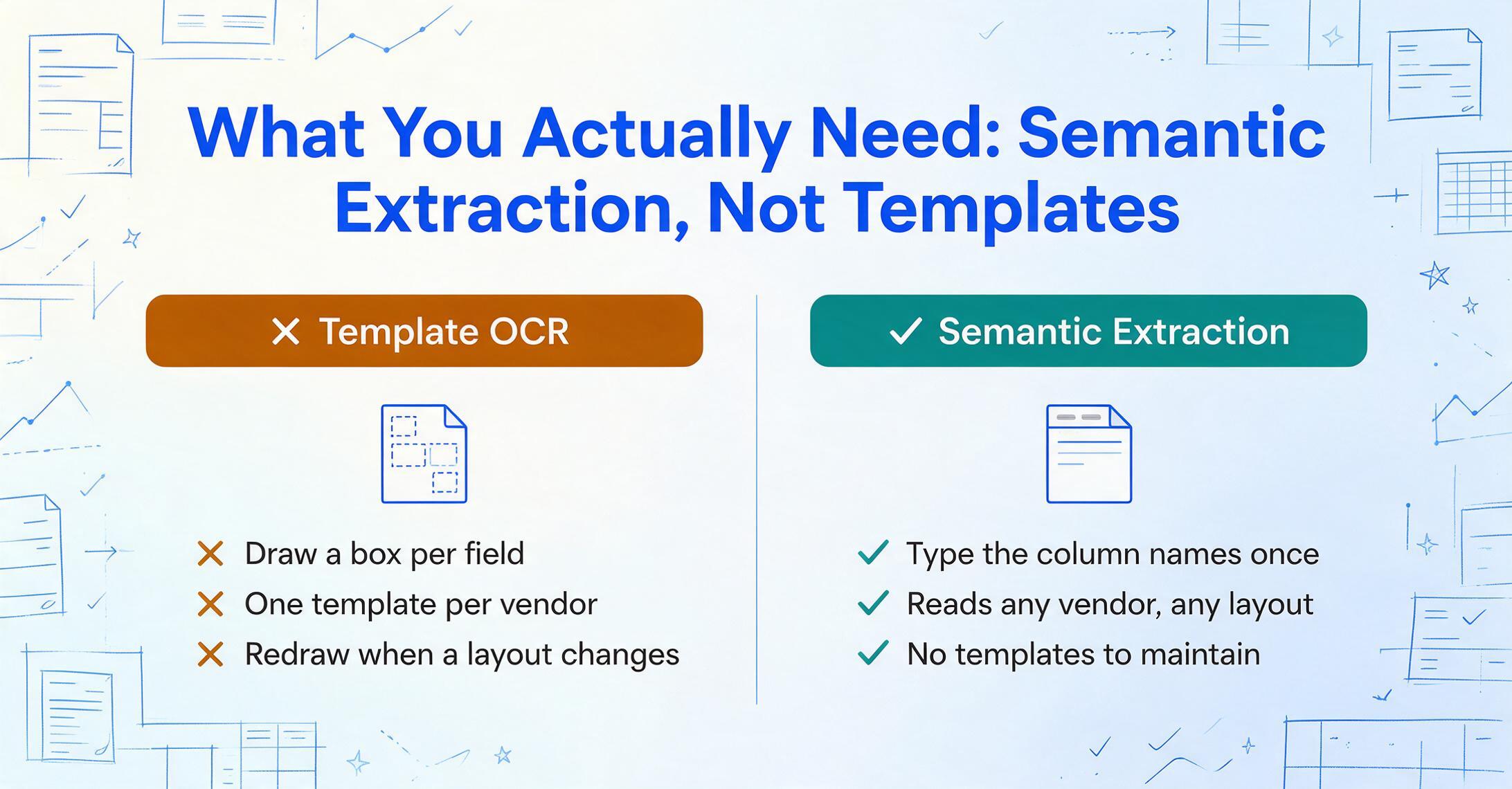
What makes this possible is a shift in extraction technology. Traditional template-based OCR tools require you to define zones on the page for each field — draw a box around "Invoice Number" on vendor A's layout, draw another box on vendor B's layout, maintain a library of templates, and remake them when layouts change. This setup cost was always why extraction automation was bundled into ERP-class solutions.
Semantic extraction eliminates templates entirely. You type the column names you want — "Invoice Number," "Vendor Name," "Total Amount," "Due Date" — and the AI locates those values on any invoice by understanding what they mean, not where they sit. This is Custom Column Extraction: you define the output, and the AI figures out the input. The same column names work whether the invoice comes from a Fortune 500 supplier or a freelancer with a hand-typed PDF.
For a pricing comparison, see affordable invoice extraction tools for small businesses.
The No-ERP Invoice Extraction Workflow
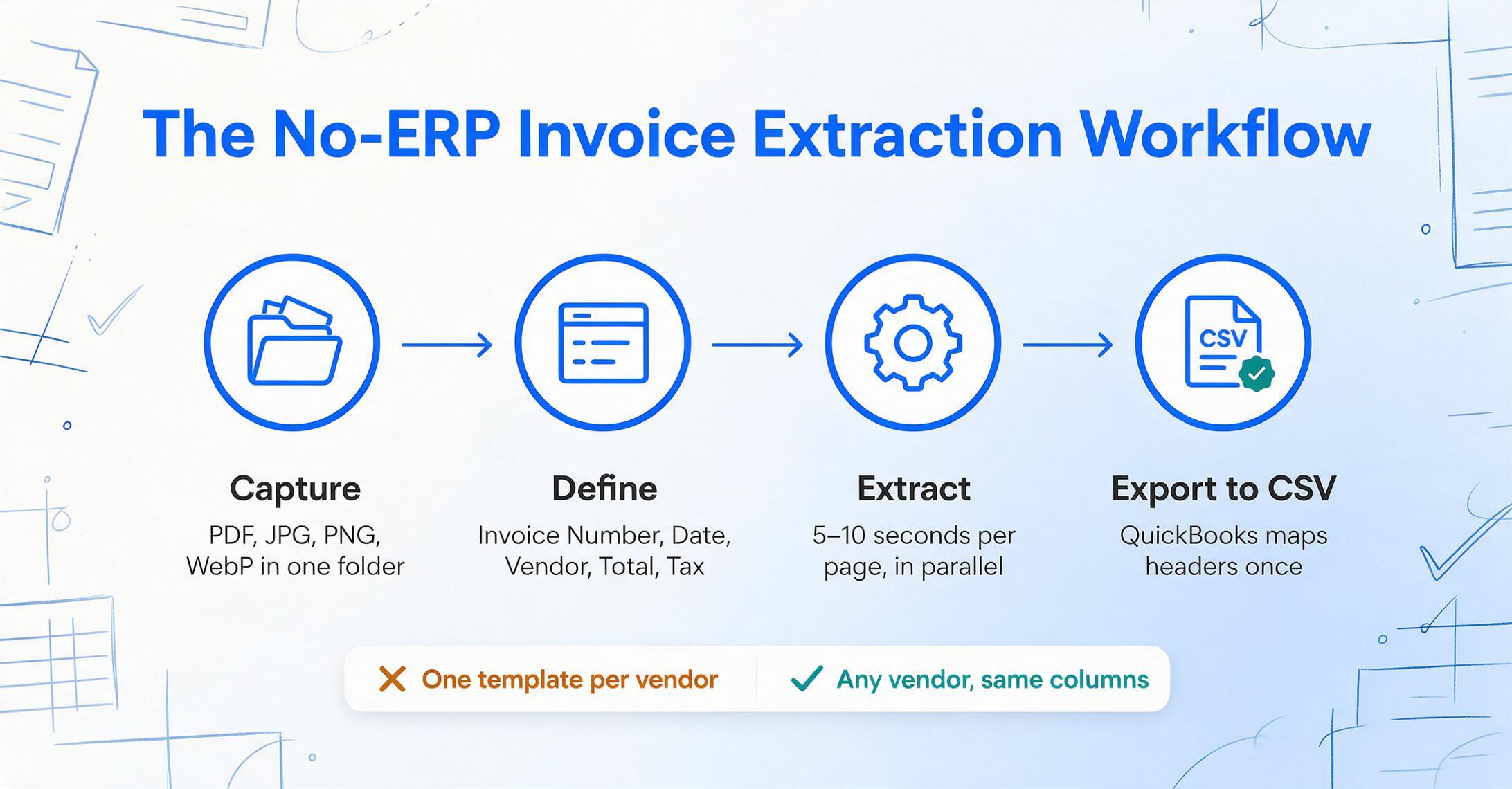
Here is how a complete invoice extraction workflow looks without an ERP. These four steps replace what would otherwise require manual data entry across dozens or hundreds of invoices:
Vendors send invoices through email, paper mail, or phone photos. Collect them all into a single folder — the extraction tool handles PDF, JPG, PNG, and WebP. No need to sort by vendor or format.
Name the data points you want: Invoice Number, Date, Vendor, Total, Tax Amount, Line Items. With Custom Column Extraction, you can also add computed columns — like "Line Total (Qty × Unit Price)" — or inferred columns like "Category" that the AI determines from document content.
Files are processed securely and not stored.
Upload all captured invoices at once. The AI processes them in parallel — each page in 5–10 seconds — and merges results into a single unified table. Because the extraction is semantic, not positional, invoices from different vendors with different layouts produce consistent output in the same columns.
Export as CSV or Excel. QuickBooks Online imports invoices and bills via CSV — map the column headers once, and every subsequent batch follows the same mapping. Xero also accepts CSV imports for sales invoices and purchase bills through its built-in import tool. If you use Excel or Google Sheets, the CSV is ready immediately with no import step.
The total time from "invoice arrives" to "data in QuickBooks" drops from minutes per invoice to seconds per batch. For a complete walkthrough of the batch process, see our step-by-step guide on batch extracting invoice data into Excel.
What You Give Up Without an ERP
Acknowledging what you lose is what makes the no-ERP argument credible, not weaker. Here are the capabilities you do not get when you skip ERP-level infrastructure:
Automated three-way matching. ERPs automatically match each invoice against its corresponding purchase order and goods receipt. Without an ERP, you verify these matches manually — which is feasible at volumes under 200 invoices per month but becomes a bottleneck as volume grows.
Real-time inventory sync. Invoice processing in an ERP automatically updates inventory levels. Without it, inventory adjustments are a separate manual step or handled by your inventory management tool.
Automated approval routing. ERPs route invoices to the right approver based on amount, department, or project code. Small teams often skip formal routing or manage it through email — a workable approach until headcount grows beyond a handful of decision-makers.
Duplicate detection at scale. ERPs flag duplicate invoice numbers before they reach payment. AI extraction tools can catch obvious duplicates (matching invoice number + vendor), but a thorough cross-check still requires human review.
These trade-offs are real, but they are volume-dependent. At 50–100 invoices per month, the workarounds take minutes. The question is not whether ERP features are valuable — they are. The question is whether their value exceeds their cost at your current volume.
For practical strategies on verifying extraction results without an ERP, see our guide on how to verify extraction results in five steps.
When an ERP Actually Makes Sense
There is a threshold at which operating without an ERP becomes more expensive than operating with one. Based on industry benchmarks and practitioner discussions, that threshold tends to emerge when one or more of these conditions are met:
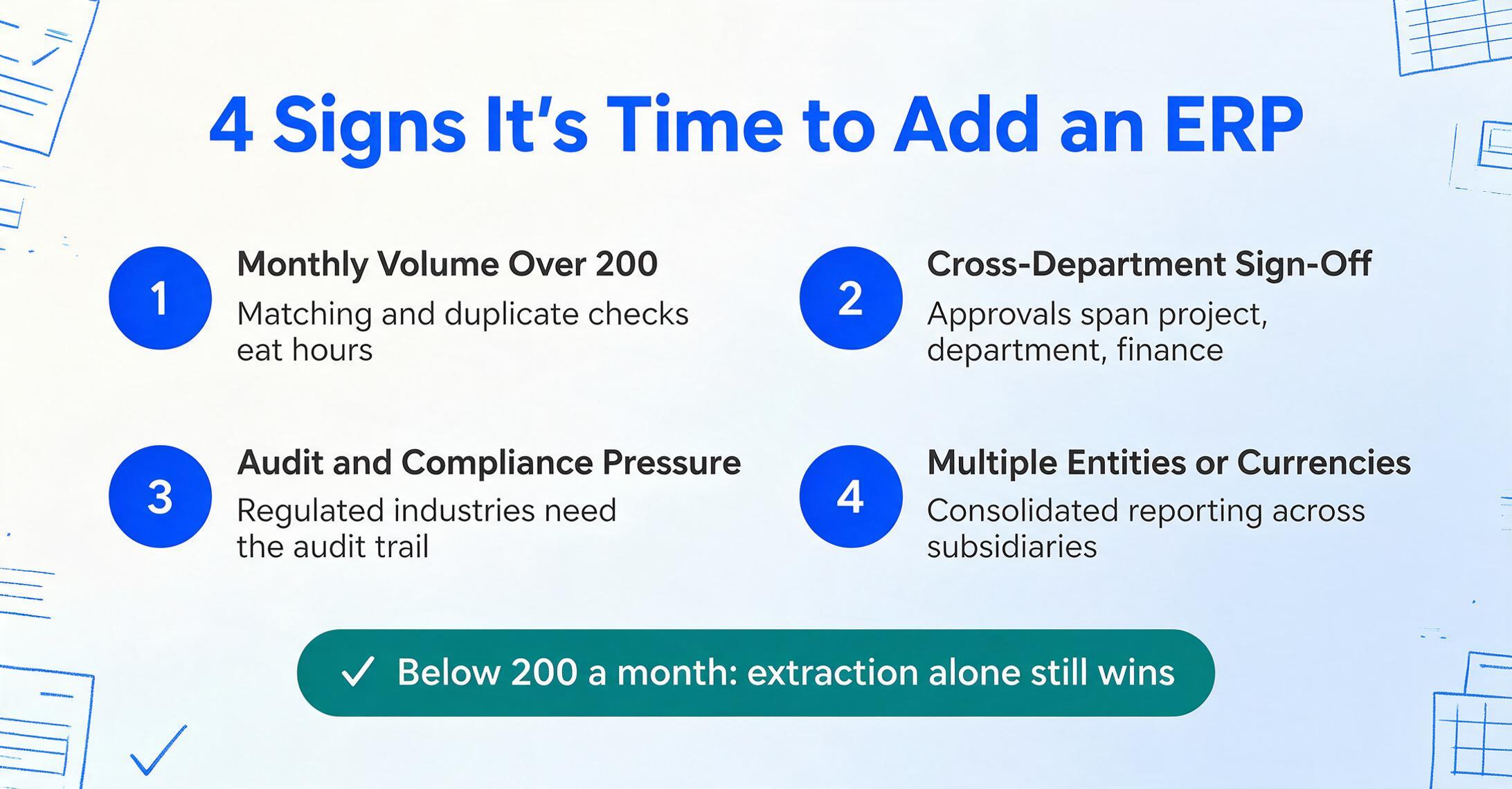
- Monthly invoice volume exceeds 200. Above this point, manual matching, duplicate checking, and approval tracking consume enough time that an ERP's automation features begin to pay for themselves.
- Cross-department approval workflows are required. When invoices need sign-off from project managers, department heads, and finance before payment — and these approvals span separate teams — the routing logic of an ERP saves more time than it costs.
- Compliance or audit requirements are high. Regulated industries (defense, healthcare, government contracting) often require the audit trail and controls that ERP systems provide by design.
- Multiple entities, currencies, or tax regimes. International operations with consolidated reporting across subsidiaries are the native use case for ERP — no workaround replaces it well.
In r/Accounting, a practitioner managing 600 monthly invoices described the breaking point: "We had to check each freakin invoice with receiving because they billed us for refused goods all the time." At that volume, the ERP question answers itself. But for businesses below that threshold — the majority of small businesses — the no-ERP workflow covers the essential need: getting invoice data into your accounting system accurately, without manual entry.
For teams without IT support evaluating their options, see our comparison of AI invoice extraction tools for finance teams. If your team is closer to that 200-invoice threshold and wants PO matching and tax verification alongside extraction — still without an ERP module — see our accounts payable automation software built as an extraction layer. For the full picture across extraction methods, fields, and industry variants, our invoice extraction walkthrough covers the rest.
FAQ
Can I extract invoice data without any accounting software at all?
Yes. You can extract invoice data directly to a CSV or Excel file without any accounting software. The CSV is a standard format that can be opened in Excel, Google Sheets, or imported into an accounting system later. This is useful if you're a freelancer or sole proprietor who tracks income in a spreadsheet and doesn't use dedicated accounting software.
What's the cheapest way to automate invoice data extraction?
Pay-per-use AI extraction tools that charge by document volume rather than monthly subscription. For 50–100 invoices per month, you can expect to spend $0–30 per month — compared to several hundred dollars for even the cheapest ERP platforms.
Will AI extraction work with my QuickBooks or Xero?
Yes. AI extraction tools output CSV and Excel files, which both QuickBooks Online and Xero import natively. QuickBooks recommends no more than 100 transactions per import. Once your column mapping is set up, each batch follows the same structure with no reconfiguration needed.
Can I extract data from handwritten or scanned invoices without an ERP?
Yes. Modern AI extraction tools can read handwriting and low-quality scans — capabilities that traditional ERP-integrated OCR often struggles with. For specifics on accuracy expectations, see our guide on why OCR fails on handwriting.
How accurate is AI invoice extraction compared to manual entry?
AI extraction achieves up to 99% accuracy on printed invoice data — comparable to experienced data entry clerks (96–99%), but with consistency that humans can't match. AI does not experience fatigue or make transposition errors in long number sequences, and processes each page in 5–10 seconds versus about 3 minutes for manual entry. For a breakdown of common errors, see why extracted numbers end up in wrong fields.
Bottom Line: Start with Extraction, Add Infrastructure When You Need It
The most expensive decision a small business can make about invoice automation is buying an ERP because they think it's a prerequisite. It isn't. The extraction layer — the step that actually saves the typing time — works independently of your financial infrastructure.
A $0–30/month AI extraction tool exporting CSV into QuickBooks covers 80% of what most small businesses need from their AP process. The remaining 20% — three-way matching, automated approvals, real-time inventory sync — can be added by layering in an ERP when your volume genuinely demands it.
If you're processing 50–200 invoices per month and typing data by hand, the no-ERP workflow is the fastest path from where you are to automated extraction. Start with a single batch, define your column names, and see what your process looks like when the data arrives without manual entry.