What Manual P60 Data Entry
Actually Costs UK Payroll Teams
The reason no UK employer has ever put a number on manual P60 processing is that the most visible part of it — the typing — is almost free. A payroll administrator can transcribe the core fields off a P60 in about two minutes. Two minutes feels like nothing, so it never becomes a line item, never enters a budget, never triggers a review. But the typing is only the first of four independent costs that run every May, and the other three — the price of a mistyped figure, the value of the strategic work displaced during the year-end crunch, and the HMRC penalty exposure attached to every inaccurate record — are the ones that actually determine whether manual entry is cheap or ruinous. This is a framework for calculating all four, so you can produce your own number instead of guessing.
Key Takeaways
- Typing a P60's fields costs £105 for 150 employees — and because that number is so small nobody has ever added up what the downstream errors and displaced work actually cost.
- One in four P60s carries a transcription error under real May deadline conditions and a single wrong total-pay figure on a Self Assessment return triggers a 30% penalty on the understated tax under Schedule 24.
- The line you have never measured — fourteen billable hours of advisory work your payroll bureau could not do because May was consumed by transcription — costs three to six times the direct labor of the typing itself.
The Four Costs Hiding Behind One Ritual
Every UK employer must issue a P60 to each employee on the payroll as of 5 April, by 31 May, under Regulation 67 of the Income Tax (PAYE) Regulations 2003. Modern payroll software generates the certificates during the year-end run — that part costs minutes. The cost this framework measures is not generation. It is the downstream work of getting P60 data off the certificate and into the spreadsheets, reports, reconciliations, and tax returns that the payroll software cannot feed: compensation reports, general-ledger reconciliation, audit preparation, self-assessment returns, and the consolidation of P60s employees bring from previous employers.
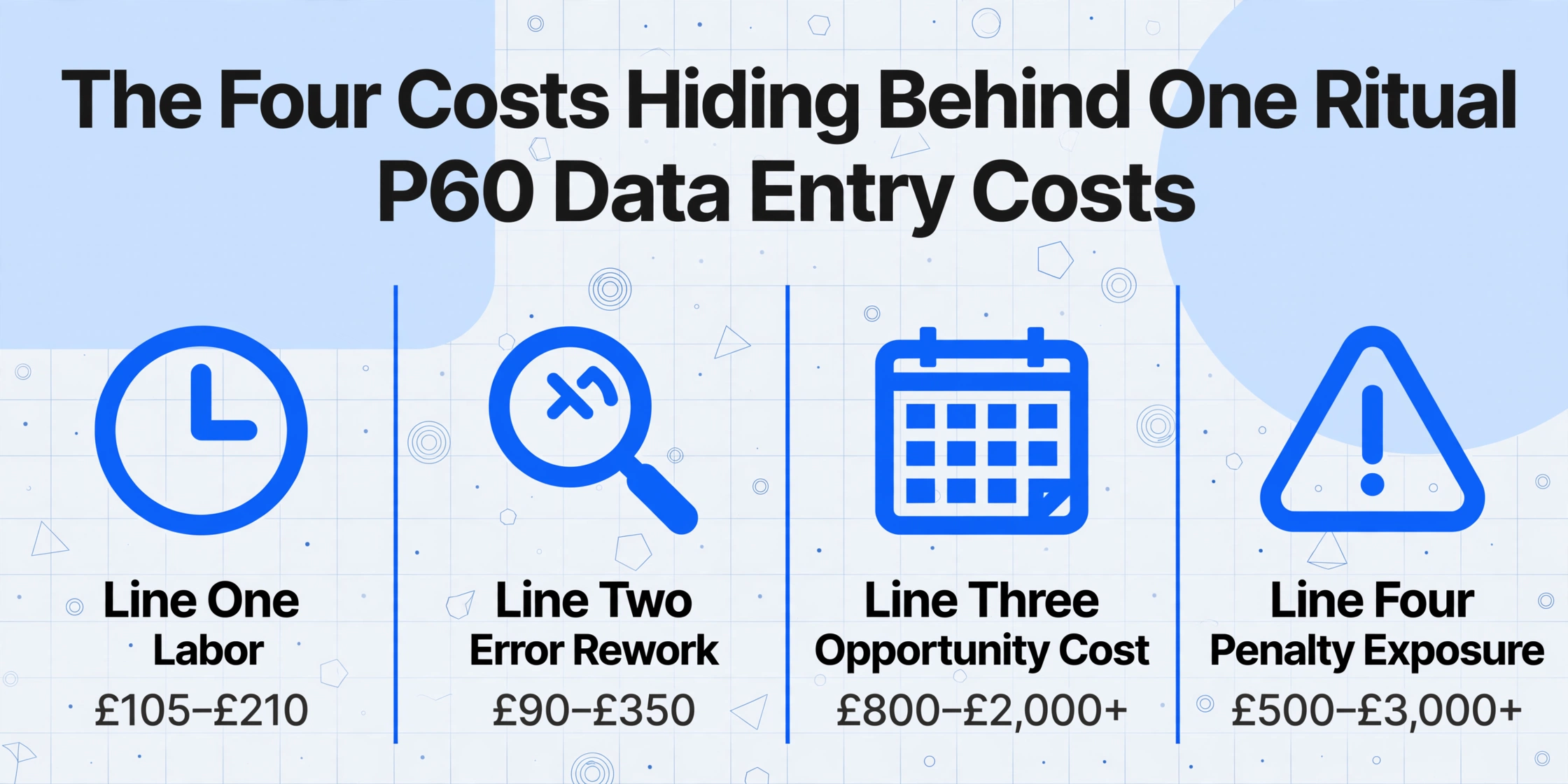
That work carries four costs that behave differently and must be calculated separately:
- Line One — Labor. The minutes a person spends locating each P60, reading the fields, typing them, and verifying the entry, priced at the fully loaded hourly cost of a UK payroll employee — employer National Insurance and pension contributions included.
- Line Two — Error rework. The cost of catching and correcting the mistyped figures that manual entry produces at a known, measurable rate — plus the downstream cost of the ones that escape.
- Line Three — Opportunity cost. The value of the higher-priority work the payroll team is not doing while it types, during a May window already crowded with statutory deadlines.
- Line Four — Penalty exposure. HMRC's penalty structure for late certificates, inaccurate records, and the tax understatements that flow from a wrong figure — prorated by the probability that manual entry triggers them.
Each line exists whether or not you calculate it. The only question is whether you know the number before HMRC does. We will build each line on a single running scenario — a company with 150 employees issuing 150 P60s, and a payroll bureau handling 450 P60s across 30 SME clients — then hand you the formula to substitute your own figures.
Line One — The Labor Cost Hiding Inside a Salaried Role
Labor is the line everyone underestimates, because the per-unit time is genuinely small and the salary is already being paid regardless. To price it honestly, you need two inputs: a loaded hourly rate and a realistic time-per-P60.
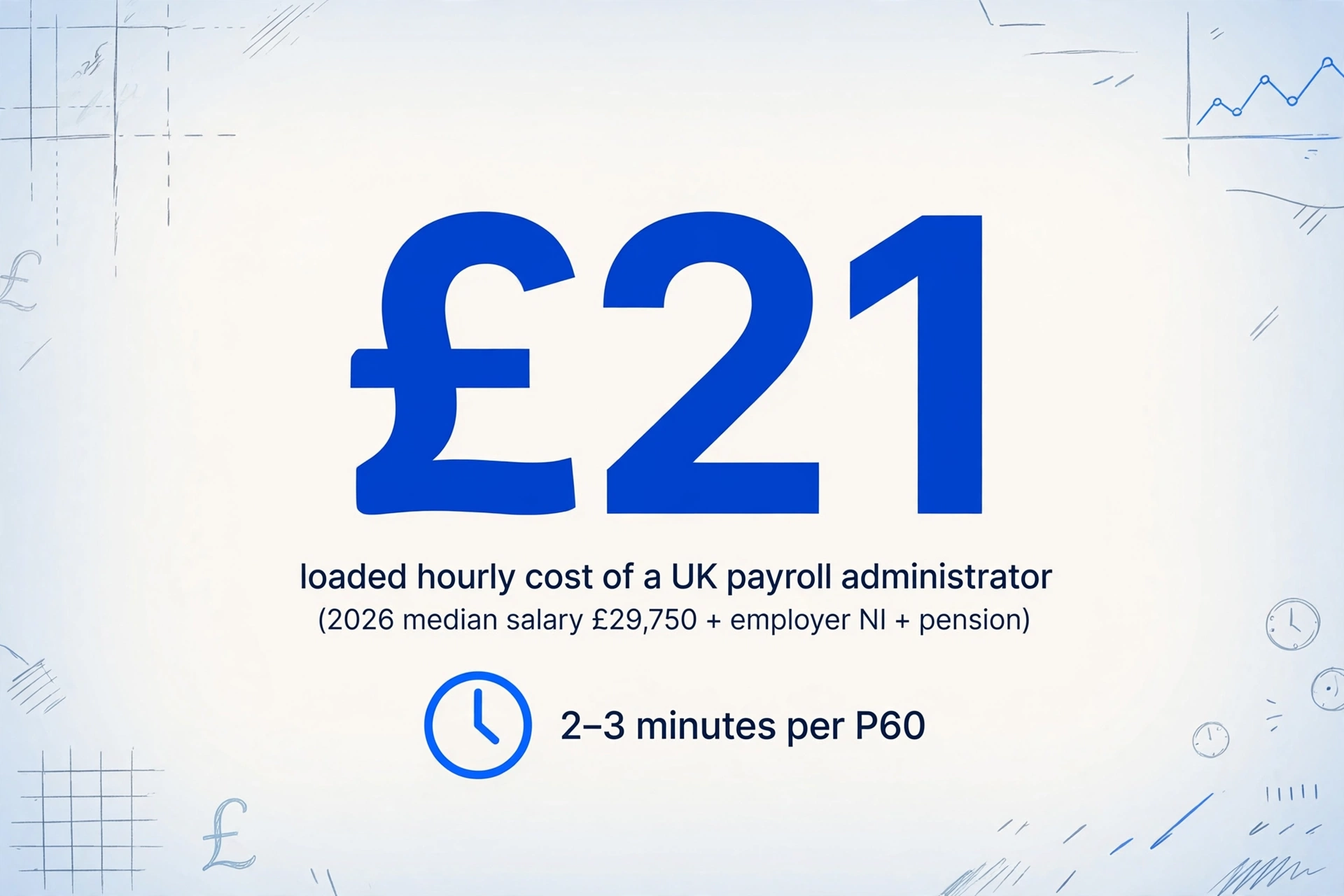
Start with the rate. A UK payroll administrator earned a median of £29,750 gross in 2026, with Robert Half's 2026 salary guide placing the range at £27,000 to £33,000. Gross salary is not the employer's cost, though. Add employer's Class 1 National Insurance at 15% on earnings above the £5,000 secondary threshold — the rate in force since April 2025 and frozen through 2027/28 — which on £29,750 is £3,713. Add auto-enrolment pension contributions at the statutory minimum. The loaded employer cost lands near £34,200. Spread across roughly 1,700 effective working hours a year (37.5 hours a week, less statutory holiday), that is about £21 per hour. An experienced administrator at £33,000 gross pushes the loaded rate past £22.50.
Now the time. Transcribing the seven fields most reports need — employee name, National Insurance number, PAYE reference, total pay for the year, tax deducted, National Insurance contributions, and final tax code — takes about two minutes per P60 once you include finding the certificate, reading each box, typing it, and glancing back to verify. When the report requires cross-referencing figures the P60 does not carry — employer NI sits on the P32, pension contributions on the final payslip — the time per employee rises to three or four minutes because the administrator is now juggling three source documents.
At two minutes per P60 and £21 per hour loaded, a 150-employee company spends five hours — about £105 — on pure transcription each May. A bureau handling 450 P60s spends fifteen hours, about £315. That is the entire Line One cost. It is small enough to disappear into "payroll processing," which is precisely why the other three lines never get measured.
Hold that number in mind. Line One is the floor, and it is deceptively low. The moment a keystroke is wrong, the arithmetic changes — and that is Line Two.
Line Two — What Every Mistyped P60 Field Costs
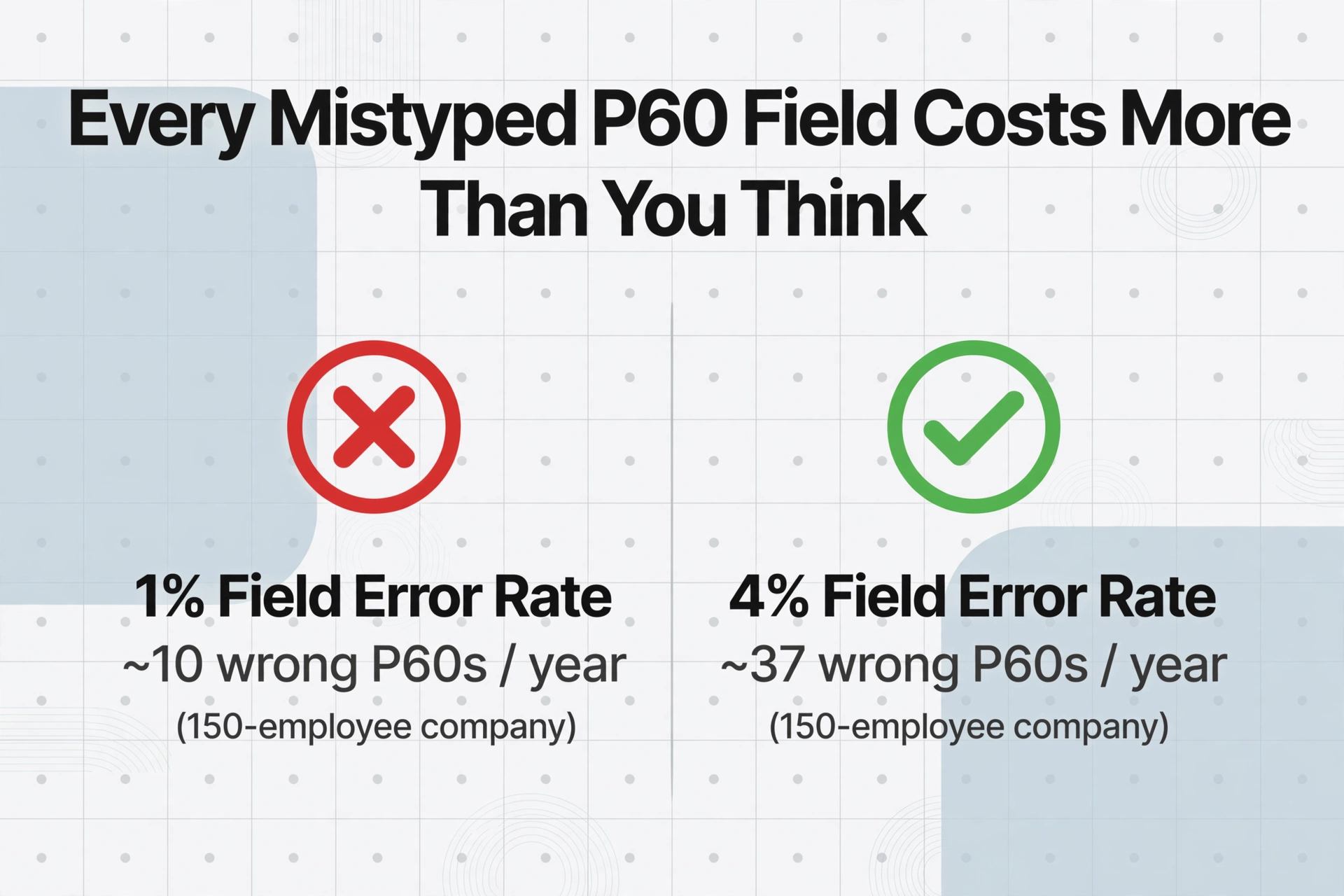
Manual data entry has a measurable error rate. Decades of research across industries put field-level error rates for trained operators at 1% under controlled conditions, rising to 3–4% under the fatigue, time pressure, and mixed document quality that define a real May crunch. In UK payroll terms, best-in-class teams aim for an error rate below 1% of payslips; anything above 2–3% signals a process problem.
The record-level number is what matters for P60s, because an error anywhere on a certificate makes that certificate wrong. Across seven fields, a 1% per-field rate gives a 6.8% chance that a given P60 contains at least one error; at 4%, that chance is 24.9%. For the 150-employee company, a 1% field rate produces roughly ten P60s with at least one mistyped figure each year. For the bureau's 450 P60s, it produces about thirty.
Each caught error costs correction labor: locate the source certificate, identify the wrong digit, re-enter it, and — if the erroneous figure already reached the employee — reissue a duplicate P60. That is typically 20 to 30 minutes per incident. Ten errors at 25 minutes is a little over four hours, about £88 in rework labor for the 150-employee company — before any downstream consequence.
The downstream is where a mistyped P60 stops being cheap. A wrong total-pay figure entered into a client's self-assessment return produces a tax calculation that no longer matches the RTI data the employer already filed with HMRC; the mismatch triggers a compliance check, and the accountant's time to locate the P60, find the transcription error, amend the return, and explain it to the client is entirely unbillable. A wrong figure on a P60 an employee later hands to a mortgage lender surfaces at the worst possible moment, obligating the payroll team to issue a corrected certificate. None of this appears in a budget. It is absorbed as "business as usual" — which is another way of saying nobody has costed it.
The companion analysis of why P60 data still gets typed by hand in UK payroll traces where all this paper comes from — previous employers, multiple jobs, acquisitions on different payroll systems — and why the fragmentation guarantees the manual step persists.
Line Three — The Opportunity Cost of May
Line One prices the hours spent typing. Line Three prices the hours that typing consumes — hours the payroll team could have spent on work that is worth far more than £21.
May is not a quiet month for UK payroll. It sits immediately after the year-end submission sprint — the final Full Payment Submission and Employer Payment Summary, the P32 reconciliation — and immediately before the 6 July deadline for P11D and P11D(b) benefit returns. From 6 April 2026, payrolling of benefits in kind became mandatory for most employers, adding a new compliance workload to the same window. Every hour a payroll professional spends transcribing P60 fields is an hour not spent verifying year-end reconciliation quality, preparing benefit returns, or getting the new payrolling process right — work whose value shows up later as penalties avoided rather than hours logged.
For a payroll bureau the opportunity cost is measurable in the currency the business actually sells: billable time. When the May P60 load consumes the equivalent of two full working days of an administrator's attention — spread across a week of interruptions from clients asking about their P60s, P32s, and P11Ds — that is roughly fourteen hours of capacity diverted from advisory or additional payroll work that bills at £75 to £150 an hour. At even the low end, fourteen displaced hours represent about £1,050 in work the bureau could have done and didn't.
For a bureau, the opportunity cost of manual P60 processing — £1,050 to £2,100 in displaced billable capacity each May — is three to six times the direct labor cost of the typing itself. This is the line that inverts the intuition that manual entry is cheap: the cost is not what you pay the administrator, it is what the administrator cannot do while typing.
In-house teams face the same displacement without a billable rate to price it against. The right proxy is the value of the deferred work: if P60 transcription pushes back the reconciliation review that would have caught a payrolling-of-benefits error before the P11D(b) deadline, the opportunity cost is the penalty that error later attracts — which brings us to the line most employers never price at all.
Line Four — HMRC Penalty Exposure
The penalty structure has three layers, and most cost discussions stop at the first.
Late issuance. Miss the 31 May deadline and HMRC can levy an initial penalty of £300 per P60, plus £60 for every day the certificate remains outstanding. This is the figure everyone cites — and it is the smallest of the three layers, because it is bounded and predictable.
Inaccuracy. This is the layer the £300 headline hides. Under Schedule 24 of the Finance Act 2007, where a document given to HMRC contains an inaccuracy that understates tax, a penalty is payable — and it is a percentage of the potential lost revenue, not a flat fee. A careless inaccuracy — the category a transcription error falls into — carries a penalty of 30% of the potential lost revenue. A deliberate but not concealed inaccuracy is 70%; deliberate and concealed, 100%. Critically, the Schedule specifies that "where a document contains more than one inaccuracy, a penalty is payable for each inaccuracy." A mistyped P60 total-pay figure that flows into an RTI submission or a self-assessment return and understates the tax due by, say, £2,000 exposes the filer to a £600 careless-inaccuracy penalty on top of the £2,000 of back-tax — and late-payment penalties on the unpaid amount start at 1% at 30 days and rise to 5% at six and twelve months.
Records. HMRC requires payroll records to be kept for at least three years from the end of the tax year they relate to, and accepts corrections going back six tax years. Failure to keep adequate records carries a penalty of up to £3,000. A manually-typed spreadsheet with no source-to-cell audit trail is not, in HMRC's terms, a defensible record: when an inspector asks you to prove a figure and the only evidence is a cell someone typed, the penalty is not for getting the number wrong — it is for being unable to prove it was right.
None of these penalties is certain in any given year, which is exactly why they get ignored. The correct way to include them in the model is probabilistically: multiply the exposure by the likelihood that manual entry triggers it. Across a bureau's client base and multiple tax years, a per-year penalty expectation in the low thousands is conservative — and unlike Line One, it does not shrink as you get faster at typing. It shrinks only when the errors stop.
Your Four-Line Number
With the four lines separated, the total cost of manual P60 processing becomes a function of your own situation, not an industry average. Here is the calculation for the 150-employee company, with a single payroll administrator at a £21 loaded hourly rate, error and penalty lines prorated by probability:
| Cost Line | Annual Total (150 employees) | Calculation Basis |
|---|---|---|
| Line One — Labor | £105–£210 | 2–4 min/P60 × £21/hr loaded × 150 P60s |
| Line Two — Error rework | £90–£350 | 1–4% field error → ~10–37 wrong P60s × ~25 min correction, plus downstream amendments |
| Line Three — Opportunity cost | £800–£2,000+ | May hours displaced from year-end reconciliation / P11D / benefit payrolling, valued at strategic or billable rate |
| Line Four — Penalty exposure | £500–£3,000+ | Schedule 24 careless inaccuracy (30% of lost revenue) + records penalty + late-payment, prorated by probability |
| Total — 150 employees | £1,500–£5,500+ | Probability-weighted annual cost of the P60 data step |
The spread is wide on purpose: your number depends on whether you run a stable single-source payroll or a bureau reconciling four different systems, and on whether your error rate sits near 1% or, under May pressure, closer to 4%. To build your own figure, substitute into four expressions:
- Line One = P60 count × minutes per P60 ÷ 60 × your loaded hourly rate
- Line Two = P60 count × your record-level error rate × (correction labor + expected downstream cost)
- Line Three = May hours displaced × the hourly value of the work those hours would otherwise do
- Line Four = penalty exposure × the probability manual entry triggers it, summed across late-issuance, inaccuracy, and records layers
The striking result for most employers is that Line One — the only line anyone ever thinks about — is almost always the smallest. The cost of manual P60 processing lives in the three lines that never appear on an invoice.
Where Extraction Changes the Arithmetic
Every one of the four lines traces back to the same root operation: a person reading a figure off a certificate and typing it into a cell. Remove that operation and all four lines move at once — Line One collapses, Line Two's error rate drops toward the automated floor, Line Three's displaced hours return to higher-value work, and Line Four's exposure falls with the error rate that feeds it. That is what a document-extraction tool does, and it is worth being precise about how, because the mechanism is different from the payroll software you already run.
Payroll software is built to generate P60s from its own database. It cannot read a P60 that originated somewhere else — a previous employer, a different provider, a scanned paper certificate. An extraction tool works the opposite way. Rather than matching fixed positions on a page — the approach template-based tools take, which breaks the moment a different payroll system lays the certificate out differently — semantic extraction reads what each field means. This is Custom Column Extraction: you type the column names you want once — "Total Pay," "Tax Deducted," "NI Contributions," "Tax Code," "PAYE Reference" — and the AI locates each value on every P60 in the batch by understanding the label, whether the certificate came from Sage, Xero, BrightPay, or a handwritten HMRC-ordered template. The columns you defined become the headers of your spreadsheet; the source format does not matter.
The lever that attacks Line Two directly is the computed column — a column whose value the AI calculates during extraction rather than reads off the page. Define a verification column such as "Total Pay minus FPS figure" and the tool flags any row where the extracted total does not match your Full Payment Submission, turning error-hunting from a full re-read into a sort on one column. The step-by-step version of this workflow, from upload to reconciliation-ready sheet, is in our guide to extracting UK P60 data into Excel for payroll reconciliation, and the same extraction logic applied to routine payslips is covered in the pay stub to Excel use case.
Files are processed securely and not stored.
The gathering step has its own cost that this model quietly assumes away — chasing employees and clients for paper copies and prior-year certificates. A Collection Link addresses it: you generate a shareable link, send it to employees or bureau clients, and they upload their P60s directly into your processing queue after entering a short verification code, with no account to create. It removes the "wait for the file to arrive" delay from the workflow, which matters most in a May window measured in days. The pattern is the same one used to collect employee payslips into a spreadsheet.
At roughly ten seconds of processing per document versus two to four minutes of typing, extraction does not shave Line One — it removes it, leaving only a verification glance. And because the AI reads labels rather than relying on keyboard accuracy, the error rate that drives Lines Two and Four falls to the automated floor. The arithmetic that made manual entry look cheap was never wrong about Line One. It was wrong about which line mattered.
FAQ — UK P60 Processing Cost
Can't I just export P60 data from my payroll software instead of paying for extraction?
For the employees your software pays, yes — and you should. Export removes Line One for those P60s entirely. The cost this framework measures is for P60s your software cannot export: certificates from a previous employer, a different payroll provider your bureau client switched away from, prior-year paper copies for an amended return, or a subsidiary still running a separate system after an acquisition. Your payroll software cannot read a P60 it did not generate. That is the gap extraction fills.
What is the penalty for issuing a P60 late?
HMRC can charge an initial penalty of £300 per P60, plus £60 for every day the certificate remains outstanding beyond the 31 May deadline. Whether a penalty is actually applied depends on the reason for the delay and how quickly it is corrected — a genuine, promptly-fixed error is treated more leniently than repeated or systematic late issuance. This is the most predictable of the penalty layers; the inaccuracy penalties under Schedule 24 of the Finance Act 2007 are the larger, less-discussed exposure.
How much does a UK payroll administrator's time actually cost per hour?
Around £21 per hour fully loaded, based on a 2026 median gross salary of £29,750, employer's National Insurance at 15% on earnings above the £5,000 secondary threshold, statutory pension contributions, and roughly 1,700 effective working hours a year. An experienced administrator at the top of the £27,000–£33,000 range costs closer to £22.50 loaded. Use your own salary figure and the same on-cost method to price Line One precisely.
Is manual data entry error rate really high enough to worry about for P60s?
At the field level, trained operators average about 1% under good conditions and 3–4% under time pressure. That sounds small until you convert it to the record level: across the seven fields a typical P60 report needs, a 1% field rate means roughly one in fifteen certificates carries an error, and a 4% rate means one in four. For 150 P60s that is ten to thirty-seven wrong certificates a year — each one a potential correction, duplicate reissue, or, if it reaches a tax return, a Schedule 24 inaccuracy penalty.
Does a P60 contain everything I need for a year-end compensation report?
No — and this is why the labor line is higher than it looks. A P60 shows total pay, total tax deducted, National Insurance contributions, and the final tax code. Employer NI sits on the P32; pension contributions sit on the final payslip. A full compensation or reconciliation report requires cross-referencing all three documents per employee, which is why realistic time-per-P60 rises from two minutes to three or four when the report is anything more than a straight copy of the certificate.
Can AI handle P60s from different payroll systems without configuration?
The P60 follows an HMRC-prescribed layout, so it is more standardised than most documents — the variation is cosmetic (fonts, field positions, logos) rather than structural. Semantic extraction reads the field labels, so it treats "Total Pay for the Year" on a Sage certificate and "Pay for the Year" on a BrightPay one as the same data point, with no per-provider setup. The honest limit: heavily degraded photocopies, handwritten amendments, and non-standard paper templates reduce accuracy, so the realistic gain is eliminating the bulk of the typing and its error rate, not every edge case. That is still enough to collapse three of the four cost lines.
The cost of manual P60 processing was never the two minutes of typing. It is the mistyped figures, the strategic hours lost in May, and the HMRC exposure that all trace back to the same keystroke. Calculate your own four-line number — then see whether extraction changes it.
Extract Your P60 Data