Convert Volksbank Raiffeisenbank
Statements to Excel
A Volksbank Raiffeisenbank Kontoauszug is not just another bank statement. It comes from one of roughly 800 locally independent cooperative banks (Genossenschaftsbanken) that share a common technical format, and it can combine checking account transactions, securities account positions, and member account dividend payments in a single PDF document — something no generic PDF-to-Excel converter expects. A template-based extraction tool trained on the standard four-column bank layout will break the moment it encounters Depotkonto entries mixed into the Auszugskonto transaction list, or a Mitgliederkonto dividend line that has no corresponding Verwendungszweck. This article shows how to convert any VR-Bank statement into a structured Excel spreadsheet — handling the multi-account format, the GENO BIC identifiers, and German accounting software integration in one workflow.
Key Takeaways
- 800 independent VR-Banken share a unified Kontoauszug format — but that same PDF routinely blends current-account transactions, securities entries, and member dividend lines in a single document.
- Generic PDF-to-Excel tools expect every page to have the same column structure — the moment a Depotkonto section appears, securities fields land in the wrong columns and the entire table silently breaks.
- A semantic extraction tool that reads the document visually rather than by text-line parsing handles all three account types automatically — no template switching, no manual sorting.
What Makes Volksbank Raiffeisenbank Kontoauszüge Different
The Volksbanken and Raiffeisenbanken — collectively the VR-Banken — form Germany's cooperative banking group (Genossenschaftliche FinanzGruppe Volksbanken Raiffeisenbanken). Unlike Deutsche Bank or Commerzbank, which are centrally managed, the VR-Gruppe consists of roughly 800 independent banks, each serving a local region: Volksbank Stuttgart, Volksbank Köln Bonn, Raiffeisenbank Bad Kötzting, and hundreds more. What unifies them is a common technical standard for Kontoauszug PDFs, developed by the DZ BANK and Atruvia (the group's IT service provider). If you understand one VR-Bank statement, you understand them all.
A Kontoauszug (German bank account statement) from a VR-Bank follows a recognizable layout: the "VR-Bank" or "Volksbank" or "Raiffeisenbank" logo in the top-left corner, the account holder's information and IBAN/BIC in the top section, and a transaction table spanning the body. But the VR-Bank format has three structural features that make extraction different from other German banks.
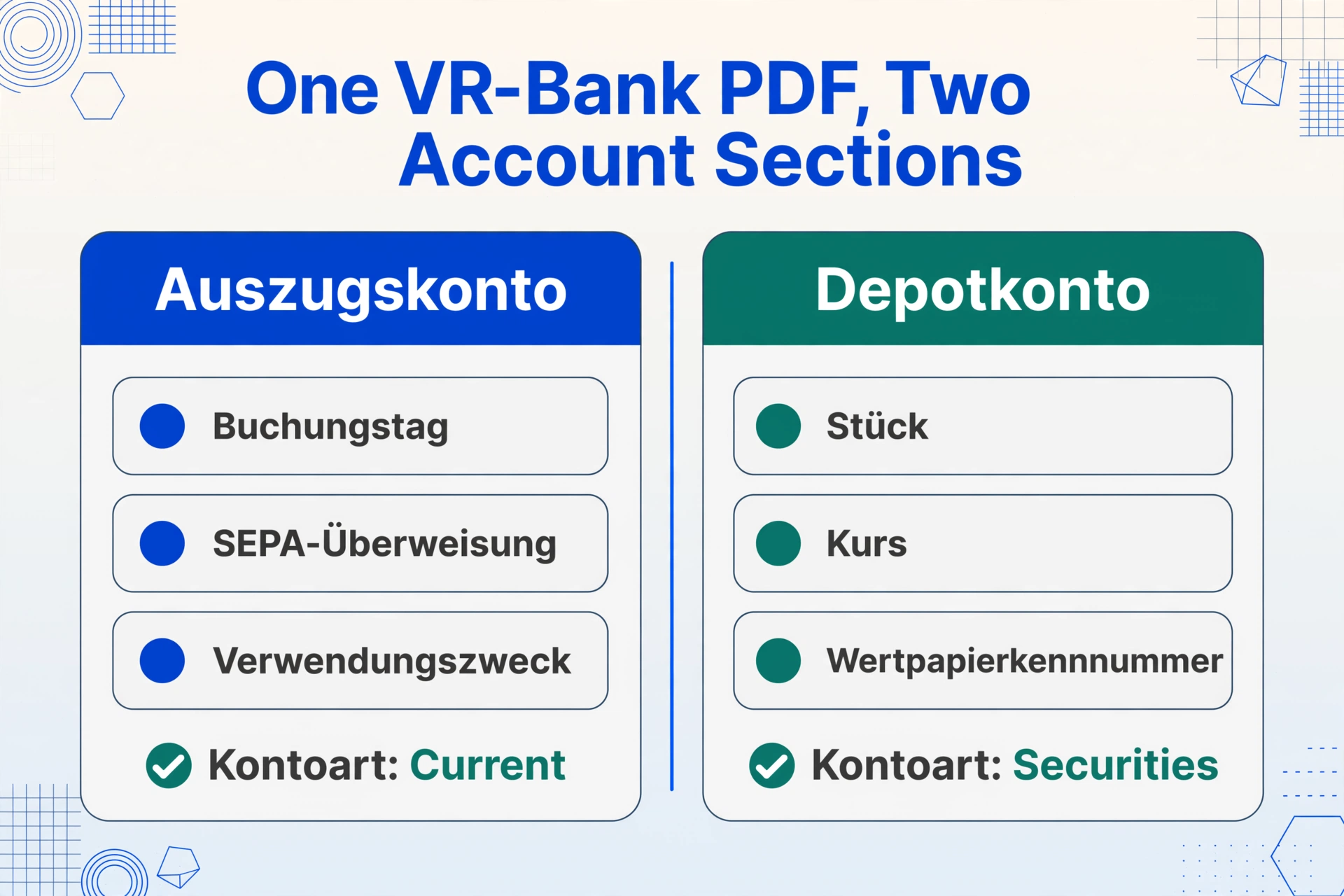
First, the multi-account PDF. A single VR-Bank Kontoauszug frequently combines the Auszugskonto (current account) and the Depotkonto (securities account) in the same PDF document. The first half of the document shows checking transactions — SEPA-Überweisungen, Lastschriften, Daueraufträge — and the second half shows securities-related entries: dividend payments, buy/sell settlements, custody fees. A generic extraction tool that assumes one account per PDF will either mix the two account types into a flat table or drop the securities transactions entirely.
Second, the Mitgliederkonto (member account). Because VR-Banken are cooperatives (Genossenschaften), account holders are also members (Mitglieder) who hold shares in the bank. The Kontoauszug sometimes includes member-specific entries — dividend payouts (Gewinnausschüttung) on Geschäftsguthaben (business share capital), or member bonus payments. These lines use a different layout from standard transactions: no Verwendungszweck field, a non-standard amount format, and a reference to the member's share account number rather than the IBAN. A position-based extraction tool that expects every row to have a Verwendungszweck column will misalign these member rows.
Third, the GENO BIC. Every VR-Bank has a BIC starting with GENO (short for Genossenschaft). A typical VR-Bank BIC looks like GENODEF1XXX — the first four characters identify the institution as a cooperative bank, the next two (DE) indicate the country, and the remaining characters identify the specific bank. This consistent BIC prefix is useful for automated account classification: if you process statements from multiple German banks, the GENO prefix immediately identifies the document as a VR-Bank statement, which may need different column mapping than a Sparkasse or Commerzbank statement.
The Key Fields on a VR-Bank Statement
A VR-Bank Kontoauszug carries all the standard fields you expect from a German bank statement, plus a few unique to the cooperative banking format. Understanding which fields to extract — and how they appear — is the prerequisite for a usable spreadsheet output.
| Field (German) | English | Where It Appears | Why It Matters |
|---|---|---|---|
| Buchungstag | Booking date | First column, DD.MM.YYYY format | Date the bank processed the transaction. Used for chronological sorting. |
| Umsatzart | Transaction type | Short code in the description column | SEPA-Überweisung, SEPA-Lastschrift, Dauerauftrag, Kartenzahlung, Gutschrift, Entgelt. Each maps to a different booking key in German accounting. |
| Verwendungszweck | Purpose / reference | Multi-line block below the transaction type | The payer's structured reference — invoice number, customer ID, period. SEPA codes like SVWZ+, EREF+, MREF+, CRED+ appear here. |
| Umsatz (mit Vorzeichen) | Signed amount | Right-aligned, single amount column | VR-Bank uses a signed-amount format: outgoing debits with a minus sign, incoming credits without. Some VR-Bank statement variants use separate Soll (debit) and Haben (credit) columns instead. |
| Saldo (fortlaufend) | Running balance | Far-right column | Cumulative balance after each transaction. Critical for arithmetic validation. |
| IBAN / BIC | Account identifier | Statement header | The DE-IBAN (22 characters) and GENO-prefixed BIC. Identify the specific Volksbank or Raiffeisenbank. |
| Alter Saldo / Neuer Saldo | Opening / closing balance | Footer section | Opening balance before the period's transactions and closing balance after. The equation Alter Saldo + SUM(Umsätze) = Neuer Saldo validates the entire statement. |
| Depotkonto-Einträge | Securities account entries | Second section of the PDF, after current-account transactions | Dividend payments, security buy/sell settlements, custody fees, and corporate actions. These use a different row structure from current-account transactions. |
| Mitgliederkonto-Posten | Member account items | Lines referencing Geschäftsguthaben (share capital) | Dividend payouts on cooperative shares. These rows lack a standard Verwendungszweck and use a non-standard amount notation. |
The challenge with extracting these fields from a VR-Bank statement is that the document mixes two fundamentally different data structures — current-account transactions and securities/member entries — within the same PDF. A tool that treats every page as a uniform table will either misalign the securities rows or lose them entirely.
Why Generic PDF-to-Excel Tools Struggle with VR-Bank Statements
Generic PDF-to-Excel converters and traditional OCR tools share a common assumption: that every page in a document follows the same column structure. This assumption breaks on a VR-Bank statement in three specific ways.
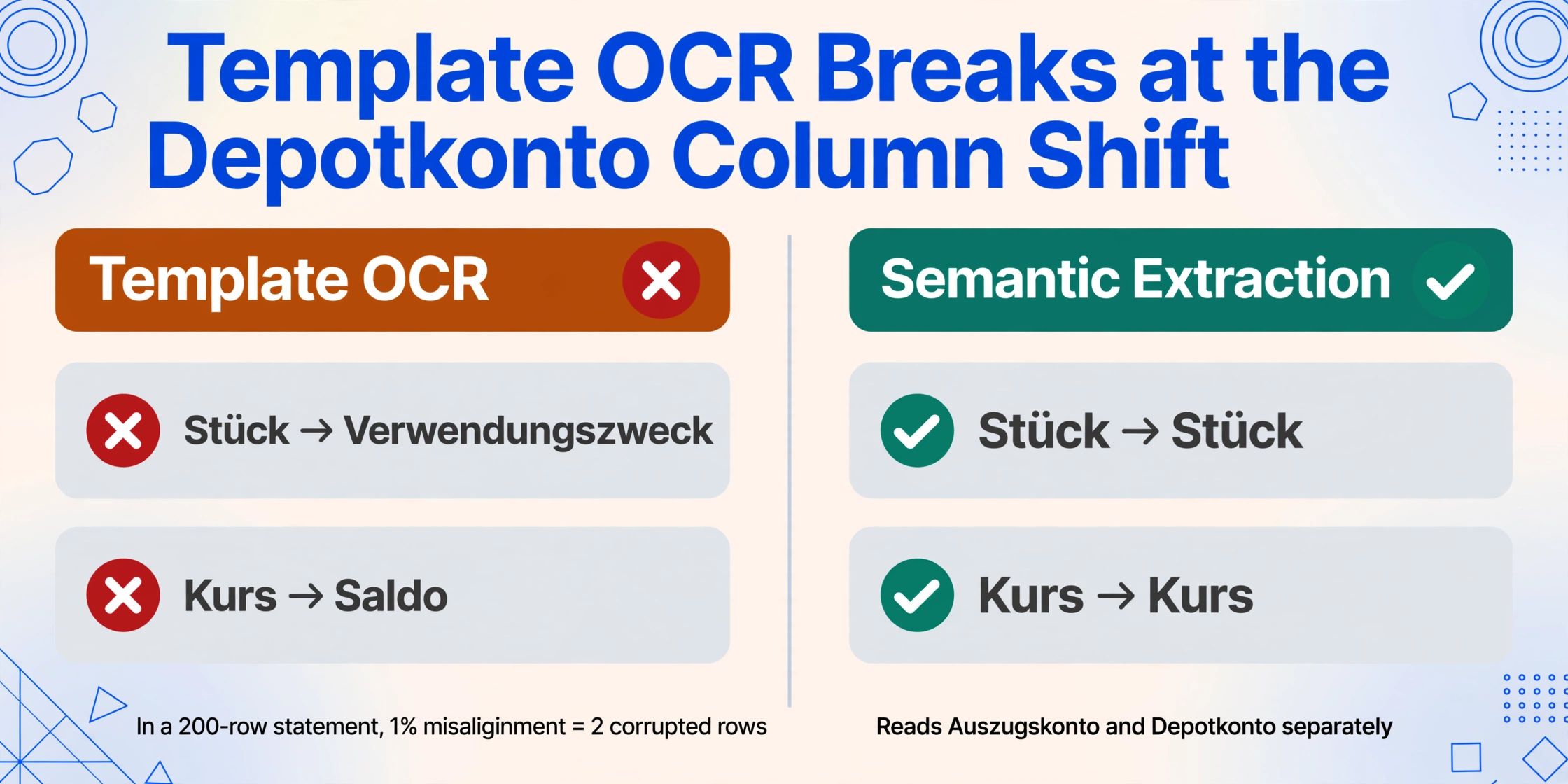
The Depotkonto problem. When the Auszugskonto transactions end and the Depotkonto section begins, the column layout shifts. Securities entries use different field labels — "Stück" (quantity), "Kurs" (price), "Kurswert" (market value), "Wertpapierkennnummer" (security ID) — instead of the standard transaction fields. A template-based OCR tool trained on the first half of the document will map the Depotkonto fields into the wrong Auszugskonto columns, creating nonsensical rows where a dividend payment's share quantity appears in the Verwendungszweck column and the price lands in the Saldo column.
The multi-line Verwendungszweck. VR-Bank statements use a dense multi-line Verwendungszweck block that often spans three to six lines per transaction. Each line carries a SEPA code prefix — SVWZ+ for the actual purpose text, EREF+ for the end-to-end reference, MREF+ for the mandate reference, CRED+ for the creditor identifier. A line-based OCR engine treats each SEPA code line as a separate text row, splitting a single transaction across multiple spreadsheet rows and cascading the alignment error through every subsequent column. In a 200-transaction statement, even a 1% misalignment rate means two corrupted rows that can take 20 minutes to identify and fix manually.
The Mitgliederkonto dividend line. Cooperative member dividend payments use a completely different row format. A typical member dividend line shows a reference like "Gewinnausschüttung Geschäftsguthaben" followed by a Euro amount — no IBAN, no Verwendungszweck, no Umsatzart code. The row may not even have the same number of columns as the standard transaction rows above it. A tool that expects every row to have the same column set will interpret the missing fields as nulls and shift the amount into the wrong column.
A semantic-based extraction tool — one that reads the document visually rather than by text-line parsing — handles all three cases automatically. The AI recognises the transition from the Auszugskonto table to the Depotkonto section, groups multi-line Verwendungszweck blocks into single rows, and maps member dividend lines to the correct output columns by understanding what each field represents.
How to Convert Your VR-Bank Statement in 6 Steps
Here is the practical workflow for turning a Volksbank Raiffeisenbank Kontoauszug PDF into a structured Excel spreadsheet, from download through export. The same steps apply whether your account is at Volksbank Stuttgart, Raiffeisenbank Oberbayern, or any of the other ~800 VR-Bank institutions.
Buchungstag, Umsatzart, Verwendungszweck, Betrag (signed), Saldo, Kontoart (Current/Securities), IBAN, BIC. The Kontoart column tells Custom Column Extraction to tag each row with its source account type — so you can filter the current-account transactions from the securities entries in your export.Kontoart column, you can filter or pivot by account type — keep the Auszugskonto transactions for reconciliation and the Depotkonto entries for your Steuerberater's investment accounting.Files are processed securely and not stored. Try it with your own VR-Bank Kontoauszug.
VR-NetWorld vs. Online-Banking: Two PDF Sources
VR-Bank customers can access their Kontoauszüge through two channels, and the extraction workflow differs slightly depending on which one you use. Understanding the difference avoids a common frustration: downloading a file that looks right but contains embedded formatting that breaks the extraction.
VR-NetWorld Software is a desktop banking application developed by Atruvia (formerly Fiducia & GAD IT AG), the IT service provider for the Genossenschaftliche FinanzGruppe. It connects to your bank via the FinTS/HBCI standard and downloads Kontoauszüge directly to your computer. The exported PDFs from VR-NetWorld are typically well-formed — the software generates them using the bank's own PDF template, and the text layer is clean and machine-readable. However, some VR-NetWorld versions export Kontoauszüge in the proprietary DTA/VT format for business customers, which is not a standard PDF structure and will not be readable by generic extraction tools. If you use VR-NetWorld for business banking, ensure you export as PDF, not DTA.
Online-Banking (browser-based) is the web portal accessed through your VR-Bank's website. The PDFs generated by the online-banking system use the same underlying format as VR-NetWorld but may carry additional security features, such as a qualified electronic signature (qualifizierte elektronische Signatur) that the Finanzamt recognises as equivalent to a paper statement. Some VR-Banken issue password-protected PDFs through the online portal — the password is often your Kontonummer or a PIN you set during registration. ImageToTable.ai supports these encrypted PDFs: you enter the password before processing, and the AI decrypts the file in memory without storing the password.
The VR Banking App (mobile) also offers PDF download. The mobile-generated PDFs are visually identical to the online-banking versions but may have lower image resolution if the app compresses them for transmission. For best extraction results, use the online-banking portal or VR-NetWorld rather than the mobile app.
The important thing is that the extraction tool does not care which channel the PDF came from — the AI reads the document layout the same way regardless of origin. As long as the PDF contains visible transaction data (not the DTA/VT proprietary format), the extraction workflow is identical.
Preparing VR-Bank Data for German Accounting Software
A structured Excel file with all your VR-Bank transactions is useful on its own. A file formatted for your German accounting software is where the time savings compound. The three most common destinations for VR-Bank statement data are DATEV, Lexware, and sevDesk — and each has specific format requirements that determine whether the import succeeds on the first try or gets rejected.
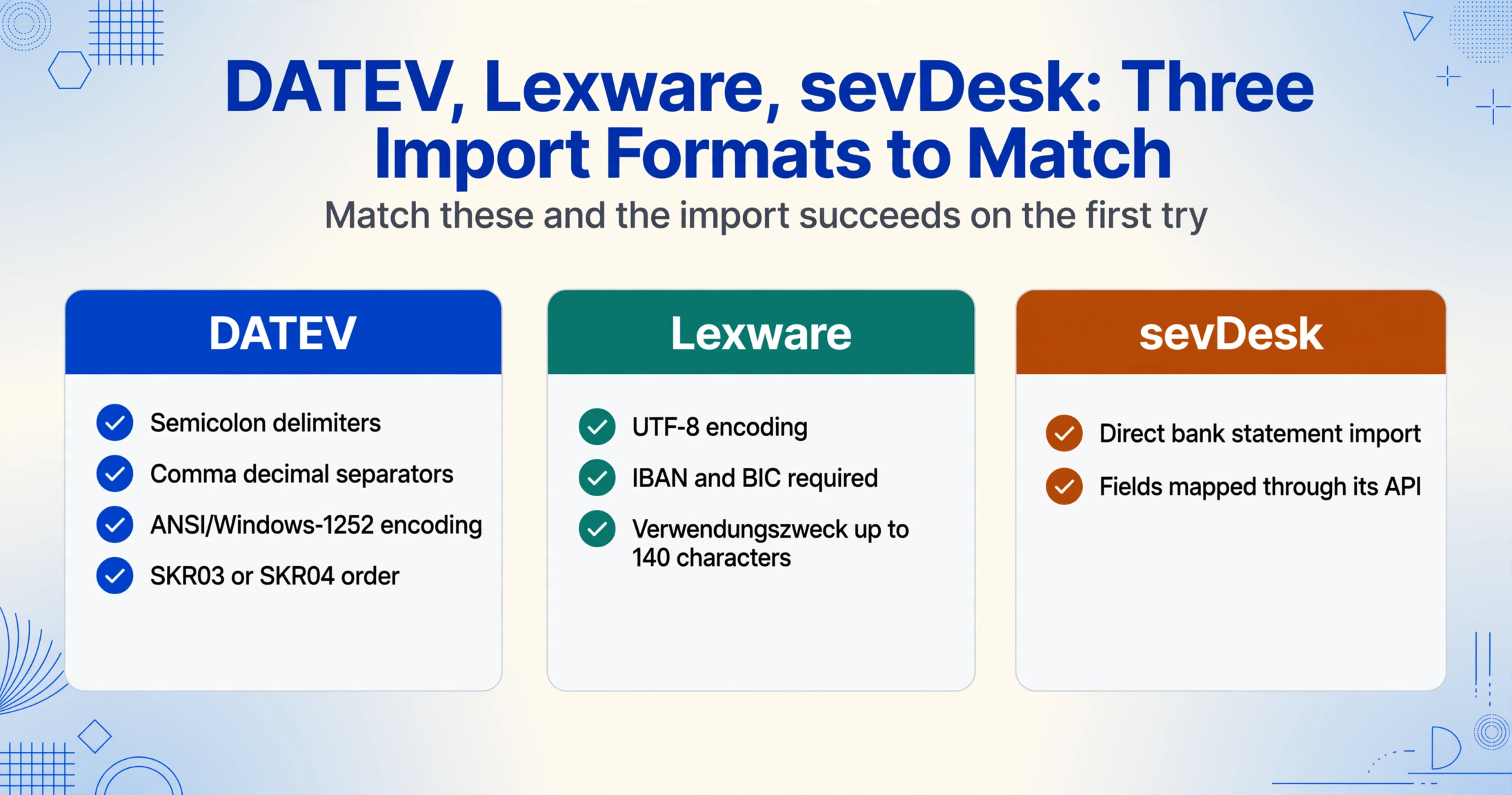
DATEV is the dominant system used by German tax advisors (Steuerberater). It expects CSV files with semicolons as delimiters (not commas), commas as decimal separators, ANSI/Windows-1252 character encoding, and a specific column order that maps to the SKR03 or SKR04 standard account frameworks. The transaction-type field — SEPA-Überweisung, SEPA-Lastschrift, Dauerauftrag — should be mapped to the appropriate DATEV BU-Schlüssel (booking key). For a VR-Bank statement, the Verwendungszweck field often contains the invoice number or customer reference that the Steuerberater uses for open-item matching (offene Posten-Verwaltung). If this field is missing or truncated, every unmatched transaction requires manual lookup.
Lexware buchhalter and the cloud-based Lexware Office accept CSV imports with UTF-8 encoding and comma delimiters, and they require the IBAN and BIC to be present in the transaction data. The Verwendungszweck can be up to 140 characters, which is usually sufficient for VR-Bank statements.
sevDesk supports direct bank statement import through its API and can map the extracted fields automatically if the CSV uses standard column names. If you process a batch of VR-Bank statements — for example, 12 monthly statements for a single account — the tool merges all transactions into one output table, and you import once rather than 12 times.
For a detailed walkthrough of batch-processing multiple German bank statements, see our guide to batch-processing German bank statements for Buchhaltung.
GoBD Compliance for VR-Bank Statement Extraction
Germany's GoBD regulations (Grundsätze zur ordnungsmäßigen Führung und Aufbewahrung von Büchern, Aufzeichnungen und Unterlagen in elektronischer Form) — established by the Bundesministerium der Finanzen and codified in §146 and §147 of the Abgabenordnung (AO) — require that all tax-relevant documents, including Kontoauszüge, be retained for 10 years in an unalterable, machine-readable format. For VR-Bank statements specifically, three compliance points matter.
The extracted Excel file is a working copy, not an archival substitute. The original PDF Kontoauszug — whether downloaded from VR-NetWorld or the online-banking portal — must be stored immutably in a GoBD-compliant archive. The extracted spreadsheet is the operational tool for reconciliation, expense tracking, and accounting software import, but it does not replace the original.
Completeness is a compliance requirement. If the extraction pipeline drops a Depotkonto entry or misaligns a Mitgliederkonto dividend row, the resulting spreadsheet fails the GoBD requirement for Vollständigkeit (completeness). This is why semantic extraction that correctly handles the multi-account PDF format matters for compliance — not just for convenience. Over a 12-month audit period, a single missing securities transaction per month becomes twelve missing entries that a Betriebsprüfer (tax auditor) could question under §162 AO, potentially leading to Hinzuschätzung (addition of estimated income).
Traceability must be maintained. During a tax audit (Betriebsprüfung), the auditor may ask how a specific value in your accounting system was derived. If you use the Bbox verification feature — which links each extracted cell to its position on the original document — you can trace any transaction from the Excel cell back to its location on the original Kontoauszug in under a minute. For more on bank statement extraction methods, see the complete guide to bank statement data extraction.
Frequently Asked Questions
Do all Volksbanken and Raiffeisenbanken use the same Kontoauszug format?
Yes. Despite being roughly 800 legally independent banks, the VR-Gruppe uses a unified technical standard for Kontoauszug PDFs. The layout — header structure, field labels, transaction table format — is consistent across all institutions. This means a statement from Volksbank Stuttgart extracts the same way as one from Raiffeisenbank Bad Kötzting. Austrian Raiffeisenbanken (Raiffeisenlandesbanken) use a different format under the George platform and are not part of this standard.
How does the tool handle Depotkonto entries mixed with Auszugskonto transactions?
Semantic extraction reads each section of the PDF independently. The AI recognises when the document transitions from the current-account table to the securities-account section and adjusts the column mapping automatically. If you define a Kontoart column in your output, each row is tagged with either "Current" or "Securities" so you can filter or analyse them separately.
My VR-NetWorld export is in DTA/VT format. Does the tool support that?
DTA/VT is a proprietary German banking format for electronic account statements, not a standard PDF. The tool requires a PDF, JPEG, or PNG input. In VR-NetWorld, choose "Export as PDF" instead of "DTA" when downloading Kontoauszüge. If your workflow already uses DTA/VT, you may need to print-to-PDF from within VR-NetWorld to convert the format.
Are Mitgliederkonto dividend payments extracted correctly?
Yes, but you may need to define a separate column for the member account data. Standard current-account columns will capture the dividend amount, but the reference may not have the same SEPA structure as regular transactions. Adding a Mitgliederkonto-Referenz column helps separate these entries from standard transactions in your output.
Can the tool handle multi-page VR-Bank statements that combine current and securities accounts?
Yes. The tool processes PDFs of any page count. It tracks the running balance across page boundaries and identifies the transition between account types regardless of which page it occurs on. A 20-page statement that mixes 10 pages of Auszugskonto transactions with 10 pages of Depotkonto entries is processed in a single upload.
What if my VR-Bank statement PDF is password-protected?
Some VR-Banken issue password-protected Kontoauszüge through the online-banking portal, where the password is typically your Kontonummer or a PIN you set during registration. The tool supports encrypted PDFs — you enter the password before processing, and the file is decrypted in memory. The password is not stored. For recurring monthly statements that use the same PIN, you can save the password in your account settings for automatic decryption.
Can I export directly in DATEV format?
The tool exports standard CSV and Excel. For DATEV compatibility — semicolons as delimiters, ANSI/Windows-1252 encoding, and German decimal notation — you can post-process the exported CSV, or hand the clean structured data to your Steuerberater who will handle the format conversion in their DATEV import workflow.