Complete Guide to W-2 and 1099
Tax Form Extraction
A mid-sized CPA firm gets 400 W-2s and 600 1099s between mid-January and March 15 every year. Even at two minutes per form — reading the boxes, verifying the figures against the photocopy, typing them into the return — that adds up to roughly 33 hours of pure transcription work across a single six-week window. Rekeying errors slip into the mix: a transposed EIN here, a misread Box 12 code there. Those errors generate IRS CP2000 notices months later, which the firm has to resolve at no additional billing. The "W-2 and 1099 data entry" problem is not a question of whether the numbers are hard to read. It is a question of whether your process can absorb a predictable, high-volume, deadline-critical data transcription task without breaking.
Key Takeaways
- $5,000 to $13,000 in billable time disappears every tax season — not from complex advisory work, but from 33 hours of staff time spent typing the contents of W-2 and 1099 boxes into tax software.
- A 2% transcription error rate across 1,000 forms generates 20 IRS CP2000 notices — and every notice costs 15 to 30 minutes of unbillable resolution work that nobody tracks on the firm's P&L.
- AI extraction replaces the typist, not the reviewer — the same eyes-on-the-form verification remains, but the keystroke step vanishes, recovering 80% of processing time without lowering your accuracy standard.
What Tax Form Extraction Actually Means
Tax form extraction is the process of reading the labeled boxes on IRS-standardized forms — W-2s and the various 1099 variants — and converting those box-level values into structured data that can be entered into a tax return or imported into tax preparation software. The IRS mandates that every W-2 follows a fixed box-numbering scheme (Box 1: wages, Box 2: federal income tax withheld, and so on through Box 20), and each 1099 variant defines its own set of numbered boxes for specific income types.
This is different from generic document extraction. An invoice might have "Total Due" in different places on every vendor's layout, but a W-2 Box 1 is always wages, and it is always in the same relative position. The challenge is not locating the data — it is reading it accurately across thousands of employer-specific print variations, handling handwritten corrections, and doing it fast enough to matter during tax season. Modern AI document extraction addresses this by using vision models that understand IRS box semantics rather than relying on fixed template zones.
The difference between extraction and data entry: Data entry means a human reads each box and types the value into a field. Extraction means the system reads the form, identifies each box by its semantic meaning (not its pixel coordinates), and outputs the value as structured data — which a human then verifies rather than enters from scratch.
Why Manual W-2 and 1099 Data Entry Is So Costly
The cost of manual tax form data entry is not just the hourly wage of the person doing it. The real cost has four components that compound during Q1 tax season.
Volume compression. Employers must furnish W-2s to employees by January 31, and 1099-NECs to contractors by the same date. This means all forms arrive in a four-to-six-week window. A firm that handles 1,000 information returns does not get to spread that work across the year — it all lands between February 1 and March 15. The staffing needed to absorb that peak demand is expensive and hard to scale.
Transcription error costs. An IRS study on information return matching found that mismatches between taxpayer-reported income and information return data are a primary driver of CP2000 notices. Each notice costs the firm time to resolve — often 15 to 30 minutes per notice reviewing the original document, preparing a response, and corresponding with the IRS. A firm with a 2% transcription error rate on 1,000 forms faces 20 CP2000 notices per tax season, costing roughly 5 to 10 hours of unbillable resolution time.
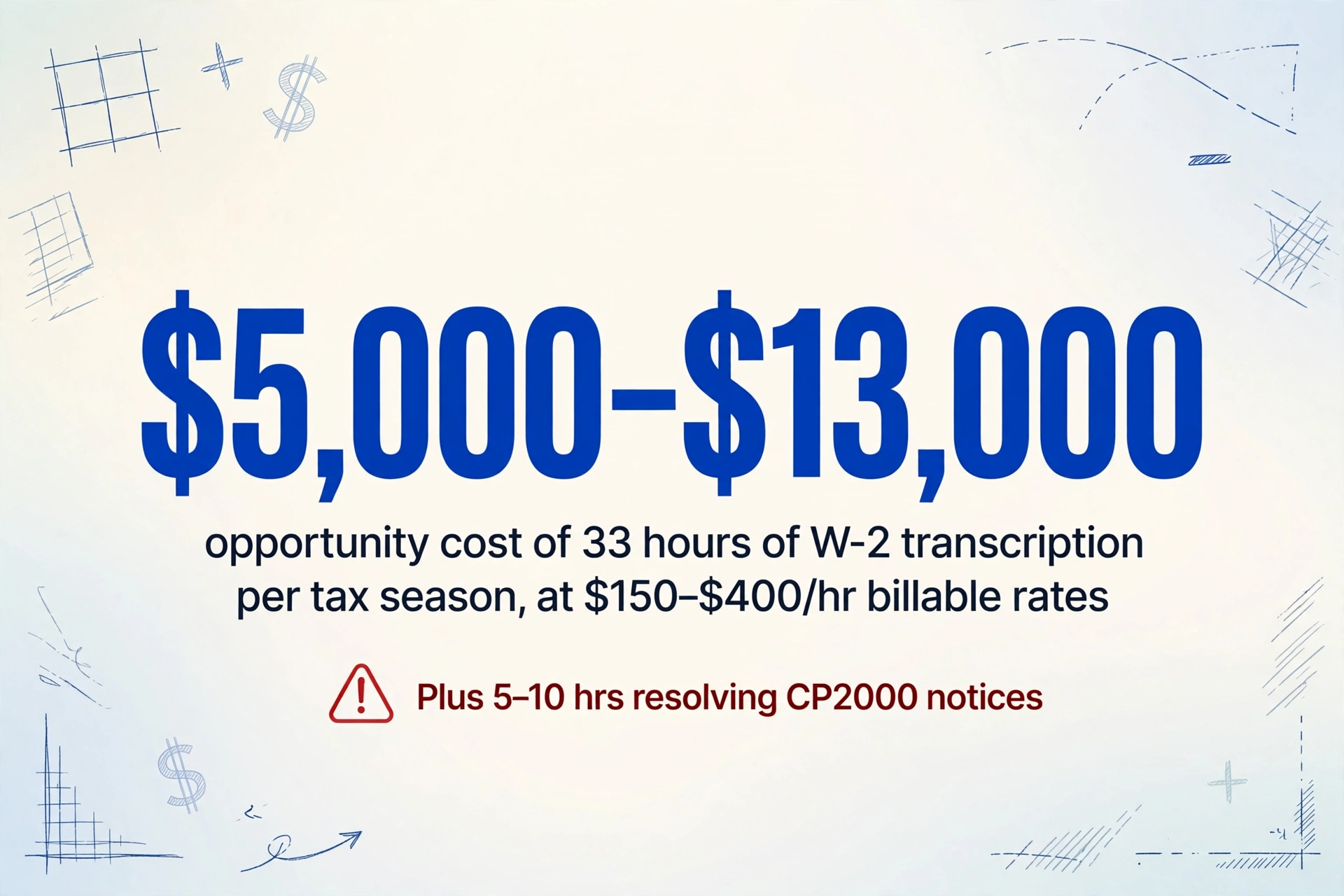
The Q1 deadline premium. Tax season pricing means every hour spent on data entry is an hour not spent on higher-value work: tax planning, complex returns, or client advisory. At typical billable rates of $150–$400 per hour for CPAs and EAs, the opportunity cost of 33 hours of W-2 transcription alone ranges from $5,000 to $13,000 per tax season.
Cross-year reconciliation. Many clients bring multi-year W-2s for amended returns or prior-year filings. Manually re-entering prior-year forms increases error risk because the formats may differ slightly (IRS made layout changes to Box 12 reporting in recent years), and the data must match what the IRS already has on file from the employer's original submission.
The Challenge: Standard Layout, Non-Standard Execution
IRS forms are standardized. W-2s follow IRS Publication 15-T layout specifications. Each 1099 variant has its own prescribed format in the IRS instructions. In theory, this should make extraction straightforward. In practice, four issues create friction.
Employer printing variations. Large employers use dedicated payroll software (ADP, Paychex, QuickBooks) that prints W-2s in the IRS-specified layout — but the font sizes, box border weights, and alignment vary. Some employers print on perforated card stock, others on plain paper with a laser printer. Copy A (the IRS copy) uses red dropout ink that makes certain fields invisible on photocopies. Copy B (employee copy) can be a single sheet or a combined form with state tax information on the back. These variations matter because the visual layout of each form differs — even though the semantic meaning of each box remains consistent.
1099 has five-plus variants. The 1099 family includes at least five commonly encountered forms, each with different box structures:
| Form | Purpose | Key Boxes to Extract |
|---|---|---|
| 1099-NEC | Nonemployee compensation (freelancers, contractors) | Box 1 (Nonemployee comp), Box 4 (Federal tax withheld), Box 5–6 (State/local) |
| 1099-MISC | Miscellaneous income (rents, royalties, prizes, medical) | Box 1 (Rents), Box 2 (Royalties), Box 3 (Other income), Box 4 (Fed tax), Box 6 (Medical), Box 8 (Substitute payments), Box 10 (Crop insurance), Box 14 (Attorney) |
| 1099-INT | Interest income (bank accounts, bonds) | Box 1 (Interest income $10+), Box 2 (Early withdrawal penalty), Box 3 (Tax-exempt interest) |
| 1099-DIV | Dividends and distributions (stocks, mutual funds) | Box 1a (Ordinary dividends), Box 1b (Qualified dividends), Box 2a (Capital gain distributions) |
| 1099-K | Payment card and third-party network transactions | Box 1a (Gross card payments), Box 1b (Gross TPN payments), Box 2 (Merchant category code), Box 5a–5b (State info) |
Processing a mixed batch of 1099s requires the extraction system to first classify each form by its variant type (reading the form title in the upper-left corner), then apply the correct box mapping. A system that treats every 1099 as the same template will map Box 3 on a 1099-MISC ("Other income") to Box 3 on a 1099-INT ("Tax-exempt interest") — which is the wrong value entirely.
Cross-year cumulative accuracy. W-2 Box 12 uses letter codes (A through HH) to identify specific types of compensation and deductions. Code D is a 401(k) deferral, Code E is a 403(b), Code G is a 457(b), Code C is group-term life insurance over $50,000. These codes carry forward across tax years — a client's prior-year W-2 may have different Box 12 codes than the current year. The extraction system must read these alphanumeric codes precisely, because a misread code (D vs. C) changes the tax treatment of that amount.
SSN and EIN accuracy. A single-digit error in the employee's Social Security Number or the employer's EIN renders the data useless for tax return matching. The IRS cross-references every W-2 against its database; a mismatched SSN will trigger a CP2100 notice, requiring the firm to obtain a corrected W-2 from the employer. Extraction systems must treat SSN/EIN fields as high-confidence checkpoints — values that require explicit human confirmation before being accepted into the return.
Every Critical Field You Need to Extract (Box by Box)
Setting up a tax form extraction workflow starts with knowing which boxes matter for your specific use case. Here is a field-level breakdown for the most common forms.
W-2 Fields (All Employees)
| Box | Field | Why It Matters |
|---|---|---|
| b | Employer EIN | IRS matching; must be exact 9-digit number |
| c | Employer name/address | Return identification; state filing |
| d | Control number | Employer internal reference (optional) |
| e | Employee name | Must match SSN record exactly |
| f | Employee address | Return prepopulation |
| 1 | Wages, tips, other compensation | Lines 1 of Form 1040 |
| 2 | Federal income tax withheld | Lines 25a of Form 1040 |
| 3 | Social Security wages | SSA record matching; Schedule 2 line 11 |
| 4 | Social Security tax withheld | Schedule 2 line 11 |
| 5 | Medicare wages and tips | Additional Medicare tax threshold |
| 6 | Medicare tax withheld | Schedule 2 line 12 |
| 7 | Social Security tips | If non-zero, affects SS wage limit |
| 8 | Allocated tips | Not subject to SS/Medicare but must be reported |
| 10 | Dependent care benefits | Form 2441 |
| 11 | Nonqualified plans | May be taxable income |
| 12a–12d | Codes (D=401k, E=403b, G=457b, C=life insurance, etc.) | Each code has different tax treatment; critical to get right |
| 13 | Statutory employee / Retirement plan / Third-party sick pay | Checkbox (yes/no); affects filing status |
| 14 | Other | Employer-specific; union dues, educational assistance, etc. |
| 15–20 | State and local: employer state ID, state wages, state tax, local wages, local tax | Multi-state filing; one employee may have multiple state rows |
For most tax returns, the must-extract fields are Boxes 1, 2, 3, 4, 5, 6, 12 (codes and amounts), 15, 16, 17, and the employee/employer identifying information (b, c, e). The remaining boxes matter for specific situations — Box 10 for clients with dependent care FSA, Box 7 and 8 for tipped employees, Box 11 for deferred compensation plans.
1099 Variant Fields (Self-Employed / Investment Income)
1099-NEC: Box 1 (Nonemployee compensation) is the primary field — this is the amount that goes on Schedule C, line 1 or Schedule E. Box 4 shows federal income tax withheld (rare but relevant for backup withholding). State and local fields (Boxes 5–7) matter for multi-state contractors.
1099-MISC: This form is more complex because it covers many income types. Box 1 (Rents) goes on Schedule E. Box 2 (Royalties) goes on Schedule E or C. Box 3 (Other income) goes on Form 1040 Schedule 1. Box 4 (Federal tax withheld) and Box 6 (Medical and health care payments) each map to different parts of the return.
1099-INT and 1099-DIV: These are simpler. 1099-INT Box 1 (Interest income) goes on Schedule B. 1099-DIV Box 1a (Ordinary dividends) and Box 1b (Qualified dividends) also go on Schedule B. The critical distinction for extraction is that consolidated brokerage statements (combined 1099-INT, 1099-DIV, 1099-B, and 1099-MISC on one document) must be split into individual form-type records.
1099-K: Growing in relevance as gig economy and online platforms expand. Box 1a (Gross payment card transactions) and Box 1b (Third-party network transactions) are the key fields. The 2026 threshold for 1099-K reporting is $20,000 and 200 transactions (under the One Big Beautiful Bill), but this may shift again in future years.
How AI Reads W-2 and 1099 Forms (And Where It Stumbles)
AI-powered tax form extraction works differently from traditional OCR. Traditional OCR reads characters in reading order (left to right, top to bottom) and outputs a stream of text. On a W-2, this means it might output "Box 1" as text adjacent to the wage amount, but it does not inherently understand that the number printed next to "Box 1" is the wages figure. The pairing happens afterward through template rules or regex patterns.
Modern vision AI, by contrast, uses semantic understanding: it reads the form as a human would, recognizing that the printed box number and its corresponding value form a labeled data pair. The AI understands that "Box 1" is a field label and the number below it is the field value. This is what allows the system to extract W-2 and 1099 data without pre-built templates — it simply needs to know which box numbers to look for.
Where AI performs well: Clean printed W-2s and 1099s scanned at 200+ DPI. The box labels are clear, the numbers are machine-printed, and the layout is consistent. On these forms, per-box accuracy runs 93–98% for most fields. The IRS-standardized numbering means the AI can be instructed to extract "Box 1" and "Box 2" directly, without needing to know which employer's layout it is looking at.
Where AI stumbles:
- Handwritten corrections. Small employers occasionally cross out a printed value on a W-2 and write the correct figure by hand. AI reads handwriting less accurately than print. A form with handwritten edits requires manual verification of every altered field.
- Multi-state W-2s. An employee who worked in multiple states may have multiple state rows (Boxes 15–20 repeated for each state). The AI must correctly group each state's employer ID, wages, and tax as a single record, not mix State A's wages with State B's tax.
- Consolidated brokerage 1099s. Major brokerages (Fidelity, Schwab, Vanguard) produce consolidated 1099s that combine 1099-INT, 1099-DIV, 1099-B, and 1099-MISC on a multi-page document. The AI must identify where each form type begins and segment the data accordingly.
- Poor scan quality. Forms scanned at 150 DPI or lower, or photographed at an angle with a phone camera, reduce accuracy. The box labels become hard to distinguish from the value text, especially for small boxes like Box 7 (Social Security tips) or the Box 12 code fields.
The verification principle: AI tax form extraction does not eliminate human review — it shifts the reviewer's role from "reading every box and typing it in" to "reading every box and confirming the AI got it right." The time savings come from removing the keystroke step, not from removing the eyes-on-the-form step.
Step-by-Step: Batch-Process W-2s and 1099s in One Workflow
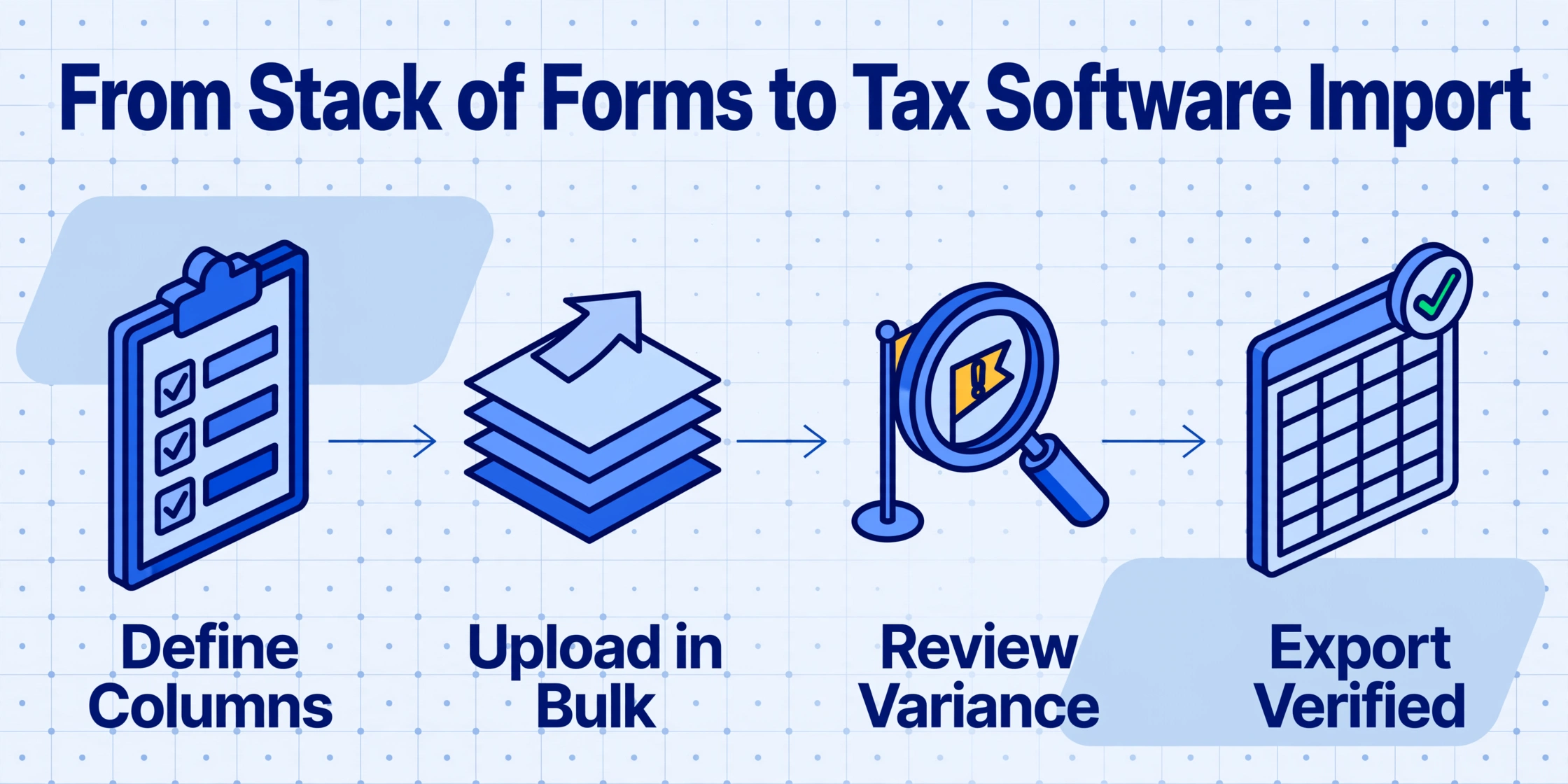
Here is the actual workflow a CPA firm or tax preparer would follow to process a batch of W-2s and 1099s using AI-powered extraction. This assumes use of a tool like ImageToTable.ai's W-2 extraction or 1099-to-Excel converter, but the workflow applies to any semantic extraction system.
Employee Name, SSN, Employer EIN, Employer Name, Box 1 Wages, Box 2 Federal Tax, Box 3 SS Wages, Box 4 SS Tax, Box 5 Medicare Wages, Box 6 Medicare Tax, Box 12 Codes, Box 12 Amounts, State ID, State Wages, State Tax. For 1099-NECs: Recipient Name, Recipient TIN, Payer Name, Payer TIN, Box 1 Nonemployee Comp, Box 4 Fed Tax Withheld. With Custom Column Extraction, you simply type these column names, and the AI locates the corresponding values in each form by semantic understanding — not by position on the page.Exporting to Tax Preparation Software
The final step — getting data into the actual tax return — is where extraction workflows either deliver their full value or break down. Not all tax software handles CSV import the same way, and some require specific formatting. For a deeper walkthrough of tax-software field mapping, PTIN tracking, and firm-level compliance — written for CPA firms and tax preparers — see our W-2 and 1099 extraction guide for accounting firms.
Drake Tax
Drake supports importing W-2 and 1099 data via CSV through its Import Center. The import expects specific column headers matching Drake's field names (e.g., EMPEIN for employer EIN, BOX1 for wages). Export your extraction output with these headers, and Drake will populate the forms automatically for each client. Drake also supports direct copy-paste from spreadsheet cells into its form input screens.
UltraTax CS (Thomson Reuters)
UltraTax CS offers a Data Import utility for CSV files. The import requires the client ID to be included in each row. For W-2s, the system maps to the W-2 screen fields by matching column headers. UltraTax also supports a Microsoft Excel-based import using its proprietary mapping template, which is more flexible but requires setup before tax season begins.
ProSeries (Intuit)
ProSeries supports W-2 and 1099 import via CSV in its Import from Spreadsheet feature. Column headers must match ProSeries field names. Intuit provides a downloadable mapping template (.CSV with the required headers) that you can populate from your extraction output.
Lacerte (Intuit)
Lacerte's import workflow is similar to ProSeries but uses its own Import Spreadsheet Template. Lacerte supports importing multiple clients in one import file by including the client ID column. The extraction output must be organized with one row per client per form type (i.e., one row for W-2, separate rows for each 1099-NEC, 1099-INT, etc.).
ATX and TaxSlayer Pro
Both ATX and TaxSlayer Pro support CSV import with field mapping. ATX uses its ATX Import Manager; TaxSlayer Pro uses ProForm. The import process for both is similar: export your extraction data as a clean CSV, then use the software's import wizard to map each column to the corresponding tax form field.
Key formatting tip regardless of software: Ensure dollar amounts are exported as plain numbers without dollar signs or commas. IRS form data is all numeric; extraneous formatting characters will cause import errors. Also ensure SSNs and EINs are exported as text (not numbers) to preserve leading zeros. Most extraction tools handle this automatically, but it is worth verifying in the export preview.
How to Choose a W-2 and 1099 Extraction Tool
Not every AI extraction tool is suitable for tax form processing. Here are the criteria that matter specifically for W-2 and 1099 extraction.
IRS form awareness. Does the tool understand that a W-2 has numbered boxes with fixed meanings, or does it treat every form as generic "document text"? Tools that understand IRS form structure will extract Box 1 wages more reliably than general-purpose OCR tools that just output text and let you pattern-match afterward.
Multi-variant 1099 handling. If you handle multiple 1099 types, the tool must auto-classify each form before extracting. A tool that cannot distinguish 1099-NEC from 1099-MISC will produce incorrect data. Look for systems that output a "Form Type" column alongside the extracted data.
SSN/EIN verification. The best extraction tools treat SSN and EIN fields as special — they flag these values for manual confirmation or apply additional pattern validation (checksum verification for EINs, format validation for SSNs). If a tool treats every field equally, you will need to verify SSNs manually.
State and local handling. Multi-state W-2s are common in some industries (construction, healthcare staffing, transportation). The tool must handle multiple state rows without data mixing. Check whether the tool can extract multiple state rows and keep each state's wages and tax paired correctly.
Batch and export workflow. The tool should support batch upload (not single-form processing) and export to CSV or Excel in a format that maps to your tax software's import requirements. If you need to click "export" 50 times for 50 W-2s, the tool is not delivering the efficiency gain you need.
For a more detailed look at how pricing and plan structures compare across the extraction market, see our 2026 document extraction pricing breakdown.
Frequently Asked Questions
Does W-2 and 1099 extraction have a seasonal spike in accuracy issues?
Not in terms of the AI's accuracy — the same model performs consistently year-round. The seasonal factor is volume. Firms that process 50 W-2s per month outside tax season suddenly handle 500 per month in January–March. The verification bottleneck is human, not technical. The solution is to build the extraction workflow before tax season starts, so the verification step is already calibrated. Processing a trial batch of 20 forms in December will surface any form-type issues before the January flood arrives.
What accuracy can I expect for W-2 Box 1 (wages)?
On clean, printed W-2s scanned at 200+ DPI, Box 1 accuracy typically runs 95–98%. The most common errors involve misreading the decimal separator (e.g., "35,000.00" read as "35.00000" in European number format) or mistaking a printed smudge for a digit. Handwritten forms drop to 80–85% accuracy. The solution is not to expect 100% AI accuracy — it is to budget 15–30 seconds of verification per form for the high-risk fields.
Can AI extract handwritten W-2 corrections?
Partially. AI reads handwriting less accurately than machine print — expect 70–85% accuracy on handwritten numeric corrections. Small employers sometimes cross out the printed wage amount and write a corrected figure by hand. These forms should be manually verified. Some extraction systems flag fields where the AI detected handwriting, making it easier to spot which forms need extra attention.
How do I handle 1099 variants in a single batch?
The best approach is to process each 1099 variant as a separate batch with variant-specific column definitions. Some extraction tools auto-classify the form type and apply the correct field mapping. If your tool supports "Form Type" as an output column, you can process all 1099s together and sort by type in the export. Always verify that the auto-classification is correct — a 1099-MISC misclassified as 1099-NEC will produce wrong box mappings for every field.
Is it safe to upload tax forms containing SSNs and EINs to an AI extraction tool?
Security depends on the tool's data handling practices. Look for tools that process files in memory without storing them long-term, use HTTPS encryption for uploads, and explicitly state that uploaded documents are not used for model training. As with payslip extraction, the same data sensitivity considerations apply — verified encryption and clear data retention policies are non-negotiable when handling tax documents.
Can extraction handle multi-year W-2s?
Yes — the AI reads whatever year's form it receives. The key is to include a "Tax Year" column in your extraction output so that data from different years stays correctly identified. Prior-year W-2s may have slightly different box layouts (the IRS made minor formatting changes in 2020 and 2023) but the box numbering scheme is consistent across years.
How do I handle consolidated brokerage 1099s?
Consolidated 1099s from Fidelity, Schwab, Vanguard, and other major brokerages combine multiple 1099 types on a single multi-page document. AI extraction tools vary in their ability to segment these. Some tools can identify where each form type begins and extract the relevant boxes; others treat the entire document as a single form. If you receive consolidated 1099s frequently, test your extraction tool on one before committing to batch processing them.
Does extracting 1099 data affect refund calculations?
Extraction itself does not affect calculations — it is a data capture step. The values extracted from the form are the same values that would be entered manually. The risk is if an extraction error (e.g., misreading Box 1 on a 1099-INT) passes through verification and gets imported into the return. This would produce the same incorrect result as a manual data entry error. The mitigation is verification, not extraction accuracy alone.
What is the best approach for freelancers with multiple 1099s?
Freelancers who receive 10+ 1099-NECs (from Upwork, Fiverr, client payments, etc.) benefit from batch extraction because they can process all forms in one upload and get a single spreadsheet. The output can then be used to prepare Schedule C without manually typing each payer's name and EIN alongside the compensation amount. See our guide on extraction tools for freelancers for a comparison of solutions suited to this use case.
How much time does AI extraction really save compared to manual entry?
For a tax professional processing 100 W-2s: manual entry at 2–3 minutes per form takes 200–300 minutes (3.3–5 hours). AI extraction at 5–10 seconds per form plus 15–30 seconds of verification per form takes roughly 35–50 minutes total. That is an 80–85% time reduction, not accounting for the reduced error-related follow-up time. The savings scale with volume — a firm processing 1,000 forms recovers roughly 25–35 hours per tax season.
Related Guides
This article is part of a series on document-specific extraction guides for financial professionals. For other document types with similar data sensitivity and format standardization, see:
- Complete Guide to Payslip Extraction — income verification documents with similar cross-year accuracy requirements
- Complete Guide to Meter Reading Extraction — batch processing of standardized forms with field-level extraction