One Clean Row per Employee
in Your 401(k) Census
A 401(k) census looks like a payroll export with a few extra columns, which is why so many are built that way. Payroll answers what a person was paid in a period. The census answers what the plan needs to know about everyone who was paid during the plan year, including people who never joined the plan. The same employee can be paid correctly all year and still arrive in the census twice, with a hire date that erases eight years of service.
The file goes to the plan's third-party administrator (TPA) or recordkeeper, who uses it for the annual coverage, nondiscrimination, top-heavy and contribution-limit tests, and for the Form 5500 schedules. The columns come from the recipient's current template and from the plan document behind it. Census preparation is a mapping exercise across payroll, HR and tax records, and the failures cluster in predictable places every year.
Key Takeaways
- Paid correctly all year, the same employee can still arrive in the census twice and lose eight years of service to a new hire date.
- A blank birth date becomes 01/01/1980 at the recordkeeper, and missing hours get prorated from the hire date.
- Build the row first and fill it second, then log every unresolved date or deduction as an exception with an owner.
What a 401(k) Census Is, and What It Is Not
A 401(k) census is an employee-level file with one row per person who received compensation during the plan year. It carries the identity, dates, hours, compensation and contribution fields the plan's annual tests need. It must include people who were eligible but never deferred, people who terminated in February, and people in a class the plan excludes.
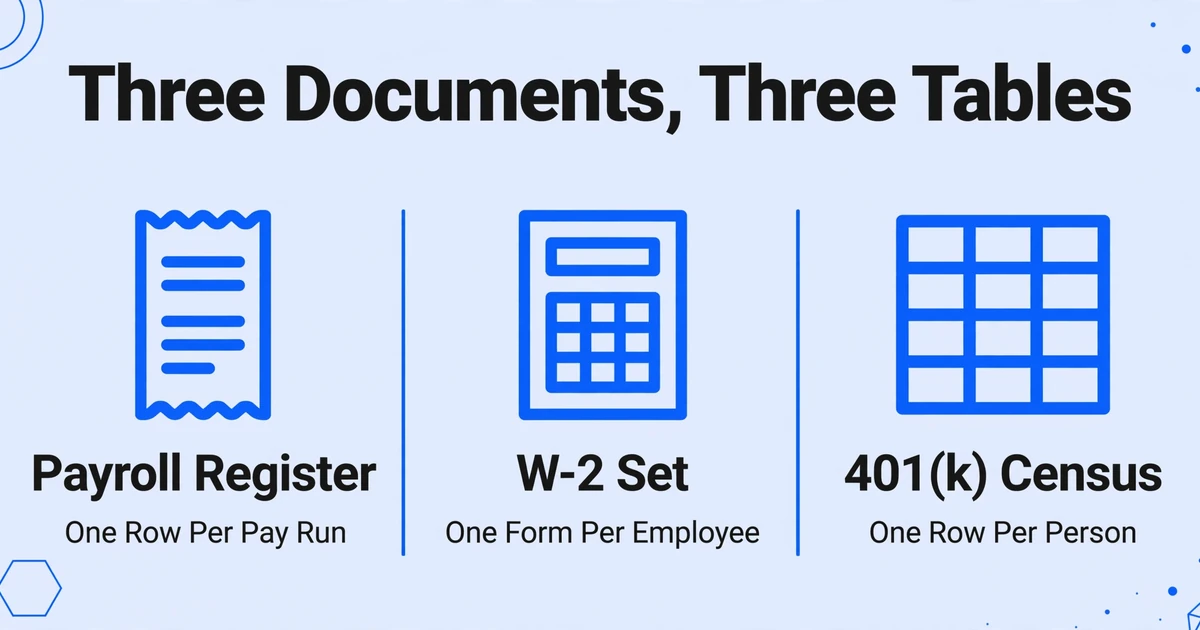
Three documents that look alike produce three different tables. A payroll register is a period document: every pay run, earning code and deduction for a pay date. A W-2 set is a tax document: one form per employee per calendar year, organized by tax boxes. A census is a plan document: one row per employee for the plan year. It is often written 401k census, and the shorter name hides the difference.
This is why a payroll export can be perfectly accurate and still be the wrong file. The export is organized around pay events. The census is organized around people and plan definitions. Everyone who received compensation at any time during the plan year belongs on the census, whether or not they were eligible, whether or not they participated, and whether or not they are still employed. A file limited to current employees or plan participants is not a smaller census; it is a census that produces the wrong coverage result.
Start with the recipient's template. Save an untouched copy, note the plan year and version, and keep its headers, dropdown values, date formats and formulas intact. A generic 401k census template, or last year's file, is a reference, not the specification. TPAs add columns as rules change, and an old workbook can be missing a Roth split, an excluded-compensation column or a long-term part-time flag that the current request requires.
Who Owns Each Step
Five parties touch the census, and each one owns a different part of it. The handoffs are where assumptions creep in.
| Role | What they own | What they hand off |
|---|---|---|
| Plan sponsor (HR or payroll administrator) | Employment and payroll facts, ownership and officer information, final sign-off | The completed census and an exception log |
| Payroll provider | Registers, deduction detail, W-2s, year-to-date reports | The year-end register, deduction report and W-2 file |
| TPA | Eligibility, HCE and key-employee determination, coverage, ADP/ACP, top-heavy and 415 tests, employer contribution calculations | Test results, correction amounts and the 5500 schedules |
| Recordkeeper | Participant accounts, deferral deposits, loan balances, vesting | Deposit and contribution data; receives census updates |
| Auditor (plans with more than 100 participants) | Testing the census population and contribution allocation against source records | Audit findings and requested corrections |
A payroll administrator can answer "what was paid" and cannot answer "was this person eligible" or "does the plan exclude bonuses." Those are plan document questions. When the person assembling the file guesses at them, the file looks complete and tests wrong.
When the handoffs happen
TPAs usually send the request in January, and many ask for the file within 30 days of the plan year close, which means January 31 for a calendar-year plan. That deadline is tied to a correction window. A plan that fails the ADP or ACP test has 2½ months after the plan year ends to correct excess contributions without an excise tax, which is March 15 for a calendar-year plan. Later corrections require Form 5330 and a 10% excise tax on the excess, per the IRS 401(k) Fix-It Guide. A late census eats the window before anyone has run a test.
The annual return has its own clock. Form 5500 is due by the last day of the seventh month after the plan year ends, July 31 for a calendar-year plan, and Form 5558 extends it by up to 2½ months, according to the Form 5500 instructions.
The TPA runs the tests and the sponsor signs off on the data. A signature on the census attests to the facts, not to the test results.
The Field Map: Every Column Has One Source
Every census column has an authoritative source, and it is rarely the payroll register. The template groups the columns into families, and each family fails in its own way.
| Field family | What the template asks for | Authoritative source | Typical failure |
|---|---|---|---|
| Identity | Legal name, SSN, date of birth, address, personal email | HR master file and W-2 | Nickname instead of legal name, masked SSN, transposed date of birth |
| Dates and status | Original hire, termination, rehire, separation reason, status code | HRIS or personnel file | Payroll's latest hire date replaces the original; status typed as free text |
| Hours | Hours of service, paid hours | Timekeeping or payroll | Salaried employees have no hours recorded; 1,000-hour convention applied inconsistently |
| Compensation | Gross, W-2 Box 1, W-2 Box 3, plan compensation, pre-entry compensation, excluded components | Year-end register, W-2 and plan document | One total pasted into every compensation column |
| Deferrals and employer money | Pre-tax, Roth, after-tax, match, safe harbor, nonelective, loan | Payroll deduction detail and recordkeeper | Pre-tax and Roth merged; loan repayment counted as a deferral |
| Ownership and classification | Ownership percent, officer, family relationship, job class, division, union, long-term part-time | Corporate records, plan document and HR | Job title treated as ownership evidence; owner has no W-2 |
Compensation deserves its own map because the template may ask for six numbers that all sound like "pay." A TPA's census instructions, such as Nova 401(k) Associates' field guide, typically separate them into ten columns or more.
- Gross compensation is pay for the plan year on a cash basis: the paycheck date, not the date the money reached the plan.
- W-2 Box 1 is federal taxable wages. It differs from gross because pre-tax deferrals and Section 125 deductions come out.
- W-2 Box 3 is Social Security wages, capped at the taxable wage base. Some tests and catch-up checks need it.
- Plan compensation follows the definition in the plan document, often gross minus what the plan excludes, such as bonus, commission, overtime or taxable fringe. The 401(a)(17) limit caps the amount that can be taken into account ($360,000 for 2026, $350,000 for 2025, per the IRS COLA table). Report actual pay and let the TPA apply the cap.
- Pre-entry compensation is the slice earned before the employee's entry date, reported in its own column. Do not subtract it from plan compensation; some tests need full-year pay and others need the pre-entry slice.
- Excluded components are the bonus, commission, overtime, Section 125, taxable fringe and severance amounts the plan leaves out. Each gets its own column so the TPA can verify the subtraction.
The IRS is explicit that a plan may use different definitions of compensation for deferrals, allocations and testing, and that applying the wrong one is an operational failure with a correction cost. The fix is often a corrective contribution adjusted for earnings, not a corrected spreadsheet, as the compensation section of the Fix-It Guide explains. One "comp" column cannot serve all three purposes.
The template may also ask for prior-12-month compensation. That column exists because HCE status is a lookback. The same IRS table puts the HCE compensation threshold at $160,000 for the 2026 plan year: 2025 pay above that amount, or more than 5% ownership at any time in 2026 or 2025. Payroll supplies the number. The TPA makes the determination, so if the template asks for an HCE flag, confirm it with the TPA instead of deriving it from a job title or a salary.
Where the Rows Multiply
Most false rows come from four document habits, not from typing errors. Each one has a reason a careful person walks past it.
A page break runs through an employee
A register prints a fixed number of lines per page. An employee with a bonus, three deduction codes and a loan can start near the bottom of page 3 and continue at the top of page 4. Extract page by page and the continuation becomes a second row, or attaches to the next employee whose name appears above it. The page total at the bottom makes the break look like a natural boundary, which is why the error survives review: the page is internally consistent.
A rehire becomes a new person
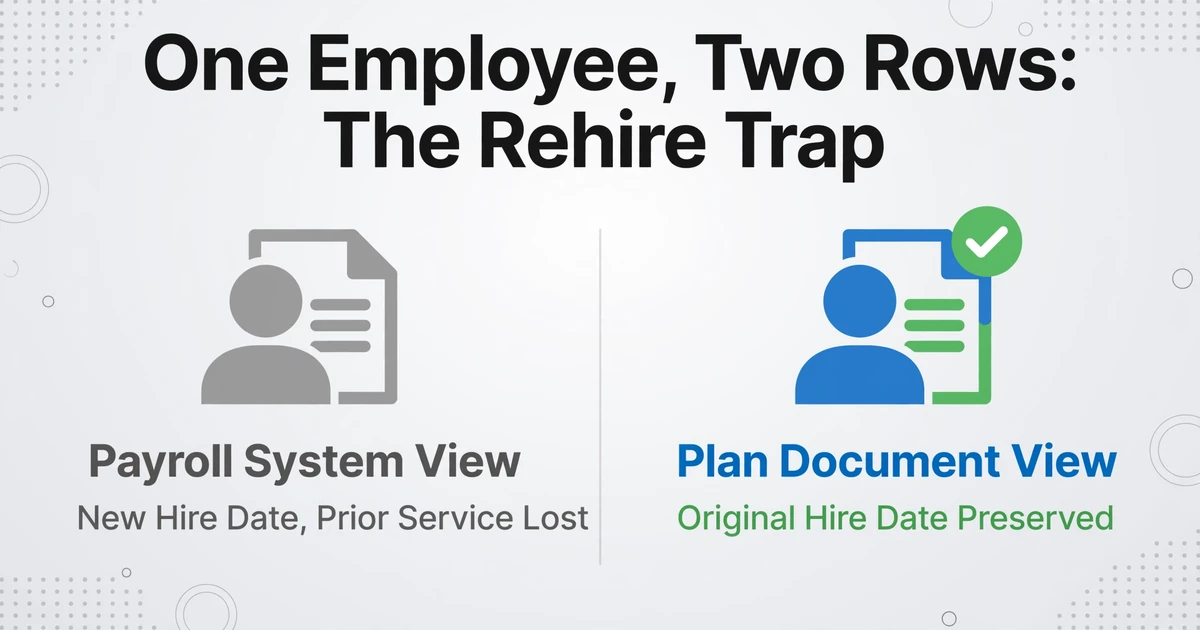
Payroll usually creates a new employee record when someone returns. The plan does not. It needs the original hire date, the termination date before the break, and the rehire date, with the earlier service preserved. Export the payroll system's current hire date and the prior service disappears, which can re-serve a waiting period that was already satisfied or cost vesting service. A register that spans the break can also show the person twice.
Practitioners see the contradiction before they see the cause. A 2012 census report warning list posted on the BenefitsLink boards includes the line "ee has prior year term date but current comp /hours. must be a rehire that was imported", alongside a warning for an active employee with zero compensation. The record is not blank. It is internally inconsistent, which is a different problem and a more expensive one.
Multiple rehire events do not fit in three columns. Empower's census instructions ask for the original hire date, the most recent termination date and the subsequent rehire date, with the full history sent separately within 48 hours of upload. One rehire fits the row. A person who left and returned twice does not.
The same document arrives twice
W-2 packages include Copy B, Copy C, and state or local copies. A corrected W-2c can arrive after the original. A mid-year payroll provider switch leaves one plan year split across two systems, each with its own employee IDs and report layout. Several entities under one plan may file separate registers. None of these look like duplicates on the page; they look like more data, and the count grows quietly.
If you are pulling tax boxes in bulk, the copy handling and field list are covered in W-2 and 1099 field extraction. The census adds one requirement: every W-2 row has to join back to an employee row that already exists, not create one.
The export filters people out
Most payroll reports default to active employees. The census needs everyone paid during the plan year, including people who terminated in February, people who were eligible but never enrolled, and people in an excluded class. An active-only export reconciles to today's headcount and fails the population test. The same filter problem appears when a mid-year payroll switch leaves the current provider with only six months of history.
A register is organized by pay event. A census is organized by person. Every false row comes from that mismatch.
Where the Numbers Drift
The amounts go wrong where two systems use the same word for different things. Five versions of that problem account for most of the drift.
One compensation total for several definitions
An $8,000 year-end bonus sits in the register. If the plan excludes bonuses and the census reports gross as plan compensation, the file overstates that employee's plan compensation by $8,000, which changes the match calculation and the ADP test. Subtract the bonus without confirming the plan excludes it and the error runs the other way. The plan document decides. The register only records what was paid.
Deduction codes collapsed into one column
A payroll system may show a single "401(k)" deduction. The template may have separate pre-tax and Roth columns. Splitting the total by a ratio is a guess. The source is the deduction code, or W-2 Box 12: codes D, E and G are pre-tax deferrals, and codes AA, BB and EE are Roth, both including catch-up. A blank Roth column next to a filled pre-tax column can also shift the next amount one column to the left when someone pastes row by row.
Cash basis, plan year and the calendar
The census reports pay for the plan year, usually on a cash basis. A January paycheck for December work belongs to the year it was paid, and deferrals follow the paycheck date, not the date the deposit reached the plan. A fiscal-year plan adds a second trap: W-2 Box 1 is a calendar-year figure. A June 30 plan year may need Box 3 from the calendar year inside the plan year and a blank Box 1, depending on the template.
Annualized salary and a changed pay frequency
A salary rate is not pay. Someone hired in October, someone who received a raise in July, and someone whose pay frequency changed from biweekly to semimonthly cannot be annualized by multiplying one check. Twenty-six checks and 24 checks do not make the same year. Use year-to-date actual pay from the register, and check it against the W-2 before you trust it.
Blanks become assumptions
This is the part most plan sponsors never see. Recordkeepers publish their default rules, and the defaults are not neutral. Empower's Explanation of Census Data states that missing hours are prorated from the hire date, a missing date of birth becomes 01/01/1980, a missing long-term part-time flag means no LTPT employees, and an employee with no termination date, compensation or contributions is assumed to have terminated in a prior year. Each assumption changes eligibility, vesting or a test result, and it is applied after the file leaves your desk.
A blank cell is a decision the recipient will make for you.
Leave a cell blank only when the template says the field does not apply. Otherwise write the value, write 0.00 when the column requires a number and the value is zero, or put the item in an exceptions column with a note.
Build the File in Five Passes
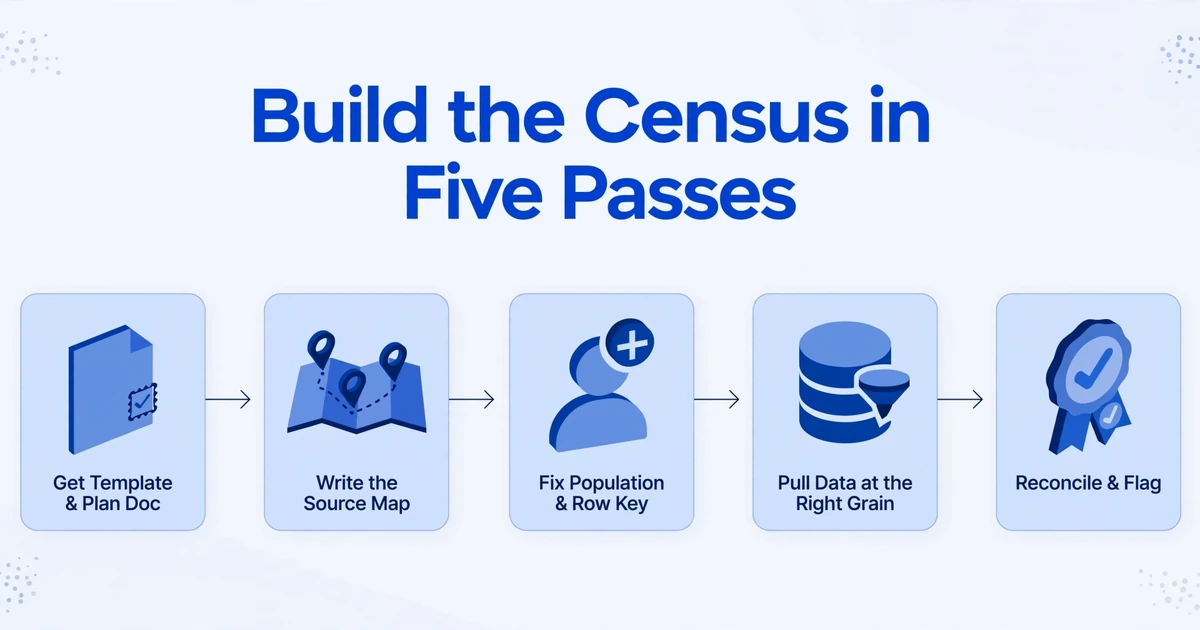
Build the census in five passes, and do not format anything until the fourth. Each pass produces something the next one depends on.
Get the template and the plan document first
Save an untouched copy of the template, note the plan year and version, and ask the TPA which columns apply to this plan and which can stay blank. Pull the plan's compensation definition, entry dates, eligibility waiting period and excluded classes. Without those four facts, every compensation column is a guess.
Write the source map
Make one row per census column with the source system, report name, field, transformation and the person who owns it. Mark the columns payroll cannot answer: ownership, officer status, family relationships, eligibility, HCE. Those go to HR or the owners for confirmation. The map becomes your audit trail when the TPA asks where a number came from.
Fix the population and the row key
One row per employee who received compensation during the plan year. Use employee ID or SSN as the key, because names change and two people can share one. Include terminated employees, non-participants, rehires and employees of other entities that adopted the plan. Exclude department subtotals, location totals, tax summaries and grand totals, which sit in the same columns as employee data.
Pull the data at the right grain
Prefer a payroll report that carries earning codes and deduction codes; it preserves the split the census needs. When the only source is a PDF or scanned register, extracting the register into a spreadsheet is the mechanical part. Custom Column Extraction works by column name: you type the census headers you need, such as "Original Hire Date," "Plan Compensation," "Pre-Tax Deferral" and "Roth Deferral," and the AI finds each value by what it means on the page rather than by a fixed coordinate. The names you type become the output headers.
Batch processing puts a year of registers into one table. Multi-Page Merge groups page results that belong to one logical record and fills each field from whichever page carries it, which fits a register printed one employee per page or a set of per-employee statements. A dense register that prints five employees on every page is a different problem: the page is not a record, so check those boundaries by hand.
Computed columns handle the arithmetic the plan definition requires, such as plan compensation as gross minus the excluded components, or a check that outputs the difference when the subtraction does not reconcile. Keep a source reference for every row in your working file, even if the TPA never sees that column.
If you are combining monthly registers rather than a year-to-date report, expect one row per employee per period, then sum by employee ID before you paste into the template. A single year-to-date earnings report from payroll removes that step.
Reconcile, then flag instead of fixing
Tie the population to an HR list of everyone paid in the plan year, not to today's active headcount. Tie total gross compensation to the W-3 or the four quarterly 941s. Tie deferrals to the payroll deduction report and, where you have it, the recordkeeper's deposit report. Then stop. Do not zero-fill a missing SSN, split a merged deduction by ratio, or replace a conflicting date with the one that looks more likely. Put the item in an exceptions column and name the owner.
The extraction step is worth testing on one real register before you commit a year of them. Upload a register, type four or five census headers, and see whether the page breaks come back as one row per employee.
Files are processed securely and not stored.
Checks to Run Before You Send It
A file can be complete at the cell level and still be the wrong population, so run these checks in order.
- Headcount. Compare census rows with the HR list of everyone paid during the plan year. Explain every difference. Do not force the count to match one convenient report.
- Duplicates. Search employee ID, SSN, and name plus date of birth. A rehire with two IDs and one SSN still shows up here.
- Identifiers and codes. Nine-digit SSNs where the template requires them, dates in its format, and status codes from its allowed list. "Terminated" typed into a code column will be rejected or, worse, read as a different code.
- Compensation ties. Per-employee gross against W-2 Box 1 where the template asks for it. Plan compensation against gross, with a documented reason for every difference. The total against the W-3 or the four 941s.
- Column shifts. Every employee with a pre-tax deferral has a pre-tax value. Roth amounts are not sitting in the pre-tax column. Loans are not counted as deferrals.
- Required blanks. Every required field populated, with 0.00 entered where the column needs a number and the value is zero.
- Control rows. No subtotal, department total, tax summary or grand total left in the employee rows.
- Exceptions. Each unresolved item has a source, a note and an owner. Attach the log to the submission.
For a plan with more than 100 participants, the auditor tests the same population, so the reconciliation you do for the TPA is also the audit trail. The pattern matches batch payslip extraction for HR audits: build the population once, prove it, then sample from it.
What Extraction Does Not Do
Extraction moves values from documents into the columns you define. It does not make the plan judgments behind those columns.
- It does not decide who was eligible, who is an HCE or key employee, or which compensation definition applies. Those depend on the plan document, the controlled group and the lookback year.
- It does not run coverage, ADP/ACP, top-heavy or 415 tests, calculate the match or true-up, or produce correction amounts.
- It does not file the Form 5500 or sign the census. The sponsor signs.
- It cannot find an employee who is missing from every document you gave it, or recover a full SSN that was masked at the source.
- It does not preserve the template's dropdowns, formulas or formatting. The output is a clean table; paste values into the recipient's workbook so its rules stay intact.
- It reads what the page says. A transposed date or a wrong pay figure on the register comes through as a transposed date or a wrong figure.
The census is a statement about facts. Extraction can make the facts legible. It cannot make them true.
That boundary is useful, because it puts human review where it belongs: on the plan-dependent columns and the exceptions, not on retyping sixty rows of names and amounts.
FAQ
What is a 401(k) census?
A 401(k) census is an annual employee-level file that a plan sponsor sends to its TPA or recordkeeper, with one row per person who received compensation during the plan year. It carries the identity, employment, hours, compensation and contribution fields needed for coverage, nondiscrimination, top-heavy and contribution-limit testing, and for the Form 5500. It is not a payroll register or a set of W-2s, though both are inputs.
Where do I get the census template?
From your TPA or recordkeeper, for the current plan year. Use their version rather than a generic template or last year's file, and ask which columns apply to your plan. Keep the original untouched so its dropdowns and formulas survive; paste your values into a copy.
Should bonuses be included in census compensation?
It depends on the plan document. Gross compensation normally includes the bonus because it was paid. If the plan excludes bonuses from plan compensation, report the bonus in its own excluded-compensation column so the TPA can subtract it, and do not reduce the gross figure yourself. If the plan does not exclude bonuses, subtracting them understates compensation.
How do I report a rehired employee?
Keep one row and report the original hire date, the termination date before the break, and the rehire date. Do not let the payroll system's new hire date replace the original. If the person left and returned more than once, put the most recent events on the census and send the full history separately in the format the recipient requests.
Do terminated employees belong on the census?
Yes, if they received compensation during the plan year. Include their termination date and the reason or status code the template accepts. They affect coverage testing, vesting, employer allocations and the participant count on the Form 5500. An active-only export will miss them.
Can I build the census from pay stubs instead of a payroll register?
Pay stubs can supply per-period gross pay, deductions and hours, but you have to sum the year and match each stub to one employee. A register or year-to-date report is safer because it already carries the employee identity and earning codes. If stubs are the only source, batch them through payslip field extraction, then reconcile annual totals to the W-2. The grain problem is the same as in converting pay stubs to a spreadsheet: one row per stub is not one row per employee.
Does the census have to reconcile to the W-2s?
Not every column. Box 1 and Box 3 should tie where the template asks for them. Gross compensation can differ from Box 1 because pre-tax deferrals and Section 125 deductions come out, and plan compensation can differ from gross because of plan exclusions. Reconcile totals to the W-3 or the quarterly 941s, and document each difference instead of forcing equality.
The Row Comes First
The census is the rare deliverable where a payroll system's confidence is not evidence. The register can be balanced, the W-2s can be correct, and the file can still put the same person in twice with a hire date that costs them a year of vesting. Build the row first, then fill it, then reconcile what the row says against the records that produced it.
Put a year of registers in one batch and check the simplest thing first: does each employee come back once? Try it on your own payroll file.