ImageToTable vs Rossum:
AI-First Extraction or Enterprise IDP? An Honest 2026 Comparison
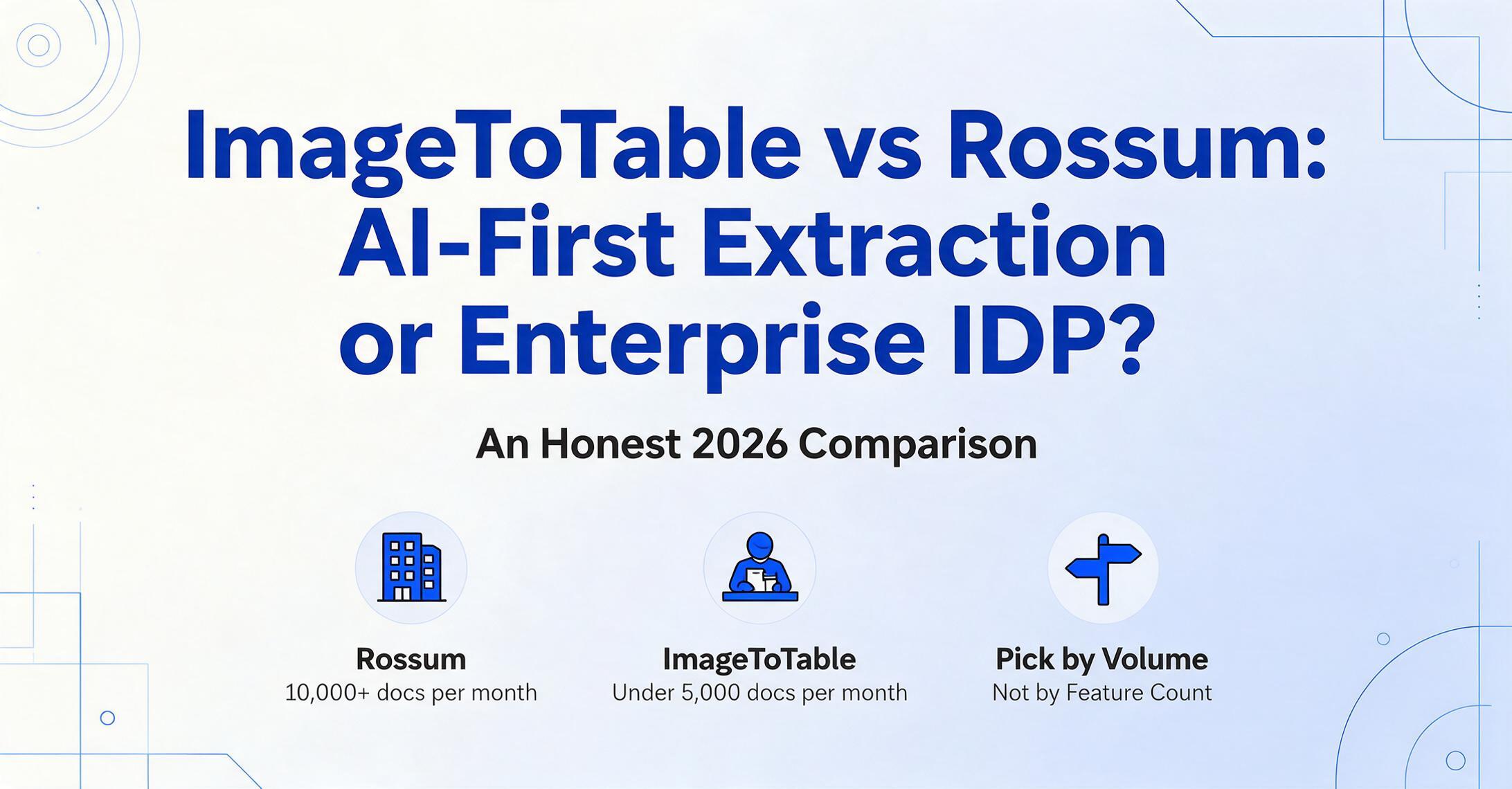
Comparing ImageToTable to Rossum isn't a feature-by-feature exercise — it's a question of which product category fits your team. Rossum is an enterprise IDP (Intelligent Document Processing) platform built for AP departments processing 10,000+ documents a month with approval workflows. ImageToTable is a self-serve AI extraction tool built for teams that need spreadsheet-ready data without IT involvement. The two tools solve the same core problem — getting structured data out of documents — but they operate in different tiers of complexity, price, and organizational maturity. Choosing between them means understanding not just what each tool does, but what category of product your workflow actually needs.
Key Takeaways
- Rossum starts at $18,000 per year and ImageToTable starts at $9 per month — the price gap alone tells you that these are different product categories not different pricing tiers of the same product.
- The real dividing line between these tools is not extraction accuracy or supported formats — it is whether your organization routes data through approval queues into an ERP or exports it to a spreadsheet.
- Stop asking which tool extracts invoices better and start asking which product category your workflow actually lives in — the right answer depends on your organizational structure not on any accuracy benchmark or feature grid.
Quick Comparison
Here is a snapshot of where the two tools differ on the dimensions that matter most in a document processing decision.
| Dimension | Rossum | ImageToTable.ai |
|---|---|---|
| Target user | Enterprise AP departments, shared-service centers, back-office operations | SMBs, teams, individuals across any department — AP, procurement, logistics, HR, finance |
| Deployment | Managed onboarding with professional services — weeks to months | Fully self-service — minutes from signup to first extraction |
| Setup approach | Document queues, field configuration, training data for custom docs; AI improves from user corrections over time | Type column names, upload documents — zero configuration, zero training, works on first upload |
| Workflow | Built-in approval routing, validation queues, ERP integration, PO matching, GL coding | Upload → extract → export. No built-in approval routing or ERP connectors |
| Pricing model | Enterprise-quoted — contact sales; Starter from $18K/yr, typical ACV in five figures | Transparent subscriptions — $9 to $59/mo; free tier available |
| Document scope | Primarily transactional: invoices, POs, receipts, order confirmations | Broader: adds forms, handwritten documents, screenshots, phone photos, mixed-format batches |
| Compliance | SOC 2 Type II, HIPAA BAA, SSO/SAML, SIEM audit logs, on-prem option | Encryption in transit and at rest, auto-deletion — no formal compliance certifications |
The table draws clear lines. But selecting the right tool requires understanding why these differences exist — and whether they matter for your workflow. Let's walk through each dimension.
Target User: Individual Contributor or Enterprise AP Department?
Rossum is designed for dedicated AP teams in organizations large enough to have dedicated AP teams. Its user roles — extractor, approver, admin — correspond to the structure of an enterprise back-office where document processing is someone's full-time job. The platform assumes multi-user access, queue-based work distribution, and a separation between who extracts data and who approves it. Rossum's customer base includes companies like Adyen, Bosch, and Imperial Dade — organizations where document processing is a department function, not an individual task.
ImageToTable is designed for anyone who needs data from documents — a bookkeeper processing receipts at tax time, a logistics coordinator extracting delivery note data, a construction project manager collecting inspection forms from the field, a solo accountant handling invoice entry for multiple clients. There are no user roles, no queues, no approval workflows. One person uploads documents, defines columns, and downloads a spreadsheet. The tool is structured around individual tasks, not departmental process flows.
This distinction matters because it determines whether Rossum's enterprise features feel like essential capabilities or unnecessary overhead. If you have a ten-person AP team processing invoices through SAP, Rossum's role-based queues and ERP connectors are the minimum viable tool. If you are a single person collecting receipts from a trip, those features add complexity without value.
The right tool is the one whose complexity matches your organizational structure — not the one with more features, but the one whose features fit how your team actually works.
Deployment & Setup: Managed Onboarding vs. Self-Serve
Rossum's deployment process is managed and structured. After signing an enterprise agreement, the vendor assigns a customer success manager. There is a discovery phase where Rossum's team learns your document types, volumes, and integration requirements. Document queues are configured. Field mappings are defined. ERP connectors are tested. The Port of Rotterdam Authority case study — one of Rossum's published success stories — describes a multi-month onboarding process that included configuring Tonnage Certificate processing for port inspection documents. This is typical: enterprise IDP implementations involving ERP integration, role configuration, and custom field mapping run in the range of weeks to months.
ImageToTable's deployment is fully self-serve. You open the website, create an account, type the column names you want extracted, and upload your documents. The entire process from "I need data from this document" to "I have the spreadsheet" takes minutes. There is no onboarding call, no configuration phase, no professional services engagement. The tool is designed to deliver value on the first use without any setup steps that require explanation.
This difference is not a criticism of Rossum — enterprise deployments genuinely require structured onboarding. ERP integrations need testing. Role-based access needs configuration. Compliance certifications require documented processes. These steps exist because at enterprise scale, getting the implementation wrong has real costs. But if your organization does not operate at that scale, the onboarding process itself becomes a barrier to getting value from the tool.
Setup Approach: Training the AI vs. Naming Your Columns
This is where the product categories diverge most visibly.
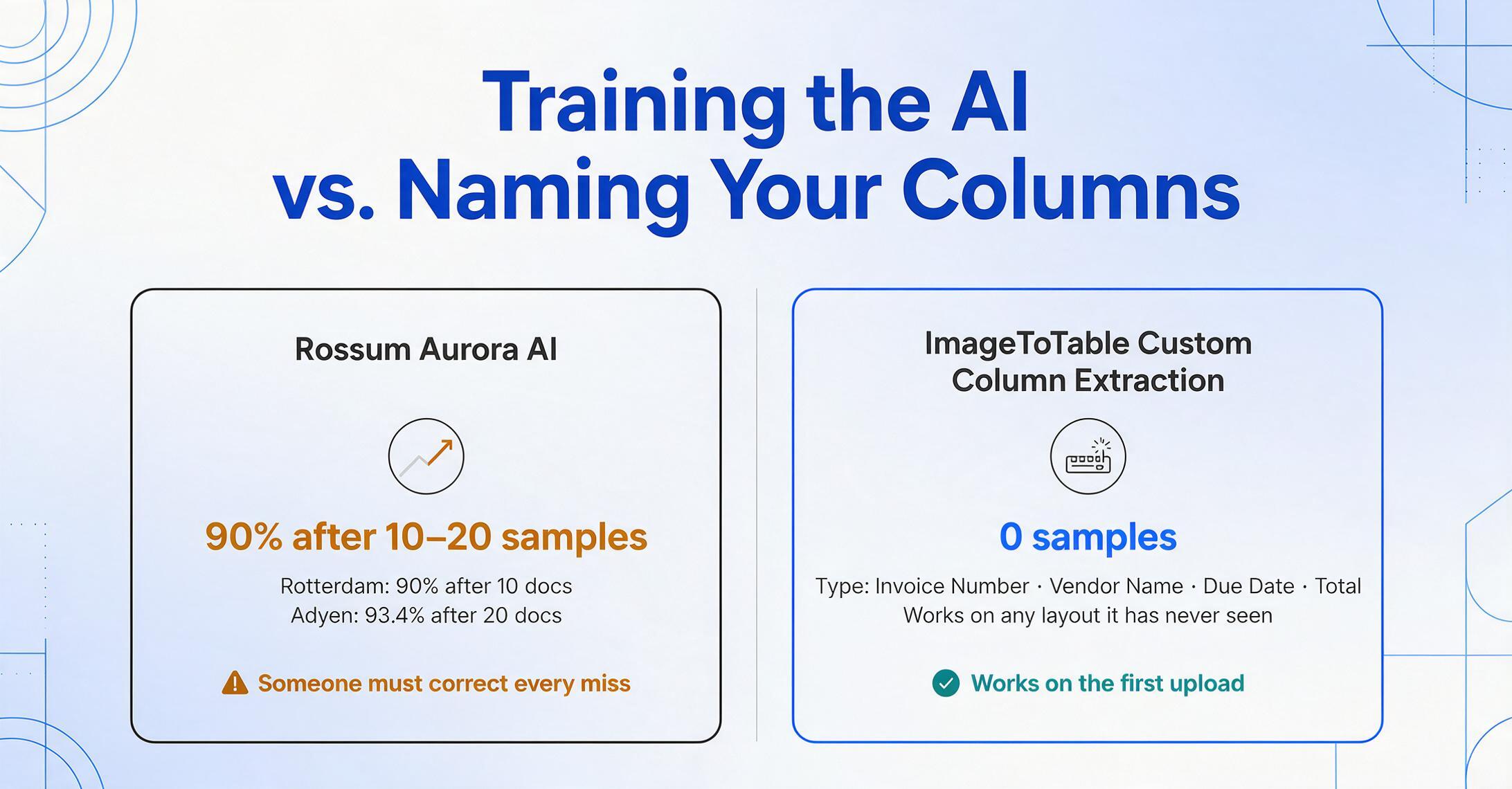
Rossum's Aurora AI learns from user corrections. When you first upload documents, the AI extracts what it can. Operators review the results, correct errors, and annotate fields. The system improves over time as it sees more examples of your particular document formats. Rossum's published case studies show this process working: after 10–20 sample documents of a new format, accuracy reaches 90% and continues climbing with continued corrections. The Port of Rotterdam reached 90% accuracy after just 10 documents. Adyen achieved 93.4% average accuracy after 20 documents. The feedback loop works — but it requires someone to do the correcting, and it takes time to ramp up on new document types.
ImageToTable uses Custom Column Extraction: you type the field names you want — "Invoice Number," "Vendor Name," "Due Date," "Total" — and the visual AI locates each value anywhere on the document by understanding what the term means semantically, not by learning from prior corrections. It does not require sample documents. It does not improve over time through corrections because it does not need to — it works from the first upload on any document format you have never seen before. You define the output columns once, and the AI handles any variation in input layout.
Rossum's approach is better for high-volume, repetitive document types where the same senders use the same layouts consistently. Once trained, the system processes those formats with minimal human intervention — the learning investment pays back in volume. ImageToTable's approach is better for varied document formats where layouts change frequently or where you process documents from many different sources. There is no learning curve to amortize because there is no learning curve at all. For a detailed breakdown of how these extraction paradigms differ, see our comparison of template-based vs. template-free extraction.
Workflow: Where Rossum Truly Dominates
This is the dimension where Rossum wins decisively — and it is important to be specific about why.
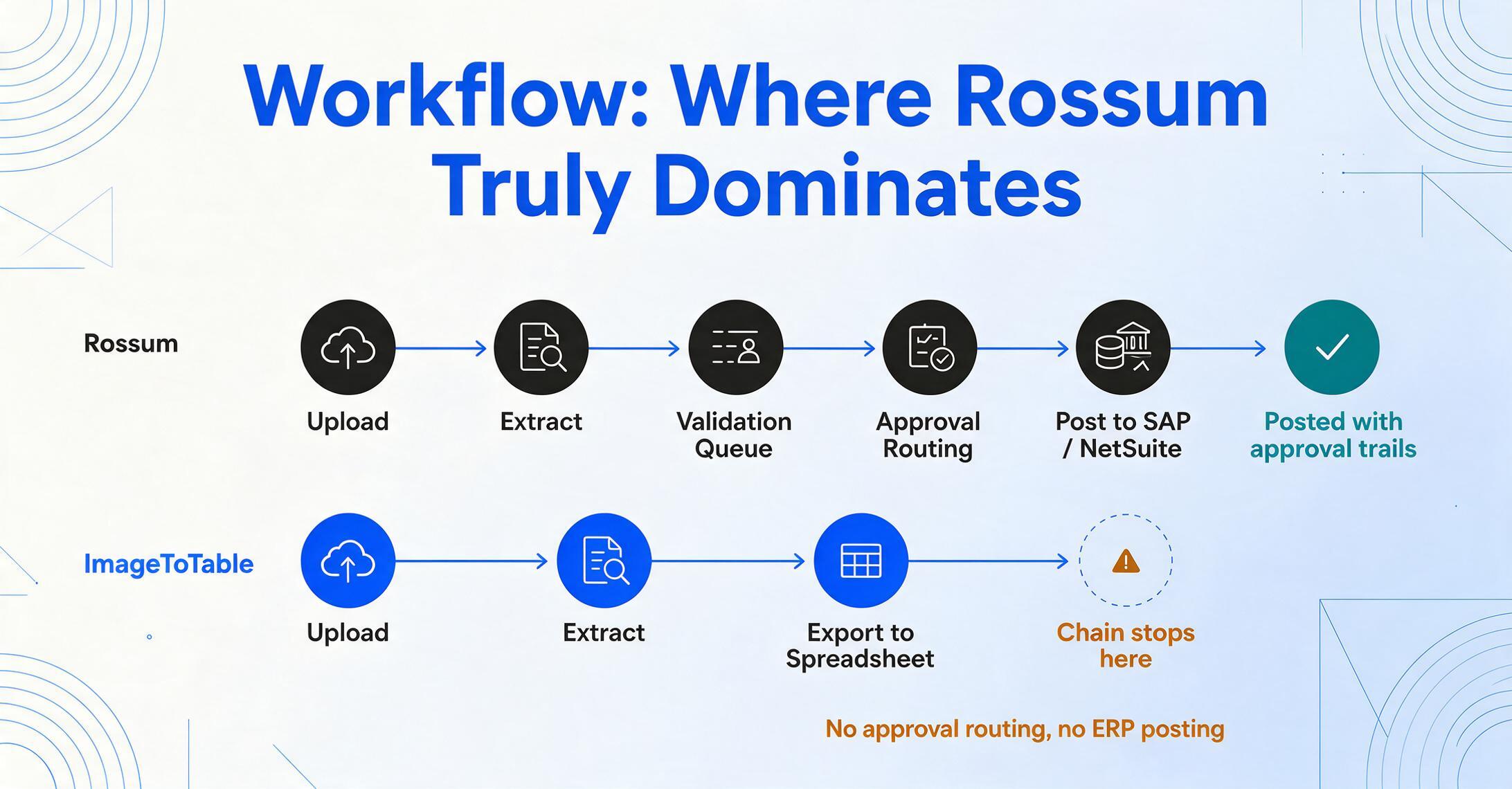
Rossum is not just an extraction engine. It is a document processing platform that includes:
- Approval routing — extracted documents follow configured approval paths. A worker extracts the data; a supervisor reviews exceptions; a manager approves payment. Each step is tracked with timestamps and audit trails.
- Validation queues — fields with low confidence scores are automatically routed to human reviewers. The system knows which extractions need eyes on them before they proceed downstream.
- ERP integration with automated posting — Rossum connects natively to SAP, Oracle NetSuite, Coupa, Workday, and Microsoft Dynamics 365. Extracted data posts directly to the ERP without manual re-entry. This includes three-way PO matching, line-item GL coding, and vendor master data matching.
- Duplicate detection — incoming documents are checked against processed records to prevent double payments or duplicate entries.
- Vendor communication — Rossum's integrated mailbox lets AP teams communicate with vendors about invoice discrepancies without leaving the platform.
These capabilities are not "nice to have" for an enterprise AP department processing 10,000+ invoices per month. They are the minimum infrastructure required to operate at that volume without chaos. Approval routing ensures that payment authorization follows policy. Validation queues prevent bad data from reaching the ERP. ERP integration eliminates the manual re-entry step that would otherwise recreate the bottleneck the tool was supposed to solve.
ImageToTable does not have any of these features. It is an extraction and export tool: you upload documents, the AI extracts structured data, and you download the results as Excel, CSV, or JSON. There is no approval routing, no validation queue, no ERP connector, no three-way matching, no audit trail for processed documents. These are not gaps that ImageToTable plans to fill — they are architectural choices reflecting a different product category. If your workflow requires any of these enterprise capabilities, Rossum is the correct tool for your needs, and no self-serve extraction tool will replace it.
Pricing: Transparent Subscriptions vs. Enterprise Negotiation
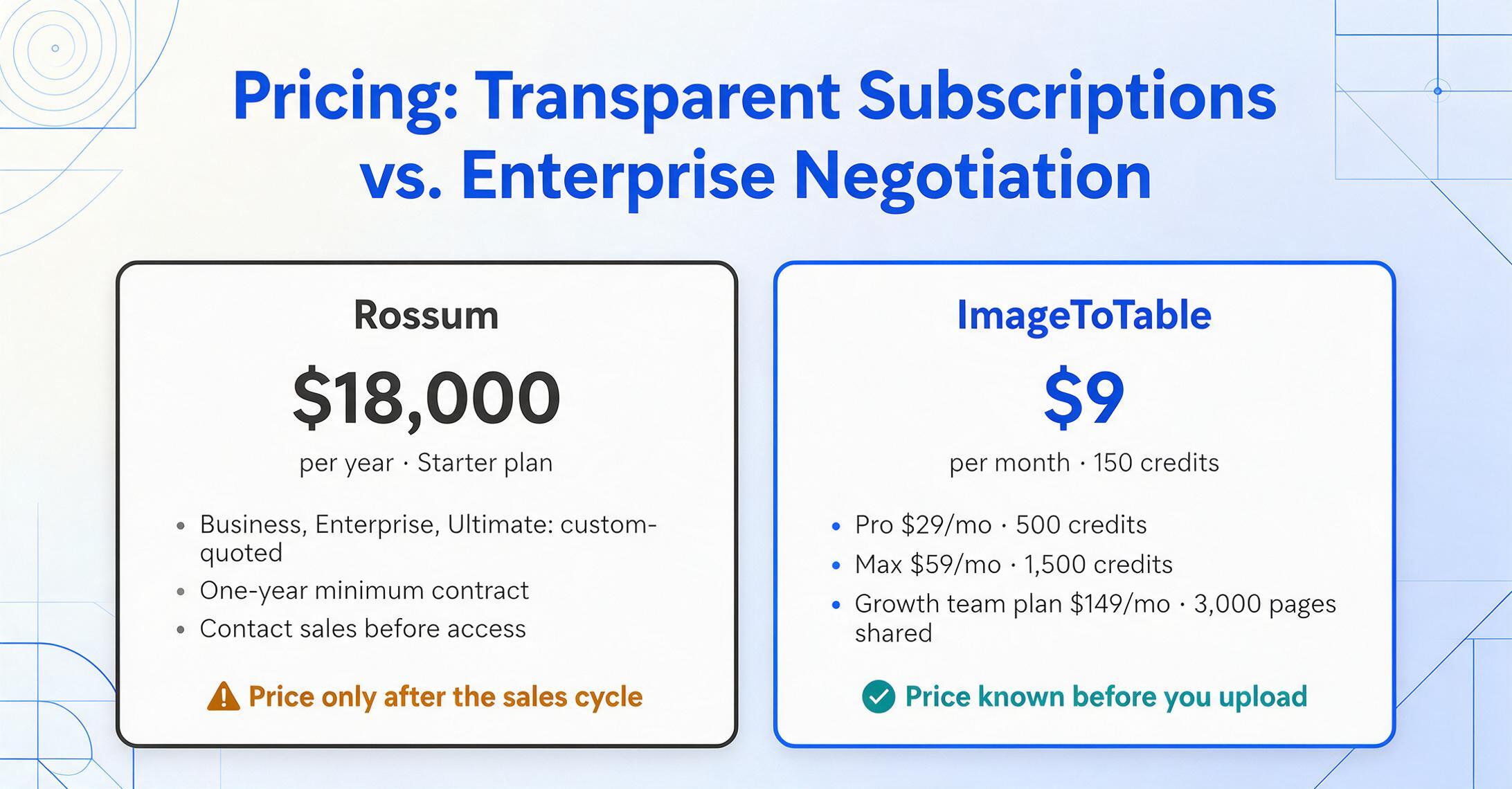
Rossum's pricing is enterprise-quoted. The Starter plan begins at $18,000 per year. Business, Enterprise, and Ultimate tiers are custom-priced through a sales process. Published industry references put typical ACVs in the five-figure range, with six-figure deals for high-volume implementations. ERP integrations are often add-on costs. A one-year minimum contract is standard. There are no self-serve signup tiers — you must contact sales, discuss volumes, and negotiate terms before gaining access to the platform.
ImageToTable uses transparent subscription pricing: Basic at $9/month for 150 credits, Pro at $29/month for 500 credits, Max at $59/month for 1,500 credits. Team plans (Growth at $149/month, Scale at $299/month, Enterprise at $899/month) add shared credit pools and multi-user access. A daily free quota lets you test with real documents before committing. There is no sales process, no contract negotiation, and you know exactly what you will pay before you upload anything. For a detailed comparison of how different pricing models affect your monthly bill across volume tiers, see our document extraction pricing breakdown for 2026.
The honest framing: if your organization processes tens of thousands of documents per month and already has an enterprise procurement process, Rossum's volume pricing may be competitive on a per-document basis — but you will only find out after going through the sales process. If you process under 5,000 documents per month and do not have dedicated procurement or AP automation budgets, ImageToTable's pricing is not just cheaper — it is the difference between being able to afford a tool and not.
Document Scope: Transactional Focus vs. Broad Coverage
Rossum is optimized for transactional business documents — primarily invoices, purchase orders, receipts, and order confirmations. Its Aurora AI has been trained extensively on these document types across multiple languages and formats. For invoices and POs from known senders, its extraction accuracy is industry-leading. But Rossum's document scope is intentionally narrow: it is built for accounts payable and procurement workflows that process predictable document types at high volume.
ImageToTable covers a broader range of document types by design. Beyond invoices and receipts, the tool handles forms, handwritten documents, screenshots, phone photos, table-heavy pages, and mixed-format batches. This is because ImageToTable's vision LLM treats every document as a unique visual layout — it does not rely on pre-trained document-type models. The same column-name extraction approach works whether the input is a scanned invoice, a photo of a site inspection log, a screenshot of a payment confirmation, or a handwritten timesheet.
This broader scope is relevant for teams whose document processing needs span multiple departments or document categories. A construction company may need to process invoices through AP but also handle handwritten site logs, purchase order screenshots from suppliers, and inspection forms with checkboxes. For an ERP perspective on construction document workflows, see our guide to document extraction software for construction in 2026. Rossum handles the invoice part of that mix well but does not extend to the rest. ImageToTable handles all of them in the same upload-and-extract workflow.
If every document you process is an invoice or PO from a known sender, Rossum's specialized focus is an advantage. If you deal with five different document types from ten different sources, ImageToTable's broader coverage matters more than Rossum's depth in one category.
Compliance & IT: Enterprise Certifications Matter
This is the second dimension where Rossum wins — and transparency requires acknowledging it directly.
Rossum maintains SOC 2 Type II certification, supports HIPAA Business Associate Agreements, offers SSO/SAML integration for centralized identity management, and provides SIEM-compatible audit log streaming for organizations that need to monitor system activity in their security operations center. For regulated industries — healthcare, financial services, government contracting, publicly traded companies subject to SOX — these certifications are not optional. They are prerequisites for vendor approval by IT security and compliance teams.
Rossum also offers an on-premises deployment option for organizations that cannot process documents in cloud infrastructure due to data residency or security policies. Documents stay within the organization's own infrastructure, with dedicated SLAs for uptime and processing throughput.
ImageToTable encrypts data in transit (TLS) and at rest, with configurable auto-deletion schedules for processed documents. This is sufficient for most SMB use cases and self-serve workflows. But ImageToTable does not maintain SOC 2 certification, HIPAA BAAs, SSO/SAML, or on-prem deployment. If your compliance requirements include any of these, Rossum is the appropriate tool — and the compliance gap is a genuine reason to choose Rossum even if ImageToTable matches on extraction capability.
When Rossum Makes More Sense
Rossum is the right choice when your organization operates at enterprise AP scale. The specific signals are:
- You process 10,000+ documents per month with a dedicated AP team. Rossum's queue management, approval routing, and multi-user roles are built for this volume. Below this threshold, the enterprise infrastructure adds overhead without proportional benefit.
- You need deep ERP integration — SAP, NetSuite, Coupa, Workday, or Oracle. If extracted data must post directly to your general ledger without a spreadsheet step in between, Rossum's native ERP connectors are the industry standard. ImageToTable exports spreadsheets; it does not post to ERPs.
- Your documents are primarily invoices and purchase orders from known, consistent senders. Rossum's feedback-loop AI excels at learning specific formats and delivering improving accuracy over time for a stable document set.
- Compliance certifications are a hard requirement. SOC 2, HIPAA, SSO, on-prem option, audit logs — if your IT security team requires these in writing before approving a vendor, Rossum has them and ImageToTable does not.
- You have organizational capacity for an implementation project. Rossum's onboarding process takes weeks and requires active participation. If your team has project management bandwidth and is looking for a platform partner rather than a self-serve tool, Rossum's managed approach delivers a more integrated result.
Rossum's acquisition by Coupa in 2026 reinforces its position as an enterprise spend management platform. For organizations already in the Coupa ecosystem or considering enterprise-wide automation, Rossum's role as Coupa's IDP layer creates additional integration advantages.
When ImageToTable Makes More Sense
ImageToTable is the right choice when your extraction needs are practical, not institutional. The specific signals are:
- You process under 5,000 documents per month and do not have a dedicated AP automation team. At this volume, the maintenance cost of an enterprise IDP platform — onboarding time, feedback loop management, configuration overhead — exceeds the extraction value it delivers.
- You need to start extracting today, not after a sales cycle. ImageToTable is fully self-service: create an account, type your column names, upload documents, get results in minutes. There is no demo, no procurement process, no customer success manager introduction call.
- Your documents come in varied formats — not just invoices and POs, but also forms, handwritten sheets, screenshots, phone photos, and mixed-format batches. ImageToTable's vision LLM handles any document type in the same workflow without switching engines or configuring document-type profiles.
- Your budget for document extraction is under $500 per month. ImageToTable's Max plan at $59/month covers 1,500 pages. Even the Growth team plan at $149/month covers 3,000 pages shared across multiple users. At these price points, there is no comparison with Rossum's $18,000/year entry point.
- You work with spreadsheets, not ERPs. If your output target is Excel, Google Sheets, or CSV — not SAP or NetSuite — ImageToTable's spreadsheet-native workflow is faster and more direct than routing data through an IDP platform into an ERP.
- You need Computed Columns and Inferred Columns. ImageToTable can calculate line totals, classify expense categories, and derive values during extraction — capabilities Rossum does not offer. If you want finished answers rather than raw data that needs post-processing, this is a meaningful advantage.
For teams that have been evaluating enterprise-level tools like ABBYY or Rossum but find the complexity and cost disproportionate to their actual needs, see our guide to simpler alternatives to enterprise document processing platforms.
The honest verdict: Rossum wins for enterprise AP departments with high volumes, deep ERP integration needs, and compliance requirements. ImageToTable wins for teams that need immediate, budget-friendly, spreadsheet-ready extraction from varied document types. They are different product categories solving overlapping problems at different scales — and the mistake is choosing the wrong tier for your organization's actual needs.
The Verdict: Not the Same Category, Not the Same Decision
After comparing across seven dimensions — target user, deployment, setup, workflow, pricing, document scope, and compliance — the conclusion is not "which tool is better" but "which category of tool fits your organization."
Rossum is an enterprise IDP platform. It is built for organizations that have dedicated AP teams, process documents at high volume, integrate with enterprise ERPs, and require formal compliance certifications. Its approval routing, validation queues, feedback-loop AI, and ERP connectors are not luxury features — they are the core infrastructure that makes document processing work at enterprise scale without chaos. If your organization operates at that scale, Rossum is the right tool and ImageToTable will not replace it.
ImageToTable is a self-serve AI extraction tool. It is built for teams that need structured data from documents delivered into spreadsheets quickly, without IT involvement, enterprise sales cycles, or ongoing maintenance of a feedback loop. Its Custom Column Extraction, Computed Columns, and batch-first design address a different set of problems than Rossum's approval workflows and ERP connectors. If your organization operates below enterprise AP scale — or above it but with broader document variety than invoices alone — ImageToTable delivers more value for less cost and complexity.
The tools do not compete in the same space. They are designed for different scales, different users, and different workflow depths. Choosing correctly means being honest about where your organization sits on the spectrum — and selecting the tool that matches your actual tier, not the one with the more impressive enterprise feature list.
Want the condensed version? See the side-by-side feature comparison table, or browse all ImageToTable comparisons.
FAQ
Can ImageToTable replace Rossum for enterprise AP automation?
No — and this is an important distinction to be clear about. Rossum is an enterprise IDP platform with approval routing, validation queues, ERP integration, PO matching, and compliance certifications. ImageToTable is a self-serve extraction tool that exports to spreadsheets. If your workflow requires ERP integration, multi-user approval workflows, or SOC 2 compliance, Rossum is the appropriate tool. ImageToTable can replace Rossum only in scenarios where the core need is extraction-to-spreadsheet and the enterprise workflow features are not required.
How much does Rossum cost compared to ImageToTable?
Rossum's published pricing starts at $18,000 per year for the Starter plan. Business, Enterprise, and Ultimate plans are custom-quoted through a sales process, with typical ACVs in the five-figure range. ImageToTable starts at $9/month for 150 pages and goes up to $59/month for 1,500 pages, with team plans available. Rossum requires an annual contract; ImageToTable offers month-to-month subscriptions. For a comparison across different volume tiers, see our pricing breakdown for 2026.
Does ImageToTable require training or sample documents like Rossum?
No. ImageToTable uses zero-training Custom Column Extraction: you type the column names you want, and the AI extracts the corresponding values from any document by understanding what each field means semantically. It works from the very first upload on any format, with no sample documents, no annotation, and no feedback loop. Rossum's AI improves over time through user corrections, which means sample documents and human review are part of the process — a tradeoff that pays off at high volume with consistent formats but adds overhead for teams processing varied documents from many sources.
Which tool handles varied document formats better?
ImageToTable handles varied formats better by design. Its vision LLM reads every document as a unique visual layout — invoices, handwritten forms, screenshots, phone photos, and tables are all processed through the same extraction workflow without switching engines or configuring document-type profiles. Rossum is optimized for transactional documents (invoices, POs, receipts) and achieves its highest accuracy when processing consistent formats from known senders. If you process primarily invoices from a stable set of vendors, Rossum's specialized focus is an advantage. If you deal with multiple document types from many sources, ImageToTable's broader coverage is more practical.
Does ImageToTable integrate with ERP systems like Rossum?
No. Rossum connects natively to SAP, Oracle NetSuite, Coupa, Workday, and Microsoft Dynamics 365 with automated posting, three-way matching, and real-time sync. ImageToTable exports to Excel, CSV, JSON, and Word — you can import those files into your ERP, but there is no native, bidirectional ERP connector. If ERP integration is a hard requirement, Rossum is the appropriate tool.
Does ImageToTable have SOC 2 or HIPAA compliance certifications?
No. ImageToTable encrypts data in transit and at rest with configurable auto-deletion, which is sufficient for most SMB use cases. Rossum maintains SOC 2 Type II certification, HIPAA BAA support, SSO/SAML integration, and SIEM audit log streaming. If documented compliance certifications are required by your organization's IT security policies, Rossum is the correct choice.