Can AI Extract Hotel Folios?
Yes — Here's Which Charges It Reads Best
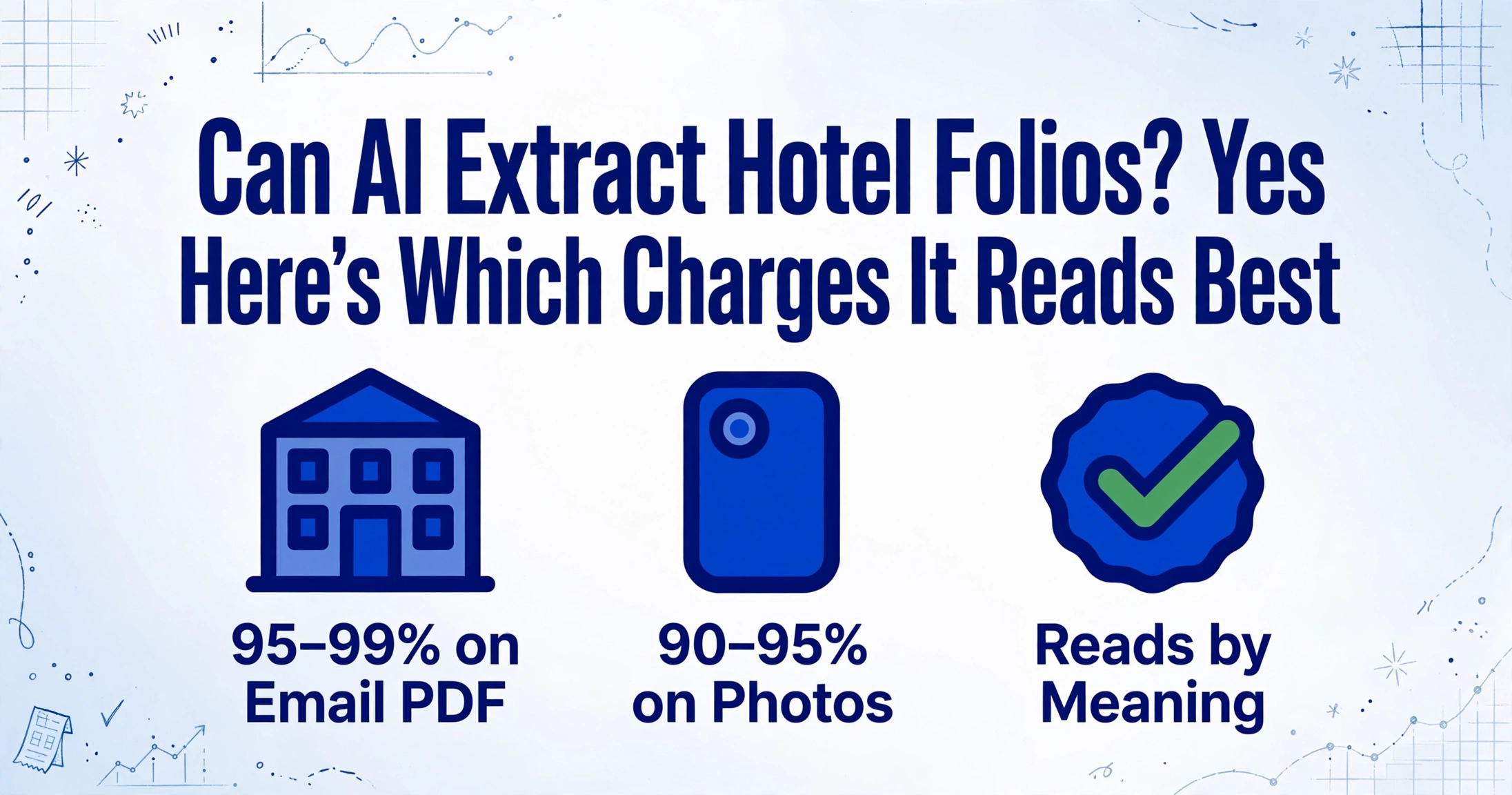
Yes. AI can extract data from hotel folios — including room charges, taxes, F&B, parking, and incidentals — with accuracy comparable to standard receipt extraction on clean documents. A hotel folio is structurally more complex than the average receipt: it spans multiple departments (rooms, food & beverage, parking), carries multiple tax rates on the same page, and comes in layouts that vary by every hotel chain's property management system. But modern vision AI handles this variability without template setup or per-chain configuration — a fundamentally different capability from what traditional OCR could deliver. Here's where the accuracy lands, which charge types it handles best, and where you should plan for a review pass.
Key Takeaways
- Marriott uses Oracle Opera while Hilton runs OnQ — each chain's PMS produces folios with different field positions and column names, so a template-based OCR tool configured for one returns a room rate in the Meals column when fed the other.
- Convincing Marriott, Hilton, and IHG to standardize their folio formats for your expense reporting convenience means asking the world's largest hotel chains to change their property management systems — which is why the manual workflow of typing 47 line items per folio never actually went away.
- Semantic extraction reads every folio regardless of format — the AI recognizes Room Charge, Taxe de Séjour, and サービス料 as the same concept in any language from any PMS, so one column configuration processes 30 folios from 8 chains in minutes.
How Well AI Extracts Hotel Folios
Global business travel spending is projected to reach $1.69 trillion in 2026, according to the GBTA Business Travel Index Outlook. A significant portion of that spend lands on hotel folios — the multi-page, multi-line, multi-tax-rate documents that land on finance desks for reconciliation. And every one of those folios raises the same question for the person processing it: can I make this go faster?
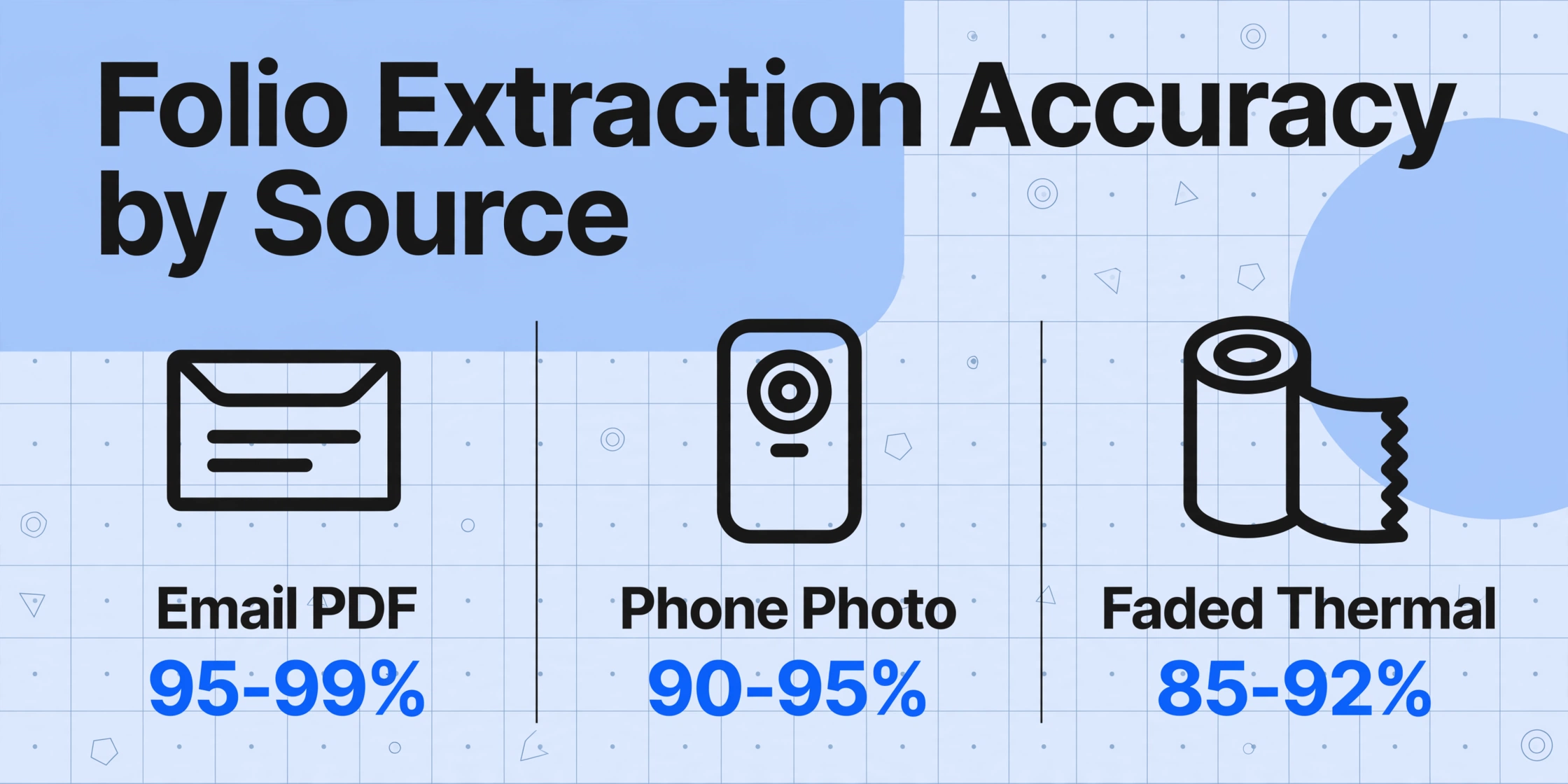
The short answer is yes — but the accuracy you get depends heavily on two factors: the source format of the folio and the type of extraction approach you use. Here is how the numbers break down across different folio sources:
| Folio Source | Field-Level Accuracy | Best For |
|---|---|---|
| Email PDF from hotel PMS | 95–99% | Clean, machine-generated folio with all line items and zero-balance line |
| Phone photo of printed folio | 90–95% | Well-lit, straight-on photo of a printed or thermal folio |
| Faded thermal paper folio | 85–92% | Thermal prints where the ink has partially faded — common for folios from independent hotels |
| App screenshot (Marriott Bonvoy, Hilton Honors, etc.) | 90–95% | Simplified folio displayed in-app; full detail version as PDF download is better |
| Booking platform receipt (Booking.com, Expedia) | 90–95% on visible fields | Reservation total only — no line items for incidentals, F&B, or parking |
The range from 99% down to the mid-80s is not a problem with the AI model. It reflects the physical reality that thermal paper fades, phone photos introduce perspective distortion, and some source documents simply carry less information than others. The AI reads what is on the page — it cannot recover text that has physically faded away.
A second dimension matters: template-free AI extraction (which reads documents by understanding what each field means) versus template-based OCR (which reads by matching coordinates on a pre-configured layout). Template-based OCR needs a separate template for every hotel chain's PMS output — Oracle Opera, Marriott LightStay, Hilton OnQ, IHG's GRS, and the dozens of independent systems like Cloudbeds and RoomRaccoon each produce folios with different field positions, font sizes, and column alignments. A template built for a Marriott PDF will produce garbage on a Hilton PDF. Modern AI extraction that uses semantic understanding reads the page by context, not by coordinates, and handles all these formats in a single pass without per-chain configuration.
What AI Extraction Gets Right on Hotel Folios
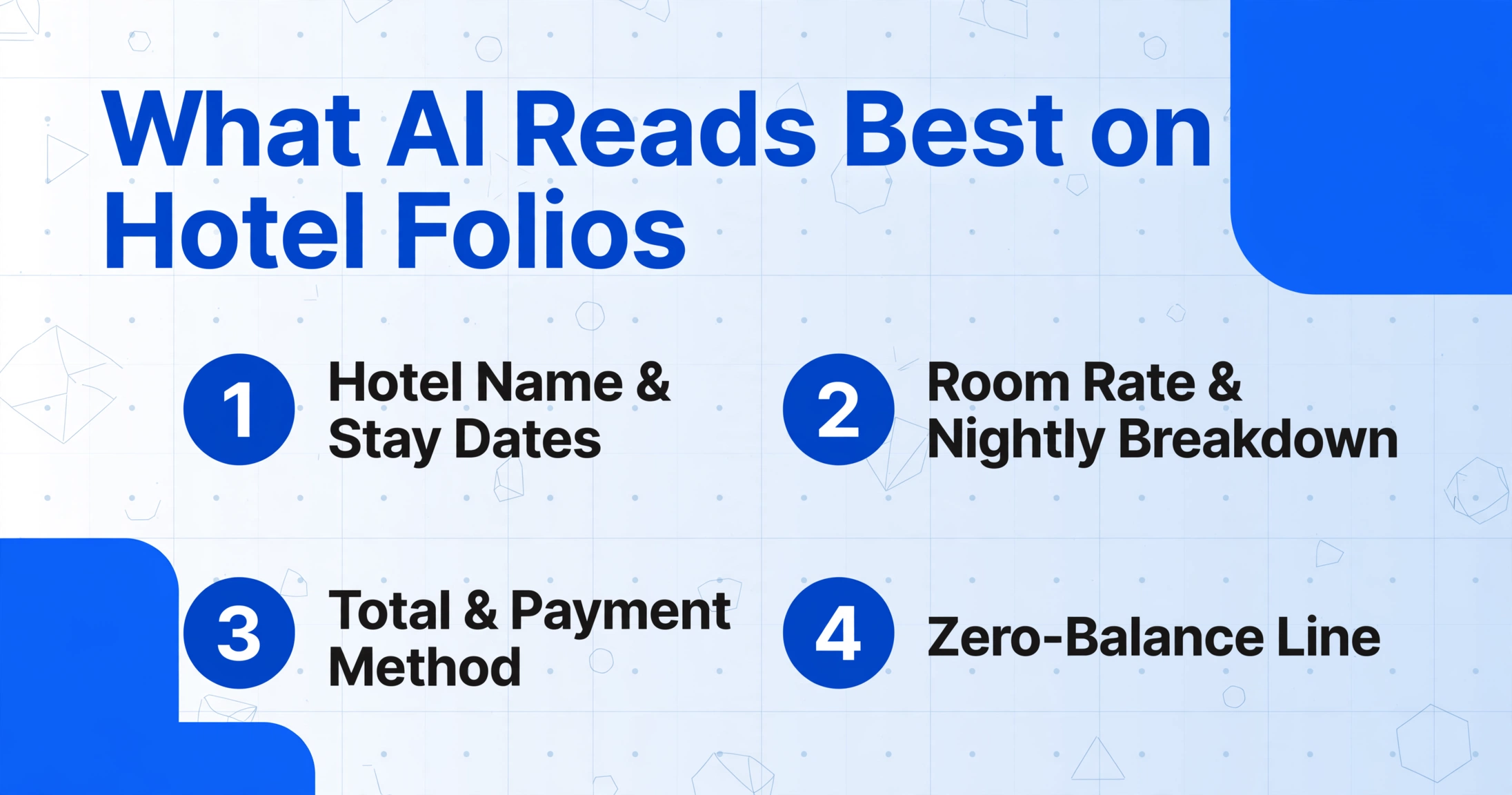
Certain fields on a hotel folio are consistently well-extracted regardless of the hotel chain or PMS source. These are the "easy wins" — the fields you can trust with high confidence.
Hotel name and stay dates. The hotel name, check-in date, and check-out date appear in large, high-contrast text at the top of every folio. These are almost universally read at 98%+ accuracy across all formats. The AI identifies them by their position (folio header) and semantic context ("Arrival," "Departure," "Check-In," "Check-Out") rather than by matching a specific layout.
Room rate and nightly breakdown. The room charge is typically the largest line item and is printed in a consistent font across all PMS formats. Most business-oriented hotels itemize each night's room rate and tax on its own line. The AI extracts each nightly charge individually, and the total room subtotal, as separate fields. If the folio prints a single line like "Room Charge: 3 nights × $189 = $567," the AI captures the per-night rate, the number of nights, and the total.
Total and payment method. The folio total — usually printed in bold or a larger font size at the bottom of the last page — is one of the most reliably extracted fields. Payment method (Visa, Amex, Mastercard, corporate card) is typically printed near the total and is consistently captured. The zero-balance confirmation line — critical for IRS accountable plan compliance under Publication 463 — is also reliably read when present.
Tax lines (when labeled). Many hotel folios break out occupancy taxes as separate line items: state occupancy tax (~6%), city hotel tax (~5.8%), and convention center taxes (~2.5% in some jurisdictions). When these are printed as labeled line items — "IL State Occupancy Tax: $14.28," "Chicago Hotel Tax: $13.19" — the AI extracts each into its own column. The catch: some folios aggregate all taxes into a single "Tax" line, and others embed taxes in the room rate. The AI extracts what is printed — it does not decompose a composite total.
Itemized F&B charges. Restaurant charges, room service, and bar tabs that appear as individual line items (with description, date, and amount) are extracted at high accuracy. A folio that itemizes each meal — "Restaurant - Lobby: $47.50," "In-Room Dining - Breakfast: $24.00" — produces usable line-level data. For teams that need to separate meals from lodging for per diem calculations or 50% deductible meal limits, this is where the extraction delivers value that a single-total receipt scan cannot.
Parking, resort fees, and Wi-Fi. These ancillary charges are consistently extracted when printed as separate line items. One useful capability: AI with inferred column logic can read a charge labeled "Destination Fee," "Resort Charge," "Urban Fee," or "Amenity Fee" and classify all of them under a single "Resort Fee" column — even though each hotel calls it something different. This is semantic extraction that template-based OCR simply cannot do.
Where AI Extraction Still Struggles on Hotel Folios
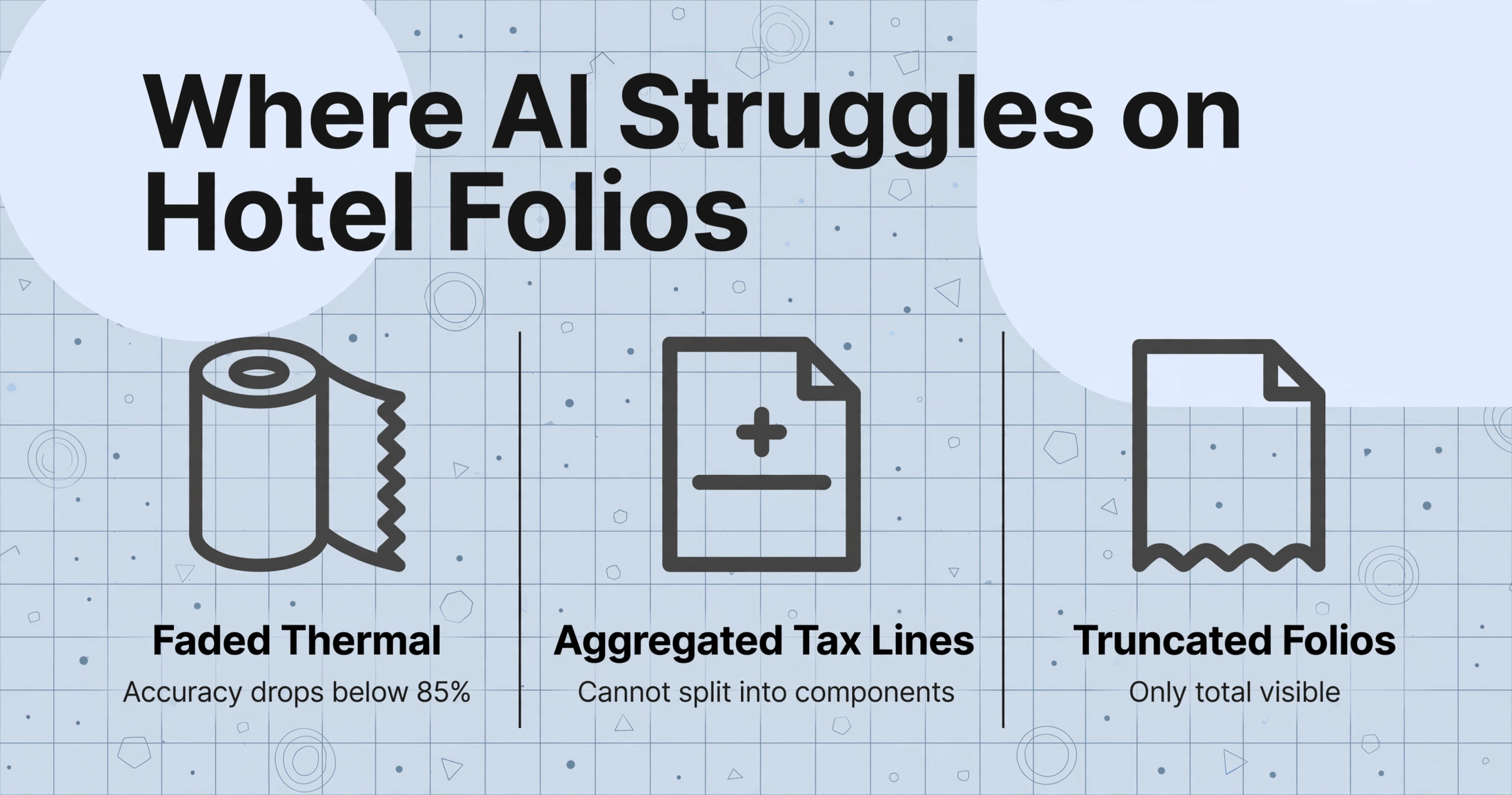
The limitations are honest and specific. Knowing them prevents wasted time on documents that will not produce reliable results.
Faded thermal paper. This is the single biggest accuracy killer. Many independent hotels and smaller chains still print folios on thermal receipt paper. Over weeks of storage in a wallet, glove compartment, or desk drawer, the heat-sensitive coating degrades — text fades, numbers become illegible, and even the best AI model cannot read characters that are no longer physically present. On heavily faded thermal folios, field-level accuracy can drop below 85%. If the folio was photographed weeks after checkout rather than scanned at the front desk, the combined effect of fading and phone photo quality can push accuracy even lower. The fix is preventative: photograph or scan the folio at checkout, before it fades.
Aggregated tax lines. Some hotels — especially properties using older PMS systems — print a single "Tax: $42.87" line that aggregates state, city, and convention center taxes into one number. The AI reads the total correctly, but it cannot split a single tax line into its component parts. If your expense policy or client contract reimburses state tax but not city hotel tax, an aggregated tax line leaves you with a manual allocation problem. The AI extracts what is on the page, and what is on the page is one number.
Truncated folios showing only the total. Some hotels, assuming the guest wants a simplified receipt, print or email an abbreviated version showing only the room total and a grand total — omitting all line item detail. The AI extracts the visible fields (hotel name, dates, total) at high accuracy, but the line-item columns (room rate, F&B, parking, minibar) will be empty. The extraction is not wrong — it is literally reading a document that does not contain the data you need. The traveler must specifically request the "guest folio with zero balance" — the full itemized version — for line-item extraction to work.
Handwritten additions on printed folios. Tips added by hand, handwritten notes from the front desk, or manual corrections ("Rate adj. -$20") written on the printed folio are read at lower accuracy than printed text. AI handwriting recognition has improved dramatically, but a single digit scrawled in a narrow margin — "15" as a tip on a $247 dinner charge — can be ambiguous. The system flags low-confidence fields for review rather than guessing, but the human review pass is where the time goes on these edge cases.
Extreme angle phone photos. A folio photographed from 40 degrees or more off perpendicular creates keystone distortion. The AI applies automatic perspective correction, but characters near the far edge of the page get stretched more during correction than characters near the near edge. On the narrow, small-font format that hotel folios use (many folios pack 40+ line items into two pages of fine print), this distortion can render small-font charges unreadable. The practical rule: if you can clearly read every line item on the photo with your eyes, the AI can too. If you are squinting at the minibar column, reshoot.
How to Get the Best Results from Hotel Folio Extraction
These five practices move a borderline folio into the reliable extraction zone. None requires changing your expense tool or workflow — they are source-document choices.
1. Request the full guest folio with zero balance. At checkout, specifically ask for the "guest folio with zero balance" — not a simplified receipt or a booking confirmation. The zero-balance line confirms no outstanding charges and is required for IRS accountable plan compliance. Many hotels default to a truncated version; asking explicitly for the full itemized version is the single highest-impact action you can take.
2. Capture at checkout, not weeks later. Thermal folios from independent properties begin fading immediately. The difference between a folio photographed at the front desk and one photographed from a desk drawer three weeks later can be 10+ percentage points in extraction accuracy. Make it a habit: photograph or ask for a PDF before leaving the lobby.
3. Use email PDF delivery when available. Most chain hotels (Marriott, Hilton, IHG, Hyatt) can email a PDF folio at checkout. This is the cleanest source — machine-generated from the PMS, no perspective distortion, no fading, all line items preserved. Set up the delivery during check-in if possible. A PDF folio consistently produces 95–99% field-level accuracy.
4. Photograph straight-on, fill the frame. When photographing a printed folio, hold the phone parallel to the page. Fill at least 80% of the viewfinder with the document. Use natural daylight or diffuse overhead light — avoid flash, which creates a central hotspot. On multi-page folios, photograph each page separately. For a detailed guide on phone photo best practices, see our article on AI extraction from phone photos.
5. Include a screenshot of the folio summary from the hotel app. If the printed folio has faded, the hotel app may still show the itemized charges on screen. Taking a screenshot of the app's folio view provides a backup digital source that the extraction can read alongside the printed version. Some apps (like Hilton Honors) display a simplified folio in-app but offer a full PDF download — use the PDF option when available.
What a Real Folio Extraction Looks Like
Here is what a typical folio extraction produces — using a PDF emailed from a Marriott property as the source. The AI reads the document and populates the columns you defined:
| Field | Extracted Value | Confidence |
|---|---|---|
| Hotel Name | Marriott Chicago O'Hare | High |
| Check-In Date | 2026-06-10 | High |
| Check-Out Date | 2026-06-13 | High |
| Room Rate (per night) | $249.00 | High |
| Number of Nights | 3 | High |
| Room Subtotal | $747.00 | High |
| State Occupancy Tax | $44.82 | High |
| City Hotel Tax | $43.33 | High |
| Convention Center Tax | $18.68 | High |
| Restaurant Charges | $89.50 | High |
| Room Service | $34.00 | High |
| Parking | $72.00 | High |
| Minibar | $12.50 | Medium |
| Wi-Fi | $0.00 | High |
| Total | $1,061.83 | High |
Each row in the output spreadsheet represents one hotel stay. The fields you define become the columns; values populate where the AI finds matching data. If a particular folio has no charges for a given column — no minibar, no parking — that cell stays empty. The AI does not hallucinate values.
Now compare this to the same folio processed by a template-based OCR tool. That tool was configured for a Hilton folio last month. On this Marriott PDF, it maps the room rate to the "Meals" column because that is where the numeric field landed in the template coordinates — and the $44.82 tax line gets written into the "Total" field. The result is a spreadsheet full of wrong values in the right columns, which is harder to catch than missing data. Semantic extraction avoids this entirely because it reads each field by meaning, not by position.
For finance teams processing batches of hotel folios across multiple chains and months of travel, the consistency advantage compounds. A template-based workflow that needs a separate configuration for Marriott, Hilton, and IHG folios is not actually automated — the configuration time just moved from data entry to template setup. AI extraction that reads all three with the same column definitions is batch automation in the practical sense: upload 30 folios from 8 chains, get one spreadsheet, review for outliers, done.
Frequently Asked Questions
Can AI extract minibar charges from a hotel folio?
Yes, when they are listed as a separate line item. Most chain hotels itemize minibar charges individually — "Minibar - Cola: $4.50," "Minibar - Peanuts: $3.50" — and the AI extracts them. If the minibar charge is aggregated into a single "Incidentals" line, the AI captures the total but cannot split it into individual items.
Does AI work on folios from non-English hotels?
Yes. The AI vision model reads documents by understanding layout and context, not by matching against English-language templates. A folio from a Paris hotel labeled "Chambre," "Taxe de Séjour," "Petit Déjeuner," and "Parking" is read and categorized the same way as an English-language folio — the column names you define in English map to the document content regardless of the folio's native language. The same applies to Japanese, Korean, Spanish, German, and other languages.
How accurate is extraction on a screenshot from a hotel app?
A clean screenshot from the Marriott Bonvoy or Hilton Honors app typically achieves 90–95% field-level accuracy on the displayed fields. The caveat: some hotel apps display a simplified version in-app and offer the full detail version only as a PDF download. The full PDF is better for extraction because it preserves all line items and the zero-balance line, but the screenshot works for whatever fields are visible.
Can AI extract data from a booking.com receipt instead of a hotel folio?
Partially. A Booking.com or Expedia receipt shows the reservation total, hotel name, and stay dates — which the AI extracts at high accuracy. What it does not show is the line-item breakdown: room charges by night, F&B charges, minibar, parking, resort fees, or incidentals posted during the stay. For expense reconciliation purposes, a platform receipt may be sufficient if the traveler had no incidental charges. For full accountable plan compliance with IRS Publication 463, the itemized guest folio with zero balance is required. The pre-stay document works the same way: a hotel booking confirmation screenshot yields the hotel name, check-in and check-out dates, room type, and reservation total before the folio ever exists.
How much time does AI extraction save on a batch of hotel folios?
A single manual folio line-item entry — reading 47 line items from a four-page folio, typing room rate, each tax breakdown, F&B, parking, and incidentals into separate fields — takes 5 to 10 minutes for an experienced finance person. AI extraction does the same in 5 to 10 seconds. For a month-end batch of 30 folios, that is roughly 3 to 5 hours versus 3 to 5 minutes of processing time, plus a 15–30 minute review pass for outliers. The review pass is real — especially for phone photos and thermal prints — but scanning a spreadsheet for outliers is an order of magnitude faster than typing 47 line items from scratch, thirty times over.
Do I need to create a separate template for each hotel chain?
No. Template-free AI extraction reads every folio by understanding what each field means — it does not match coordinates on a template. A Marriott PDF that places the room rate in the upper-left and a Hilton PDF that places it in the center-right are both read correctly using the same column definitions. The batch processing workflow handles mixed-format folios from any number of hotel chains in a single upload, and the output merges them into a single consolidated spreadsheet. No per-chain configuration required.
Can AI allocate hotel folio charges to the correct GL codes?
Yes, through custom column extraction with computed columns. You define a column for "Room GL Code," "F&B GL Code," "Parking GL Code," etc., and write a rule that maps each charge type to the correct account. The AI extracts the charge type (using the charge description to determine whether it is room, food, parking, or incidentals) and then applies the GL mapping. On a typical business stay, the room rate maps to Lodging (GL 6400), F&B maps to Meals & Entertainment (GL 6500, 50% deductible), and parking maps to Transportation (GL 6600). For a complete walkthrough of this workflow, see our guide on turning a hotel folio into GL-coded expense report lines.