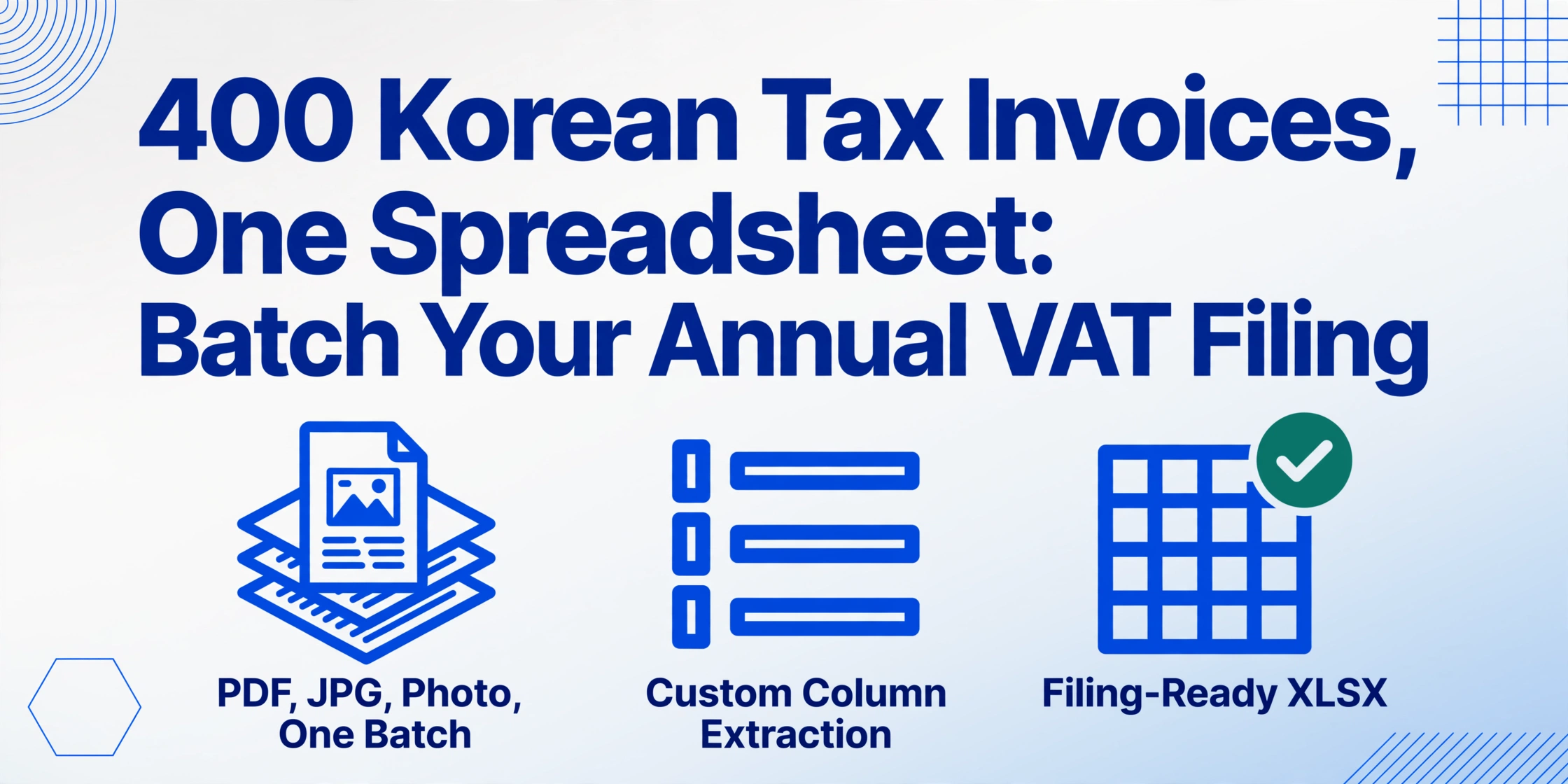
400 Korean Tax Invoices,
One Spreadsheet for Annual VAT Filing
South Korea's simplified taxpayer (간이과세자) system covers over 3 million microbusinesses — small retailers, restaurant owners, freelance contractors, and local manufacturers — filing VAT once a year by January 25. For a typical small business, that means collecting every invoice received across twelve months, extracting the data from paper slips and PDFs and KakaoTalk photos, and consolidating everything into a single dataset before the deadline. The arithmetic of doing that invoice by invoice is punishing: at 3 minutes per document, 300 invoices represent 15 hours of concentrated data entry in the first three weeks of January.
Key Takeaways
- Your January VAT scramble isn't about typing faster — a 400-invoice annual batch creates error rates that personal diligence cannot fix.
- The printed VAT (부가세액) on every invoice is a decoy — the industry ratio turns your rate to 1.5–4% which means a second manual pass across every row.
- Your real job shifts from data entry to defining columns once and verifying the output — batch extraction handles the rest.
Why an Entire Year's Worth of Invoices Is a Different Problem
General taxpayers (일반과세자) — businesses with annual revenue above 104 million won — file VAT four times a year: quarterly returns by April 25, July 25, October 25, and January 25. Each quarter covers three months of transactions, which limits the volume of invoices that must be processed in any single window. The data consolidation burden is spread across the calendar.
Simplified taxpayers file once a year, covering the entire period from January 1 to December 31 — one return for 365 days of transactions, due by January 25 under Article 67 of the Value-Added Tax Act (부가가치세법). A small business with 30 to 50 active suppliers typically accumulates 200 to 500 invoices over that span. Every one of those documents — whether it is an electronic tax invoice (전자세금계산서) issued through Hometax (홈택스), a paper slip from a local wholesaler, or a photographed receipt forwarded by KakaoTalk — must be accounted for on the return.
The compressed filing window creates a structural problem. If you are the business owner, you are also managing inventory, customer service, payroll, and end-of-year operations during December and early January. Finding 15 uninterrupted hours to type invoice data into a spreadsheet is not just time-consuming — it is a genuine operational bottleneck. And because the data entry happens under time pressure, the error rate climbs. A transposed digit in a business registration number (사업자등록번호) or a misread supply value (공급가액) may only be caught weeks later when the 세무사 (tax accountant) flags a discrepancy, requiring a correction filing that costs both time and potential penalties.
This is not a marginal edge case. Over 3 million Korean microbusinesses operate under the simplified taxpayer system. Each one faces the same January data scramble. Yet most invoice extraction content — in both Korean and English — focuses on general taxpayer workflows, leaving 간이과세자 businesses to figure out the batch consolidation step on their own.
The difference between general and simplified taxpayer data preparation is not just scale — it is the rhythm. Four quarterly batches are manageable. One annual batch of 400 invoices is a different class of problem.
The Batch Workflow: One Pass from Files to Filing
Custom Column Extraction — the core mechanism of ImageToTable.ai — changes the arithmetic. Instead of opening each invoice, locating the fields by eye, typing them into a cell, and repeating 300 times, you define the output structure once and the AI reads every document against it. You type the column names you want to extract; the AI understands what each field means — not where it sits on the page — so the same column definition works across every supplier's invoice format without templates or per-vendor configuration. This semantic approach is the enabler of batch processing at scale. For a closer look at how field-level extraction works for individual documents, see our step-by-step guide to extracting 간이과세자 세금계산서 data.
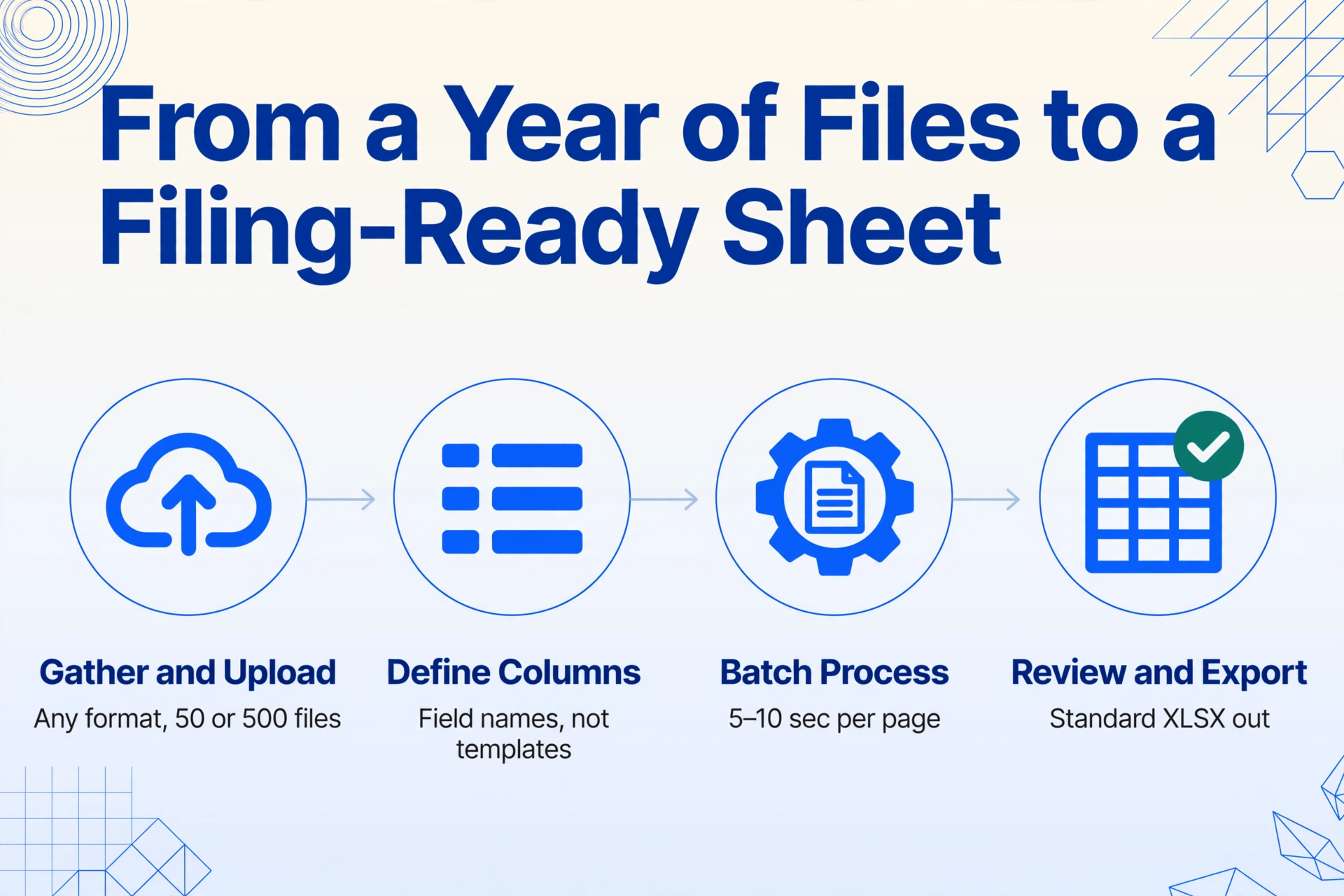
Gather and upload everything at once
Collect every invoice from the year — electronic PDFs downloaded from Hometax, paper slips scanned as JPGs, photos taken with your phone, images forwarded through KakaoTalk. Upload them all in a single batch. The tool accepts PDF, JPG, PNG, and WebP, and handles mixed formats within the same batch. There is no minimum or maximum file count for a single run — 50 invoices or 500, the upload process is the same.
Define your extraction columns
Enter the field names that match what your spreadsheet needs. For an annual VAT filing batch, include these columns:
Issue date (작성일자)— groups invoices into the correct tax yearSupplier registration number (공급자 사업자등록번호)— supplier identifier for your recordsSupplier name (공급자 상호)— who issued the invoiceSupply value (공급가액)— the net transaction amountVAT amount (부가세액)— 10% printed on the invoice faceTotal amount (합계금액)— quick reconciliation check
The column names you enter become the exact headers of your output table — no renaming or reordering needed after extraction. If your accounting software uses specific field labels (for example, 공급자등록번호 instead of 사업자등록번호), enter those directly.
Add columns for the industry ratio calculation
This is the step that differentiates a 간이과세자 batch from a general taxpayer batch. Add an inferred column: Industry type (업종, options: 소매/제조/건설/서비스) so the AI classifies each invoice by business type. Then add a computed column like Estimated VAT liability (공급대가 × industry ratio × 10%) to calculate the approximate tax amount that maps to your actual liability — not the 10% printed on the invoice, but the reduced amount based on the supplier's industry value-added ratio. The computed column feature means the calculation happens during extraction, not as a post-processing step in Excel.
Process and download one consolidated spreadsheet
Click process. Each page takes 5–10 seconds. For 300 invoices, the batch completes in under an hour of wall-clock time — while you work on other things. The output is a single XLSX file with one row per invoice and your column names as headers, sorted by date. A single typo in a 사업자등록번호 or a misplaced decimal in 공급가액 that would have taken minutes to detect in a manual batch is visible at a glance when every field sits in its own column. You can inspect the output in the review interface before downloading, or hand the file directly to your 세무사 without reformatting.
Try it on a batch of your own invoices — no login required:
Files are processed securely and not stored.
Handling the Industry Value-Added Ratio in a Batch Run
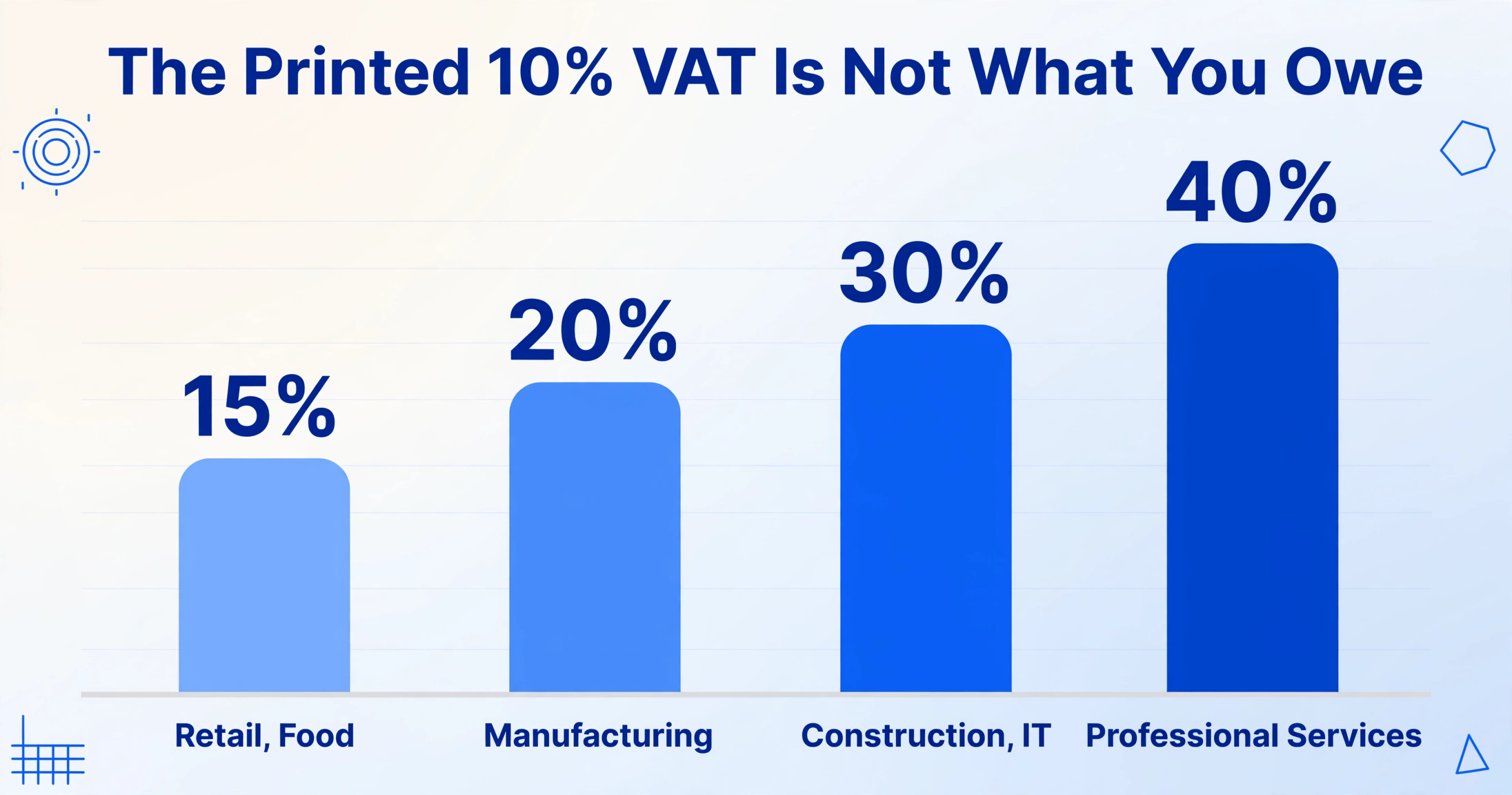
When you extract the VAT amount (부가세액) from a 간이과세자 invoice, the number printed on the document is calculated at the standard 10% rate. But your actual tax liability for the annual return is computed using the industry-specific value-added ratio (업종별 부가가치율) — a percentage that varies from 15% to 40% depending on the supplier's business classification, as published by the NTS under the amended VAT rate schedule effective from July 2021. The simplified taxpayer's effective tax rate lands between 1.5% and 4% after applying this ratio.
In a batch of 300 invoices from 30 different suppliers, you may encounter four or five different industry ratios. A restaurant delivery invoice falls under retail (15%). A freelance designer invoice falls under professional services (40%). A small contractor's invoice falls under construction (30%). Summing the printed 부가세액 column without adjusting for these ratios would produce a number that bears no relationship to what you actually owe.
| Industry Category | Value-Add Ratio (2021.7+) | Effective VAT Rate | Typical Suppliers |
|---|---|---|---|
| Retail, Food service, Scrap collection | 15% | 1.5% | Local grocery wholesalers, restaurant ingredient suppliers |
| Manufacturing, Agriculture, Fisheries, Parcel delivery | 20% | 2.0% | Small manufacturers, farms, courier services |
| Construction, Transport (excl. parcel), IT/Telecom | 30% | 3.0% | Contractors, logistics providers, software developers |
| Finance/Insurance, Professional services, Facilities management, Real estate rental | 40% | 4.0% | Accountants, consultants, property lessors, cleaning services |
The computed column feature in Custom Column Extraction handles this complexity within the batch itself. Define a column like Actual tax (공급대가 × 업종별 15% × 10%) — or use the inferred column approach where the AI reads the industry type from each document and applies the corresponding ratio automatically. In either case, the output spreadsheet contains a column that reflects the real tax liability, not the face-value VAT amount. This saves you from having to look up each supplier's 업종코드 (industry code) on the NTS website and recalculate invoice by invoice after extraction.
For a complete reference of all Korean tax invoice fields — covering both 간이과세자 and 일반과세자 documents — see our Korean tax invoice extraction guide, which includes a field-by-field breakdown of the seven mandatory items on every 세금계산서. For the wider Korean tax document family — cash receipts, delivery notes, and certificates — our Korean tax document extraction hub collects the field sets for each type.
What Happens When Your Batch Includes Mixed Sources
One of the practical realities of the 간이과세자 system is that invoices arrive through multiple channels. Unlike general taxpayers who issue and receive most invoices electronically through Hometax or certified ASP providers like Barobill (바로빌) and Popbill (팝빌), simplified taxpayers — and their suppliers — rely on a mix of electronic and non-electronic methods. The January filing dataset for a typical small business might include:
- Electronic tax invoice PDFs downloaded from Hometax or received via email from suppliers who use Douzone (더존) or ECOUNT (이카운트) ERP systems
- Paper invoices collected from local suppliers and scanned with a phone camera or office scanner
- Photographed invoices sent through KakaoTalk or email by suppliers who do not issue electronic tax invoices
- Self-issued 세금계산서 — if you as the buyer issued a tax invoice on behalf of a supplier who cannot issue one (common for transactions with sole proprietors below the 48 million won issuance threshold)
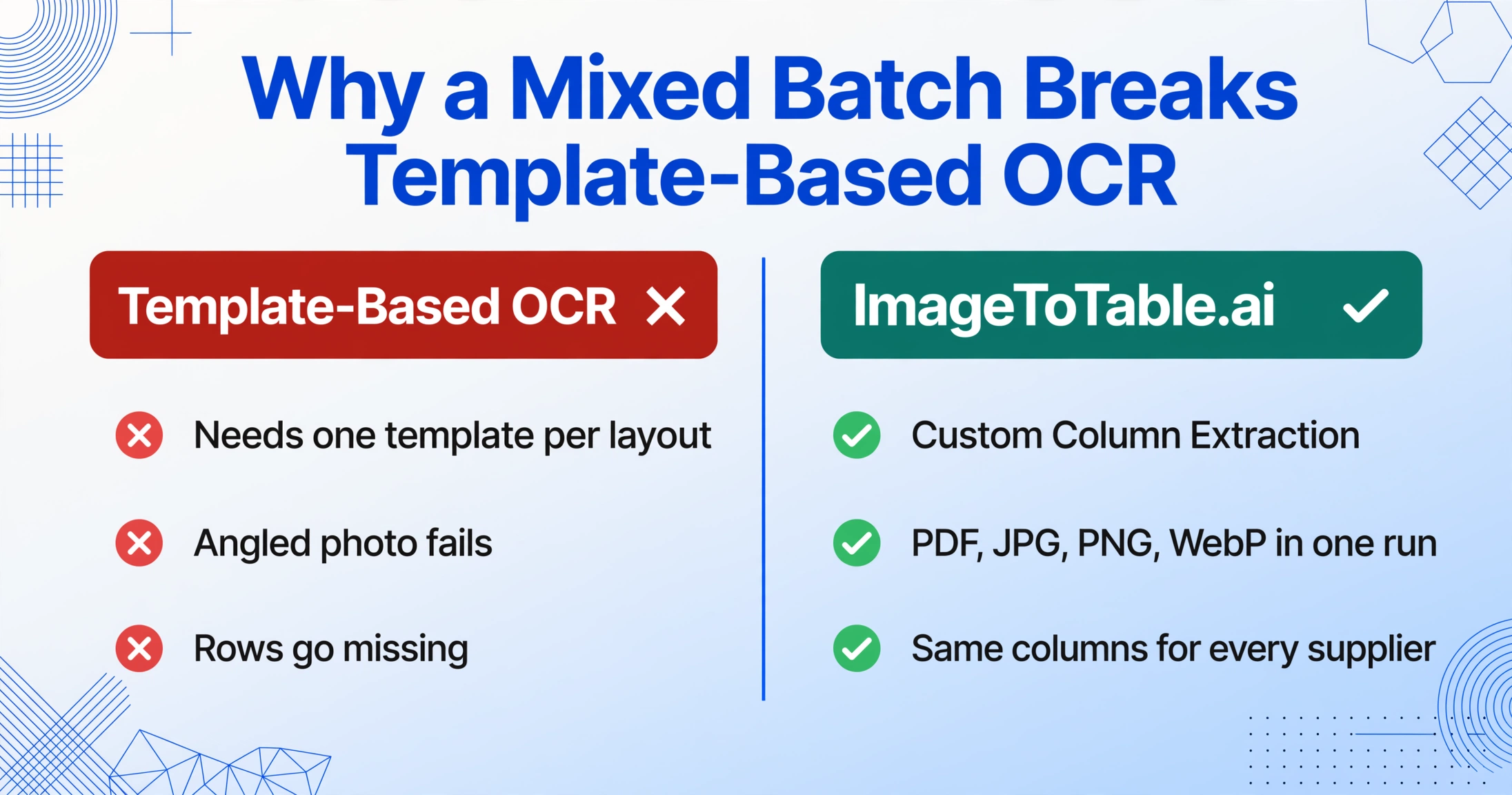
The critical capability for batch processing is format independence: the AI reads the data fields from any of these sources using the same column definition, without per-format configuration. A PDF from Hometax, a JPG scan of a paper slip, and a PNG photo forwarded from KakaoTalk all land in the same output spreadsheet with 공급가액 in one column, 부가세액 in the next, and 사업자등록번호 in the third. This is where template-based OCR tools break down — they need a separate template for each layout, and an invoice photographed at an angle or under uneven lighting will fail to match any of them. Semantic extraction does not depend on layout matching: it reads the meaning of each field, so a supply value is a supply value whether it sits in the top-right corner of an electronic PDF or the bottom-left of a photographed paper slip.
If you also need to collect invoices from suppliers who send them directly — without asking them to upload through your account — the Collection Link (수집 링크) feature generates a shareable URL that recipients open and upload files to, no registration required. For recurring suppliers, the Email Inbox (이메일 수집함) provides a dedicated address they can forward invoices to, with attachments landing automatically in your processing queue. Both feed into the same batch workflow, so invoices arriving through different channels converge into the same consolidated output.
From Spreadsheet to Hometax (or Your 세무사)
Once your batch is processed and the output is reviewed, the next question is: how does this Excel file become a filed VAT return? The answer depends on whether you file yourself through Hometax or work with a tax accountant.
If you file through Hometax (홈택스): The NTS portal pre-populates some data from electronic tax invoices issued through the system, but it does not automatically include paper invoices, photographed receipts, or transactions from suppliers who issued invoices outside the electronic system. The batch extraction output fills this gap. With your spreadsheet open alongside the Hometax filing screen, the columns you have extracted — 공급가액 by supplier, 부가세액, 작성일자 — map directly to the input fields on the simplified taxpayer return form. Having the data in a structured format cuts the filing process from hours to minutes. The NTS also requires supporting documents (증빙서류) to be submitted as PDF — you can export your extracted data as a PDF summary alongside the original invoice images.
If you work with a 세무사 (tax accountant): The vast majority of 간이과세자 businesses in Korea use a tax accountant for their annual filing. The accountant does not need access to your ImageToTable.ai account or your upload history. They need the data — clean columns of supplier registration numbers, supply values, VAT amounts, and issue dates — in an Excel file they can open and work with. The batch output is a standard XLSX that any tax accountant in Korea can use directly, without reformatting or manual re-entry. One practical tip: save a separate tab or file that breaks down the totals by the industry ratios discussed above, so your accountant can verify the 업종별 부가가치율 application without having to reconstruct it from the raw data.
If your accountant or software system requires a specific format — for example, ECOUNT ERP expects columns in a certain order for CSV import — you can name your columns to match those labels in the extraction step, so the output is import-ready without post-processing.
Frequently Asked Questions
Can I process both 간이과세자 and 일반과세자 invoices in the same batch?
Yes. If your business receives invoices from both general and simplified taxpayer suppliers — which is common — include them in the same upload. The AI extracts the same field names (공급가액, 부가세액, 합계금액) regardless of invoice type. The difference is in how you interpret the data afterward: 일반과세자 invoices use the standard 10% VAT (fully deductible by the buyer), while 간이과세자 invoices involve the industry ratio calculation. The industry classification column you add during extraction helps you separate the two groups in your output spreadsheet.
How long does a batch of 400 invoices take to process?
Each page processes in 5–10 seconds. At the upper end, 400 invoices complete in approximately 70 minutes of processing time. The key difference from manual work is that you do not need to sit at the computer during processing — upload the batch, start processing, and come back to a completed output file.
What if some invoices are blurry or poorly photographed?
The AI performs best on clearly printed documents scanned at reasonable resolution. For invoices photographed with a phone camera under normal lighting, accuracy for printed text is up to 99%. If an invoice has handwritten corrections, smudged text, or extremely low resolution, the affected fields may be less accurate. The review interface highlights extracted values against the original image so you can spot-check the output without re-reading every document word by word.
What about the 0.5% input tax credit (공제세액)?
Simplified taxpayers can claim a limited input tax credit of 0.5% of their purchase amounts (매입액 × 0.5%). If you want to include this in your batch extraction, add a computed column with the formula Input credit (공급가액 × 0.5%) — the AI calculates it during extraction. Note that input tax credit is only available for purchases with proper supporting documents (세금계산서, 신용카드 매출전표, 현금영수증).
Do I still need a 세무사 if I use batch extraction?
Batch extraction provides the structured data that feeds into the VAT return process. The actual filing — completing the return form on Hometax, calculating the final tax amount, submitting supporting documents, and managing any adjustments — is a separate step. Many 간이과세자 business owners choose to use a tax accountant for the filing itself, and having clean extracted data makes the accountant's work faster and reduces the chance of filing errors.
Can I use the extracted data for other purposes, not just VAT filing?
Yes. The same dataset that prepares your annual VAT return is also useful for supplier spend analysis, budgeting for the coming year, and verifying that the electronic invoices registered in Hometax match what you actually received. The extraction is not a tax-specific process — it is a document-to-data conversion that happens to produce the inputs your VAT filing requires.
Your January Filing Starts with Today's Data Preparation
The annual VAT deadline does not change — it falls on January 25 every year, and every day of delay in preparing your invoice data is a day of compressed work during the filing window. The difference between a stressful January and a controlled one is often just a single dataset: every supplier registration number, every supply value, and every transaction date already sitting in a spreadsheet before January begins. The files you have on your phone, in your email, and in your filing cabinet are the raw material of that dataset. One batch pass converts all of them into the structured input your VAT filing needs.