Accounts Receivable Automation Software
Leaves Out One Step
Every list of the best accounts receivable automation software in 2026 compares the same things: how well a platform matches cash, whether its collections workflow can chase a late payer, how deep its credit module runs, and which ERP it plugs into. Those are the right questions to ask about the software. Every one of those comparisons assumes a starting condition that a large share of B2B payments do not meet. The payment arrives, and the detail explaining which invoices it covers arrives with it, readable and ready. In practice the money lands in the bank with a reference that means something to the payer, while the remittance advice that decodes it sits in an email, a PDF, or a screenshot. Before any matching or dunning can run, someone has to turn that document into rows.
ImageToTable.ai is published by the team that wrote this review, and it is document extraction, not an AR platform. It does not match payments, run collections, or manage credit. It sits one layer below the platforms reviewed here, turning the remittance documents they depend on into structured data. It stays out of the platform ranking and appears where it honestly fits.
Key Takeaways
- Four of the six jobs in AR automation all hinge on one fact, and none of the platforms can read it off a payment.
- A bank feed reading "ACH CREDIT 48,210.00" names no invoice, so the remittance detail sits unread in a separate email.
- Matching is a reading problem first, so ask who turns the remittance document into rows, not which platform matches best.
What Accounts Receivable Automation Software Actually Automates
Accounts receivable automation software covers the span between sending an invoice and posting the cash it brings in. The category name hides several distinct jobs, and the platform lists blend them together. Knowing which job is failing in your business is the first step to a shortlist that fits.
| Module | What it does | The input it needs |
|---|---|---|
| Invoicing and e-invoicing | Creates and delivers invoices by email, print, EDI, or a buyer portal. | Invoice data from your billing or accounting system. |
| Cash application | Matches each incoming payment to the open invoices it pays, then posts the entry. | A payment amount and a reference, plus the invoice detail they point to. |
| Collections and dunning | Prioritizes overdue accounts and sends escalating reminders. | An accurate aging report of what is genuinely unpaid. |
| Credit management | Sets limits and terms, and scores customer risk before an order ships. | Clean customer payment history and credit data. |
| Deductions and disputes | Captures short-pays and chargebacks, then routes them for resolution. | The remittance detail showing the deduction and its reason code. |
| Payment portal and integrations | Lets customers view and pay invoices, and syncs data with the ERP. | Invoice and payment data consistent across every connected system. |
Four of these six jobs depend on one fact: knowing which invoices a payment is for. Cash application pairs the payment, collections chases what is truly open, deductions explain a short-pay, and credit history is built from posted cash. When that link is missing, every module downstream reports noise.
That is why the platform you choose is only half the decision. The other half is whether the data the platform runs on exists in a form it can read, and that question rarely appears in a feature comparison.
The Leading AR Automation Platforms, and Who Each Fits
The strongest platforms in the category are genuinely strong, and they are priced that way. Most sell on a custom quote with an implementation project on top, so the shortlist matters more than a sticker price almost none of them publish. The table below gives each one an honest fit and an honest limit.
| Platform | Best fit | Where it leads | Main limitation |
|---|---|---|---|
| Billtrust | Mid-market and enterprise B2B that must deliver invoices through many channels | Multi-channel invoice delivery, buyer portal, payments network, cash application | Quote-only pricing, often with per-seat components |
| HighRadius | Large enterprises with a dedicated AR team and multi-ERP complexity | AI cash application, deductions, credit, collections, and global e-invoicing at scale | Among the longest implementations in the market |
| Versapay | Mid-market teams that want customer self-service and collaboration | Collaborative buyer portal, real-time dispute resolution, cash application | Lighter on credit risk and global compliance than enterprise-first suites |
| Quadient AR (formerly YayPay) | Mid-market B2B that wants faster deployment | Collections dashboards, reminder automation, cash application, aging visibility | Dispute resolution leans on manual agent work |
| Esker | SAP-first and multinational operations | Global document and workflow automation, e-invoicing compliance, AR collections | Complex implementation; less native deduction automation |
| Sidetrade | European and smaller enterprises | Order-to-cash suite with the Aimie AI agent and payment prediction | Smaller North American footprint |
| BlackLine Invoice-to-Cash | Large enterprises tying cash application to the financial close | High-volume cash application inside the close and reconciliation process | Built around the close, not customer-facing AR |
For a small team, the platform tier is usually more than the job needs. BILL, Zoho Books, and QuickBooks handle invoicing, reminders, and payment acceptance at a self-serve price. Upflow, Gaviti, and Kolleno focus on collections cadences, and Centime adds cash visibility for growing SMBs. None of these removes the remittance problem, and a portal can even make it more visible: a customer portal only helps when customers use it, and the emailed remittance that arrives instead still lands in someone's inbox.
Across every tier, the platforms share one assumption. They are built to match and act on payment data. Reading that data out of a PDF, a spreadsheet, or a screenshot is not a feature they sell.
The Precondition Every Platform Assumes: Remittance Processing
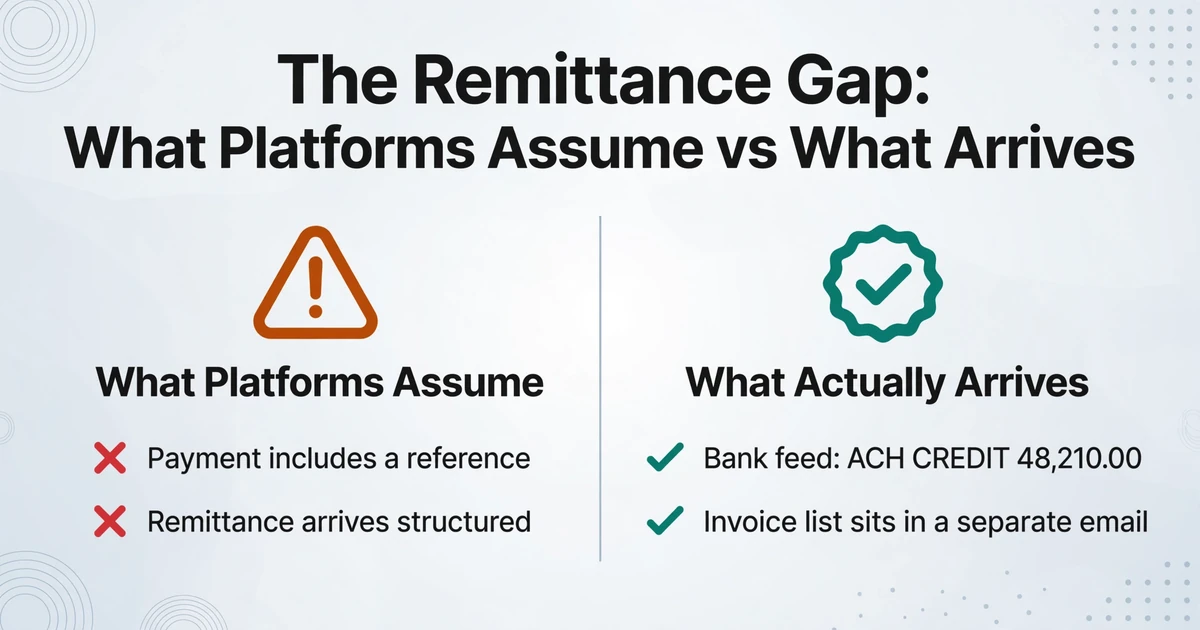
Cash application matches on two keys: the amount and a reference to an open invoice. The amount is always present. The reference frequently is not. A bank feed line may read "ACH CREDIT 48,210.00" with an abbreviated payer name and nothing else, while the eleven invoices that payment covers are listed in a remittance advice the payer sent somewhere else.
The Federal Reserve's payments improvement program describes the pattern plainly: remittance information is often sent in an unstructured format and detached from the payment itself. Mainstream ACH adoption led most payors to send remittance detail separately, by email or web portal, and only a small percentage include it inside the payment. Retrieving that detail has been, in the Fed's words, "a largely manual process."
Practitioners describe the same loop. In an r/Accounting thread from April 2026, a team processing more than 50 ACH and wire payments a day wrote that bank statements "alone don't carry enough detail (customer name, invoice numbers)" for their ERP to auto-match, so the team has to "dig through the remittance inbox, pull the advice manually, and apply each payment by hand." The platform had nothing to match, because the detail it needed was still sitting in an inbox.
The remittance advice is not one format. It arrives as a spreadsheet with invoice numbers in a single column, a scanned image of a printed table, plain text pasted into an email body, an EDI 820 file, or an ISO 20022 remittance message. The X9 market guide on ISO 20022 remittance content draws the line that decides whether a payment posts itself: structured remittance information is what an AR system needs for straight-through processing, while unstructured remittance "requires manual intervention and posting by AR or a tool to convert the unstructured information to a format that can be ingested by the AR system." That final clause names the layer this review is about.
The volume makes the gap structural rather than occasional. Nacha reported 8.08 billion B2B payments on the ACH Network in 2025, up 9.9% from 2024 and worth $63.11 trillion. If the majority arrive without structured detail attached, then converting remittance documents is one of the largest manual steps left in the receivables cycle.
Cash application is a matching problem only after it is a reading problem. The platforms automate the matching. The reading is still the buyer's job.
Where Extraction Fits, and What It Does Not Do
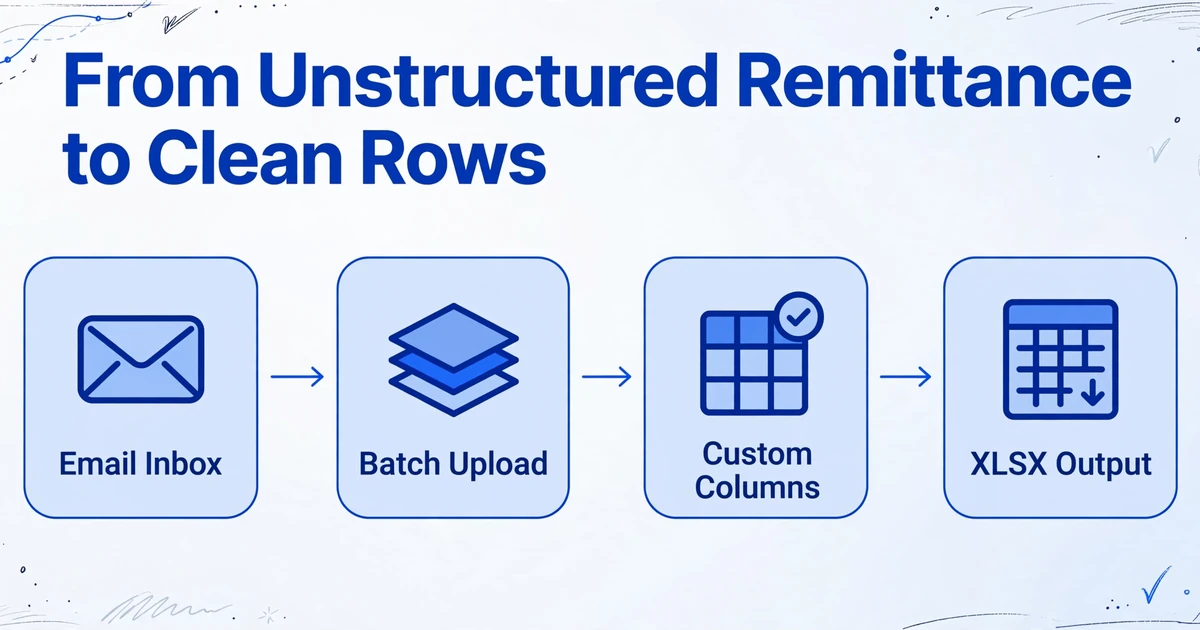
The gap the X9 guide describes has a direct answer: convert the unstructured remittance into a consistent table before it reaches the platform. That is document extraction, and it is a different product from an AR suite.
ImageToTable.ai reads remittance advice, payment stubs, bank statements, and processor settlement reports, and returns the transaction rows as a spreadsheet. The mechanism is Custom Column Extraction: you type the column names you want, such as "Customer," "Invoice Number," "Amount Applied," and "Remittance Date," and the AI locates each value by understanding what it means rather than by where it sits on the page. There is no template to draw and no sample to train, and the names you type become the headers of the output table.
Four capabilities matter for remittance work. Batch processing means you upload many files at once, for example a month of remittance PDFs, and they merge into a single Excel table with consistent columns, so one dataset comes out instead of one file per source. Multi-Page Merge folds a remittance that spans several pages, or a screenshot set covering one customer, back into one continuous record by grouping on a tracked value or a shared reference. The Email Inbox gives the remittance a place to land directly: share the address with customers, and forwarded attachments enter the processing queue automatically, including encrypted PDFs when a stored password matches. A computed column performs arithmetic you describe in the column name during extraction, so a column like Net (Gross - Fee) outputs the figure on every row and skips a later subtraction pass.
Because amounts are the highest-stakes field in a remittance, the output stays checkable. Review mode with bbox verification highlights exactly where on the original image an extracted value came from when you hover over its cell, and clicking a region on the image jumps back to the matching cell. A corrected field can be compared against the original AI value in one click. The same approach applied to a different regional AR document, Brazilian boletos at accounts-receivable scale, shows how the columns adapt to the local format. If your shortlist question is really about extraction tools rather than AR platforms, the invoice data extraction software comparison covers that ground, and the payables side of the same workflow is mapped in accounts payable automation.
ImageToTable.ai does not connect to a bank or an ERP, match payments to invoices, decide which invoice a payment covers, post journal entries, run collections, set credit limits, or resolve deductions. It produces the structured remittance data that a platform, an ERP, or a person then acts on.
That boundary is the point. A tool that promises to both read your remittance and run your receivables is either integrating with every source you have, including the PDFs and screenshots most platforms skip, or guessing at matches it cannot verify. The useful split is simple: automate the reading, keep the deciding.
How to Choose: Platform, Extraction, or Both
Answer three questions in order and the decision usually falls out. The goal is to put each layer where it earns its cost.
Which job is actually failing?
If invoices are not going out, or customers have no easy way to pay, the platform's delivery and payment portal earn their place. If payments are arriving but sitting unapplied, the failure is upstream of matching, and extraction is where the work starts.
Where does your remittance data come from?
If most of it arrives as structured EDI 820 or ISO 20022 messages, a platform can ingest it directly. If it arrives as email attachments, PDFs, spreadsheets, and screenshots, no matching engine can read it until something converts it into rows first.
Who will operate it?
Enterprise platforms need ERP access, clean customer master data, and months of implementation. A no-code extraction tool sets up in an afternoon and outputs an XLSX, CSV, or JSON file that your existing systems can take as input.
The two layers work together. A platform fed unreadable remittance produces exceptions it cannot explain. Extraction without a platform produces clean rows that still need somewhere to post. Most teams need both, and only one of them usually makes the shortlist.
Frequently Asked Questions
What is the best accounts receivable automation software in 2026?
There is no single winner, because the right pick depends on your size, your ERP, and where your payment data comes from. For mid-market and enterprise teams that need broad order-to-cash coverage, Billtrust and HighRadius lead on cash application, deductions, credit, and collections. Versapay and Quadient AR fit mid-market teams that want customer self-service and faster deployment. Esker suits SAP-first multinationals. For small teams, BILL, Zoho Books, and QuickBooks cover invoicing and reminders at a self-serve price. None of them reads your remittance advice for you.
What is cash application in accounts receivable?
Cash application is the process of matching each incoming payment to the open invoices it pays, then posting the entry so the customer's balance is correct. It depends on remittance detail to identify which invoices a payment covers. When that detail is missing or unstructured, the payment stays unapplied regardless of which platform you use.
What is a remittance advice?
A remittance advice is the document or message that lists which invoices a payment covers, and often the deductions or discounts applied. It arrives in many forms: a PDF, an Excel attachment, a scanned image, text inside an email body, an EDI 820 payment order, or an ISO 20022 remittance message. Structured formats can post automatically; unstructured ones need a person or a conversion tool.
Does ImageToTable.ai match payments to invoices?
No. It reads remittance advice, payment stubs, bank statements, and settlement reports and returns the transaction data as a spreadsheet. It does not connect to your bank or accounting system, match payments to invoices, or post entries. It completes the reading step so that matching, whether done by software or a person, has clean rows to work with.
Can it read remittance advice in different formats?
Yes. Inputs include PDFs, including password-protected files, plus JPG, PNG, WebP, AVIF, and screenshots. Because extraction works from the meaning of each value rather than its position on the page, a digital remittance, a scanned table, and a phone photo can feed the same output table with the same columns. Recognition accuracy for printed table data reaches up to 99%; dense handwriting is better handled on a higher processing tier.
Do I still need AR automation software if I extract the data?
Usually yes. Extraction produces structured remittance data; it does not keep a ledger, apply cash, chase late payers, or manage credit. The extracted file is the input your AR platform, ERP, or spreadsheet process consumes. The tool removes the retyping between the document and the system, not the system itself.
The platform shortlist answers the question every search result is asking: which accounts receivable automation software is best. The step that decides whether your choice works sits earlier in the cycle. A cash application engine, a collections queue, and a credit model all read from the same table, and that table has to be built before any of them run. The teams that get the most from AR automation treat the remittance document as the real starting point and give the software something it can read.