Manual Data Entry vs AI:
What Each Record Actually Costs
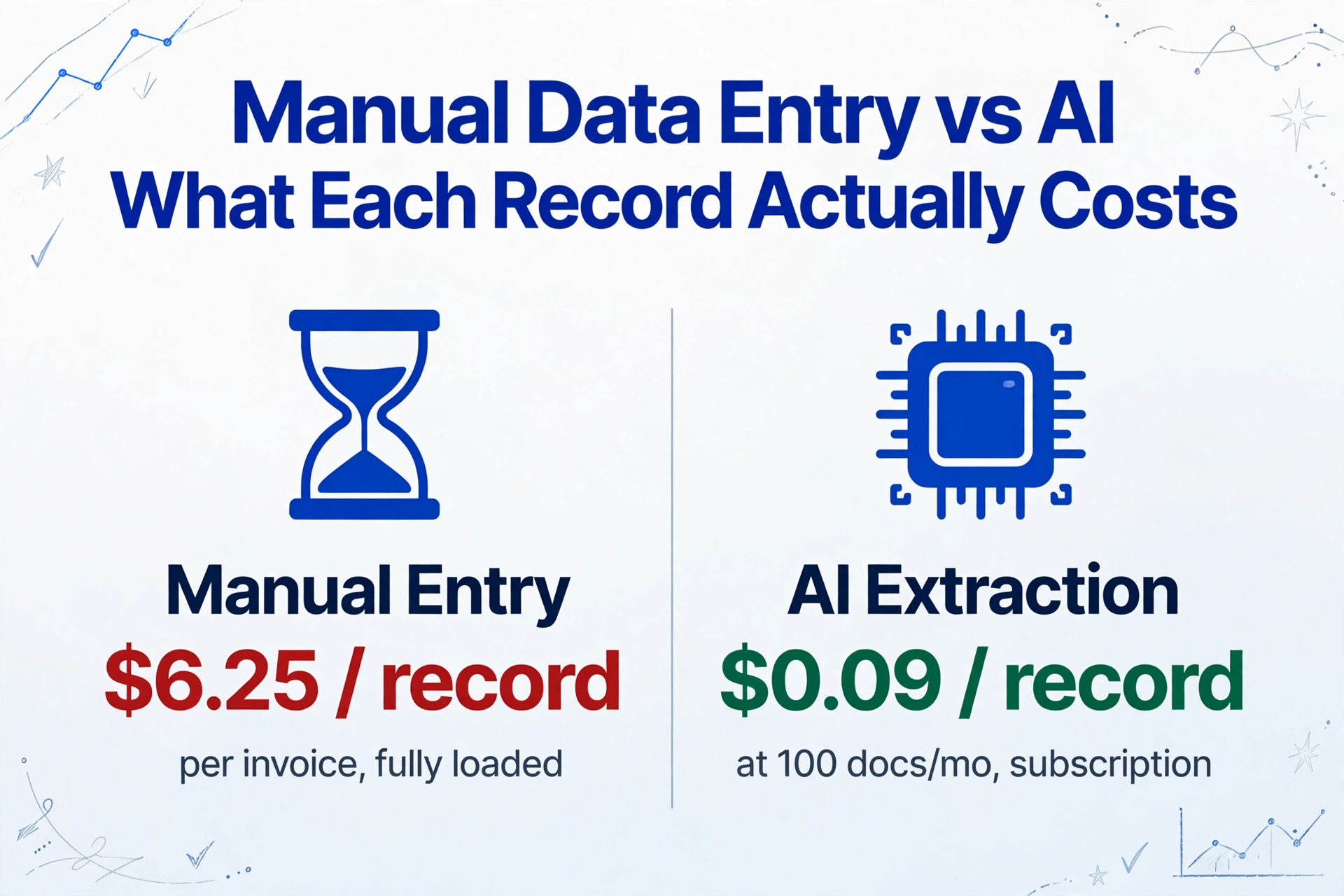
$6.25 per invoice — just the direct labor of keying fields from one vendor bill into your system. At 500 invoices a month, that’s $37,500 a year before error correction, before the receipts pile, before the intake forms stacked on someone’s desk. AI data entry, by contrast, runs $0.01 to $0.59 per document depending on your volume. The gap isn’t incremental. It’s structural — and it holds across invoices, receipts, and forms in ways most cost analyses never show.
Key Takeaways
- $37,500 a year to type 500 invoices a month — and $10,000 more to fix what was mistyped.
- Doubling your data entry team doubles throughput but also doubles your error surface — manual entry resists growth, it doesn’t enable it.
- One ImageToTable.ai subscription extracts invoices, receipts, and forms at $0.03 per document with the same set of field names.
The Per-Record Manual Cost — Three Document Types, One Framework
Most cost comparisons fixate on invoices. That makes sense — accounts payable is the most heavily benchmarked back-office function. But manual data entry doesn’t stop at invoices. Receipts pile up from every employee who bought lunch on the road. Forms — intake packets, applications, surveys, inspection sheets — sit in a different queue but pull from the same pool of hours. A cost analysis that ignores two of those three document types is telling you a third of the story.
The framework is the same across all three: direct labor cost (hourly wage × time per document) plus error correction cost (error rate × cost per error). The numbers change because the documents are different — different complexity, different volume patterns, different people doing the work.
| Document Type | Who Does It | Avg. Loaded Wage | Time Per Document | Direct Labor | Error Rate | Error Cost | Total Per Record |
|---|---|---|---|---|---|---|---|
| Invoice | AP Clerk | $27/hr | 12 min | $5.40 | ~1.6% | $0.85 | ~$6.25 |
| Receipt | Employee / Bookkeeper | $23/hr | 3 min | $1.15 | ~3% | $1.50 | ~$2.65 |
| Form | Data Entry Clerk | $23/hr | 8 min | $3.07 | ~3% | $1.50 | ~$4.57 |
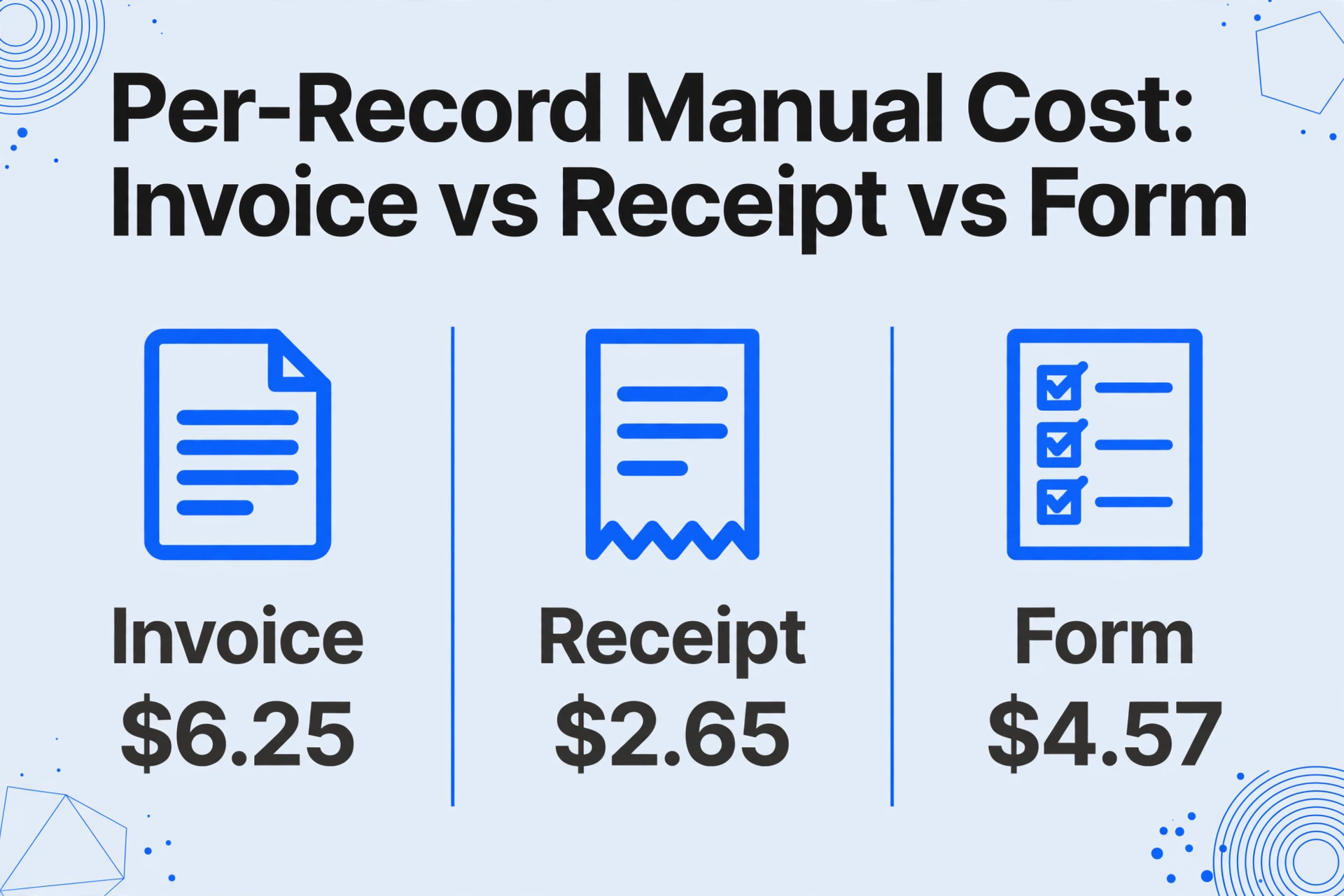
These are conservative midpoints. A multi-page invoice with 20 line items and GL coding can push 20-25 minutes. A crumpled thermal receipt with a faded total takes longer than a crisp PDF from a national chain. A medical intake form with handwritten checkboxes and insurance ID numbers runs well past 8 minutes. The range is real — the midpoints are what you use to build a baseline.
Note on methodology: The numbers above isolate the data entry step — reading fields from a document and keying them into a system. Full invoice processing (including approval routing, PO matching, and payment scheduling) costs $15–16 per invoice according to industry benchmarks from the Institute of Finance & Management. This article focuses on the capture-and-entry component because that’s what AI data entry replaces directly.
Where the Numbers Come From — Wage Data, Time Studies, and Error Rates
Every number in the table above has a traceable source. If you want to substitute your own wages or processing times, the framework stays the same.
Wages. AP clerks in the US earn a median $19.92 per hour according to PayScale’s 2026 data. Bookkeeping and accounting clerks earn a mean $25.75 per hour per the Bureau of Labor Statistics May 2025 OEWS release. Data entry keyers come in at $20.82 per hour mean. Loaded costs — adding benefits, payroll taxes, and overhead — typically add 30–40% to base salary. We use 35%, which puts AP clerks at roughly $27/hr loaded and general data entry clerks at roughly $23/hr loaded.
Processing times. Industry benchmarking by APQC shows that a manual AP clerk processes roughly 5 invoices per hour, or 12 minutes each for the data capture step. Individual receipts clock at 2–5 minutes depending on condition and complexity; expense reports that bundle 5–15 receipts take 20–30 minutes total according to workflow timing studies. Forms vary most — a simple one-page survey takes 3–5 minutes; a healthcare intake packet with insurance fields can run 12–20 minutes. We use 8 minutes as a moderate-complexity midpoint.
Error rates. Decades of research converge on 1–4% for manual data entry at the field level. Skilled operators under controlled conditions hit ~1%. Under typical working conditions — fatigue, time pressure, variable document quality — the rate rises to 3–4%. For invoice processing specifically, Sterling Commerce found a 1.6% per-invoice error rate. The IOFM reports that resolving each error costs an average of $53 in staff time, system corrections, and downstream follow-up. A 2025 analysis of supply chain data entry put the total cost per error at $50–$150 once you include investigation, corrections, and customer or vendor communication across multiple industry studies.
At the invoice level, these small percentages compound fast. A business processing 1,000 invoices monthly with a 1.6% error rate generates 16 errors. At $53 per correction, that’s $848 per month — over $10,000 per year — just to fix what the data entry step got wrong. And that assumes errors get caught before reaching a vendor payment or a compliance filing, which is optimistic.
What AI Data Entry Costs Per Record — Real Pricing, Not Market Averages
Most industry articles quote “$1–3 per document” for AI extraction. That number comes from enterprise AP automation suites — platforms designed for organizations processing tens of thousands of invoices per month with ERP integrations, approval workflows, and dedicated implementation teams. It’s an accurate number for that market segment, but it doesn’t tell a small business or a freelancer anything about what they’d pay.
The economics change completely when the pricing model is a flat monthly subscription rather than per-document billing. ImageToTable.ai, for example, ranges from $9 to $59 per month depending on usage tier. There’s no per-document surcharge. That means your per-record cost is simply your subscription price divided by how many documents you process:
| Monthly Volume | On $9/mo Plan | On $19/mo Plan | On $59/mo Plan |
|---|---|---|---|
| 100 documents | $0.09 / doc | $0.19 / doc | $0.59 / doc |
| 500 documents | — | $0.04 / doc | $0.12 / doc |
| 2,000 documents | — | — | $0.03 / doc |
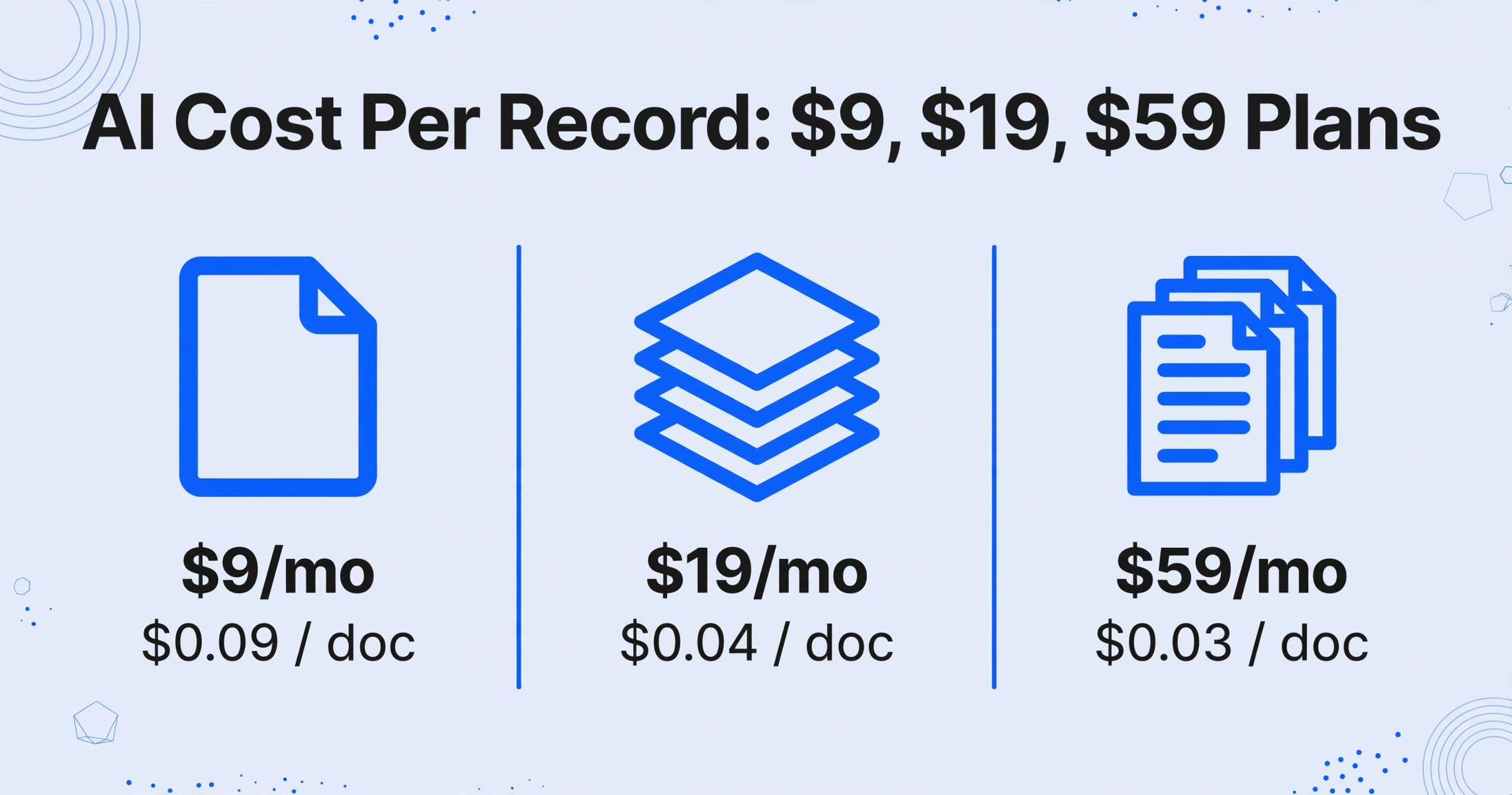
At any volume over 100 documents per month, the per-record cost is measured in cents. That’s the structural difference between subscription AI and hourly labor: one scales down toward zero per unit, the other scales up linearly with each new hire.
What makes this possible across three different document types without switching tools is Custom Column Extraction. Instead of building templates or training models for each document layout, you type the field names you want — “Invoice Number,” “Vendor,” “Total” — and the AI locates each value anywhere on the page by understanding what it means semantically. The same column names work on an invoice from one vendor, a receipt from a restaurant, and an intake form from a new client, because the AI isn’t matching layout — it’s matching meaning. Upload all three document types together in a batch, and they merge into a single spreadsheet with consistent column headers, no template required.
Files are processed securely and not stored.
Beyond the subscription math, AI data entry brings an accuracy floor that manual processes can’t match at scale. For printed text, AI data entry tools driven by vision models achieve up to 99% recognition accuracy — not just on character transcription but on field-level extraction where the AI understands whether a number is a line total or a grand total. The error rate doesn’t climb at 4pm. It doesn’t vary with document volume. And when an extraction is flagged as low-confidence, it goes to human review as a targeted fix, not a full re-key.
Annualized: What 100, 500, and 2,000 Documents Per Month Actually Costs
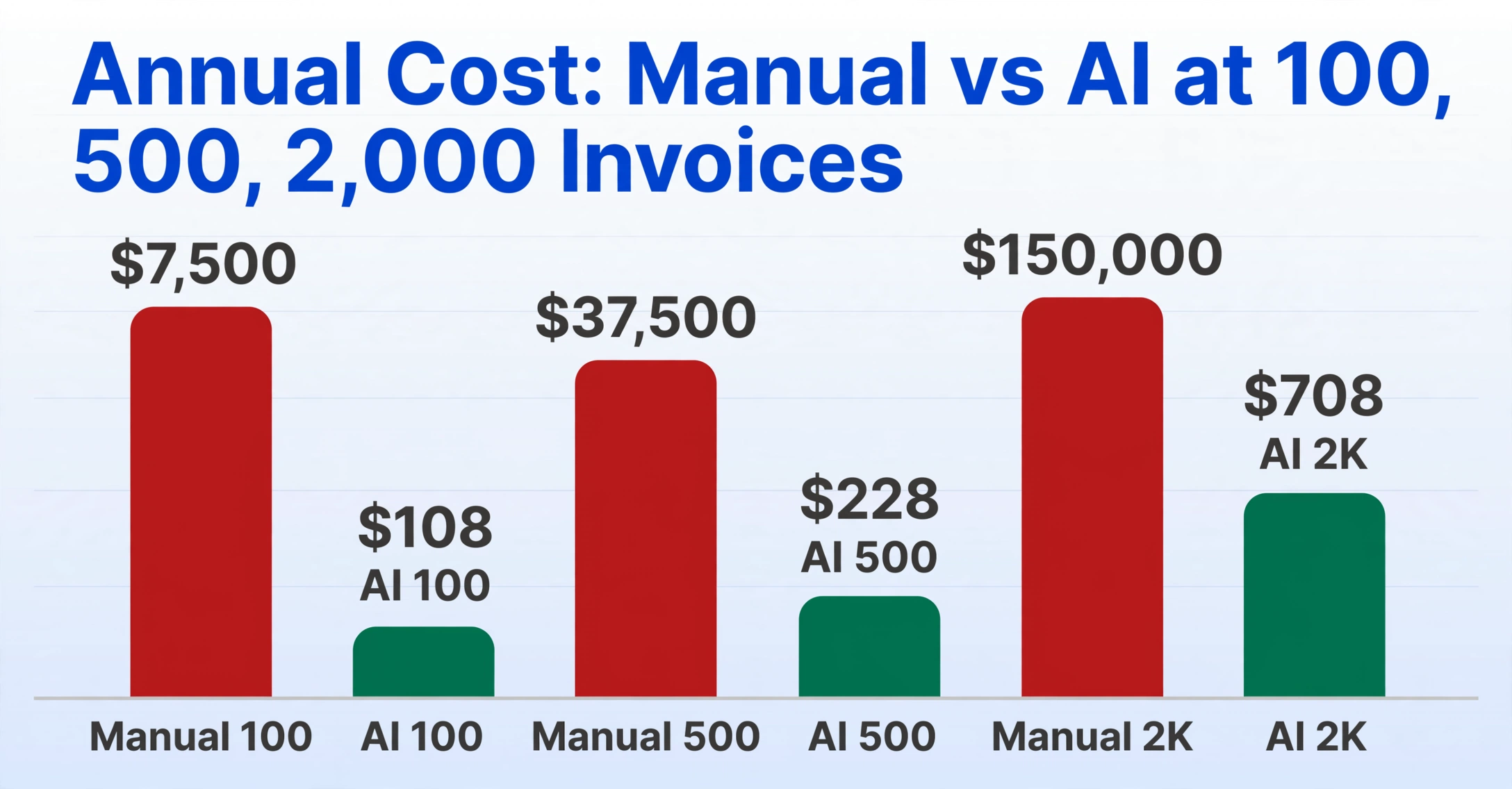
Per-document costs are useful for understanding the mechanics. Annualized costs are what show up on a P&L. The table below runs the numbers for invoices — the most expensive manual document type — across three volume tiers, using the $6.25 mid-point for manual data entry and subscription-tier AI pricing.
| Volume | Manual Annual Cost | AI Annual Cost | Annual Savings | Savings % |
|---|---|---|---|---|
| 100 invoices/mo | $7,500 | $108 ($9/mo) | $7,392 | 98.6% |
| 500 invoices/mo | $37,500 | $228 ($19/mo) | $37,272 | 99.4% |
| 2,000 invoices/mo | $150,000 | $708 ($59/mo) | $149,292 | 99.5% |
Receipts and forms produce similar ratios, scaled down to their per-document labor costs. At 500 documents per month, manual receipt entry costs roughly $15,900 per year; AI brings it to the same $228 subscription. Manual form entry at the same volume runs $27,420; same AI cost. The subscription covers all document types — you’re not paying separately for invoice processing, receipt extraction, and form data extraction.
The pattern is consistent: manual costs grow linearly with volume, while AI costs plateau once you’re on the right subscription tier. The highest-volume tier costs $708 per year regardless of whether you process 500 or 5,000 documents. That’s the structural gap — and it widens with every document you add.
The Manual Ceiling — When Growth Breaks Your Data Entry Process
Every manual data entry operation has a ceiling. Below it, hiring another person seems like the obvious answer. Above it, hiring another person is the problem you’re trying to solve.
The ceiling isn’t a fixed number. It depends on document complexity, team size, and how much error correction your downstream processes can absorb before something breaks. But the pattern is predictable. A solo bookkeeper handling 100 invoices a month spends roughly 20 hours — one morning a week — on data entry. Manageable. At 300 invoices, it’s 60 hours. That’s most of a full-time week just keying data — nothing left for reconciliation, client communication, or the strategic work that actually generates revenue.
The instinct is to hire. And at first, it works. A second person doubles throughput. But it also doubles the error surface. Two people entering data means two sets of typos, two sets of misfiled receipts, and the coordination overhead of splitting work, tracking who did what, and reconciling output. At 2,000 documents per month — a volume typical of a mid-sized accounting firm or a growing e-commerce operation — you’re looking at roughly 2.5 full-time equivalents doing nothing but data entry, plus a manager spending part of their week on quality control. The annual fully-loaded cost, per the framework above, approaches $150,000 for invoices alone.
The manual ceiling isn’t just about money. It’s about when you process documents. A manual queue means invoices sit for days before being entered, which means late payments, missed early-pay discounts, and vendors who start calling. It means expense reports pile up until month-end when someone clears the backlog in a marathon session — the worst possible conditions for accuracy. And it means growing the business means growing the data entry team in lockstep, which turns document processing from an operational cost into a scaling constraint.
AI doesn’t eliminate the ceiling entirely — you still need humans for exception handling and review — but it pushes the ceiling from dozens of documents per day to hundreds. The bottleneck shifts from “how fast can a person type” to “how fast can a person review flagged exceptions.” For most organizations, that’s the difference between data entry as a growth blocker and data entry as a solved problem.
Who Benefits Most — Three Profiles
The math favors automation at nearly any volume, but the urgency varies. Here’s where the gap hits hardest.
The Solo Operator
One person. All the data entry. A freelance bookkeeper handling 200 invoices, 150 receipts, and 50 client intake forms per month spends roughly 65 hours — a week and a half of full-time work — just transcribing documents. At $30/hr billing rate, that’s $1,950 in billable time consumed by a task that adds no client value. The $9/mo plan recovers those hours for $108/year. The ROI isn’t theoretical — it appears in the first month. Freelancers and solopreneurs on tight budgets see the fastest payback because manual entry consumes the highest percentage of their total working hours.
The Accounting Firm
A small firm with three staff processing 1,500 client invoices per month across multiple entities. Each client has different invoice formats, different accounting systems, different field requirements. Manual processing at this volume requires roughly two FTEs just for data capture. AI with Custom Column Extraction handles every client’s invoices through the same interface — different column names per client, same tool — and merges results into separate spreadsheets. The $59/mo subscription replaces ~$90,000 in annual labor costs. More importantly, it eliminates the month-end bottleneck where all three staff work overtime to clear the invoice backlog before client reporting deadlines.
The Growing Company Hitting the Ceiling
A 30-person services firm that doubled in two years. Invoice volume went from 80/month to 400/month. The office manager who used to handle data entry in spare moments now spends most of her week on it. Receipt volume from a growing team compounds the problem. Forms — client onboarding packets, vendor applications, compliance checklists — have multiplied with the headcount. The company is at the manual ceiling: hiring a dedicated data entry person costs $45,000/year fully loaded, but that only solves the invoice problem — receipts and forms are still backlogged. AI at $59/month handles all three document types for $708/year. The alternative — adding headcount proportional to document volume growth — turns data entry into a recurring fixed cost that grows with the company rather than shrinking as a percentage of revenue.
Each profile faces a different version of the same equation. The solo operator needs time back. The accounting firm needs throughput. The growing company needs to decouple document volume from headcount. AI data entry addresses all three because the cost structure is fundamentally different: fixed subscription, near-zero marginal cost per document, consistent accuracy regardless of volume. For more on how subscription pricing compares to alternatives, see the breakdown of pay-as-you-go vs subscription document extraction and the 2026 AI document extraction pricing landscape.
Frequently Asked Questions
Does AI data entry work with handwritten documents?
Yes — with the caveat that handwriting quality matters. Vision-model-based AI extraction can read handwritten text, including cursive, at accuracy levels that depend on legibility. A clear handwritten receipt produces results comparable to printed text. Illegible handwriting that a human would struggle with will produce low-confidence extractions that get flagged for review. This is not “perfect” — but neither is manual entry, which research shows produces error rates of 3–4% on handwritten documents. The practical question isn’t “is AI perfect” but “is AI more accurate than a tired person at 4pm on a Friday.” The answer, at scale, is yes.
Can I process invoices, receipts, and forms in the same batch?
Yes. With Custom Column Extraction, you define the field names you want extracted — “Date,” “Amount,” “Vendor,” “Category” — and upload all three document types into the same batch. The AI extracts matching fields from each document regardless of whether it’s an invoice, an expense receipt, or a client form. The output is a single spreadsheet where each row is one document and each column is the field you named. This is the core difference between template-based extraction (which requires a separate template per document layout) and semantic extraction (which reads for meaning across layouts). If you also want the AI to classify each document by type, you can add an inferred column — “Document Type (options: Invoice/Receipt/Form)” — and the AI will populate it based on document content.
Is there setup or training time with AI data entry?
No template training or sample document annotation is required. You type the column names you want, upload your documents, and the AI begins extracting immediately. This is a material difference from template-based tools that need 5–10 sample documents per layout before they can process anything. The trade-off is that template-based tools can sometimes achieve marginally higher field-level accuracy on highly standardized documents (same vendor, same format, every time). AI semantic extraction trades that marginal gain on uniformity for the ability to handle any layout without setup — which matters more when you’re processing invoices from 50 different vendors, not 50 invoices from one vendor. For most real-world document flows, the zero-setup advantage outweighs the template-consistency advantage. You can read more about this distinction in our comparison of AI extraction vs traditional data extraction software.
The Bottom Line
The cost gap between manual and AI data entry isn’t about technology being “faster.” It’s about two fundamentally different cost structures. Manual entry is a variable cost tied to labor hours — each new document adds the same per-unit expense, and each new volume tier requires another person. AI data entry under a subscription model is a fixed cost — once you’re on the right plan, adding more documents doesn’t add more cost. The break-even point, by any reasonable calculation, is well below 100 documents per month.
The question isn’t whether automation saves money. It’s whether your current manual process is costing you more than you’ve measured. The framework above is designed to give you the numbers to make that call with your own parameters, not someone else’s industry average.