Manual Data Entry Costs $12–$22
Per Invoice. Here's Why
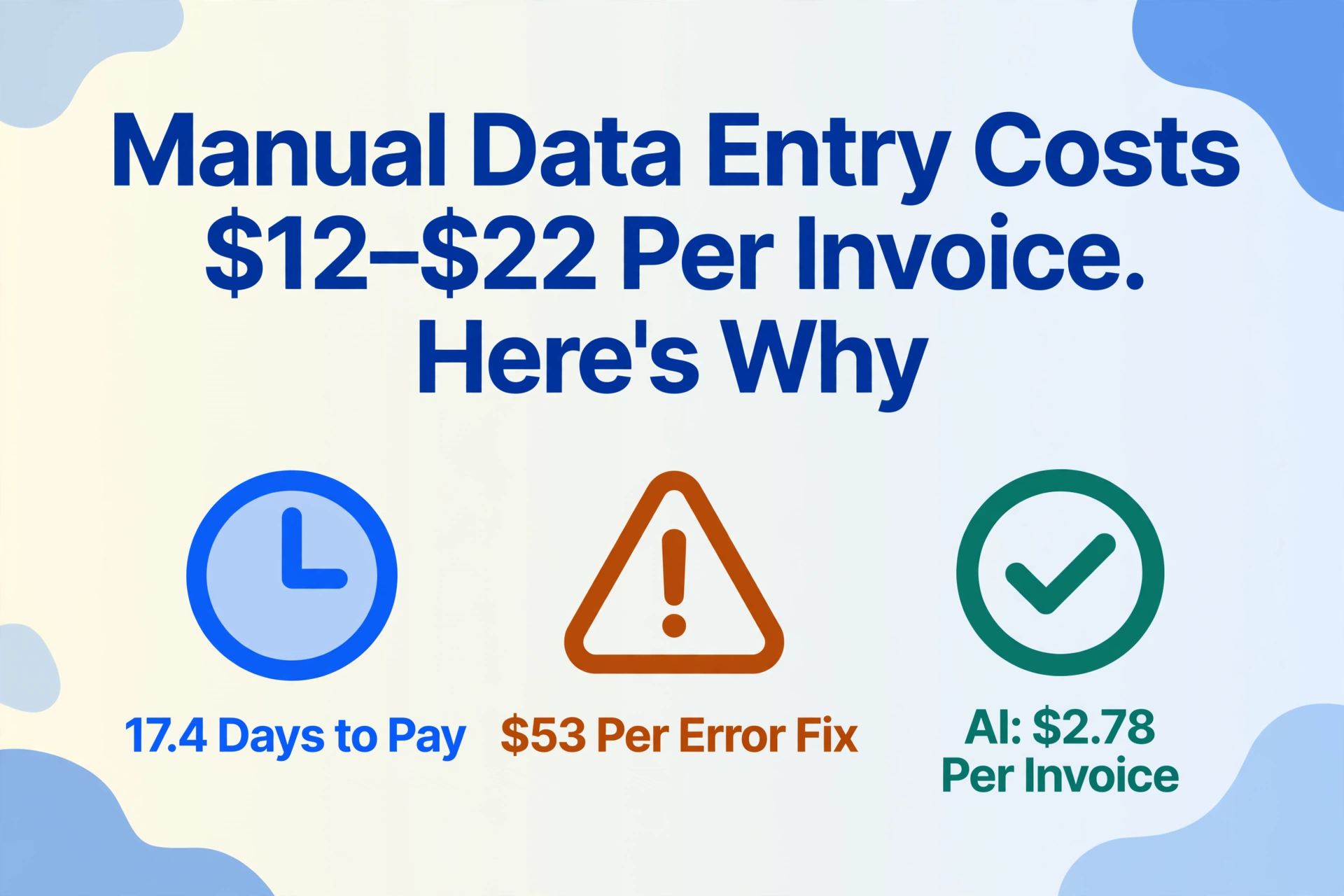
The median cost to process a single invoice is $21.40, according to APQC's 2024–2025 Open Standards Benchmarking data1. Ardent Partners' 2025 AP Metrics report puts the average manual processing cost at $12.88 per invoice for organizations without best-in-class automation, while top-performing AP teams spend $2.782. The gap between those numbers — roughly $10 per invoice — represents the hard cost of manual data entry. Multiply it across 500, 2,000, or 10,000 invoices a month and the line item stops being an operating expense and becomes a structural drag on margin.
Most finance teams track the obvious costs: AP clerk salaries, office supplies, the time it takes to type a number into QuickBooks or NetSuite. They miss the rest. Error correction — $53 per mistake, on average, according to the Institute of Finance & Management (IOFM)3 — consumes hours nobody budgets for. Late payment penalties, missed early-payment discounts, and the downstream cost of bad data propagating through the general ledger compound the number further. This article walks through the full cost — line by line, source by source — so you can calculate what manual entry is actually costing your organization, and compare it to what automated extraction costs today.
Key Takeaways
- The labor to type an invoice costs $3 to $6 but that is not what makes manual entry expensive.
- 39% of manually processed invoices contain errors and fixing just one costs $53 in staff time — five to ten times what entering it cost.
- Automated extraction removes the error correction cycle from invoice processing and the per-invoice cost drops from $16 to under $3.
The Line-by-Line Cost of a Manually Processed Invoice
Labor is the single largest component — but it's not the whole story. Ardent Partners' 2025 data shows that the average invoice takes 17.4 days from receipt to payment in a manual environment, compared to 3.1 days for best-in-class automated teams. Those two weeks of lag don't just represent processing time. They represent labor hours stacked end to end across multiple people: the AP clerk who opens the PDF and keys in line items, the department manager who approves against a purchase order, the controller who reviews exceptions, and the treasury analyst who schedules the payment.
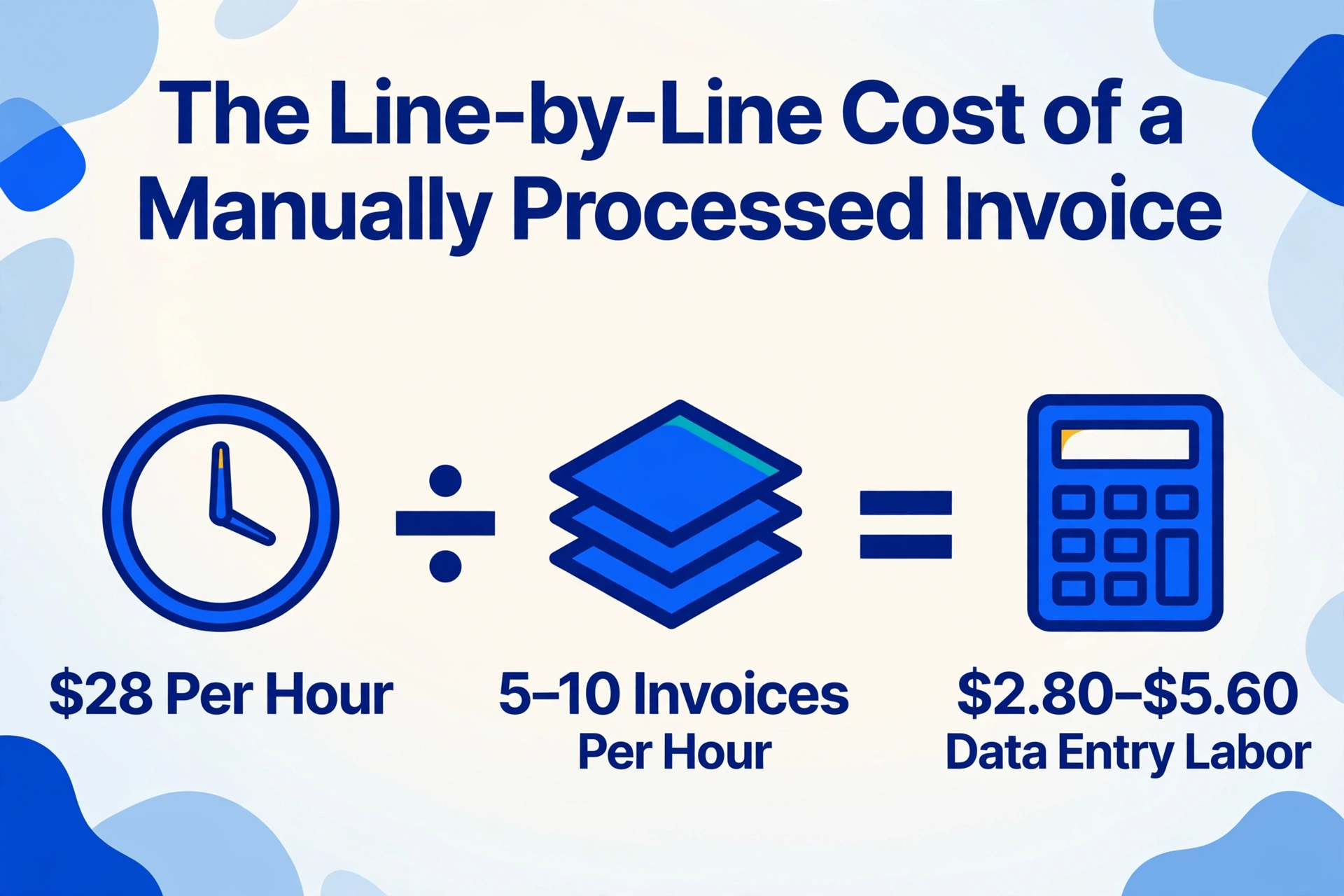
Breaking it down by task, the math is stark. A full-time AP clerk earning a fully loaded cost of $28 per hour processes approximately 5 to 10 invoices per hour in a fully manual workflow — opening the document, locating each field, keying data into the ERP, cross-referencing PO numbers, and flagging discrepancies. That works out to $2.80 to $5.60 in direct labor per invoice for data entry alone. But the data entry step is only about a third of the total touch time. APQC benchmarking data shows that top-quartile organizations process 32.4 invoices per FTE per day, while bottom-quartile organizations process just 2.91 — a more than tenfold gap that reflects differences in process standardization, exception handling, and automation, not individual clerk speed.
The IOFM reports that organizations processing fewer than 50,000 invoices annually pay the highest per-invoice costs, averaging $15.97 per invoice when processed manually. The Hackett Group's 2025 Digital World Class Purchase-to-Pay Performance Study found that top-performing finance organizations with high levels of AP automation save 54% on invoice processing costs and require 42% fewer full-time equivalents across key finance functions4. For a mid-market company processing 500 invoices per month at the Ardent manual average of $12.88, the math is $6,440 per month — $77,280 per year — spent on invoice processing alone. At 1,500 invoices per month, that approaches a quarter of a million dollars annually.
Those are the line items you can see. The ones you can't are where the real damage compounds.
When 39% of Invoices Have Errors, Each Correction Multiplies the Cost
Roughly 39% of manually processed invoices contain at least one error, according to IOFM benchmarking data3. Those errors range from mistyped dollar amounts and transposed invoice numbers to incorrect GL codes and missing line items. And each one triggers a correction process that costs far more than the original entry.
A wrong invoice total, once keyed into the ERP, doesn't stay still. It propagates. The general ledger picks up the wrong expense amount. The accrual report for month-end close carries it forward. If the vendor's payment is processed against that wrong total, you've now got an overpayment or underpayment to reconcile — possibly across reporting periods. The IOFM estimates that correcting a single data entry error costs an average of $53 in staff time when you account for investigation, vendor communication, system correction, and management review. For a team processing 1,000 invoices a month at a conservative 1.6% field-level error rate — the figure cited by human-factors research compiled by Panko on data entry error rates — that's 16 errors per month, or roughly $848 in pure correction cost before accounting for any downstream consequences like late payment penalties or duplicate payments.
That 1.6% error rate is under ideal conditions. Under quarter-end crunch, unfamiliar document formats, or fatigue, error rates routinely spike well above 4%. On Reddit's r/smallbusiness, one operations manager quantified what this looks like from the inside: "Error rates: 1-4% on manual entry. Doesn't sound bad until you realize that's 40 wrong records per 1,000. Each one takes 3-5x longer to fix than it took to enter. Employee turnover: nobody wants to do data entry all day. We lost two people in 6 months and spent $8k+ recruiting replacements."5
The same Reddit post flagged a cost that doesn't appear on any AP benchmark dashboard: delayed decisions. "Reports that depend on manually entered data are always a week behind reality. By the time you see a trend, it's too late to act." This lag — data that's stale before it's analyzed — is an opportunity cost. The AP team isn't just slow. The entire organization's cash flow visibility runs on a one-week delay.
There's a compliance dimension too. Under Sarbanes-Oxley Section 404, publicly traded companies must attest to the effectiveness of internal controls over financial reporting. Manual data entry — with its 1-4% error rate and inconsistent audit trail — is a control weakness. External auditors performing attribute sampling on AP transactions are far more likely to flag exceptions in a manual-processing environment than in one where extraction is automated and every field is traceable to its source document. An IRS Section 6721 penalty for an incorrect information return — which can be triggered by a single mistyped vendor TIN or payment amount on a 1099 — runs $310 per form as of the 2025 adjustment. One mistyped line on a single invoice, propagating through a quarter of reporting, can generate enough noncompliance to trigger a notice.
Why OCR Never Solved the Manual Data Entry Problem
OCR solved character recognition. It never touched the part of manual data entry that actually costs money. Optical character recognition reads the text on a scanned invoice: "Invoice #: INV-15892, Date: 06/15/2026, Total: $1,250.00." But reading text and understanding what it means are two fundamentally different operations. OCR outputs an unstructured string of characters. A human still has to decide which string goes into which ERP field — and that decision process, not the keystrokes, is where the time goes.
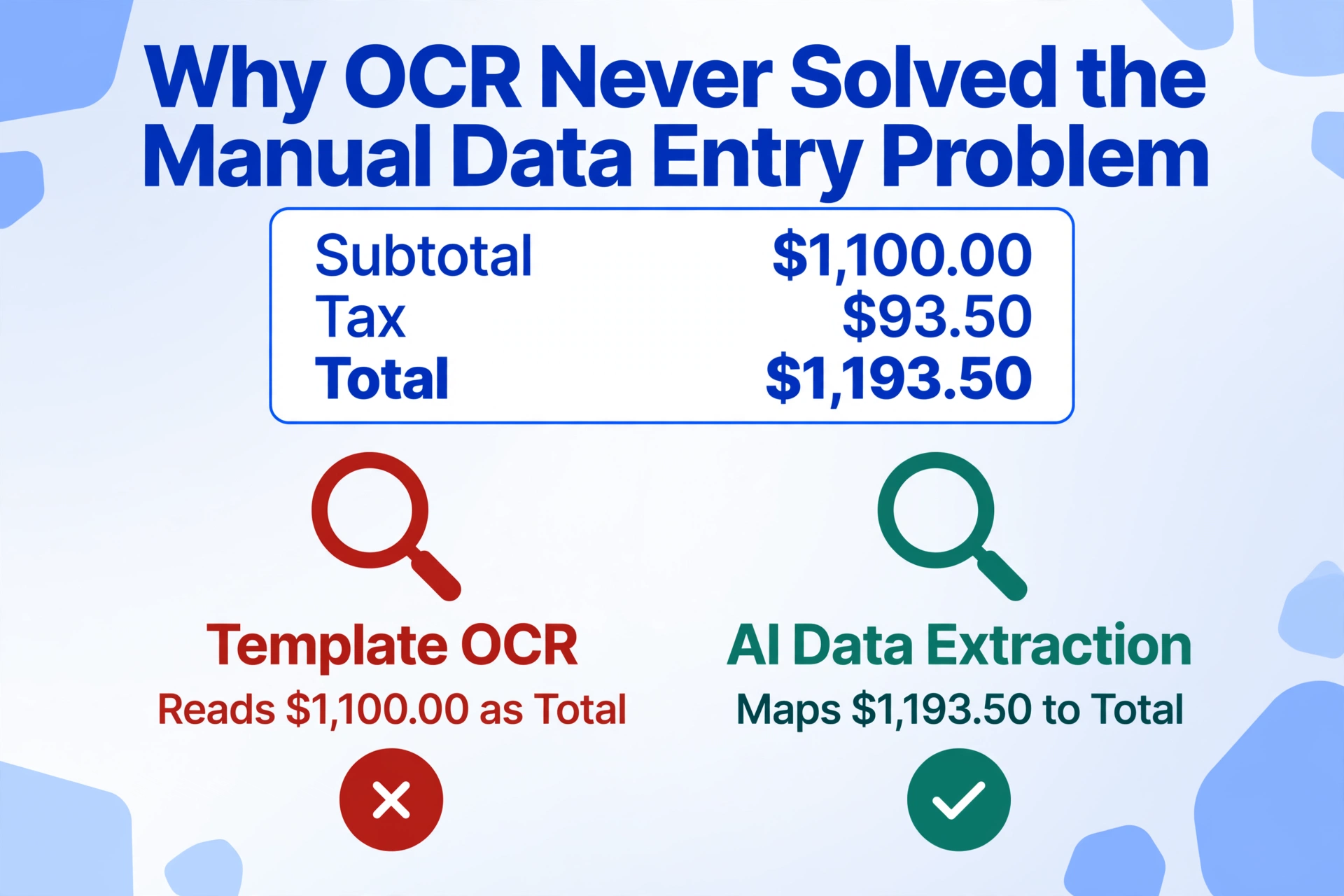
Consider an invoice with three different dollar amounts on it: a subtotal of $1,100.00, a tax line of $93.50, and a grand total of $1,193.50. A template-based OCR tool configured to look for "Total" and grab the number next to it might grab the subtotal because that's what it's pointed at. A human has to verify which of the three numbers maps to which field, every time. That verification step is manual entry disguised as automation.
Template maintenance makes it worse. Positional OCR — the kind that draws boxes around fields on a PDF — requires one template per vendor format. A mid-market company with 200 suppliers, each averaging one layout change every 18 months, is dealing with roughly 11 broken templates per month before processing a single invoice. An AP team using template OCR hasn't eliminated manual work. It's just shifted it from data entry to template repair.
The core gap is that OCR outputs raw text. What an AP team needs is structured, semantically mapped data: a spreadsheet where every row is an invoice and every column is a specific field, with values that are normalized (all dates in one format, all currencies in one unit) and validated (invoice totals that match line-item sums). Closing that gap — between raw OCR output and spreadsheet-ready data — is where most of the 12-minute-per-invoice touch time goes, and where most tools in the "document capture" category fall short.
Semantic-based extraction closes the gap by inverting the workflow. Instead of the document dictating where data lives and the user building templates to match, the user defines the output columns they want — Invoice Number, Vendor, PO Reference, Net Amount, Tax, Due Date, GL Code — and the AI locates the matching data on every document by understanding what each field means, regardless of where it sits on the page or what label the vendor uses. A French "Numéro de facture" maps to your "Invoice #" column the same way a US "Invoice Number" does. No template. No per-vendor configuration. The output lands in your column structure every time.
Two additional capabilities push this further into territory traditional OCR cannot reach. Computed columns let you embed calculations into the extraction step — define a column as "Line Total (Qty × Unit Price)" and the AI performs the arithmetic while extracting, delivering calculated answers rather than raw values that require a second round of Excel formulas. Inferred columns let the AI classify or derive information not explicitly written on the document — define a column "Expense Category (options: Office/Logistics/Materials)" and the AI reads the invoice content, determines the right category, and fills it in. Together, these collapse multiple manual steps — extraction, calculation, classification — into a single processing pass.
12 Minutes vs 10 Seconds: What 18× Faster Actually Means
The widely cited industry benchmark for manual invoice touch time is approximately 12 minutes per invoice — from opening the document, through data entry and PO matching, to routing for approval. An AI-powered extraction engine processes the same page in 5 to 10 seconds. That's the 18-fold gap between typing every field by hand and letting an AI read the document and populate the spreadsheet automatically.
But the productivity impact is larger than the ratio suggests, because human processing speed isn't linear. An AP clerk who processes 5 invoices per hour at 9:00 AM might only process 3 per hour at 4:00 PM, after six hours of repetitive keying. Error rates rise in parallel. The 18× number is the speed improvement. The more meaningful metric is what happens to capacity: a single AP clerk assisted by AI extraction can process hundreds of invoices per day rather than 30 to 40, because the bottleneck shifts from data entry speed to exception review — and 80% of invoices that matched cleanly require no review at all.
That capacity shift changes what an AP team can do with its time. Instead of spending 13+ hours per week on manual data entry — the figure SAP Concur's AP survey found for most accounts payable teams — the same staff can focus on cash flow analysis, early-payment discount capture, vendor negotiations, and fraud prevention. The Hackett Group's research quantifies this: top-performing organizations with high automation levels use one-third as many internal employees for AP operations4. The savings aren't just labor cost. They're opportunity cost — the strategic financial work that manual entry crowds out.
Files are processed securely and not stored.
Automated Processing Costs $2.78 Per Invoice. Manual Costs $12.88
Best-in-class AP teams using AI-powered extraction process invoices at a fully loaded cost of $2.78 per invoice — a 78% reduction from the $12.88 manual average. That number comes from Ardent Partners' 2025 AP Metrics That Matter report and it's the benchmark that makes the ROI case concrete enough to bring to a CFO.
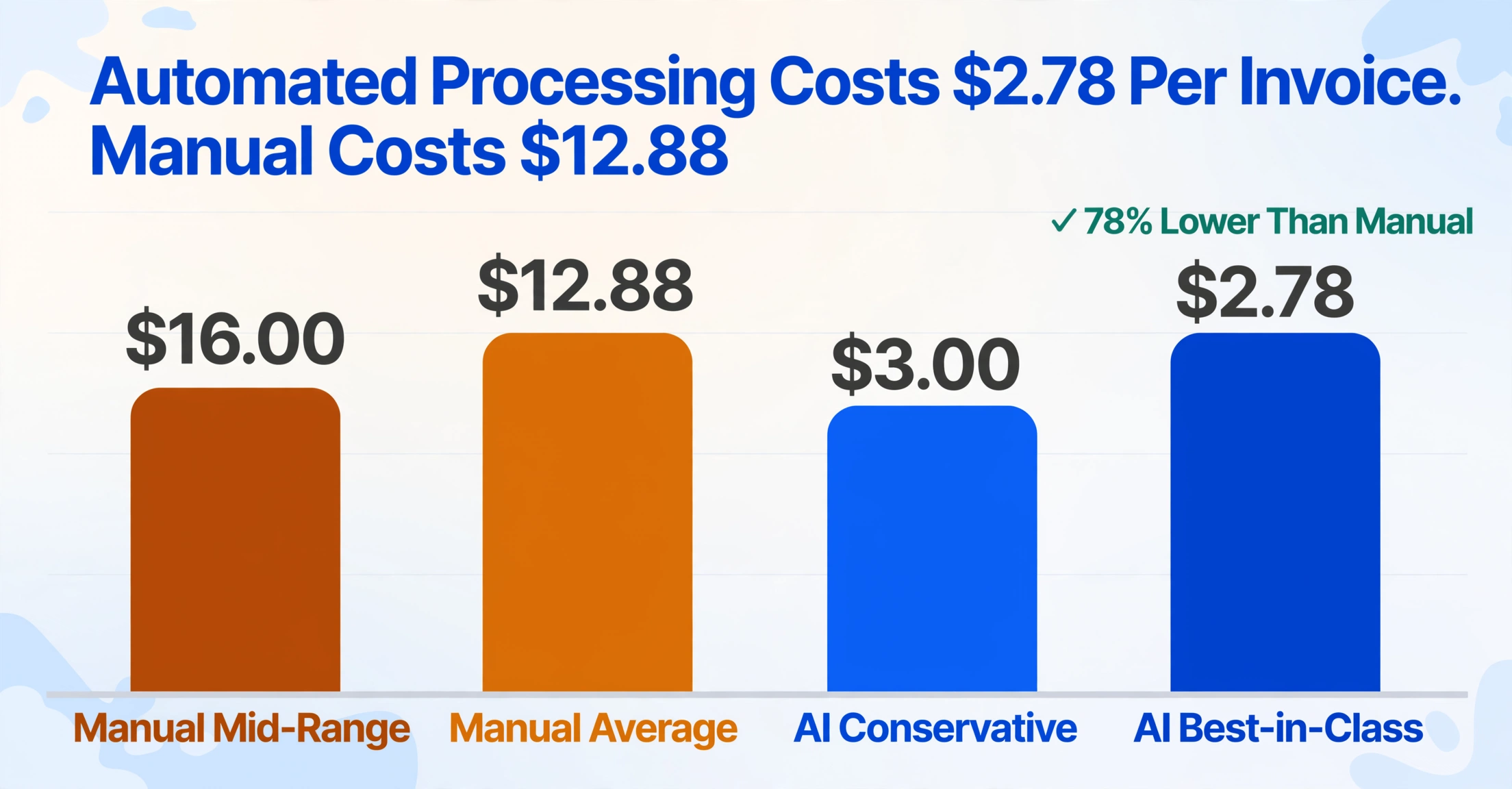
Run the calculation for your own volume. A business processing 500 invoices per month at a manual cost of $16 per invoice — the mid-range estimate across Ardent, APQC, and IOFM data — spends $8,000 per month, or $96,000 per year. Switching to AI-powered extraction at $3 per invoice — a conservative estimate that includes the tool subscription and residual human review — brings that to $1,500 per month, or $18,000 per year. That's a $78,000 annual difference from invoice processing alone, before factoring in early-payment discount capture (best-in-class organizations capture 90% of available discounts versus 18% for manual laggards, according to Aberdeen Group research6), reduced late-payment penalties (companies report paying nearly $40,000 annually in late fees from manual workflows), and reallocation of AP staff time toward higher-value work.
The tool cost on the extraction side is modest compared to the savings. ImageToTable.ai operates on a credit-based system: the free tier lets you test extraction on sample documents, while paid plans start at $9 per month (Basic) and scale to $19 per month (Pro) and $59 per month (Max), each with an allocation of monthly processing credits. Even at the Max tier with heavy usage, the tool cost is a fraction of a single full-time AP clerk's monthly salary — and a single clerk, working unassisted, can't process 500 invoices a month anyway. At that volume, you're already paying two clerks. The extraction tool replaces one of them at roughly 1% of the cost.
The comparison gets sharper when you consider that template-based OCR tools require ongoing maintenance labor that AI extraction doesn't. Every time a vendor changes their invoice format, a template OCR tool needs its template updated — a recurring hidden cost that doesn't show up in the initial subscription price. Template-free AI extraction, by contrast, reads each document on its own terms. The column definition stays fixed; the documents can vary endlessly. Ardent Partners found that best-in-class AP teams achieve a 49.2% touchless processing rate, meaning nearly half of invoices flow from receipt to approval without any human interaction. The remaining half require only exception review — not re-entry.
Frequently Asked Questions
What's the real cost range for manual invoice processing?
Independent benchmarks converge on a range of $12 to $22 per invoice for fully manual processing. Ardent Partners' 2025 AP Metrics report cites $12.88 as the average for organizations without best-in-class automation. APQC's Open Standards Benchmarking data puts the median cost at $21.40 across all organizations. The IOFM reports $15.97 for organizations processing fewer than 50,000 invoices annually. The variation depends on invoice complexity, process standardization, exception rates, and whether your cost calculation includes labor alone or the full loaded cost including error correction, storage, and approval delays.
How quickly does AI invoice extraction pay for itself?
For most organizations processing more than 200 invoices per month, the payback period is measured in weeks, not months. At 500 invoices per month with a manual cost of $16 per invoice, the monthly processing spend is $8,000. An AI extraction tool at the Pro tier ($19 per month plus credit costs) brings the per-invoice cost to approximately $3 — a monthly saving of roughly $6,500. The subscription cost is recovered within the first batch of processed invoices. Organizations with higher volumes see the ROI compound faster; Ardent Partners found that best-in-class automated AP teams save over $10 per invoice compared to manual processing.
Can AI extraction handle invoices in different formats and languages?
Yes — and this is the fundamental difference between template-based OCR and semantic AI extraction. Template OCR requires a unique configuration for each vendor format. Semantic AI extraction, the approach used by ImageToTable.ai, reads documents by understanding what each field means rather than where it sits. A French invoice with decimal commas, a German invoice with "MwSt" instead of "VAT," and a US invoice with standard dollar formatting all map to the same user-defined column structure in a single batch. For workflows that span international suppliers, our batch invoice to Excel tool handles multi-format extraction with no per-vendor setup.
How accurate is AI invoice extraction compared to human data entry?
Top-performing AI extraction achieves up to 99% accuracy for printed invoice data, well above the manual entry accuracy rate of 96-99% — but the comparison understates the gap. A 1% human error rate on field-level entry means roughly one wrong field per invoice (at 10 fields per invoice). Each of those errors carries a downstream correction cost of $53 on average. AI extraction's errors, when they occur, tend to be flaggable — a mismatch between an extracted total and the sum of line items, for example — and are caught by validation rules rather than propagating silently through the general ledger.
How long does it take to set up AI invoice extraction vs traditional OCR templates?
AI extraction requires effectively zero setup time. You type the column names you want, upload your first batch of invoices, and the system processes them immediately. Template-based OCR, by contrast, requires you to define coordinate zones or regex rules for each vendor format — a process that can take hours for the initial vendor set and requires ongoing maintenance whenever formats change. This setup gap is one reason the Hackett Group found that top-performing automated AP teams run with 42% fewer FTEs: they spend zero time on template creation or repair.
Is AI data extraction worth it for smaller businesses processing under 100 invoices per month?
At 100 invoices per month, the manual processing cost at $16 per invoice is $1,600 per month, or $19,200 per year. An AI tool at the Basic tier ($9 per month) brings the per-invoice cost to approximately $3, reducing the monthly spend to roughly $300. The annual savings are approximately $15,700. The question isn't whether the math works — it does at nearly any volume above a handful of invoices. The question is whether the time saved (roughly 12 hours per month at 100 invoices) is valuable enough to your team to make the switch. For most small business owners and bookkeepers, reclaiming a full day and a half of data entry every month is worth more than the $9 subscription.
The bottom line: Manual invoice data entry isn't just slow. At $12 to $22 per invoice, with error correction adding $53 per mistake and late payments piling on penalties, it's one of the most expensive non-strategic costs in the back office. The independent data from APQC, Ardent Partners, IOFM, and the Hackett Group all converge on the same conclusion: AI-powered extraction doesn't just save time. At $2.78 per invoice for best-in-class automated teams, it transforms a cost center into a fraction of its former self — and frees the AP team to do work a spreadsheet can't do.
Test the math on your own invoices. See if 12 minutes per invoice becomes 10 seconds.