What Is Restaurant Receipt Tracking?
Supplier Receipts, Food Cost & What Most Operators Miss
Restaurant supplier receipt tracking is the process of capturing key data from food distributor delivery receipts — the packing slips that accompany every Sysco, US Foods, Metro, or Transgourmet delivery — and structuring that data into your food cost spreadsheets, inventory systems, and accounts payable workflows. It is not the same as scanning customer POS receipts for expense deductions. It is not the same as processing invoices for payment. It is its own data stream, and for most restaurant operators, it is the one that silently determines whether your food cost numbers are right or wrong.
What Restaurant Supplier Receipt Tracking Actually Is
If you search "restaurant receipt tracking," most results will tell you to photograph your customer POS receipts for tax deductions. That is a valid workflow — receipt OCR for expense reporting serves freelancers and small business owners well. But the receipts that drive your food cost are not the ones customers take home. They are the ones the delivery driver hands you at the receiving dock: the food distributor delivery receipt, also called a packing slip or delivery docket.
Every time a Sysco, US Foods, Metro, or Transgourmet truck arrives at your restaurant, the driver carries a paper document that lists what is actually in the shipment — item by item, case by case. That document is the delivery receipt, and it carries data that the invoice does not: the actual quantity received (not the ordered quantity), handwritten annotations from the receiver (damages, substitutions, short counts), and sometimes the delivered-case weight for protein items.
Restaurant supplier receipt tracking is the discipline of capturing this data — reliably, across every distributor format, despite handwritten marks and crumpled thermal paper — and feeding it into your food cost calculation. Without it, your "Purchases" number is a guess based on what you ordered, not what came through the door. For a deeper look at how this differs from the invoice side of the workflow, see our guide on what restaurant invoice extraction is and how it works.
Supplier Receipt vs Invoice: Two Separate Data Streams
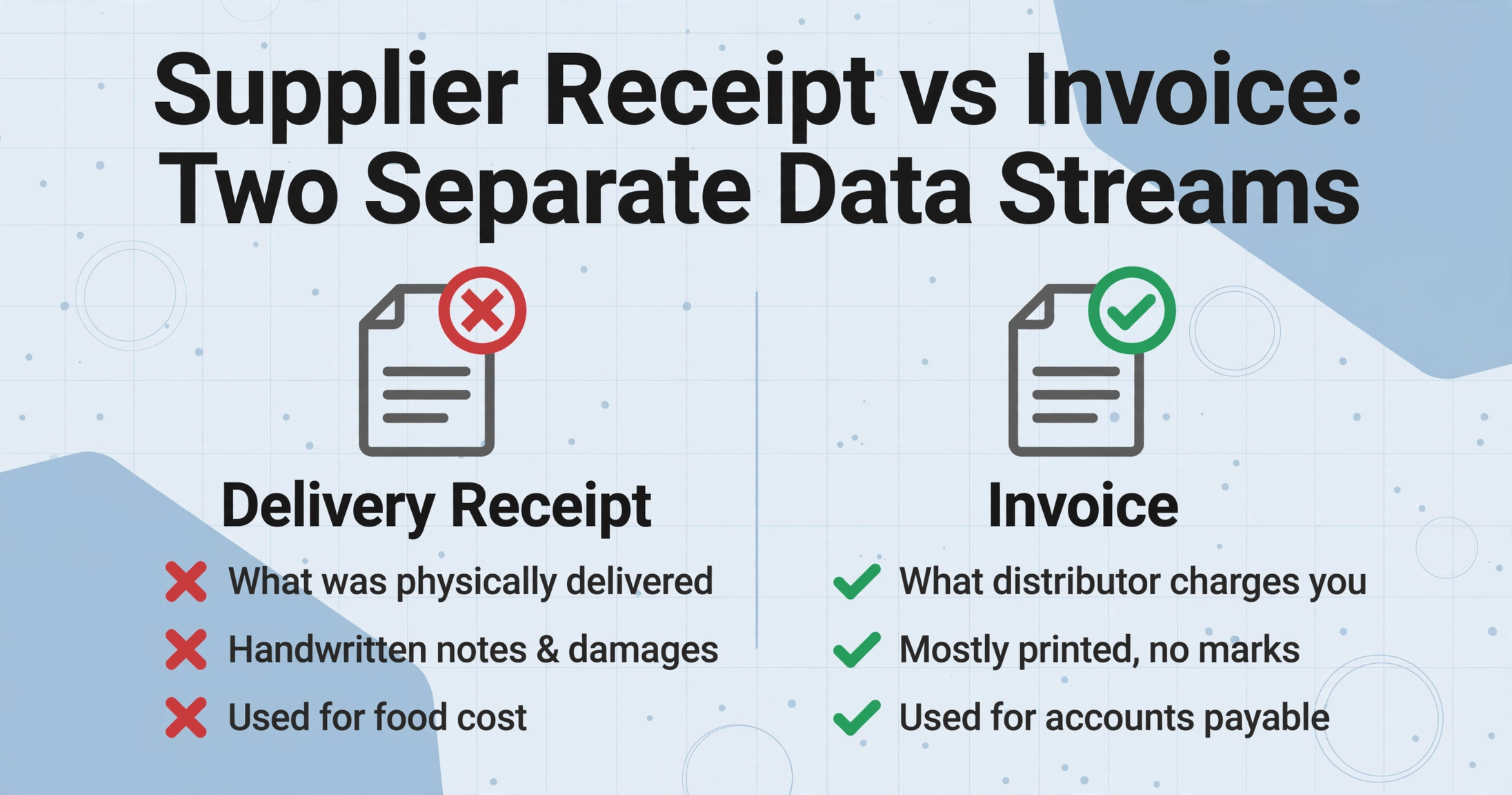
These two documents look similar — both come from the same distributor, both list items and prices — but they serve fundamentally different purposes in restaurant operations. Confusing them is the single most common source of food cost tracking errors.
| Delivery Receipt | Invoice | |
|---|---|---|
| What it documents | What was physically delivered to your dock | What the distributor charges you for |
| Comes with | The shipment itself (handed by the driver) | Email, portal, or mailed separately |
| Quantities reflect | Actual received — may differ from ordered | What distributor bills you for |
| Handwritten data | Receiver notes, damage marks, substitutions | Rare (mostly printed) |
| Used for | Food cost (what's in your cooler) + inventory | AP (what you pay) |
| Timing | Day of delivery | Later (net terms) |
The operational challenge is that both documents need to be processed, and they need to be reconciled against each other. A kitchen manager might receive the delivery receipt physically at 8 AM when the Sysco truck arrives, but the invoice for that delivery arrives electronically two days later. If the manager enters the delivery receipt data into the food cost spreadsheet on delivery day but the invoice shows different quantities or prices, the discrepancy can go unnoticed until month-end reconciliation — and by then, correcting the food cost numbers means unpicking weeks of margin calculations built on the wrong data.
For a broader framework on how both invoice and receipt extraction fit into the overall document processing landscape, see our guide on what invoice data extraction is.
What's on a Food Distributor Delivery Receipt
A delivery receipt from a food distributor carries different data depending on the supplier, the region, and whether the items are dry goods, produce, proteins, or dairy. But across Sysco in the US and Metro in Germany, the same core fields appear:
Header Fields
- Distributor name & location
- Delivery date & time
- Delivery / order number
- Receiver name (often handwritten)
- Driver name
Line Items
- Product description & code
- Pack size (e.g. "4/5 LB")
- Quantity ordered
- Quantity received (may differ)
- Catch weight (protein items)
- Unit price or case price
The bolded item — quantity received — is the field that makes delivery receipt tracking fundamentally different from invoice processing. On an invoice, the quantity is what the distributor wants to be paid for. On a delivery receipt, the quantity is what you can actually sell. If 40 lb of chicken breast was ordered but 38.7 lb was delivered (the catch weight), the invoice might show the ordered quantity while the delivery receipt carries the actual weight. The food cost for that week needs the 38.7 lb number. Using the invoice number would overstate your food cost by 3%, and that error compounds across every protein line item.
Delivery receipts also carry handwritten data that standard OCR tools cannot read at all. A receiver might write "DROP" next to a case of damaged tomatoes, circle a substitution, or scribble a corrected quantity next to a line item. These annotations have financial consequences — the damaged tomatoes are a credit memo, the substitution affects menu costing — but they are invisible to template-based tools trained only on clean printed text.
How Delivery Receipt Data Feeds Food Cost
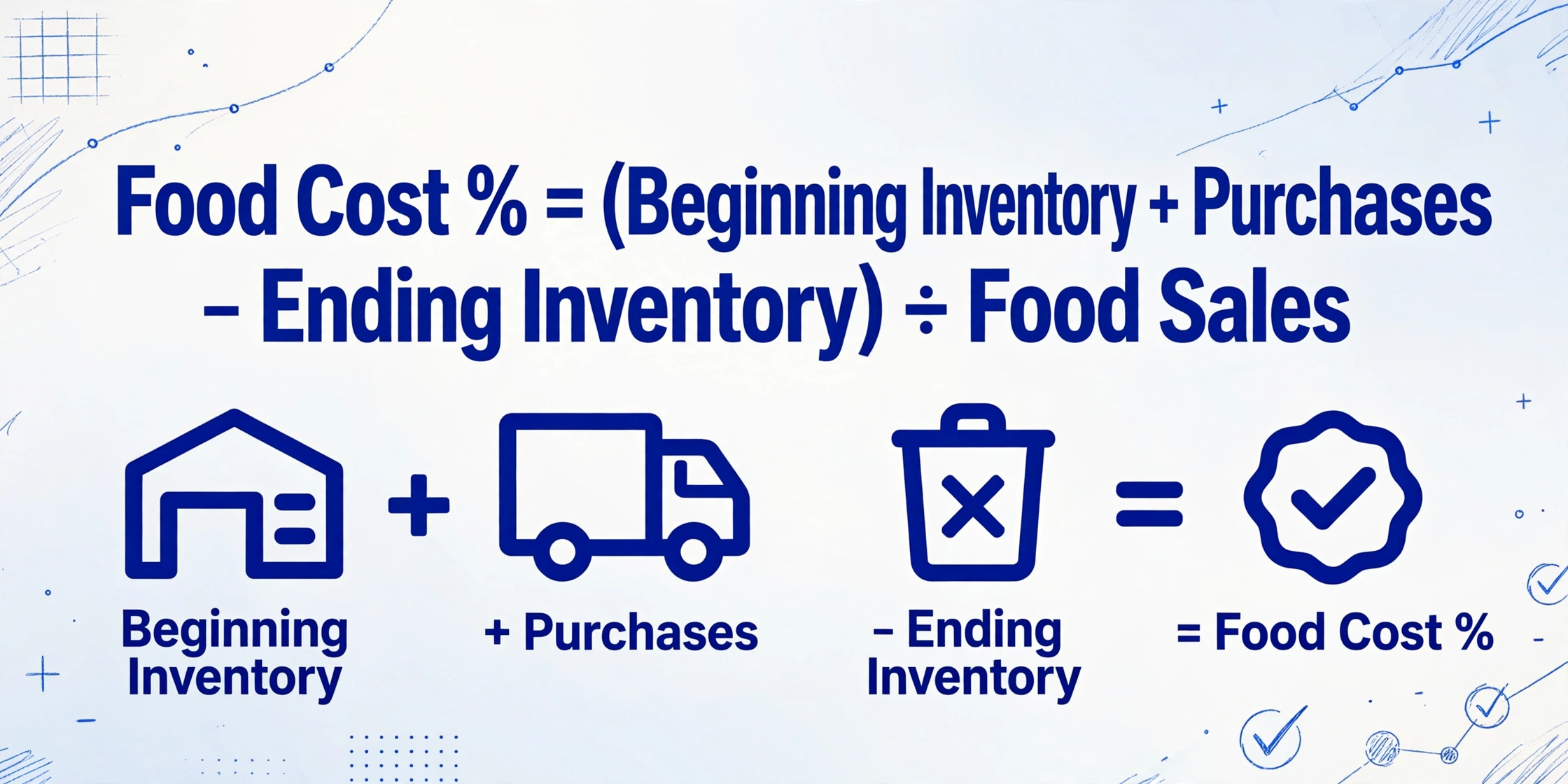
Food cost percentage is the most important operational metric in a restaurant. The formula is straightforward:
Food Cost % = (Beginning Inventory + Purchases − Ending Inventory) ÷ Food Sales
Of the four variables in that formula, "Purchases" is the one that restaurant operators most commonly get wrong — not because they do not know what they bought, but because they use the wrong document as the source of truth.
Suppose a restaurant receives a Sysco delivery on Tuesday. The delivery receipt lists 15 items with actual received quantities. The invoice for that delivery arrives on Thursday showing 15 items with slightly different quantities — a case was short by one unit, a substitution was recorded at a different price. Which document should feed the "Purchases" line in the food cost formula?
The correct answer is the delivery receipt. Purchases are the ingredients that entered your inventory — what was physically received at the dock. The invoice is what you will pay, but payment reconciliation and food cost tracking run on different timetables. If you use the invoice for food cost, you delay the calculation by 2–3 days waiting for the invoice to arrive, and you introduce systematic errors from invoice-receipt mismatches that compound over dozens of suppliers and hundreds of line items per week.
This is where Custom Column Extraction becomes directly relevant to restaurant operations. Instead of typing each line item from a 40-line delivery receipt into a spreadsheet, you define the columns you need — "Item Description," "Qty Received," "Catch Weight," "Unit Price," "USAR Category" — and the AI reads the delivery receipt, pulls the actual received quantities, and writes them directly into your food cost spreadsheet. Handwritten receiver notes get captured alongside printed data. If you want the AI to classify each line into a USAR account code — 5110 Meat, 5140 Produce, 5160 Dairy — you add an inferred column named "USAR Category (options: Meat/Seafood/Poultry/Produce/Bakery/Dairy/Grocery)" and the AI populates it by reading each item description. Extraction and cost coding happen in a single pass, and the "Purchases" data in your food cost formula updates the same day the truck arrives.
Files are processed securely and not stored.
The Multi-Supplier Format Problem
A single restaurant receives deliveries from 6–10 different food distributors in a typical week. Each uses a different delivery receipt format. In the United States, the major broadliners — Sysco, US Foods, Performance Food Group (PFG), Gordon Food Service (GFS) — all print delivery receipts that look completely different from one another. Sysco's receipt uses one coding system for its products; US Foods uses another. PFG prints its packing slips with line items grouped by temperature zone (dry, refrigerated, frozen); GFS uses a single continuous table. A local produce vendor's delivery receipt might be a handwritten slip with no printed structure at all.
In Europe, the diversity is equally wide. A restaurant in Paris receives deliveries from Metro (wholesale cash & carry) and Transgourmet (delivery wholesaler) with different receipt layouts. Groupe Pomona, the leading French distributor to restaurants and institutional kitchens, prints its delivery dockets with line items categorized by the Pomona product hierarchy. A chef in Zurich ordering from Transgourmet Switzerland or Pomona Suisse sees a format that differs from the German Transgourmet receipt. A bakery in Germany buying from Metro Deutschland handles yet another format. The problem is the same across markets: every supplier prints its delivery receipt differently, and the kitchen manager has to read them all.
The operational consequence is straightforward: a template-based tool that requires per-supplier configuration will never catch up. By the time you have built a template for Sysco and US Foods, your produce vendor changes its format, or you add a seafood distributor with a completely unfamiliar layout. Template-free extraction — which reads documents by understanding what each field means rather than where it sits — handles this diversity on the first upload of any supplier's receipt. The AI identifies the distributor name, delivery date, and line items by their semantic role, not by matching a pre-defined coordinate. For a side-by-side comparison of template-based and template-free approaches, see our guide on how AI extraction works without templates.
Batch processing compounds the efficiency: upload 20 delivery receipts from 8 different suppliers — some PDFs emailed by the distributor's rep, some photos taken at the receiving dock — and get a single spreadsheet with all 600 line items from the week's deliveries. Receipts from Sysco, Metro, Transgourmet, and the local produce vendor all land in the same table with the same columns.
What to Look For in a Supplier Receipt Tool
Not every extraction tool can handle food distributor delivery receipts. The specific characteristics of these documents — handwritten annotations, catch weights, multi-supplier format diversity, multi-language field labels (in EU markets), and the need to reconcile with invoices — narrow the field considerably.
Template-free operation is non-negotiable. A restaurant deals with 6–10 suppliers whose formats change unpredictably. A tool that requires per-vendor template setup will create a maintenance workload that silently grows until it eclipses the time saved on extraction.
Handwriting support matters more than most operators realize. The most operationally critical data on a delivery receipt is often handwritten: the receiver's corrected quantity, the "REFUSED" mark on a damaged case, the substitution note. A tool that only reads printed text misses the data that drives inventory corrections and credit memos. For a detailed breakdown of handwriting extraction capabilities, see can AI read handwriting from photos.
Batch processing across suppliers. A single week's deliveries generate 15–25 receipts from 6–10 suppliers. Processing them one at a time — even at 10 seconds each — creates a workflow bottleneck that makes managers procrastinate data entry. A batch workflow: upload all receipts for the week, get one spreadsheet. No sorting by supplier, no per-file processing.
Invoice-receipt reconciliation support. The extracted delivery receipt data should be structured in a way that allows easy comparison with invoice data. If your tool can extract both document types using the same column definitions — "Item Code," "Qty," "Unit Price" — then reconciliation becomes a matter of sorting the delivery receipt line items next to the invoice line items in a spreadsheet and flagging mismatches. Some operators use the Google Sheets add-on to extract receipt data directly into a sheet where the invoice data already lives, keeping both data streams in the same workbook.
USAR account coding (or equivalent local categorization). For US operators, the output should support mapping each line item to a USAR category — 5110 Meat, 5120 Seafood, 5130 Poultry, 5140 Produce, 5160 Dairy, 5170 Grocery. For European operators, the categorization might follow local accounting standards or simply the operator's own cost category labels. An inferred column that reads the line description and assigns the category during extraction eliminates the manual coding step entirely.
Frequently Asked Questions
What is the difference between a restaurant supplier receipt and an invoice?
A supplier receipt (also called a delivery receipt or packing slip) is the document that comes with the physical delivery. It lists what was actually placed on your loading dock — including substitutions, damages, and short counts. An invoice is the billing document, which typically arrives separately (by email or portal) and lists what the distributor charges. The two often disagree on quantities, prices, or items. Food cost should be calculated from the delivery receipt because it reflects what entered your inventory. Accounts payable processes the invoice. Reconciling the two is a standard — and often manual — restaurant AP task.
How is restaurant receipt tracking different from general receipt OCR?
General receipt OCR is designed for consumer POS receipts — the kinds you get at a grocery store or restaurant. It extracts store name, date, total, and sometimes line items from a well-defined printed format. Restaurant supplier receipt tracking handles a fundamentally different document: food distributor delivery receipts that carry pack-size notation, catch weights, handwritten receiver annotations, and format diversity across 6–10 suppliers. A general receipt OCR tool that works well on a Walmart receipt will fail on a Sysco packing slip with handwritten quantity corrections and "6/10#" pack-size notations. The document structure, field semantics, and workflow context are entirely different. For more on the general side, see our guide on what receipt OCR is.
Can AI extraction handle handwritten corrections on delivery receipts?
Yes. Modern vision AI models read handwriting alongside printed text in the same document pass. A receiver's handwritten "SHORT 1" next to a case of produce or a circled "-2" next to a damaged dairy item is captured as structured data — not just as an image attachment. Accuracy depends on legibility: clear block print or standard notation extracts reliably; dense scribble in the margin is more variable. The practical advantage is that the handwritten data becomes searchable and reconcilable in your spreadsheet, rather than requiring someone to manually read and type each annotation from the paper slip before filing it.
Does this work for European restaurant suppliers like Metro or Transgourmet?
Yes. Semantic extraction reads field labels regardless of language — a delivery receipt from Metro Germany uses German field labels ("Art.-Nr.," "Bezeichnung," "Menge"), while one from Transgourmet France uses French ("Désignation," "Qté Livrée"). Because the AI understands meaning rather than matching fixed positions, it can extract the same structured fields — item code, description, quantity delivered — from any language layout without per-supplier configuration. This is particularly valuable for multi-country restaurant groups that source from different distributors across markets. However, the accuracy of line-item extraction depends on the same factors that apply to US receipts: document quality, handwriting legibility, and format complexity.
How does batch processing work for restaurant supplier receipts?
Batch processing means uploading multiple delivery receipts at once — the Tuesday Sysco delivery, the Wednesday produce vendor, the Thursday US Foods drop — and getting one unified spreadsheet with all line items from all receipts. A typical week for a full-service restaurant (15–25 receipts across multiple suppliers) processes in under two minutes. The output merges line items from all suppliers into a single table with consistent column headers, so you can sort by supplier, filter by USAR category, or sum the "Qty Received" column across all receipts. This is the workflow that makes weekly food cost calculation feasible — if you have to process one receipt at a time, the delay between receiving the data and calculating the cost creates a window where operational decisions are made without current numbers.
What's the accuracy rate for food distributor delivery receipt extraction?
For printed, legible delivery receipts, AI-based extraction achieves 95–99% field-level accuracy on header data (distributor name, delivery date, order number) and 90–95% on line-item data, depending on document quality and format complexity. Handwritten annotations drop to 70–85% depending on legibility. The key difference from manual entry is error type: extraction errors are systematic (the same field on the same supplier's format will fail the same way every time), which makes them detectable and correctable. Manual entry errors are random — a mistyped digit here, a skipped line item there — and harder to catch systematically. For a broader comparison of AI extraction across document types, see our accuracy comparison of AI extraction vs traditional OCR.
Can I use the same tool for both delivery receipts and invoices?
Yes, if the tool uses semantic extraction. Because the AI reads by meaning rather than template position, it can process a Sysco delivery receipt and a US Foods invoice in the same batch with the same column definitions. The column "Item Description" works on both documents — the AI finds the item descriptions regardless of whether they are on a packing slip or an invoice. The column "Qty" needs to be paired with a label that tells the AI which quantity you want: on a delivery receipt, you want "Qty Received"; on an invoice, you want "Qty Billed." Setting up separate extraction profiles for receipts and invoices within the same tool is the typical approach, and the output from both can be reconciled in a single spreadsheet. For the invoice side of this workflow, see our guide on restaurant invoice extraction.
Where to Go From Here
Restaurant supplier receipt tracking occupies a blind spot in most food cost conversations. Every operator knows they need to track food cost percentage. Most know they need to count inventory. But the data that connects the two — the actual quantities received, every day, from every supplier — sits on paper delivery receipts that get filed away without ever entering a spreadsheet. The gap between what arrives at the dock and what shows up in your food cost report is filled with manual typing, skipped line items, and silent errors that compound across hundreds of supplier deliveries per month.
The technology to close this gap exists today, and it does not require per-supplier templates, a training period, or any configuration beyond naming the columns you want. A Sysco receipt from Tuesday morning and a handwritten produce slip from Wednesday afternoon can be processed in the same batch and land in the same spreadsheet — because the AI reads the data by what it means, not by where it sits.
The best way to evaluate whether this fits your operation is to test it on the delivery receipts from your most challenging supplier week: include a multi-page Sysco delivery with catch-weight proteins, a produce vendor's handwritten slip, and a US Foods delivery with substitutions and price adjustments. If the tool handles these, the straightforward receipts follow. Upload a sample supplier receipt and see what structured data comes back — or start with our complete guide to invoice data extraction for the broader context on how extraction works across document types.