What Is Fleet Receipt
Extraction? Automating Pump-to-IFTA Receipts
Fleet receipt data extraction is the automated process of reading key expense fields — fuel type, gallons, price per gallon, odometer reading, toll amount, and maintenance line items — from driver-submitted receipts and converting them into structured data for IFTA quarterly reporting, per-vehicle cost analysis, and DOT audit preparation. Unlike a fuel card, which captures transaction data at the point of sale, receipt extraction works on the receipts themselves — photographed paper slips, PDF toll invoices from state authorities, and screenshot fuel purchases — regardless of whether the transaction ran through a card network.
What Fleet Receipt Extraction Actually Is
Fleet receipt extraction is not a fuel card. It's not an expense app that asks a driver to snap a photo and type the total. It's not a telematics dashboard that pulls fuel consumption from the engine ECU. Fleet receipt extraction is a data pipeline that reads a receipt image — any receipt image, from any station, toll authority, or shop — and outputs the fields that matter for fleet operations into a structured spreadsheet.
The distinction matters because a fleet manager's receipt problem is unlike a consumer's or an office worker's. A consumer logs one receipt for a business lunch. A fleet manager logs hundreds of receipts per month, across fuel grades, toll authorities, maintenance shops, and truck washes — each one carrying data that feeds a different compliance obligation. The receipt from a Pilot station in Utah feeds IFTA fuel tax allocation. The toll invoice from an E-ZPass statement feeds per-route cost analysis. The PM receipt from a service shop feeds vehicle maintenance history. A tool that only captures fuel transactions — or only reads one receipt at a time — solves one slice of the problem while leaving the rest on the fleet manager's desk.
The fields fleet receipt extraction targets fall into three categories, each tied to a specific compliance or analysis need:
Fuel & Tax
- Fuel type & grade (diesel, DEF, gasoline)
- Gallons purchased
- Price per gallon
- Total fuel cost
- Jurisdiction / state
- Tax paid indicator
→ Feeds IFTA quarterly filing
Asset & Routing
- Vehicle ID / plate number
- Odometer reading
- Driver ID
- Toll amount per crossing
- Route / location of fueling
- Date & timestamp
→ Feeds cost-per-mile & IRP
Maintenance & Misc
- Service type (PM / repair / inspection)
- Parts & labor line items
- DEF (Diesel Exhaust Fluid) purchases
- Truck wash charges
- Scale / weigh fees
- Shop name & location
→ Feeds maintenance budget & TCO
The underlying technology is the same semantic extraction engine that powers receipt OCR — but applied to the specific data model of fleet operations. Instead of extracting "item description" and "category" for expense reporting, fleet receipt extraction targets "jurisdiction," "odometer," and "fuel grade" because those are the fields IFTA auditors ask for. This is the difference between a general-purpose receipt scanner and a fleet-aware extraction pipeline: the output schema matches the compliance requirement, not just the expense category.
Three Receipt Formats, One Extraction Pipeline
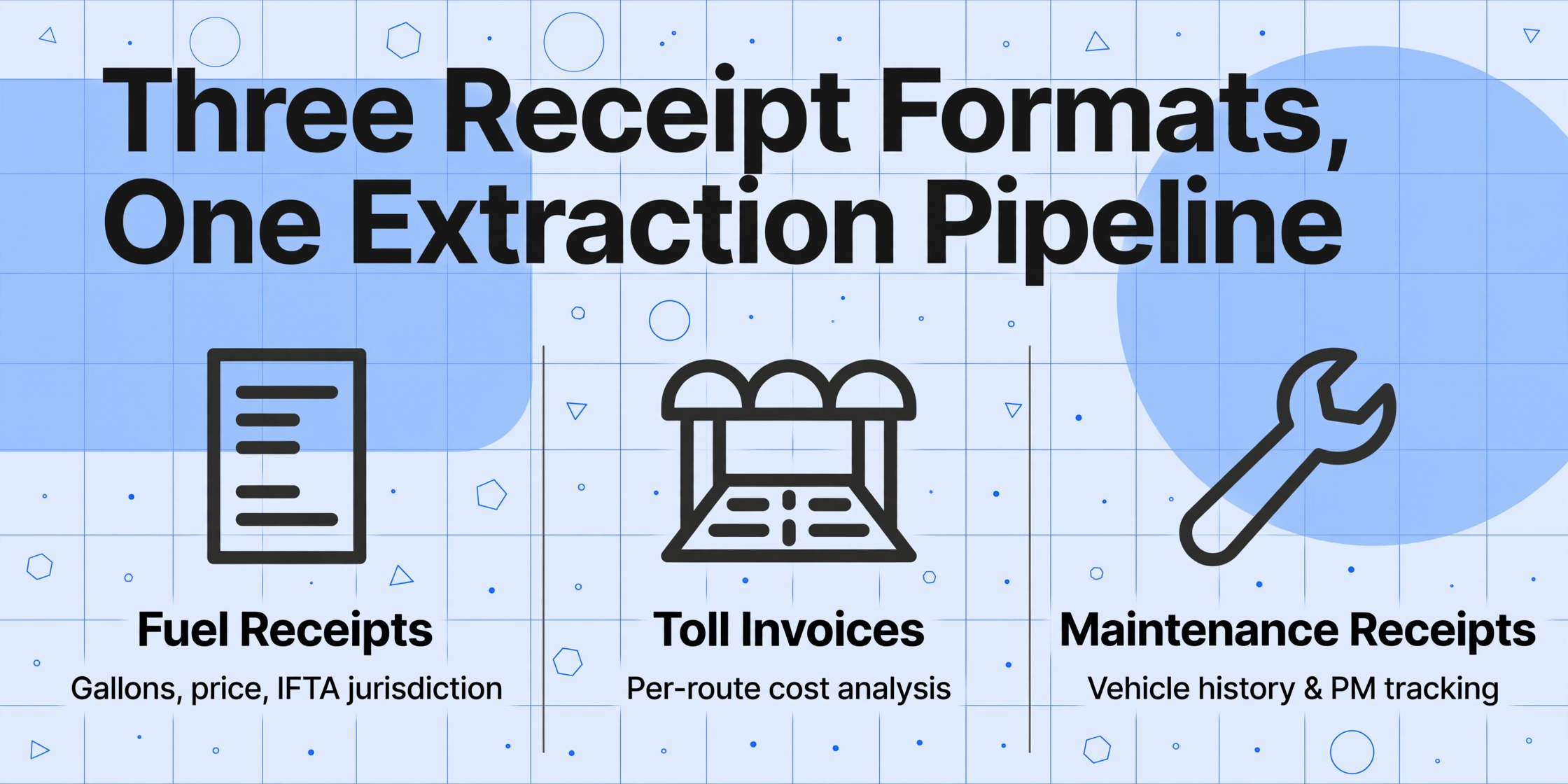
A fleet doesn't generate one type of receipt. It generates three — and each format carries data that feeds a different part of the operation. Understanding the distinction is critical because a tool that only handles one format leaves the other two categories sitting on the fleet manager's desk.
Fuel Receipts — Gallons, Price, and IFTA Jurisdictions
A fuel receipt is the most common fleet receipt, and the one with the most regulatory weight. Every commercial trucking fleet operating in IFTA-jurisdictional states and provinces must document each fuel purchase with nine specific data points: purchase date, seller name and address, gallons purchased, fuel type, price per gallon or total sale amount, vehicle unit number, and purchaser name. A fuel receipt from a chain station like Pilot, Love's, or TA typically prints all nine fields in a standardized layout — but "standardized" only means consistent for that chain. Across 50 fueling stops, a driver accumulates receipts from 15 different station chains plus independent cardlock stations, each with its own field placement, font size, and thermal paper quality.
The extraction challenge for fuel receipts is field consistency across station chains. One station prints the odometer reading in a small box near the bottom; another prints it at the top next to the driver ID. Some stations label the price per gallon as "PPG" while others use "Unit Price" or "$/Gal." A semantic extraction approach reads by meaning — it identifies "number near 'Gallons' label" as the fuel quantity and "number with $ sign at the bottom" as the total — regardless of where on the slip these fields sit.
Toll Invoices — Multiple Authorities, Per-Trip Line Items
Toll receipts are structurally different from fuel receipts. Instead of a single transaction total at a point of sale, a toll authority invoice contains a table of per-trip line items — date, time, toll plaza, vehicle plate, amount — spanning multiple crossings across a billing period. A cross-country fleet operating in 12 states may receive toll invoices from E-ZPass (Northeast and Midwest), SunPass (Florida), TxTag (Texas), FasTrak (California), and several other regional authorities — each producing a PDF with its own column order and header layout.
The extraction challenge for toll invoices is multi-line table parsing across formats. An E-ZPass statement lists charges with toll plaza name, date, and transponder ID. A SunPass invoice uses a different column arrangement and includes a discount column. TxTag embeds the vehicle plate in the header instead of the line-item table. The AI must recognize that each row in the table represents a single toll crossing, map the correct values to the right columns (date, plaza, amount, vehicle), and handle the fact that some authorities bill monthly while others bill per-transaction.
Maintenance Receipts — Parts, Labor, and Vehicle History
Maintenance and repair receipts — from quick-lube shops, dealer service centers, and independent diesel mechanics — are the least standardized of the three. A PM receipt for an oil change may show a flat fee with "Labor" and "Parts" line items. A major repair invoice might list 15 separate part numbers, each with a quantity, unit price, and labor charge, plus shop supplies, environmental fees, and tax. Unlike fuel receipts (which feed IFTA) and toll invoices (which feed route cost analysis), maintenance receipts feed total cost of ownership (TCO) and vehicle lifecycle tracking.
The extraction challenge for maintenance receipts is open-ended line-item structure. Fuel receipts have a predictable set of fields. Maintenance receipts vary by shop: one mechanic itemizes every bolt and gasket; another bundles parts under "Shop Materials." The extraction pipeline must handle both a simple 4-line oil change ticket and a 30-line engine overhaul invoice, extracting the service description, total cost, shop name, and vehicle ID — and flagging which line items are parts vs labor when the shop distinguishes them. For a deeper look at how vehicle-level cost data feeds fleet analytics, see our guide to invoice data extraction — the invoice extraction principles that support AP automation also apply to reconciling shop invoices against work orders.
Fleet Receipt Extraction vs Fuel Cards vs Manual Processing
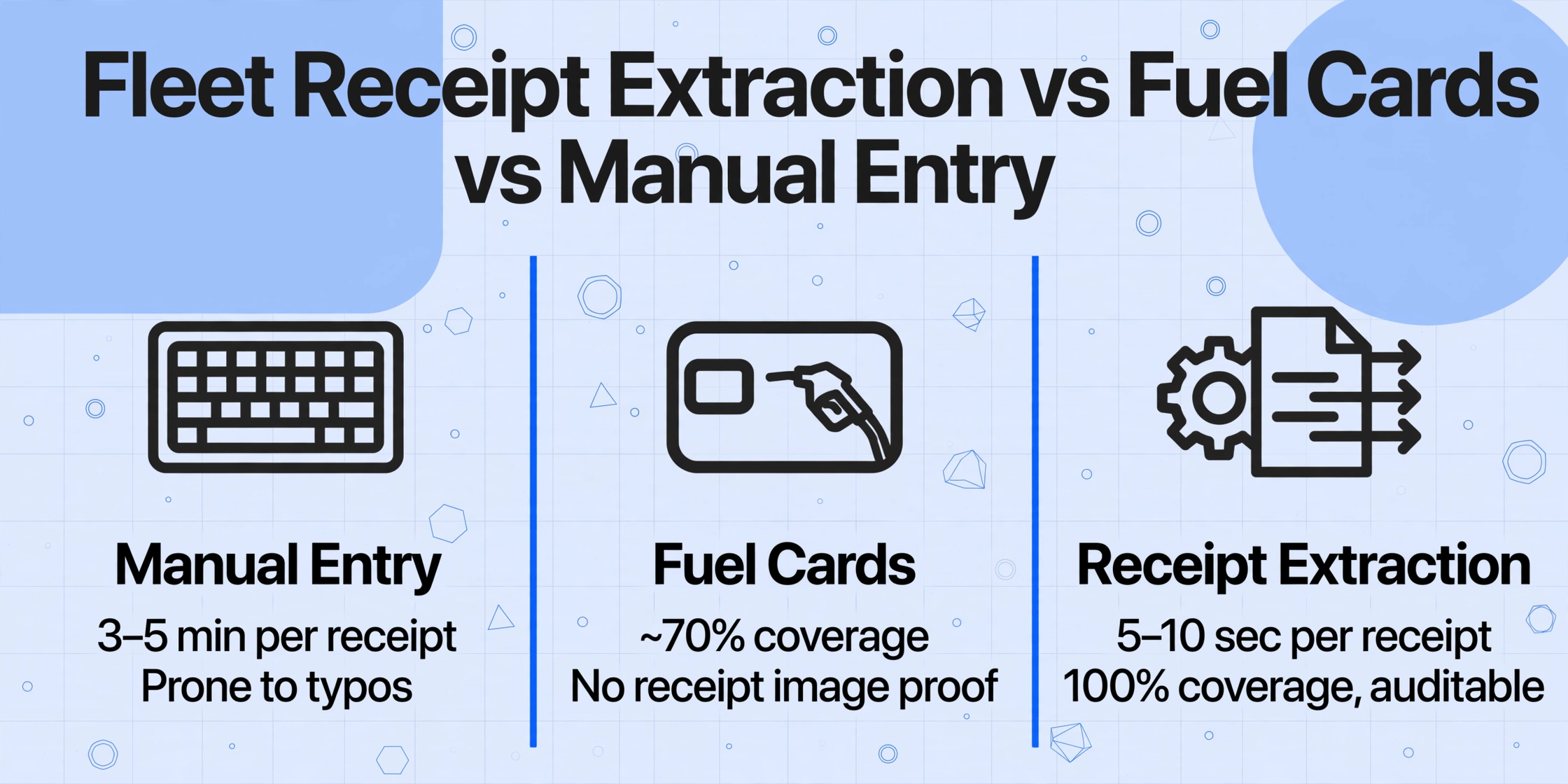
Fuel cards — WEX, FleetCor, Comdata, Fuelman — capture transaction data at the pump: gallons, price, location, timestamp, driver ID, vehicle ID. For the ~70% of fuel purchases that occur at in-network stations where the driver remembers the card and keys in the correct odometer reading, this automation is genuine. The data arrives structured in a dashboard, ready for IFTA calculation. No receipt needed.
The other 30% is where fleet receipt extraction earns its place. Rural stations outside the card network. Emergency refueling where a driver uses cash or a personal card. Toll authority PDFs from six different state agencies, each with its own invoice layout. DEF purchases, scale tickets, truck washes, and maintenance receipts — expenses that matter for cost tracking but never run through the fuel card. These receipts still travel at paper speed: photographed or scanned, then hand-typed into a spreadsheet by someone in the office.
| Manual Entry | Fuel Card | Receipt Extraction | |
|---|---|---|---|
| What it covers | Anything a person types | In-network fuel purchases | All receipt types — fuel, toll, maintenance, DEF |
| Network coverage | N/A | ~70% of transactions (varies by card) | 100% — reads any receipt image |
| Per-receipt time | 3–5 minutes | ~0 (auto-captured) | 5–10 seconds (batch) |
| IFTA audit readiness | Depends on entry accuracy | Card data only — no receipt image proof for non-card purchases | Structured data + original receipt image, auditable |
| Non-fuel receipts | Same manual process | Not covered | Same pipeline — toll, maintenance, DEF, scales |
| Per-vehicle cost | $0 (labor only) | $3–12/month card fee + platform $25–100/vehicle/month | Subscription-based, not per-vehicle |
The right mental model is not "receipt extraction replaces fuel cards." It's "fuel cards handle what they were designed for; receipt extraction handles everything else." For fleet managers, the practical stack is fuel card data for in-network fuel transactions + receipt extraction for the paper, PDF, and screenshot receipts the fuel card never sees. Together, they produce a complete fuel and expense dataset with no manual entry gap. For a deeper analysis of the numbers behind this gap, see our cost framework for manual fuel receipt processing.
How Fleet Receipt Extraction Works
The old way: position-based template matching. A traditional OCR tool requires a template for each receipt layout. You draw a box around the "Total" field on Pilot receipts, then you draw a different box on Love's receipts, then a third box on the local independent station's receipts. Every station chain prints differently. Even the same chain changes its receipt format when it upgrades its POS. Each template you build is a maintenance commitment, and every format change silently breaks it.
The way fleet receipt extraction actually works: semantic reading. Instead of looking at coordinates, the AI reads the receipt by understanding what each piece of text means. A dollar amount next to "Total" or "AMOUNT DUE" or even just sitting at the bottom of the slip with no label — the AI identifies it by its semantic role as the transaction total, regardless of where on the page it sits or what the station calls it. This is what makes template-free extraction possible: a receipt from a station the AI has never seen works on the first try.
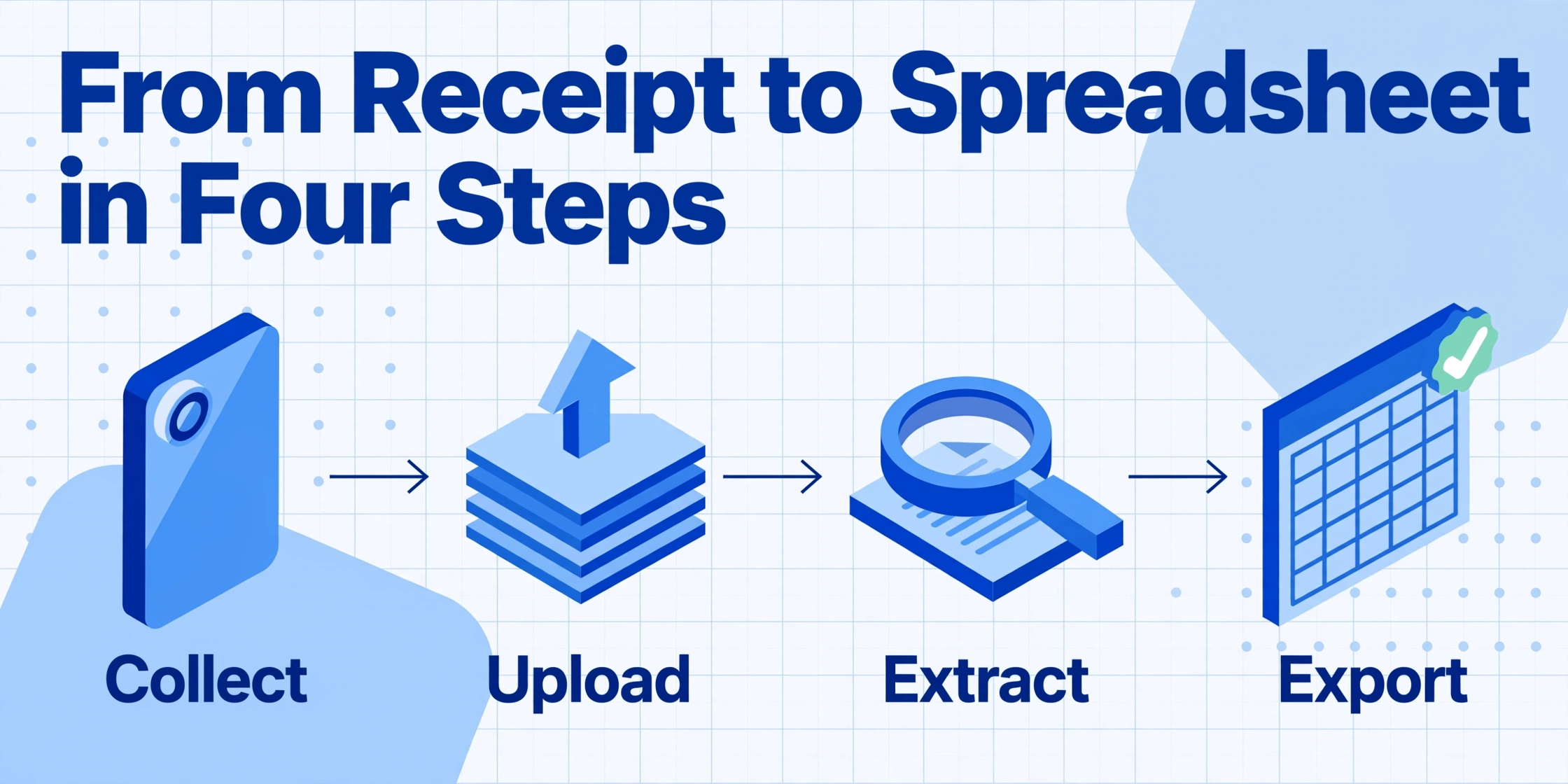
The pipeline runs in four steps, and it's the same steps whether the receipt is a phone photo of a fuel slip or a PDF toll invoice from a state authority:
Collect receipts from drivers
Drivers photograph receipts at the pump or toll booth — no special app, just a phone camera. Or use a Collection Link — a shareable upload page where drivers drop files directly into your processing queue without logging in. PDF toll invoices, emailed maintenance receipts, scanned fuel slips — all go into the same batch.
Define the columns your fleet needs
Type the field names that match your fleet's data model: Vehicle ID, Fuel Grade, Gallons, Price/Gallon, Odometer, Jurisdiction, Total. These become your spreadsheet column headers. No template setup, no per-station configuration. You can also define computed columns — like MPG (Trip Miles ÷ Gallons) or Cost Per Mile (Total ÷ Trip Miles) — and the AI runs the calculation during extraction, so the output is ready for analysis.
AI reads and maps each field by meaning
The vision model processes each receipt image and identifies every text block by its semantic role — "this number near 'Gallons' is the fuel quantity," "this address block contains the jurisdiction." It works across thermal-printed paper, PDFs, phone photos of crumpled slips, and screenshots of digital fuel purchases — all in a single batch, no format segregation required.
Export structured data into your fleet tools
Download as Excel (XLSX) or CSV — one row per receipt, columns exactly as you named them. Import into Fleetio, Samsara, Geotab, or your accounting system. Merge with fuel card data for a complete, auditable fuel dataset that covers every transaction — card-captured and receipt-extracted — in one spreadsheet.
Files are processed securely and not stored.
This workflow doesn't ask a fleet to rip out its fuel card system or switch telematics providers. It plugs a gap — the gap between "the fuel card captured this transaction" and "we have a receipt for this transaction" — by turning any receipt image into the same structured row that a fuel card would have produced, using the same column names the fleet's system already expects.
When You Need Fleet Receipt Extraction
Not every fleet crosses the threshold where receipt extraction becomes necessary. The triggers are specific:
1. IFTA quarter-end is a scramble through filing cabinets. IFTA requires carriers to file quarterly fuel tax returns — deadlines April 30, July 31, October 31, and January 31 — reporting miles traveled and gallons purchased in each of 58 member jurisdictions (48 US states + 10 Canadian provinces). The International Fuel Tax Agreement mandates that for every gallon of tax-paid fuel claimed, carriers must retain a receipt containing: purchase date, seller name and address, gallons purchased, fuel type, price per gallon or total sale amount, vehicle unit number, and purchaser name. Records must be retained for four years from the filing date. An auditor who finds missing receipts disallows the corresponding tax credit — meaning the carrier pays fuel tax twice on those gallons. A single quarter with 30 missing receipts at an average state diesel tax of $0.32/gallon and 100-gallon fills represents $960 in unrecoverable tax credits.
2. Fuel cards don't reach everywhere your drivers go. WEX covers approximately 95% of US retail fueling locations — which leaves a 5% gap that, for a fleet running rural routes or fueling at independent cardlock stations, produces paper receipts with no automated data pipeline. The Shell State of Fleet Cards 2025 report found that 27% of fleet managers rank inconsistent or incomplete driver reporting among their top 3 fuel management challenges, and 26% cite inadequate technology for monitoring fuel use. Those numbers reflect the reality: drivers fuel where the route takes them, not where the card network ends.
3. You need per-vehicle and per-mile cost allocation. Under IRS rules, fleets operating 5 or more vehicles simultaneously cannot use the standard mileage rate — they must use the actual expenses method (IRS Form 2106 Instructions). This requires maintaining receipts for all vehicle expenses, including fuel, tolls, maintenance, and repairs. The American Transportation Research Institute's 2025 report pegged the average cost of operating a truck at $2.260 per mile in 2024, with non-fuel costs reaching an all-time high of $1.779 per mile. The Fleetio 2025 Benchmark Report found the median trucking fleet's cost per mile at $0.31, with fuel accounting for $0.16 of that. When per-mile costs vary by 35% between the most and least efficient drivers operating the same equipment — a gap documented by the ATA Technology & Maintenance Council — granular per-vehicle receipt data becomes the diagnostic tool that identifies the spread.
4. DOT compliance and IRP registration tie to receipt-backed records. The International Registration Plan (IRP) requires carriers operating across jurisdictions to maintain individual vehicle distance records supported by source documents — trip reports, driver logs, and fuel receipts. Under Ohio's IRP/IFTA recordkeeping requirements, GPS data must be accessible in spreadsheet formats (XLS, XLSX, CSV) — static images like PDF are not acceptable as the primary record format. This means receipt photos need to become structured data rows, not just image files in a folder. For a walkthrough of the complete fleet receipt workflow, see our step-by-step guide to building a fleet fuel receipt spreadsheet.
What to Look For in a Fleet Receipt Extraction Tool
Fleet receipt extraction tools aren't all the same — and a tool built for consumer expense tracking won't hold up to fleet-scale data requirements. Here's what separates a fleet-capable tool from a receipt scanning app:
Template-free operation across any receipt format. A fleet deals with receipts from fuel stations, toll authorities, maintenance shops, and truck washes — each in a different format. A template-based tool that requires per-vendor setup is not extraction; it's template management that breaks when any vendor changes their receipt layout. Template-free extraction reads by semantic meaning: the AI identifies "Gallons: 87.3" as a fuel quantity whether it appears on a Pilot receipt, a Love's receipt, or a handwritten slip from a rural cardlock station. If the tool asks you to "define a template" for each receipt type, you're buying maintenance, not automation.
Batch processing that matches fleet volume. Processing 50 receipts one at a time — upload, wait, download, repeat — is not meaningfully faster than manual entry once you account for tool interaction overhead. Batch processing — upload 50 receipts at once, get one unified spreadsheet — is where the time savings compound from seconds per receipt to minutes per month. A fleet of 50 vehicles generating 400 fuel receipts a month can't afford a one-at-a-time workflow.
Multi-receipt-type handling in a single pipeline. A tool that only reads fuel receipts solves one category. A fleet also has toll invoices, DEF purchase receipts, maintenance bills, scale tickets, and truck wash charges — all of which feed cost-per-mile and TCO calculations. The extraction tool should handle all of them in the same batch, extracting relevant fields from each receipt type without requiring separate workflows or templates per category.
Per-vehicle tagging and output schema control. Fleet management platforms — Fleetio, Samsara, Geotab, Verizon Connect — each expect specific column names on import. A tool that locks you into its own predefined output schema forces reformatting before your data enters the fleet system. Custom column extraction lets you name your columns to match whatever your fleet platform expects: Vehicle ID if that's what Fleetio calls it, Asset Name if that's what your ERP uses. You control the output schema so the data lands where it's supposed to without reformatting.
Collection tools for driver-submitted receipts. The gap between "the driver fueled up" and "the receipt reached the office" is where data loss happens. A Collection Link — a shareable upload page that routes driver-submitted files directly into the processing queue — closes that gap without requiring drivers to install an app or log into a system. The driver photographs the receipt at the pump, opens the link, and drops the file. The receipt data is extracted and structured before the truck reaches the next state line.
Frequently Asked Questions
Do I need fleet receipt extraction if I already use a fuel card?
For the ~70% of fuel transactions that occur at in-network stations where the driver keys in the correct odometer reading, a fuel card provides automated data capture that feeds directly into IFTA calculations. Fleet receipt extraction is for the other 30%: purchases at stations outside the card network, emergency cash refueling, toll invoices from state authorities, DEF purchases, scale fees, and maintenance receipts. It's not a replacement — it's a gap filler that ensures every transaction, regardless of payment method or receipt format, produces structured, auditable data. Without it, the IFTA auditor who asks for "all fuel receipts from Texas in Q2" will find a hole in your records where the card network didn't reach.
What happens during an IFTA audit if fuel receipts are missing?
IFTA auditors review fuel purchase records, trip sheets, and mileage logs for the audit period — typically a four-year lookback. If a fuel receipt is missing for a claimed purchase, the auditor disallows the corresponding tax-paid gallons. You lose the credit for fuel tax already paid in that jurisdiction, effectively paying that tax twice. A pattern of missing receipts can also expand the scope of the audit, increasing its duration and cost. IFTA record retention requirements from Wisconsin DOT and Virginia DMV specify that carriers must maintain individual vehicle distance records with supporting documents — fuel receipts, trip reports, driver logs — for a minimum of four years from the filing date.
Can receipt extraction handle faded thermal paper receipts?
Yes, within limits. AI-powered extraction handles moderate fading by analyzing contrast patterns that remain even after the thermal coating begins degrading. A receipt left on a truck dashboard for a week in July — partially faded but still showing ghost text — is typically readable. Severely degraded receipts where the text has essentially disappeared are beyond any extraction tool's capability. The best practice is to capture fuel receipts within 24 hours of the fill-up: photograph at the pump before the receipt enters a hot truck cab. For receipts that must be retained for IFTA's four-year lookback, digital capture at the moment of creation is the only reliable preservation strategy.
Can fleet receipt extraction handle handwritten odometer readings on fuel receipts?
Yes, though accuracy varies with legibility. Most fuel receipts with driver-entered odometer readings are keyed into a pin pad at the pump and printed — these extract reliably. For genuinely handwritten readings, modern vision models handle clear block-style writing well. Cursive or heavily scribbled entries have lower accuracy. If odometer data is critical and receipt handwriting is unreliable, GPS-based odometer tracking via telematics is a more consistent primary source, with extracted receipt data serving as validation during audits.
What if the fuel receipt doesn't show the jurisdiction or state?
Most fuel station receipts include the station address, which contains city and state. The AI extracts the address field, and from the state abbreviation the jurisdiction is determined. For receipts that genuinely lack location information — rare for US fuel stations but possible with some independent cardlock receipts — the jurisdiction must be supplemented from driver trip logs or GPS data. This is a data completeness issue at the source, not an extraction limitation. The IFTA audit standard requires location documentation for every fuel purchase; if the receipt doesn't provide it, another record must.
How is fleet receipt extraction different from a basic receipt scanning app?
A receipt scanning app — like the photo capture feature in QuickBooks or an expense tracking app — extracts three to four header fields (vendor, date, total) and attaches the receipt image to a transaction record. That satisfies basic expense logging for an individual's tax deduction. Fleet receipt extraction is built for a different data model: it extracts field-level detail (gallons, price per gallon, odometer, jurisdiction, fuel grade, vehicle ID) across batch volumes and receipt types, producing a spreadsheet structured for IFTA tax allocation, per-vehicle cost analysis, and fleet management software import — not just expense categorization.
Does the IRS accept digital receipt scans as valid records for fleet vehicles?
Yes. Under IRS Publication 583, supporting documents include "cash register tapes," "account statements," and "credit card sales slips" — all accepted in digital form if legible and showing amount, date, and business purpose. The IRS does not require physical paper originals. For fleets using the actual expenses method (required for 5+ vehicles), maintaining digital receipt records with extracted data provides substantiation that satisfies IRS recordkeeping requirements. Retention is generally three years, though records related to vehicle depreciation should be kept longer.
What are the IFTA quarterly filing deadlines?
IFTA quarterly tax returns are due by April 30 (Q1 — January through March), July 31 (Q2 — April through June), October 31 (Q3 — July through September), and January 31 (Q4 — October through December). Late filings incur a penalty of $50 or 10% of net tax liability, whichever is greater, plus monthly interest on any unpaid balance. State diesel tax rates change mid-year in several jurisdictions — July 1 is a common adjustment date — so carriers filing Q2 and Q3 reports must use the correct rate for each jurisdiction in each period. The extraction tool's output should include a jurisdiction column and a purchase date field to support accurate rate lookup across rate-change boundaries.
Where to Go From Here
Fleet receipt extraction closes the gap between a fuel card's 70% coverage and the complete, auditable dataset that IFTA auditors expect. It doesn't require replacing your fuel card system, switching telematics providers, or training drivers on a new app. It requires one thing: turning a receipt photo into structured data before the receipt becomes a faded scrap of thermal paper in a truck cab — or a gap in an IFTA auditor's spreadsheet.
The American Transportation Research Institute found that non-fuel operating costs reached an all-time high of $1.779 per mile in 2024 — and fuel itself is the single largest variable expense at 24% of marginal cost per mile. Every receipt that goes un-extracted is a data point that can't inform cost-per-mile analysis, can't substantiate an IFTA tax credit, and can't flag a vehicle burning 15% more fuel than its baseline. The best way to evaluate whether fleet receipt extraction fits your operation is to test it on the receipts your fuel card doesn't cover: the toll PDF, the rural station slip, the maintenance invoice. Upload a sample receipt and see what structured data you get back — or start with our step-by-step guide to building a fleet fuel receipt spreadsheet.