How to Automate Fleet Fuel Receipt
Data Entry into Excel (2026)
A commercial truck burns through 20,500 gallons of diesel a year. At current pump prices, that’s over $70,000 in annual fuel spend — and every single gallon generates a receipt that someone has to type into a spreadsheet. For a fleet of 20 trucks, that’s roughly 2,000 fuel receipts per year moving through someone’s keyboard. Most fleet managers don’t have a data entry problem. They have a data loss problem — receipts go missing, numbers get transposed, and IFTA quarter-end becomes a scavenger hunt through a shoebox.
Key Takeaways
- A 20-truck fleet burns through 2,000 fuel receipts a year — each one takes 3 minutes of manual data entry at roughly $15 in loaded labor, meaning $30,000 evaporates into typing alone, and that's before you count the receipts drivers lose between the pump and the office.
- Your fuel card captures 70% of transactions automatically, but the remaining 30% — receipts from rural stations, non-network pumps, and thermal paper that fades in a hot cab — still travels at paper speed, and these are the exact receipts IFTA auditors demand when they open a quarterly review.
- The fix is not another card, not a per-vehicle SaaS fee: define your eight column names once, photograph any receipt, and let ImageToTable.ai locate Gallons, Odometer, and Jurisdiction by what each field means — regardless of where the station prints it — closing the 30% gap your fuel card was never designed to handle.
The Real Cost of Manual Fuel Receipt Tracking
The American Transportation Research Institute’s latest operational cost report puts fuel at roughly 24% of marginal cost per mile for trucking — second only to driver wages. The American Trucking Associations (ATA) reports commercial trucks paid $30.26 billion in federal and state fuel taxes in 2023 alone. These aren’t abstract numbers. They translate to hundreds of receipts per vehicle per year, each one carrying data that matters for cost analysis, tax filing, and IFTA compliance. If you want the full breakdown of what that receipt-handling pipeline costs a fleet, our calculation framework for manual fuel receipt processing walks through the numbers layer by layer.
Manual fuel receipt tracking is deceptively expensive because the costs don’t show up on a fuel invoice. They show up in the gaps. A driver loses a receipt from a fill-up in rural Nebraska — that’s a $200 transaction that didn’t happen as far as your IFTA return is concerned. An odometer reading gets entered as 150,000 instead of 150,100 — now the MPG calculation for that vehicle is wrong for the rest of the quarter. And every quarter, when the IFTA deadline hits, someone spends two days cross-referencing fuel card statements against paper receipts against GPS logs, patching together what actually happened.
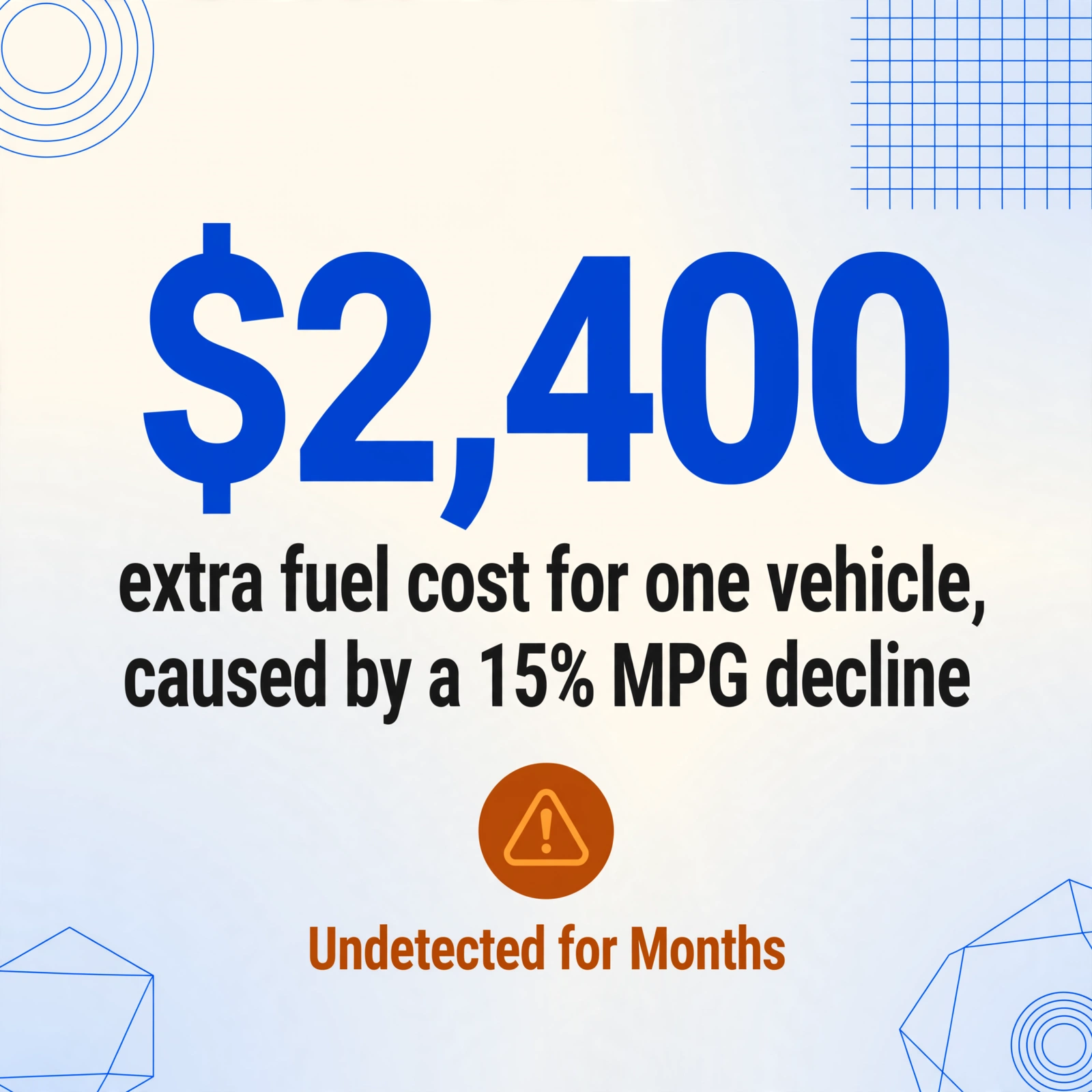
A single vehicle with a 15% MPG decline costs an extra $2,400 in fuel annually — and that decline often goes undetected for months because the manual spreadsheet that should catch it is three weeks behind. The ATA’s Technology & Maintenance Council documented a 35% efficiency gap between the most and least fuel-efficient drivers operating the same equipment. That gap is invisible to a fleet manager who’s still reading receipts off a stack of paper.
What Data You Actually Need from Every Fuel Receipt
Not every field on a fuel receipt matters. A fleet manager doesn’t need the cashier’s name or the store’s loyalty program ID. But skipping the fields that do matter — for cost analysis, IFTA reporting, or IRS recordkeeping — creates hours of backtracking when audit season arrives. Here’s what belongs in every fuel transaction record, grouped by why it matters.
| Field | Why It Matters | Compliance Driver |
|---|---|---|
| Vehicle ID / Plate | Without it, fuel cost can’t be assigned to a specific asset. MPG per vehicle becomes impossible to calculate. | IFTA — jurisdiction allocation requires per-vehicle mileage |
| Driver ID | Links consumption to operator behavior. The 35% efficiency gap between drivers only becomes visible when this field exists. | Internal accountability; IRS actual-expense substantiation |
| Odometer Reading | The denominator in every MPG and cost-per-mile calculation. Without it, fuel consumption is just a dollar number with no efficiency context. | IFTA — jurisdiction distance allocation; IRS mileage log (Publication 463) |
| Fuel Grade | Diesel, regular, premium — different grades have different tax rates and cost structures. Misfuelling a diesel truck with gasoline is a five-figure repair. | IFTA — tax rates vary by fuel type and jurisdiction |
| Gallons Purchased | Core consumption metric. Combined with odometer, this is how MPG gets calculated. | IFTA — gallons per jurisdiction is the core input for tax allocation formula |
| Price per Gallon | Tracks fuel cost variance across routes and stations. A $0.30/gallon difference across a fleet of 50 trucks adds up fast. | IRS — actual expense method requires per-transaction cost records |
| Location / Jurisdiction | Determines which IFTA jurisdiction gets the tax credit for this purchase. A receipt from a station on the Utah side of the Arizona border has different tax implications than one two miles east. | IFTA — fuel tax credit can only be claimed in the jurisdiction where fuel was purchased |
| Date & Time | Maps each transaction to the correct tax quarter and trip record. | IFTA quarterly filing deadlines; IRS contemporaneous recordkeeping |
These eight fields are the minimum viable dataset for a fleet fuel transaction. Miss any of them, and the data can’t be used for MPG analysis, cost-per-mile tracking, or IFTA tax allocation. The problem, of course, is that fuel receipts aren’t standardized — a Love’s receipt arranges this data differently than a Pilot receipt, and a rural independent station might not print the odometer field at all because the pump doesn’t prompt for it.
Step-by-Step: From Receipt Photo to Fleet Spreadsheet
Fuel card dashboards and telematics integrations are great — if every station your drivers visit supports them, and if you’re willing to pay $25–35 per vehicle per month. But many fleets operate in a hybrid reality: some transactions come through the fuel card, some come as paper receipts from stations outside the fuel card network, and some are uploaded as phone photos from drivers who forgot the card. The workflow below handles all three formats the same way — by reading the receipt image itself, regardless of where it came from. If you’re new to the concept, our overview of fleet receipt extraction explains what it is, how it differs from a fuel card, and why the receipt side of the pipeline still matters.
The approach uses AI-powered custom column extraction: instead of drawing boxes around fields on each receipt template, you tell the tool what data you want by naming the columns. The AI locates each value on the receipt by understanding what it means — a dollar amount next to “Total” is the total, a number next to “Odometer” is the odometer reading — regardless of where those fields sit on the page or how the receipt is laid out.
Upload your fuel receipts
Drop in photos, scans, or PDFs of fuel station receipts — from any station, any layout, any format. JPG phone photos work. Scanned thermal paper works. A single batch upload can handle dozens of receipts at once, merging everything into one output file.
Specify the columns you need
Enter column names that match your fleet spreadsheet: Vehicle ID, Driver ID, Odometer, Fuel Grade, Gallons, Price/Gallon, Total, Location, Date. The AI reads each receipt and fills in what it finds. You can also add computed columns like MPG (Miles Since Last Fill ÷ Gallons) or Cost Per Mile (Total ÷ Trip Miles) — the extraction runs the math on the spot so the output spreadsheet is ready to analyze, not just raw data.
Download the fleet expense spreadsheet
Export to Excel — one row per receipt, columns exactly as you named them. The file is ready to import into Fleetio, Samsara, Geotab, or your accounting system. No template setup, no formula debugging, no copy-paste from a PDF viewer.
Files are processed securely and not stored.
This workflow handles the formats that fuel cards and telematics don’t cover — the paper receipt from a small-town station, the phone photo a driver texts you, the scanned PDF from last month’s batch you’re still catching up on. It doesn’t replace a fuel card system if you already have one; it fills the gaps that every fuel card system leaves behind.
Why Fuel Cards Alone Don’t Solve the Receipt Problem
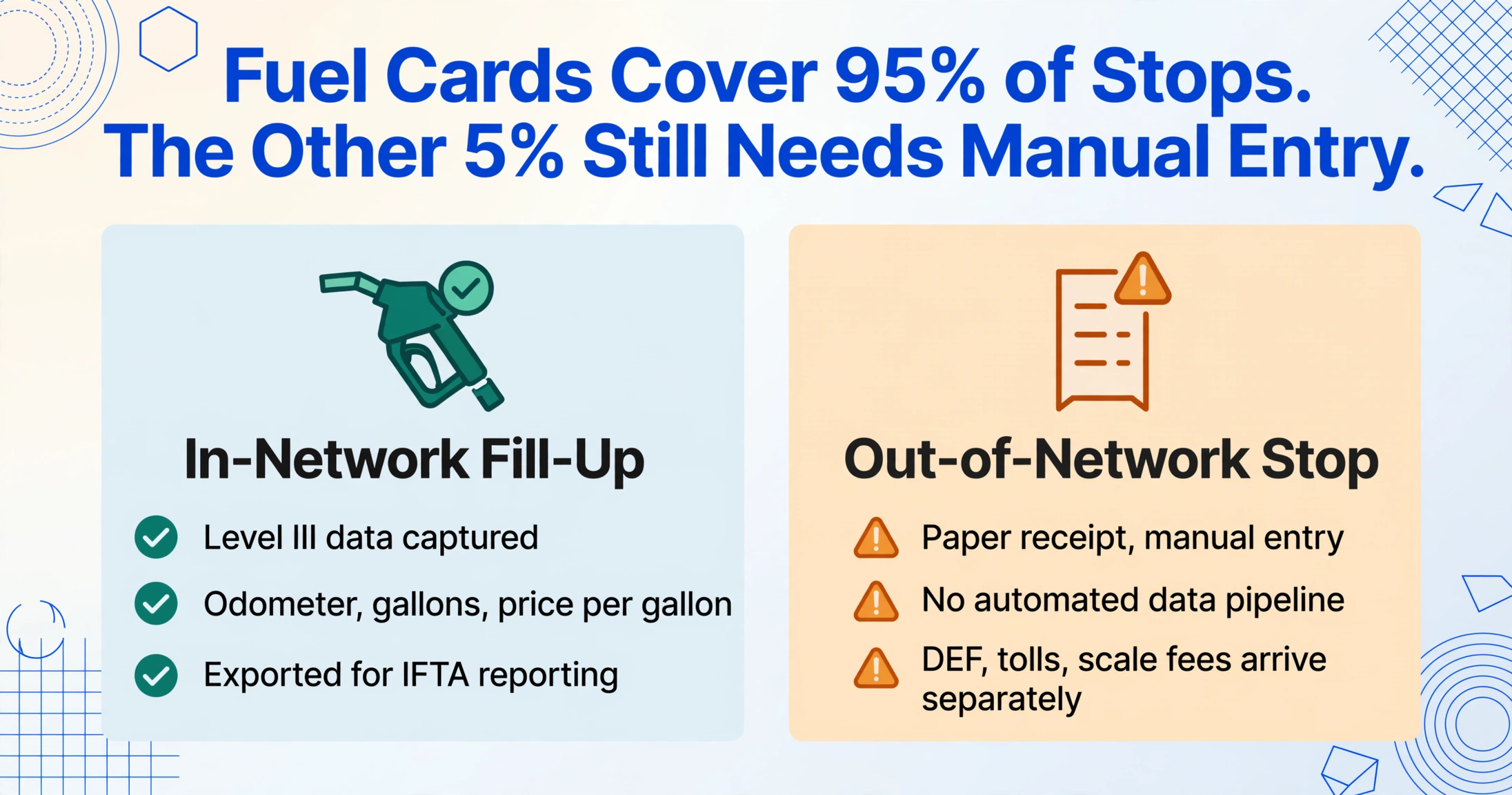
Fuel cards are genuinely useful. WEX and Fuelman both capture Level III transaction data — driver ID, vehicle ID, odometer, fuel grade, gallons, price per gallon, location, timestamp — at the point of sale. This data flows into dashboards and can be exported for IFTA reporting. For fleets whose drivers consistently fuel at major network stations, this is a significant efficiency gain.
But fuel cards have three structural gaps that leave fleet managers reaching for spreadsheets anyway:
Network coverage isn’t universal. WEX covers approximately 95% of U.S. retail fueling locations. That sounds comprehensive until you operate in the 5% — rural routes, family-owned stations, cardlock networks outside the major providers. Every transaction outside the network generates a paper receipt that still needs manual entry, with no automated data pipeline to catch it.
Non-fuel purchases break the pipeline. DEF (diesel exhaust fluid), tolls, scale fees, and truck wash receipts don’t always run through the fuel card. These are still fleet expenses that need to land in the same spreadsheet as fuel data — but they arrive as separate receipts, in separate formats, from separate vendors.
Cost scales per vehicle. Fleet management platforms with fuel card integration typically cost $25–100 per vehicle per month. For a fleet of 100 trucks, that’s a line item. For an owner-operator with 3 trucks, that’s a decision between the platform subscription and another set of tires.
This is why the most practical fuel tracking stack for many fleets is a combination: fuel cards for the transactions they capture automatically, and AI-based receipt extraction for everything the fuel card doesn’t catch — paper receipts, non-network stations, phone photos, DEF and toll receipts, and historic batches you’re still digitizing. When the pile grows to a full month of fuel and toll receipts, our guide to batch fuel and toll receipt processing shows how one column setup turns hundreds of mixed-format receipts into a single fleet cost report.
What About Exporting the Fuel Card’s Own Transactions?
If your question is on the fuel card side of the workflow — exporting the transactions your card already captured into a clean table with custom date filters — the fastest path is usually the card portal’s native CSV or Excel export. Most fleet card providers (WEX, Comdata, Fuelman, and others) let you pull a transaction report for a specific date range straight from the dashboard, and that file lands in Excel ready to filter, pivot, and merge with your other expense data.
The extraction workflow on this page matters when the native export falls short: some smaller card programs only show transactions in a web dashboard with no CSV download, some export files drop fields you need for IFTA like odometer or jurisdiction, and statements that arrive as PDFs can’t be filtered until someone turns them into rows. In those cases, screenshot the dashboard or upload the statement PDF and extract it the same way you would a paper receipt — define the columns once, and the output merges with your card’s native export into one filterable spreadsheet. The tool reads the document itself; it doesn’t connect to your card provider’s API.
IFTA Compliance: What Your Receipt Records Must Include
The International Fuel Tax Agreement (IFTA) governs fuel tax reporting for commercial vehicles operating across 48 U.S. states and 10 Canadian provinces. Instead of filing separate fuel tax returns with every jurisdiction a truck passes through, carriers file one consolidated quarterly return with their base jurisdiction, which then distributes tax to each member jurisdiction.
The quarterly deadlines are non-negotiable: Q1 (Jan–Mar) due April 30, Q2 (Apr–Jun) due July 31, Q3 (Jul–Sep) due October 31, Q4 (Oct–Dec) due January 31. You must file even if you operated zero taxable miles in a given quarter.
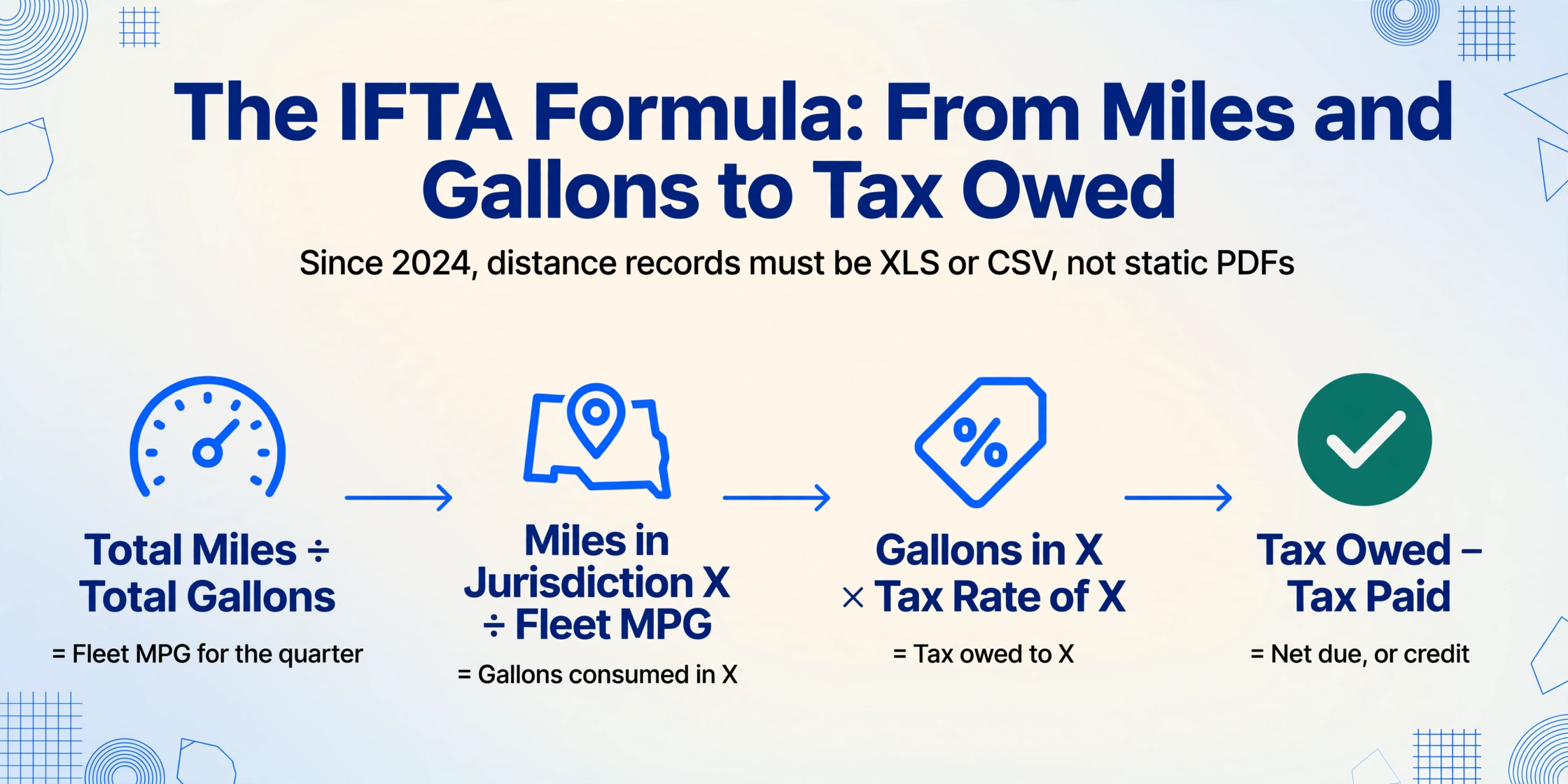
As of 2024, IFTA tightened its electronic recordkeeping requirements: distance records produced by vehicle tracking systems must be accessible in spreadsheet formats like XLS or CSV. Static image formats such as PDFs are no longer acceptable as the primary record format. This means fuel receipt data needs to be digitized and structured — not just photographed and stored in a folder.
The IFTA tax calculation works as a four-step formula:
1. Total miles ÷ Total gallons = Overall fleet MPG for the quarter
2. Miles driven in Jurisdiction X ÷ Overall MPG = Gallons consumed in Jurisdiction X
3. Gallons consumed in X × Tax rate of X = Tax owed to Jurisdiction X
4. Tax owed to X − Tax already paid in X = Net amount due (or credit)
Every fuel receipt needs to provide the jurisdiction where fuel was purchased, the number of gallons, the fuel type, and evidence that tax was paid — because the tax already paid at the pump becomes a credit against your IFTA liability. A missing receipt doesn’t just mean lost expense tracking; it means paying tax twice on those gallons. The Texas Comptroller and California CDTFA both provide Excel templates for IFTA filing that expect structured transaction data as input — Texas IFTA filing and California IFTA templates are available directly from each state’s tax authority. The closer your receipt extraction output matches these templates’ expected format, the less reformatting you do on filing day.
Record retention for IFTA purposes is generally four years from the tax return due date or filing date, whichever is later. For IRS purposes, retain fuel receipts, mileage logs, and maintenance records for at least three years — seven years if you want coverage against extended audit windows for underreported income.
Integrating Receipt Data with Fleet Management Software
Extracting receipt data into Excel solves the data entry bottleneck. The next question is where that data goes. Most fleet management platforms — Fleetio, Samsara, Geotab, Verizon Connect — support CSV or Excel import for fuel transaction data. The typical integration path is straightforward:
Fleetio, for example, connects with major fuel card providers (WEX, Comdata, Fuelman) to auto-import transactions, and also accepts manual CSV uploads for receipts that fall outside those integrations. The platform then maps each transaction to a vehicle, calculates MPG and cost-per-mile, and surfaces anomalies — like a vehicle suddenly burning 20% more fuel than its baseline — in its reporting dashboard. Samsara similarly ingests fuel data from both telematics and fuel card integrations, layering it over GPS route data to provide per-route fuel cost analysis.
The key to making this integration work is column consistency. If your extracted Excel uses Vehicle ID as the column header but Fleetio expects Asset Name, the import breaks. Define your extraction column names to match whatever your fleet management platform expects on import, and the output file lands in the system without reformatting. This is where custom column extraction has an edge over template-based OCR: you’re not locked into whatever fields a pre-built template decided to capture. You name the columns, so you control the output schema.
If you’re extracting receipt data to Excel for broader expense reporting beyond just fuel, the same column-naming principle applies across all receipt types — toll receipts, maintenance invoices, DEF purchases. One extraction workflow, multiple output destinations.
FAQ
Can AI extraction read handwritten odometer readings on fuel receipts?
Yes, but results vary with handwriting legibility. Most fuel receipts with driver-entered odometer readings are printed at the pump — the driver keys in the reading on a pin pad and it appears as printed text on the receipt. For receipts where the odometer is genuinely handwritten, AI extraction using vision models handles clear, block-style handwriting well. Cursive or heavily scribbled entries will have lower accuracy. If odometer data is critical and receipt handwriting is unreliable, GPS-based odometer tracking (via telematics) is a more consistent primary source, with receipts serving as validation.
Does this work with thermal receipt paper that’s faded?
Thermal paper fades because the heat-sensitive coating degrades over time, especially when exposed to sunlight or heat. A receipt left on a truck dashboard for a week in July will be significantly harder to read than one scanned immediately after printing. AI extraction handles mild fading by analyzing contrast patterns that are invisible to the human eye, but severely degraded receipts — where the text has essentially disappeared — are beyond any extraction tool’s capability. The best practice is to photograph or scan fuel receipts within 24 hours of the fill-up, before fading begins.
What if the fuel receipt doesn’t show the jurisdiction or state?
Most fuel station receipts include the station address, which contains the city and state. The AI can extract the address field and you can map it to the IFTA jurisdiction. If a receipt genuinely lacks any location information (rare for U.S. fuel stations but possible with some independent cardlock receipts), you’ll need to supplement with driver trip logs or GPS data. This is not an extraction limitation — it’s a data completeness issue at the source. The IFTA audit standard requires location documentation; if the receipt doesn’t provide it, another record must.
Can I extract data from fuel receipts in different languages?
Yes. Fuel receipts from stations in Quebec, Mexico, or European routes use different languages for field labels (“Carburant” instead of “Fuel,” “Litres” instead of “Gallons”), but the underlying data structure — numeric amounts next to recognizable field labels — is consistent across languages. Vision-based AI extraction reads the layout and context, not just the text, so it handles multilingual receipts without separate templates per language.
How many receipts can I process at once?
Batch processing supports uploading multiple receipts simultaneously — dozens or hundreds in a single upload — and the output merges all extracted data into one Excel file with one row per receipt. There’s no per-file limit on the extraction side. The practical constraint is upload time and processing queue depth, not the tool’s ability to handle volume.
What Changes When Fuel Receipt Data Moves at the Speed of a Photo
Fleet fuel management sits at an odd intersection: the vehicles generate more data than ever (telematics, GPS, engine diagnostics), but the receipts that tie that data to actual dollars spent still travel at paper speed. Closing that gap doesn’t require ripping out your fuel card system or signing a $30-per-vehicle SaaS contract. It requires a workflow that treats a receipt photo the same way your fuel card treats a transaction — as structured data, captured once and routed to where it’s needed.
Try it on your own fuel receipts. See if the 2,000-receipts-a-year problem becomes a 10-second-per-receipt process.