US Document Retention Requirements:
What to Keep, How Long, and What the IRS Actually Expects
US document retention isn't one law — it's a patchwork of federal and state requirements that vary by document type, industry, and jurisdiction. Here's what you actually need to keep, for how long, and whether a digital copy satisfies the legal requirement.
Key Takeaways
- US document retention isn't governed by one law — it's a patchwork of IRS Rev. Proc. 97-22, SOX Section 802, HIPAA, and fifty state statutes of limitations that range from 4 to 10 years for written contracts alone.
- The compliance trap: a digital copy is legally valid as a substitute for paper — but only if your storage system passes six conditions under Rev. Proc. 97-22, and "a folder on my computer" meets maybe two.
- What protects you in an audit isn't memorizing the right number — it's a documented destruction schedule tied to regulation numbers, organized storage by tax year and category, and source images kept alongside any extracted data.
Ask ten business owners how long they keep their records, and you will get ten different answers — "three years," "seven," "forever, just in case." None of them is entirely wrong, and none is entirely right. The reason is structural: US document retention is governed by at least four separate federal statutes, fifty state codes, and a handful of industry-specific regulations, each with its own timeline and its own definition of what counts as a valid record.
This guide is organized around the three frameworks that matter most to a US business owner: the IRS rules for electronic records, the Sarbanes-Oxley Act's criminal document destruction provisions, and the state-by-state variation that makes a one-size-fits-all policy impossible. Within each section you will find the exact regulation number, not a paraphrase — because when your tax advisor or auditor asks "where does it say that," you need an answer.
IRS Revenue Procedure 97-22: The Six Requirements for Electronic Records
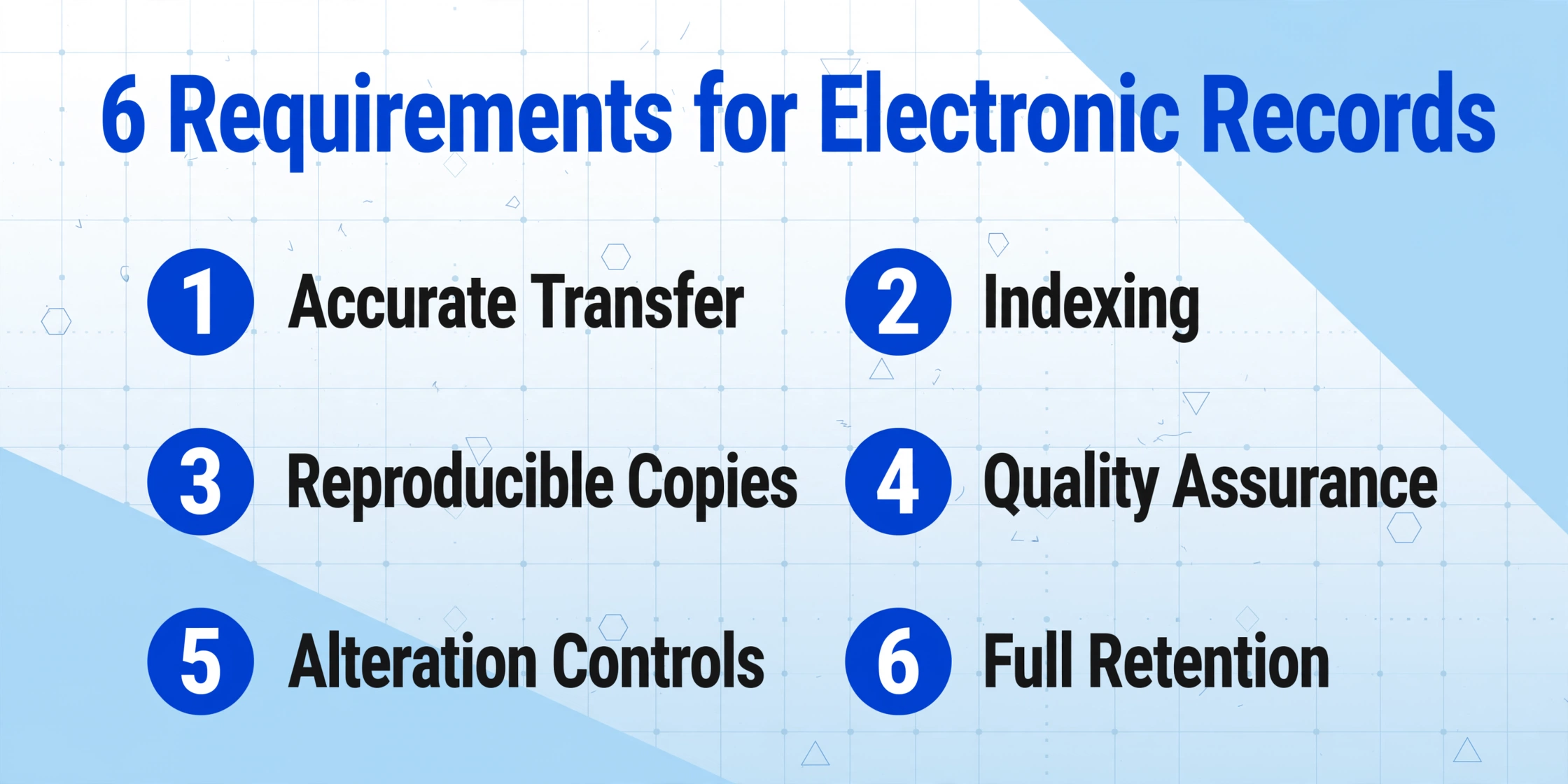
The most important document in US electronic recordkeeping is Revenue Procedure 97-22, published by the IRS on March 31, 1997. It answers the question every business owner asks: can I scan my paper records and throw the originals away? The answer is yes — but only if your electronic storage system meets six specific conditions.
Rev. Proc. 97-22 operates under the authority of Internal Revenue Code Section 6001, which requires every taxpayer to keep records "sufficient to establish the amount of gross income, deductions, credits, or other matters required to be shown" on a tax return. Before 1997, this was widely interpreted as requiring paper originals. The revenue procedure changed that by defining the conditions under which an electronic storage system constitutes a valid recordkeeping method under Section 6001.
The six system requirements from Section 4 of Rev. Proc. 97-22 are:
- Accurate and complete transfer. The electronic copy must be a complete and accurate reproduction of the original document. A partial scan, a blurry phone photo, or a cropped screenshot does not qualify.
- Indexing and retrieval. The system must be able to locate and retrieve any stored record using any indexing designation that appeared on the original. "It's somewhere in my email" is not indexing.
- Reproducible copies. The system must produce legible copies of stored records on demand. The IRS may ask for direct access — the ability to view, search, sort, and download records from your system within a reasonable timeframe (typically a few business days, not weeks).
- Quality assurance. You must implement and document quality assurance procedures that verify the accuracy and completeness of the storage process. This is not optional — the IRS expects to see evidence of testing.
- Controls against unauthorized alteration. Once a record is stored, the system must prevent tampering. If records can be altered after storage without a trace, the system fails this requirement.
- Retention for the full statutory period. Electronic records must be kept as long as the underlying paper records would have been required — which brings us to the period question below.
A critical detail buried in Section 4(.09): if you stop maintaining the hardware and software needed to access the stored records, "the electronically stored books and records will be deemed destroyed." This means a backup format that you can no longer read five years later is not compliance. Your retention system must remain operable for the entire retention period.
For a focused breakdown of what the IRS expects specifically from receipt documentation — including what qualifies as a valid digital image and how the six requirements apply at the single-receipt level — see our dedicated guide on IRS receipt digital record requirements.
Bottom line on Rev. Proc. 97-22: The IRS accepts digital records as a substitute for paper originals — but only if your storage system passes all six checks. A scanned PDF in a folder labeled "Tax 2025" satisfies requirements 1 and 2. It does not automatically satisfy 4 and 5 unless you have documented QA procedures and access controls.
SOX Section 802: When Document Destruction Becomes a Crime
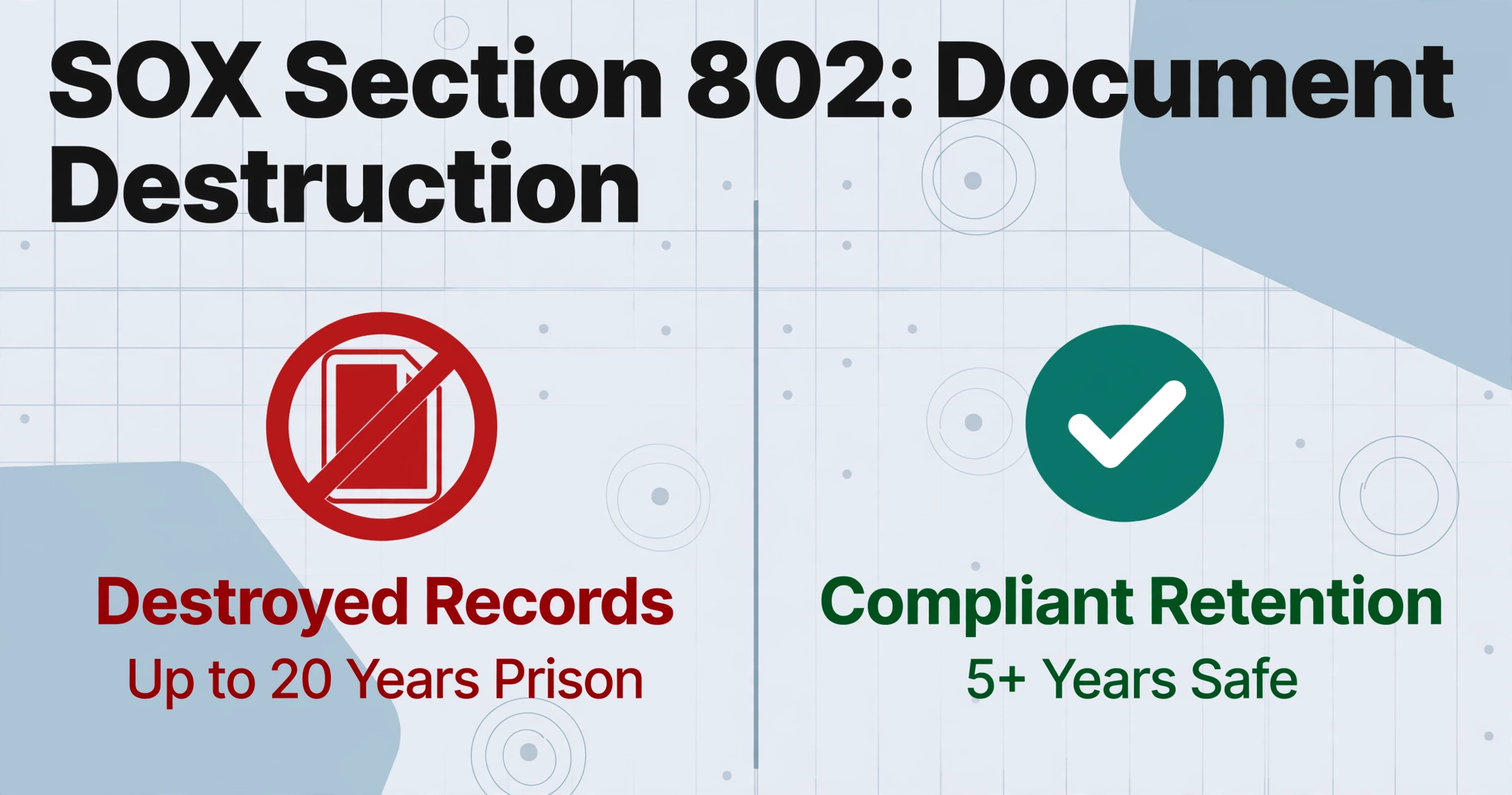
The Sarbanes-Oxley Act of 2002 (SOX) was written in direct response to the Enron collapse, in which auditors at Arthur Andersen shredded work papers and deleted electronic files once they realized federal regulators were closing in. Section 802 makes it a federal crime to knowingly destroy, alter, or falsify documents with the intent to impede a federal investigation. The penalty: up to 20 years imprisonment.
Two provisions within Section 802 matter for retention policy:
18 USC § 1519 — "Whoever knowingly alters, destroys, mutilates, conceals, covers up, falsifies, or makes a false entry in any record, document, or tangible object with the intent to impede, obstruct, or influence the investigation or proper administration of any matter within the jurisdiction of any department or agency of the United States" faces fines and up to 20 years in prison. Note the phrase "contemplated" investigations — criminal liability can apply even without actual notice of an investigation.
18 USC § 1520 — Any accountant who conducts an audit of a public company must "maintain all audit or review workpapers for a period of 5 years from the end of the fiscal period in which the audit or review was concluded." The SEC extended this practical effect by requiring retention of all records relevant to an audit or review, not just the final workpapers.
A workpaper set also holds evidence gathered from outside the company, and a returned audit confirmation to Excel filed beside the schedule it supports is part of that same retention obligation — which is why the responses are worth structuring as rows rather than leaving them loose in a folder.
What does this mean for your retention policy? SOX's audit recordkeeping requirement is 5 years, but most companies default to 7 years for financial records to account for overlapping SEC rules, state statutes of limitations, and IRS timelines. More importantly, Section 802 means you must have a documented destruction policy — shredding records randomly or "when the cabinet gets full" exposes you to the risk that a prosecutor could characterize the timing as intentional. A written retention schedule that specifies when each document type is destroyed is your best defense.
State-by-State Variation: Why a One-Size Policy Won't Work
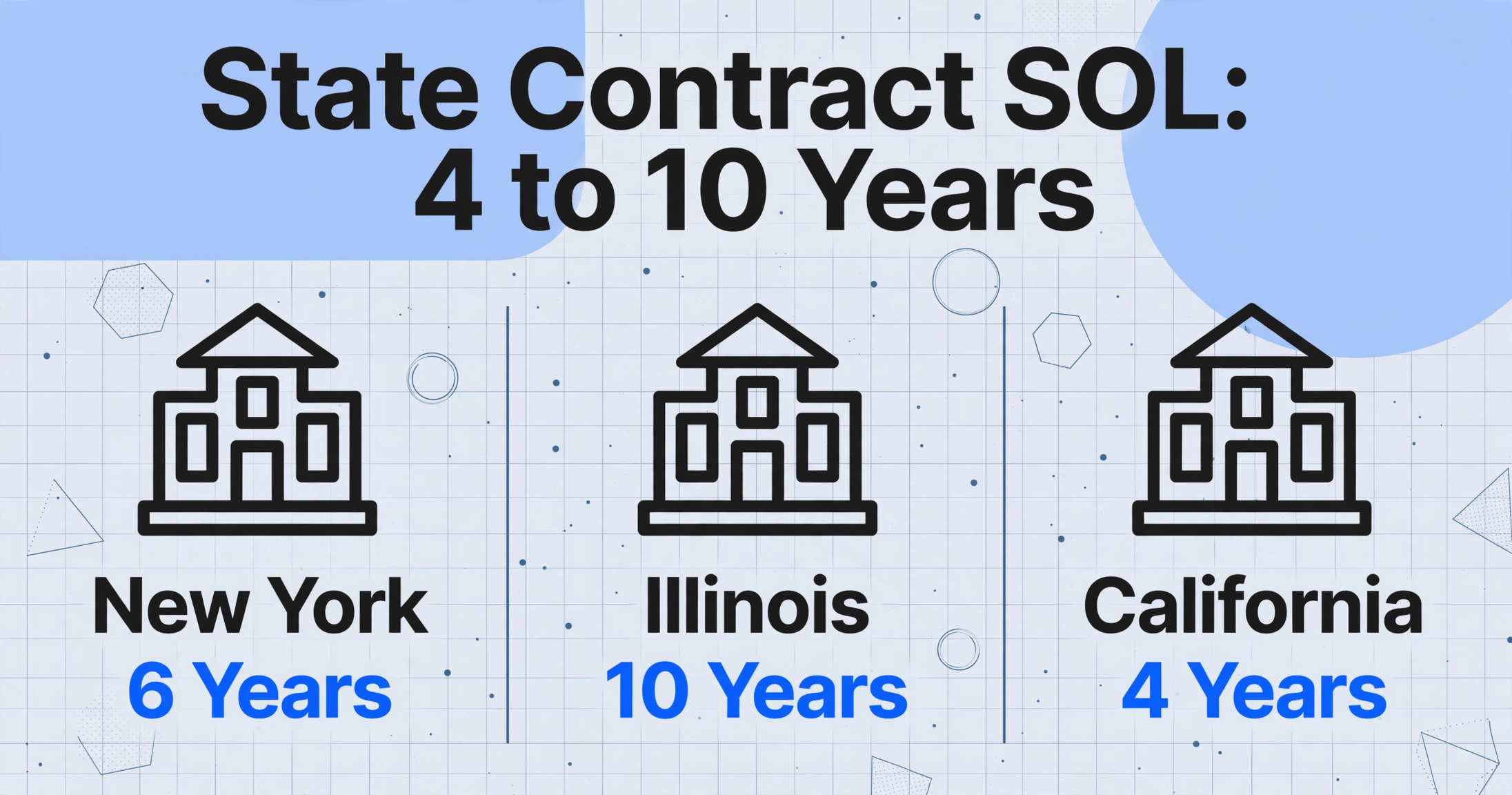
Federal law sets the floor. State law sets the ceiling — and the ceiling varies dramatically. The most common source of state-level variation is the statute of limitations for written contracts, which determines how long a party has to sue after a breach. Your retention period for contracts and related records should match or exceed that window.
| State | Written Contract SOL | Medical Records (Adult) | Business Records (General) | Legal Authority |
|---|---|---|---|---|
| California | 4 years | 7 years | 4+ years | CCP § 337; 22 CA ADC § 70751(c) |
| New York | 6 years | 6 years | 6 years | CPLR § 213; 8 NYCRR 29.2 |
| Texas | 4 years | 7 years | 4 years | Civ. Prac. & Rem. § 16.004; 22 TAC § 165.1 |
| Illinois | 10 years | 10 years | 7+ years | 735 ILCS 5/13-206; 210 ILCS 85/6.17 |
| Florida | 5 years | 5 years | 5 years | Fla. Stat. § 95.11; 64B8-10.002 |
| Georgia | 6 years | 10 years | 6 years | OCGA § 9-3-24; § 111-8-40-.18 |
The practical implication: if you have contracts with counterparties in multiple states, your retention period should default to the longest applicable statute of limitations across those states. A written contract with a New York counterparty carries a 6-year SOL; the same contract with an Illinois counterparty carries 10 years. Using 7 years as a blanket policy covers New York but not Illinois. For a deeper look at how retention requirements interact with modern invoice formats, read our companion guide on e-invoicing compliance requirements for US businesses.
Document-Specific Retention Periods: A Practical Reference
Below is a retention reference organized by document type, with the specific regulation driving each timeline. Use this as your starting point, then verify against the laws of every state where you operate.
| Document Type | Minimum Retention | Governing Authority | Notes |
|---|---|---|---|
| Tax returns & supporting records | 3 years (general) 6 years (substantial omission) 7+ years (fraud, no limit) | IRC §§ 6501(a), 6501(e), 6501(c) | The "3 year" rule is the standard. Keep 7 if you file a loss carryback or have self-employment income. |
| Invoices (accounts payable/receivable) | 7 years | IRC § 6001; State SOLs | Best practice: 7 years covers IRS extended limitations + most state SOLs for contract disputes. |
| Receipts (business expenses) | 7 years (tax-related) 3 years (expense reimbursement) | IRC § 6001; Rev. Proc. 97-22 | Keep 7 years to support deductions. Your company's reimbursement policy may set a shorter internal period, but do not destroy before tax SOL expires. |
| Payroll records | 4 years (IRS) 3 years (FLSA basic) 2 years (FLSA supporting) | IRC § 6001 (4 yr); 29 CFR Part 516 (FLSA) | FLSA requires 3 years for basic payroll records (earnings, hours, deductions) and 2 years for supporting documents (timesards, schedules). IRS requires 4 years for employment tax records. Default to 7 years for simplicity. |
| Contracts (general business) | Duration + applicable SOL | State statutes of limitations | Keep for the life of the contract plus the written contract SOL in the governing state (4–10 years depending on state). |
| HIPAA-related records | 6 years | 45 CFR § 164.316(b)(2)(i) | Covers policies, risk assessments, training records, and authorizations. State medical record laws may require 7–10 years and are not preempted by HIPAA for the medical record itself. |
| SOX audit workpapers | 5 years (minimum) 7 years (best practice) | 18 USC § 1520; SEC Rule 17a-4 | The 5-year period runs from the end of the fiscal period in which the audit concluded. Most firms default to 7. |
| Bank & credit card statements | 7 years | IRC § 6001 (supporting tax records) | 7 years covers the extended IRS assessment period plus state SOLs. |
| Employment records | 1 year (EEOC, post-termination) 3 years (ADEA payroll) Duration (benefit plans) | 29 CFR § 1602.31; 29 CFR § 1627.3; ERISA | EEOC requires 1 year post-termination for personnel records. ADEA requires 3 years for payroll records involving workers over 40. ERISA plan documents must be kept for the plan's duration plus 6 years. |
A practical note: most compliance professionals recommend a 7-year default retention period for all financial and tax-related business records. Seven years covers: the standard IRS 3-year assessment period, the 6-year extended period for substantial omission (more than 25% of gross income), state contract SOLs up to 6 years in most states, and the HIPAA 6-year requirement. It does not cover Illinois' 10-year contract SOL or Georgia's 10-year medical record requirement — but for a general business without operations in those states, 7 years is a defensible baseline.
Digital Records vs. Paper Originals: What Counts?
This is the question that drives most business owners to read this article in the first place: If I scan everything and store it digitally, can I throw the paper away without risking a compliance violation?
Under Rev. Proc. 97-22, the answer is yes — provided your electronic storage system meets the six requirements described above. The IRS explicitly states that records maintained in a compliant electronic storage system "will constitute records within the meaning of § 6001." In plain English: a properly scanned and stored digital copy is the legal equivalent of the paper original for federal tax purposes.
However, there are important caveats:
- Image quality matters. A receipt scanned at 72 DPI where the vendor name is illegible does not satisfy the "accurate and complete reproduction" requirement. The scan must be readable — all text, numbers, and relevant details must be preserved.
- State law may differ. Some states have specific requirements for the retention of original paper records in certain contexts (e.g., healthcare, real estate). New York's 20 NYCRR § 2402.2, for instance, requires "true copies" of invoices and receipts — which digital copies satisfy — but always verify with a local attorney for document types that carry special evidentiary weight in your state.
- Fraud or bad faith allegations. If the authenticity of a digital record is challenged in litigation, the burden shifts to you to prove the record has not been altered. This is why requirement 5 (controls against unauthorized alteration) is not optional — a system that logs every change and prevents tampering is your only defense.
Key takeaway: Digital copies are legally valid substitutes for paper originals under federal tax law. But "digital" is not a binary state — it ranges from "photo on your phone" to "tamper-proof indexed archive with audit trail." Only the latter satisfies Rev. Proc. 97-22. If you are scanning receipts for tax deductions, make sure your system produces legible, indexed, unalterable copies — and retains them for the full period applicable to each record.
Where AI Document Extraction Fits in Your Compliance Workflow
If you are digitizing records at scale — processing invoices from dozens of vendors, extracting receipt data for expense reports, or converting paper timesheets into payroll records — you will likely use AI document extraction to convert unstructured document images into structured data. Tools like ImageToTable.ai (full disclosure: that is the tool behind this blog) let you upload images or PDFs, specify the data fields you want, and receive structured spreadsheet output in seconds.
The question: does using AI extraction create a compliance risk?
The honest answer is no — but with a clear boundary that matters.
AI extraction is a tool for transforming documents, not a compliance system on its own. When you upload an invoice to ImageToTable.ai and extract the invoice number, date, line items, and total into a spreadsheet, you have converted unstructured data into structured data. This is functionally identical to a data entry clerk typing the same information into QuickBooks — faster, more consistent, and less error-prone, but the same class of action.
What AI extraction does not do is certify compliance. The tool does not guarantee that your retention period is met, that your digital copies satisfy Rev. Proc. 97-22 requirements, or that your data storage has the proper access controls. Those are your responsibility — or more precisely, your document management system's responsibility. The AI extraction tool handles the conversion step; you handle the storage, retention, and audit trail.
The practical workflow that keeps you compliant:
- Source document retention. Keep the original image or PDF after extraction. Your AI-extracted spreadsheet rows are derived data — the original document is still your primary record under Rev. Proc. 97-22. Many document extraction workflows include saving the original file alongside the extracted output.
- Audit trail. Maintain a record of when each document was processed, what fields were extracted, and which version of the extraction logic was used. This is straightforward to implement — timestamps and batch IDs are standard features in most extraction tools, including ImageToTable.ai's batch processing records.
- Storage system compliance. Ensure the repository where you store both originals and extracted data meets the six Rev. Proc. 97-22 requirements. This is your file storage or document management system, not the extraction tool itself.
- Documented policy. Write down your retention schedule, your extraction workflow, and your storage system's compliance characteristics. An auditor who sees documented procedures with named regulation references will treat you differently from one who sees a "we just scan everything" approach.
In short: AI extraction is fully compatible with US document retention requirements. It does not create a compliance gap — but it also does not fill one. The gap is filled by your retention policy, your storage infrastructure, and your audit trail. Think of extraction as the translation layer: it turns a paper document into data you can use. The compliance layer is everything that happens around it.
Frequently Asked Questions
Can I destroy original paper documents after scanning them?
Yes, if your digital storage system meets the six requirements of IRS Revenue Procedure 97-22 (accurate transfer, indexing, reproducibility, quality assurance, alteration controls, and retention for the full period). If your system does not meet those requirements, the IRS considers the originals still required.
How long should I keep invoices from vendors?
Seven years is the industry best practice. The minimum IRS retention period for tax-supporting records is 3 years, but that extends to 6 years if you understate gross income by more than 25%, and state contract statutes of limitations range from 4 to 10 years. Seven years covers almost all scenarios for most businesses.
Does an AI-generated spreadsheet count as a valid record under IRS rules?
The spreadsheet itself is a derived data product, not a primary record. Under Rev. Proc. 97-22, the original scanned document (the invoice or receipt image) is the primary record. The extracted data in your spreadsheet is a convenience layer on top. Keep the original image alongside the extracted data, and ensure both are stored in a compliant system.
What happens if I destroy records before the retention period expires?
Civil penalties vary by regulation — the IRS can impose accuracy-related penalties, and an auditor can draw adverse inferences from missing records. Under SOX Section 802 (18 USC § 1519), if you destroy records with the intent to impede a federal investigation, you face criminal penalties of fines and up to 20 years in prison. This is why a documented, systematic destruction schedule is essential — it proves that destruction was routine, not responsive to a known or anticipated investigation.
Are there different retention rules for healthcare businesses?
Yes. HIPAA (45 CFR § 164.316(b)(2)(i)) requires retaining policies, procedures, risk assessments, and training records for at least 6 years from their last effective date. State medical record retention laws often require longer periods — California 7 years, Illinois 10 years, Texas 7 years — and these are not preempted by HIPAA for the medical record itself. Medicare and Medicaid providers face additional 10-year retention requirements under the False Claims Act (31 USC § 3731).
Does the IRS accept screenshots and smartphone photos of receipts?
Rev. Proc. 97-22 does not specify a minimum resolution or file format — it requires an "accurate and complete" reproduction. A smartphone photo of a receipt where all details are legible satisfies this. A blurry photo where the total amount is unreadable does not. The practical standard: if you can read every relevant data point on the screen, the digital copy is acceptable.
Build a Compliant Digital Record-Keeping System
US document retention is not a single number — it is a system of overlapping federal and state timelines, each tied to a specific regulation. The three frameworks that define most of your obligations are: IRS Revenue Procedure 97-22 (which tells you how to store records digitally), SOX Section 802 (which tells you when destruction becomes a crime), and your state's statute of limitations (which sets the ceiling on how long you must keep contracts and related records).
The practical takeaway: digitizing your records saves space and makes retrieval faster, but compliance requires more than a scanner. You need a storage system that passes the six Rev. Proc. 97-22 checks, a documented retention and destruction schedule, and an audit trail that connects each extracted data point to its source document.
The tool you use to convert documents into data is separate from the system you use to store them — but the two must work together. ImageToTable.ai handles the extraction layer: you upload a document, name the fields you need, and receive structured data in seconds. The storage layer — indexed, controlled, retained for the right period — is up to you and your document management infrastructure.
Test your own documents and see how AI extraction fits into your compliance workflow. The extraction itself is straightforward — it is the policy around it that makes it compliant.