Why Tax Season Data Entry
Still Hasn’t Been Automated
The W-2 form was standardized in 1978. That year, the average American office used typewriters, filing cabinets, and carbon paper. The IBM PC was three years in the future. Forty-seven years later, approximately 245 million W-2s flow through the U.S. economy each year, each one wearing the same 20 numbered boxes and six lettered identifier fields that were designed for a pre-digital world. And every January, in tax preparation offices across the country, a human being still picks up each one, reads the numbers, and types them into a screen.
This article is not about a better way to do that typing. It is about why the typing still exists — the structural, regulatory, and technical reasons that have kept W-2 and 1099 data entry stubbornly manual across five decades of computing progress. By the end, you will understand not just that the problem is real, but why every previous attempt to solve it has hit the same invisible walls.
Key Takeaways
- The W-2's six-copy architecture was designed in 1978 for carbon paper and typewriters — 245 million forms a year still flow through a system built before the personal computer existed, and every copy assumes a human will type what they read.
- The SSA already holds each W-2 digitally from employer e-filing, yet the tax preparer's Copy B was designed for human eyes, not machine reading — 66 hours per tax season vanish retyping data that sits in a government database, with IRS penalties starting at $60 per miskeyed digit.
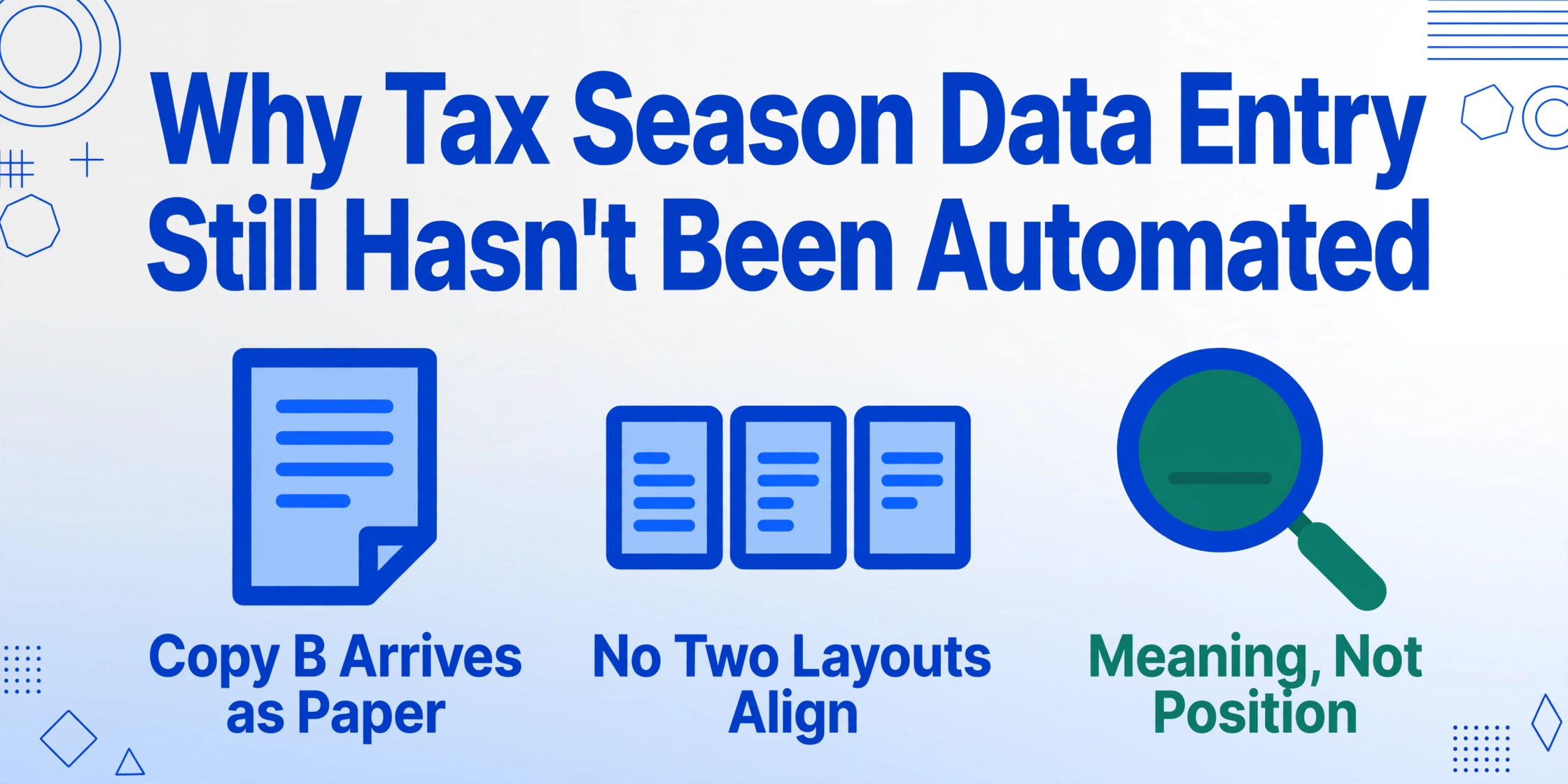
- Template-based OCR (optical character recognition — reading printed text by its location on the page) looks for Box 1 at the exact pixel coordinates it appeared on a training sample, which is why it collapses the moment a Paychex W-2 or phone photo replaces the ADP layout — the same field appears at different positions on every payroll provider's output.
- ImageToTable.ai reads W-2s by what each field label means instead of where it sits on the page, finding "Wages, tips, other compensation" wherever it appears — so ADP, Paychex, Gusto, scanned copies, and phone photos all process in a single batch because the tool adapts to the form instead of demanding the form match a template.
The W-2 Was Designed for Carbon Paper, Not Computers
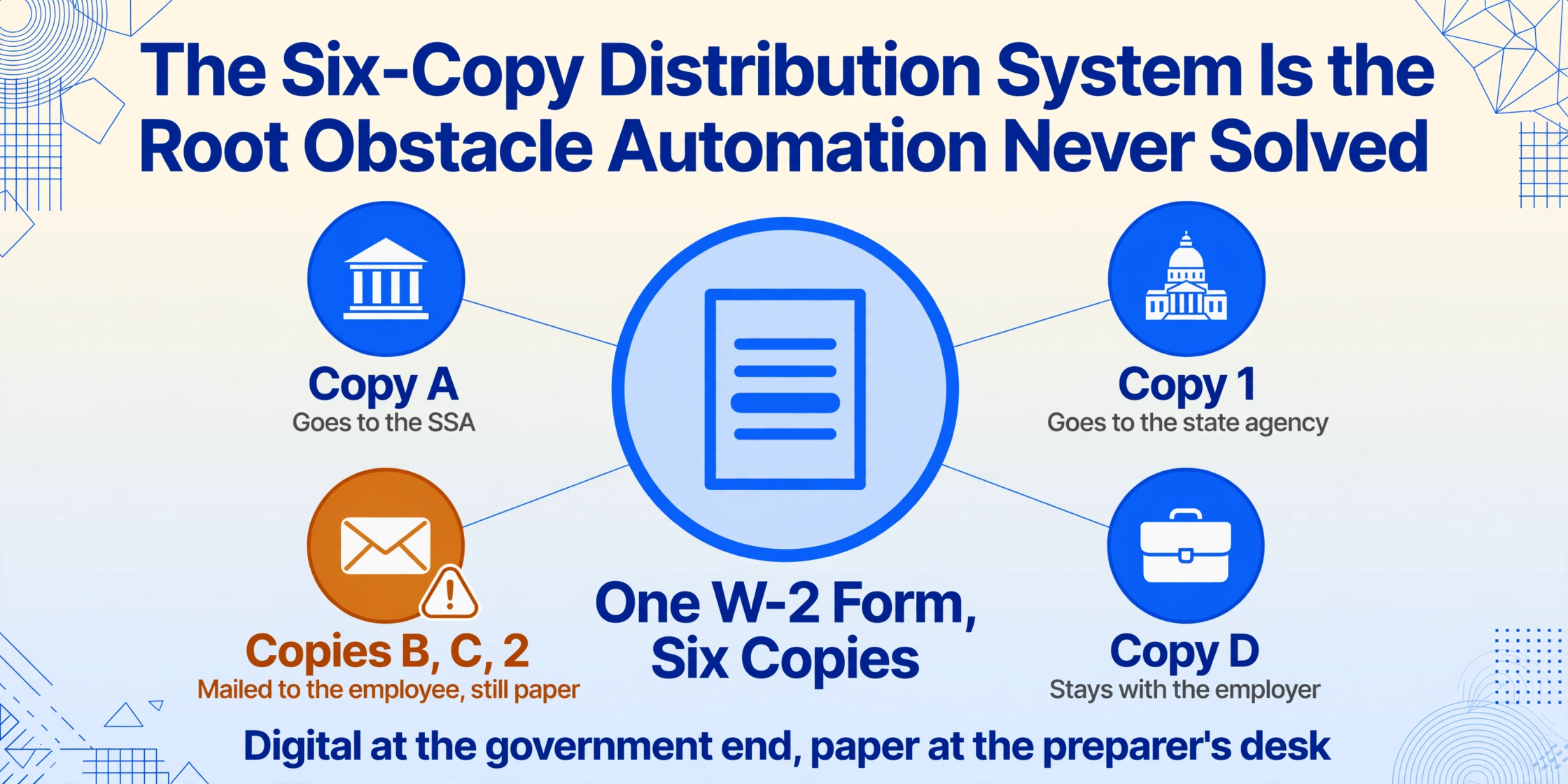
The W-2’s six-copy distribution system isn’t a relic the IRS forgot about — it is the form’s defining architecture. Copy A goes to the Social Security Administration, printed in special red drop-out ink so SSA’s optical scanners can read it. Copy 1 goes to the state tax agency. Copies B, C, and 2 go to the employee — one for the federal return, one for the state return, and one for the employee’s records. Copy D stays with the employer. Six copies, one purpose, and every single one of them begins as a piece of paper.
This architecture made sense in 1978, when the only way to get wage data into the government’s hands was to physically mail a piece of paper. But it also created a permanent, structural dependency: as long as employees receive paper W-2s, someone in the chain — the employee, the tax preparer, the accountant — has to convert that paper back into digital data. The SSA has since built Business Services Online (BSO), an electronic filing system that accepts W-2s in the EFW2 format, and the IRS mandates electronic filing at 10 or more information returns. But the employee copy — the piece that lands on a tax preparer’s desk — is still paper. The digital bridge was built at the employer-to-government end of the pipeline, not at the employee-to-preparer end. The form itself was never redesigned to close that gap.
The consequence is a structural contradiction at the heart of modern tax preparation: the government receives W-2 data digitally through employer e-filing, but the taxpayer’s representative — the preparer who actually files the return — got the same data on a piece of paper mailed to the taxpayer in January. Two parallel data flows for the same form, one digital, one physical, and every January they collide on the desk of a tax preparer holding a paper form and looking at an empty screen.
The Six-Copy Distribution System Is the Root Obstacle Automation Never Solved
The National Association of Tax Professionals (NATP) reports that 65% of its 23,000+ member firms’ gross revenue is earned during tax season. That four-month window — roughly January through April — is when the entire profession makes its living. Within that window, January is the bottleneck: W-2s must be furnished to employees by January 31, filed with the SSA by January 31, and then entered into tax preparation software in time for the April 15 filing deadline. A preparer who receives a shoebox of W-2s from 50 clients on February 1 has exactly 73 days to type every field from every form into a screen — and that’s before reviewing the return, checking for errors, and discussing the result with the client.
The six-copy system means the tax preparer’s source document is almost never the original digital file the employer submitted to the SSA. It is Copy B — the employee copy that came in the mail, was possibly folded, possibly photocopied, possibly scrawled on, possibly photographed with a smartphone and texted. The labor cost of converting that paper copy is real and well documented — at 8 minutes per form for careful manual entry, a firm processing 500 W-2s over the season spends over 66 hours doing nothing but reading forms and pressing keys. That’s nearly two full weeks of billable hours consumed by an activity that adds zero analytical value to the return — hours that a complete W-2 and 1099 extraction workflow replaces with a single upload-and-review pass.
The Same W-2 From Three Payroll Providers Is Three Different Documents
If every W-2 looked identical — same font, same box positions, same page geometry — automated extraction would have been solved decades ago. But a single client can arrive with two W-2s from two employers using two payroll systems, plus a 1099-NEC from a contracting client using a third. ADP positions Box 1 (wages) at a different set of coordinates than Paychex, which positions it differently than Gusto, which positions it differently than the local bookkeeper who printed a W-2 from QuickBooks on a laser printer and partly filled it in by hand. The IRS standardizes what must appear on the form, not how it must be laid out on the page.
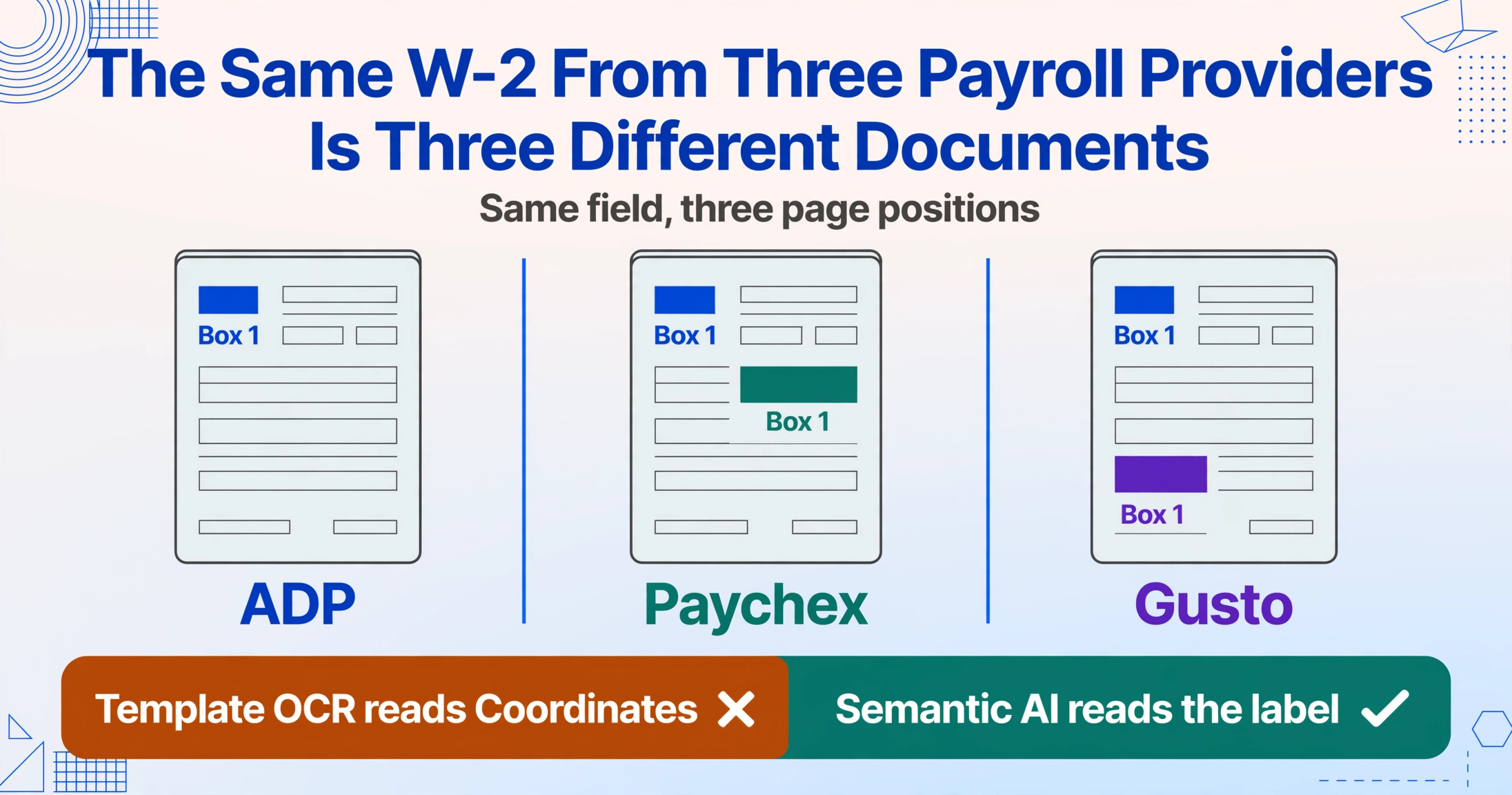
This fragmentation is the first wall every automation approach runs into. The payroll industry has consolidated around a handful of major providers — ADP alone processes pay for roughly one in six U.S. employees — but that consolidation has not produced layout standardization. Each provider generates W-2s in its own proprietary format, with its own font choices, its own box positioning, its own page dimensions. The result is that a batch of 50 W-2s from a mid-sized employer might contain forms from four different payroll systems, each one requiring a different extraction template — or, more commonly, requiring a human to just read them and type.
And the fragmentation isn’t just cross-provider. It can happen within a single filing year for a single employee. Someone who changed jobs in March gets a W-2 from Employer A (ADP) and Employer B (Paychex). Someone who worked a W-2 job and had a 1099 side gig gets a W-2 from their employer and a 1099-NEC from the client. Each form arrives in a different format, through a different channel, at a different time. The diversity isn’t an edge case — it’s the default state of tax season preparation.
The IRS Still Maintains a Paper Processing Pipeline — and That Keeps Paper Alive
Under T.D. 9972, the e-file mandate for information returns kicks in at 10 forms. File 9 or fewer W-2s, and you can still mail them to the SSA on paper. The IRS’s own instructions for Form W-2 acknowledge this threshold. Nationwide, millions of small employers — restaurants with six employees, construction firms with eight, dental practices with five — fall under the limit. Each one prints a stack of W-2s, fills them out (sometimes by hand), and mails them to the SSA while handing paper copies to employees.
This is not a regulatory oversight. It is a deliberate accommodation. The IRS knows that requiring every two-person landscaping company to navigate SSA’s BSO electronic filing system — with its EFW2 format specifications, AccuWage validation software, and SSN verification requirements — would be an unreasonable compliance burden. So the paper pipeline stays open. And every paper W-2 created below the e-file threshold is a W-2 that will eventually end up in a tax preparer’s hands, needing to be transcribed.
The IRS penalty schedule makes this more than an inconvenience. Under Internal Revenue Code §§ 6721 and 6722, late or incorrect information returns are penalized per form — the schedule escalates from $60 to $680 depending on correction timing and intent. A preparer who miskeys a single digit in Box 1 and files an incorrect return has created a liability — not for the employer, but potentially traced back to the preparer’s error in transcription. For a full breakdown of what those per-form penalties and transcription errors cost a firm over a season, see our cost analysis of manual W-2 and 1099 entry.
The Pencil Mark in Box 3 That Breaks Every Automation Pipeline
One of the most consistent findings from tax preparation professionals is that W-2s arriving from clients are rarely pristine. A corrected Social Security wage amount is handwritten above the printed figure. An EIN is crossed out and re-entered. Box 13 checkboxes are marked with a pen instead of the original printer ink. A coffee stain obscures the state ID number. The form was folded into thirds for a business envelope and then unfolded — leaving crease lines across the wage fields. None of these are unusual. They are the baseline condition of paper tax documents submitted by real taxpayers.
For template-based OCR systems, each of these variations is a failure point. Handwritten digits superimposed on printed text confuse character recognition. Crease lines through number fields break digit segmentation. Checkboxes marked with the wrong mark type — a circle instead of an X, a check instead of a filled square — return null values where there should be a selection. A system that was trained on clean, flatbed-scanned PDFs of freshly printed forms has no model for the physical state of a W-2 that has traveled through the U.S. Postal Service, sat on a kitchen counter for two weeks, and been filled in with a ballpoint pen by someone who wasn’t sure what Box 12 code DD meant.
The most painful irony is that a human preparer can process this degraded document almost instantly. A glance at a crossed-out Box 3 with a handwritten replacement tells the preparer: “the original figure was wrong, use the handwritten one.” A template-based system sees two competing numbers in the same field and returns neither — or worse, returns the wrong one. The judgment that a trained preparer applies in half a second is exactly what automation systems lack, and exactly what has kept the human at the center of the W-2 transcription loop.
Tax Preparation Software Can Transmit Data — It Can’t Read Your Client’s Paper
The profession’s primary tax preparation platforms — Drake, UltraTax, Lacerte, ProSeries, ATX — all support importing W-2 data. From a CSV. From a prior-year return. From a payroll provider’s digital export. What none of them can do is read a paper W-2 Copy B that a client handed to the preparer across a desk. The importer expects structured digital input, and the source document is unstructured physical paper. The preparer is the conversion layer.
Even when W-2 data has been e-filed to the SSA, the preparer cannot simply pull it from the SSA database into Drake. The SSA’s Business Services Online system provides wage data to the IRS for compliance matching, not to tax preparers for return preparation. The Wage and Income Transcript — which the preparer can access through the IRS’s Transcript Delivery System (TDS) — is available to tax professionals with a signed Form 8821 or Power of Attorney, but it arrives as a redacted summary, not as structured field-level data. So the preparer, sitting with a client’s paper W-2 in one hand and a Drake input screen on the screen, still types.
The U.S. Bureau of Labor Statistics pegged the median hourly wage for accountants and auditors at $39.27 as of May 2024. Fully loaded with benefits, payroll taxes, office overhead, and software licenses, a staff accountant’s cost to the firm is closer to $55–65 per hour. Every hour that accountant spends transcribing W-2 fields — a task that adds zero analytical judgment — is an hour not spent reviewing the return, identifying tax-saving opportunities, or consulting with the client. The cost of the data entry itself has been quantified at $4,000–$6,000 per tax season for a mid-sized firm. The opportunity cost — the billable work displaced by typing — is harder to measure but almost certainly larger.
Template-Based OCR Fails on W-2s for the Same Structural Reason It Always Fails: Layout Variation
For two decades, the dominant approach to document data extraction has been template-based OCR. You create a template that says “Box 1 is at coordinates (x1, y1, x2, y2) on this ADP-generated W-2” and the system reads whatever text falls in that rectangle. This works beautifully for documents with fixed, predictable layouts — a specific invoice from a specific vendor, always generated by the same ERP system, always laid out the same way. It works terribly for W-2s, where the same field (Box 1) appears in different positions on every payroll provider’s output and on every scanned paper copy.
The underlying problem is that template-based OCR reads documents by position, not by meaning. It knows where Box 1 was on the training sample, not what Box 1 is on the current document. This distinction — position vs. meaning — is the central reason W-2 data entry has resisted automation. The form specification guarantees what information appears (wages, withheld tax, SSN, EIN) but not where on the physical or digital page that information sits. Any system that relies on “where” to determine “what” will collapse the moment it encounters a W-2 from a payroll provider it hasn’t been trained on.
Template tools also fail on the multi-source problem. A template built for “ADP W-2, 2024 format” cannot extract data from “Paychex W-2, 2024 format” — let alone from “photo of a paper W-2 from a small employer, 2024 format, with a handwritten Box 3 correction.” The preparer would need to maintain a library of templates for every payroll provider every client’s employer uses, updated annually as each provider tweaks its form layout. The maintenance burden alone makes the approach impractical at any real-world scale. For a step-by-step look at how semantic extraction reads each box across these layouts — and where it still stumbles — see the complete guide to W-2 and 1099 extraction.
Semantic Understanding Replaces Position With Meaning — And That Changes What Automation Can Do
The alternative to template-based extraction is semantic document understanding: an AI model that reads a W-2 the way a human does — by recognizing what each field means, not where it sits. When you see “Wages, tips, other compensation” on a W-2, you know that’s Box 1 regardless of whether it appears in the top-left on an ADP PDF, the top-right on a Paychex PDF, or the middle of a phone photo of a paper form. Semantic AI makes the same judgment: it identifies “Wages, tips, other compensation” as a concept and extracts the dollar amount next to it, whether that amount is printed, handwritten, or strikethrough-corrected.
This shift — from coordinate-based extraction to concept-based extraction — is what makes W-2 automation technically feasible for the first time. Instead of defining where Box 1 lives on a specific template, you tell the system: “Extract the dollar amount labeled Wages, tips, other compensation.” The system reads the entire form, finds that label wherever it appears, and returns the value beside it. This approach — sometimes called column-name extraction, where you define the fields you want by their semantic names rather than their page coordinates — handles all three payroll providers, the handwritten correction, and the phone photo in a single pass, because it never depends on knowing in advance where anything is.
This is also where extracting W-2 data from PDFs into structured spreadsheets becomes possible at scale. A preparer defines the column names — “Box 1 Wages,” “Box 2 Federal Tax Withheld,” “Box b EIN,” “Employee SSN” — and the semantic model finds each value across every W-2 in the batch, regardless of which payroll provider generated which form. The output is a single Excel sheet with one row per employee, ready for import into Drake or UltraTax, without a single field being manually typed.
What End-to-End W-2 Automation Would Require — And Why Three Pieces Are Finally in Place
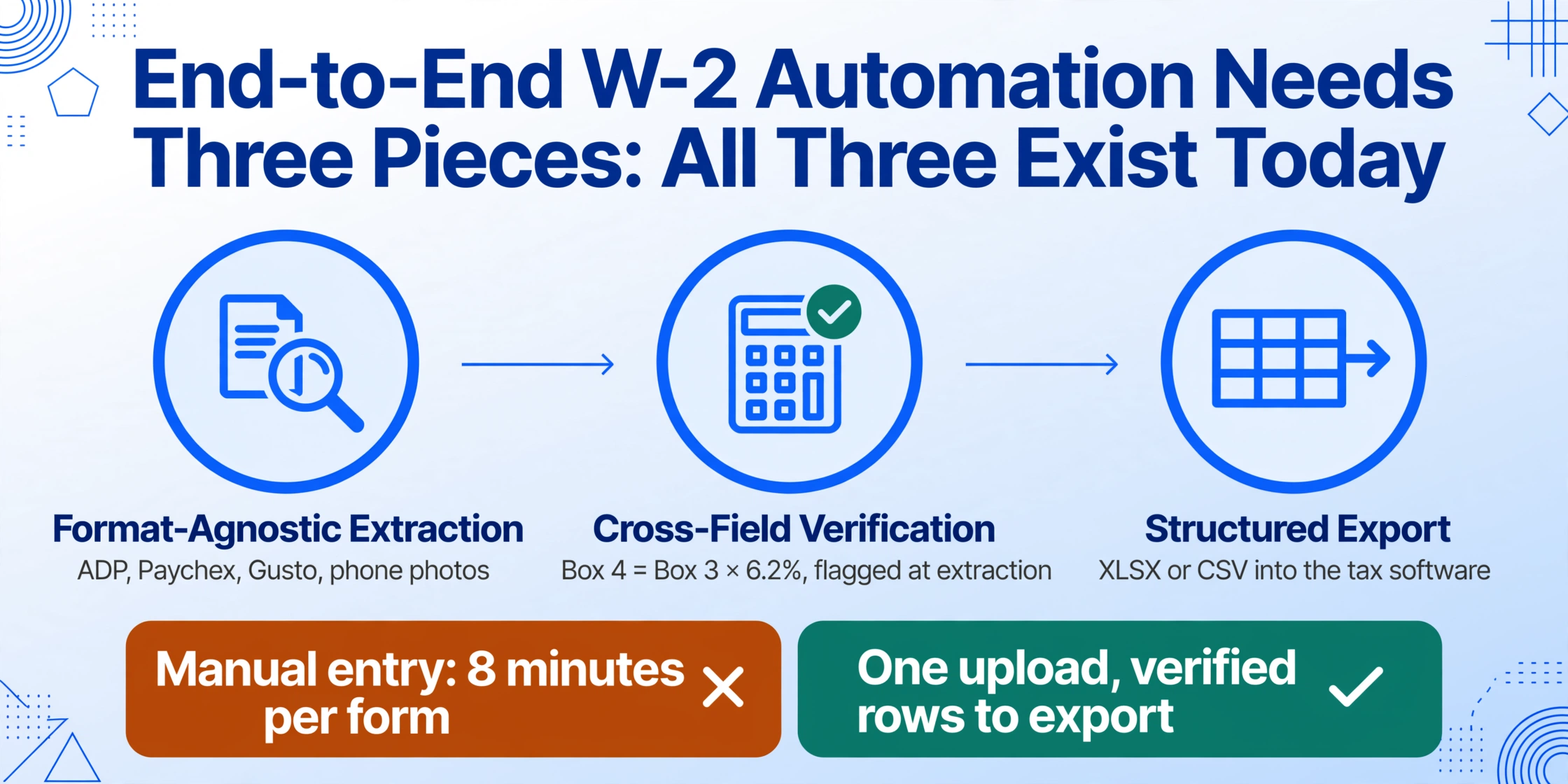
Full automation of W-2 data entry — from client document intake to tax software import — requires three capabilities that have historically existed in separate systems:
- Format-agnostic field extraction — reading the same field correctly across ADP, Paychex, Gusto, scanned paper copies, and phone photos, without per-provider templates.
- Cross-field verification — automatically checking that Box 4 (Social Security tax) equals Box 3 × 6.2%, that Box 2 (federal withholding) is plausible relative to Box 1 wages, and that the SSN format is valid. This is the preparer’s judgment step — and it needs to happen at extraction time, not during later review.
- Structured export — delivering the extracted and verified data in a format the tax preparation software can consume directly (XLSX, CSV), eliminating the re-keying step entirely.
The first piece — format-agnostic extraction — is what semantic AI enables. The second piece — cross-field verification — is what computed columns add to the workflow: the ability to define, at extraction time, calculations like “verify Box 4 = Box 3 × 0.062” and flag discrepancies before the data ever reaches the spreadsheet. The third piece — structured export — is the final bridge between the preparer’s document stack and the tax software’s import screen. Each of these three pieces exists today. What has been missing is a single tool that puts them together.
The W-2 data entry problem has persisted for 47 years not because the technology to solve it didn’t exist, but because the approach was wrong. Template-based systems tried to make W-2s conform to their extraction model. Semantic systems read W-2s the way they actually arrive — varied, physical, imperfect — and extract the data anyway. That difference — making the tool adapt to the form instead of demanding the form adapt to the tool — is the structural shift that makes automation possible at last.
Frequently Asked Questions
Can I extract data from a photo of a paper W-2, or does it need to be a clean PDF?
Semantic AI models process photos of paper W-2s the same way they process clean digital PDFs — by reading the meaning of each field label, not by matching a template. A smartphone photo of Copy B taken by your client and texted to you is a valid input. The quality of the photo matters — reasonably well-lit and in focus — but the format does not. JPG, PNG, and PDF are all supported.
If I have 50 W-2s from different payroll providers, can I process them all at once?
Yes. Batch processing is designed specifically for mixed-source W-2 batches. You upload all 50 files in a single session — ADP PDFs, Paychex PDFs, phone photos of paper forms — define your desired output columns once (Box 1 wages, Box 2 federal tax, Box 4 Social Security, employee name, employee SSN, employer EIN), and the system returns a single Excel spreadsheet with one row per employee. The extraction is by field meaning, not by file template, so the different payroll providers’ layouts don’t require separate setups.
What about handwritten corrections on W-2 forms — can AI read those?
Semantic AI models trained on handwriting recognition can distinguish between printed text and handwritten corrections on the same field. A crossed-out printed figure with a handwritten replacement in Box 3 will typically be read as the handwritten value — the system recognizes the correction. However, heavily damaged or smudged handwriting may reduce accuracy. In those cases, the extracted output should be spot-checked against the source image, which is a standard quality-control step regardless of extraction method.
Does the IRS accept W-2 data extracted by AI tools for e-filing purposes?
The IRS does not regulate how tax preparers digitize client source documents — it regulates the accuracy of the filed return. Preparers remain responsible for verifying that the data entered into tax software (whether typed manually, imported from a payroll export, or extracted by AI) matches the source W-2. AI extraction is the data intake step; the preparer’s verification and professional judgment remain the compliance step.
What’s the difference between template-based OCR and semantic AI for W-2 extraction?
Template-based OCR extracts data by position: “read whatever text appears in this rectangle.” It requires a separate template for every payroll provider’s W-2 format and fails on any form it wasn’t explicitly trained for. Semantic AI extracts data by meaning: “find the field labeled ‘Wages, tips, other compensation’ and return the dollar amount next to it.” It works across any W-2 layout — ADP, Paychex, Gusto, scanned paper, phone photo — because it doesn’t care where the label appears on the page. When you use column-name extraction instead of coordinate-based templates, the same setup processes every W-2 in your batch regardless of source.
Can I cross-check extracted W-2 data automatically — for example, verify that Social Security tax withheld equals 6.2% of wages?
Yes. Computed columns let you define verification formulas during extraction. You can add a column that calculates Box 3 × 6.2% and compares it to the extracted Box 4 value, flagging any mismatch. You can also verify that Box 1 wages don’t exceed Box 3 Social Security wages plus Box 5 Medicare wages in impossible ways. These cross-checks — the same ones a preparer performs manually — happen at extraction time, so discrepancies are surfaced before the data reaches the tax software input screen.
Where Manual Entry Ends and Automation Begins
The W-2 wasn’t designed to be automated. Its six-copy distribution, its paper-first architecture, its acceptance of handwritten corrections — every structural feature of the form assumes a human being will read it. For 47 years, technology companies tried to solve this by treating W-2s like any other structured document: build a template, match coordinates, extract text. That approach failed because W-2s aren’t structured in the way templates require. They’re a family of visually different documents sharing a common set of field meanings — and the only extraction approach that works on them is the one that reads meaning, not position.
Semantic extraction changes the unit of work from “one form, one template, one typist” to “one batch, one column definition, one click.” The preparer still verifies the result — that’s professional judgment, and it’s not going anywhere. But the hours spent reading numbers from a piece of paper and transferring them to a screen — the legacy of a 1978 form design in a 2026 tax season — those hours have a replacement.