Five Multi-Currency Consolidation Errors
That Look Right in Review
Multi-currency consolidation breaks at the copy step between the document and the spreadsheet, where a value is rekeyed by hand and its unit gets left behind: the decimal point's country, the currency symbol, the date's order. A German invoice prints 1.234,56 and lands in the working file as 1,234.56. A French invoice prints 05/06/2024 and lands as May 6 instead of 5 June. Every row is defensible at the moment it is typed, and the group total ties to nothing anyone can trace. That is exactly why these errors survive review.
Two related readouts are worth separating before going further. Pulling one account's multi-currency statements into a spreadsheet is a single-account job: one statement archive, one balance, one family of formats, covered for single-account multi-currency statements. Consolidating foreign currency invoices across entities is a different unit of work: several legal entities, several invoice formats, several languages, one consolidated report. The companion walkthrough on consolidating invoices across entities shows how to build the tagged table. This article replaces that how-to with an error catalogue: the specific document-layer failures that break the table, and which extraction setting stops each one.
Key Takeaways
- You blame the off-by-a-thousand row on carelessness, but every wrong entry was defensible at the moment it was typed.
- The break happens at the copy step, where a number is rekeyed and its decimal convention, currency symbol, and date order are silently dropped.
- Reading harder will not save the close, so make each row carry a currency tag and an amount-as-printed column instead.
A Total That Ties to Nothing, One Copy-Paste at a Time

The errors that sink a multi-currency consolidation live in the copy step between the document and the spreadsheet, not in the accounting standard, because a typed value carries no unit and nobody reviews a unit.
Walk the normal flow and the failure becomes visible. The German entity's bookkeeper reads 1.234,56 on a supplier bill and types 1,234.56 into the shared working file. The US entity's bookkeeper enters the same vendor family from a US dollar invoice and types 1,234.56 as printed. Both rows are internally consistent, both match what each person believed they saw, and neither carries the original print format. When FP&A compares the two entities over a quarter, a gap appears that no one can explain, because the comparison is between a value read in one convention and a value read in another.
The profession has its own catalogue of failures one level up, and it is worth naming because it shows how persistent this class of problem is. The Journal of Accountancy (2012) catalogued three classic currency-adjustment mistakes: foreign-currency gains and losses booked into the wrong statement, cash-flow statements derived from consolidated balance sheets, and translation methods left unchanged in inflationary economies. The article's own observation is that these mistakes persist even though the rules have not changed for years. Below that standard layer sits the copy-step layer this article covers. Standard-level positions get reviewed; a typed value does not.
Who Touches the Consolidation, and Where the Documents Sit
Four roles touch a multi-entity consolidation, and each one owns a different part of the number. The document layer sits between the local books and the ERP module, which is why it falls through everyone's remit.
| Role | Owns | Hands up |
|---|---|---|
| Entity bookkeeper | Closing the local books in the local currency, keeping vendor invoices as support | Invoices and statements in the entity's own language and format |
| Group accountant | Collecting every entity's documents into one working file and normalizing the fields | A file where every row carries the same meaning in every column |
| Controller | Choosing the exchange-rate basis, applying conversion policy, posting close entries | The group numbers that go out |
| FP&A | Comparing the consolidated view against budget and prior periods | Variance explanations, which is where a phantom gap first surfaces |
In good shape, the flow is read front to back: each entity closes locally, the group accountant rolls up the document layer, the controller translates and posts, and FP&A explains the result. In practice, the software reality leaves the document layer last in line. The consolidation modules groups actually run, NetSuite OneWorld, SAP S/4HANA Group Reporting, Oracle FCCS and Sage Intacct, start their automation at the trial balance. QuickBooks Online and Xero record foreign-currency transactions fine, but each handles a single company file, so a group still lands in manual roll-ups across files. Nobody in that stack reads raw invoices arriving in three languages except a human with a spreadsheet. The need is voiced in plain terms: an accountant running a US company with a French branch asked whether any software could give him the amount of every transaction in both dollars and euros (r/Accounting). Teams that already pull one account's statements into a sheet will recognize the mechanics; single-account multi-currency statement extraction is the one-account version of this problem, and consolidation is every account at once.
Five Errors That Survive Review
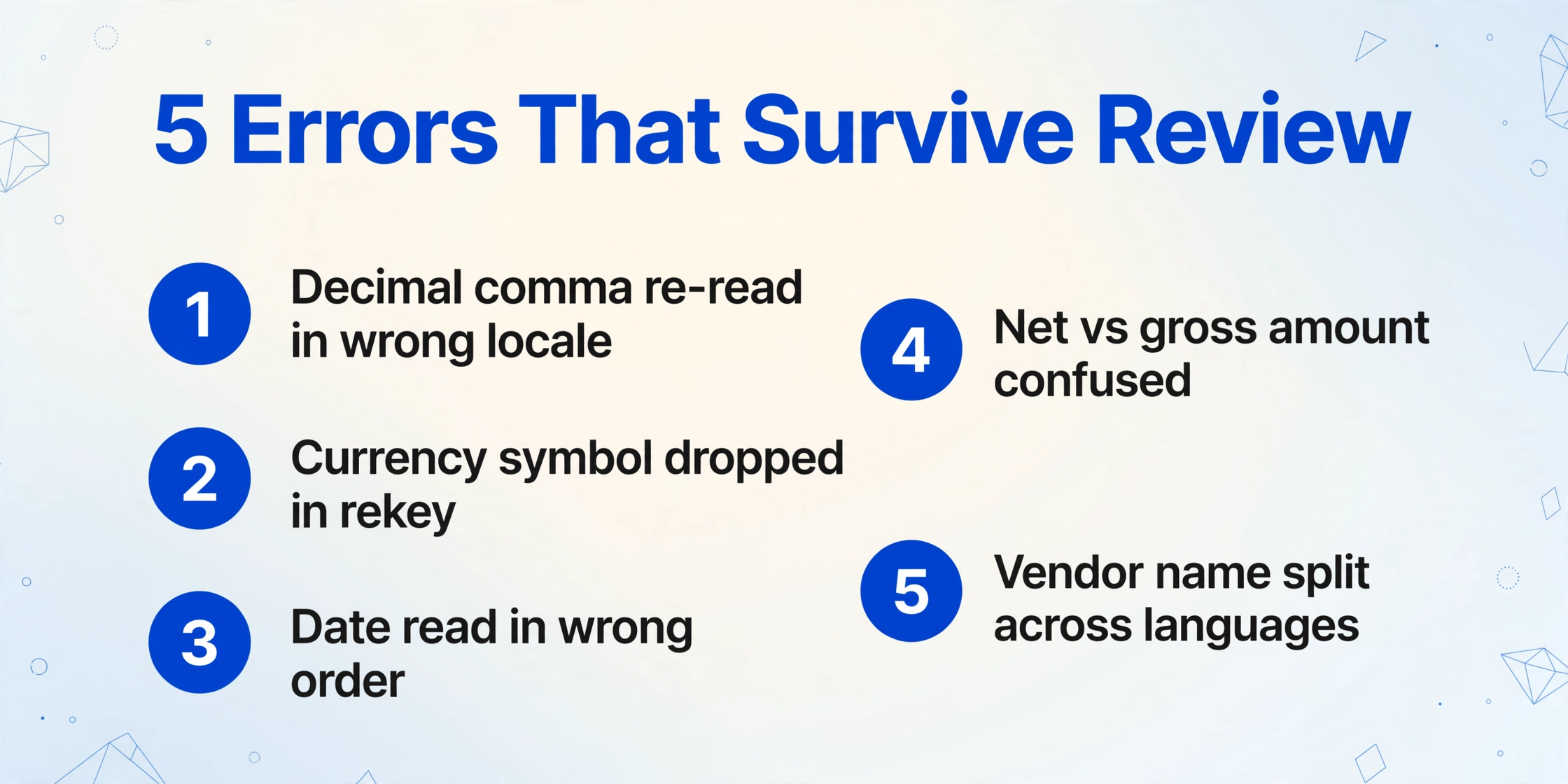
Five document-layer errors account for most multi-currency consolidation screw-ups. Each one looks correct at the moment it happens, which is the shared reason they survive.
The decimal comma is re-read in the wrong locale
German, French, Spanish and Portuguese invoices print the decimal comma: 1.234,56 in Germany, 1 234,56 in France, 1'234.56 in Switzerland. An English-language invoice prints 1,234.56. The European Commission's own guidance on number formatting states that in most European countries the comma is the decimal sign, while in English it is the thousands separator (data.europa.eu, number formatting guide). The human reason this keeps happening: the person typing applies their own locale, and a spreadsheet on a US-locale machine silently applies the same guess. The value shifts by a factor of one thousand on part of the row, and the only symptom is a period-over-period comparison that no one can explain.
The currency symbol is dropped when the amount is rekeyed
An invoice that prints "€ 4.280,00" usually reaches the spreadsheet as 4,280 with no symbol at all, because hand rekeying keeps the digits and drops the prefix. A symbol that never made it in cannot be checked later, so the row loses its currency identity entirely. The "$" case is worse: the same character names the US dollar (USD), the Canadian dollar (CAD), the Australian dollar (AUD), the Mexican peso (MXN) and the Singapore dollar (SGD). A row tagged with a bare "$" is not tagged at all, and no validation rule on the document flags it, because the document itself contained the symbol and the working file did not.
The date is read in the wrong order
05/06/2024 is May 6 in the US and 5 June in most of Europe. The ISO 8601 format, 2024-06-05, exists precisely because every local convention is defensible. When invoice dates from several entities land in one column without a stated convention, roughly half the rows are off by a month, nobody notices during the month, and the aging of the payables file is wrong at year end. Each bookkeeper read the date the way they have always read dates; the column never declared an order.
The same column label means different amounts across languages
"Total" is not the same number on every invoice. A German invoice shows a net amount (Nettobetrag) and a gross amount (Bruttobetrag), and either one claims "Total". A French invoice prints total including tax (Total TTC) or the tax base without it; a Spanish invoice shows the tax base (base imponible) and the VAT (IVA) separately. When the mapping from invoice number (Rechnungsnummer), invoice no. and n° de facture into one working column is redone ad hoc each month by whoever is available, one month maps the net figure and the next maps the gross figure, and the same column quietly mixes two bases. Nobody is wrong; the convention changed hands.
A subtotal quietly sums mixed currencies
When the working file has no currency column, a SUM() over the amount column adds EUR, GBP and USD as if they were one number. The subtotal is not wrong the way a keying error is wrong; it is a value no participant in the group could interpret, because three currencies were summed as one. The reason it survives: SUM does not care what its inputs mean, and no row flag exists to make the mixture visible. Each of these five failures looks small on its own, which is the trap, because a single multi-currency transaction is already easy to misread by hand, and consolidation repeats the same slip across hundreds of rows with no one reading each one.
What to Configure So the Errors Cannot Hide
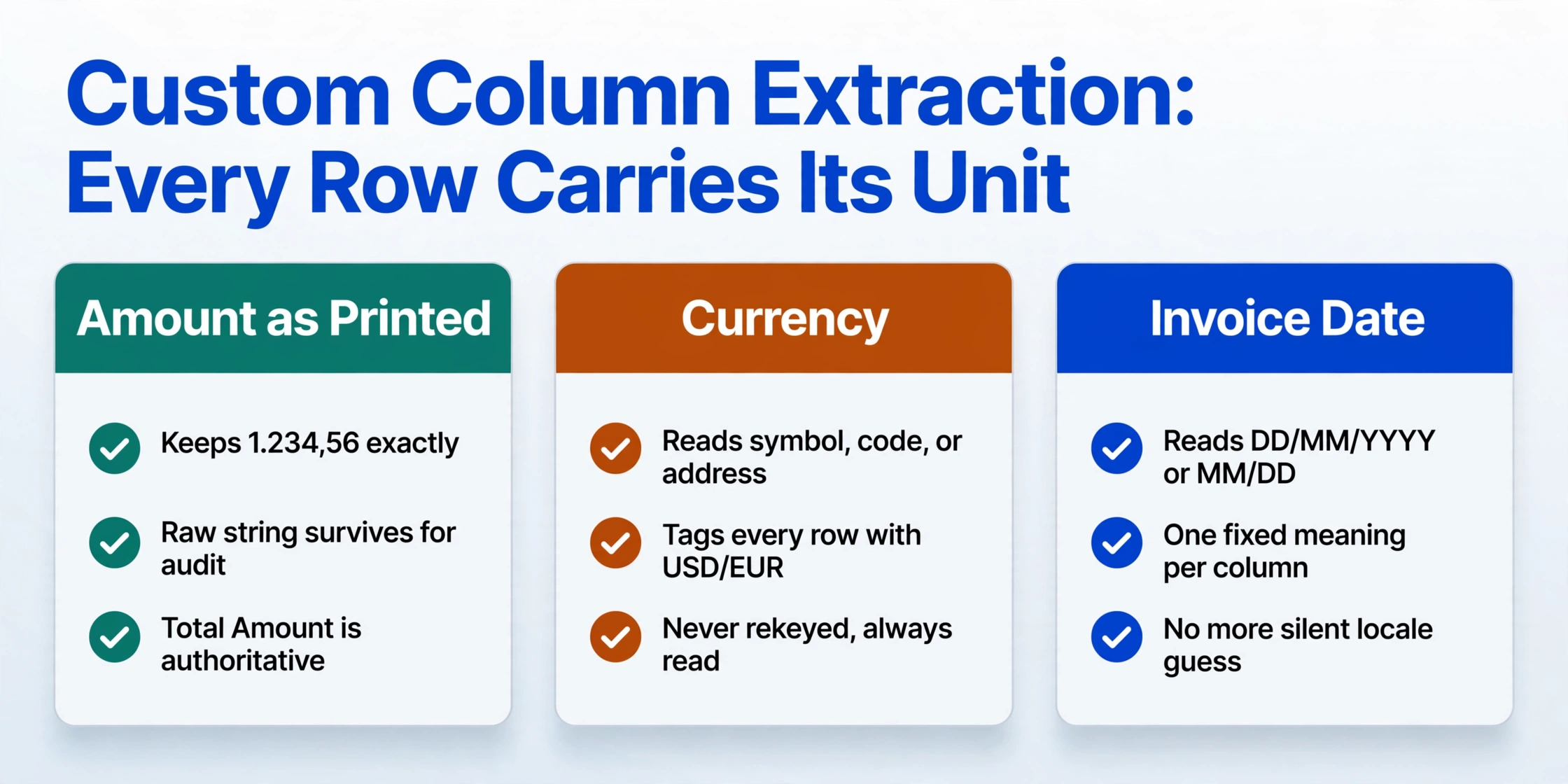
Custom Column Extraction stops all five, not by reading faster, but by making every row carry its unit: a currency tag, a preserved print format, and one fixed meaning per column.
Custom Column Extraction is the product capability at work here, and it works differently from template OCR: you type the column names you want, and the AI locates each value by meaning rather than by position on the page. The names you type become the headers of the output table, and the same definition reads a German PDF, a French scan and a US screenshot. For a consolidation working file, define the set once:
Supplier Name, Invoice Number, Invoice Date, Net Amount, Total Amount, Amount as Printed (text), Currency (options: USD, EUR, GBP, CHF)
Each error above now has a specific setting that catches it, and the mapping is the whole review checklist:
| Error | The column that catches it |
|---|---|
| Decimal comma re-read in the wrong locale | Amount as Printed (text): keeps "1.234,56" exactly as printed, so the raw string survives for audit while Total Amount carries the normalized value. You decide which column is authoritative; your spreadsheet no longer guesses. |
| Currency symbol dropped during rekeying | Currency (options: USD, EUR, GBP, CHF): an inferred column. The invoice rarely prints an ISO code next to every amount, so the AI reads the symbol, the code or the registered address and tags every row. The symbol is read, never "kept", because nothing is rekeyed. |
| Date read in the wrong order | Invoice Date: extracted and standardized to one format across the whole batch by the pipeline's post-processing, with the raw string still visible in the text column when auditors need the original. |
| Same label meaning different bases across languages | One shared definition maps invoice number (Rechnungsnummer), invoice no. and n° de facture into Invoice Number, and separate Net Amount and Total Amount columns state the basis of every row instead of assuming it. |
| Subtotal summing mixed currencies | The Currency tag on every row makes a subtotal a filter: sum by EUR, sum by GBP, sum by USD. A mixed total can now only happen if someone deliberately drops the filter. |
The column names you enter are the contract, which is also why the language mix stops being a layout problem: extraction reads the document's meaning, so Invoice Number is satisfied by whichever label each country prints. Documentation on the full mechanics lives in the guide on extracting invoice fields into a spreadsheet row, but the setting that matters for this article is the batch: run all entities' invoices through the same column definition and every row comes back with the same headers, the same date order, and a currency tag.
Try the read on a document you already know the answer to:
Files are processed securely and not stored.
What Still Needs a Person
The tool keeps every row's unit and format visible; it does not choose your conversion policy, and an honest setup says so. Under IAS 21 (IFRS) and ASC 830 (US GAAP), balance sheet items translate at the closing rate while income statement items use a period average, so "convert everything at one rate" is not a simplification a controller can accept. Choosing the rate basis, applying it consistently, and posting the translation and cumulative translation adjustment entries stays with the controller. The document layer's job is to deliver original-currency rows so that policy has something clean to bite on.
This is also not an intercompany elimination engine and not an ERP. NetSuite OneWorld, Oracle FCCS and SAP S/4HANA Group Reporting still eliminate intercompany balances and produce statutory packs from trial balances; the tagged table feeds those systems instead of replacing them. Multiplying your mistake risk is not on the product's side: the extraction transcribes what the document says, so a deliberately inflated invoice is extracted as the inflated total, and a document with no currency symbol and no ISO code genuinely has no convention for the AI to read. Those cases need a person to decide, which is why the review step, with the five errors above as its checklist, stays in place.
Multi-Currency Consolidation Errors: Quick Answers
Can you set it up to convert all currencies to USD automatically?
No, and that is deliberate. Translation is a policy decision: IAS 21 and ASC 830 require different rates for balance sheet items versus income statement items, so no single conversion factor is the "right" one. What the setup guarantees is that every row still carries its original currency, which is the precondition for any defensible conversion step.
How does it know 1.234,56 is twelve hundred something, not one thousand two hundred and thirty-four?
It reads the document's whole context, the currency symbol, the grouping of digits and the label around the number, rather than applying one locale to every document. The Amount as Printed text column keeps the raw string so the reading can be checked against the original, and Total Amount carries the value you want treated as authoritative.
Does one column set really work for German, French and English invoices?
Yes. Because extraction locates values by meaning rather than by template position, the column names are the contract and each language is just another layout that satisfies it. Invoice number (Rechnungsnummer), invoice no. and n° de facture all supply Invoice Number, and the net-versus-gross split is handled by keeping Net Amount and Total Amount as separate columns.
What if an invoice has no currency symbol at all?
The Currency inference reads ISO codes and the registered address on the document when the symbol is absent. A document with no symbol, no code and no company identity genuinely has no convention for anyone to infer, so that single row should be checked by hand. Keeping the raw print format in the text column makes the check fast.
Does this replace our ERP consolidation module?
No. Modules like NetSuite OneWorld and SAP S/4HANA Group Reporting work from trial balances, eliminate intercompany balances and produce statutory statements. This tool works one layer below, turning the entities' raw invoices and statements into the unit-tagged table that feeds those systems. For a group without a consolidation module, the tagged spreadsheet is a working substitute for the roll-up, with the controller still responsible for the rate basis and close entries.
Who should check the output every month?
The entity bookkeeper checks their own invoices, because the labels printed on them were theirs, and the controller reviews the final tagged table. The review no longer needs to be a hunt: with the five errors above as a checklist and the Currency and Amount as Printed columns in place, the check is looking for rows that violate an explicit unit, not hoping nothing slipped through.
Consolidation errors survive because each one is defensible in isolation and invisible in aggregate. The fix that sticks is not checking harder; it is making the document layer state its units: an Amount as Printed column, a Currency tag on every row, and one definition for every column. Test it on a batch where you already know the answer, one German invoice, one French, one US. If the tags come back matching the documents, the next close has a checklist instead of a hope.