Manual vs AI P60 Extraction:
Which Workflow Survives the UK May Deadline?
Every UK employer must issue a P60 to each employee on payroll as of 5 April by 31 May — roughly eight weeks to generate the certificates, distribute them, and for many payroll teams, transcribe the same seven to ten fields from dozens or hundreds of certificates into spreadsheets for reconciliation, audit, and client reporting. At two minutes per certificate, 150 employees means five hours of typing in a window already squeezed between the year-end Full Payment Submission and the July P11D deadline. What makes the manual approach dangerous isn't the two minutes — it's what happens to those two minutes when you add a second payroll system, a stack of P60s employees bring from previous employers, and the accumulated fatigue of the third consecutive late night in May.
Key Takeaways
- Two minutes per P60 is genuinely fast for ten certificates — but that speed collapses when you add a second payroll system whose layout you have never seen before, and the May deadline is four days away.
- The hidden cost is the mid-batch format switch — your eyes spend 30–90 seconds relearning where each field sits on each provider's P60, and the error rate creeps up with every unfamiliar layout you encounter in an eight-hour session.
- The real transition isn't from slow to fast — it's from transcription to verification, where you review the handful of rows the AI marked uncertain instead of typing and double-checking every single cell.
The Two Workflows, End to End
Before comparing dimensions, it's worth laying both approaches side by side as complete workflows — not just the data entry step, but everything before and after it. The manual workflow and the AI-assisted workflow differ at more points than most people assume, and some of the largest time gaps sit outside the actual typing step.
Manual workflow: A payroll administrator locates each P60 — printed from the payroll software, saved as a PDF in a folder, or received as an email attachment from an employee bringing a certificate from a previous employer. The administrator opens the source, reads the employee name and National Insurance number, types them into the spreadsheet. Locates total pay for the year — box 14 on one provider's layout, the third numeric field from the top on another's — types it. Checks the NI category letter in the P60's NI section and types it. Repeats for tax deducted, student loan deductions, statutory payments, and employer PAYE reference. Glances back at the source to verify. Moves to the next certificate. If the report requires employer National Insurance contributions — a figure the P60 does not carry, since it sits on the P32 — the administrator opens a second document and cross-references. If an employee held two jobs during the tax year and brings a P60 from the previous employer, the layout is different, the field labels are phrased differently, and the cross-referencing step repeats with a document the administrator has never seen before.
AI-assisted workflow: The administrator collects all P60 PDFs and images into a single folder or upload queue. They define the columns the spreadsheet needs — "NINO," "Pay in This Employment," "Tax Deducted," "NI Category Letter," "Employer PAYE Reference," and so on — once, in plain English. The AI reads each P60, locates each field by understanding what it means rather than where it sits on the page, and populates all rows in a single pass. The administrator reviews the output — a spreadsheet with one row per employee, columns matching the defined headers — and spots anomalies: a missing NI letter, a zero where a figure is expected, a PAYE reference that doesn't match the known employer list. The review step replaces the locating-typing-verifying loop; the administrator's attention shifts from transcription to validation.
The essential difference is not speed — it is what kind of work the person is doing. The manual workflow makes a payroll professional into a data entry operator for eight hours each May. The AI-assisted workflow keeps them in the judgment role: spotting exceptions, reconciling discrepancies, verifying against FPS totals. That shift in attention is where the accuracy and scalability gaps come from — not from the AI being smarter, but from the human being freed to do what humans are better at.
Speed: When Two Minutes Stops Being Fast
At two minutes per P60 for the seven core fields most reconciliation reports need, manual entry is genuinely fast for a handful of certificates. Ten P60s take twenty minutes — less than the time to set up any automation tool. This is why most UK employers with under 30 employees have never considered changing their P60 workflow: the absolute time is too small to feel like a problem, and the cost is absorbed into the payroll administrator's salary without ever becoming a line item.
The speed comparison doesn't break at the per-unit level. It breaks at the scaling curve. Manual entry time grows linearly: double the certificates, double the minutes. AI extraction time is sub-linear: adding a second batch of 75 certificates to a 75-certificate job adds seconds to processing, not minutes — because the column definitions are already configured, the upload is parallelised, and the AI processes all certificates in the same inference window.
| Number of P60s | Manual Entry (2 min/P60) | Manual Entry (4 min/P60, cross-reference) | AI Extraction (one pass) |
|---|---|---|---|
| 10 | 20 minutes | 40 minutes | Under 2 minutes |
| 50 | 1 hour 40 minutes | 3 hours 20 minutes | Under 2 minutes |
| 150 | 5 hours | 10 hours | Under 3 minutes |
| 450 (bureau) | 15 hours | 30 hours | Under 5 minutes |
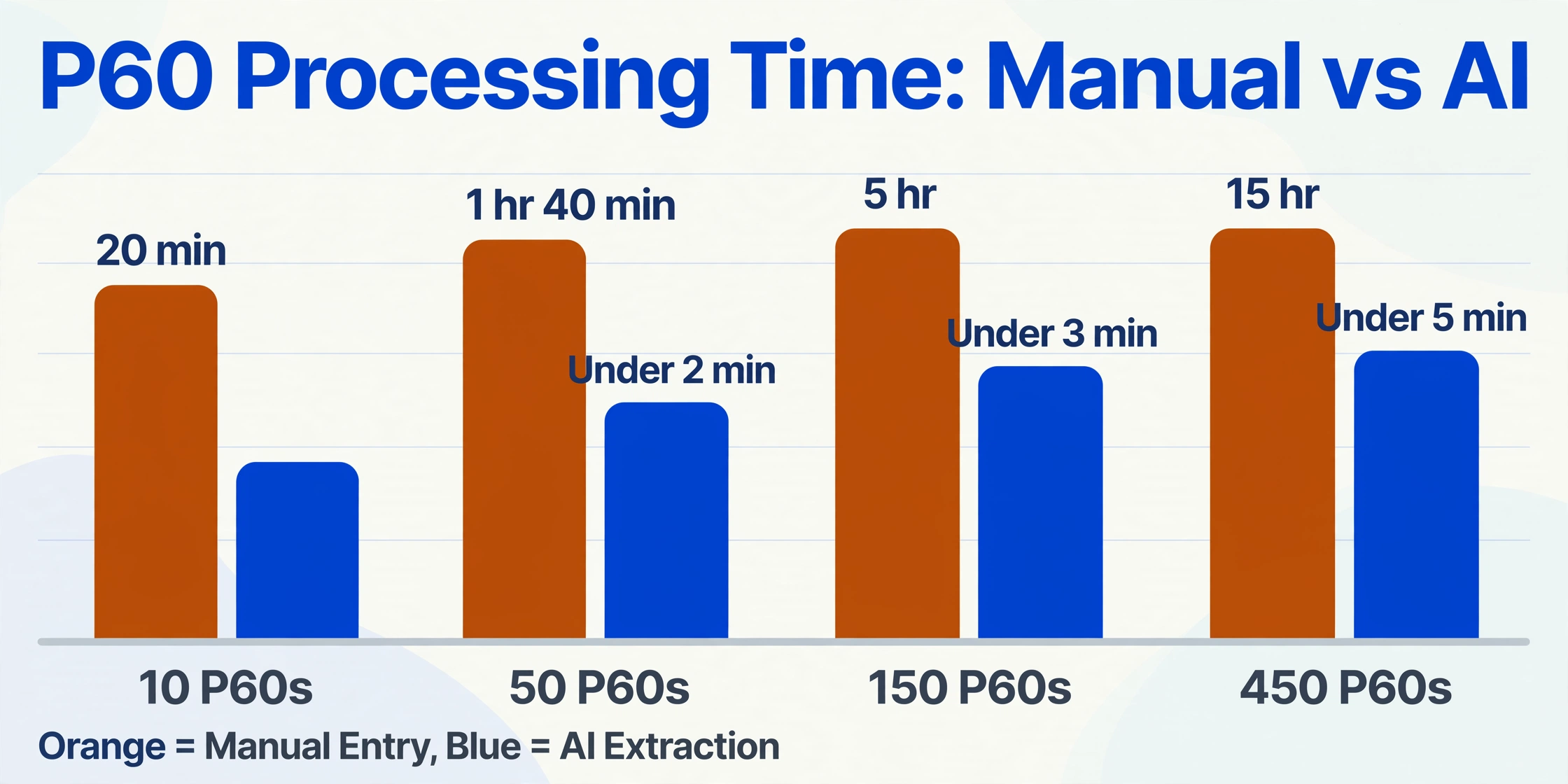
The two-minute estimate assumes a single source document per employee and a single payroll software provider. The four-minute column reflects the more common reality: the administrator is cross-referencing a P60 from a previous employer (different layout, different field names) or pulling employer NI from the P32 to complete a reconciliation spreadsheet. The full cost of manual P60 processing breaks down how those minutes translate into pounds — labour, error rework, displaced capacity, and penalty exposure — but the speed gap alone tells you why a payroll bureau handling 450 P60s across 30 clients faces a fundamentally different arithmetic from an in-house team processing 15.
Accuracy: One Wrong Digit in a P60
Manual data entry has a field-level error rate of 1% under controlled conditions, rising to 3–4% under the time pressure, document variation, and accumulated fatigue of a May year-end sprint. Across the seven fields on a typical P60 extraction, a 1% per-field error rate means roughly 7% of certificates contain at least one mistyped value; at 4%, a quarter of all P60s carry an error.
Each caught error costs correction time — 20 to 30 minutes to locate the source certificate, identify the wrong digit, re-enter it, and reissue a corrected duplicate if the mistake already reached the employee or HMRC. Each uncaught error compounds differently depending on where it lands: a mistyped total-pay figure entered into a client's self-assessment return triggers an HMRC compliance check when it doesn't match the RTI data already on file. A wrong PAYE reference number breaks the link between the certificate and the employer entity. A transposed digit in the National Insurance number means the entire row cannot be validated against HMRC records — and the mistake may not surface until the employee applies for a benefit and discovers their contribution record doesn't match.
AI extraction does not eliminate errors — any tool that claims 100% accuracy should be treated with scepticism. Modern visual language models achieve 95–99% accuracy on printed P60 fields, but that range itself is the point: at 97%, three certificates in a batch of 100 will contain a field that needs human review. The difference is that AI errors are systematic and auditable — fields where the AI has low confidence are flagged, and the administrator reviews only those rows instead of verifying every cell. The review step goes from "check everything" to "check the three the AI is unsure about."
Manual entry produces random errors distributed across all certificates. AI extraction concentrates its uncertainty in a small, identifiable subset. The administrator's verification workload shifts from 100% of rows to roughly 3–5% — and those are the rows most likely to benefit from human judgment anyway.
The Layout Problem Payroll Software Creates
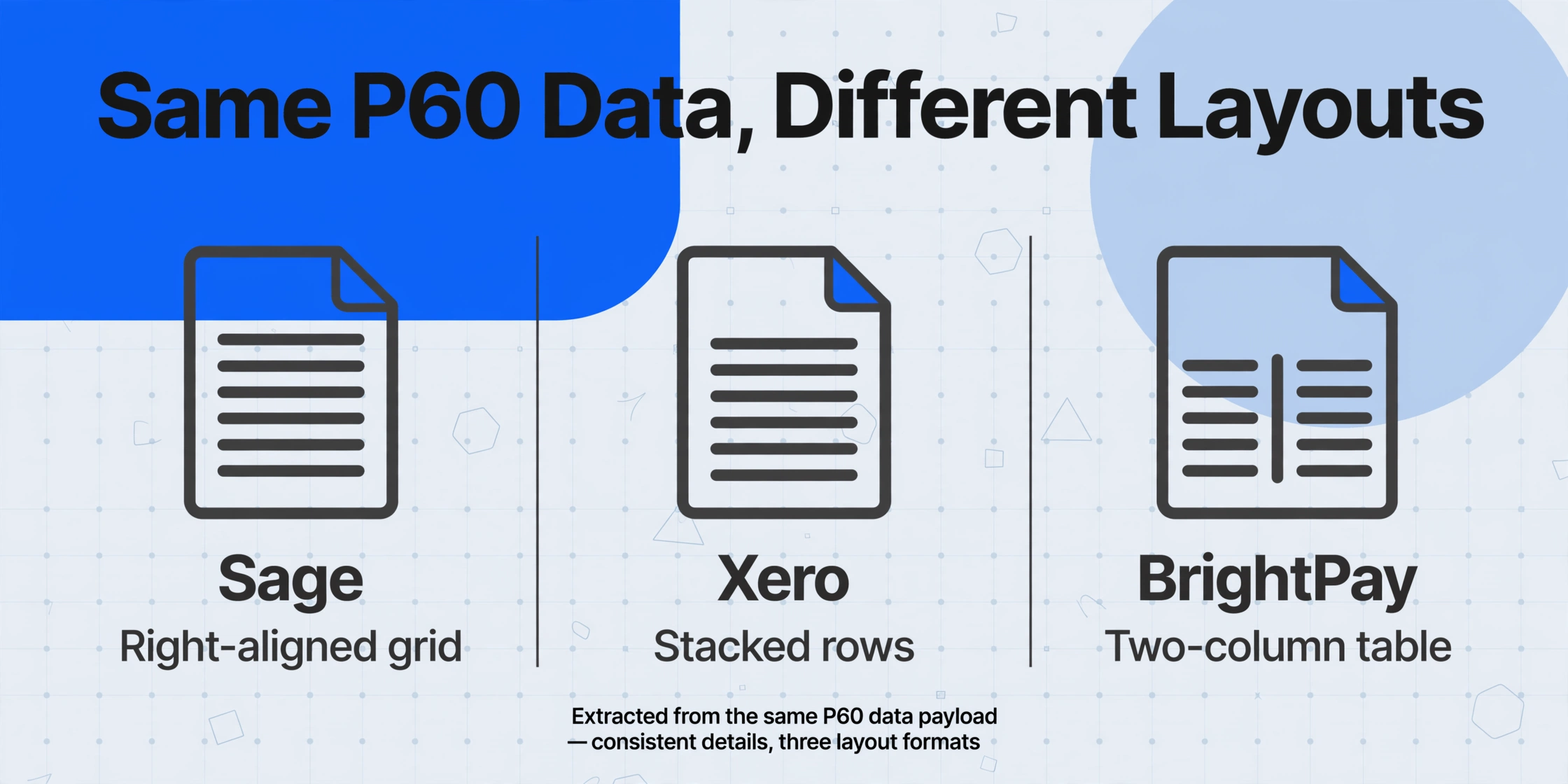
P60s do not look the same across payroll software providers — and they are not supposed to. HMRC's RD1 specification mandates the data fields that must appear but explicitly permits "variations in format and layout" for substitute forms. Sage, Xero, BrightPay, QuickBooks, IRIS Staffology, and Moneysoft each exercise that permission differently, producing P60s with the same statutory data arranged in entirely different visual structures.
For manual entry, different layouts mean the administrator must re-learn where each field sits on each provider's certificate. A Sage P60 might print the NI category letter and earnings bands in a right-aligned grid. Xero might display them as stacked rows. BrightPay might use a two-column table with section headers. An administrator who processes BrightPay P60s all year and then receives a single Sage P60 from an employee's previous employer spends an extra 30 seconds just locating the right boxes — and the risk of misreading a figure rises with the unfamiliarity of the layout.
This is where the two methods diverge most sharply. Manual entry relies on the administrator's ability to visually navigate each layout. AI extraction — specifically template-free, semantic extraction — reads the fields by their labels and meaning, not by their pixel coordinates. Extracting P60 data into Excel with the same column definitions works across every payroll provider's layout because the AI understands that "Pay in This Employment" is the same data whether it appears in box 14 of a Sage certificate or as the third numeric field on a Moneysoft printout.
For a payroll bureau managing clients on three different payroll systems — a common profile among UK practices — the layout problem alone can add 60–90 seconds per unfamiliar P60. Across 150 certificates from mixed sources, that's two to four extra hours of nothing but visual re-orientation.
Where Manual Entry Breaks: The Three Escalation Triggers
Manual P60 entry does not fail gradually. It degrades at specific thresholds, and most teams don't notice they've crossed one until the May deadline is two days away and the spreadsheet is still half-empty. Three triggers reliably push the manual workflow past its sustainable limit:
Trigger 1 — Multiple payroll systems. An employer that switched from Sage to Xero mid-year, or acquired a subsidiary still running BrightPay, or a bureau that serves clients across four different platforms. Each additional payroll system multiplies the layout-variation problem described above. Manual entry scales linearly with employee count but combinatorially with software diversity — and software diversity grows faster than headcount for most growing organisations.
Trigger 2 — Third-party P60s. Employees who held previous jobs in the same tax year arrive with P60s from former employers, each printed from a payroll system the administrator may never have seen. These certificates cannot be generated from the current payroll software — they exist only as paper or PDF copies the employee provides. For firms handling client self-assessment returns, these third-party P60s are essential: the total-pay-for-year figure must aggregate across all employments. Manual entry of third-party P60s combines every problem at once — unfamiliar layout, no source system to cross-reference against, and a field set that might not perfectly match the in-house template.
Trigger 3 — Client onboarding and historical catch-up. When a payroll bureau or accountancy practice takes on a new client, they typically need to ingest prior-year P60 data — sometimes going back two or three tax years — to establish a payroll history. This is high-stakes batch work: every statutory field must be preserved, including NI category letters (which determine contribution rates), student loan plan codes (which determine repayment thresholds), and statutory payment figures (which affect benefit eligibility). A single mistyped NI category letter for a client who later reaches State Pension age means the contribution record for that year is wrong — and the error may not surface for a decade. Using AI extraction for client onboarding preserves these reference fields without the transcription risk that accumulates across multi-year backfill.
When Manual Entry Is Still the Right Answer
A comparison that doesn't acknowledge when the old method still wins is advertising, not analysis. Manual P60 entry remains the rational choice in several scenarios, and the decision to automate should be driven by need, not by the availability of a tool:
- Under 15 employees, single payroll system, no third-party P60s. The total annual time commitment is under 30 minutes. The cost of learning any new tool exceeds the cost of the manual work. Manual entry is faster, simpler, and the error risk across 15 certificates is low enough that a quick visual check catches most mistakes.
- One-off or ad-hoc extraction. If you need P60 data from three certificates once a year for a specific report, configuring any automated workflow — AI or otherwise — takes longer than just typing the fields.
- Payroll software with built-in P60 reporting. If your payroll system already exports P60 data to Excel in the format you need — and some do — the extraction problem is solved at the source. The manual-vs-AI comparison becomes irrelevant because there's nothing to extract. The challenge arises when the software's built-in export doesn't match the report format, or when you're dealing with P60s from multiple systems or previous employers that your software cannot access.
The manual workflow breaks not when the per-unit time is high, but when the per-unit complexity crosses a threshold the administrator cannot absorb through concentration alone. That threshold is almost never reached by a 15-person company on a single payroll system printing its own P60s. It is routinely exceeded by a payroll bureau onboarding a 50-employee client with two prior-year P60 sets from different software providers.
How to Decide: A Four-Question Self-Assessment
Rather than prescribe a single answer, here are the four questions that determine whether manual P60 entry is still sustainable for your situation. Each "yes" pushes the arithmetic toward automation:
Do you process P60s from more than one payroll software provider?
If yes, the layout-variation problem adds 30–90 seconds per unfamiliar certificate — and error rates rise with each format switch. A template-free AI extraction approach reads all layouts through the same column definition. If no and you never receive third-party P60s, manual entry remains efficient.
Do you handle more than 50 P60s each May?
If yes, the total manual time exceeds a full working day — and that day falls in a window already packed with year-end and P11D deadlines. The opportunity cost of displacing reconciliation and compliance work for transcription becomes significant, as the companion cost analysis quantifies.
Do employees or clients bring P60s from previous employers?
If yes, you are processing documents from payroll systems you do not control, in formats you cannot predict. These are the highest-risk entries: unfamiliar layout, no source system to validate against, and an error that may go undetected for months. Automated extraction reduces the format problem to a single column definition.
Would a mistyped P60 figure trigger a compliance risk you cannot absorb?
If yes — whether because you file self-assessment returns for clients, because you are subject to HMRC payroll compliance checks, or because your professional indemnity insurance depends on data accuracy — the risk-reward of manual entry shifts. An AI-assisted workflow with automated validation flags the uncertain rows before they become errors, and the audit trail links every extracted value to its source certificate, which is a stronger defence position than "someone typed it."
Frequently Asked Questions
Does AI extraction work across all UK payroll software P60 layouts?
Yes, for any system that produces a PDF or printed P60 with the statutory fields present. The AI reads the field labels — "Pay in This Employment," "Tax Deducted," "NI Category Letter" — rather than relying on fixed box positions. This means the same column definition works across Sage, Xero, BrightPay, QuickBooks, IRIS Staffology, Moneysoft, and manual HMRC templates. Handwritten or heavily degraded scans reduce accuracy; printed or digital P60s perform best.
How accurate is AI P60 extraction compared to manual entry?
AI extraction on printed P60 fields typically achieves 95–99% accuracy. Manual entry under May deadline conditions operates at 96–99% per-field accuracy. The key difference is not the peak accuracy — it's where the errors land and how you find them. Manual errors are randomly distributed and cost 20–30 minutes each to correct after detection. AI errors concentrate in low-confidence fields that are flagged for review, letting you verify 3–5% of rows instead of 100%.
What's the minimum number of P60s where AI extraction makes sense?
There is no fixed threshold — it depends on the complexity triggers above, not just volume. A bureau processing 30 P60s from five different payroll systems may benefit more than an in-house team processing 60 P60s from one system. As a rough heuristic: if the number of P60s multiplied by the number of different payroll software sources exceeds 100, the manual approach is likely costing more in error risk and displaced capacity than it appears to.
Can AI extract P60 data from a photo or scan, or does it need a clean PDF?
AI extraction works from PDFs, scanned images, and photographs of printed P60s. Quality affects accuracy — a clear scan from a office photocopier performs near-identically to a digital PDF, while a low-resolution smartphone photo of a crumpled P60 in poor lighting will produce lower confidence scores and may require more manual review. The same constraint applies to manual entry: if a human administrator cannot read the figure, the AI cannot either.
What does it cost to switch from manual P60 entry to AI extraction?
The direct cost is the subscription for the extraction tool. The learning cost is the time to define your column set once — roughly 10 minutes — after which the same definition is reused for every batch. There is no template training, no sample collection, and no integration requirement: the output is a spreadsheet, not an API call to a payroll system. For teams already exporting P60 data from their payroll software into Excel, the workflow change is minimal — the extraction step replaces the typing step, and everything downstream (review, reconciliation, filing) remains the same.
Does the AI handle multi-year P60 backfill for new client onboarding?
Yes. Batch processing handles multi-year P60 sets in a single upload — 2024/25, 2025/26, and 2026/27 certificates processed together, with the tax year field extracted as a separate column to keep each year's data segregated. The column definition for a 2024/25 P60 is identical to the one for a 2026/27 P60 because the statutory fields are the same — only the tax year box label changes.