Why Contractor Receipts
Never Make It Into the Expense Log
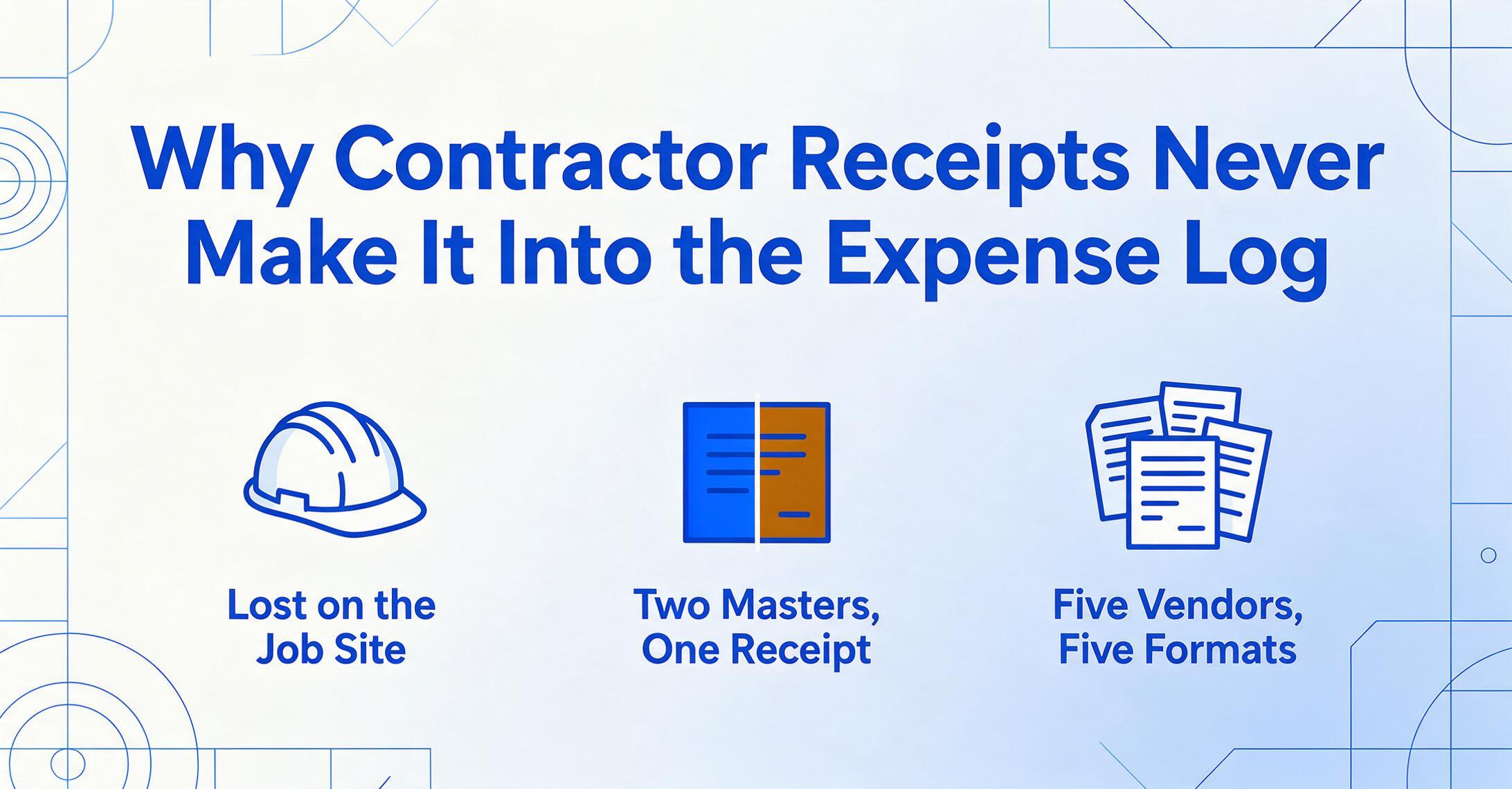
Most receipt-tracking advice starts from a desk job. Open the app, snap the receipt, tag it, done. The workflow assumes you are stationary, with clean hands, a flat surface, and the mental bandwidth to categorize a purchase the moment it happens. A contractor buying materials at 7:15 a.m. before heading to a job site has none of those things. The receipt goes into a pocket, then the truck console, then a glove box. By Friday it has migrated to a jacket left at home. By tax season it is gone. This is not disorganization. It is a structural mismatch between the conditions under which contractor receipts are generated and the conditions under which most tracking systems expect them to be processed — and it repeats across thousands of independent contractors every single day.
Key Takeaways
- The moment a receipt gets lost is not at the checkout counter — it's in the 12-to-48-hour gap after purchase, when memory fades, thermal paper degrades in a pocket, and the tool's assumption that you already processed it leaves no fallback.
- Every contractor receipt serves two masters the tools don't connect: IRS Schedule C categories (supplies, contract labor) on one side, project cost codes (Project 14, Phase 2) on the other — and maintaining two parallel tracking systems is the rational response, not disorganization.
- One extraction pass with ImageToTable.ai — using column-name extraction that reads what data means rather than matching receipt templates — pulls vendor, date, total, and project code from every receipt in a batch, collapsing a month of dual-entry overhead into minutes.
The Three Structural Forces That Make Contractor Receipts Uniquely Hard to Track
Contractor receipt tracking fails for reasons that have almost nothing to do with the contractor's diligence or the quality of their accounting software. Three structural forces converge on every independent contractor's purchase — and none of them exist for the desk-based sole proprietor whose receipt tracking advice dominates search results.
The first force is the physical job site itself. A purchase made standing in a Home Depot Pro checkout line at dawn, in work gloves, with a crew waiting in the truck, generates a receipt under conditions that are actively hostile to documentation. The second force is the dual purpose every receipt must serve: tax substantiation for the IRS and job cost allocation for the project budget. A desk worker only needs the first. A contractor needs both — and the two purposes pull in different directions. The third force is supplier fragmentation. A single day's work might involve purchases from a lumber yard, an electrical supply house, a plumbing distributor, and a hardware store — each with its own receipt format, each carrying a different mix of taxable and non-taxable items, each needing to be allocated to the correct job.
Individually, any one of these forces would create friction. Together, they create a system where receipt loss is not an occasional accident but the default outcome. The tools that exist to solve this problem — QuickBooks Self-Employed, Expensify, generic receipt scanning apps — were designed for the desk worker's world. They address the first and simplest layer: capturing an image of the receipt. They largely ignore the other two.
The Job-Site Environment — Why Physical Context Eats Receipts
Construction sites are hostile to paper documentation by design. Dust, moisture, wind, and the simple absence of a flat surface combine to degrade receipts physically and organizationally. A receipt that spends an hour in a pocket on a summer day emerges creased, faded, and often illegible at the edges — precisely where the date and total tend to sit on thermal-printed hardware store receipts.
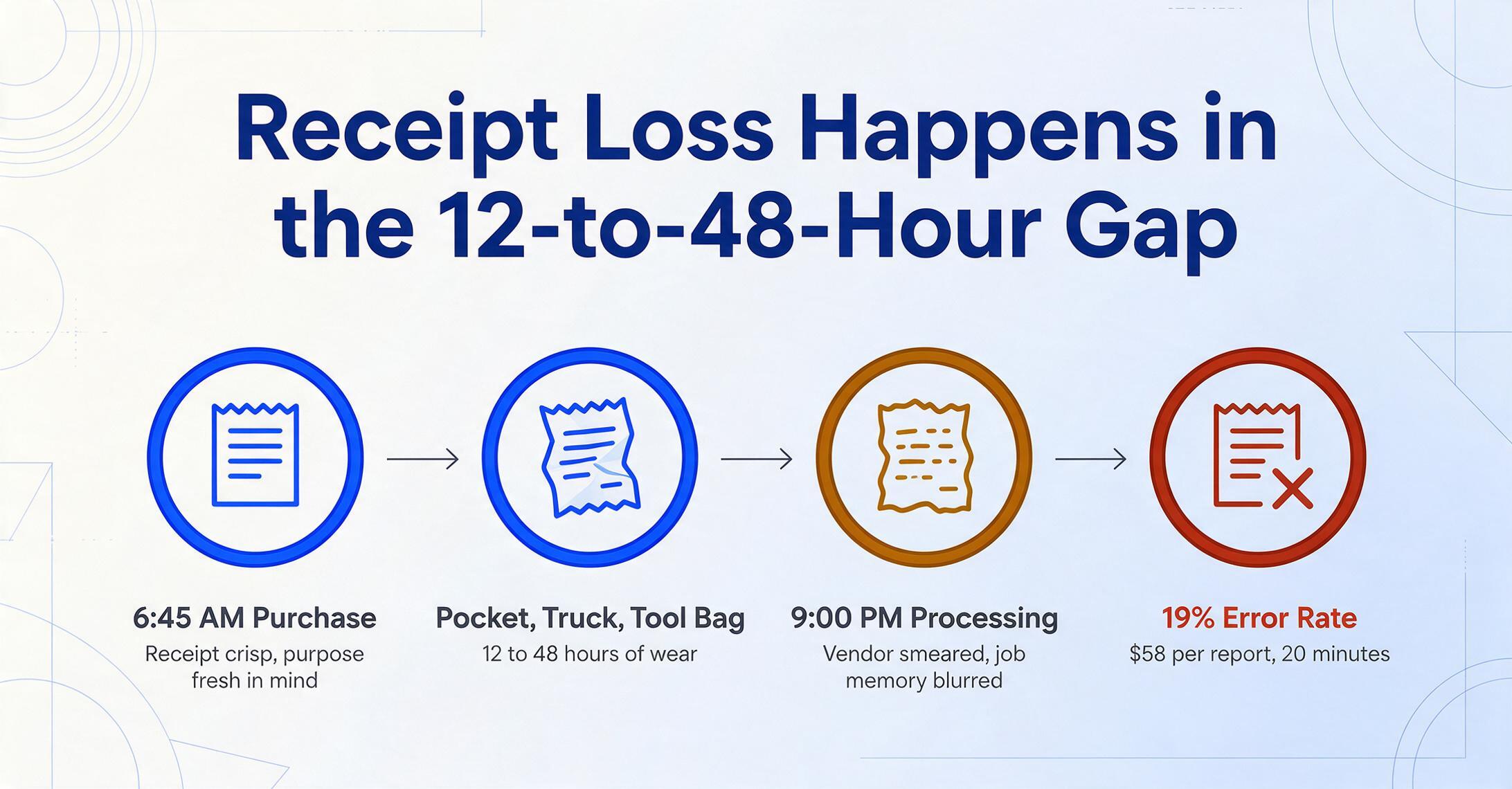
But the physical degradation of paper is only the visible symptom. The deeper problem is the temporal gap between purchase and processing. A desk worker buys a recurring software subscription and processes it in the same sitting. A contractor buys $340 in lumber at 6:45 a.m., drives 45 minutes to the job site, works until 5:00 p.m., drives home, eats dinner, and might — might — get to receipts at 9:00 p.m. By that point the receipt has passed through a pocket, a truck console, and possibly a tool bag. The vendor name is smeared. The memory of which job the lumber was for has blurred with memories of three other stops made that morning.
This temporal gap is where most receipt loss happens — not at the point of purchase, where the receipt is new and crisp and the purpose fresh in mind, but in the 12-to-48-hour window between purchase and processing. The Foundation Software analysis of construction expense tracking found that manual processing costs $58 per report and takes 20 minutes, with errors appearing in 19% of submissions — figures driven largely by this delayed-processing dynamic. A receipt processed the moment it's generated has a near-zero error rate. A receipt processed two days later has an error rate approaching one in five.
This is not a discipline problem. It is a design problem. The systems contractors are offered — QuickBooks Self-Employed, Expensify mobile, buildertrend receipt attachments — all share the same assumption: that the user will process the receipt at the point of capture. Snap a photo, tag it, done. When the user cannot do this — because they are on a ladder, or wearing gloves, or simply focused on the work they're being paid to do — the system has no fallback. The receipt enters the void.
As one contractor on r/Construction described the reality: "We use buildertrend. You just snap a photo of the receipt and attach it to the job. It can read the receipt and sometimes even get the cost code correct." The word "sometimes" in that sentence carries most of the weight. The tool exists, the feature is there — but it only works reliably when conditions are perfect. On an active job site, conditions are rarely perfect.
The Dual-Purpose Trap — When One Receipt Has Two Masters
A receipt in the hands of a desk-based freelancer has one job: prove to the IRS that a business expense happened. The freelancer needs to know what was bought, when, from whom, and for how much. Category assignment — office supplies, software, travel — is usually obvious from context.
A receipt in the hands of a contractor has two jobs. Job one is the same: IRS substantiation. Job two is job costing — determining which project absorbed the expense, under which cost category, so that the contractor knows whether that project is profitable, whether the estimate was accurate, and whether future bids should be adjusted. These two purposes pull the receipt data in different directions. IRS categorization cares about the nature of the expense: materials, contract labor, vehicle expenses, each mapped to a Schedule C line. Job costing cares about the allocation of the expense: Project A foundation phase vs. Project B rough-in phase, tracked against the original estimate line by line.
The result is that a single receipt — say, a $247.50 purchase from an electrical supply house — must be processed twice through two different classification systems. In the IRS system, it's "Supplies" on Schedule C line 22 or "Cost of Goods Sold" on Part III. In the job costing system, it's "Electrical rough-in, Project 14, Phase 2." These are not the same thing, and most expense tracking tools support one or the other, not both simultaneously.
QuickBooks Self-Employed handles the IRS dimension adequately — auto-categorize transactions into Schedule C buckets, track mileage, estimate quarterly taxes. But it has no job costing capabilities at all. The contractor who needs to know that Project 14's electrical work came in $1,200 over estimate cannot get that answer from QBSE. Meanwhile, construction-specific platforms like buildertrend or CoConstruct handle job costing well but offer only basic receipt capture — the data extraction stops at storing an image, leaving the contractor to manually type values into spreadsheets for tax preparation.
The dual-purpose trap explains why so many contractors maintain two parallel tracking systems: one for the IRS (spreadsheets or QBSE) and one for project management (buildertrend, Jobber, or paper notebooks). The overhead of dual entry is not laziness — it is a rational response to tools that solve half the problem each. And it is precisely this dual-system overhead that creates the friction gap where receipts get lost.
Supplier Fragmentation — Why Five Small Receipts Are Worse Than One Big Invoice
A single-day material run for a general contractor can generate receipts from a lumber yard, an electrical supply distributor, a hardware store, a plumbing wholesaler, and a concrete supplier — five separate vendors, five receipt formats, five different tax treatments. The $340 lumber receipt lists dimensional lumber by the board foot with commodity pricing that fluctuates weekly. The $89.50 electrical receipt uses manufacturer part numbers and trade pricing tiers. The $27 fasteners receipt from the hardware store is a thermal-printed strip with abbreviated SKUs and no subtotals. Each receipt speaks a different data language.
This fragmentation matters because it multiplies the per-receipt processing cost. If each receipt takes 3 minutes to categorize, type into a spreadsheet, and file physically, five receipts cost 15 minutes — more than the lunch break the contractor doesn't take. Over a month, with daily material runs to multiple suppliers, the arithmetic becomes punishing: 100 to 150 receipts per month at 3 minutes each is 5 to 7.5 hours of pure data entry, before a single tax form or project report is generated.
And unlike a desk worker processing recurring vendor invoices — predictable format, predictable categories, predictable frequency — the contractor's receipts are novel almost every time. The mix of materials changes per project. The vendors change per phase. The items on a single receipt can span multiple job cost codes — a trip to the hardware store might include both job-specific materials and shop supplies, each needing a different allocation. The desk worker's "set up a rule and auto-categorize" workflow collapses under this variability.
The NFIB's 2024 Tax Survey found that tax compliance complexity — not the financial cost of taxes themselves — is the top concern among small business owners. For contractors, that complexity concentrates at the receipt level: the point where raw purchase data must be transformed into structured financial records that satisfy two different classification systems under conditions that actively resist systematic processing. The Bureau of Labor Statistics puts the national average hourly wage at $32.23. At 5 to 7.5 hours of receipt processing per month, the labor cost of manual entry alone runs $1,900 to $2,900 annually — and that is before accounting for missed deductions, which compound the loss by 30 to 40 cents per dollar in combined income and self-employment tax.
What the IRS Actually Requires — and Why Contractor Workarounds Don't Cut It
IRS requirements for business expense documentation are not vague. Under Treasury Regulation § 1.274-5, every deductible business expense must be substantiated with four elements: the amount paid, the date of the transaction, the place or vendor, and the business purpose. For expenses of $75 or more, documentary evidence — a receipt, paid bill, or similar record — is explicitly required.
For desk-based freelancers, meeting this standard is tedious but straightforward. An Expensify report with scanned receipts attached checks the boxes. For contractors, the business-purpose element introduces a complication that desk workers rarely face. "Business purpose" for a contractor's receipt is not just "this was for my business" — that threshold is trivially met by any material purchase. The real question is which project and which cost category, because an IRS audit of a contractor's Schedule C will test deductions against the reasonableness of reported costs relative to the scope of work. A general contractor claiming $40,000 in materials deductions against $200,000 in gross receipts will face less scrutiny than one claiming $80,000 — unless the receipts substantiate that $80,000 with project-level detail that makes the number defensible.
The Cohan rule — which allows the IRS to estimate deductions when records are incomplete — is often cited as a safety net. It is not. The rule does not apply to travel, meals, entertainment, or listed property expenses, and even where it does apply, it requires the taxpayer to provide a credible basis for estimation. "I know I bought materials but I can't prove how much" does not meet that standard. In practice, the Cohan rule means the IRS determines what your deductions should have been — not what they actually were — and the taxpayer bears the burden of proof.
The practical result is that contractors who cannot tie receipts to specific projects face two risks simultaneously: overpaying tax on undocumented deductions, and under-defending legitimate deductions in an audit. The IRS's Publication 334, the Tax Guide for Small Business, states plainly that "you must keep your records as long as needed to prove the income or deductions on a tax return" — generally three years from filing, six if income is understated by more than 25%. A shoebox of faded, unsorted receipts from three years ago does not constitute proof of anything.
Where the Tools Miss the Mark — and Why That Matters
The existing software landscape for contractor receipt management falls into two camps, and neither camp solves the full problem.
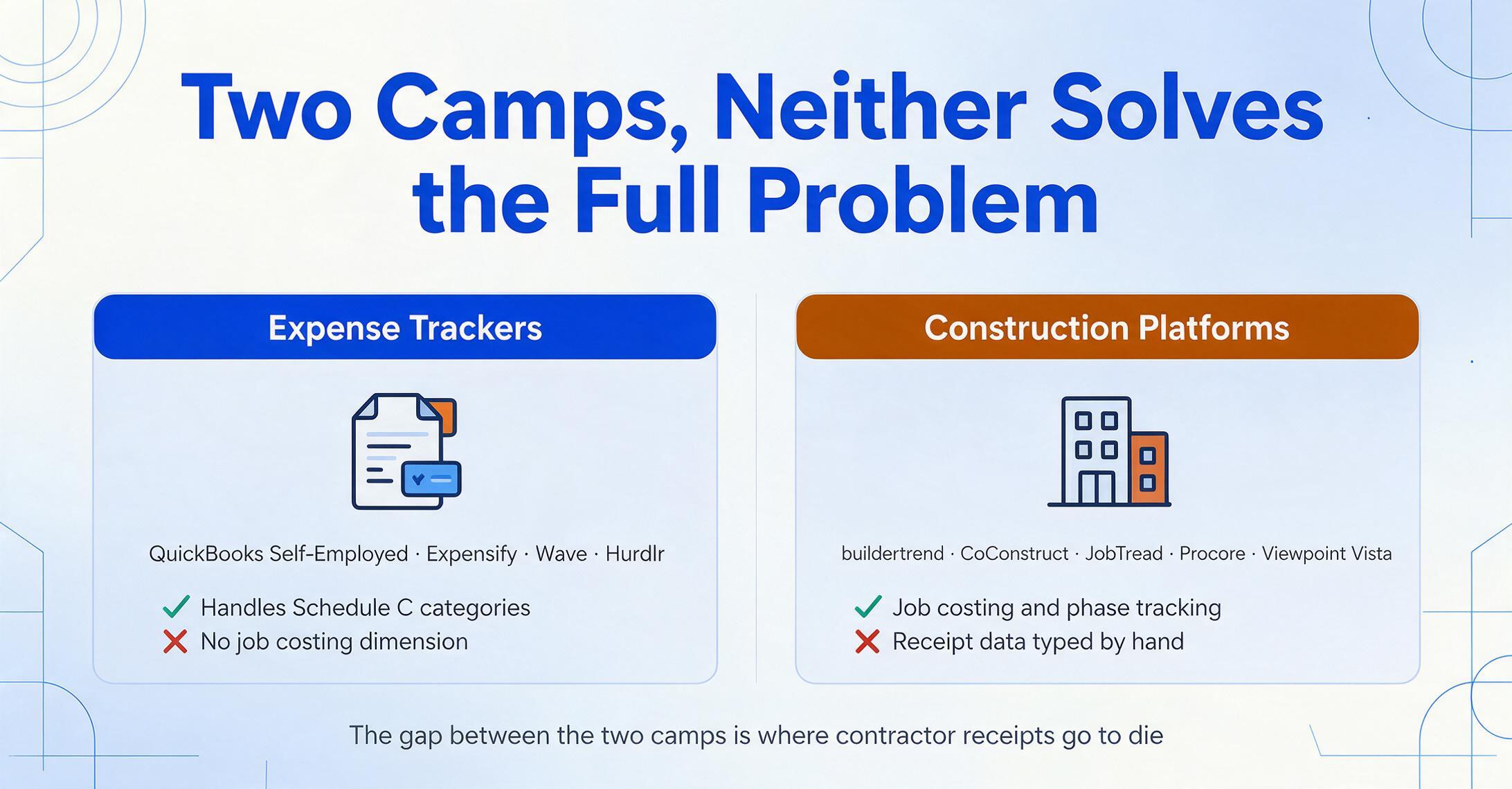
Camp one is the generic expense tracker: QuickBooks Self-Employed, Expensify, Wave, Hurdlr. These tools excel at capturing receipt images, auto-categorizing by Schedule C line, and estimating quarterly tax liability. They handle the IRS dimension well. But they were designed for desk-based freelancers — writers, designers, consultants — whose expenses follow predictable patterns and whose accounting needs stop at "is this business or personal?" The contractor who needs to know that Project 14's electrical rough-in came in 18% over estimate gets no answer from these tools. The job costing dimension is entirely absent.
Camp two is the construction management platform: buildertrend, CoConstruct, JobTread, Procore, Viewpoint Vista. These tools handle job costing, phase tracking, and estimate-vs-actual reporting in depth. But their receipt handling is an afterthought — typically limited to attaching a photo to a cost code, with no extraction of structured data from the receipt image. The contractor still types vendor names, dates, and amounts manually into the platform. For tax preparation, the data must then be exported and re-entered into a separate system.
The gap between these two camps is where contractor receipts go to die. The generic tools don't speak job costing. The construction tools don't extract structured receipt data. The contractor is left maintaining two systems — or, more commonly, giving up on one of the two purposes and accepting that either the IRS return or the project profitability picture will be incomplete.
What would close this gap is a tool that does both things in a single pass: extract the vendor, date, amount, and line items from a receipt image, and let the contractor assign project-level metadata — job ID, cost code, phase — to each entry. This is not two separate tasks that must be performed sequentially. The data is on the receipt. The question is whether the extraction system gives the contractor a place to put the allocation data, or forces them to handle it in a separate tool.
Files are processed securely and not stored.
What Would Actually Break the Cycle
If the problem is structural — physical job sites, dual-purpose receipts, fragmented suppliers — then the solution cannot be a better version of the same "snap and tag" workflow. It requires changing the extraction model itself so that the receipt data does both jobs in one pass.
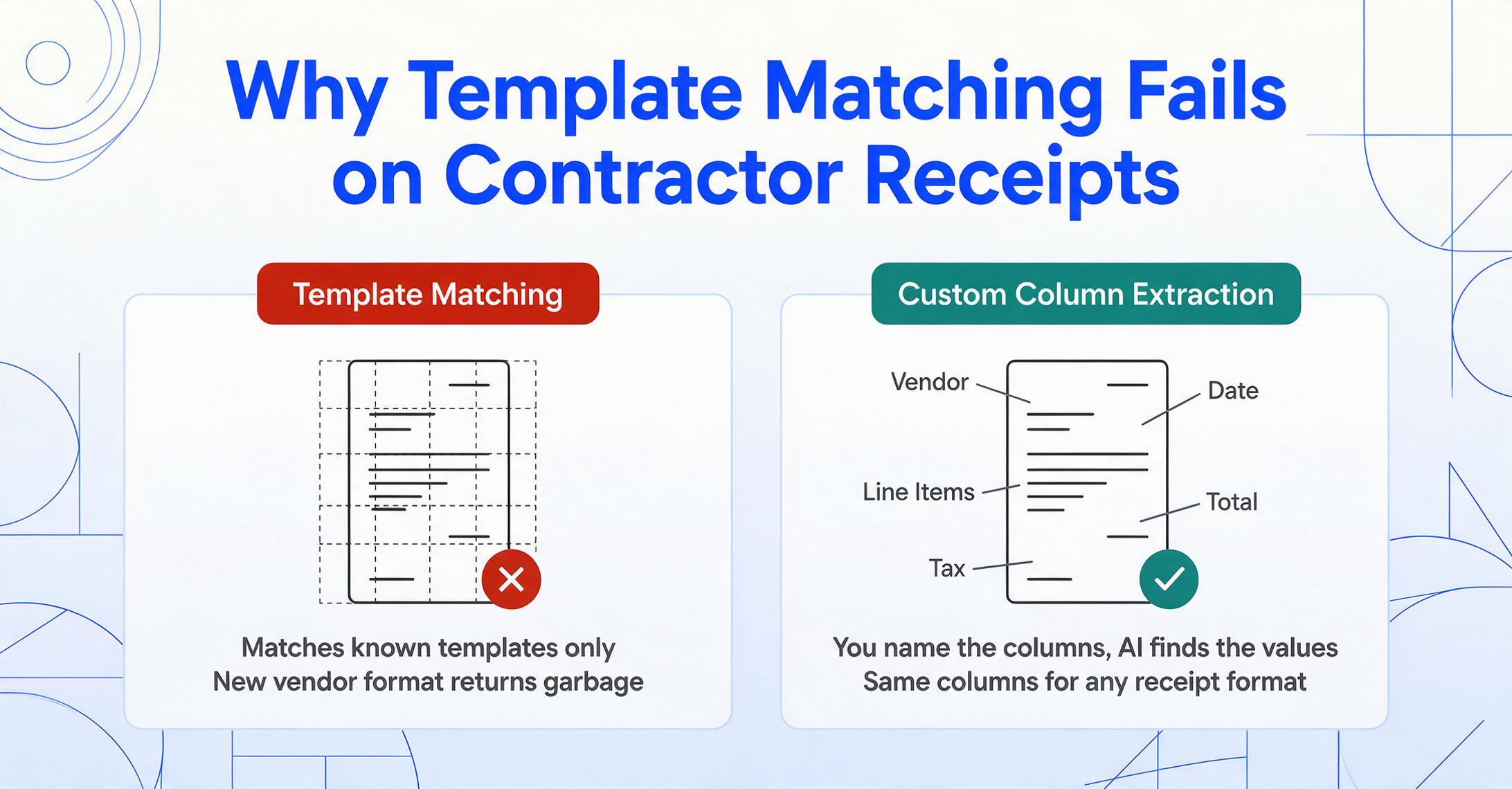
The mechanism that makes this possible is fundamentally different from the OCR-based receipt capture that most tools offer. Traditional receipt scanning works by matching a receipt image against known templates — a Home Depot receipt template, a Lowe's receipt template — and extracting data from pre-defined zones. When the receipt doesn't match a known template — because it came from a local lumber yard with its own format, or because the vendor redesigned their receipt layout — the extraction fails or returns garbage. This is why buildertrend's receipt reading works "sometimes." It depends on template matching, and contractor receipts come from too many sources with too many format variations for a template library to cover.
The alternative is column-name extraction: instead of telling the system where on the receipt to look for data, you tell it what you want — "Vendor," "Date," "Total," "Line Items," "Tax" — and the AI locates each value anywhere on the page by understanding what it means, not where it sits. This approach does not require the receipt to match any template. A hardware store receipt with a dense grid of SKUs, a lumber yard receipt with board-foot pricing, and a restaurant receipt with a single total are all processed the same way: the AI reads the page as a human would, identifies what each element represents, and maps it to the columns you defined.
The second piece that breaks the dual-entry cycle is the ability to define project-level columns alongside receipt-level columns. In the same extraction pass that pulls "Vendor," "Date," and "Total," the contractor can add "Job ID," "Cost Code," and "Phase" — manually entered values that the system assigns to every receipt in the batch, or varied per receipt for multi-project batches. The output spreadsheet then contains everything needed for both tax preparation and project profitability analysis in a single file, with no re-entry required.
This approach addresses all three structural forces simultaneously. The physical job-site problem is mitigated because the contractor does not need to process receipts at the point of capture — a batch of week's receipts can be uploaded at once from the truck at the end of the week, with the extraction happening in minutes. The dual-purpose problem is resolved because the same extraction pass produces data for both IRS categories and job cost codes. The supplier fragmentation problem is neutralized because the column-name approach doesn't care which vendor printed the receipt — the extraction is semantic, not template-dependent.
A contractor on r/smallbusiness put it simply when asked how they track receipts across multiple job sites: "way simpler than QuickBooks for field work, just snap receipts on site and it ties them to jobs automatically." The key phrase is "ties them to jobs automatically." That linkage — receipt to project — is the step that generic expense trackers skip, and it is the step where most contractor receipt systems break. Closing that gap is not a feature upgrade. It is the difference between a system that works on paper and a system that survives contact with an actual job site.
FAQ
Is this just a discipline problem — do I need to be more organized?
No. The structural analysis above should make it clear that the forces working against contractor receipt tracking — physical job sites, dual-purpose accounting requirements, and supplier fragmentation — would defeat even the most disciplined manual system. You can be the most organized person on the job site and still lose receipts to rain, still forget which project a hardware store run was for by the time you sit down to process it on Sunday evening, still face the dual-entry overhead of feeding data into both QuickBooks and buildertrend. The solution is not more discipline — it is a different extraction model that processes receipts in batches with project-level metadata, reducing the per-receipt cognitive load from a 3-minute classification task to zero.
How does column-name extraction differ from the OCR in my QuickBooks app?
QuickBooks and similar apps use OCR to read text off a receipt image and auto-populate pre-set fields (vendor, date, total). This works well for standardized receipts from major retailers but breaks down with non-standard formats — the local lumber yard's handwritten invoice, the supply house's multi-page order form, the restaurant receipt with tip and tax split oddly. Column-name extraction replaces template matching with semantic understanding: the AI identifies values by what they mean (a date, a total, a vendor name) regardless of where they appear on the page or what the surrounding text looks like. The output is a structured spreadsheet with the columns you specified, not whatever the app's OCR managed to read.
Can I assign receipts to specific jobs and cost codes?
Yes — by defining columns like "Job ID," "Cost Code," or "Phase" alongside the receipt data columns ("Vendor," "Date," "Total"), you produce a single spreadsheet that serves both tax preparation and project cost tracking. You can batch-process a week's receipts from multiple job sites and assign different project codes to different receipts in the same processing pass. The output goes directly into Excel or can be integrated with Google Sheets, eliminating the dual-entry overhead of maintaining separate tax and project-tracking spreadsheets.
What about receipts that are faded, crumpled, or handwritten?
Visual AI models can read handwritten text and partially degraded receipts that would defeat traditional OCR. The key limitation is legibility — the AI needs enough visual information to distinguish characters. A receipt that spent a week in a sweaty pocket and is now a blank thermal-paper rectangle cannot be read by any system. The practical takeaway: capture the receipt image as soon as practical after the purchase, even if you process it later. The image preserves the data; the extraction can wait.
Does this replace buildertrend / QuickBooks / Jobber?
No. Column-name extraction is a data capture and structuring layer that feeds into your existing systems. It replaces the manual data entry step — reading receipts and typing values into spreadsheets or apps — but does not replace the accounting, job costing, or project management platforms where that data ultimately lives. The distinction matters because most contractors who have tried multiple tools have given up not because the tools are bad but because the bridge between paper receipt and structured data entry is where the system breaks. Column-name extraction is that bridge.
How long should I keep digital receipt records?
The IRS generally has three years from the date you file to assess additional tax, or six years if you understate income by more than 25%. IRS Publication 334 recommends keeping employment tax records for four years. Keeping digital receipt images and their extraction outputs for seven years is a conservative standard that covers all standard windows. Digital storage makes this costless — unlike a box of fading paper receipts in a garage.
Process Your Job-Site Receipts in One Pass
Upload a week's worth of contractor receipts — Home Depot Pro, lumber yards, supply houses, restaurant meals — and extract vendor, date, total, and project-level data into a single spreadsheet. No templates, no per-receipt setup, no dual entry.
Start Extracting Receipt Data