Why Subcontractor Invoices Get
Buried in Email and Paid Late
A subcontractor invoice rarely goes missing. It sits in the inbox, read or unread, while the monthly pay-app deadline passes and a sub who finished the work two pay periods ago asks why the check has not arrived. The divide between what happens and what the people writing the checks believe is documented: Construction Dive's coverage of Billd's 2025 National Subcontractor Market Report, built on surveys from more than 800 construction professionals, found that general contractors think subs are paid about 30 days after a pay application, while subcontractors report waiting an average of 56 days.
That gap is not an accounting mystery. It is an intake problem. The invoice arrived, someone saw it, and it still failed to become a payable, because an email is a message and not a record. This article covers the main-office step where construction invoices enter the business by email, and how to make that step produce a structured row before the billing cycle closes.
Key Takeaways
- A buried invoice looks like a filing failure, so the blame lands on whoever forgot to file it.
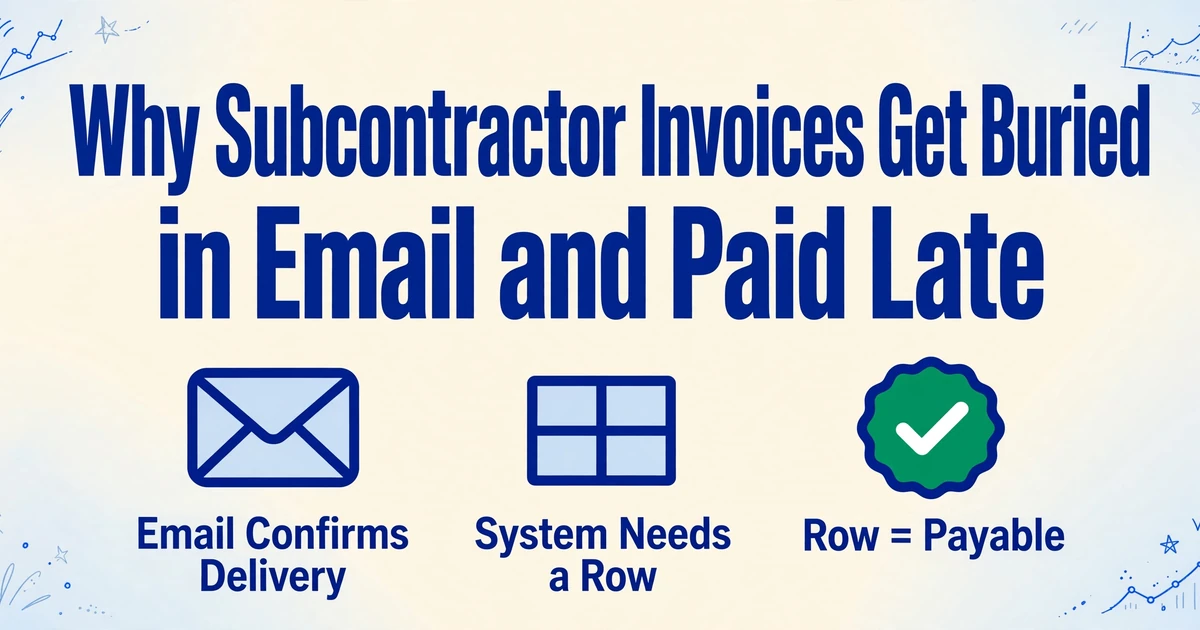
- An email carries no vendor, amount, or due date as fields, so it confirms delivery without ever creating a payable.
- Make the moment an invoice arrives produce a row, and checking a register replaces remembering a message.
An Inbox Confirms Delivery. It Does Not Create a Payable.
To pay an invoice, an accounting system needs a vendor, an invoice number, an amount, a due date, a job number, and a cost code. An email carries none of those as fields. It carries a message and an attachment. That distinction sounds academic until month-end, when the mailbox can only answer one question: did we receive this? The accounting system needs a different answer: what do we owe, on which job, and when?
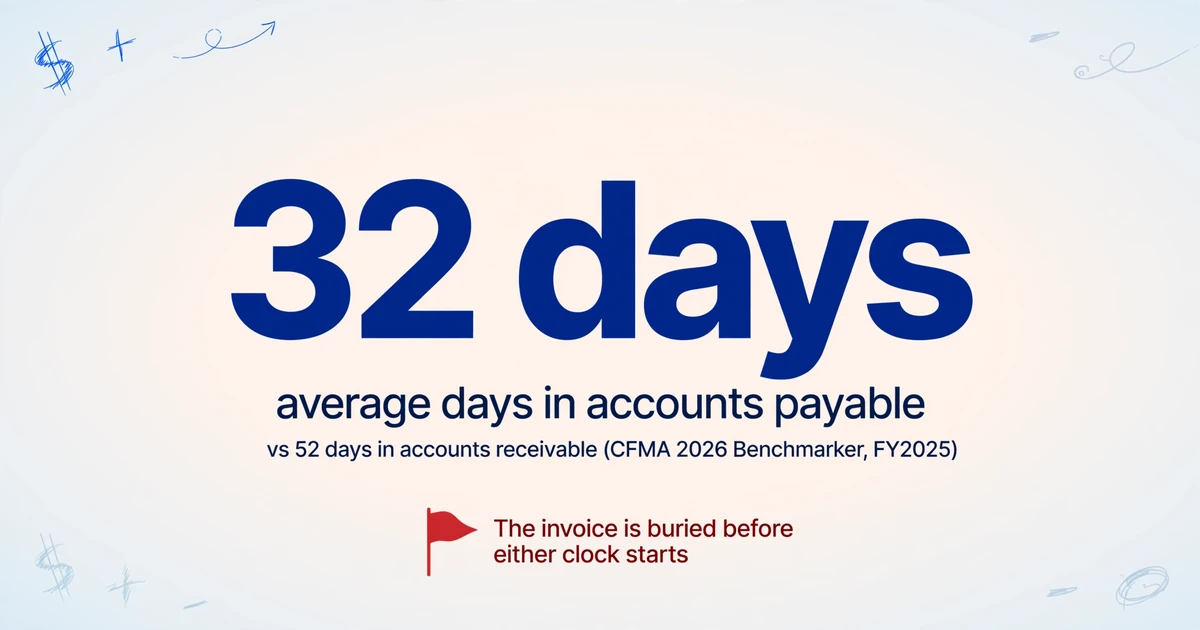
Once an invoice is in the system, a contractor's payment clock is readable. CFMA's 2026 Construction Financial Benchmarker, drawing on FY2025 data from 1,359 contractors, reports an industry figure of about 32 days in accounts payable against 52 days in accounts receivable. Contractors hold payment for roughly a month, and they collect their own pay slower than that. The damage from a buried invoice happens before either number: it is the stretch where an invoice has arrived but has not entered the system at all.
The standard advice is to route every sub and supplier to one dedicated address, something like [email protected]. It is good advice, and it stops invoices from scattering across a project manager's personal mailbox. But the inbox is a container, not a ledger. Mail arrives faster than one person can open, rename, and code it, so the dedicated invoice inbox becomes a backlog with the same behavior as the personal mailbox it replaced: the newest messages get attention, and the older ones wait.
An invoice that arrived is not the same as an invoice that exists. Until it has a row, it is a message someone has to remember.
What the Intake Process Looks Like on a Normal Month
The construction AP cycle is predictable by design. A subcontractor finishes work during a billing period, then submits a payment application by a contract deadline, often the 20th or 25th. The format is frequently AIA G702 (the one-page Application and Certificate for Payment) with G703 (the schedule-of-values continuation sheet), though plenty of subs send a plain invoice or their own simplified form. Submission itself is split: some subs email a PDF to the main office, some upload through a platform like Procore, and some hand paper to a superintendent on site.
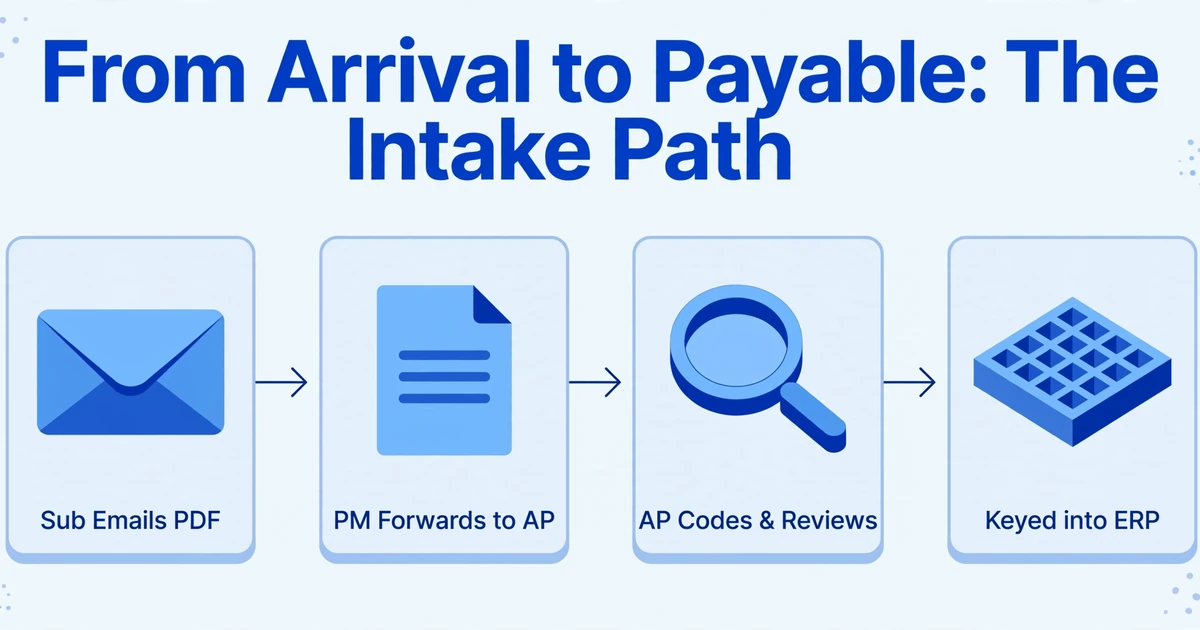
Inside the main office, the path from arrival to payable runs through several hands. A project manager or superintendent forwards the invoice to AP. An AP clerk or project accountant renames it with the project manager's initials, job number, vendor name, and invoice number, then codes it to the right job and cost code. The project manager reviews and approves, and finally someone keys the data into the accounting system, whether that is Sage 300 CRE, Sage 100 Contractor, Viewpoint Vista, Foundation, CMiC, or QuickBooks.
That sequence has to land inside a monthly cycle. Under AIA A201, the general contractor rolls dozens of subcontractor pay applications, supplier invoices, and lien waivers into a single application to the owner each month (AIA Contract Documents). Retainage is withheld at the contracted rate, often 5% to 10%, and a conditional lien waiver has to ride with each pay app and an unconditional waiver with the following one. A sub invoice that misses the cutoff does not just arrive late. It slides a full month, and the waiver and retainage math shifts with it.
The monthly cycle gives every missed invoice the same penalty: not a late fee, but a one-month slide into the next draw.
Where Intake Breaks, and Why Discipline Alone Does Not Fix It
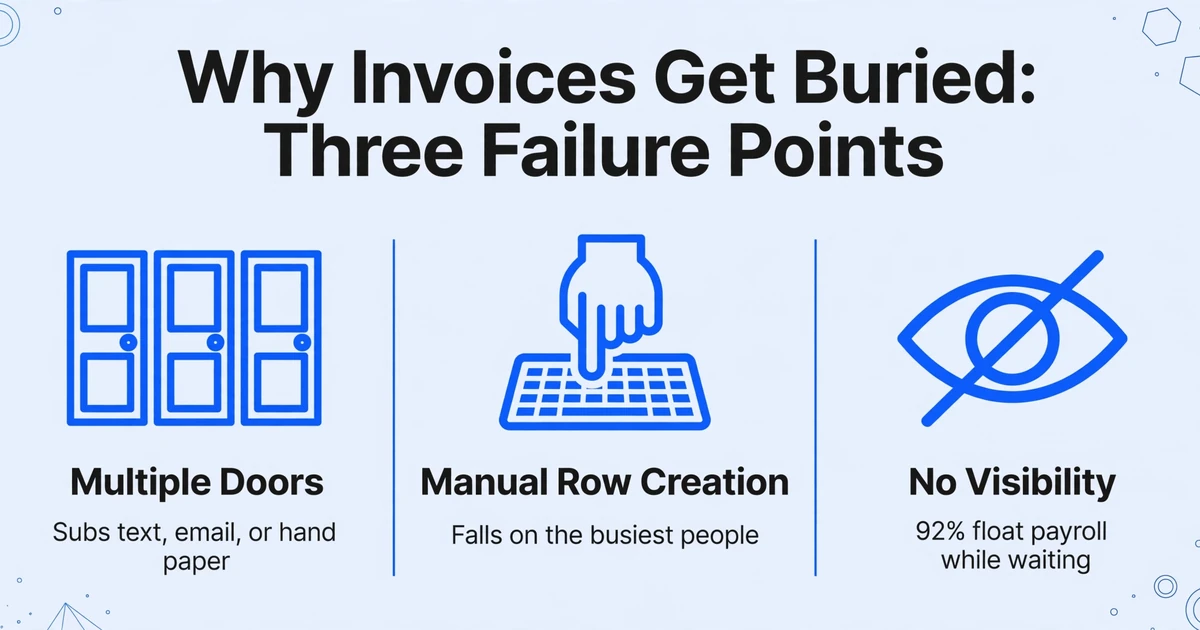
The first failure is that invoices still arrive through several doors. The "one AP inbox" rule depends on subs and field staff following it, and they do not always follow it. A general contractor described the reality in an r/GeneralContractor thread: "Some email them, some mail paper copies, some just text me a total. By the time I'm reconciling project costs I'm always missing something or can't find an invoice from two months ago."
The second failure is that creating the row is manual, and it falls on the busiest people in the chain. Invoices arrive from suppliers and subcontractors by email and paper, AP logs them and routes them to project managers for approval, and in the handoff between AP and the project managers some of them stall and never come back. The invoice does not disappear because anyone is careless. It disappears because the only thing separating an email from a payable is a person remembering to make it one.
The third failure is a mismatch of capacity and visibility. The teams losing invoices are not short of hands, and the work is not a throughput problem. What is missing is a view of which invoices have arrived and what state they are in, so the gap between arrival and payment stays a blind spot instead of a queue someone can work down.
That is the correct diagnosis, and it changes the fix. Adding a person to chase a mailbox does not solve a problem rooted in the mailbox never holding structured data. What solves it is making the moment of arrival produce a record.
Most construction teams do not lose invoices because they are disorganized. They lose them because the intake step stores a message where the rest of the workflow expects a row.
The Fix: Make Every Incoming Invoice Produce a Row
The move is not to force subs onto a portal or to rebuild the accounting stack. It is to change what happens the moment mail arrives, so an invoice stops being a message and starts being a row. Three capabilities cover the intake step, and each maps to a specific point where the process breaks today.
The first is Email Inbox. ImageToTable.ai gives every account a dedicated inbox address. Instead of uploading files by hand, you share that address with subs, or set a forwarding rule so your own mail lands there, and attachments enter your processing queue automatically. With auto-process switched on and an extraction template bound to the inbox, a message is read the moment it arrives. A sender whitelist keeps unrelated mail from becoming rows you have to delete, and the inbox can be told to process attachments only, the email body only, or both, which matters when one sub attaches a PDF and another types the numbers into the message. Password-protected PDFs are tried against passwords you store in advance.
The second is Custom Column Extraction. Instead of drawing boxes around fields on a template that breaks when a sub changes their layout, you type the column names you want, such as Vendor, Invoice Number, Invoice Date, Job Number, Cost Code, Work Completed, Retainage %, Net Due, and Due Date. The AI reads each document and locates those values by understanding what they mean, and the names you typed become the headers of your output sheet.
The third is Collection Link. For a sub who would rather not email, or who is working from a phone, you generate a link and send it over. The recipient opens it, enters a short verification code, and uploads the file without creating an account or a login. The document lands in the same queue as everything that arrived by email.
Put together, the intake process becomes a set of settings you configure once:
Point every invoice at one address
Share the dedicated inbox address with your subs, or set an Outlook or Gmail rule so mail from vendors forwards to it. Subcontractors keep emailing the contact they already use, and the invoice enters the queue on its own.
Restrict who can feed it
Turn on the sender whitelist so only approved subcontractor and supplier addresses reach the queue. Newsletters, unsolicited quotes, and internal mail stop competing with invoices for attention.
Bind one template and turn on auto-process
Save the column set once and bind it to the inbox. Each message is then read against the same columns, so a G702 from one sub and a plain invoice from another land in the same structure without reconfiguration.
Match the reading to the sender
Set the inbox to attachments only, body only, or both. A sub who attaches a scanned pay app and a sub who writes the amount into the email text are both captured, because the intake step handles either habit.
Land the queue in one sheet
Batch processing collects the queue into a single Excel file where each invoice is a row under the same headers. A computed column can carry the retainage math, for example Net Due defined as Total Billed multiplied by one minus Retainage %, so every row reflects that sub's actual terms instead of a blanket rate.
Give the holdouts an upload path
For a sub who will not email, send a Collection Link. They enter the code and upload without an account, and the document joins the same queue. You still capture it without chasing anyone.
The output is a register: one sheet, one row per incoming invoice, with vendor, invoice number, amount, job, cost code, and due date already separated into columns. That register is the record the mailbox never provided. It is sortable by due date, filterable by job, and stable enough to survive a handover or an absence, which is exactly the visibility the intake step was missing.
Files are processed securely and not stored.
For the extraction mechanics on a single document, the subcontractor invoice data extraction walkthrough covers the field list and the verification pass. When the same columns need to run across a month of invoices at once, the batch processing approach for subcontractor invoices shows what the merged output looks like. If your capture point is a spreadsheet rather than the web app, the supplier-to-AP sheet pipeline covers that route, and the broader construction document extraction guide places intake in the context of the other documents on a project. A folder of invoices can also be run through batch extraction into one table directly.
This is the point to be precise about the boundary, because it is where most construction AP claims overreach. ImageToTable.ai extracts structured data from the email or its attachment into a spreadsheet. It does not decide on its own that an invoice belongs to a specific subcontract or purchase order, and it does not perform field-by-field judgment across two documents. The tie back to your contracts, POs, or schedule of values is a sheet step, and a reliable one: once the job and invoice numbers are columns, you join the register to your records with a lookup. A computed column can carry a check such as outputting the difference when a billed total does not equal the contract line, so an exception surfaces in the sheet instead of hiding in a thread.
What This Does Not Do
It reads email, not chat or text. Attachments and message body are supported, including PDF, JPG, PNG, WebP, and AVIF. If a sub sends a total by text message or WhatsApp, this does not capture it. For that sub, the practical answer is a Collection Link so they can upload a photo of the invoice, or a quick forward once someone has the document.
It extracts; it does not match or approve. The tool will not infer that an invoice belongs to a particular PO, and it will not produce a verdict that an invoice agrees with a subcontract. It produces the columns. The join, the tolerance rule, and the approval routing are yours, because a formula you can read is easier to audit than a black box that asserts a match.
It is not your ERP or your document-management system. There is no write-back into Sage 300 CRE, Viewpoint Vista, or Foundation, and no approval workflow that replaces the one you run. The register is an input to those systems, not a replacement for them. Many of these construction ERPs have limited public APIs, which is exactly why the extraction-to-sheet route stays useful rather than trying to automate the final posting step.
Accuracy is high, not perfect. We state up to 99% accuracy on printed table data, which is our own figure for a specific input type, not a guarantee on a poor scan or heavy handwriting. Review Mode and Bbox verification exist for this reason: hover an extracted cell and its source region highlights on the original, and an edited value can be reverted to the AI's read. Use that check on the fields with financial weight, such as amounts, job numbers, and retainage.
It cannot make a sub send an invoice. Intake can only capture what arrives. A subcontractor who simply does not submit is a conversation and a contract term, not a software setting. What this changes is that once a document does arrive, it is no longer possible for it to be seen and still forgotten.
A human still owns the exceptions. The tool removes the transcription and the where-is-it hunt. It does not remove the judgment about whether a stored-materials line is properly documented, whether retainage is held at the contract rate, or whether a revised amount should be disputed. Those stay with the project accountant and the project manager, which is the intent: the work that needs judgment keeps it, and the work that does not need judgment stops consuming the day.
Frequently Asked Questions
Can it read an invoice the subcontractor wrote into the email body instead of attaching?
Yes. The Email Inbox can be set to process attachments only, the message body only, or both together. If a sub pastes the invoice details into the text instead of attaching a file, switching to the body or combined setting lets those values be extracted the same way.
Does it automatically match each subcontractor invoice to the right job or purchase order?
No, and it is worth being exact about why. The tool extracts the job number, invoice number, and other columns you define into a sheet. Matching an invoice to a specific subcontract or PO is a cross-document judgment, and that is deliberately left to a spreadsheet lookup or a computed column rather than asserted by the model. The practical result is a register with a job or PO column you can join to your records, while the logic stays visible and auditable.
Do subcontractors need an account or a portal login?
No. The inbox works on forwarding, so subs keep sending to the contact they already use, and a sender whitelist limits the queue to approved addresses. If a sub would rather upload than email, a Collection Link lets them do it with a short verification code and no registration.
What about password-protected or scanned invoices?
Encrypted attachments are handled without manual intervention. You store the passwords you commonly receive in advance, and incoming encrypted files are tried against them; a successful unlock sends the file straight into the processing queue. Scans and phone photos in JPG, PNG, WebP, and AVIF are supported alongside PDFs, though a skewed or shadowed photo extracts less cleanly than a crisp scan.
Is the register an audit trail?
It is a structured record of what arrived, and Review Mode lets you point any extracted value back to the region on the source document it came from. That is useful for internal verification and handover. It is not a compliance system of record, so keep the original emails and source files alongside the sheet and treat the register as the index that makes them findable. For the layers of the AP problem before and around intake, the format problem behind construction AP copy-paste and the document extraction overview for construction, including the challenge of collecting documents from subs at all, go deeper on the surrounding workflow. On the supplier-correspondence side of the same intake problem, the supplier email and purchase order breakdown follows the messages that never get a row of their own.
The Invoice Was Never Lost in the Inbox
It is tempting to treat a buried invoice as a filing failure, something a better folder or a more disciplined team would solve. The record tells a different story: the invoice was never lost in the mailbox, because the mailbox was never where it could be found. It became a payment only once someone turned it into a row, and that step depended entirely on human memory under a monthly deadline. Make the arrival itself produce the row, and the question stops being whether anyone remembered and becomes whether the row is present. That is a check a system can run, and a person can finally stop being the system of record.