50 Material Receipts, One Project Ledger:
How to Batch Without the Scramble
On most mid-size construction jobs, a material receipt — the delivery ticket a superintendent signs when the truck pulls through the gate — still makes the trip from the job site to the job cost ledger the same way it did in 1995: it rides in a glove box for three days, lands on the office desk in a pile on Friday, and gets retyped into a spreadsheet field by field. The retyping isn't the real problem. The real problem is that every ticket's numbers have to agree with two other documents — the purchase order and the supplier invoice — and the person doing the typing is the only one who knows all three. Industry research estimates that at least 10% of all materials delivered to construction sites end up wasted through damage, loss, and over-ordering — and none of those three failure modes can be caught after the fact if the receipt was never logged.

Key Takeaways
- 300 decisions every Friday — for each ticket, you supply the job number, cost code, and PO the ticket never printed, from memory.
- The delivery ticket — the one document generated at the point of truth — carries none of the fields your accounting system needs, and no amount of typing speed can fix that.
- Define supplier-to-job and material-to-cost-code rules once — future Fridays become "check the 5 flagged rows" instead of "type 50 tickets."
The Weekly Ticket Stack: Where Material Cost Data Actually Lives
The material receipt is the first document in a three-document chain that ends in your job cost ledger — and it's the only one of the three that proves what physically arrived on site.
Each delivery generates one ticket, and every material type has its own flavor of it. The ready-mix concrete plant prints a computer ticket carrying mix design, slump, volume in cubic yards, batch time, and truck number. The lumber yard sends a handwritten carbon copy with abbreviated line items ("2×6 #2 SPF 16'") penciled in by the guy who loaded the truck. The rebar fabricator's ticket lists bars by grade and length. What they share is a skeleton: a ticket number, a date, a supplier name, a material description, a quantity, a unit of measure — tons, cubic yards, square feet, lineal feet — and a signature block that makes the receipt legally binding. On a commercial GC running five to eight projects, that skeleton gets filled in 30 to 60 times a week across every active site.
Where do those tickets go after the gate? Into trucks, vests, and center consoles. A thread on r/Construction about lost field tickets captures the reality: crews' default workflow is "texting a photo + voice note," paper gets lost, and the discipline fixes only go so far when you're short-staffed. A foreman who signs for concrete at 7 a.m. and photographs the ticket for the superintendent is doing the right thing — but a photo in a text thread isn't a ledger entry, and by Friday it's one of 40 photos nobody can find.
The delivery ticket is the only record of what actually arrived on site — but it carries none of your accounting structure. Somebody has to translate it, and every day it sits in a truck, the translation gets harder and the reconciliation window gets smaller.
The cost of letting that translation slide is measurable. Research compiled in construction waste literature on ScienceDirect estimates that at least 10% of materials delivered to construction sites are wasted through damage, loss, and over-ordering — and a separate estimate puts the figure as high as 30% of the total weight of materials delivered. Over-ordering happens when nobody can answer "how much of this is already sitting on site?" because the receipts were never logged. You can't catch over-ordering at a spreadsheet you never built.
Three Documents Have to Agree: The Receipt, the PO, and the Invoice
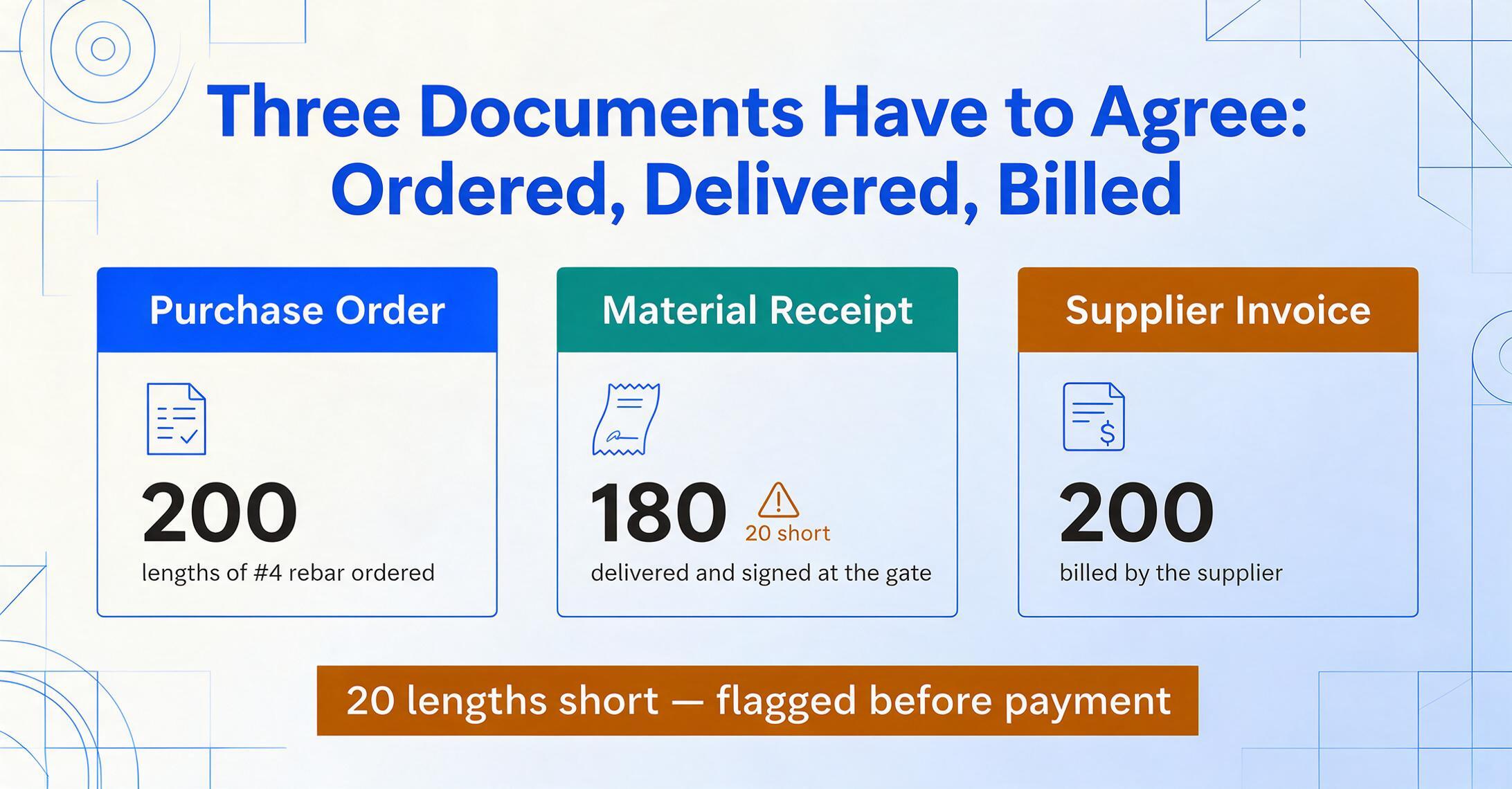
The material receipt, the purchase order, and the supplier invoice form a three-way match, and each document answers a different question: what was ordered, what actually arrived, and what the supplier wants to be paid for.
The purchase order is your commitment — the quantities and prices you agreed to before the truck left the supplier's yard. The material receipt is the proof of delivery — the quantities that actually came off the truck, signed by someone on site. The invoice is the payment demand — what the supplier's billing system generated, which may or may not match either of the first two. In construction, receipts and invoices almost never arrive together: concrete delivered Tuesday generates an invoice that shows up next week, and at any moment your payables carry a balance of materials that were received but not yet invoiced — the accrual accountants call GRNI (goods received not invoiced), and it has to be estimated correctly at month-end close or your project costs land in the wrong period.
There's a legal layer on top of the accounting one. Under UCC Article 2 §2-606, a signature on a delivery ticket — after a reasonable opportunity to inspect — constitutes acceptance of the goods, and the right to reject a shortfall under §2-602 closes once the truck pulls away. And under AIA A201-2017 §3.3.3, the contractor carries the contract obligation to inspect delivered work. The signature on the gate is both the last chance to catch a short delivery and the legal record that you accepted what arrived. That's why the ticket stack is not "just paperwork" — it's the evidence trail for every dispute you'll have with a supplier this quarter. For the receiving side of this chain, our guide to matching construction BOLs to POs at the gate covers catching shortages while the driver is still there.
| Document | What it proves | Fields it carries | Where it comes from |
|---|---|---|---|
| Material receipt (delivery ticket) | What actually arrived on site | Ticket #, date, supplier, material, qty, unit (tons/CY/SF/LF), received-by signature | Driver + site sign-off |
| Purchase order | What you committed to buy | PO #, job #, cost code, item, qty ordered, unit price | Your procurement team |
| Supplier invoice | What the supplier bills you for | Invoice #, date, line items, prices, totals, payment terms | Supplier billing system |
Notice what's missing from the middle column of the top row. The receipt — the one document generated at the point of truth — carries none of the fields your accounting system needs to file it: no job number, no cost code, usually no PO number and no price. Everything that connects the ticket to your books has to be supplied from outside the document. That's the structural reason manual entry of delivery tickets is so error-prone, and it's why the problem deserves a workflow, not a faster typist.
Why Manual Friday Entry Fails at the Only Job It Has
Manual entry of delivery tickets doesn't fail on speed — it fails on context, because the person typing has to supply three fields the ticket never printed, from memory, fifty times in a row.
Consider what the Friday entry session actually involves. For each ticket, the office manager reads the supplier name and mentally maps it to the right job ("Gerdau = Job 24-003, ABC Supply = Job 24-005"). Then they read each line item and mentally assign a CSI MasterFormat cost code — a 6-digit number like 03 21 00 for reinforcing steel or 06 11 00 for wood framing — based on the material description. Then they look up the PO that load was ordered against. Then they type the quantity and unit. On a 40-ticket week with an average of two line items per ticket, that's roughly 300 decisions, and each one is a context switch between materials, suppliers, and jobs.
This is where the process produces its worst errors, and it's a pattern construction accountants will recognize immediately. A drywall screw coded to 06 11 00 (wood framing) instead of 09 29 00 (gypsum board) because the typist's brain was still in "lumber mode" from the previous ticket. A short delivery of 180 rebar lengths when the ticket says 200 — signed at the gate, never flagged, and the invoice gets paid for 200. A supplier whose job reference doesn't match any PO in the system, so the ticket sits in a "misc" folder and the material cost never posts to the project at all. The Acumatica Construction community thread "PO Receipts in Construction — PMs Won't Do Them" is a running catalogue of what happens when the receiving step is too hard: project managers skip it entirely because it's "too hard and too many steps," invoices go unpaid because there's no receipt to bill against, and actual costs never post to the project budget — so management makes decisions on incomplete data across every active project.
When job costs are understated because receipts were never logged, the WIP schedule shows inflated gross profit — overbillings go undetected, bonding capacity erodes, and the first accurate number the company sees is a loss on a project everyone thought was fine.
None of this is a data-entry-speed problem. The fastest typist in the office still can't supply the job number that isn't on the ticket, the cost code that isn't on the ticket, or the memory of what was signed at the gate three days ago. The manual approach fails at the part that matters — the reconciliation — not the part that's merely tedious.
The Batch Workflow: Define the Ledger Once, Feed It Every Ticket
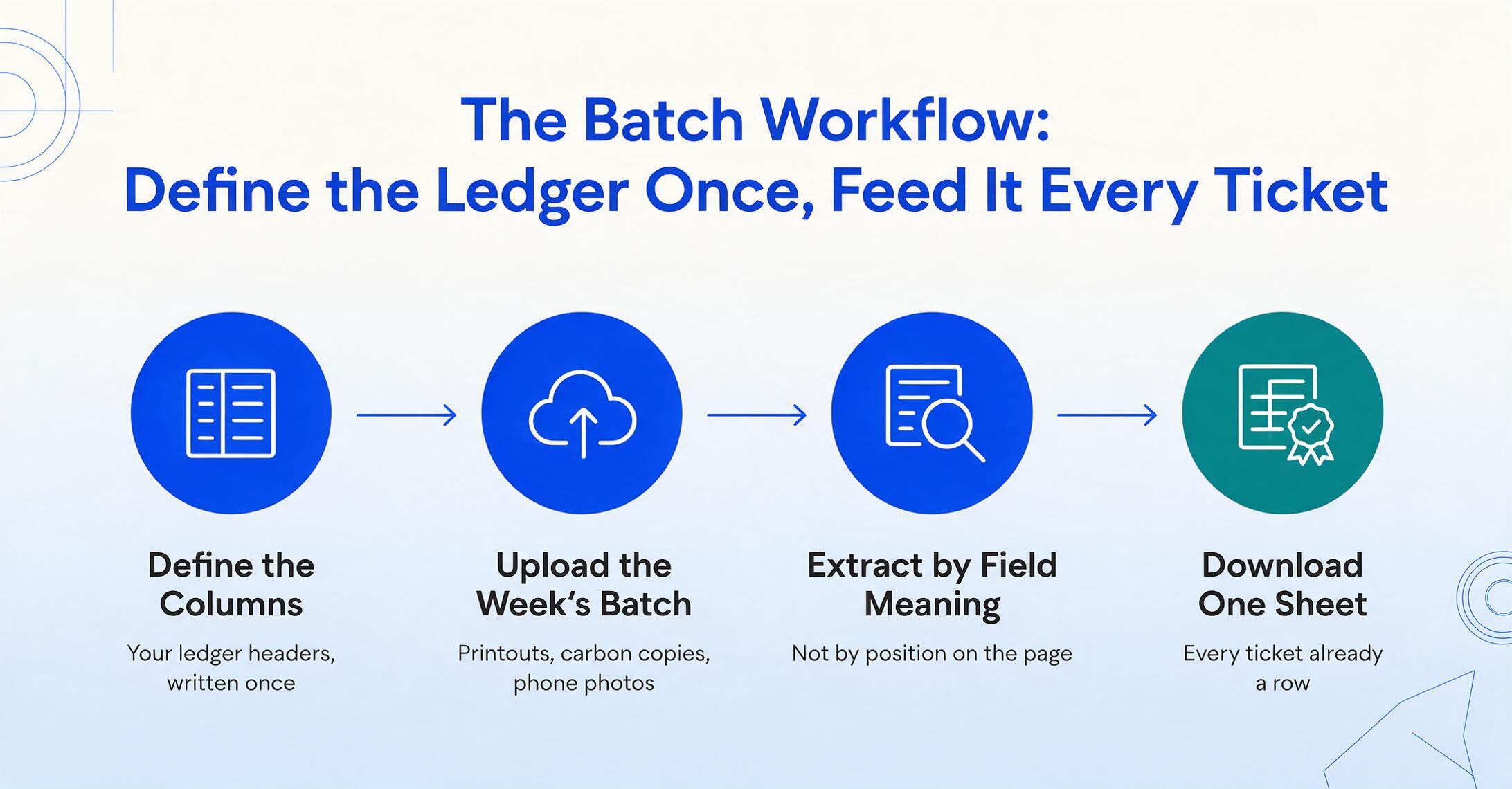
Batch extraction reverses the process: you define the ledger columns you need once, upload the week's tickets together, and download one spreadsheet where every ticket is already a row.
Batch processing means uploading many documents at once and merging them into a single output file — instead of extracting each ticket separately and copy-pasting the results into a master sheet, the merge happens at extraction time. You start by defining the columns your project inventory ledger needs — the same headers you'd want in your job cost workbook or ERP import template:
Ticket # | Date | Supplier | Job # | PO # | Cost Code | Material | Qty | Unit | Unit Price | Line Total | Received By | Invoice # | Status
Then you upload the week's tickets as one batch — the concrete plant's computer printout, the lumber yard's carbon copy, the rebar fabricator's system ticket, the superintendent's phone photos of what came off the truck. This is where column-name extraction comes in: instead of telling the tool where each field sits on each document (which would require a separate template for every supplier's layout), you tell it what each field means. The AI locates "Ticket #" on a handwritten carbon copy by understanding what a ticket number is, not by where it sits in that specific supplier's format. It finds "Qty" whether the quantity sits in a table column, below the description, or scrawled in the margin.
The operational difference that matters at 5 p.m. on Friday: you download one file, not 50. Every line item from every ticket lands in the same spreadsheet with the same columns — no opening individual exports, no copying rows into a master workbook, no praying nothing shifted. Rows are already sortable by Job #, filterable by PO #, and subtotalable by cost code the moment the file opens.
Files are processed securely and not stored.
The batch approach also scales without setup cost. Adding a 41st supplier with a brand-new ticket layout costs zero extra configuration — there's no template to build, no zones to draw, no per-supplier training set. The column definitions are format-agnostic; the new supplier's tickets flow through the same pipeline as the first 40 and land in the same unified spreadsheet. That's the difference between a process that gets harder every month and one that stays flat.
The Fields the Ticket Never Prints: Job Number, Cost Code, and PO
The three fields your ledger needs most — job number, cost code, and PO reference — are exactly the three fields a supplier's delivery ticket almost never prints.
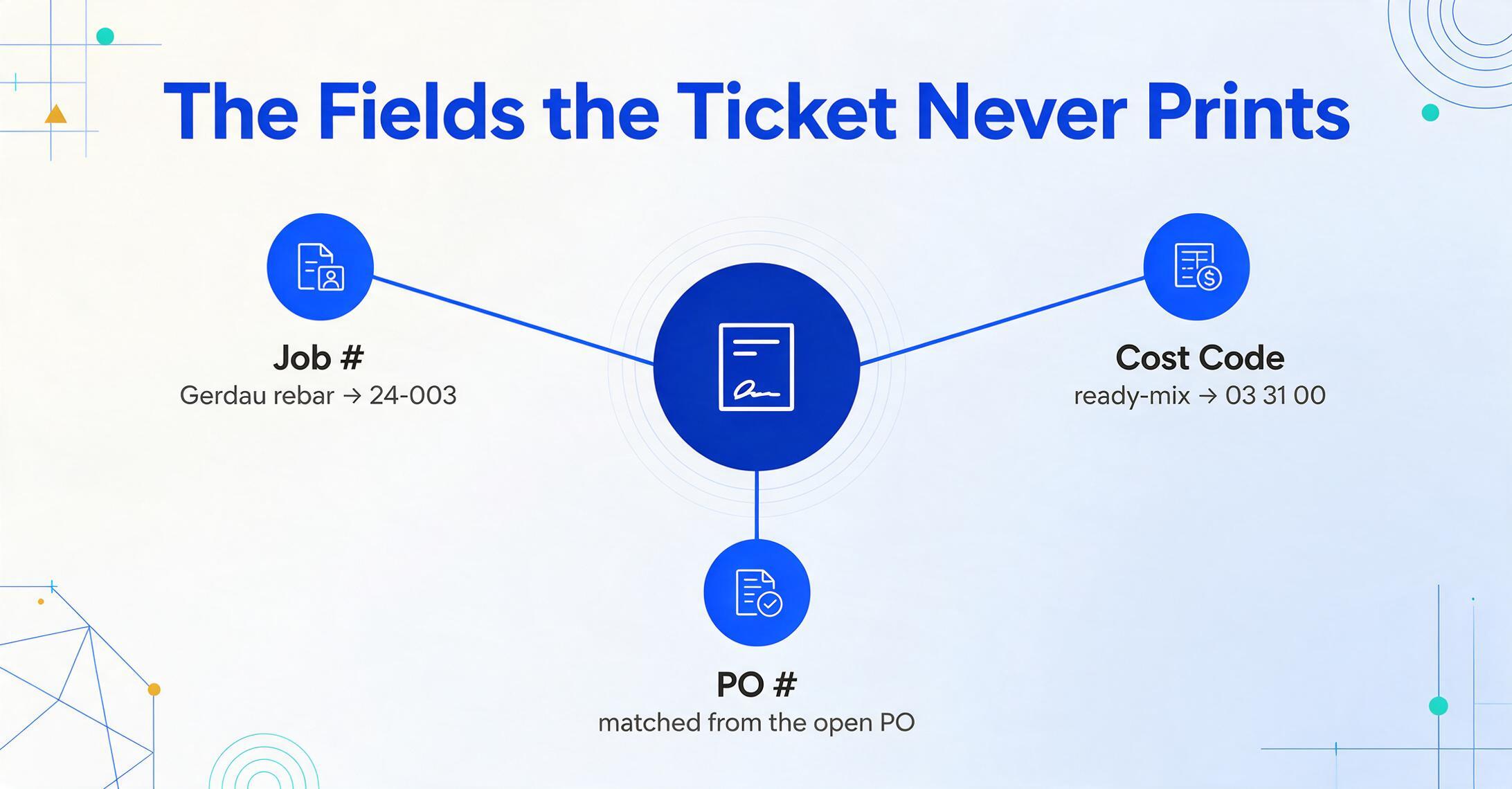
The ready-mix plant doesn't know your internal job numbers. The lumber yard doesn't speak CSI MasterFormat. Their tickets carry their own order numbers and their own material codes, and somebody has to bridge the gap. In a manual workflow that bridge is the office manager's memory, exercised 300 times a Friday. In a batch workflow, the bridge is a set of rules you write once and the AI applies to every ticket — this is what inferred columns do. An inferred column doesn't extract a value printed on the page; it applies a rule you define to determine a value the document never carried. For job numbers, you define a "Job #" column with inference rules like:
Job # (infer from Supplier):
Gerdau Rebar → 24-003 | Site Concrete Supply → 24-003 | Builders FirstSource → 24-005 | ABC Supply → 24-005 | HD Supply → 24-006 | Ferguson → 24-006
When the AI reads a ticket from Gerdau, it matches the supplier name against your rule and fills "24-003" on every line of that ticket. The same pattern handles cost codes, though the inference is per-material rather than per-supplier: "ready-mix" maps to 03 31 00, "#4 rebar" to 03 21 00, "2×6 SPF" to 06 11 00, "5/8″ Type X" to 09 29 00. A supplier that delivers both lumber and drywall produces rows with two different cost codes, both assigned automatically. If a rule has no match — a new supplier, an unfamiliar material — the cell is left blank rather than guessed, which is exactly what you want: a blank cell flags the exception for the review pass instead of silently coding a cost to the wrong division.
The PO reference needs a slightly different treatment, because a supplier's ticket may carry a job name or their own order number rather than your PO number. The cleanest approach is to extract whatever reference the ticket does carry into its own column, then use a lookup table (supplier order number → your PO number) to fill the PO column in the spreadsheet after extraction. On loads ordered directly against a PO — the common case for scheduled deliveries — a computed column can also compare delivered quantity to the PO's ordered quantity and flag the difference. Computed columns run calculations during extraction: "Line Total (Qty × Unit Price)" derives a value the ticket didn't print, and "Qty vs PO" outputs "OK," "SHORT," or "OVER" so the discrepancy surfaces in the same file as the data — not in a separate review meeting next week.
For the individual-ticket version of this workflow — extracting one material receipt and walking through every field choice — our step-by-step guide to extracting construction material receipt data goes deeper. And if you're batching the purchase orders themselves alongside the receipts, the batch construction PO to job cost workflow covers the ordering side of the same ledger.
From Ledger Rows to Three-Way Reconciliation
Once the week's tickets are rows in one spreadsheet, the three-way match stops being a document hunt and becomes a column filter.
1. Receipt vs. PO — catch short deliveries while they're still explainable. Sort or filter by PO # and compare the delivered quantities against what was ordered. A PO for 200 lengths of #4 rebar delivered in three loads produces three ticket rows; a filter groups them so the sum is one number you can check against the PO at a glance. A "Qty vs PO" column flags the load that arrived 20 short. That shortfall was signed for at the gate — the ticket proves it — and with the receipt logged you can take the discrepancy to the supplier with the document in hand, instead of discovering it at the draw deadline.
2. Receipt vs. invoice — keep GRNI honest at month-end close. Add an "Invoice #" column and mark it as invoices arrive. The rows with a receipt but no invoice number are your goods received not invoiced (GRNI) balance — materials you've accepted, whose invoices will land next period. Subtotal them by supplier and by job, and you've got the accrual number your accountant needs at close without a stack of paper on their desk. When the invoice arrives, the match is a VLOOKUP on ticket number — and invoices that reference no ticket in your ledger are flagged for investigation before they're paid, not after.
3. Receipt vs. installed — what's actually left on site. Subtotal the ledger by Job # and Cost Code to get materials received per project — the number that answers "how much of this is already sitting on site?" before anyone orders more. This is the check that directly attacks the over-ordering component of that 10% waste figure: when the ledger shows 40,000 board feet received and the framing crew has used 30,000, an order for another 20,000 is a conversation, not a default. The same monthly documentation stack that carries receipts also carries permits and compliance documents — the construction permit data extraction walkthrough shows the same batch approach applied to that paperwork.
The ledger doesn't do the reconciliation for you — it makes the reconciliation visible. Every check that used to require opening five documents and trusting your memory is now a filter, a subtotal, or a column that says SHORT.
When the Batch Isn't Clean: Handwriting, Split Loads, and Missing Tickets
A batch of delivery tickets will contain smudged handwriting, split deliveries, and the occasional ticket that never made it to the office — and the workflow needs to contain those exceptions, not fall apart on them.
Handwriting. The AI reads handwritten tickets the way it reads printed ones, and legibility is the main variable. A clear carbon copy written by the yard hand extracts at roughly the accuracy of a printed ticket; a smudged copy photographed in a dark truck will be lower and should be checked. This is where review mode earns its keep: hover over any extracted cell and the tool highlights exactly where that value came from on the original image, so verifying a handwritten quantity is a glance at the ticket, not a hunt through the whole document. The verification pass exists because extraction isn't guaranteed perfect — and a workflow that assumes it will be is a workflow that gets abandoned the first time it's wrong.
Split loads. A single PO delivered across three trucks produces three tickets, and that's fine — each ticket is its own row, and the PO filter groups them into one fulfillment view. The ledger structure absorbs partial deliveries naturally; it's the manual process that struggled with them, because each ticket got filed separately and the "did we get everything?" question had no single answer.
Missing tickets. The foreman photographed a ticket but nobody logged it; the concrete ticket stayed in the driver's cab. The ledger handles this honestly: the week's rows are complete, and the PO that shows zero received rows is a visible gap. That visibility is the fix — a PO with no receipts is a concrete, actionable question to ask the superintendent while the delivery is still recent, instead of an empty folder nobody opens.
And when a single ticket extracts wrong — the AI read 4,800 yards as 4,200 — you fix that one row, not the batch. The output is one spreadsheet; a bad line gets re-extracted or corrected in place, and the rest of the file is untouched. The workflow doesn't need to be perfect; it needs to be containable, so one bad ticket costs five minutes instead of a full re-run on Friday night.
Frequently Asked Questions
Can AI read handwritten delivery tickets from suppliers?
Yes. The extraction engine reads handwriting the same way it reads printed text, and legibility is the main accuracy variable. A clearly written carbon-copy delivery ticket extracts at roughly the accuracy of a printed ticket; a smudged copy photographed in poor light will be less reliable and should go through the review pass. Review mode shows you where every extracted value came from on the original image, so verifying a handwritten quantity takes seconds rather than a full re-read of the ticket.
What if the ticket has no unit price — can I still get line totals?
Yes, with a computed column. Many material tickets — especially concrete and aggregate tickets — carry quantities but no prices, because pricing lives on the PO. Define a "Line Total" column with the logic Qty × Unit Price, and either pull the price from the ticket when it's printed or set the unit price as a fixed parameter from the PO in your rule. The calculation runs during extraction, so the output file has usable dollar amounts even for tickets that never printed a number.
How does this work with Sage, Viewpoint, or QuickBooks job cost?
The batch output produces the structured rows your job cost system or ERP import template expects — one row per ticket line, with job number, cost code, quantity, and price columns. It doesn't replace the ERP's receiving entry, approval routing, or three-way matching; it replaces the step where someone reads a paper ticket and types numbers into a screen. For a contractor on QuickBooks or a spreadsheet-ledger setup, the file feeds the workbook directly. For Sage 100, Sage Intacct, or Trimble Viewpoint Vista, it eliminates the data-capture bottleneck before the ERP import, which is where the manual process actually breaks.
Our foremen photograph tickets on their phones — do those photos work in a batch?
Yes. Phone photos of delivery tickets extract the same way as scans, with the same legibility caveat: a crisp, straight-on photo in decent light works as well as a scan; a low-light, angled shot of a smudged carbon copy will be flagged for review. If you want the photos collected systematically rather than sitting in text threads, a Collection Link — a shareable upload page that lets field staff drop files straight into your processing queue without logging in — turns the "texting a photo" habit into an organized pipeline.
What if a delivery arrives split across three trucks?
Each truck produces its own ticket and its own row in the ledger — that's the correct structure. Filter by PO number to group all three tickets into one fulfillment view, and the "Qty vs PO" check shows whether the split loads together cover the order. The batch workflow handles split deliveries naturally because the ticket is the atomic unit, not the PO — which is also why you'll sometimes see three receipts for a single order and want all three in the same reconciliation view.