75 BOLs, One Receiving Log
How to Handle Site Receiving at Volume
Industry data collected across thousands of construction vendor invoices shows that 27% contain at least one error — wrong quantities, misapplied pricing, items billed but never delivered. On a $500,000 monthly material spend with a 3% error rate that slips through, that's $15,000 in overpayments every 30 days. For a mid-size GC running five active job sites, the last physical defense line before those errors become unrecoverable losses is a superintendent at the gate, signing delivery tickets from 40 different suppliers — none of which look alike, and none of which auto-cross-reference against an open purchase order.
Key Takeaways
- A 3% error rate on $500,000 in monthly material spend leaks $15,000 — on 2–5% net margins that's profit annihilation not cost of doing business.
- The superintendent's signature on a delivery ticket is legal acceptance under the UCC — the right to reject a short-shipped delivery expires when the truck pulls away regardless of when accounting discovers the discrepancy.
- Nobody subtracts ordered from delivered on every line of 75 daily BOLs before signing — a computed column catches the 2–3 discrepancies per batch while the truck is still idling.
When a Lumber Tally, a Concrete Ticket, and a Rebar Tag All Say "Delivered" — in Different Languages
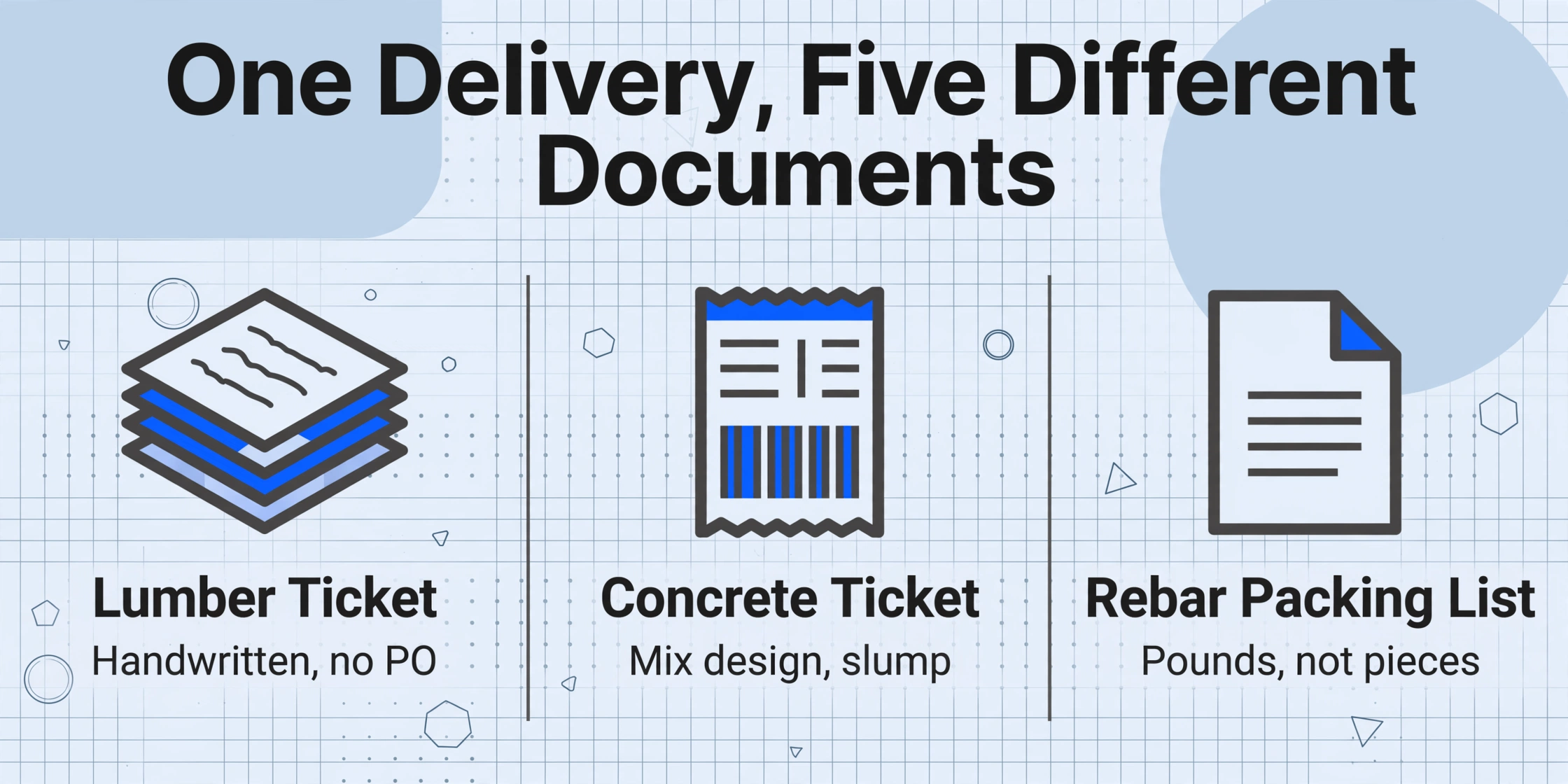
Single-document BOL extraction is a solved problem. The construction receiving challenge that breaks manual workflows isn't extracting one delivery ticket — it's extracting 75 of them, from 40 suppliers, across five job sites, and merging them into one receiving log where every line item is cross-referenced against the corresponding purchase order. That's not seven times harder than processing one BOL. It's a structurally different problem.
Here's what actually arrives at a mid-size commercial GC's gate on any given weekday:
- Lumber yard delivery ticket — carbon copy, handwritten item descriptions abbreviated to "2×6 #2 SPF 16'", quantities penciled in by the yard hand, supplier name stamped at the top. No PO number on the ticket — the yard references their own internal order number.
- Concrete batch ticket — system-printed from the batch plant computer, containing mix design code, slump measurement, volume in cubic yards, batch time, truck number. Fields that don't exist on a lumber ticket and never will.
- Rebar fabricator packing list — PDF with 14 line items of #4, #5, #6 bar, each tied to a pour sequence, with heat numbers and mill cert references. Quantities in pounds, not pieces.
- MEP distributor packing slip — ERP-generated printout with SKU codes and manufacturer part numbers in the description column. Ships by the box, but the PO orders by the linear foot.
- Drywall supplier delivery note — informal handwritten note: "80 sheets 4×8 5/8"" — no PO reference, no job number, sometimes not even a supplier name.
Each is a legally valid bill of lading — a record of what was delivered, by whom, to which site. But the data structure, terminology, and unit of measure are different on every single document. A template-based extraction tool that defines data locations by zone would need 40 separate templates built and maintained — and the moment the lumber yard changes its ticket format or a new supplier comes on board, another template has to be created.
The cost of format diversity isn't measured in extraction accuracy — it's measured in whether the receiving log gets built at all. When the AP clerk faces 150 delivery tickets three days before the draw deadline, the receiving log doesn't get more careful. It gets abbreviated. Line items get skipped. Discrepancies that would have been caught with full line-by-line matching get buried until the supplier invoice triggers a dispute — often weeks later.
This is the structural gap between extracting BOL data and receiving materials. Extraction gets you a spreadsheet row. Receiving requires that row to answer five questions accounting needs before any payment is approved: Did we order this? What exactly is it? How much arrived vs. how much did we order? Which job does it belong to? And is there a discrepancy that needs action before the supplier invoice hits the payment queue? For a broader overview of how BOL extraction works across document types and carrier formats, see our complete guide to BOL data extraction.
What Manual Receiving Logs Actually Cost — Beyond the Data Entry Hours
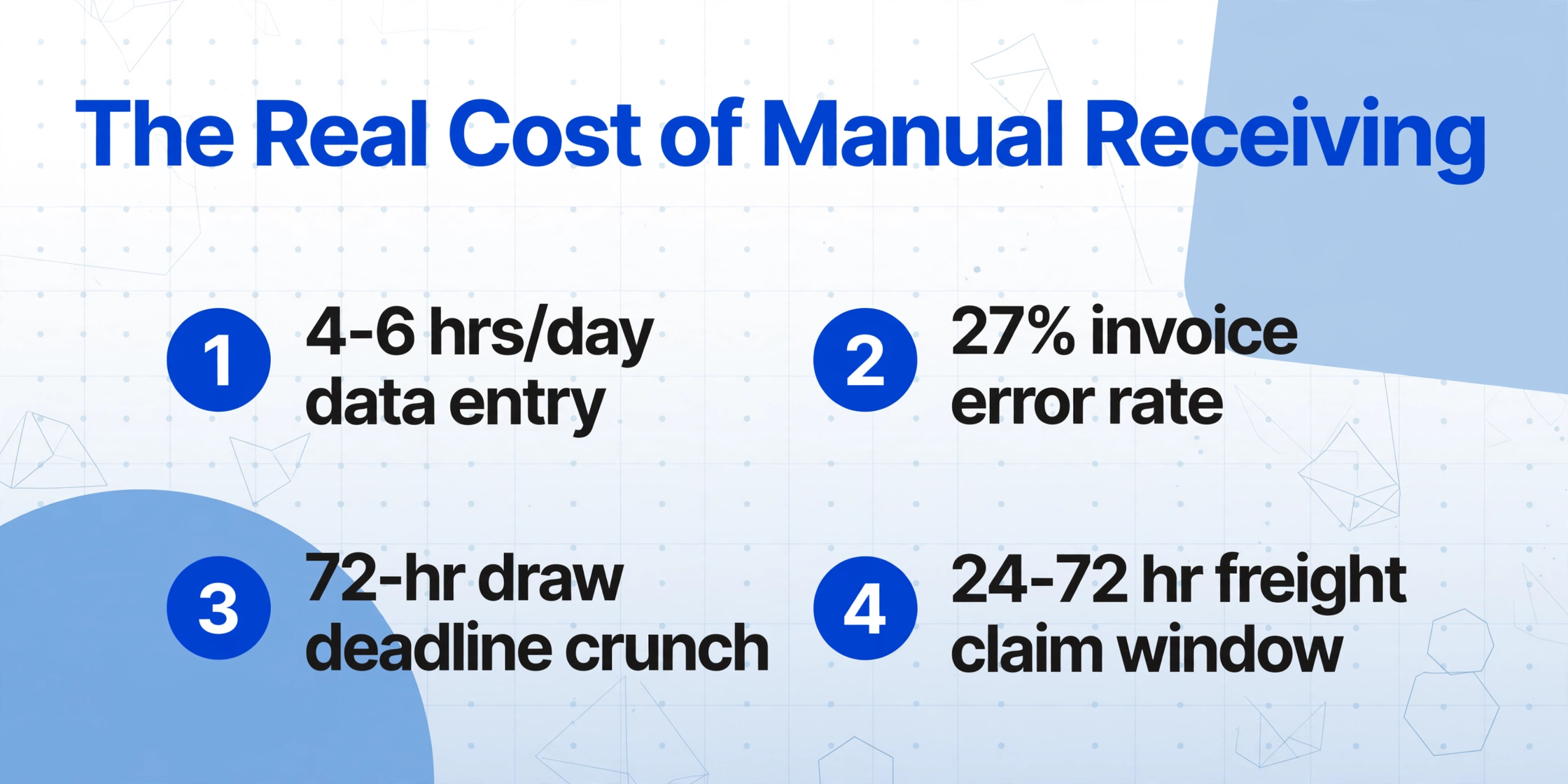
The visible cost of manual receiving is the data entry time. Each delivery ticket takes 3–5 minutes to type into a spreadsheet: supplier name, PO number, item description, quantity, job code, date. At 75 tickets per day across five job sites, that's 4–6 hours of pure typing — equivalent to a full-time role that does nothing but transcribe delivery tickets into Excel.
But the invisible costs are larger:
| Cost Category | What Happens | Real Impact |
|---|---|---|
| Invoice error leakage | 27% of vendor invoices contain errors; 3% of material spend overpaid without catching discrepancies | $15,000/month on $500K spend across five projects — on 2–5% net margins, this erases the profit on an entire project line item |
| Draw-deadline compression | BOLs accumulate for 2–4 weeks, then all get processed in a 72-hour window before the monthly draw submission | Error rates spike under time pressure; items with small discrepancies get waived — "just approve it, we'll catch it next month" |
| Inconsistent matching standards | Without automated checks, one AP clerk queries every $5 variance while another waves through $50 differences | No audit trail for matching decisions; overpayment patterns go undetected across months |
| Missed freight claims window | Carrier freight claims for short-shipped or damaged materials typically require filing within 24–72 hours of delivery | A shortfall discovered during month-end close — 3 weeks after delivery — is unrecoverable from the carrier |
Construction runs on thin net margins — 2% to 5% is typical across the industry. On a $10 million project, that's $200,000 to $500,000 of profit. A 1% material overpayment rate on $5 million in materials (50–70% of project cost) is $50,000 — which is 10–25% of the entire project profit. Catching delivery discrepancies isn't operational optimization. It's margin defense at the only point in the payment chain where errors are still reversible.
Manual three-way matching — comparing the purchase order, delivery receipt, and supplier invoice — takes 15 to 30 minutes per invoice when done properly. With 400 invoices a month, that's 100 to 200 hours of AP labor monthly just to verify that what was ordered matches what arrived and what's being billed. Most construction companies under-invest in this step because the volume makes thorough verification unsustainable — and the suppliers learn which contractors check and which don't.
From 75 Delivery Tickets to One PO-Matched Receiving Log: The Batch Workflow
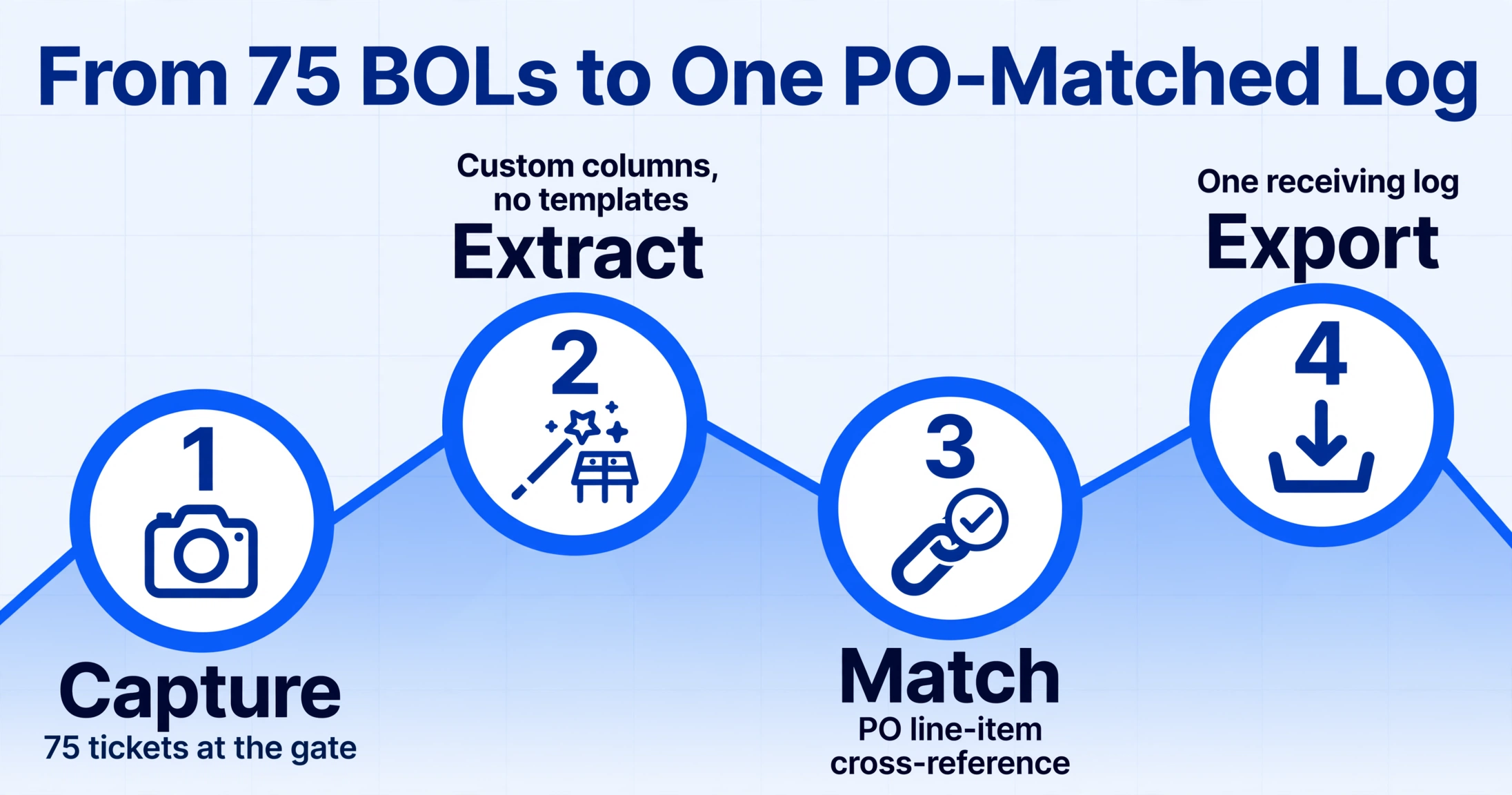
The transition from individual BOL processing to batch receiving log construction requires rethinking what the extraction step actually produces. Instead of one spreadsheet row per BOL, the output needs to be a structured receiving log where every line item — regardless of which supplier's format it came from — lands in the same columns, matched against the same PO line, with discrepancies surfaced automatically.
This works through Custom Column Extraction: you define the columns you want — Supplier Name, PO Number, Material Description, Quantity Delivered, Job Number, and so on — and the AI locates the corresponding values on each BOL by understanding what each field means, not where it sits on the page. A lumber yard's "Qty" in the bottom-right corner of a carbon copy gets mapped to the same "Quantity Delivered" column as the concrete plant's "Volume (CY)" in the middle of a system-printed ticket. The extraction approach is format-independent — 75 documents from 40 suppliers all feed into the same output structure without a single template.
Here's the column design that converts a photo of any delivery ticket into a PO-matching-ready row:
| Column Name | Source | How AI Handles Cross-Format Variation |
|---|---|---|
| Supplier Name | BOL header / stamp / letterhead | Locates supplier identity whether it's stamped, printed, or handwritten — handles abbreviated names ("ABC Lbr" → "ABC Lumber Supply") |
| PO Number | BOL reference / order # field | Finds PO reference wherever it appears on the document. If absent (common on lumber tickets), leaves blank for manual fill |
| Material Description | Line item description | Extracts per-line descriptions — "2×6 #2 SPF 16'" or "5000 psi ready-mix" or "#5 rebar × 20'-0"" — preserving grade and spec in the text |
| Quantity Delivered | BOL quantity column / weight field | Extracts whatever unit appears on the BOL — pieces, board-feet, cubic yards, linear feet, tons, pounds. Does not auto-convert between units; uses extracted value as-is for PO matching |
| Quantity Ordered | Manually entered or cross-referenced | Fixed value per PO line item — the benchmark against which the delivery is compared. Enter once per PO, reused across all deliveries against that PO |
| Discrepancy | Computed Column | Calculated during extraction: Quantity Delivered − Quantity Ordered. Negative = short-shipped. Positive = over-delivered. Zero = match. Instant visual flag — no manual subtraction needed |
| Job Number | Inferred Column | Most supplier BOLs don't carry your job number. Set inference rules once: "Supplier = ABC Lumber → Job = 2024-007." AI auto-assigns across all BOLs from that supplier |
| Delivery Date | BOL date field | Standardizes formats (06/28/26, 28-Jun-2026, June 28 2026) into a single date column |
| Signed By | BOL signature line | Extracts the name of the person who accepted delivery — creates an audit trail linking each receipt to a specific individual |
The Computed Column — the Discrepancy field — is what shifts this workflow from after-the-fact data entry to real-time decision support. The AI performs the subtraction during extraction rather than leaving it for the superintendent or AP clerk to do manually. A negative number in the Discrepancy column is an immediate visual signal: that line item needs investigation before the supplier invoice is approved for payment. For the mechanics of single-document BOL extraction that feeds into this batch workflow, see our guide on extracting bill of lading data to Excel.
The end-to-end batch receiving workflow runs in six steps, designed to fit into the superintendent's existing gate routine:
Files are processed securely and not stored.
Why Procore and Sage 300 CRE Still Need a BOL Extraction Layer
Construction ERP systems — Procore, Sage 300 CRE, and Viewpoint Vista — have mature receiving and commitment-tracking modules. Procore's Commitments tool tracks every purchase order line item against quantities received. Sage 300 CRE's purchasing module supports goods receipt entry and three-way matching at the subcontract level. Sage 300 CRE — used by 59% of the ENR Top 400 contractors — includes a Paperless Construction module for document management and an AP automation workflow that can reduce invoice approval latency by 60–80%.
But all three systems share the same upstream bottleneck: the BOL data has to get into the system before any of those downstream workflows can operate. The receiving clerk still opens a goods receipt entry screen and manually types line items from a paper delivery ticket. The Procore + Sage 300 CRE Connector syncs commitments, change orders, and subcontractor invoices between the two platforms seamlessly — but the field from the BOL that populates the "Quantity Received" field in those commitments still arrives through a keyboard.
This is where an extraction layer changes the economics. The BOL data is captured at the gate — the point where the delivery happens — rather than re-entered days or weeks later in the accounting office. The extracted receiving log exports to Excel, which imports directly into Procore's Commitments module (via CSV import) or Sage 300 CRE's goods receipt entry. The ERP continues to own the three-way match, the payment approval workflow, and the audit trail — it just receives structured data at the front door instead of paper.
This pattern — an extraction layer feeding an ERP rather than replacing it — applies beyond the BOL use case. General contractor teams handling large volumes of subcontractor paperwork apply the same batch extraction approach to batch processing handwritten delivery notes for receiving. For the carrier-side equivalent — when you're the shipper managing BOLs across multiple freight carriers — our guide to batch BOL processing for multi-carrier freight covers the logistics-side workflow.
The Discrepancy Window: Why Minutes at the Gate Beat Weeks in Accounting
The legal framework around construction material receiving is more specific than most people on site realize — and it creates a hard time boundary that determines whether a delivery shortfall is recoverable or permanently lost.
Under UCC Article 2 §2-606, a buyer accepts goods when they "after a reasonable opportunity to inspect the goods signifies to the seller that the goods are conforming or that he will take or retain them in spite of their non-conformity." A superintendent's signature on a delivery ticket — the routine act of acknowledging that a truck arrived — meets the legal definition of acceptance. Under §2-602, rejection of non-conforming goods must happen "within a reasonable time after delivery" with "seasonable notification to the seller." For construction receiving, reasonable time means before the driver pulls away from the gate.
On the contract side, AIA Document A201-2017 §3.3.3 — the General Conditions used in the majority of U.S. commercial construction contracts — requires the contractor to "be responsible for inspection of portions of Work already performed to determine that such portions are in proper condition to receive subsequent Work." This obligation flows downstream: the GC is contractually required to inspect delivered materials, and failing to catch a shortfall that later causes a schedule delay doesn't shift liability to the supplier.
A superintendent signing a clean delivery ticket isn't completing paperwork. They're making a legally binding decision under the UCC — accept the goods as delivered, or reject them with documented cause. The window for that decision closes when the truck leaves. Three weeks later, when the AP clerk discovers the discrepancy during month-end close, the legal right to reject has long since expired.
This is what makes real-time discrepancy detection structurally different from after-the-fact reconciliation. When a Computed Column shows "-20" on the 2×6 line while the driver's engine is still running, the superintendent can walk back to the truck, count the stack, and either locate the missing pieces or note the shortfall on the signed BOL. That notation on a signed BOL — created before acceptance — is the difference between a successful freight claim or supplier credit and an unrecoverable loss.
The batch processing dimension amplifies this. A superintendent handling 15 deliveries in a day, each with 5–20 line items, cannot manually subtract PO quantities from BOL quantities for 100+ line items while the driver waits. The AI does it during extraction, surfacing only the exceptions. The superintendent's job shifts from "compute all the math" to "investigate only the flagged rows." For the single-document extraction workflow that precedes the batch step, see our guide on extracting construction material BOL data to Excel for site receiving.
Handwritten BOLs, Carbon Copies, and the Limits Any Honest Tool Should Acknowledge
No discussion of construction material receiving is complete without addressing the hardest case: the handwritten delivery ticket. In logistics, most BOLs are system-generated. In construction, the lumber yard still runs on carbon paper and a clipboard. The concrete batch plant operator scribbles the slump and volume by hand. The small roofing supplier writes the square count on a tear-off pad.
AI extraction handles handwritten text reliably when the handwriting is legible — it reads letter shapes in context, similar to how a human eye works, rather than matching pixel patterns like traditional OCR. A clearly written "200 pcs 2×6×16'" on a lumber ticket extracts correctly. But the quality ceiling is real. A rushed ballpoint scrawl on a rain-spotted carbon copy, where the second and third layers are faint and smeared, is at the edge of what any system can reliably parse.
The practical workflow for degraded handwritten BOLs isn't "the AI does everything." It's "the AI extracts what it can with high confidence and flags low-confidence fields for review." On a delivery ticket with 12 line items, this might mean manually correcting 2–3 fields instead of typing all 12 from scratch. The value proposition isn't zero human involvement — it's that the human reviews flagged exceptions instead of keying every field.
Unit-of-measure mismatches are another real limitation. A lumber BOL lists quantities in board-feet but the PO orders in pieces. A rebar ticket lists pounds but the PO orders by the linear foot. The AI extracts whatever unit appears on the document — it does not automatically convert board-feet to pieces or pounds to linear feet. For unit conversion, a Computed Column with the conversion formula handles the math during extraction: Pieces (board-feet ÷ 1.33) for a specific lumber dimension. But the conversion factor has to be defined by someone who knows the material specs. This isn't a tool limitation so much as a fact of construction procurement: the unit of measure translation is industry knowledge, not something any AI can infer from a document alone.
Frequently Asked Questions
How many BOLs can be batch-processed at once?
Each BOL takes approximately 5–10 seconds to process. A batch of 75 delivery tickets — a full day's receiving across five job sites — processes concurrently and completes in roughly the same time as 2–3 individual documents, well under two minutes for the full batch. The extracted Excel file is available for download immediately after processing completes. There's no hard upper limit, but for practical receiving workflow, processing by day or by job site keeps the output manageable for review.
What if the supplier's BOL doesn't include a PO number?
This is common — lumber yards and smaller suppliers often reference their own internal order number or no reference at all. In that case, the PO Number column will be blank in the output and requires a manual fill. However, the Job Number inference rule (Supplier → Job mapping) narrows down which PO the delivery belongs to, since each job typically has a limited set of open POs per supplier. For suppliers who consistently omit PO numbers, a simple process change — requiring the PO number on every delivery ticket as a condition of acceptance — eliminates this at the source.
Does this work with handwritten carbon-copy delivery tickets?
Yes — on legible handwriting. Clear, well-lit photos of handwritten delivery tickets extract with accuracy comparable to printed documents. Carbon copies present an additional challenge: the text on the second and third layers is fainter and may have transfer artifacts from the layers above. On degraded carbon copies or rain-damaged tickets, expect manual review of low-confidence fields (typically 2–5 fields out of 20–30). The system highlights these automatically so you're not hunting for errors. For a deeper dive into handwritten document extraction specifically, see our guide on batch processing handwritten delivery notes for receiving.
Can the system match BOL line items to PO line items automatically?
The extraction tool produces a structured receiving log with both BOL data and PO reference fields in the same row. Full automated PO line-item matching — where the system reads your PO spreadsheet and cross-references every BOL line against the correct PO line — requires bringing the PO data into the workflow. In practice, this means: (1) the Quantity Ordered column is populated from your PO data (manually or via a lookup), and (2) the Discrepancy computed column performs the subtraction automatically. The AI doesn't yet auto-match BOL items to PO items by description similarity when the BOL says "2×4×8 SPF #2" and the PO says "2×4-8' Stud" — this level of semantic matching across procurement terminology is a human review step or a VLOOKUP against a supplier-item cross-reference table.
How does this integrate with Procore or Sage 300 CRE?
The extraction tool outputs to Excel (XLSX), CSV, and Google Sheets. From Excel, data can be imported into Procore's Commitments module via CSV import to update the "Received" quantity against each commitment line item. Sage 300 CRE supports goods receipt import through its data import utilities. Direct API integration with construction ERPs is not currently available — the workflow is extract → Excel → import. For Google Sheets users, the Google Sheets Add-on provides direct-to-sheet extraction without the intermediate Excel step.
What's the accuracy like on mixed-format batches — 40 suppliers, all different layouts?
Format diversity doesn't reduce accuracy because the extraction is semantic rather than position-based. The AI locates "Quantity" by understanding what that field means — not by expecting it in a specific quadrant of the page. A lumber yard's "Qty" in the bottom-right extracts to the same column as a concrete plant's "Volume (CY)" in the middle of the page. The accuracy floor is set by individual document quality (photo resolution, handwriting legibility, print clarity), not by format variation across the batch.
The superintendent's signature on a BOL is the last decision point where a delivery shortfall can be rejected before it becomes an invoice. Give that decision the data it needs — not a clipboard and a mental math exercise across 75 tickets.
Upload a Delivery TicketNo sign-up · No credit card · Results in 10 seconds