40 Monthly GPS Vouchers,
One Employee Ledger
A mid-sized accounting firm in São Paulo handles payroll for 12 corporate clients. Each client has between 5 and 120 employees. Every month, the firm receives a payment receipt — a GPS (Guia da Previdência Social) or a DARF generated from DCTFWeb — for each client's consolidated INSS contribution. Some come as PDFs from the bank. Others are screenshots from eSocial. A few arrive as printed slips that get scanned in. By the 20th of the month, the payroll team has 30 to 60 payment documents sitting in a folder, and one person's job is to open each one, read the INSS value, note the competência (reference month), and type it into a master spreadsheet. That spreadsheet is what the firm calls its "employee social security ledger."
Key Takeaways
- An accounting firm handling payroll for 12 clients processes 40 GPS and DARF vouchers per month — each opened, read, and typed by hand.
- The data is correct when it leaves the bank — the manual typing step introduces transcription errors between the payment confirmation and your employee ledger.
- Batch-extracting all vouchers in one pass produces a structurally identical ledger where every value traces back to a bank-processed document, not a keystroke.
The Monthly GPS Problem: 40 Payment Documents, No Single Ledger
The challenge is not that the data is missing — it is that the data is scattered. Each GPS or DARF voucher contains the INSS contribution record for one establishment (identified by its CEI or CNPJ) for one reference month. A company with four branches and 80 employees generates four GPS documents per month — one per CEI — each with a separate INSS employer contribution, a separate employee withholding total, and separate third-party entity contributions if their FPAS code includes SENAI, SESI, SEBRAE, or education levies. Across a year, that single client produces 48 vouchers. Across 12 clients, it is over 500 documents annually, all sitting in individual PDFs or screenshots with no structural connection between them.
The ledger that connects them — the one spreadsheet that should show, at a glance, what each client paid in INSS each month — is produced manually. Someone opens each voucher, reads the contribution value from the INSS field, checks whether the competência (reference month, e.g., 06/2026) matches the expected period, and types the number into a spreadsheet row. The process takes two to three hours per month for a mid-sized payroll load. More importantly, it introduces a transcription gap between the source document (which is correct — the bank processed the payment) and the tracking record (which may be wrong — a human typed it).
For a broader picture of how Brazilian social security fits into the country's overall tax and document ecosystem, the Brazilian tax document guide covers the relationship between NF-e, DCTFWeb, and the payment voucher system. The focus here is narrower: what happens inside the GPS and DARF documents that carry INSS payments, and how to go from 40 scattered vouchers to one clean employee ledger.
What GPS and DARF Documents Actually Contain
Before building a ledger, it helps to understand exactly what data is locked inside each payment document. Brazilian social security contributions flow through two primary channels, and which one your team encounters depends on the employer's declaration method.
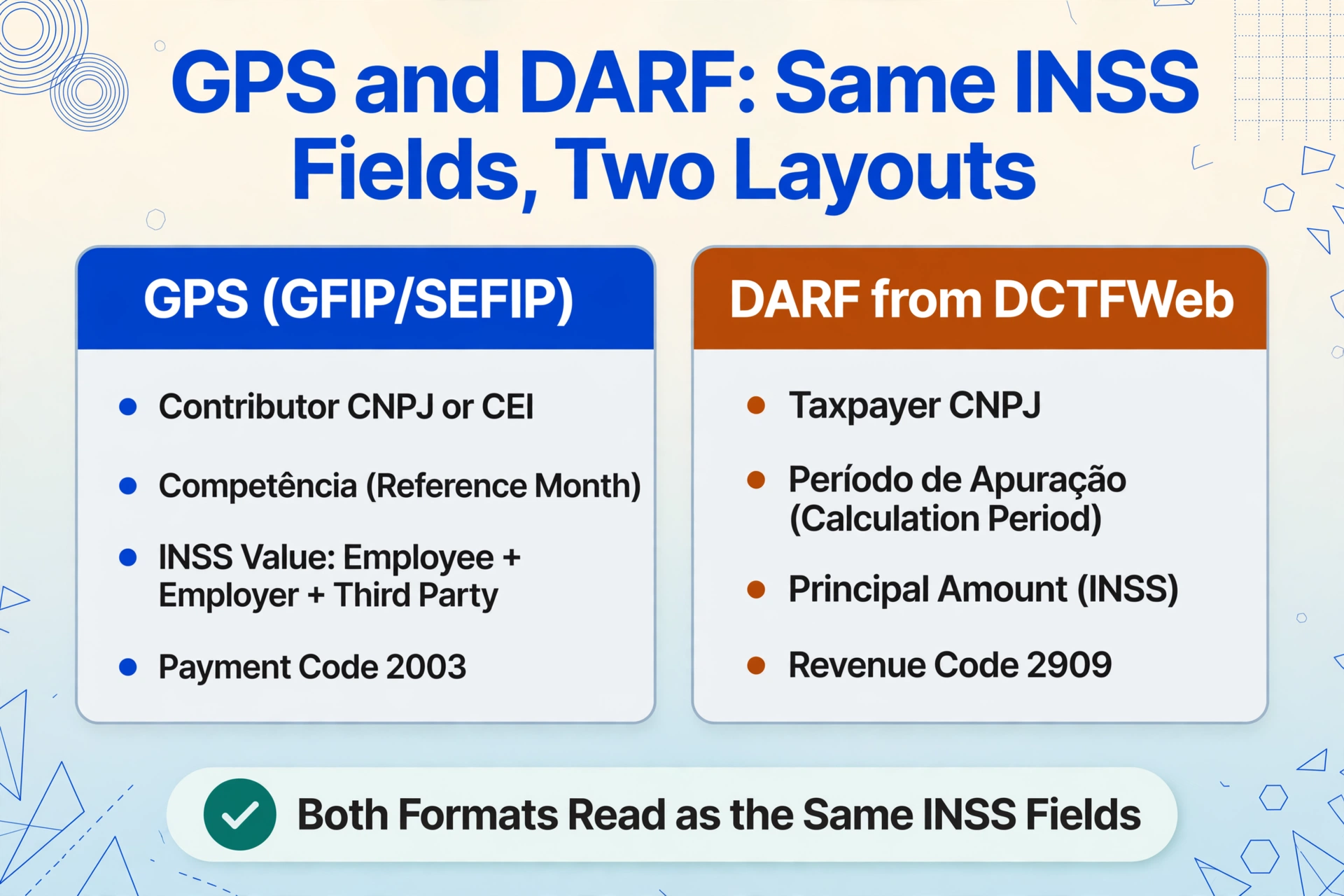
GPS (Guia da Previdência Social) is the traditional social security payment voucher, still used by smaller employers, individual contributors, and domestic employers who report payroll through GFIP/SEFIP rather than eSocial. It contains the CNPJ or CEI of the contributor, the competência (month of contribution), the INSS value (total employee + employer + third-party), a breakdown of third-party entity values (SENAI, SESI, SEBRAE, education allowance), and a payment code that identifies the contribution type — for example, code 2003 for standard employer INSS, 2100 for individual contributors, or 1007 for domestic employers.
DARF generated from DCTFWeb is the newer channel used by companies that file through eSocial. Since 2020, eSocial has been gradually replacing GFIP, and when a company's payroll is declared through eSocial, the DCTFWeb (Digital Social Security and Tax Declaration) module automatically generates a DARF — not a GPS — for the consolidated INSS amount. This DARF carries the same underlying data but uses the federal tax payment format: a código da receita (revenue code, typically 2909 for INSS on payroll), the CNPJ of the taxpayer, the período de apuração (calculation period), the principal amount (INSS due), and the total amount if paid after the deadline with fine and interest.
| Document | Key Field | What It Captures |
|---|---|---|
| GPS | CNPJ / CEI | Employer or establishment identifier |
| Competência | Contribution month (e.g., 07/2026) | |
| INSS Value | Total contribution (employee + employer + third-party) | |
| Third-Party Entities Value | SENAI/SESI/SEBRAE levies per FPAS code | |
| Payment Code | Contribution type (2003 for employer, 2100 for individual, etc.) | |
| DARF (DCTFWeb) | CPF / CNPJ | Taxpayer identifier |
| Revenue Code (código da receita) | Tax type — 2909 for INSS payroll | |
| Calculation Period (período de apuração) | Month the contribution refers to | |
| Principal Amount | INSS due before penalties | |
| Total Amount | Principal + fine + interest (if late) |
The common thread across both formats is the need to capture the establishment identifier (CNPJ or CEI), the reference month (competência or período de apuração), and the contribution value. These three fields are the minimum required to build a row in a social security ledger that can be summed by month, cross-referenced against DCTFWeb declarations, and audited at year-end.
How to Batch-Process GPS Vouchers into an Employee INSS Ledger
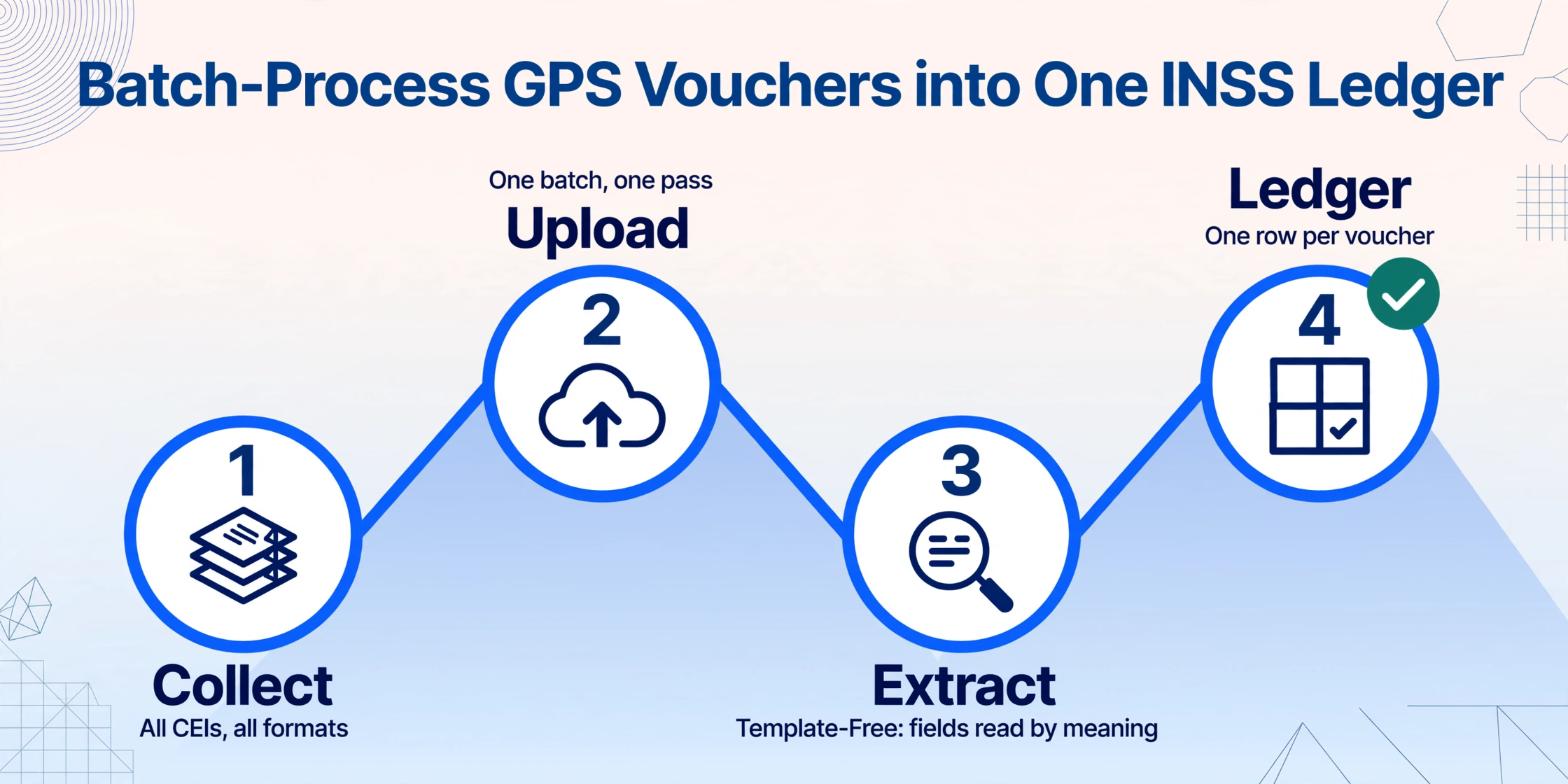
Batch processing here does not mean "open each PDF and copy the number slightly faster." It means uploading all payment documents — GPS slips, DARF vouchers, bank payment receipts, eSocial screenshots — in a single pass and having an AI engine extract the structured fields from every document simultaneously, merging the results into one table. The following workflow uses ImageToTable.ai, a Template-Free extraction tool that reads documents by semantic understanding — it identifies the CNPJ, the INSS value, and the competência by what those fields mean, not by where they sit on the page. This matters because GPS documents from different banks, different states, and different sources (PDF slip vs. phone screenshot vs. scanned printout) look completely different but contain the same logical fields.
If you are new to the single-document extraction workflow for Brazilian payment vouchers, the guide to extracting DARF/GPS data to Excel covers the fundamentals of defining columns and running extraction for one document. The batch workflow inherits all of that and adds the multi-document consolidation layer.
The key operational change: the spreadsheet is no longer produced by a person reading a voucher and typing. It is produced by the AI reading the voucher and writing. The difference between those two methods is not speed — it is the elimination of the transcription error vector. Every number in the output came from a source document, authenticated by the fact that the bank processed the payment, and moved into a structured table by the same process that read it.
Building Your INSS Contribution Ledger from the Extracted Data
With a batch-extracted table of all monthly GPS and DARF vouchers, the employee social security ledger becomes a structured dataset rather than a manual compilation. Three reporting layers become straightforward:
Per-establishment monthly register. Filter by CEI or CNPJ to produce a month-by-month record of INSS contributions for each establishment. This register shows, for every reference month, the INSS value paid, the third-party entity contributions, and whether the payment was made on or before the due date (the 15th of the following month for GPS, the 20th for DARF from DCTFWeb). A missing month in the sequence — a competência with no corresponding row — signals a missed payment that needs investigation before the late-payment penalties (0.33% per day up to 20% plus Selic interest) begin accruing.
Multi-establishment consolidation. For companies that operate multiple branches under different CEI codes, the extracted table lets you roll up all INSS contributions into a single corporate view. Sum by competência across all CEI codes to get the total INSS paid by the company for the month. Compare this total against the consolidated INSS declared in DCTFWeb — a mismatch means either a voucher is missing from the ledger or the declaration was filed with a different value. Catching this at month-end, rather than at DIRF preparation time in February, avoids the costly process of amending past DCTFWeb submissions.
Third-party entity tracking by FPAS code. The GPS includes a line for contributions to third-party entities (SENAI, SESI, SEBRAE, and the education allowance, collectively determined by the company's FPAS code — a four-digit code that classifies the company by economic activity for the purpose of social contributions). If your extraction columns include "Third-Party Entities Value" as a separate field, you can track these contributions independently from the core INSS amount. This matters because the FPAS code determines the rate — some industries pay 3.3% of payroll to these entities, others pay 2.5% or 4.0% — and an error in FPAS classification at the source means the third-party line on the GPS could be incorrect for every month of the year.
From Extracted Ledger to DCTFWeb Reconciliation
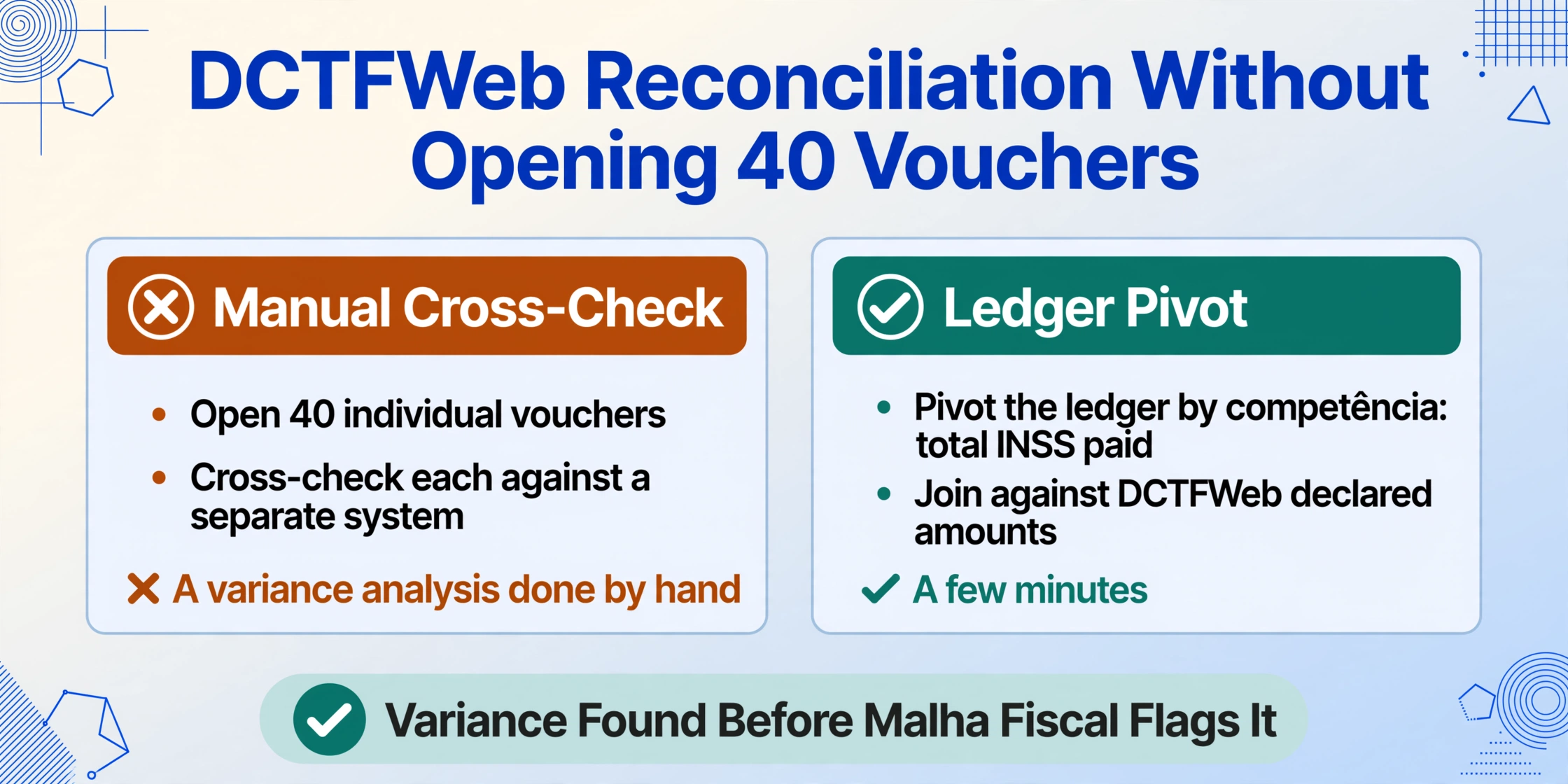
The real value of an INSS contribution ledger becomes visible during reconciliation. In Brazil, employers must declare their total social security obligation each month through DCTFWeb, which generates the DARF for payment. The DCTFWeb declaration and the actual paid vouchers should match. When they do not, the Receita Federal's automated Malha Fiscal cross-checking system flags the discrepancy.
With a structured ledger built from batch-extracted GPS and DARF data, reconciliation becomes a table join: pivot the ledger by competência to get the total INSS paid per month, compare against the DCTFWeb declared amounts for the same period, and identify months where the two diverge. A variance analysis that used to require opening 40 individual vouchers and cross-checking each against a separate system now takes a few minutes in a spreadsheet pivot. The extracted data becomes the bridge between the payment documents (which prove the money left the account) and the declaration (which proves the Receita Federal was told the correct amount was due).
For payroll teams that also handle individual employee payments — such as batch-processing Brazilian holerites into a consolidated payroll register — the same batch approach works across document types: upload all documents from a month's worth of payroll (GPS vouchers, holerites, FGTS receipts), define the columns, and get one ledger that covers the full tax and wage picture.
Frequently Asked Questions
Can the tool distinguish between GPS documents and DARF documents in the same batch?
Yes. If your column definitions include "Document Type (options: GPS/DARF)" as an inferred column, the AI classifies each document automatically. It reads the document's header and layout structure — GPS documents contain fields like "CEI do Contribuinte" and "Competência," DARF documents carry "Período de Apuração" and "Código da Receita" — and assigns the correct type to each row. This lets you process a mixed batch of GPS vouchers from one client and DARF vouchers from another in a single upload, with the document type column keeping the results organised.
How does the tool handle GPS vouchers that include multiple contribution lines (employee INSS, employer INSS, third-party entities)?
The tool extracts each line component independently. Define separate columns — "Employee INSS", "Employer INSS", "Third-Party Entities" — and the AI reads the corresponding values from the voucher's breakdown section. For GPS documents where the same contribution category appears across multiple lines (e.g., separate lines for different CEI codes within the same establishment), each line generates a separate row in the output, maintaining the CEI-to-value relationship. This is useful for tracking contributions that apply to different branches of the same company.
What happens if a GPS was paid late and includes fine and interest?
Include "Fine Amount", "Interest Amount", and "Principal Amount" as separate columns in your definitions. The AI extracts each value from the corresponding fields on the voucher. Your ledger then captures both the base contribution and any penalty charges, giving you a complete record of what was paid and why the total differs from the declared INSS amount. This is particularly useful for reconciliation, because the fine and interest are not part of the INSS obligation itself — they are a consequence of late payment — and separating them in the ledger keeps the contribution tracking accurate.
Can I extract data from a bank payment receipt instead of the original GPS document?
Yes — as long as the bank receipt displays the same key fields (CNPJ/CEI, competência, INSS value, total amount) that appear on the original GPS. Banking apps from Caixa, Banco do Brasil, Itaú, Santander, and Bradesco all generate payment confirmations that include these fields. Upload the screenshot or exported PDF as an image, define the same columns, and the AI extracts the data from the bank confirmation. The limitation is that bank confirmations may truncate certain fields — the complete GPS breakdown of employee vs. employer INSS is usually collapsed into a single total, whereas the original GPS slip shows the full multi-line structure. Use the original GPS when you need the detailed breakdown; use the bank receipt when you only need the aggregate value for ledger tracking.
Does this workflow work for FGTS (Fundo de Garantia do Tempo de Serviço) contributions too?
FGTS payments use a separate collection system (GFIP/SEFIP or eSocial-generated FGTS Digital), with a different payment voucher format — the GRF (Guia de Recolhimento do FGTS) or the newer digital payment slip. The same batch extraction approach applies: define columns for the FGTS-specific fields (employer CNPJ, reference month, 8% employer deposit, and any additional levies), upload the payment documents, and extract them into a separate FGTS contribution ledger. The batch workflow itself is identical; only the column definitions change to match the FGTS document structure.
The difference between a manually compiled ledger and a batch-extracted one is not speed — it is structural. A manual ledger is a record of what a person typed. A batch-extracted ledger is a record of what the documents say. The second is inherently auditable because every value traces back to a source document that a bank processed. The employee social security information is already in the GPS and DARF vouchers — it was correct when it left the bank. The only question is whether your ledger reflects that same information without a human transcription step introducing errors.
If your payroll team or accounting firm processes GPS and DARF vouchers for multiple clients or establishments, the next step is straightforward: take one month's worth of payment documents — even a handful — and run them through the batch extraction workflow. The time from upload to a structured Excel table is under a minute. Compare the output against your manual ledger and see which one you trust for DCTFWeb reconciliation.